

The ASUS Ascent GX10 follows the same core build around the NVIDIA GB10 Superchip, pairing an Arm v9.2-A CPU complex with integrated Blackwell graphics and 128GB of unified LPDDR5x memory. NVIDIA rates the platform at up to 1 petaFLOP of FP4 AI compute, supporting model fine-tuning up to 200 billion parameters. CPU and GPU communication is handled over NVLink-C2C, allowing coherent memory access across the system.

ASUS packages that hardware into a compact, slick 150 x 150 x 51 mm chassis, weighing 1.48 kg (slightly taller and somewhat heavier than the Dell and GIGABYTE versions), finished in Stellar Grey. Like the others, it is powered by a 240W external adapter.
Storage options range from 1TB and 2TB PCIe 4.0 NVMe configurations to a 4TB PCIe 5.0 NVMe variant. Networking includes 10G Ethernet and an integrated NVIDIA ConnectX-7 SmartNIC, along with WiFi 7 and Bluetooth 5.4 through the AW-EM637 module. Rear connectivity consists of three USB 3.2 Gen 2×2 Type-C ports with DisplayPort 2.1 alternate mode, one USB Type-C port with 180W PD input, HDMI 2.1, 10G LAN, the ConnectX-7 port, and a Kensington lock slot.
Let’s see how ASUS integrates cooling, storage, and connectivity around the GB10 platform compared to other vendors, and whether its performance differs in measurable ways under sustained workloads.
ASUS Ascent GX10 Specifications
| Specification | ASUS Ascent GX10 (GB10) |
|---|---|
| Dimensions & Weight | |
| Height | 2 in |
| Width | 5.9 in |
| Depth | 5.9 in |
| Weight | 3.26 lb |
| Processor | |
| Processor Type | NVIDIA GB10 (Grace Blackwell Superchip) (20 Cores) |
| Integrated Graphics | NVIDIA Blackwell GPU (integrated) |
| Memory | |
| Memory Type | LPDDR5x (Unified System Memory) |
| Memory Configuration | 128 GB LPDDR5x, unified system memory |
| Memory Bandwidth | 273 GB/s (8533 MT/s) |
| Operating System | |
| Supported OS | NVIDIA DGX OS |
| External Ports & Slots | |
| Network Ports | One RJ45 (10GbE) NVIDIA ConnectX-7 NIC (200G × 2 QSFP) |
| USB Ports | Three USB 3.2 Gen 2×2 Type-C (20Gbps) One USB 3.2 Gen 2×2 Type-C with PD in |
| Video Port(s) | One HDMI 2.1a |
| Power Adapter Port | USB Type-C (PD IN) |
| Security Slot | One Kensington Lock |
| Wireless | |
| WiFi | WiFi 7 (AW-EM637, 2×2) |
| Bluetooth | Bluetooth 5.4 |
| Storage | |
| Storage Options | M.2 NVMe PCIe 5.0: 4TB M.2 NVMe PCIe 4.0: 1TB / 2TB |
| Power Adapter | |
| Type | 240 W external adapter (USB Type-C) |
ASUS Ascent GX10 Design and Build
The ASUS Ascent GX10 keeps the usual compact 150 x 150 mm footprint we’ve seen across other Spark-based systems, with a height of 51 mm and a weight of 1.48 kg. The enclosure is finished in stellar grey and looks more like a slick-looking desktop appliance than a lab-oriented reference unit.

The front face is dominated by closely spaced vertical vents that stretch the entire width of the unit, with a small ASUS logo and a square power button that blends into the grille pattern. It is also unique in that ASUS incorporated a power indicator into the power button. It seems odd calling it out, but many GB10 systems have no power indicator at all.
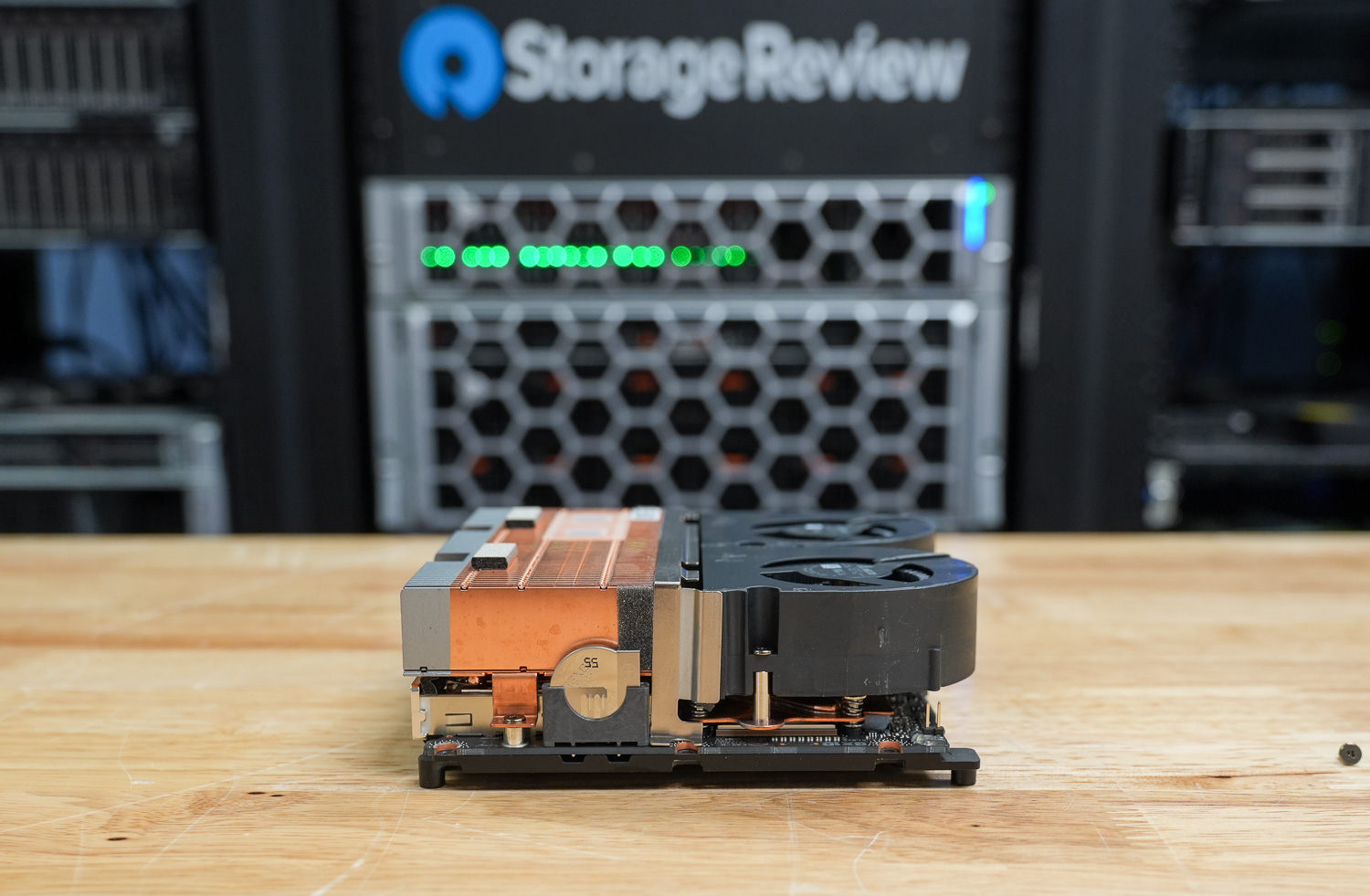
All primary connectivity is located on the back of the system, and ASUS makes good use of the available space. Three USB 3.2 Gen 2×2 Type-C ports support 20 Gbps with DisplayPort alternate mode, along with a fourth USB Type-C port dedicated to power input, which supports up to 180W via PD 3.1 EPR. For display output, it comes equipped with a single HDMI 2.1 port.
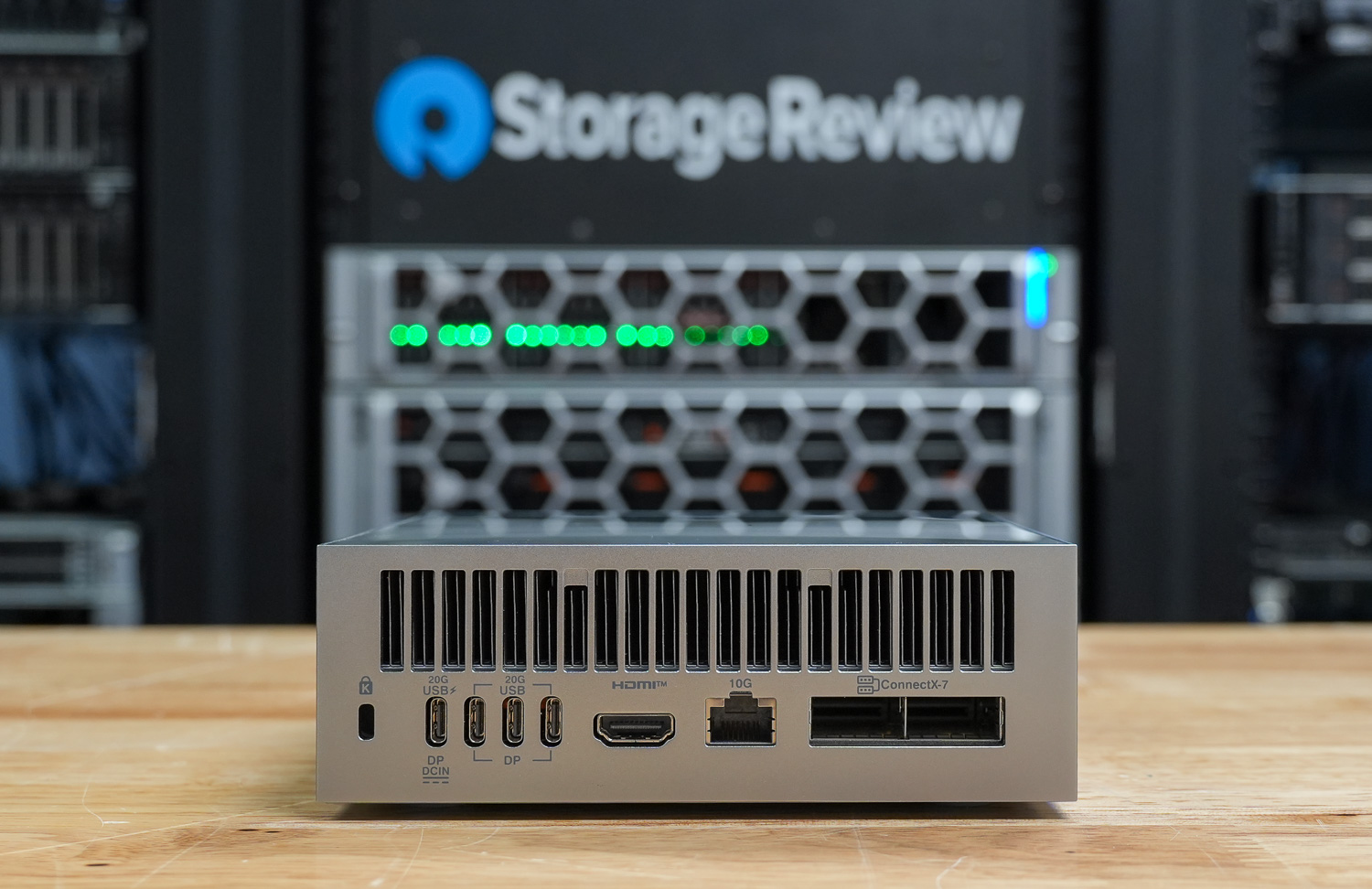
Networking options include a 10G LAN port and an NVIDIA ConnectX-7 NIC, enabling high-bandwidth data transfers and linking multiple systems. It also features the usual Kensington lock slot.
Inside, the GX10 runs on NVIDIA’s GB10 Grace Blackwell Superchip, pairing an Arm v9.2-A CPU with integrated Blackwell graphics. It’s backed by 128 GB of LPDDR5x unified memory, so the CPU and GPU share the same pool rather than working across separate memory domains. That setup is important for the kinds of AI workloads these systems are built for.
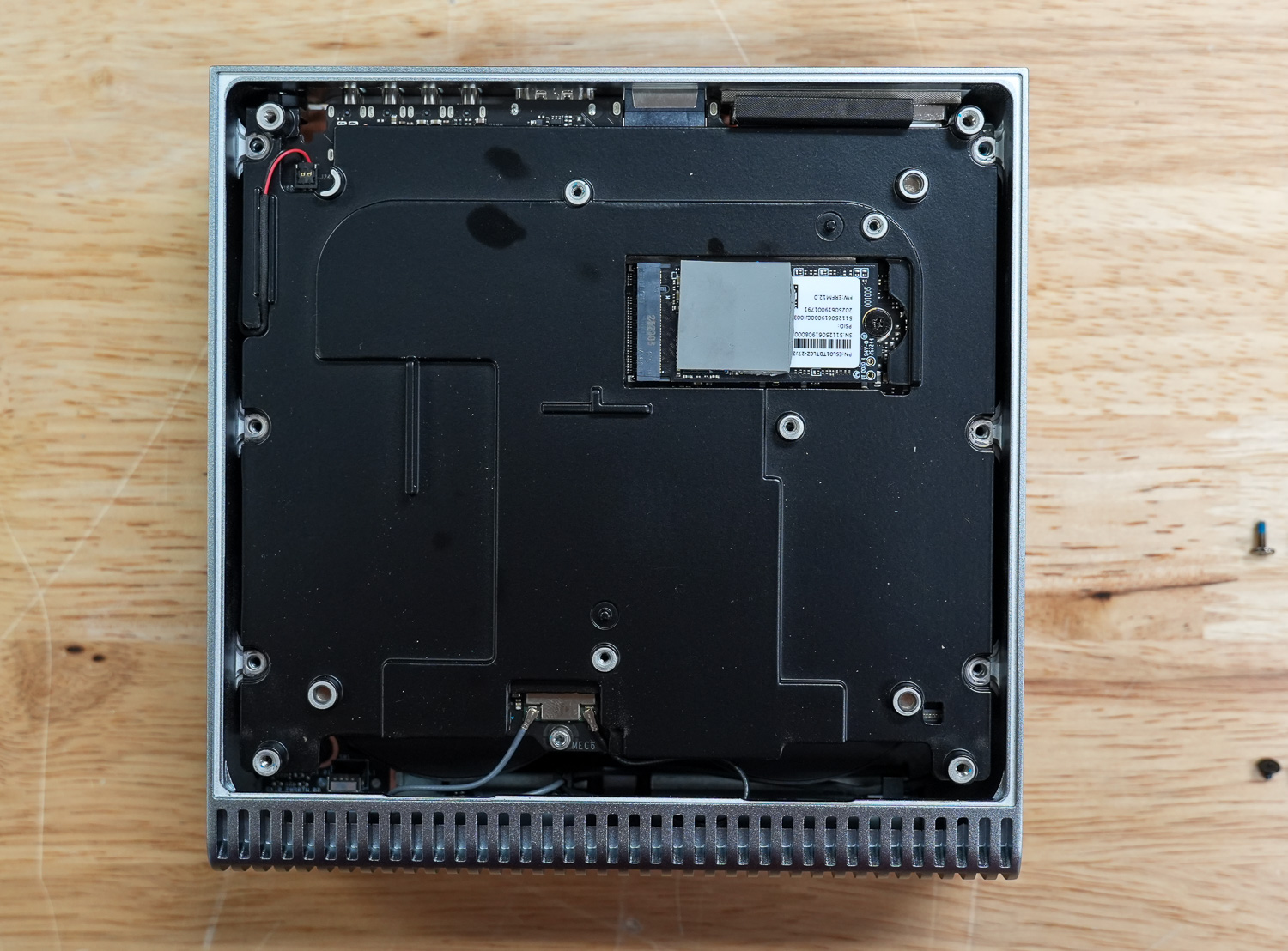
Storage comes via an M.2 2242 NVMe slot, with options ranging from 1 TB and 2 TB PCIe 4.0 drives up to a 4 TB PCIe 5.0 configuration. Power is supplied via a USB-C PD 3.1 EPR adapter rated up to 240 W, with the device drawing up to 180 W. At the same time, the wireless technology features a Wi-Fi 7 module with Bluetooth 5.4, alongside integrated 10G Ethernet for wired networking.
ASUS Ascent GX10 Thermals Testing
To test the thermals of components within the ASUS Ascent GX10, we compared them against the Founders Edition and OEMs such as Dell, Acer, and GIGABYTE. We did a deeper dive on this in our Spark Thermal Testing paper.

Across the stack, we monitored components over a given timeframe with three stages to the workload, ramping up utilization over roughly an hour. This allowed us to see the device in use over extended periods and across various workload stages. We monitored CPU, GPU, network, NVMe temps, and total power consumption.
CPU Temperature
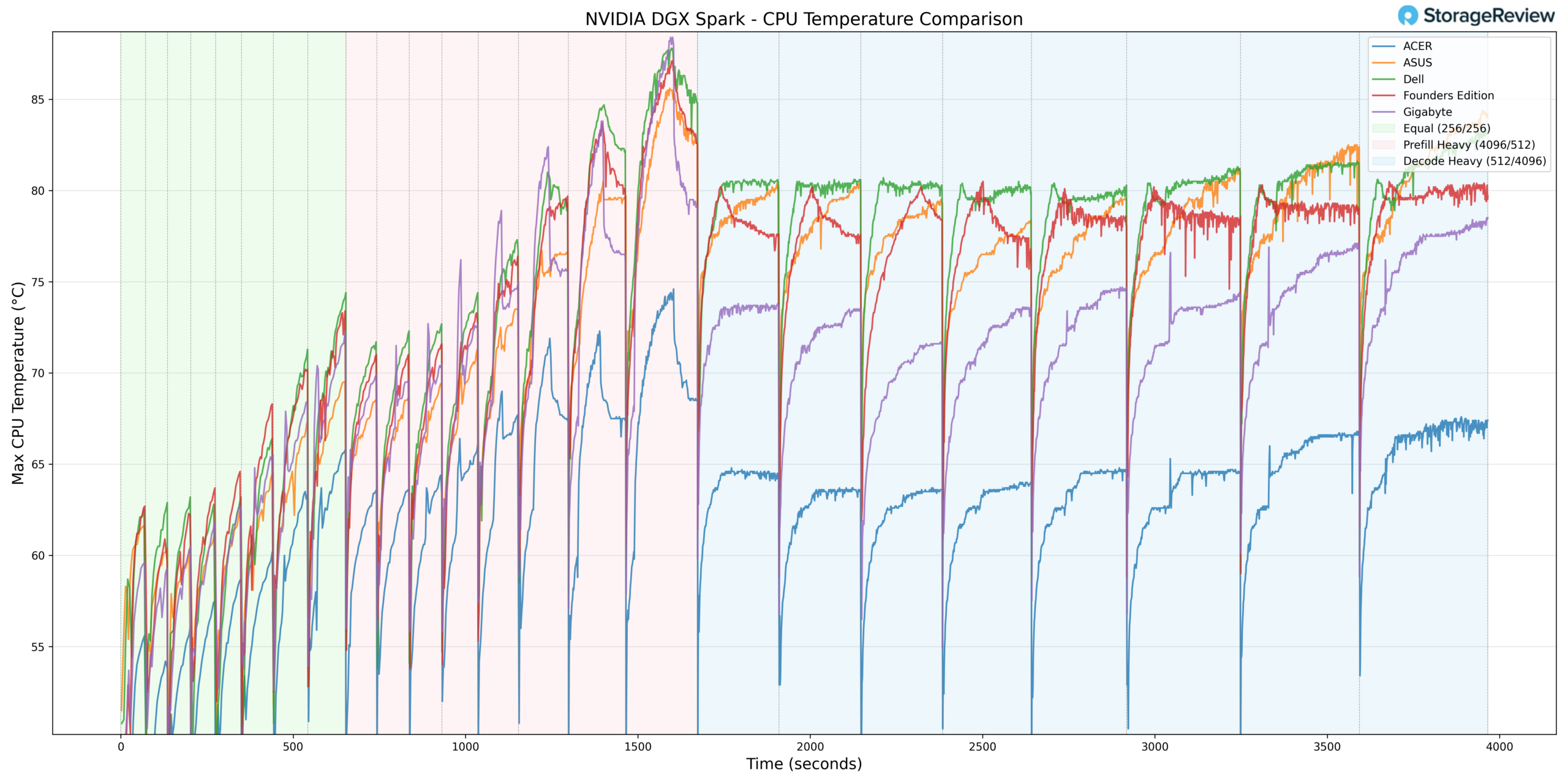
During CPU thermal testing, the ASUS system reached a peak temperature of 87.3°C during the Prefill Heavy phase. This places ASUS in the upper-middle of the comparison stack during burst-heavy transitions, though slightly below the group’s highest peaks.
As the workload transitioned into Equal ISL/OSL and then Decode Heavy, CPU temperatures stabilized rather than continuing to climb. Sustained decoding activity remained within a controlled thermal envelope, indicating that the 87.3°C peak was associated with short-duration ramp activity rather than prolonged thermal saturation.
At the lower end, the CPU recorded a minimum temperature of 38.8°C during idle or light-load conditions. This baseline reflects effective heat dissipation when the system is not under heavy computational stress.
Overall, ASUS demonstrated elevated but controlled burst CPU thermals with stable sustained-load behavior.
GPU Temperature
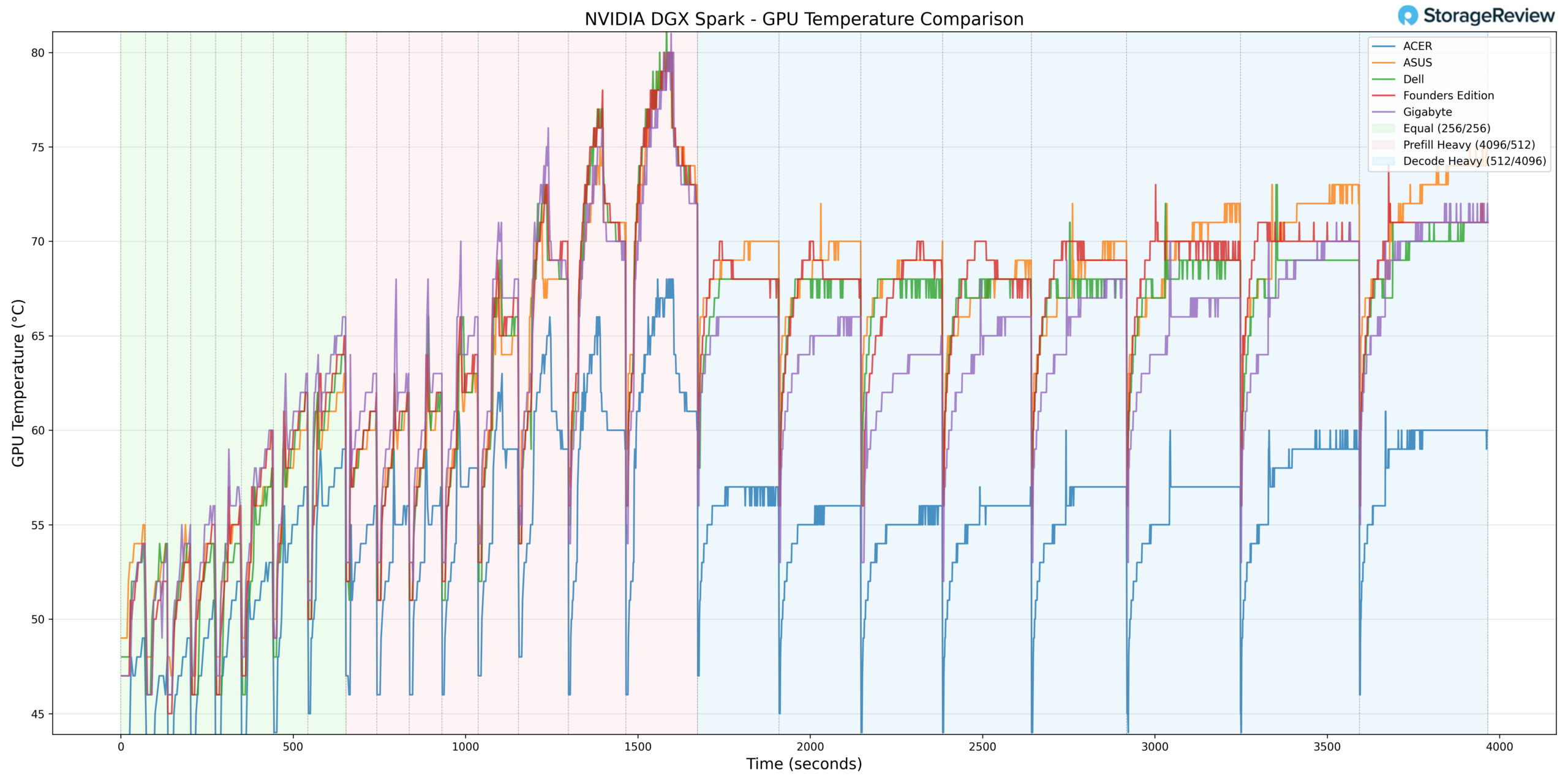
GPU thermals followed a similar pattern. During Prefill Heavy acceleration, the GPU reached a maximum temperature of 82°C. This positions ASUS slightly warmer than some competitors during peak burst conditions, but still within expected operating limits for the GB10 platform.
As activity shifted into Equal ISL/OSL and Decode Heavy phases, GPU temperatures leveled off and remained stable.
The GPU recorded a minimum temperature of 38°C during lighter phases, indicating solid idle thermal characteristics consistent with the rest of the stack.
Taken together, ASUS allowed strong burst GPU utilization while maintaining predictable sustained thermals.
NVMe Temperature
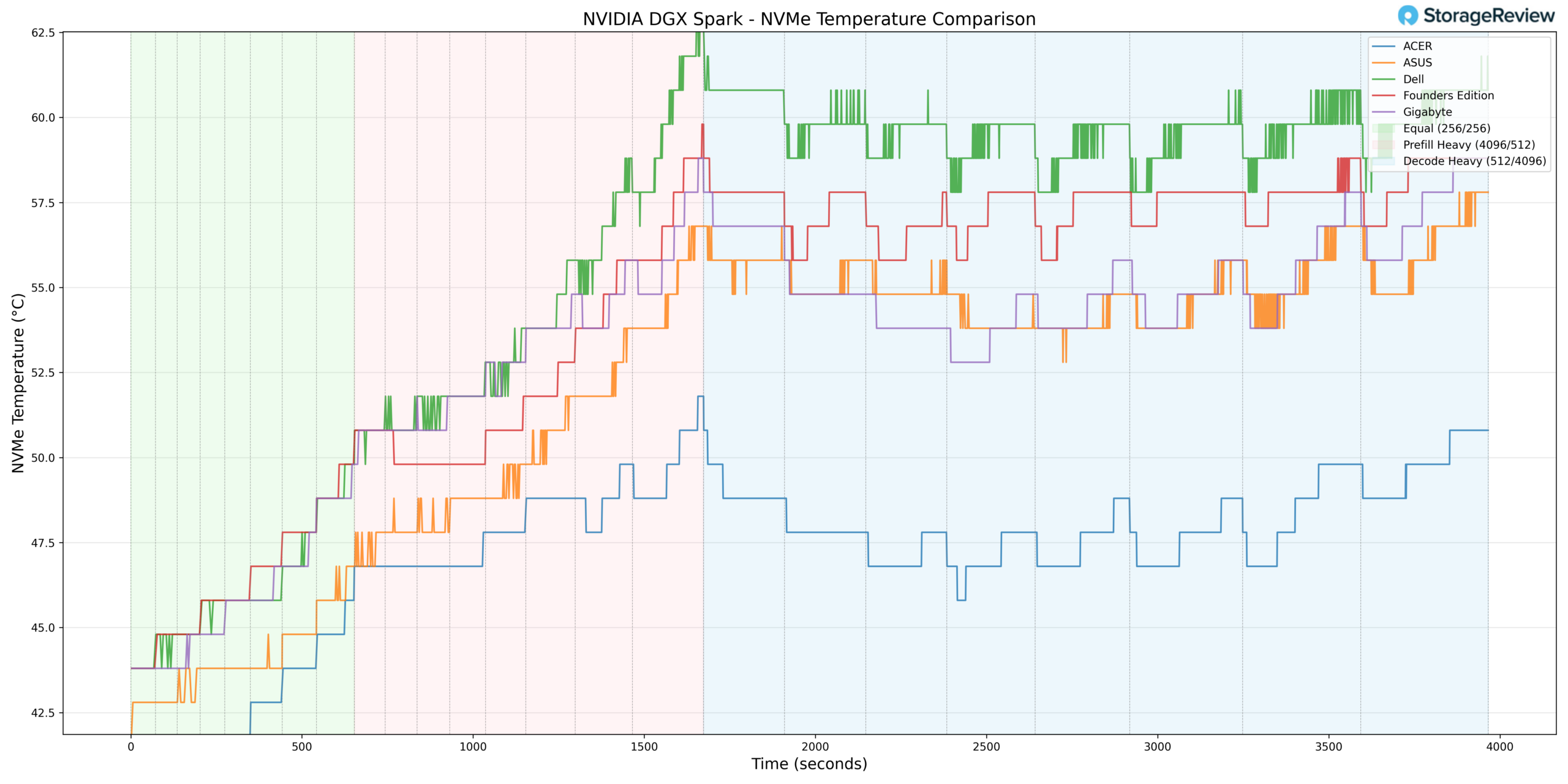
Storage thermals were well managed. The NVMe drive reached a peak of 56.8°C during heavier workload phases, remaining comfortably below common throttling thresholds. This suggests effective airflow or thermal design within the chassis around the storage subsystem.
During lighter phases, the NVMe temperature dropped to a minimum of 37.8°C, aligning closely with the idle temperatures of other systems and reinforcing that storage is not thermally constrained at rest.
Overall, ASUS maintained one of the more moderate NVMe thermal profiles under load.
NIC Temperature
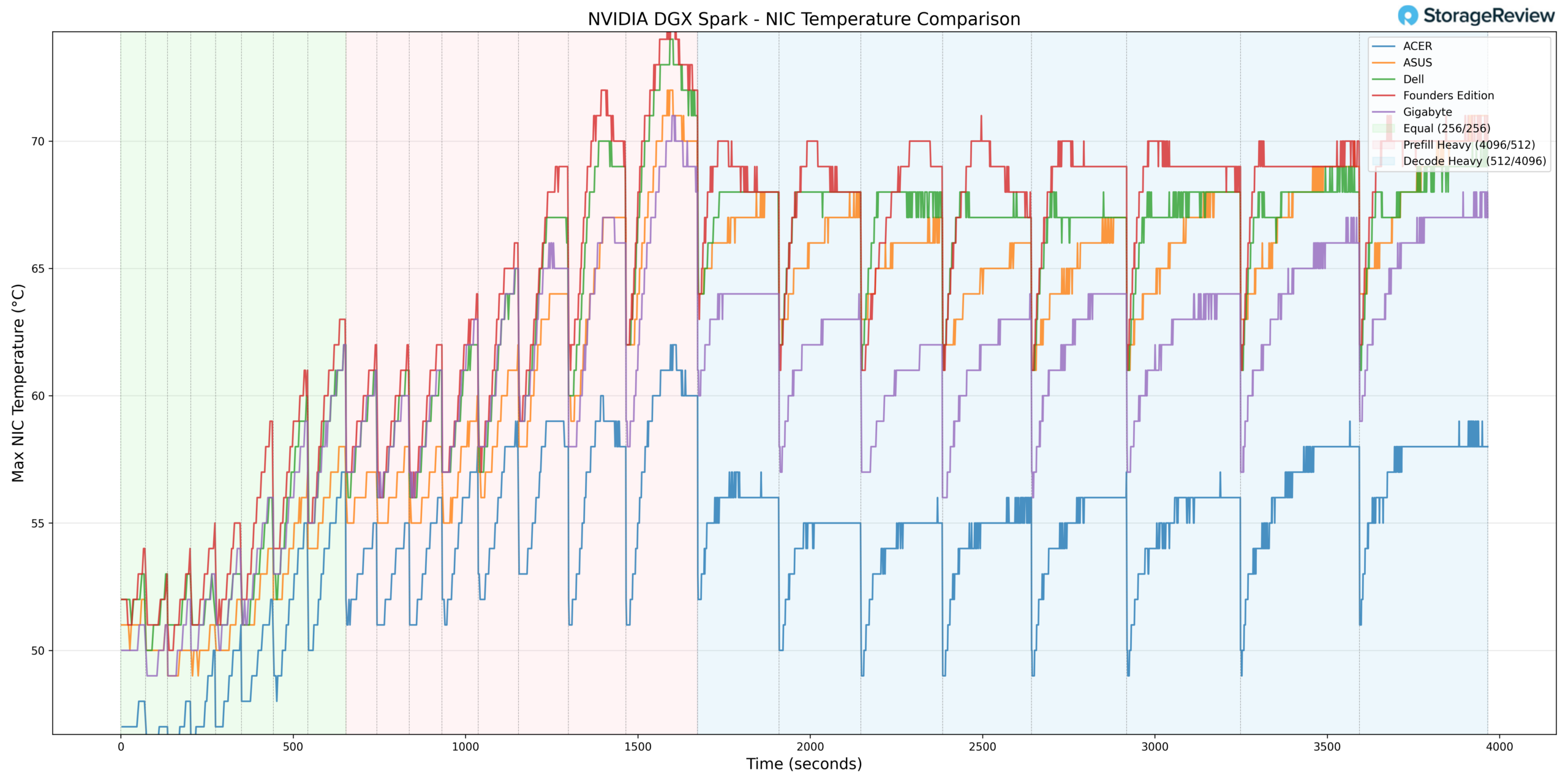
NIC thermals peaked at 73°C during heavier activity phases. This places ASUS in the warmer half of the stack during peak network throughput conditions, though still within normal operational tolerance.
The minimum NIC temperature recorded was 41°C during lighter workloads, reflecting expected baseline behavior.
Thermal scaling of the NIC’s tracked proportionally with system load and did not demonstrate abnormal fluctuations.
GPU Power Consumption
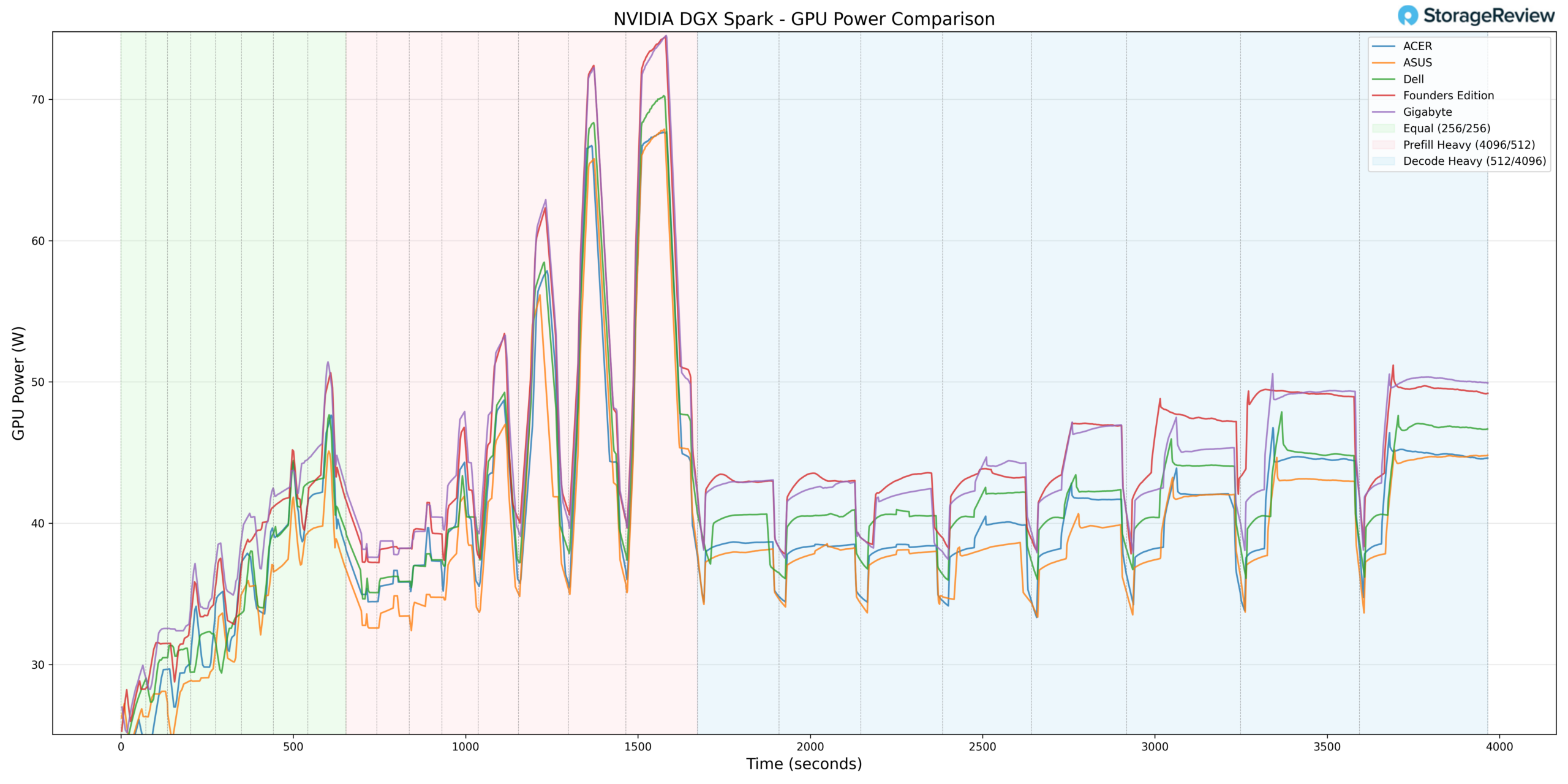
GPU power draw peaked at 69.77W during Prefill Heavy transitions. Compared to some higher-ceiling implementations in the group, ASUS operated slightly below the maximum observed power levels.
This power behavior helps explain the system’s balanced thermal profile. While GPU temperatures reached 82°C during burst phases, the slightly lower peak power allocation relative to the highest-drawing systems suggests ASUS is not pushing the GPU to the absolute top of the tested systems.
During sustained Decode workloads, power consumption stabilized in line with workload demand, reflecting consistent and predictable power management.
Thermal Summary
Across CPU, GPU, NVMe, and NIC monitoring, the ASUS GB10 demonstrated controlled burst thermals and competitive sustained-load stability. CPU peaked at 87.3°C and GPU at 82°C during Prefill-heavy transitions, while NVMe remained under 57°C and NIC peaked at 73°C. GPU power draw topped out at 69.77W, placing it slightly below the highest observed power ceilings in the stack.
Overall, ASUS presents a balanced thermal implementation, enabling strong burst performance while maintaining stable sustained performance and a moderate power allocation.
ASUS Ascent GX10 Performance Testing
To evaluate the ASUS Ascent GX10, we tested Spark units using the vLLM Online Serving benchmark, the most widely adopted high-throughput inference and serving engine for large language models. The vLLM online serving benchmark simulates real-world production workloads by sending concurrent requests to a running vLLM server, measuring key metrics, including total token throughput (tokens per second), time to first token, and time per output token, across varying load conditions.
Our testing spanned a range of models, from dense architectures to micro-scaling data types. It evaluated performance across three workload scenarios: Equal ISL/OSL, Prefill Heavy, and Decode Heavy. These scenarios represent distinct real-world serving patterns, from balanced input and output loads to compute-intensive prompt processing and memory-bandwidth-bound token generation.
In addition to the ASUS Ascent GX10, we benchmarked the NVIDIA Founders Edition Spark as a reference point, alongside OEM systems from Dell, Acer, and GIGABYTE. This allowed us to place ASUS’s results within the broader competitive landscape and understand where it leads, tracks with the pack, or trails across different models and workload types.
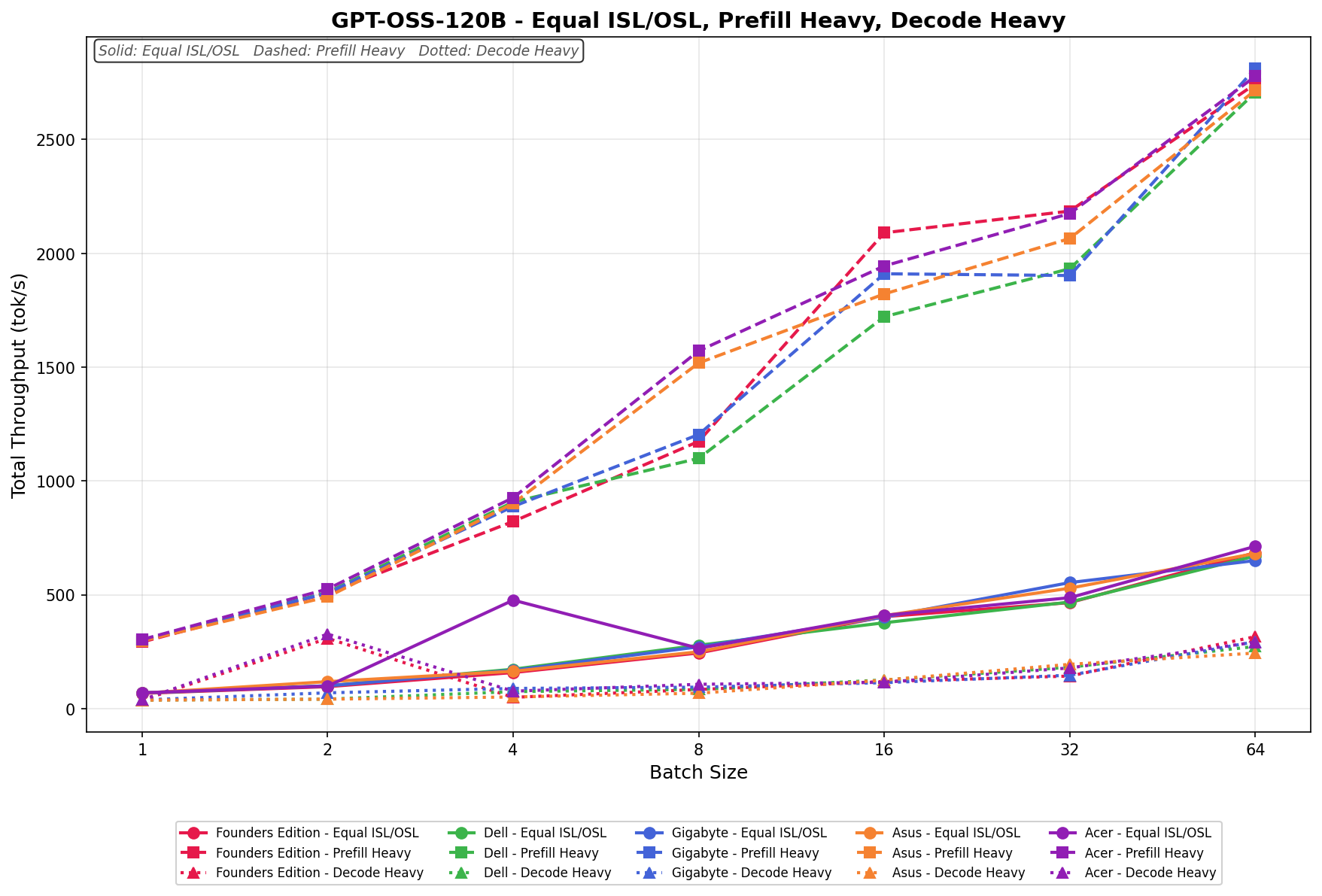
GPT-OSS-120B
In Equal ISL/OSL, the ASUS Spark scales from 70 tok/s at batch 1 to 680 tok/s at batch 64. Scaling is steady and linear across the batch sweep, with consistent gains at each doubling. There are no sharp spikes or stalls, and throughput grows predictably from batch 4 onward, maintaining close alignment with the broader OEM field across mid- and upper-batch sizes.
Prefill Heavy begins at 290 tok/s and climbs to 2,700 tok/s by batch 64. Growth is aggressive through batch 8, where throughput crosses 1,500 tok/s, and continues scaling cleanly through batch 16 and 32. The curve remains smooth with no regression points, showing strong, large-batch efficiency and stable, high-throughput behavior.
Decode Heavy ranges from 45 tok/s at batch 1 to 260 tok/s at batch 64. Lower batch sizes show minor variability between batch 1 and 2, but throughput stabilizes by batch 4 and scales consistently through batch 16 onward. The increase from batch 32 to 64 is noticeable, reflecting efficient decode scaling at higher concurrency.
Overall, ASUS tracks very closely with the broader Spark ecosystem across all three workload types.
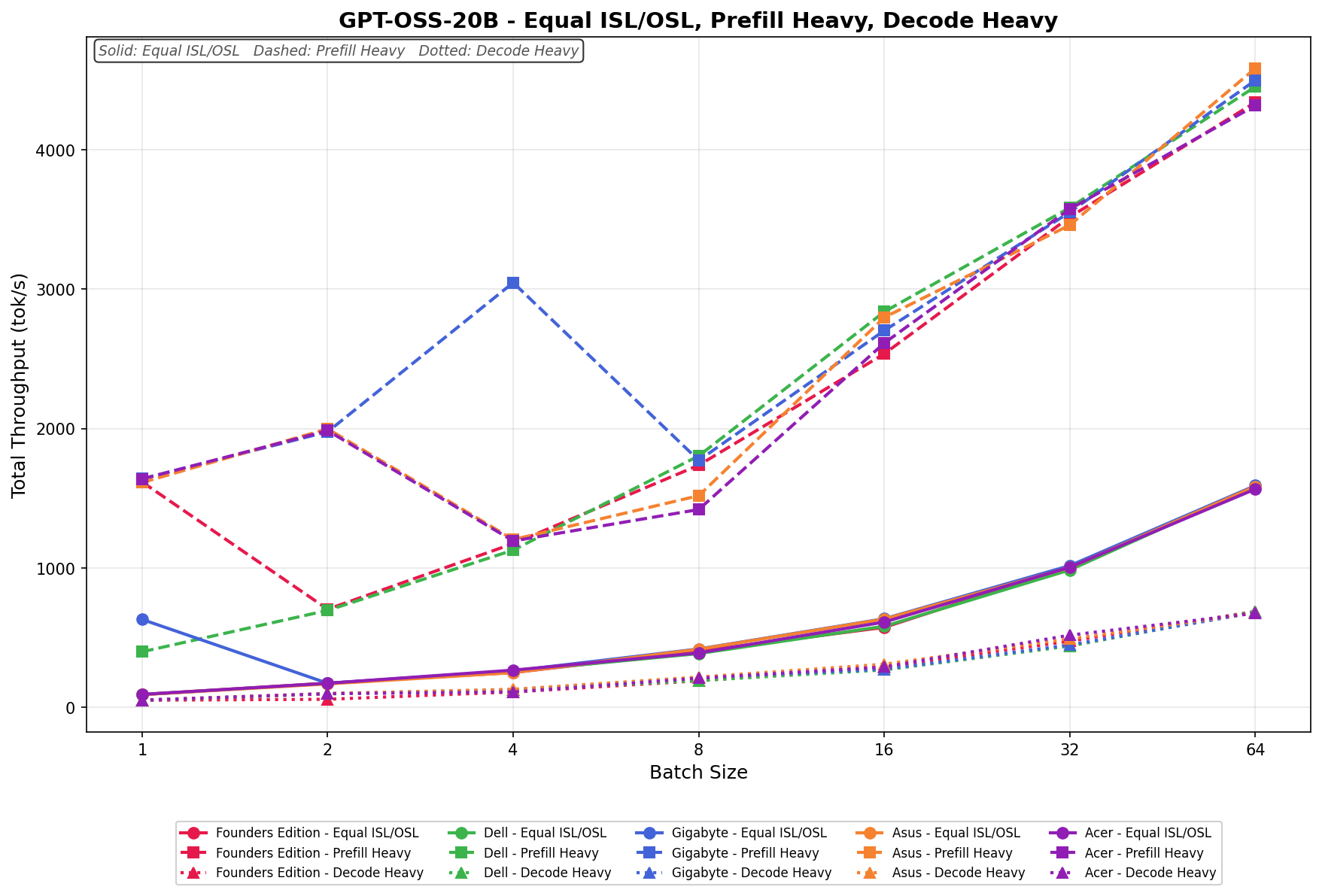
GPT-OSS-20B
In Equal ISL/OSL, the ASUS Spark scales from 90 tok/s at batch 1 to 1,600 tok/s at batch 64. Throughput increases steadily across the sweep, with particularly clean linear scaling from batch 8 onward. Gains remain consistent at each doubling, and the curve shows no instability or regression as concurrency increases.
Prefill Heavy begins at 1,650 tok/s in batch 1, rises to 2,000 tok/s in batch 2, then dips in batch 4 before resuming strong upward scaling. From batch 8 onward, throughput climbs consistently, reaching 4,550 tok/s by batch 64.
Decode Heavy ranges from 60 tok/s at batch 1 to 700 tok/s at batch 64. Scaling is gradual and consistent across the sweep, with predictable gains at each doubling. The most noticeable growth occurs between batch 16 and 64, where throughput increases steadily without spikes or dips.
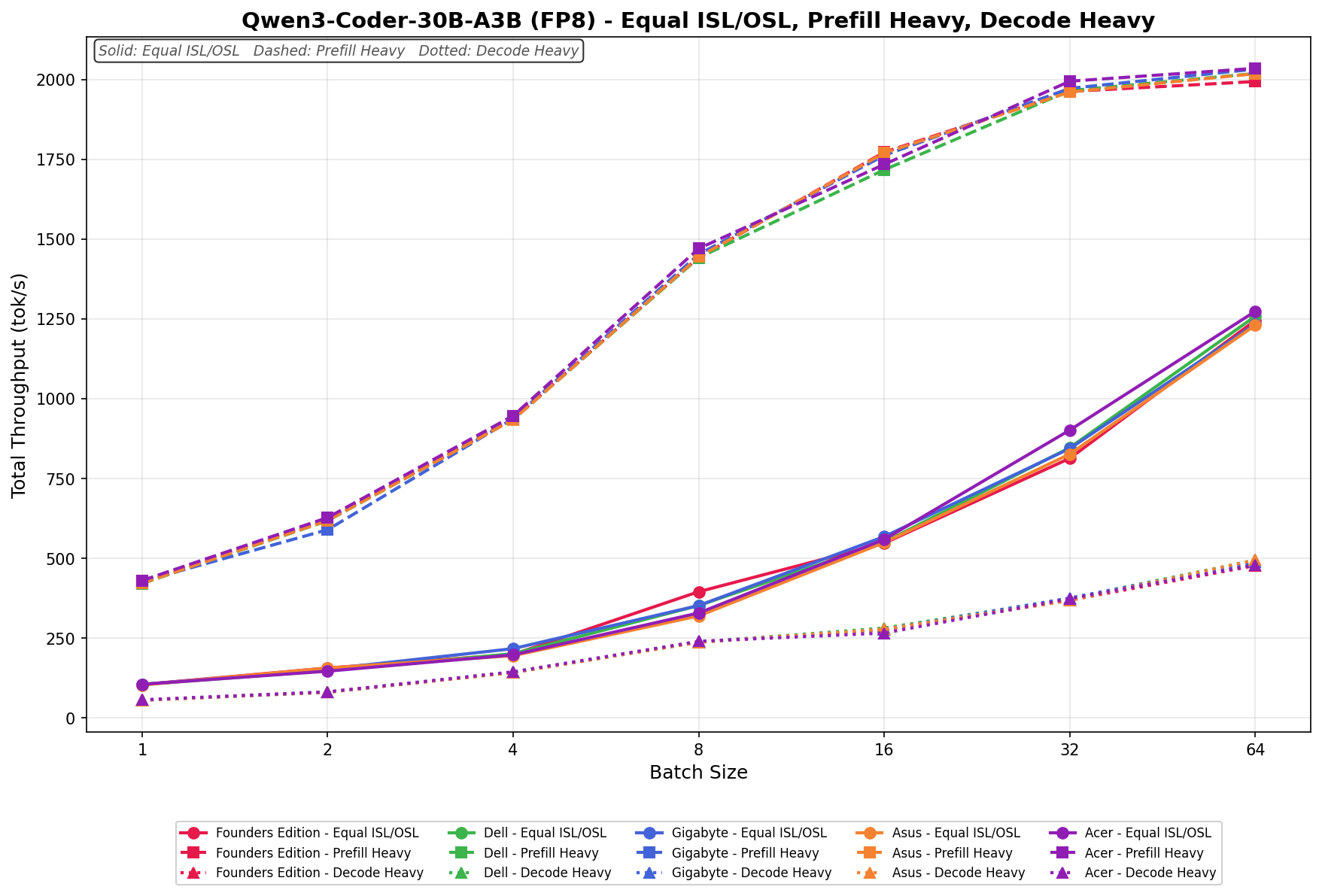
Qwen3 coder 30B A3B FB8
In Equal ISL/OSL, the ASUS Spark scales from 100 tok/s at batch 1 to 1,230 tok/s at batch 64. Throughput increases steadily across the sweep, with clean linear growth from batch 4 onward.
Prefill Heavy begins at 420 tok/s and climbs to 2,000 tok/s by batch 64. Scaling is smooth and highly predictable across the full batch sweep. The largest jump occurs between batch 4 and 8, where throughput moves from roughly 940 tok/s to 1,450 tok/s.
Decode Heavy ranges from 60 tok/s at batch 1 to 490 tok/s at batch 64. Scaling is gradual and consistent, with no dips or irregularities. Throughput increases predictably at each doubling, with the most noticeable gains occurring from batch 16 upward, reflecting efficient decode scaling at higher concurrency.
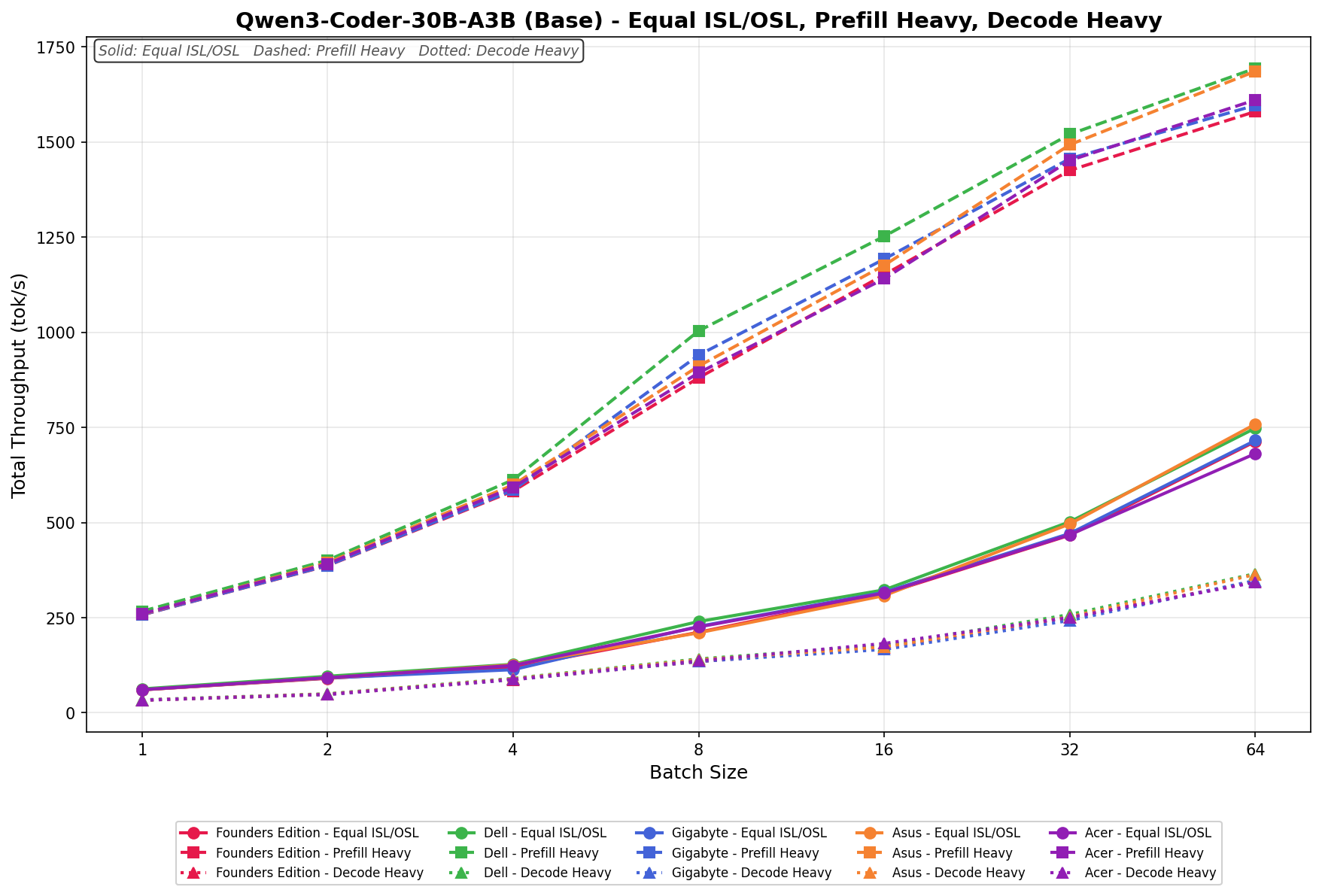
Qwen3 coder 30B A3B Base
In Equal ISL/OSL, the ASUS Spark scales from 60 tok/s at batch 1 to 750 tok/s at batch 64. Throughput increases steadily across the sweep, with particularly clean linear scaling from batch 8 onward.
Prefill Heavy begins at 260 tok/s and climbs to 1,680 tok/s by batch 64. Scaling is smooth and progressive throughout the batch sweep. The most noticeable acceleration occurs between batch 4 and 8, where throughput jumps from roughly 600 tok/s to 900 tok/s.
Decode Heavy ranges from 30 tok/s at batch 1 to 360 tok/s at batch 64. Scaling is gradual and consistent, with no irregular behavior at lower batch sizes.
Llama 3.1 8B Instruct FP4
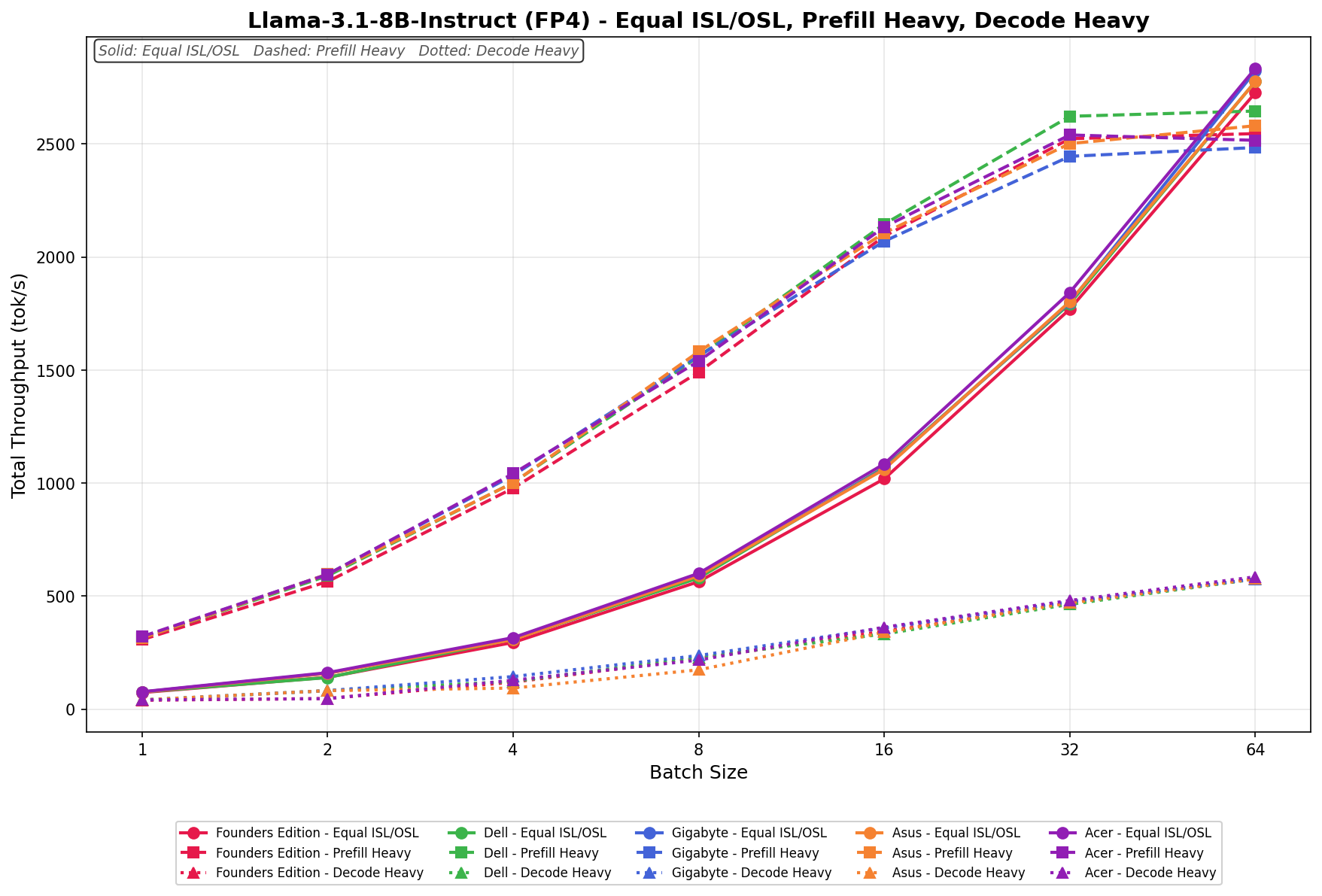
In Equal ISL/OSL, the ASUS Spark scales from 70 tok/s at batch 1 to 2,750 tok/s at batch 64. Growth is steady across the sweep, with especially strong expansion from batch 16 onward as concurrency increases.
Prefill Heavy begins at 300 tok/s and rises to 2,550 tok/s by batch 64. Scaling is clean and linear, with consistent gains at each doubling and no instability at higher batch sizes.
Decode Heavy ranges from 40 tok/s to 580 tok/s across the batch sweep. Throughput increases gradually and predictably, with the largest gains occurring beyond batch 16.
Llama 3.1 8B Instruct FP8
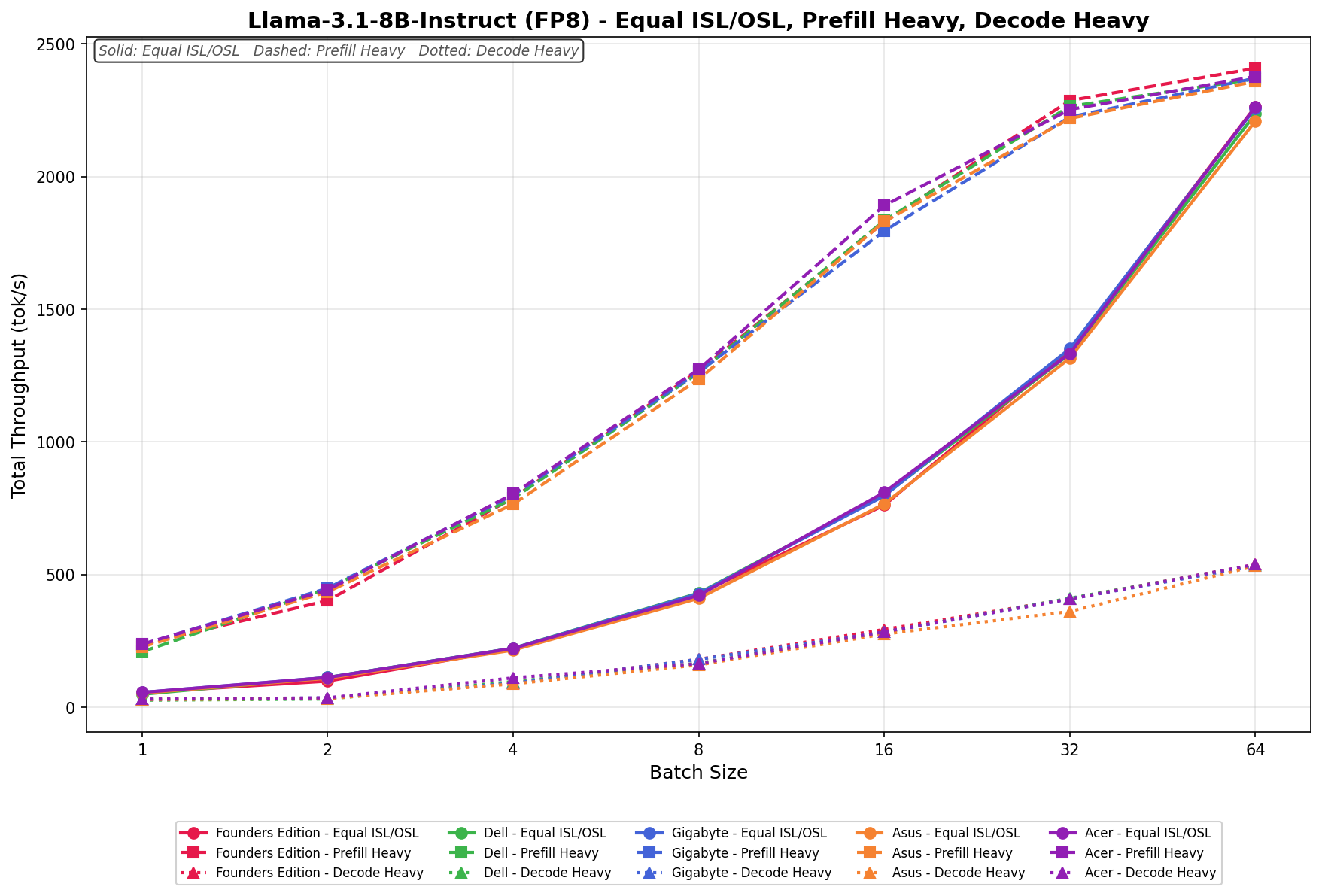
In Equal ISL/OSL, the ASUS Spark scales from 50 tok/s at batch 1 to 2,200 tok/s at batch 64. Growth is smooth and linear, with strong acceleration beyond batch 16 as concurrency increases.
Prefill Heavy begins at 220 tok/s and rises to 2,350 tok/s by batch 64. Scaling is clean and consistent across the sweep, with predictable gains at each doubling and stable high-batch behavior.
Decode Heavy ranges from 30 tok/s to 530 tok/s. Throughput increases gradually across batch sizes, with the largest gains appearing from batch 16 onward.
GPU Direct Storage
One of the tests we conducted on the Spark was the MagnumIO GPU Direct Storage (GDS) test. GDS is a feature developed by NVIDIA that allows GPUs to bypass the CPU when accessing data stored on NVMe drives or other high-speed storage devices. Instead of routing data through the CPU and system memory, GDS enables direct communication between the GPU and the storage device, significantly reducing latency and improving data throughput.
ASUS uses the Phison ESL04TBTLCZ 1TB Gen4 SSD inside the Ascent GX10. This is the only 1TB GB10 platform we’ve tested so far, but from what we’ve seen, this particular SSD, besides being PCIe Gen4, also has the slowest write speeds.
How GPU Direct Storage Works
Traditionally, when a GPU processes data stored on an NVMe drive, the data must first travel through the CPU and system memory before reaching the GPU. This process introduces bottlenecks because the CPU acts as a middleman, adding latency and consuming valuable system resources. GPU Direct Storage eliminates this inefficiency by enabling the GPU to access data directly from the storage device via the PCIe bus. This direct path reduces data movement overhead, enabling faster and more efficient data transfers.
AI workloads, especially those involving deep learning, are highly data-intensive. Training large neural networks requires processing terabytes of data, and any delay in data transfer can lead to underutilized GPUs and longer training times. GPU Direct Storage addresses this challenge by ensuring that data is delivered to the GPU as quickly as possible, minimizing idle time and maximizing computational efficiency.
In addition, GDS is particularly beneficial for workloads that involve streaming large datasets, such as video processing, natural language processing, or real-time inference. By reducing the reliance on the CPU, GDS accelerates data movement and frees up CPU resources for other tasks, further enhancing overall system performance.
GDSIO Read Throughput 16k
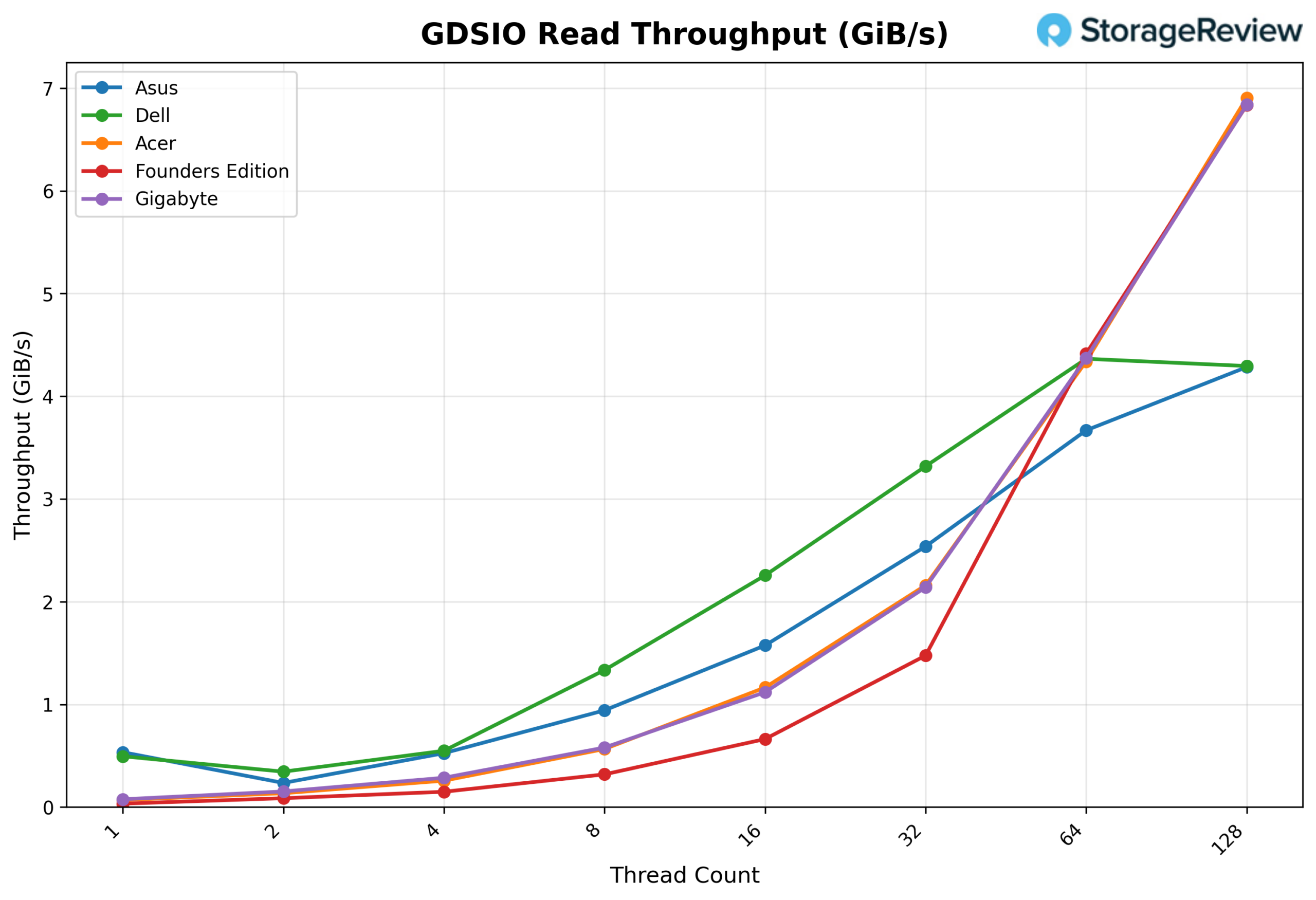
Looking at GDSIO Read Throughput 16K, the ASUS begins at 0.53 GiB/s at 1 thread, though results show some variability at the lower end, with 2 threads measuring 0.23 GiB/s before recovering to 0.52 GiB/s at 4 threads. Throughput resumes steady scaling at 8 threads (0.94 GiB/s) and 16 threads (1.57 GiB/s), stepping up more aggressively at 32 threads (2.54 GiB/s). Scaling remains strong at 64 threads (3.67 GiB/s) and peaks at 4.28 GiB/s at 128 threads, showing continued upward movement without an early plateau.
GDSIO Read Average latency 16K
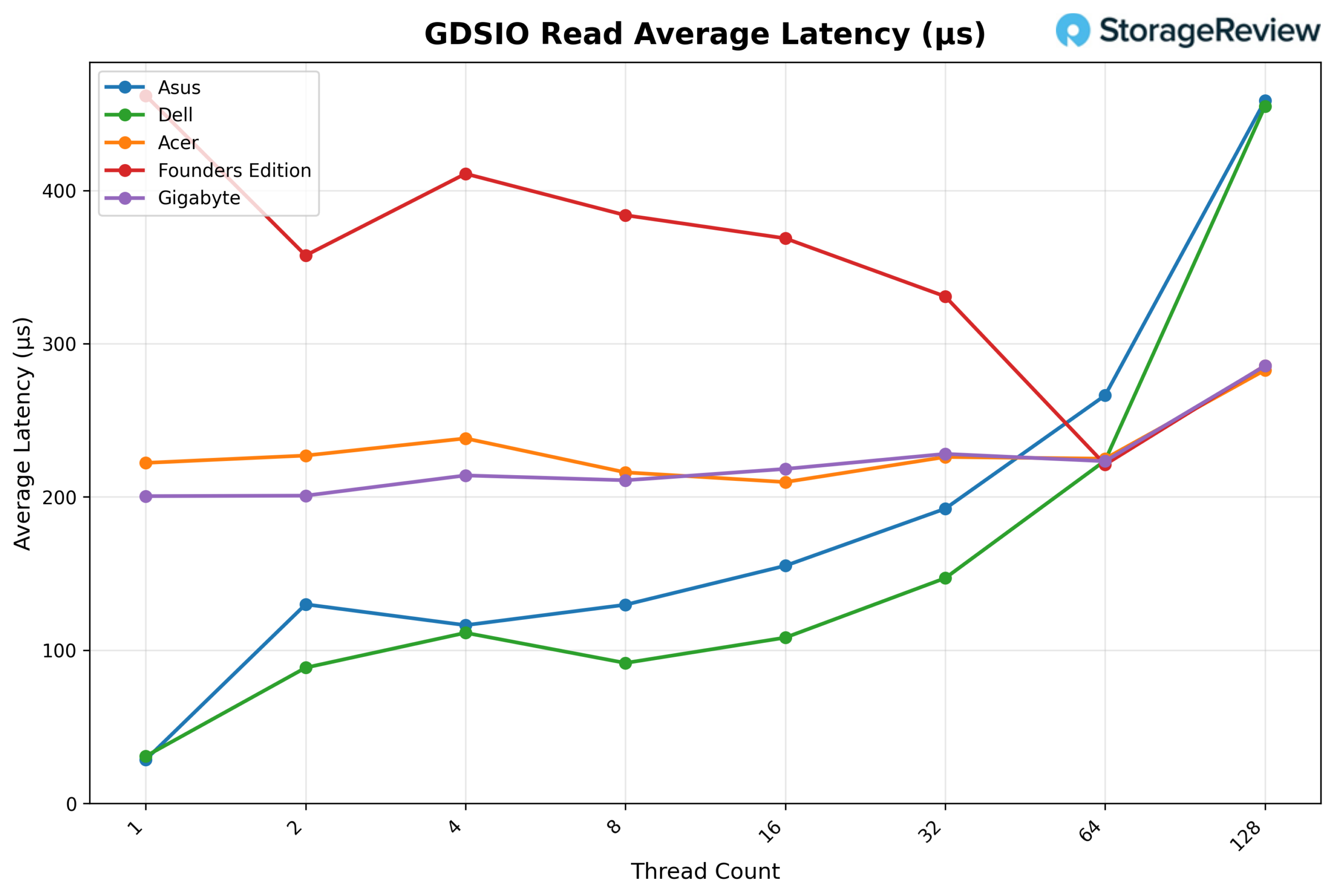
Looking at GDSIO Read Average Latency (16K), the ASUS starts at approximately 0.03ms at 1 thread and remains low through 2 threads (0.13ms) and 4 threads (0.12ms). Latency climbs modestly at 8 threads (0.13ms) and 16 threads (0.16ms), before rising at 32 threads (0.19ms) and 64 threads (0.27ms). At 128 threads, latency reaches 0.46ms, remaining relatively low across the full sweep, consistent with the continued scaling behavior seen in throughput.
GSDIO Write Throughput 16K
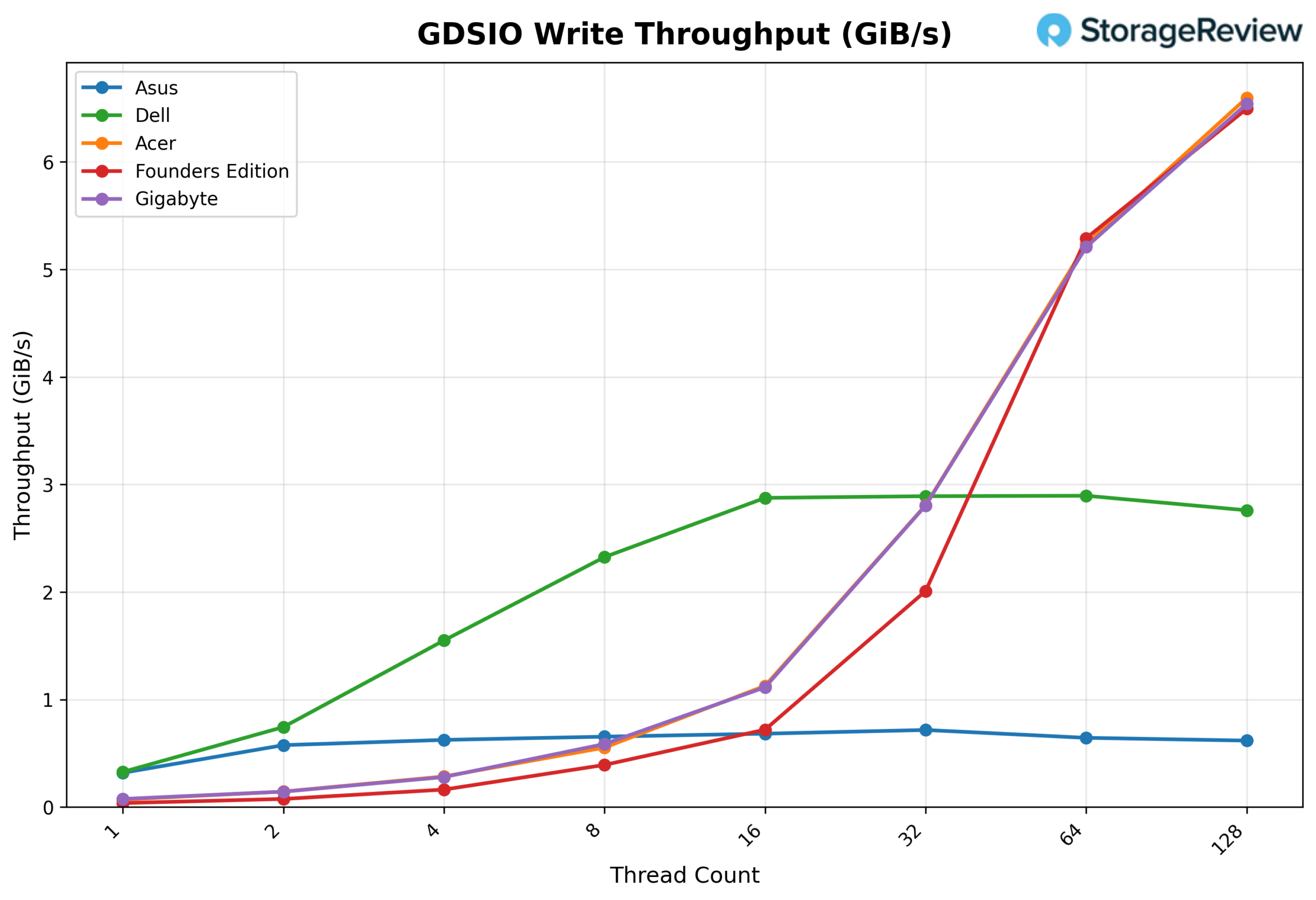
Looking at GDSIO Write Throughput 16K, the ASUS begins at 0.32 GiB/s on 1 thread, scales to 0.58 GiB/s on 2 threads, and 0.62 GiB/s on 4 threads. Performance continues to climb at 8 threads (0.65 GiB/s) and 16 threads (0.68 GiB/s), reaching a modest peak at 32 threads (0.72 GiB/s). Throughput pulls back slightly at 64 threads (0.64 GiB/s) and 128 threads (0.62 GiB/s), indicating the platform reaches its write saturation point well before the upper end of the thread sweep.
GDSIO Write Average Latency 16K
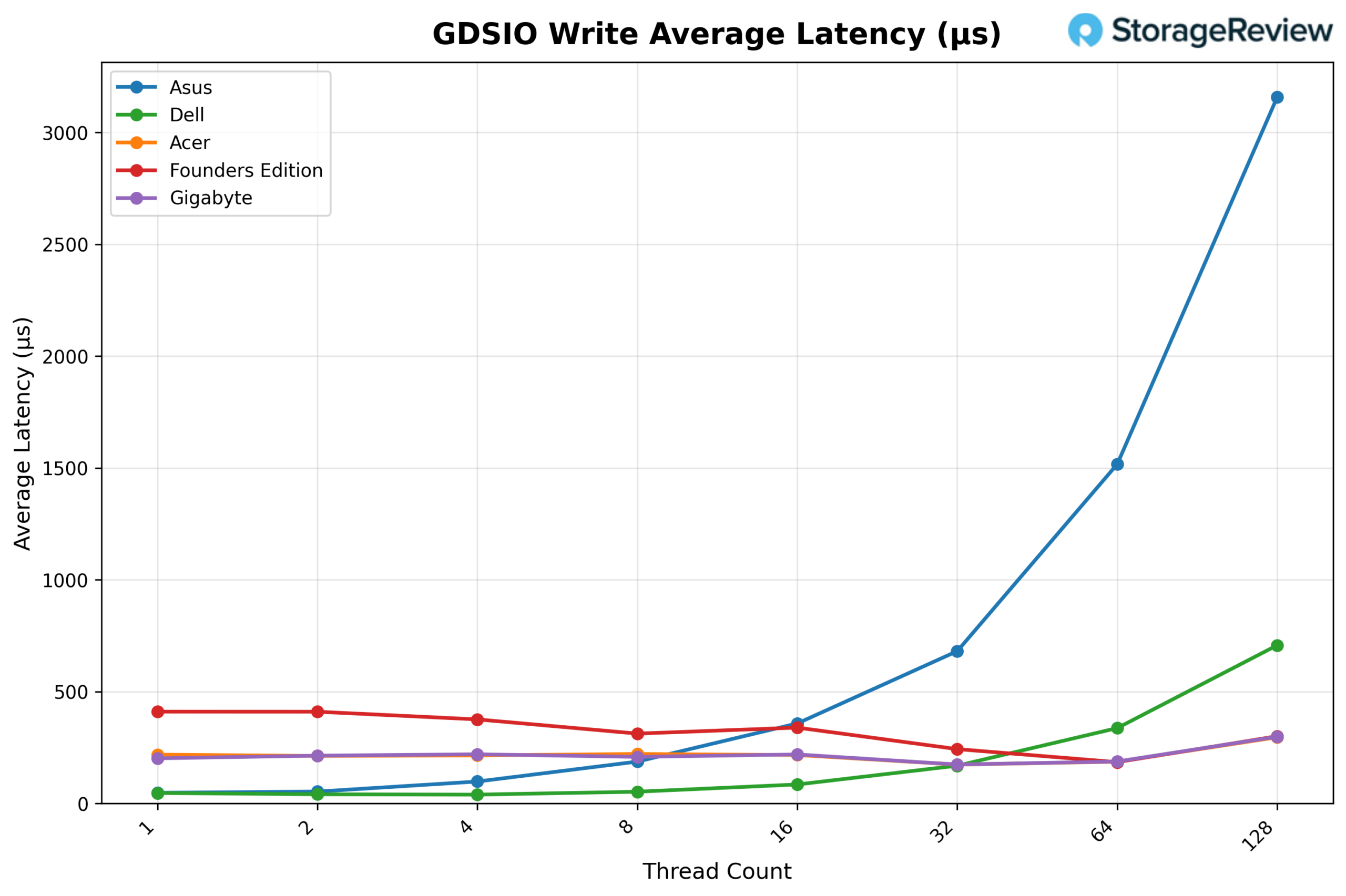
Looking at GDSIO Write Average Latency (16K), the ASUS starts at approximately 0.05ms at 1 thread and remains very low through 2 threads (0.05ms) and 4 threads (0.10ms). Latency rises modestly at 8 threads (0.19ms) and 16 threads (0.36ms), before stepping up at 32 threads (0.68ms) and 64 threads (1.52ms). At 128 threads, latency reaches 3.16ms, still relatively contained compared to the 1M results, though the upward trend aligns with the throughput plateau observed at higher thread counts.
GDSIO Read Throughput 1M
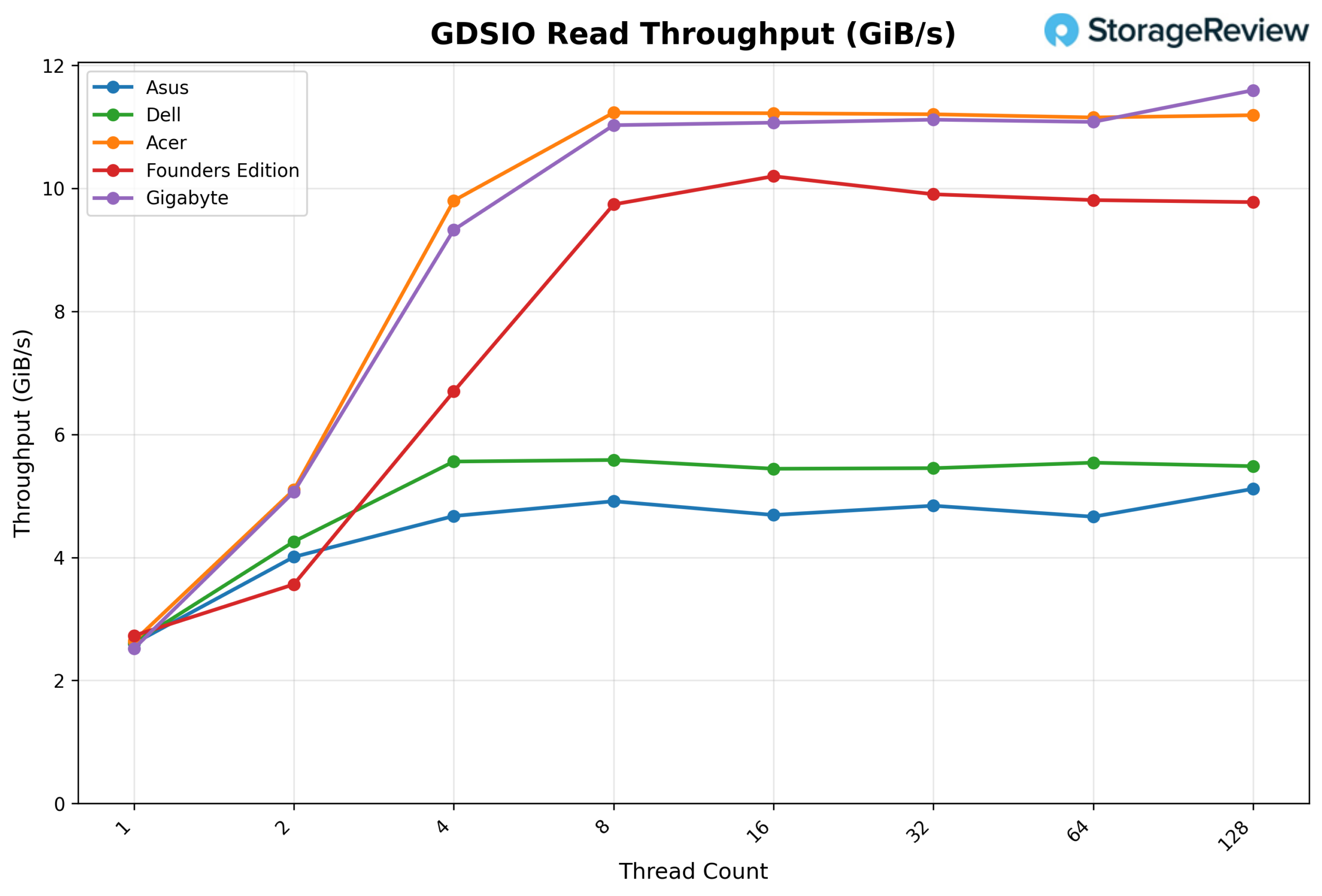
Looking at GDSIO Read Throughput 1M, the ASUS starts at 2.60 GiB/s on 1 thread and jumps sharply to 4.01 GiB/s on 2 threads. Performance continues to climb at 4 threads (4.67 GiB/s) and 8 threads (4.91 GiB/s), after which the platform effectively saturates. Throughput remains consistent at 16 threads (4.69 GiB/s), 32 threads (4.84 GiB/s), and 64 threads (4.66 GiB/s), showing a stable plateau. At 128 threads, throughput reaches 5.12 GiB/s, marking the highest observed result in the sweep.
GDSIO Read Average Latency 1M
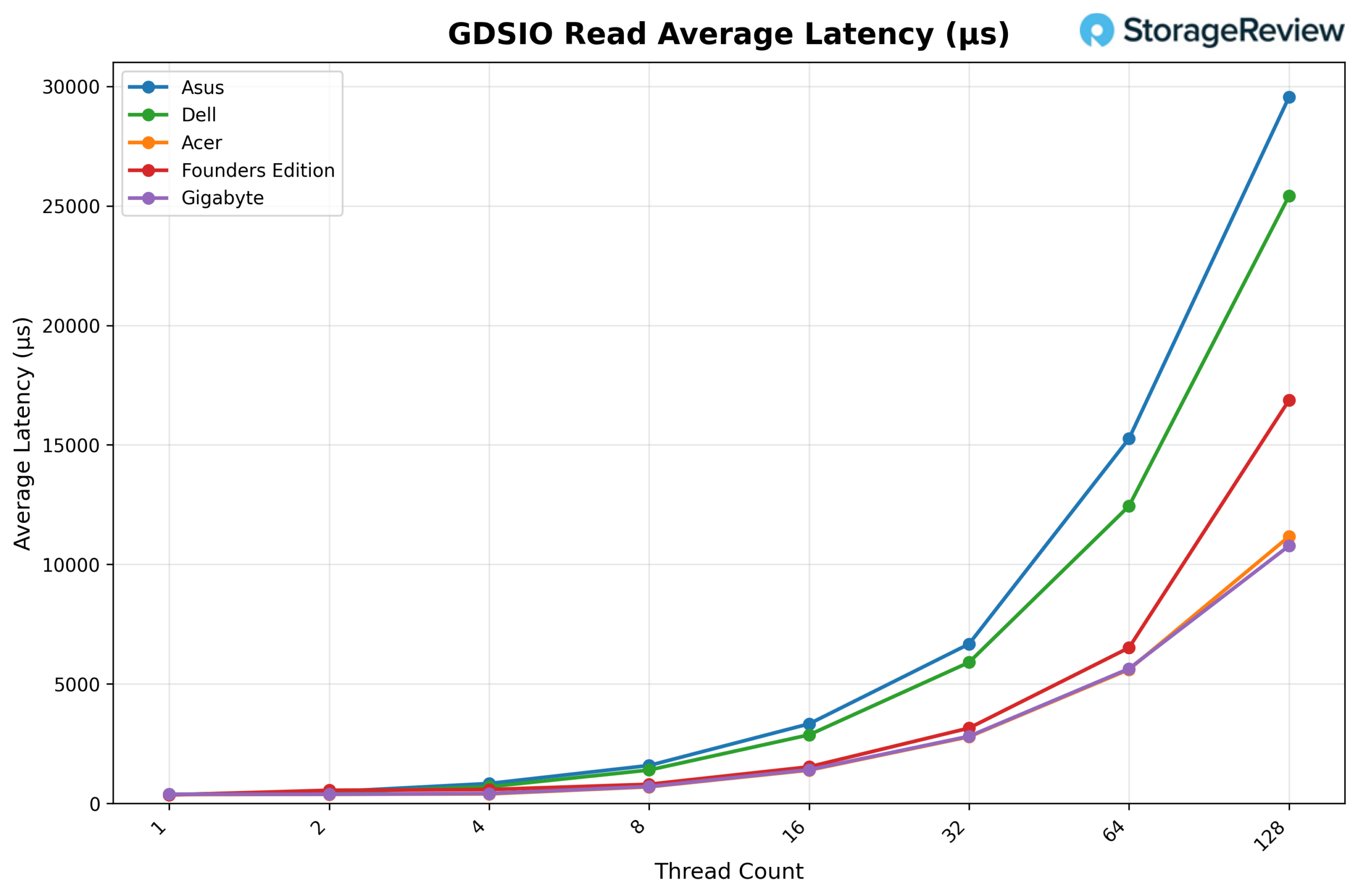
Looking at GDSIO Read Average Latency (1M), the ASUS starts at approximately 0.38ms at 1 thread and remains low at 2 threads (0.49ms) and 4 threads (0.84ms). Latency increases with concurrency, rising to 1.59ms at 8 threads, 3.33ms at 16 threads, and 6.67ms at 32 threads. The upward trend continues at 64 threads (15.26ms) and reaches 29.54ms at 128 threads, corresponding with peak concurrency levels, while throughput remains largely sustained.
GDSIO Write Throughput 1M
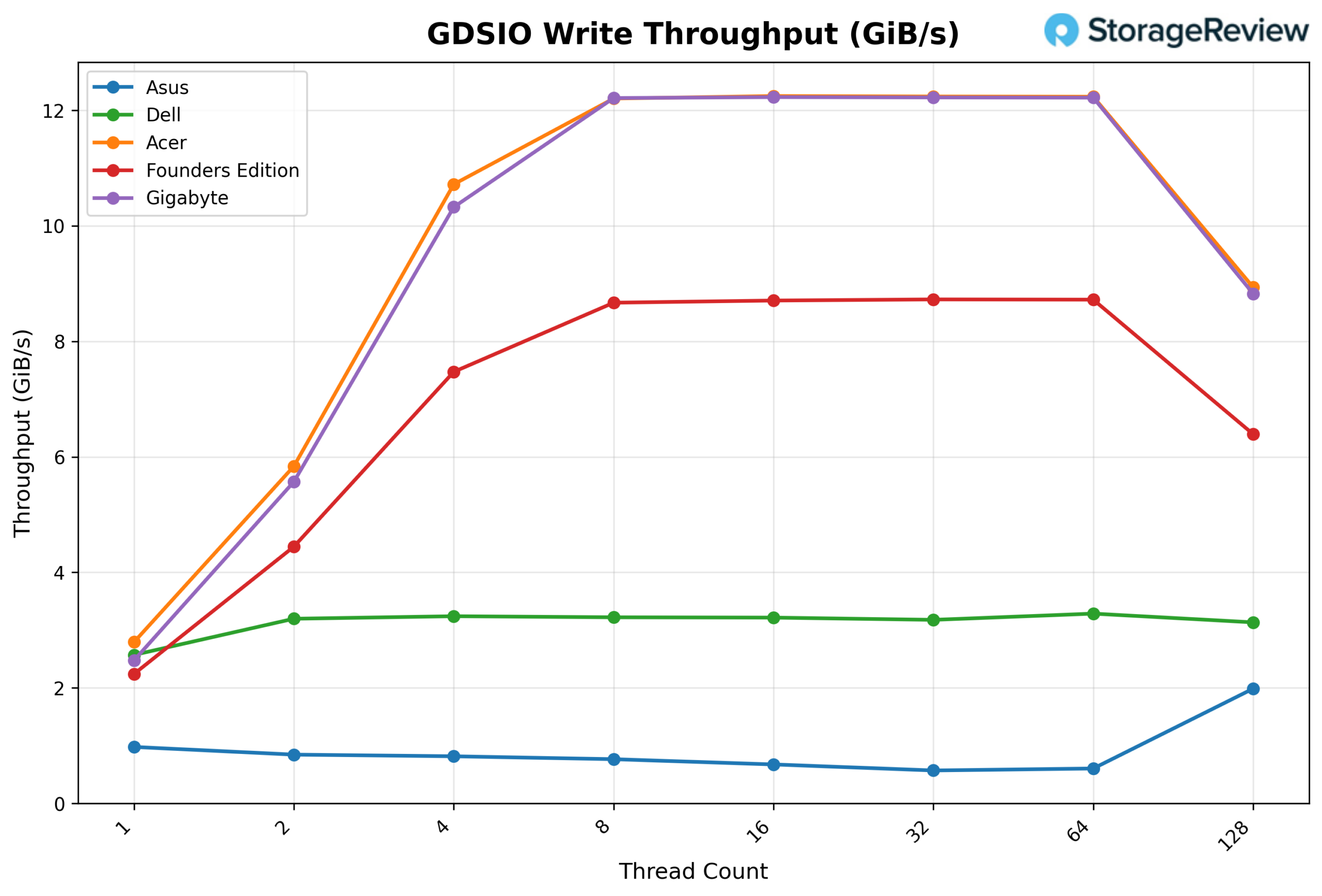
Looking at GDSIO Write Throughput 1M, the ASUS begins at 0.98 GiB/s at 1 thread and declines through 2 threads (0.85 GiB/s) and 4 threads (0.82 GiB/s), before continuing to drop at 8 threads (0.77 GiB/s) and 16 threads (0.68 GiB/s). Performance falls further at 32 threads (0.57 GiB/s) before a slight recovery at 64 threads (0.61 GiB/s). At 128 threads, throughput rises to 1.99 GiB/s, though the overall write scaling pattern indicates significant contention across the sweep.
GDSIO Write Average Latency 1M
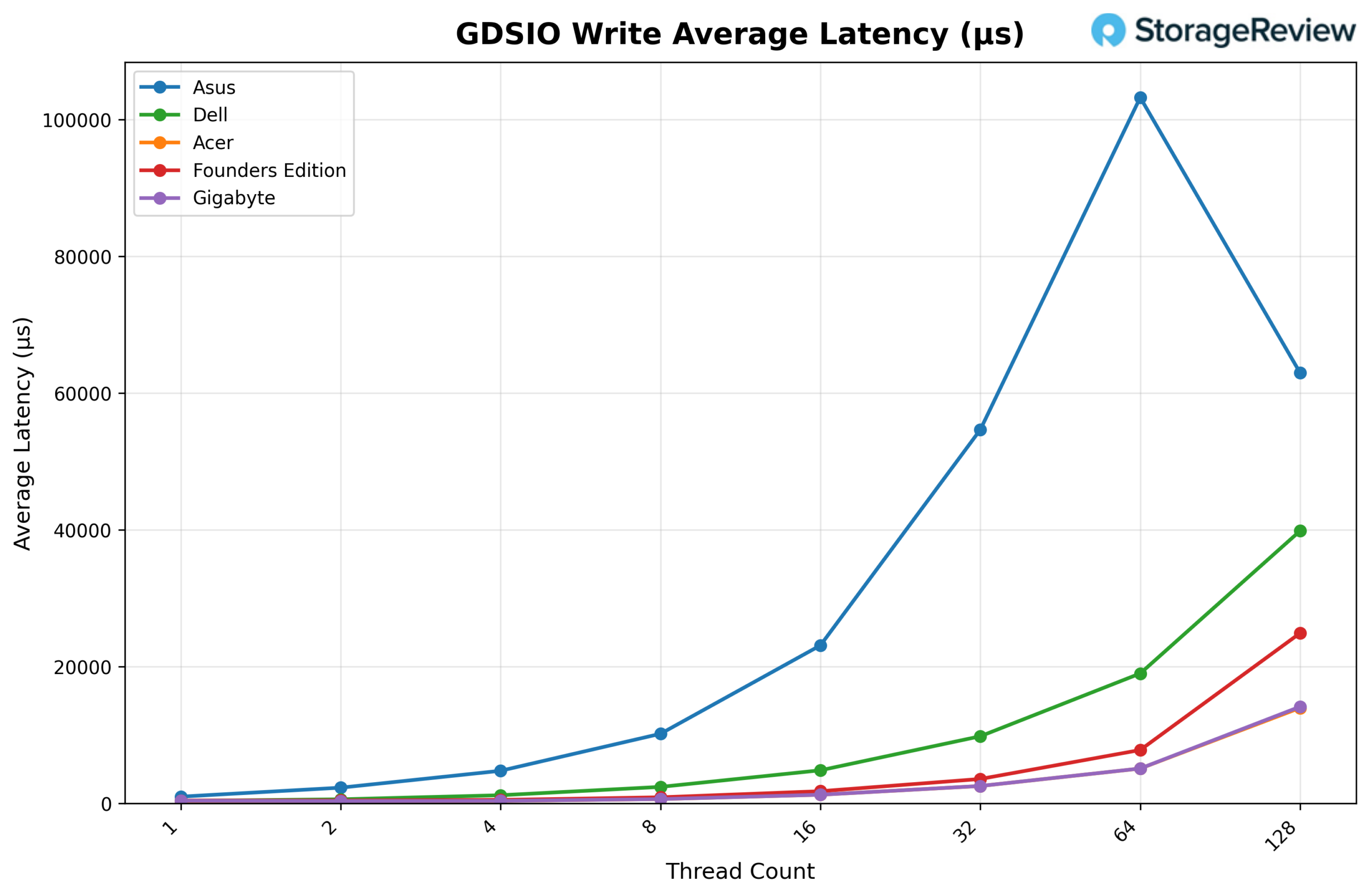
Looking at GDSIO Write Average Latency (1M), the ASUS starts at approximately 1.00ms at 1 thread, rising to 2.31ms at 2 threads and 4.78ms at 4 threads. Latency climbs steeply as concurrency increases, reaching 10.19ms at 8 threads, 23.12ms at 16 threads, and 54.67ms at 32 threads. The upward trend continues sharply at 64 threads (103.25ms), before pulling back to 62.97ms at 128 threads, consistent with the partial throughput recovery observed at maximum concurrency.
Conclusion
The ASUS Ascent GX10 is another take on NVIDIA’s GB10-based Spark platform, built around the same underlying board and silicon we’ve tested across the stack. That means core compute behavior is largely consistent, and in vLLM testing, the GX10 tracked closely with other Spark systems across GPT-OSS, Qwen3-Coder, and Llama 3.1 models. Scaling behavior remained predictable, with strong Prefill-heavy throughput and steady gains at higher batch sizes.

Thermally, the GX10 ran toward the warmer end of the group during burst phases, with the CPU peaking at 87.3°C and the GPU at 82°C before stabilizing under sustained workloads. NVMe and NIC thermals stayed within expected operating ranges, indicating the chassis is handling airflow adequately, even if it does not post the lowest peak numbers in the set.
GPU Direct Storage was the most noticeable variance point, largely influenced by the included 1TB Gen4 SSD. Read scaling was functional but landed toward the bottom of the group, and write throughput plateaued earlier with higher latency at peak concurrency. A better SSD would help considerably in this unit.
Because all Spark systems share the same board and GB10 Superchip, performance differences are incremental. In practice, the decision comes down to storage configuration, thermals, physical design, and vendor alignment rather than raw compute capability.
Product Page – ASUS Ascent GX10
Leaderboard: The ASUS Ascent GX10 is part of the tested field on our Best Desktops for Local AI leaderboard.


 Amazon