

When we last looked at Ubiquiti’s UNAS Pro, the seven-bay NAS stood out as a capable, fully integrated storage solution for prosumers and small businesses seeking serious capacity within the UniFi ecosystem. The new UniFi UNAS 2 takes that same design philosophy. It distills it into a smaller, more accessible package aimed at home users and small offices that need dependable storage without the higher cost or footprint.
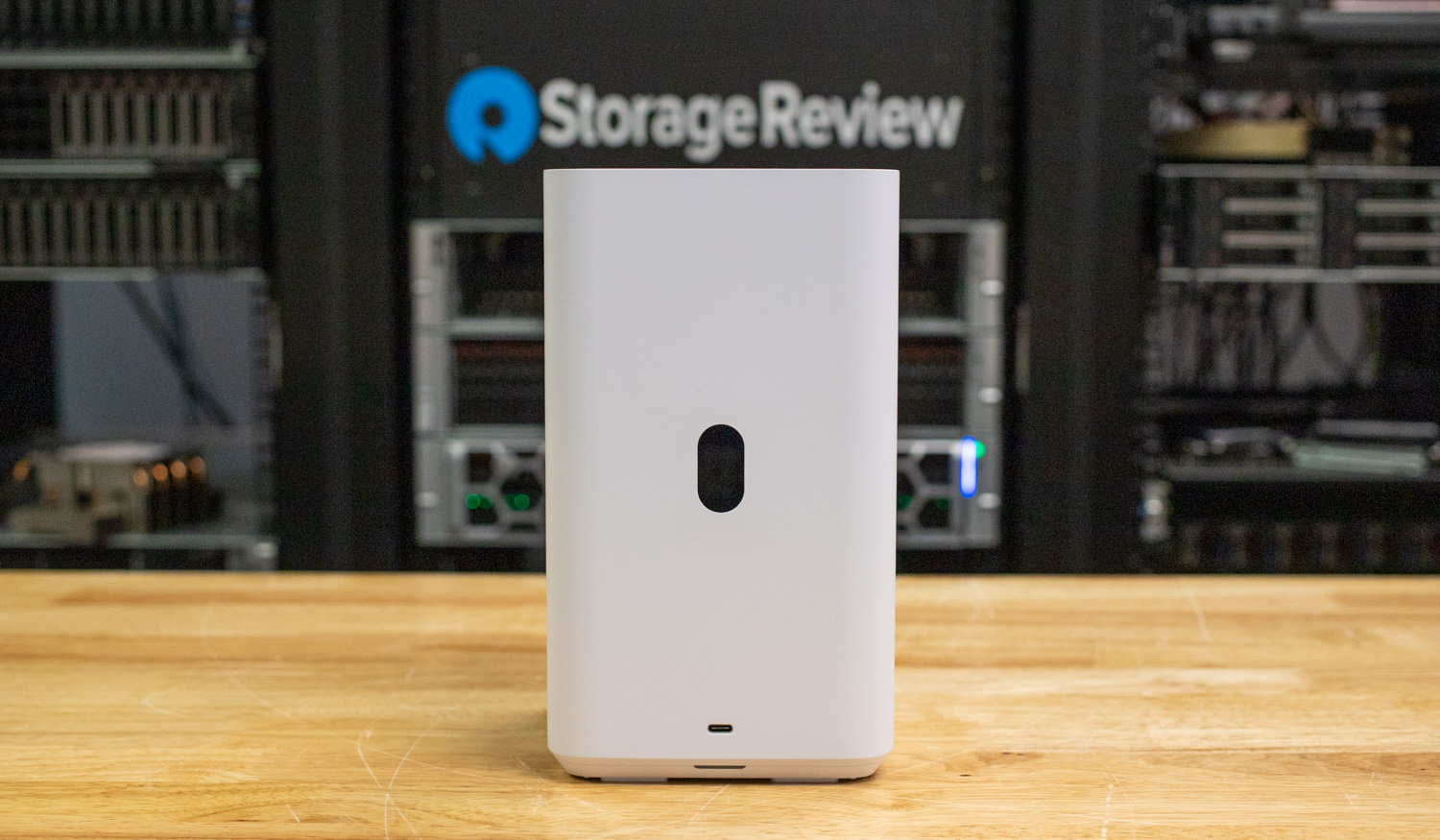
The UNAS 2 features two 3.5-inch drive bays that support up to 48 TB of raw capacity (larger drives probably work fine), providing enough room for large backups, media libraries, or shared files. Connectivity is straightforward with a 2.5 GbE RJ45 port for fast network access, a 5 Gbps USB-C port, and an included PoE++ adapter that powers the NAS directly over Ethernet. This compact approach makes it easy to deploy on a desk or shelf while keeping cables to a minimum.
Designed to fit seamlessly into the broader UniFi ecosystem, the UNAS 2 offers the same familiar management interface found in Ubiquiti’s networking and surveillance products. It gives users centralized visibility and straightforward control through the UniFi platform, making it a practical option for anyone already invested in the ecosystem. At the time of the review, the UniFi UNAS 2 is available on the UniFi Store for $199. (affiliate link)
UNAS 2 Specifications
| Specification | Details |
|---|---|
| Overview | |
| Dimensions | 135 × 129 × 223.7 mm (5.3 × 5.1 × 8.8″) |
| Storage Capacity | (2) 3.5″ drive bays |
| Networking Interface | (1) 2.5 GbE RJ45 (2.5G/1G/100M/10M) |
| Expansion Port | (1) 5 Gbps USB-C |
| Form Factor | Desktop |
| Hardware | |
| Hard Drive Capacity | (2) 3.5″ HDD support |
| Max. Power Budget for Drives | 52 W |
| Max. Power Consumption | 60 W |
| Power Method | PoE++ |
| Power Supply | 60 W PoE++ adapter (included) |
| Processor | Quad-Core ARM Cortex-A55 at 1.7 GHz |
| Memory | 4 GB |
| Management Interface | Ethernet |
| RF Interface | Bluetooth 4.1 |
| Display | 1.47″ color LCM |
| Weight | 1.3 kg (2.85 lb) |
| Enclosure Material | Polycarbonate |
| LED Indicators | System |
UNAS 2 Design and Build
The Ubiquiti UniFi UNAS 2 is a compact, two-bay NAS designed for small deployments, home labs, or users looking for an easy entry into network-attached storage. Measuring 5.3 x 5.1 x 8.8″ and weighing 2.85 lb, it has a small desktop footprint that makes it easy to place alongside a workstation or networking stack. The enclosure is made from polycarbonate, matching the clean, modern aesthetic of Ubiquiti’s UniFi lineup.
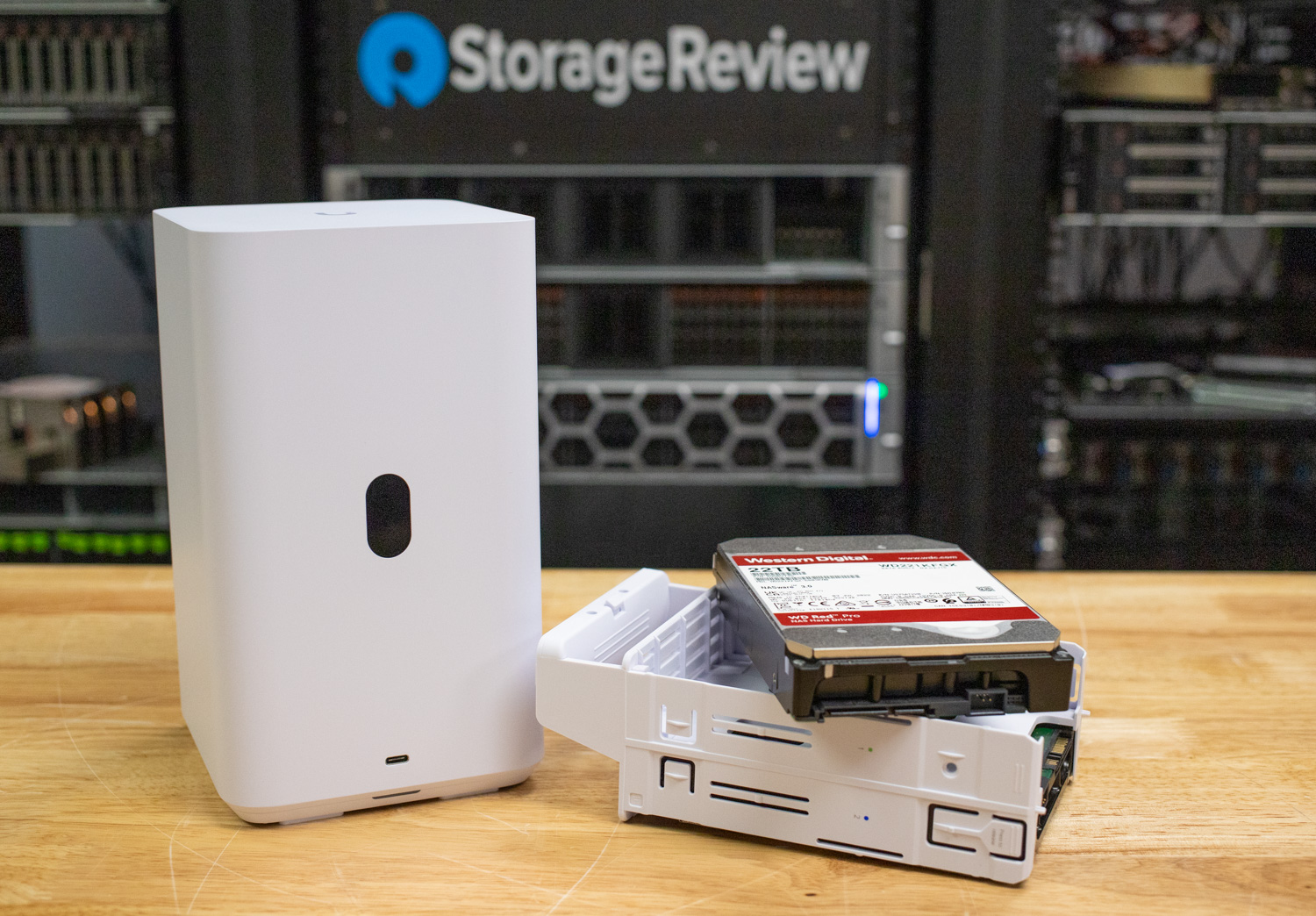
On the front panel, a USB-C port supports up to 5 Gbps, allowing users to connect compatible devices, such as Ubiquiti’s optional 5G Ethernet Adapter, for additional connectivity. A 1.47-inch color LCM display provides system status at a glance, including temperature, storage alerts, and network information.
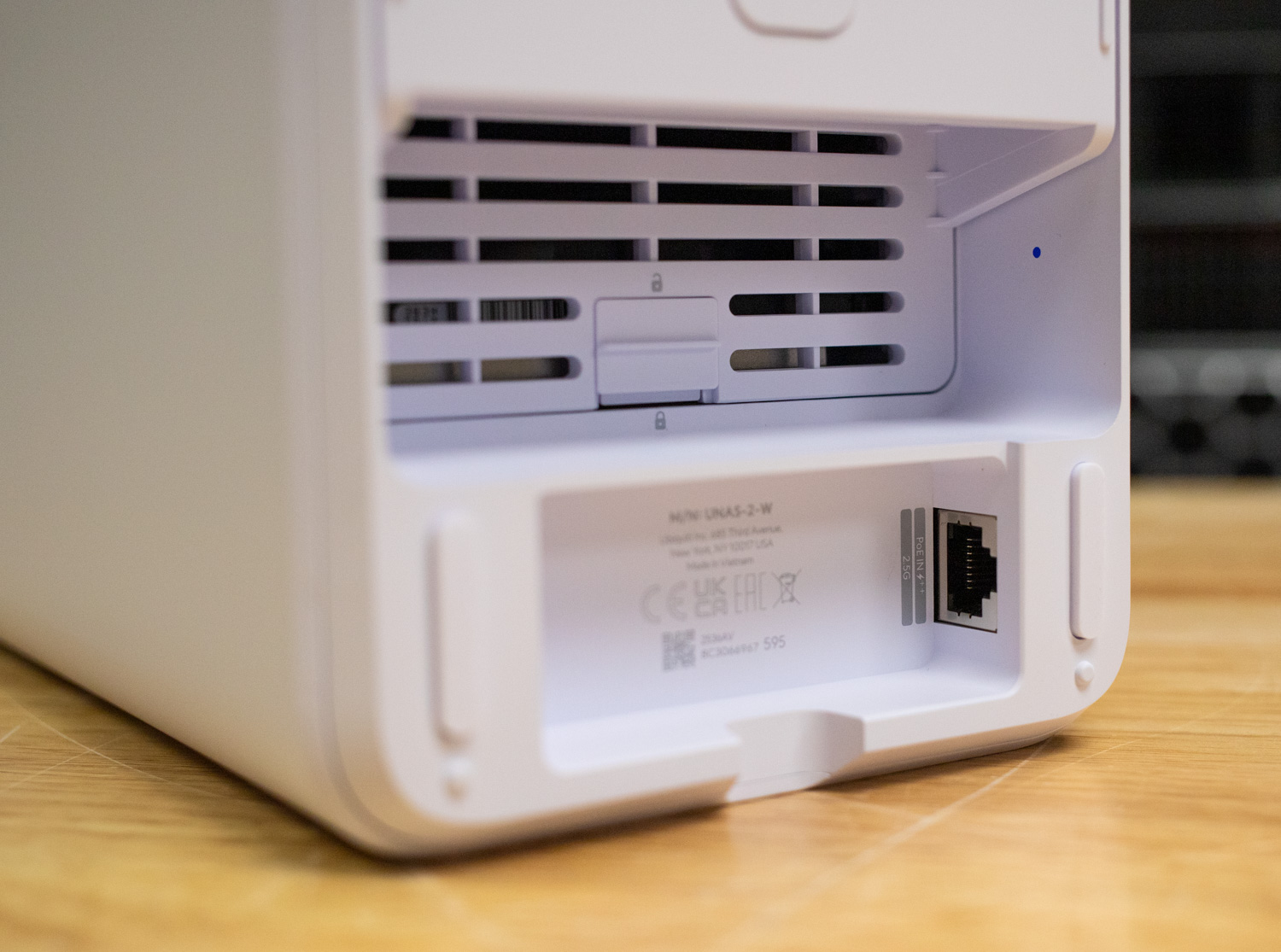
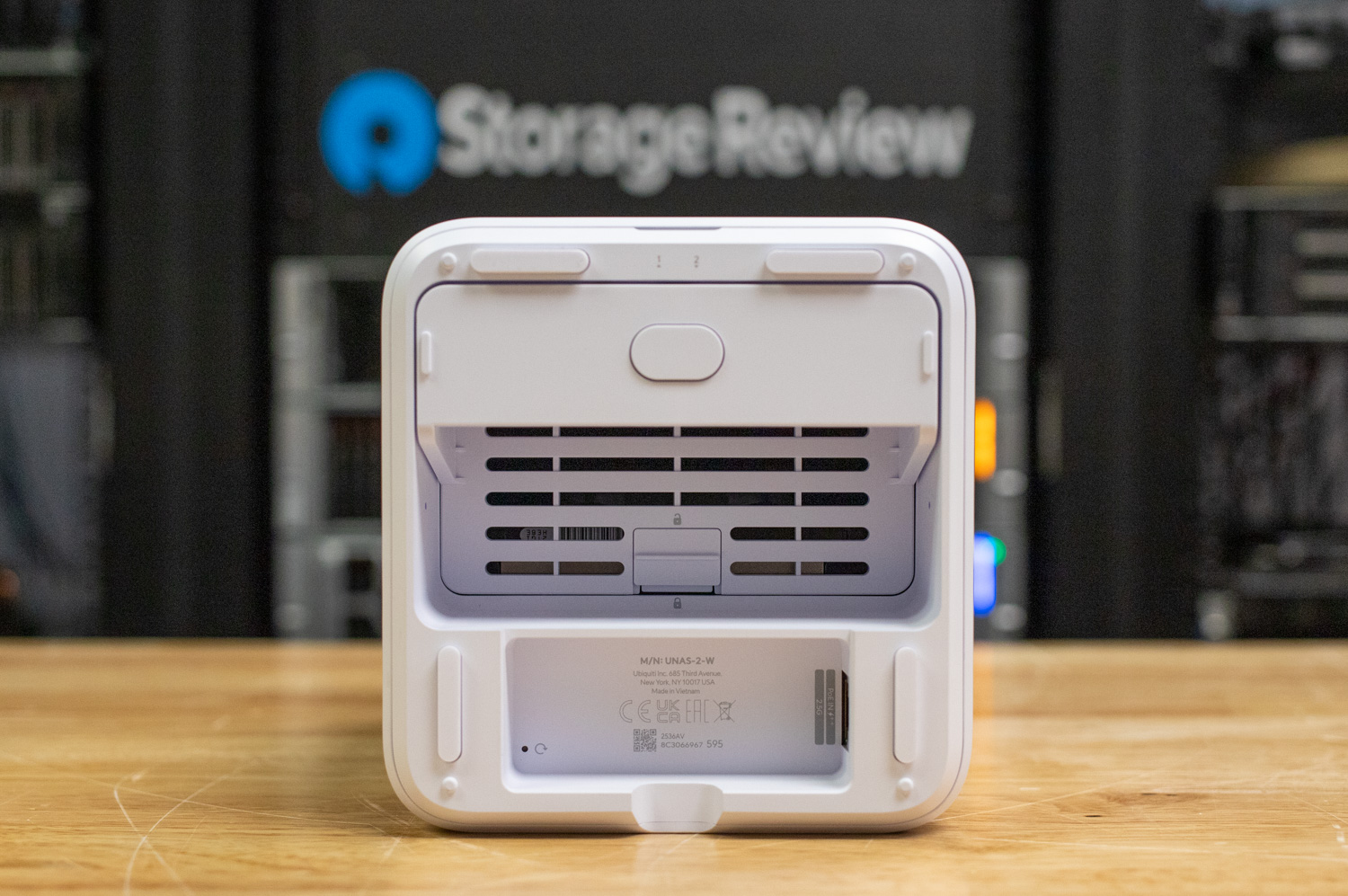
The two tool-less 3.5-inch drive trays can be accessed from the bottom of the unit by laying it on its side. Each tray securely locks in place and supports drives with a total power draw of up to 52W.
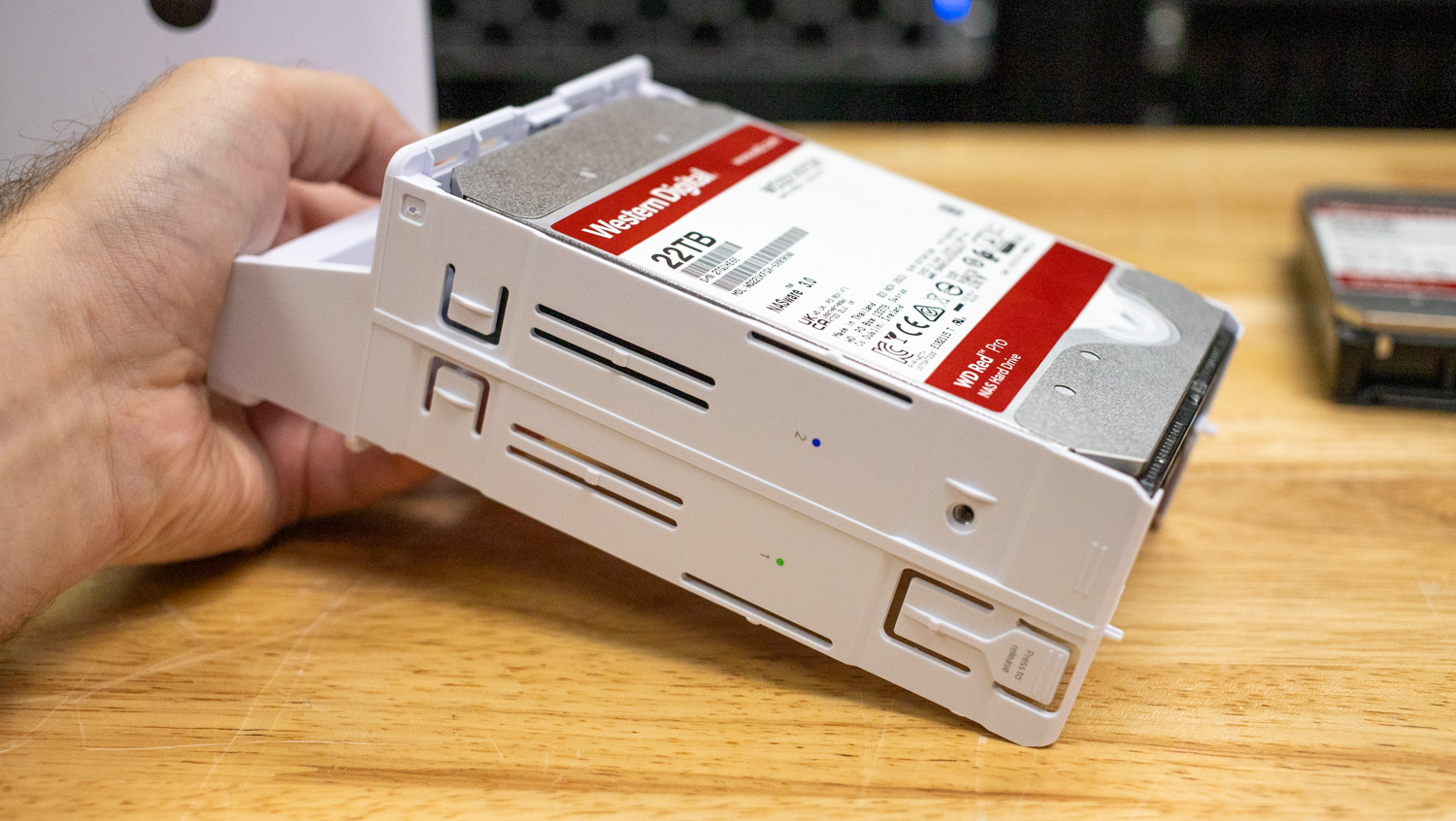
Just below the drive tray is the 2.5 GbE RJ45 port for primary networking and PoE++ power delivery, keeping cabling minimal for users who prefer single-cable operation. Alternatively, the NAS can be powered by the included 60W PoE++ adapter, offering flexibility for setups that don’t provide high-power PoE on the switch side.
Internally, the UNAS 2 runs on a quad-core ARM Cortex-A55 processor clocked at 1.7 GHz and 4 GB of memory, delivering enough performance for light-to-moderate storage and file-serving tasks across the UniFi ecosystem.
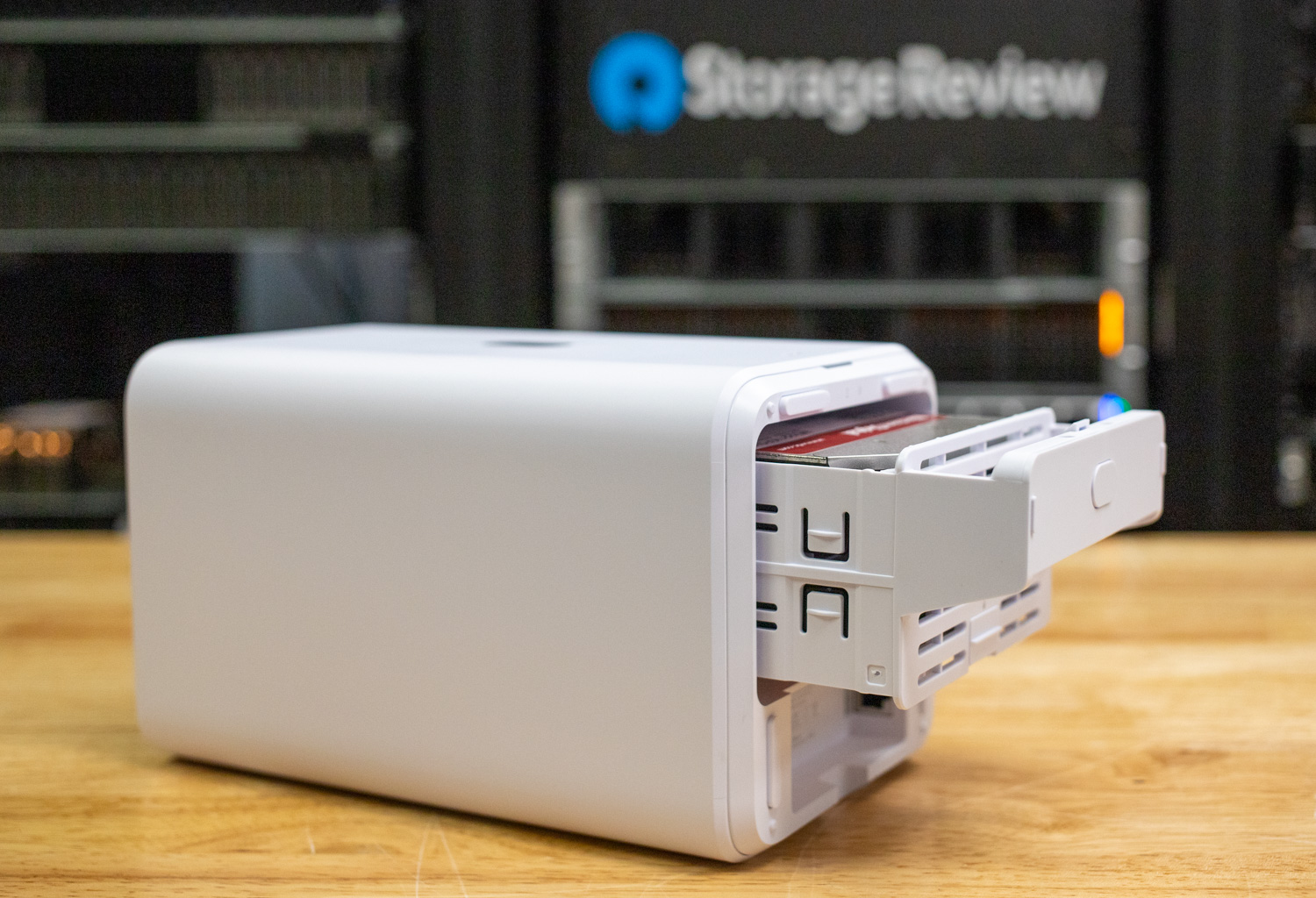
Wireless communication is handled through Bluetooth 4.1, enabling setup and management through the UniFi mobile app or web interface.
The system’s status LEDs sit below the trays, providing feedback for power and system activity.
Overall, the build and design of the UniFi UNAS 2 reflect Ubiquiti’s focus on clean integration, minimal wiring, and ease of use. With its tool-less trays, dual power options, and compact footprint, the UNAS 2 delivers a polished, user-friendly storage experience for smaller UniFi environments.
UNAS 2 UniFi Drive Application Overview
The UniFi Drive application provides a centralized, intuitive interface for managing storage, user access, and data protection across UniFi-powered NAS devices, such as the UNAS 2. Designed to simplify file sharing and backup workflows, the app brings together storage monitoring, drive health, RAID configuration, snapshot management, and remote access tools in a single, unified dashboard. From the web interface or mobile app, administrators can create shared drives, set access permissions, review system performance, configure backup destinations, and manage file services such as SMB, NFS, and Time Machine. UniFi Drive also integrates seamlessly with the broader UniFi ecosystem, enabling consistent management, secure remote connectivity, and a streamlined experience across home and business environments.
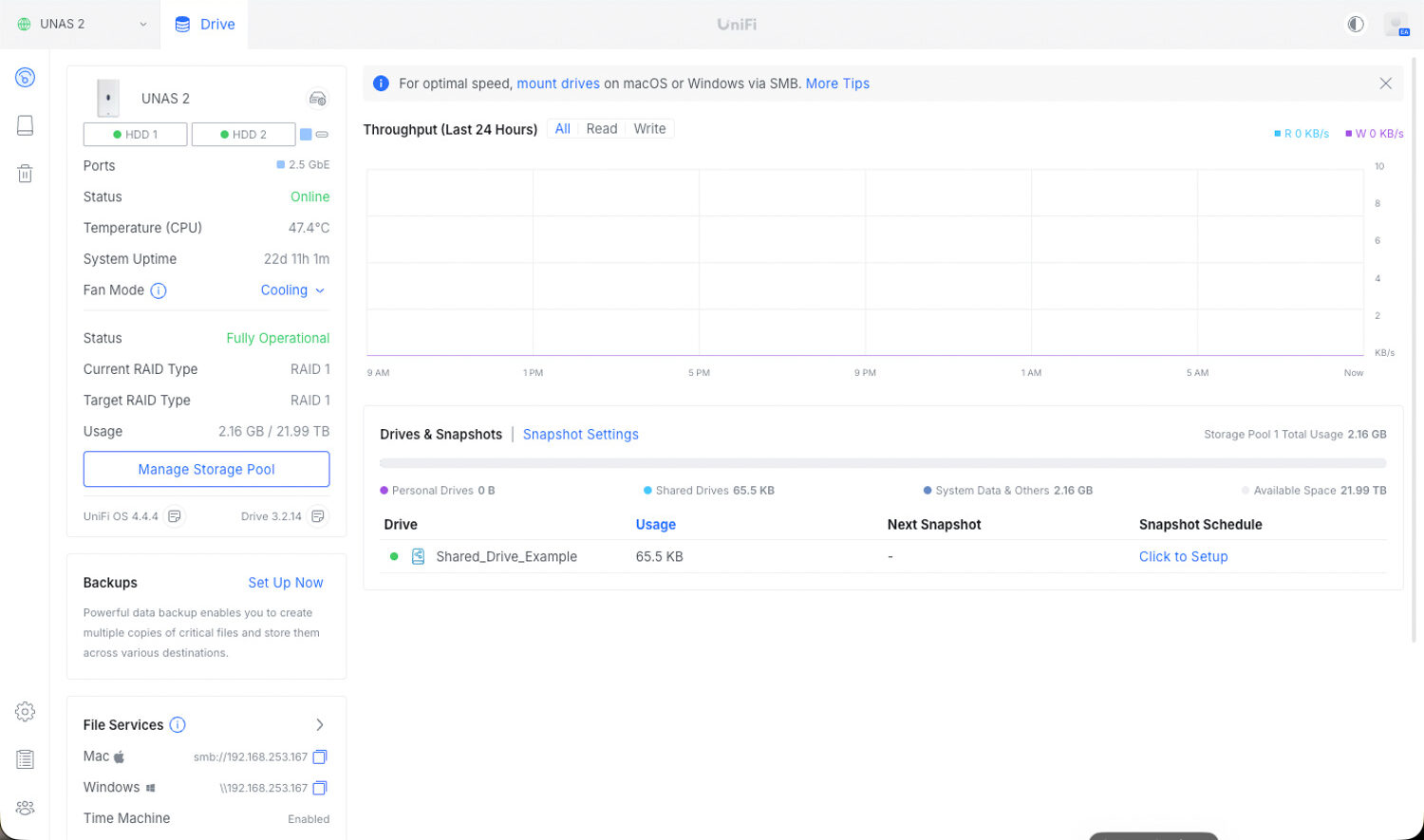
This screen shows the main UniFi Drive dashboard for the UNAS 2. It provides a brief overview of system health, RAID status, drive usage, and basic performance metrics. The left panel highlights key hardware details, including uptime, CPU temperature, fan mode, and the current RAID 1 setup. The center area displays throughput history, which helps monitor recent read and write activity. At the bottom, the Drives and Snapshots section lists available shares, space usage, and optional snapshot scheduling. File services for macOS, Windows, and Time Machine are also shown for easy access. The entire system can be viewed and managed locally from the device IP address, through the UniFi mobile app, or remotely via the UniFi web interface.
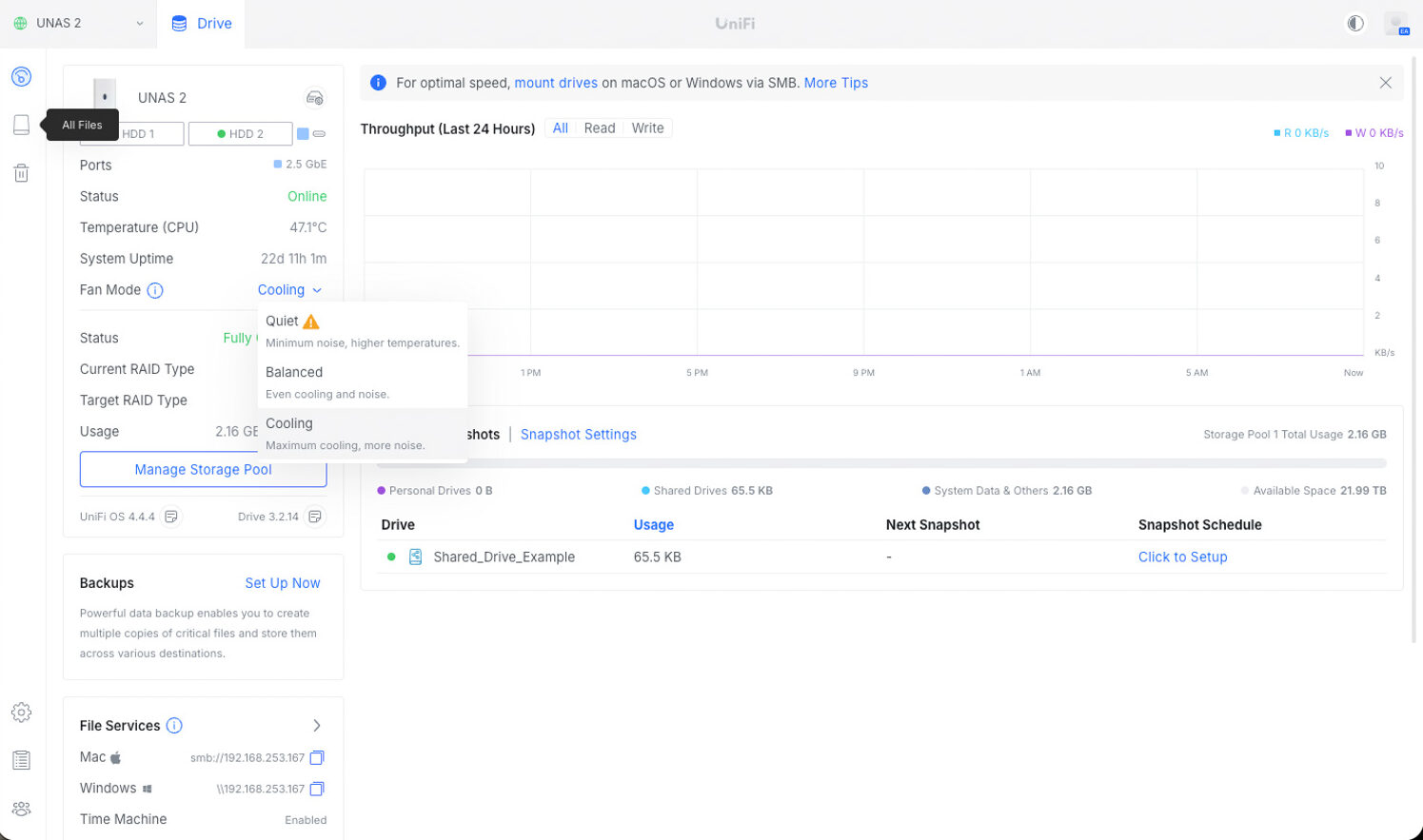
In reviewing the latest UniFi Drive OS on the dashboard, we found that it now includes fan cooling profile controls directly in the main device panel. Users can now choose Quiet, Balanced, or Cooling modes based on their noise and temperature requirements. Quiet mode reduces fan speed at the cost of higher temperatures; balanced offers an even mix of cooling and noise; and cooling provides the strongest airflow to keep drives at lower operating temperatures. This gives the UNAS 2 more degrees of flexibility than earlier UniFi storage products we tested, including the larger UNAS Pro, which initially had no adjustable options for fan behavior.
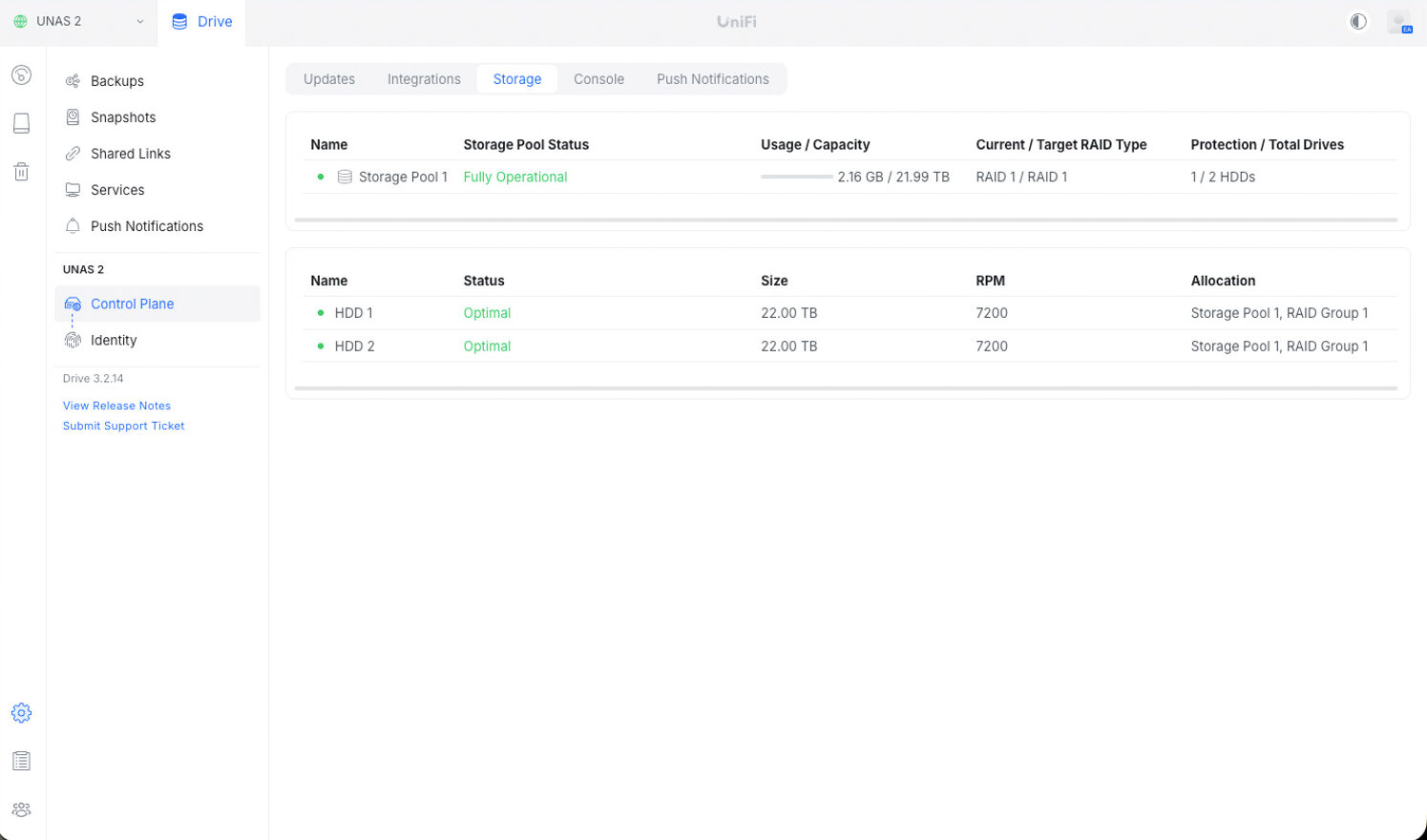
In the storage view, the UNAS 2 maintains simplicity, as expected from a two-bay NAS. We can see that the two 22TB drives are reporting an optimal state, each spinning at 7200 RPM and assigned to the same storage pool. The system is running in a RAID 1 configuration, which mirrors the drives for redundancy and provides a straightforward, reliability-focused layout. This page provides a quick confirmation that the pool is healthy and that both disks are functioning as expected before moving on to the next section.
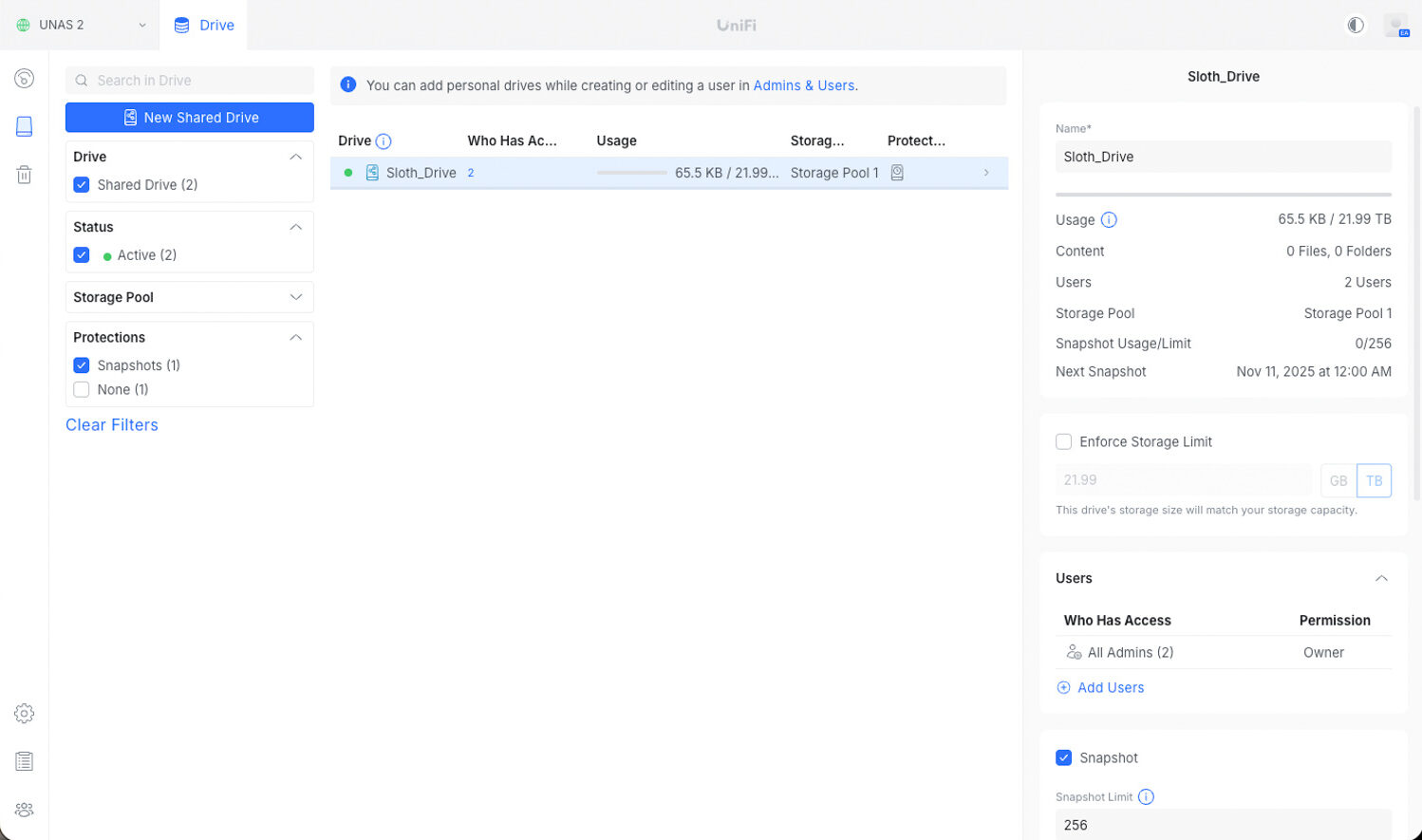
Now that storage is set up on the device, we can configure a shared drive for use on the UNAS 2. The interface for creating and managing shared drives is clean and straightforward, making it easy to assign access and keep track of usage. From this panel, you can see who has access, how much space is being used, and which storage pool the drive belongs to. There are also simple options for setting storage limits and enabling snapshots, giving the drive built-in protection and backup points without any extra setup.
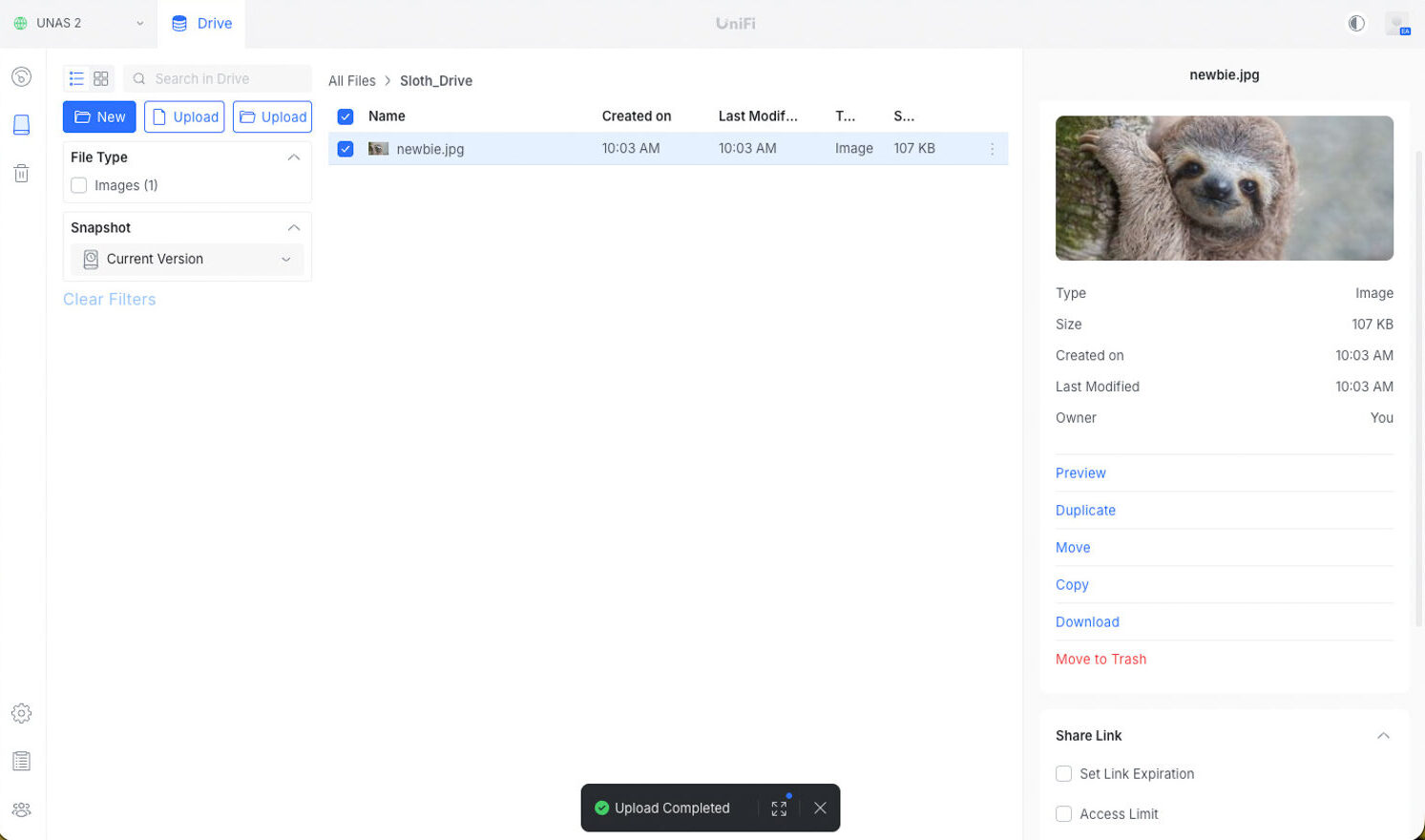
A benefit of the UniFi Drive web interface is that once a shared drive is created, you can manage everything directly in the browser. You can create new folders, upload individual files or entire folders, and view snapshot versions without leaving the page. In this example, we uploaded an image, and clicking it opens a quick preview along with options to duplicate, move, copy, download, or delete the file.
For remote sharing, UniFi makes it easy to generate a share link with optional controls, including passwords, access limits, time expiration, and the number of allowed downloads. Once a link is created, it can be exported as a QR code or shared as a standard URL, making it easy to grant others access without exposing the entire drive.
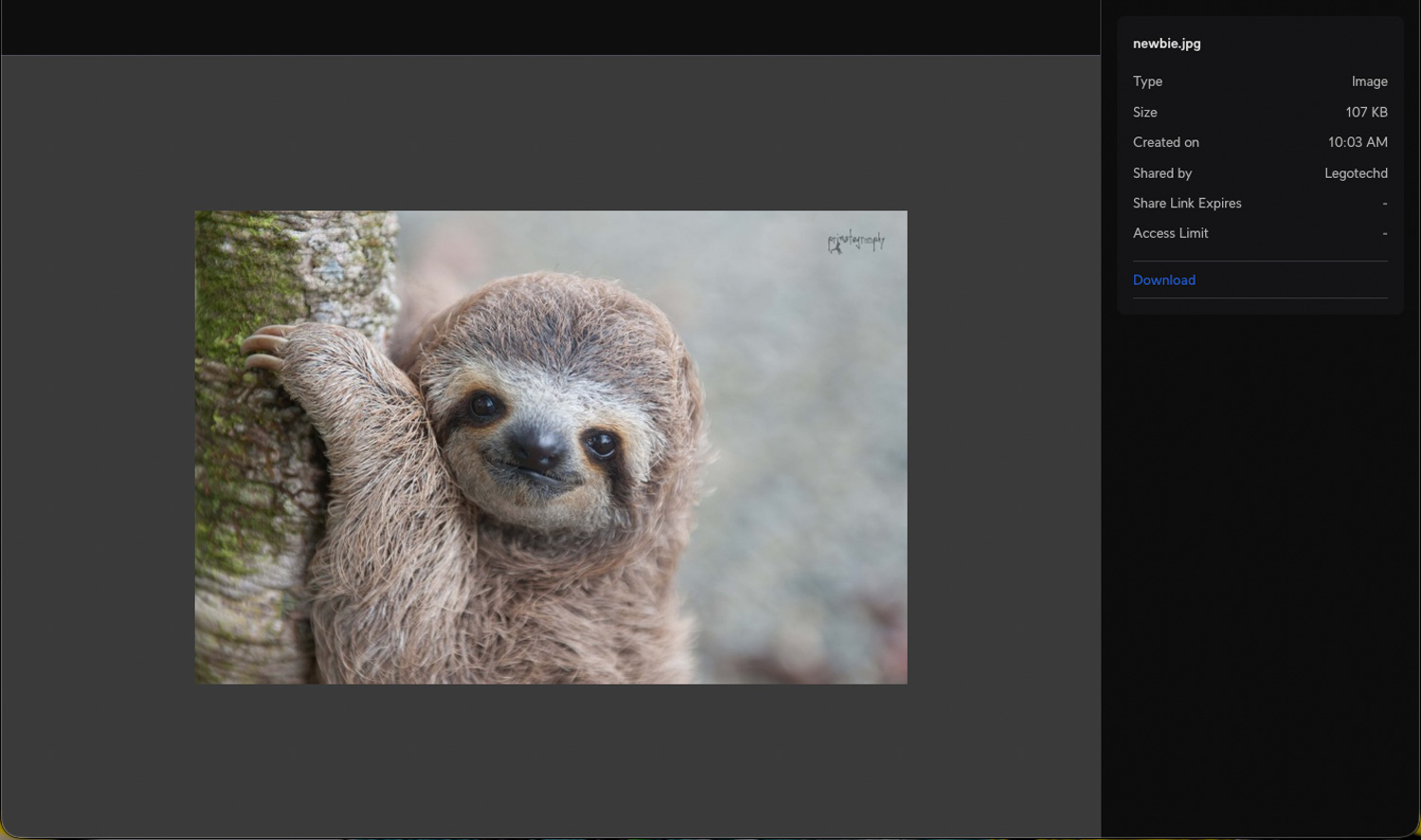
This is an example of accessing a file through a remote share link. When a shared link is opened, UniFi Drive opens a simple viewer with a file preview on the left and key details on the right, including file type, size, creation time, and who shared it. From here, the user can download the file directly without needing an account or access to the rest of the NAS. The clean layout makes it easy to view and retrieve shared files or folders from any device.
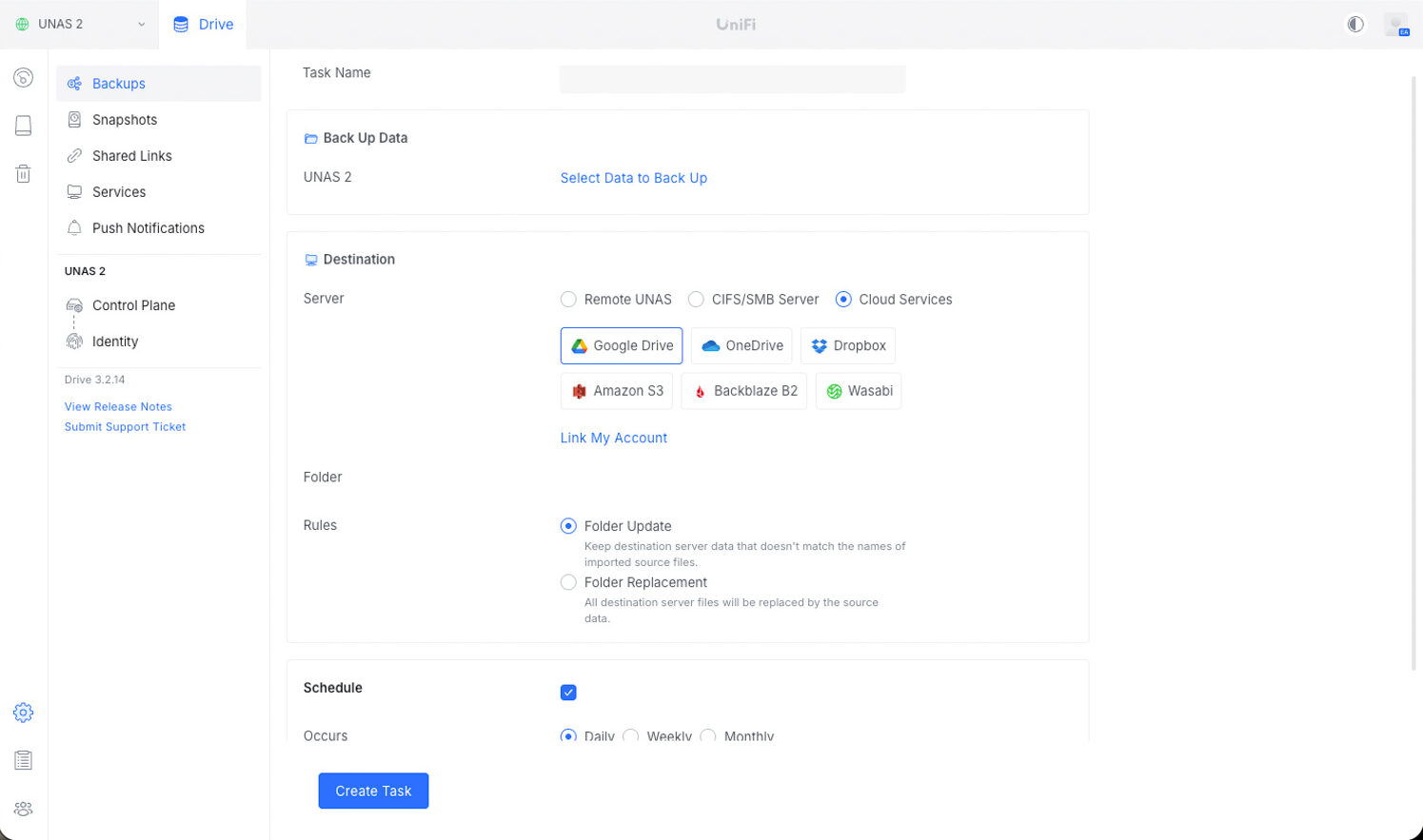
 In the backups pane, we can configure how the UNAS 2 protects the data stored on the device. The interface lets you choose a destination such as a remote UNAS, a CIFS/SMB server, or various cloud services, including Google Drive, OneDrive, Dropbox, Amazon S3, Backblaze B2, and Wasabi. You can also set rules for how backups behave, such as keeping the destination in sync with folder updates or entirely replacing the contents with each backup run. At the bottom of the screen, you can schedule how often the task occurs, making it easy to automate off-device data protection.
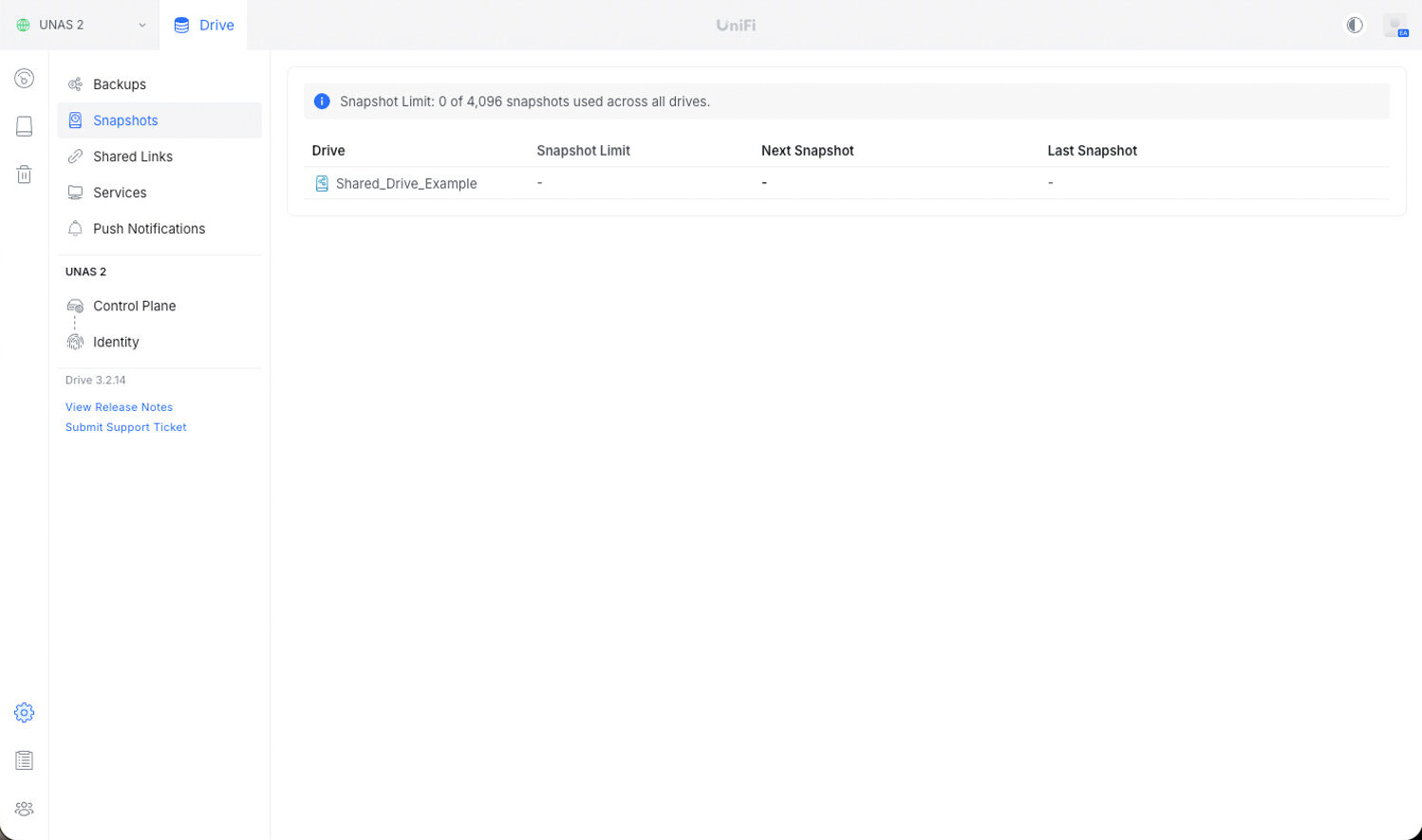
In the snapshots pane, we can see the Shared_Drive_Example listed with no snapshot limit configured and no snapshots taken yet. This view gives a quick summary of each drive’s protection state, making it easy to verify which drives have snapshot schedules enabled and which ones still need to be configured.
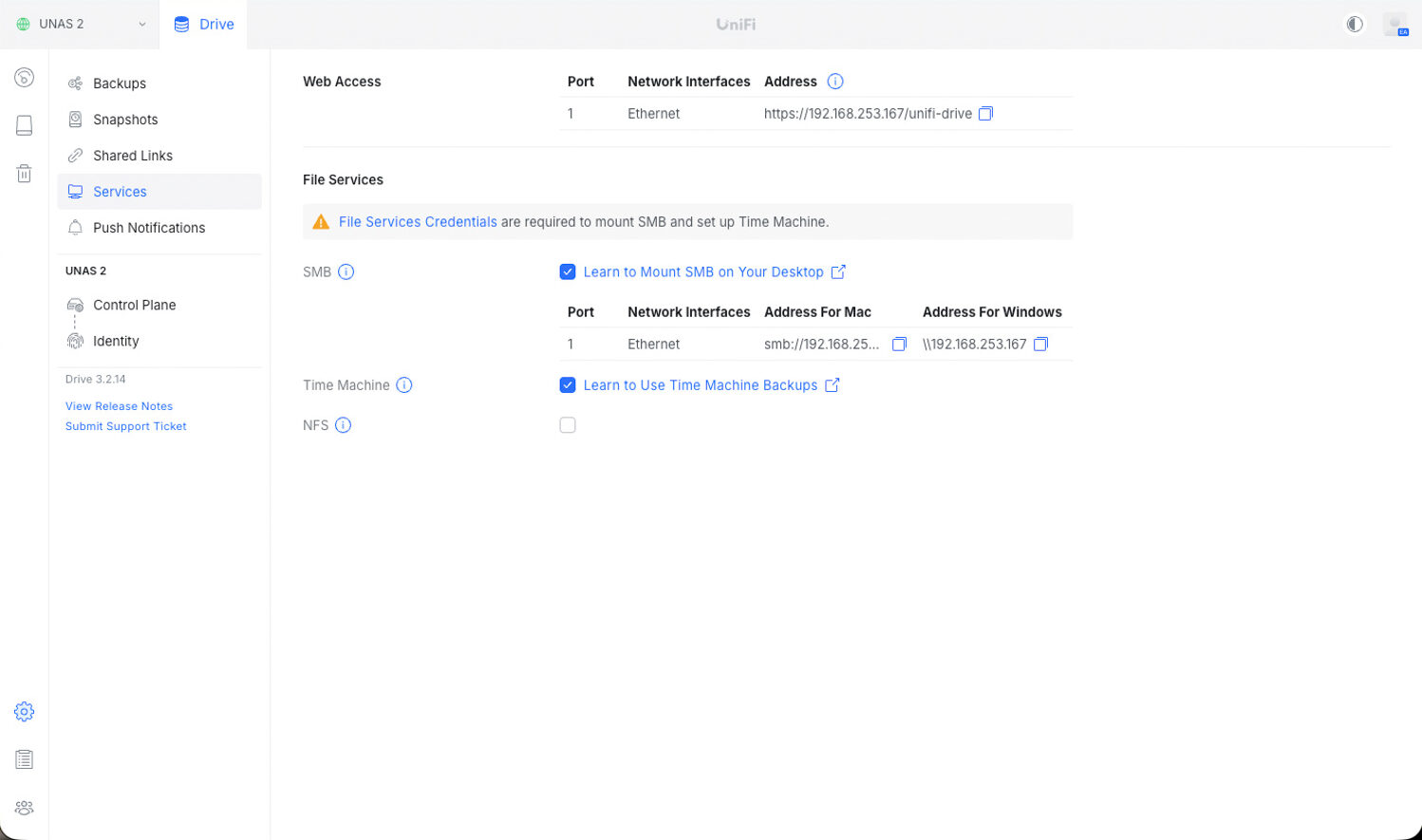
Lastly, under the services pane, we can see the current configuration for local web access to the UNAS 2, along with all available file service options. From here, you can enable and manage SMB for both macOS and Windows, set up Time Machine support, and toggle NFS if needed. Each service provides its own connection details and setup instructions, making it straightforward to integrate the NAS with different systems on the network.
UNAS 2 Performance
To measure the storage performance of the UNAS 2, we used industry-standard metrics and the FIO benchmarking tool. For this evaluation, a dedicated server acted as the load generator, connected to the environment over a 10GbE network link. The UNAS 2 itself was connected to the same switch using its native 2.5GbE interface, ensuring that all workloads flowed through realistic SMB/NFS/benchmark paths rather than synthetic local tests.
This setup allowed us to fully stress the NAS within its real-world bandwidth constraints while ensuring the load generator was never the bottleneck. In this section, we focus on the following FIO benchmarks:
- Random Read/Write
- Sequential Read/Write
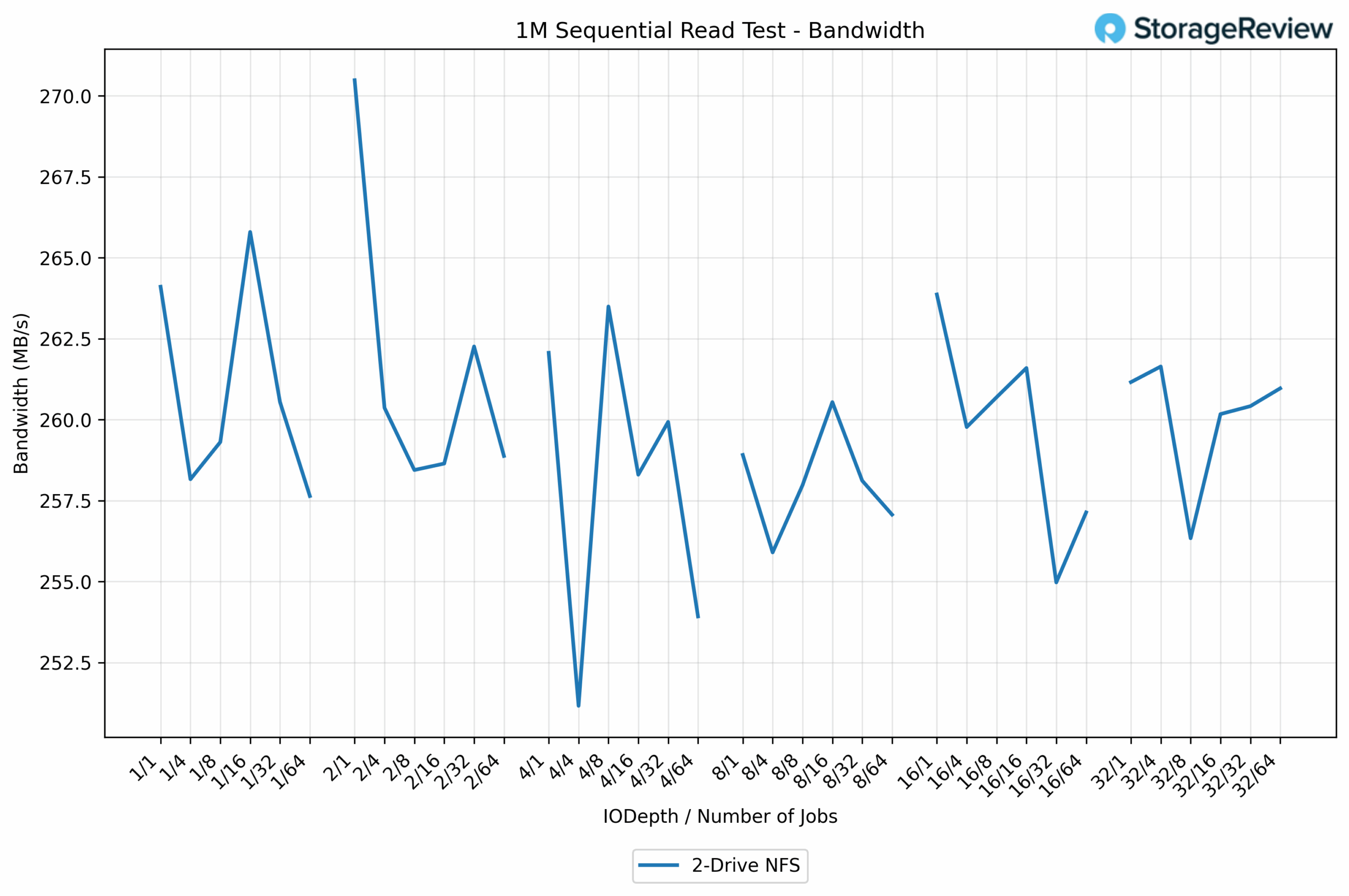
The 1M sequential read results remain mainly in the 258-266 MB/s range, indicating steady saturation of the 2.5GbE link. Bandwidth begins in the low 260s, dips briefly into the mid-255 MB/s range at a few points, then settles back into its typical plateau as I/O depth and job counts increase. The clear standout is the highest measured value of 270.5 MB/s (numjobs=1, iodepth=2, threads=1), which occurs under the cleanest single-thread conditions. Overall, the curve remains stable with only minor fluctuations around line-rate performance.
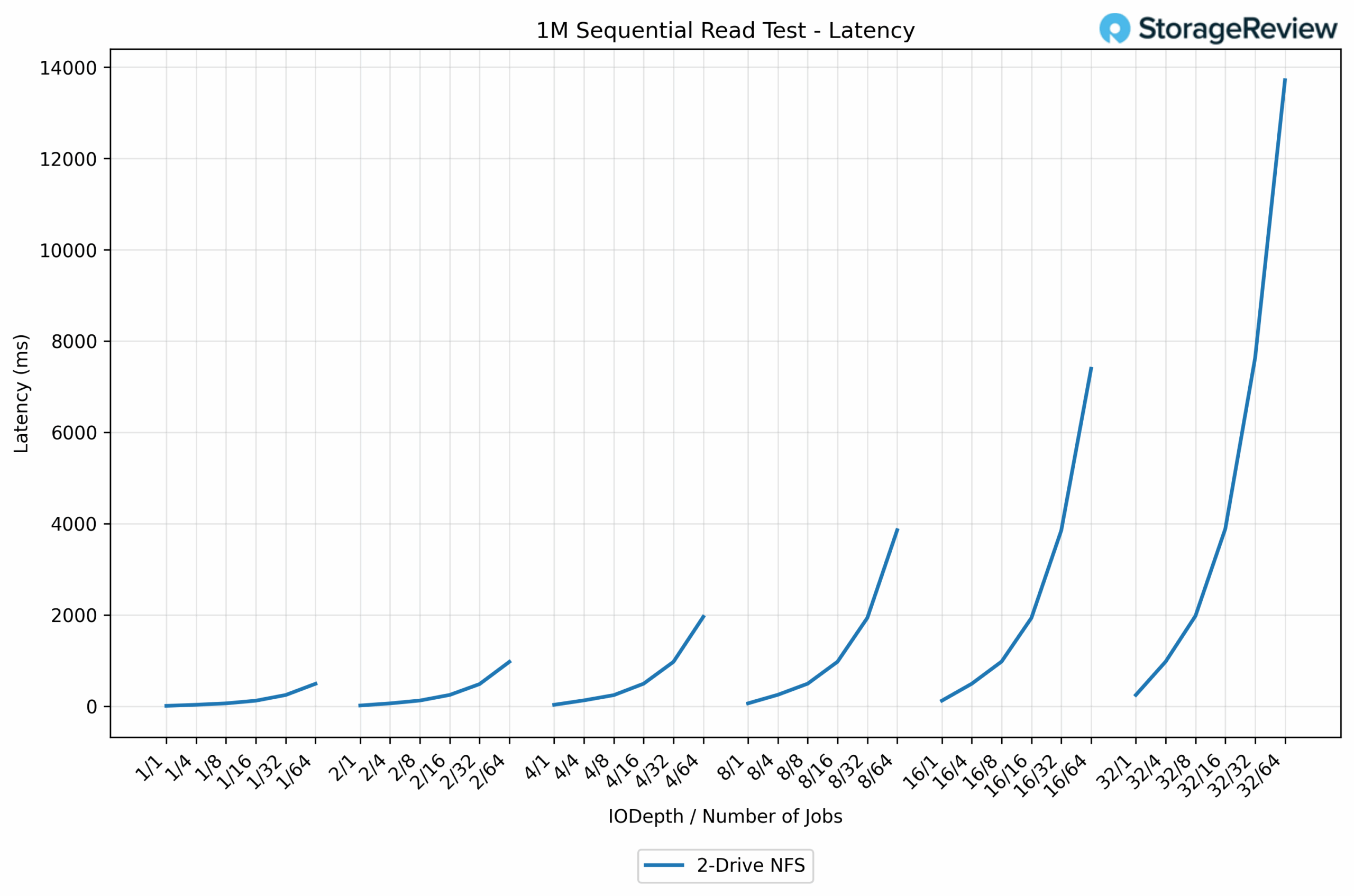
Latency starts at an exceptionally low level, with the best result recorded at 7.571 ms (numjobs=1, iodepth=1, threads=1). As concurrency increases, latency rises gradually, then sharply, reaching multi-second levels at the highest thread counts as the 2-drive NFS setup becomes saturated.
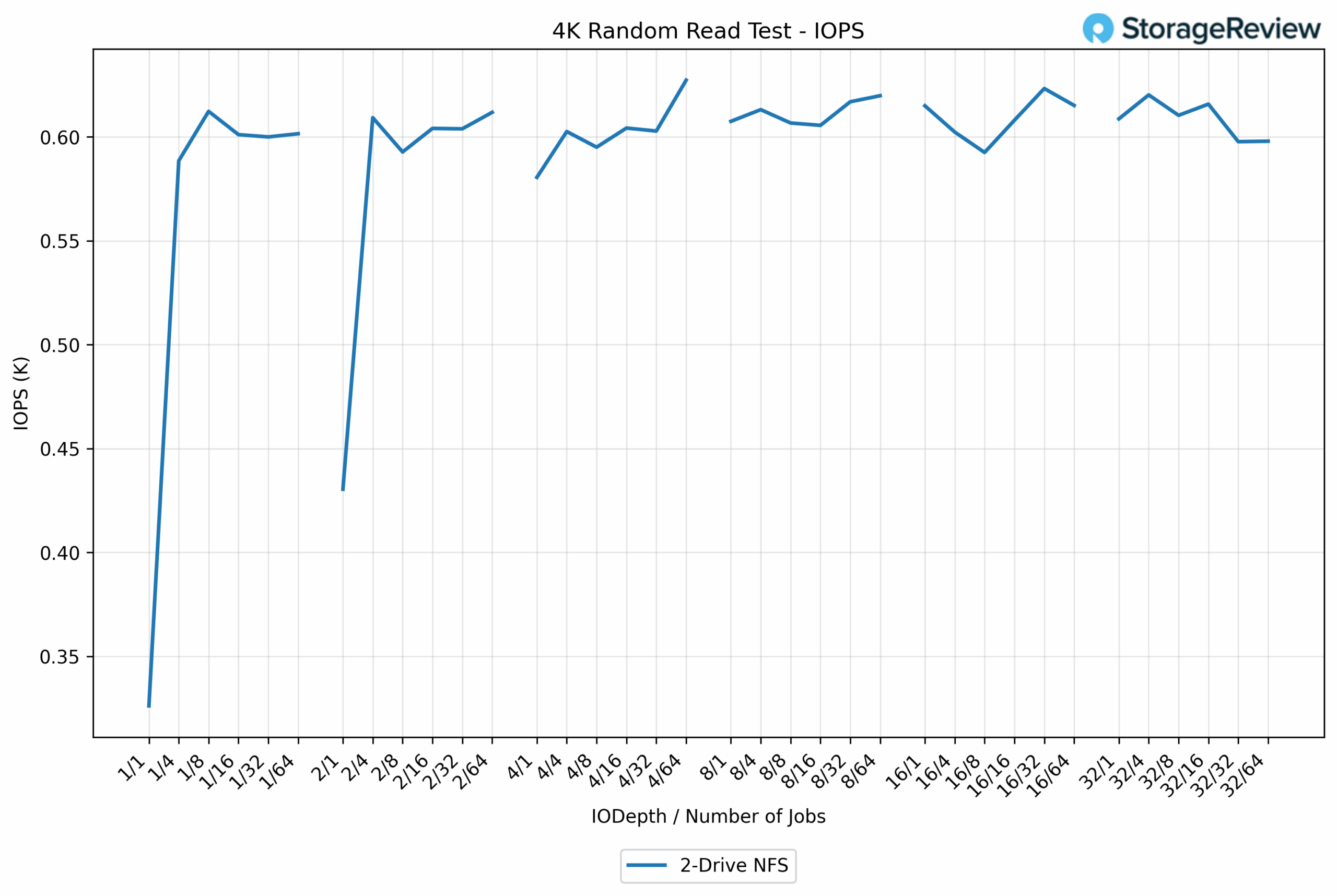
The 4K random read results remain strong, hovering around the 600-620 IOPS range across most thread and queue combinations. After an initial jump from the lower starting point, the line quickly flattens into a stable band with only minor fluctuations as concurrency increases. The peak value lands at 627 IOPS (numjobs=64, iodepth=4, threads=1), showing the NAS holding steady even at the highest levels of parallelism.
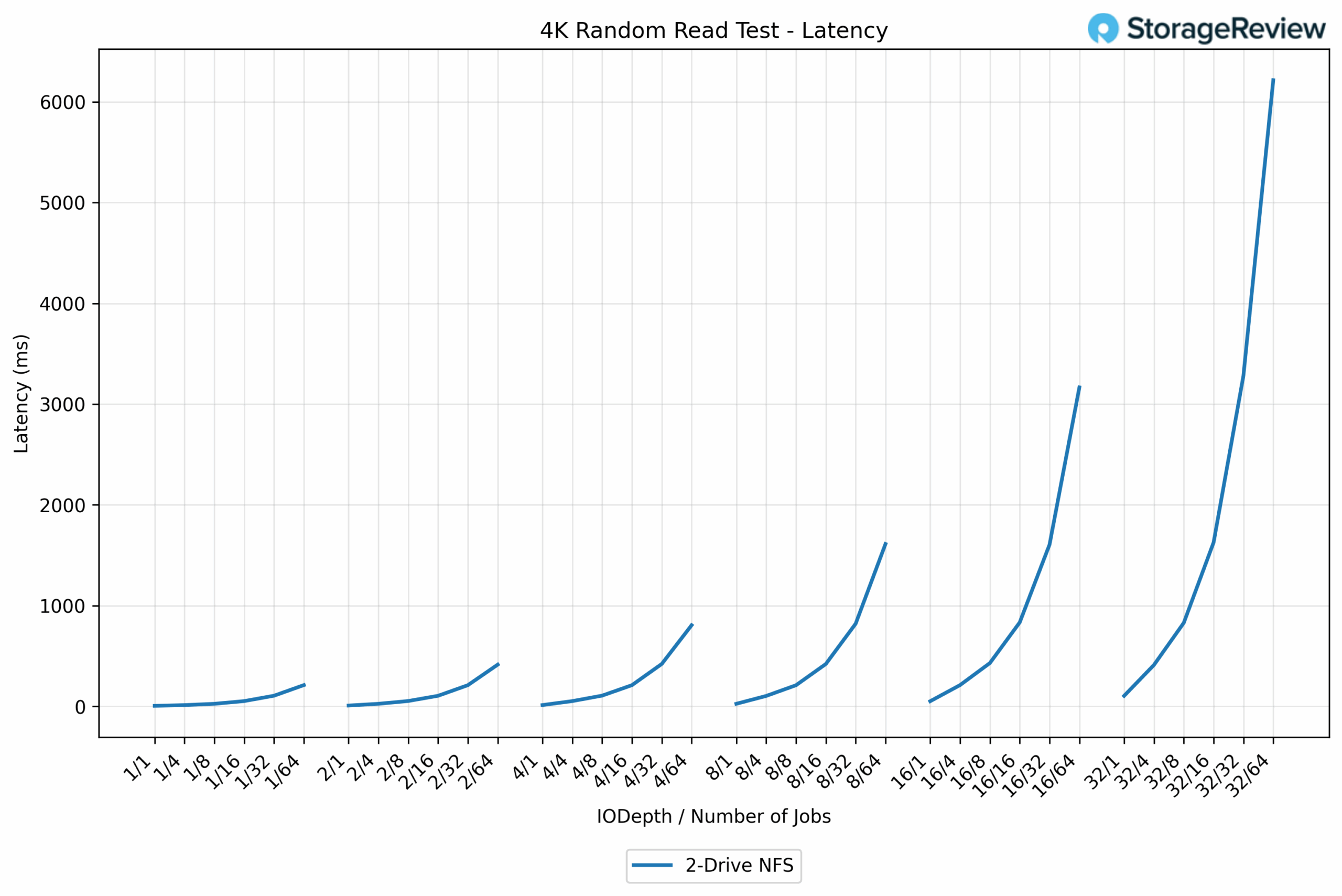
Again, latency starts low, with the best result at 6.129ms (numjobs=1, iodepth=1, threads=1). As more jobs and deeper queues are introduced, latency ramps up smoothly before spiking sharply under heavier parallelism.
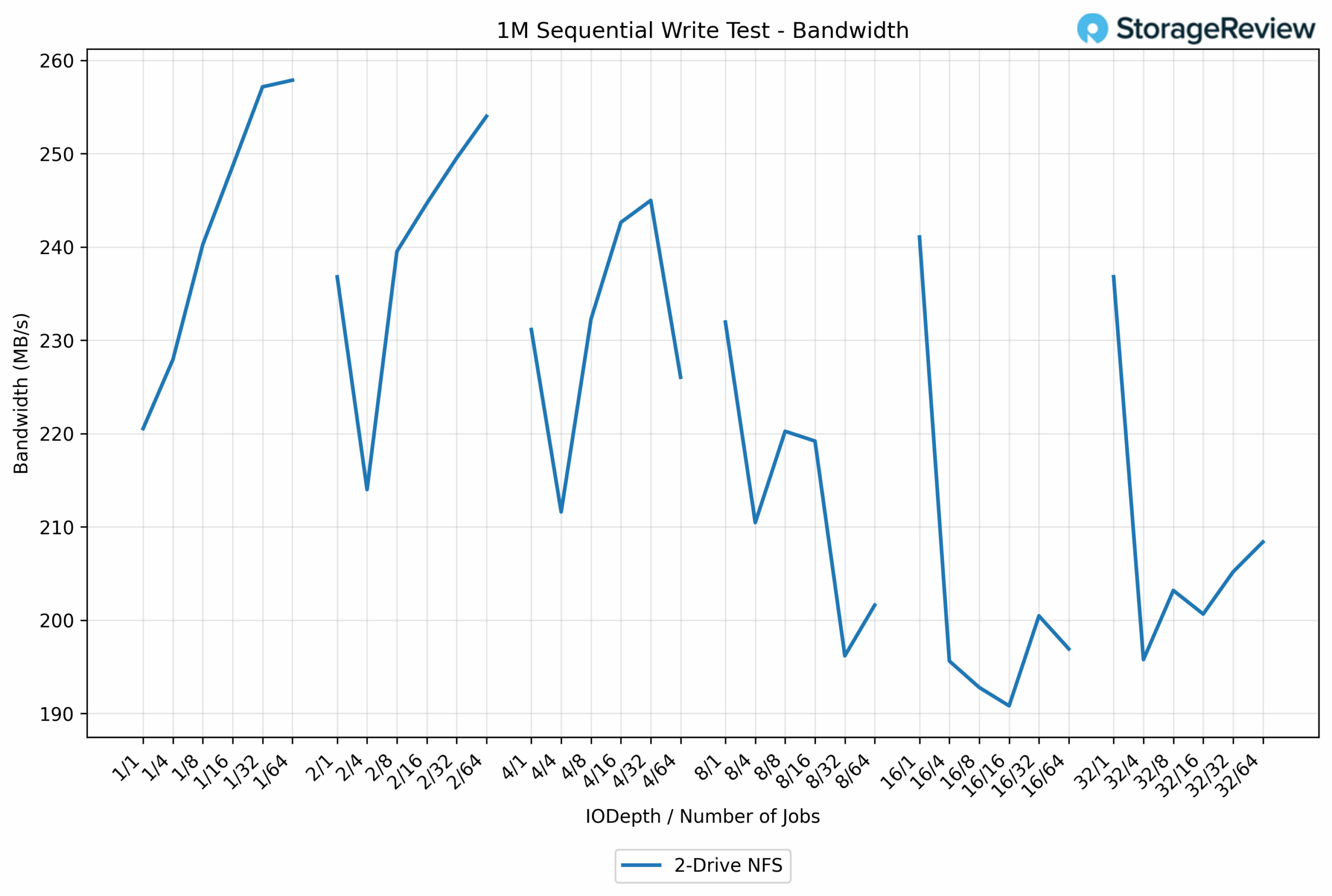
Sequential write performance starts in the low 220MB/s range, then climbs into the 240-255 MB/s band across most thread and queue combinations. The workload shows more variance than reads, with occasional dips to near 200 MB/s, but it generally stays close to the limits of the 2.5 GbE link. The highest result is 257.9 MB/s (numjobs=64, iodepth=1, threads=1), showing that the setup can still hit near-line-rate writes on the drive under the right conditions.
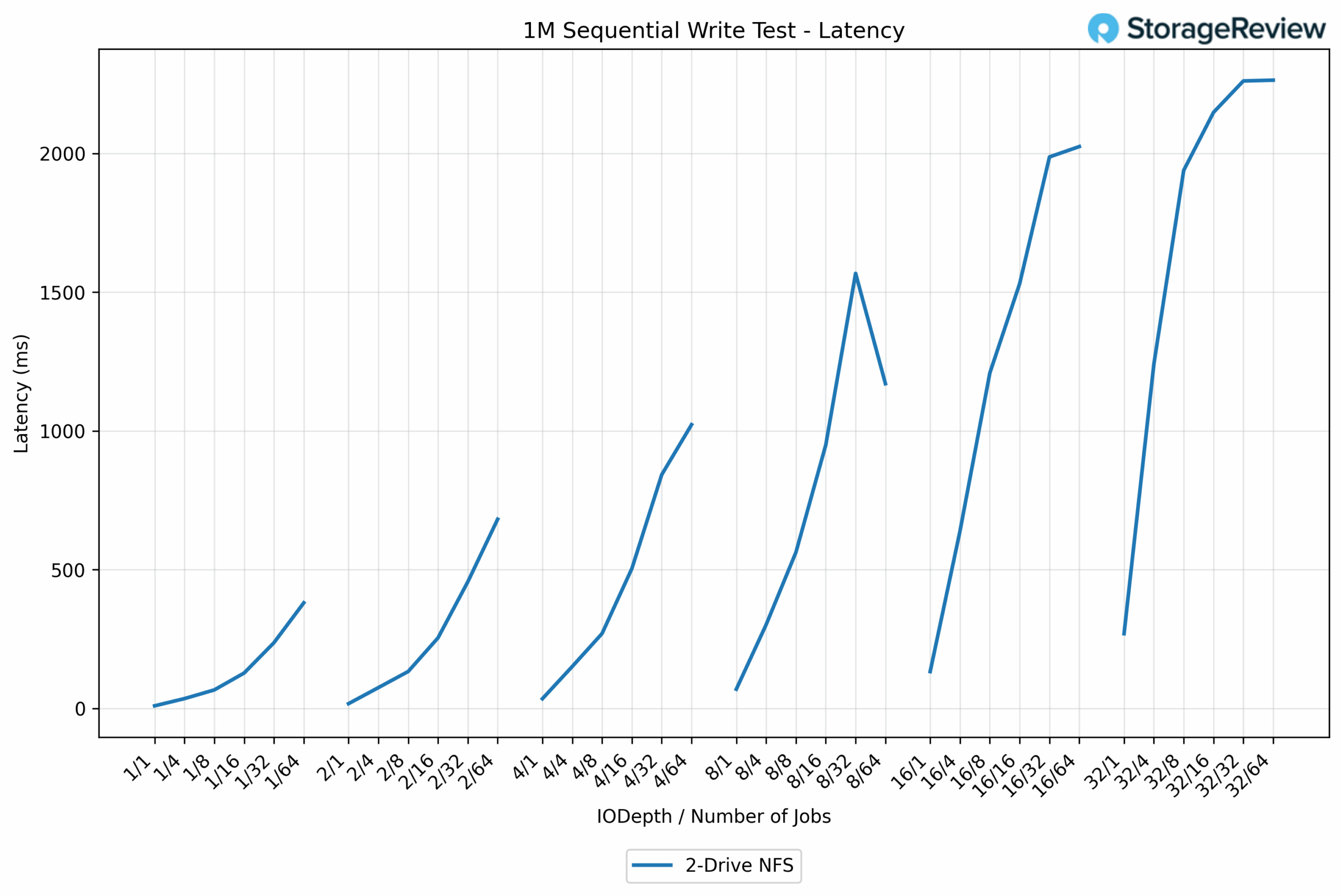
Latency begins low, with the best result at 9.067 ms (numjobs=1, iodepth=1, threads=1). As thread counts and queue depth increase, latency rises steadily before ramping sharply into the hundreds of milliseconds.
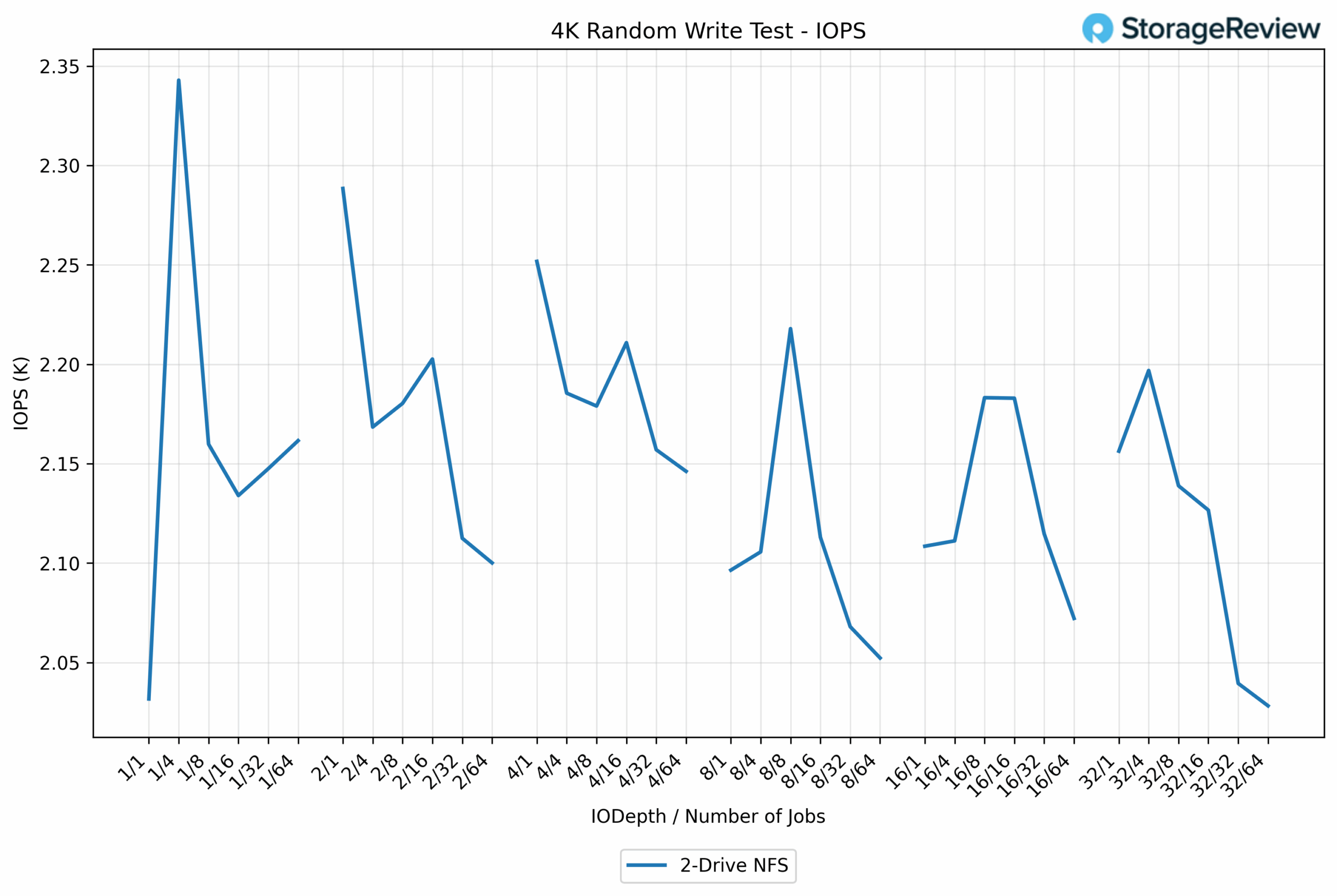
4K random write performance stays mainly in the 2.1K–2.2K IOPS range, with occasional spikes as certain thread/queue combinations align well. The highest point appears early in the test, where the line briefly jumps to roughly 2.34K IOPS before settling back into its typical band.
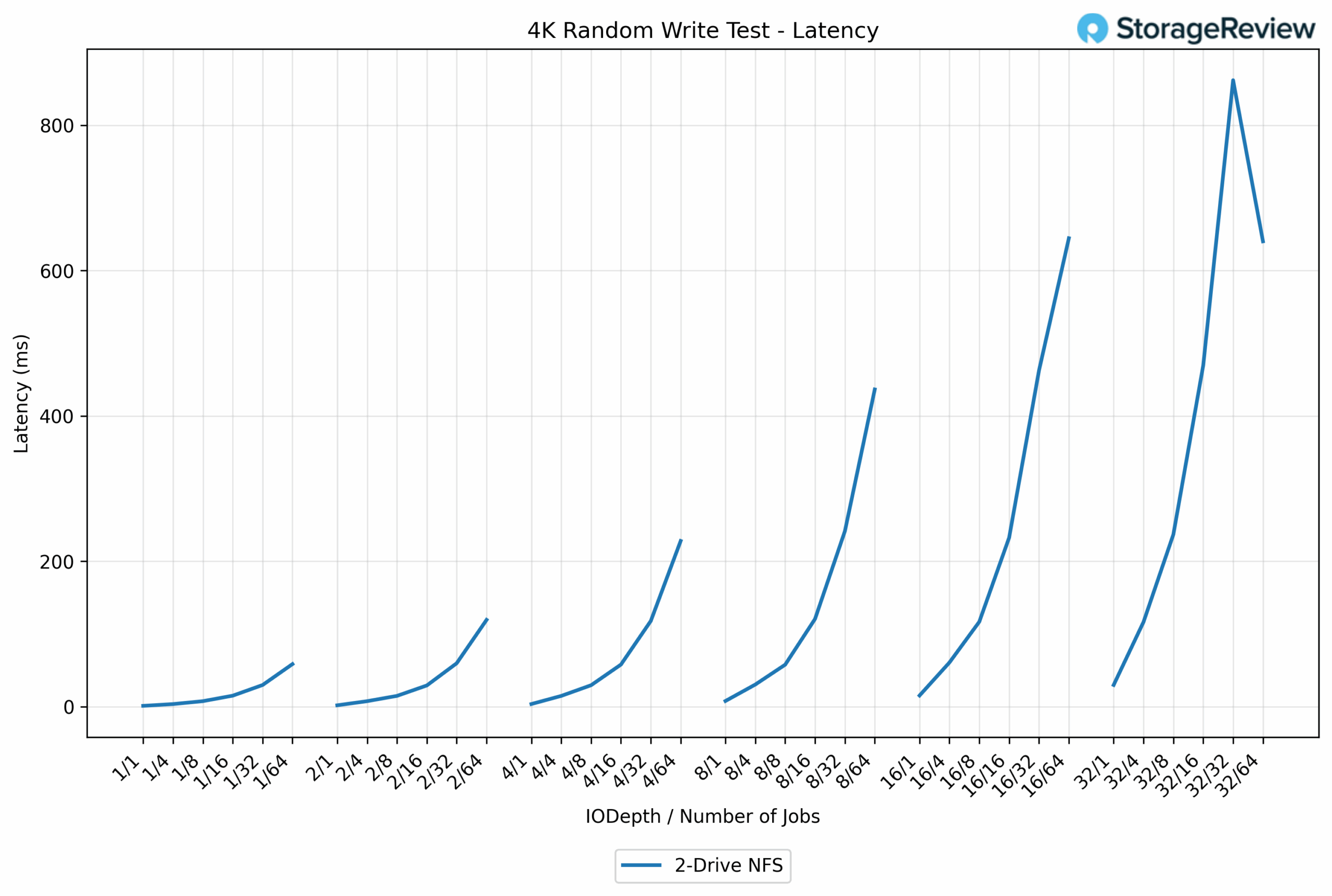
Latency begins low at 0.982 ms (numjobs=1, iodepth=1, threads=1) and remains smooth through the lighter workloads. As jobs and queue depth increase, latency rises steadily before shooting upward into the hundreds-of-milliseconds range at higher parallelism, reflecting normal saturation for a small 2-drive NFS setup under write-heavy pressure.
Conclusion
The UniFi UNAS 2 offers excellent value for users seeking reliable, easy-to-manage storage without the high cost or complexity of larger NAS platforms. At $199, Ubiquiti has created a compact system that performs above expectations while offering RAID 1 protection, a modern UniFi Drive interface, and a simplistic setup experience. The design fits almost anywhere, and the PoE++ power option lets the device run from a single Ethernet cable, keeping installation clean and flexible.
Performance is strong for a two-bay system. The UNAS 2 consistently saturates its 2.5 GbE interface during sequential reads and writes and maintains steady 4K random performance across a wide range of workloads. Latency scales predictably with concurrency in a two-drive NFS configuration. For home users, small offices, or creators who need dependable shared storage, the UNAS 2 has no trouble handling backups, media hosting, light VM storage for home labbers, and general file serving.
The overall experience is what sets the UNAS 2 apart. The single-cable PoE design is rare in this segment and eliminates the need for power bricks or extra cabling. The UniFi Drive interface is clean and intuitive with simple storage management, snapshot options, and a straightforward shared drive workflow. Remote access, browser-based file control, and tool-less drive trays all contribute to a polished and approachable experience.
The UniFi UNAS 2 fills an essential gap in the UniFi ecosystem, offering a small, affordable, and easy-to-use network storage solution for everyday use. It is not meant to replace the larger UNAS Pro for heavier workloads, but for its intended audience, it offers strong performance, intelligent design choices, and excellent value. It is a competent entry point for centralized storage in the home or small office.


 Amazon