

The HP EliteDesk 8 Mini G1a is a compact business desktop built around two distinct AMD processor families, giving companies the flexibility to tailor the system to their specific workloads. IT teams can configure this tiny machine as either an affordable, low-demand workstation or a more powerful desktop that suits departments with higher-performance needs. This can range from light productivity to configurations that support multiple displays, heavier office workloads, and AI features (via Ryzen AI PRO processors), which are now embedded in Windows releases.
The processor lineup is split between AMD Ryzen AI PRO 300-series and earlier Ryzen 5 220-series. The most potent option in the catalog is the Ryzen AI 7 PRO 350, an 8-core, 16-thread design with a boost clock of 5 GHz and 16 MB of L3 cache. AMD pairs this chip with its Radeon 860M graphics, which are noticeably better than the 740M-class graphics found on Ryzen 5 220 systems.
Moving down the CPU lineup is the Ryzen AI 5 PRO 340, which brings six cores and 12 threads, with boost speeds up to 4.8 GHz and the same 16MB of L3 cache. These configurations use the Radeon 840M, a GPU that is stronger than typical office-class integrated graphics, though still behind the 860M. These mid-tier models offer enough capability for multi-display setups and more demanding day-to-day workloads.
At the entry level, HP offers configurations built around the AMD Ryzen 5 220. This processor features six cores and 12 threads, with a boost clock speed of up to 4.9 GHz and 16 MB of L3 cache. It is equipped with the Radeon 740M graphics engine, which is sufficient for everyday tasks, video calls, and the typical range of enterprise applications. They remain the most cost-focused choice in the lineup and fit well in larger fleet deployments that want to keep expenses down and the workloads light.
Across all processor families, memory ranges from 8 GB on the most basic models to 64GB on higher-end configurations. The Mini G1a uses standard DDR5 SODIMMs, which keeps upgrades simple. Storage options range from 256GB to 2TB, depending on the local capacity a deployment needs.
Security, Software, and Manageability
The EliteDesk platform brings a solid set of security features, including BIOS protection, firmware recovery, isolated browser environments for questionable content, and sensors that detect tampering with the chassis or storage. On the software side, HP bundles its usual diagnostics, management tools, and imaging utilities, all of which help with setup and ongoing fleet maintenance. These features aren’t new to the EliteDesk line, but they remain essential for organizations that need stable, long-term fleet support.
Review Unit Specifications
The unit provided for testing is a higher-end configuration built around the Ryzen 7 AI PRO 350, which is the strongest processor available in this generation of the EliteDesk Mini. It comes with 32GB of DDR5-5600 memory in a dual-channel setup and a 1TB TLC SSD. HP also included the 120W power adapter and configured the Flex IO slot with Thunderbolt 4 and the HP Video Port Extender. It also runs Windows 11 Pro NG AI Premium, which takes advantage of the NPU inside the Ryzen 7 AI PRO 350.
| Category | Details |
| Operating Systems | Windows 11 Pro (HP recommends Windows 11 Pro for business) |
| Processor Options | AMD Ryzen AI 7 PRO 350 (up to 5.0 GHz boost, 8 cores, 16 threads, 16 MB L3 cache); AMD Ryzen AI 5 PRO 340 (up to 4.8 GHz boost, 6 cores, 12 threads, 16 MB L3 cache); AMD Ryzen 5 220 (up to 4.9 GHz boost, 6 cores, 12 threads, 16 MB L3 cache) |
| Graphics | AMD Radeon 860M (Ryzen AI 7 PRO 350 models); AMD Radeon 840M (Ryzen AI 5 PRO 340 models); AMD Radeon 740M (Ryzen 5 220 models) |
| Memory Options | 8GB, 16GB, 32GB, or 64GB DDR5 SODIMM, depending on configuration |
| Storage Options | 256GB, 512GB, 1TB, or 2TB PCIe NVMe SSD, depending on configuration |
| Ports | Front: USB-C 10Gbps, two USB-A 10Gbps, audio jack; Rear: two USB-A 10Gbps, HDMI 2.1, RJ-45, power connector, two DisplayPort 2.1, external antenna connectors, USB4 40Gbps with 100W PD; Optional Flex IO modules for additional video or network ports |
| Networking | Realtek gigabit LAN; Wi-Fi 6, Wi-Fi 6E, or Wi-Fi 7 depending on configuration; Bluetooth 5.3 or 5.4 |
| Audio | Realtek ALC3252 codec, universal audio jack |
| Expansion | Two M.2 2280 storage slots; one M.2 2230 WLAN slot |
| Dimensions | 6.97 x 7.13 x 1.35 in |
| Weight | 1.42 kg |
| Security | BIOS protection and recovery features, HP Sure Start, HP Sure Run, HP Sure Click, HP Sure Recover, tamper detection sensors, DriveLock |
| Software | HP diagnostics, HP Support Assistant, HP Smart Support, myHP, Poly Lens, and other HP management tools |
| Sustainability | Recycled plastics in chassis and components, recyclable packaging, molded pulp cushioning |
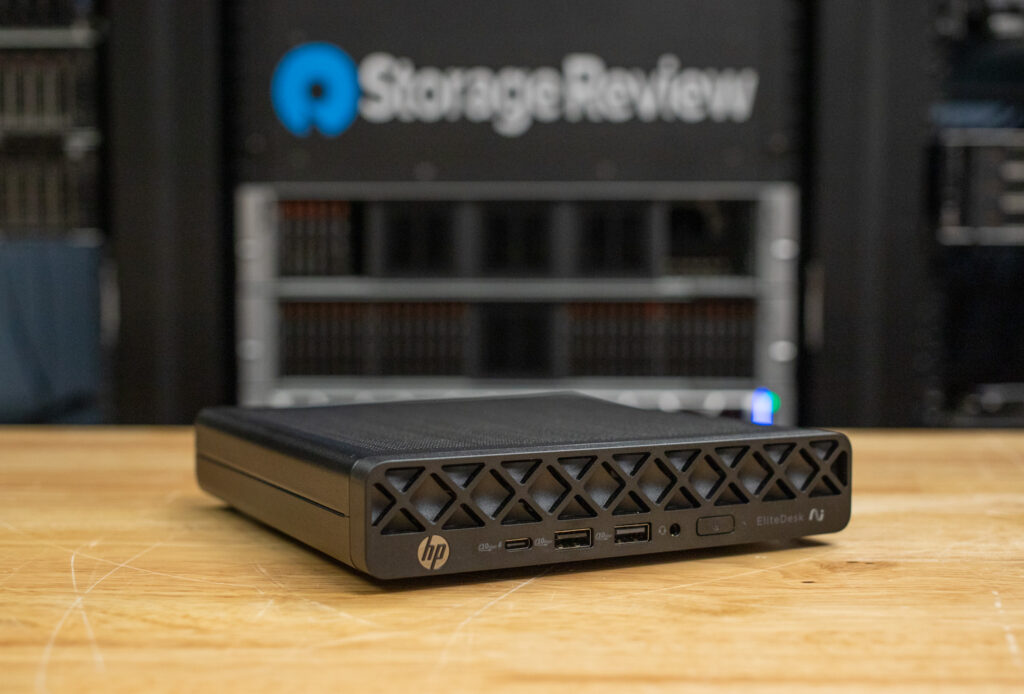
The EliteDesk 8 Mini G1a has a very compact footprint, but HP uses the available space efficiently, so the system still offers a good range of ports and configuration options.
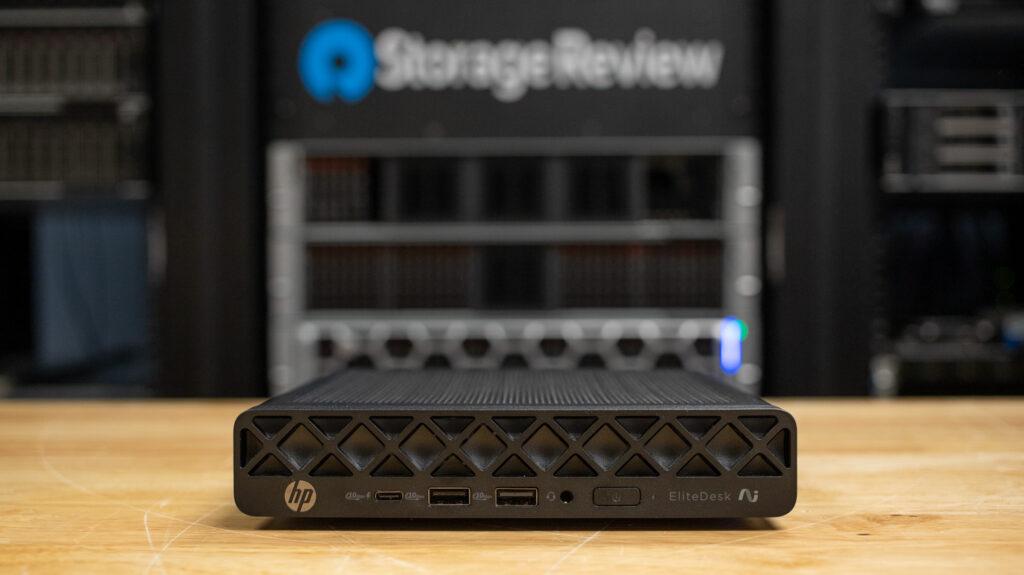
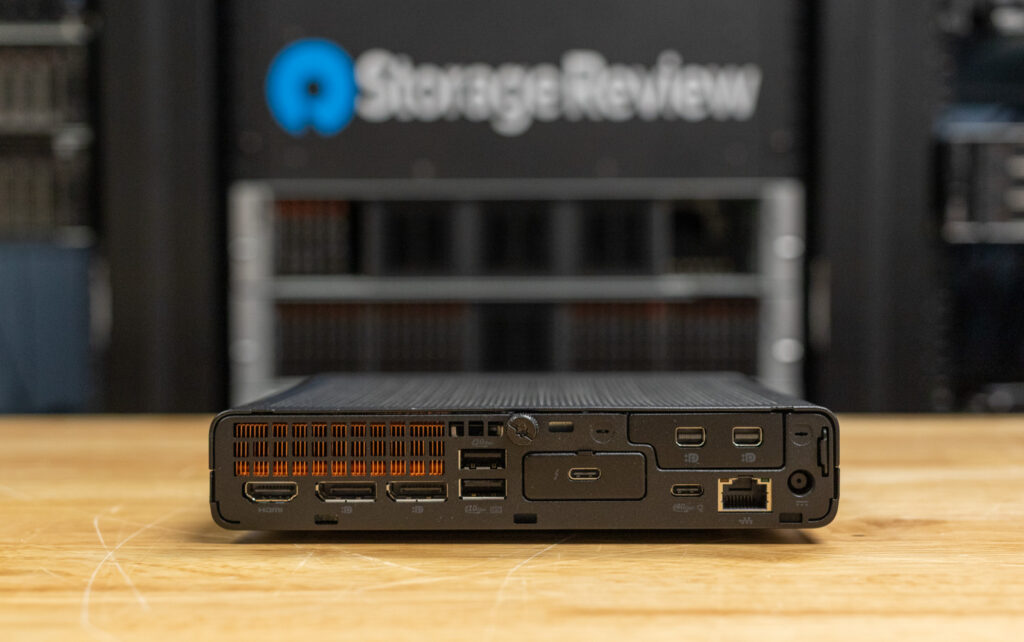
The front panel includes a USB-C port, two USB-A 10Gb/s ports, and a headset jack, while the rear panel features two more USB-A 10Gb/s ports, HDMI 2.1, dual DisplayPort 2.1 outputs, external antenna connections for wireless modules, an RJ-45 port, and the power input. Systems equipped with Flex IO modules gain even more options, such as Thunderbolt, extra video outputs, or additional USB ports, which help adapt the Mini to different mounting locations and workflows without changing the base chassis. Wireless support ranges include Wi-Fi 6 to 6E, with Wi-Fi 7 available for newer networks.
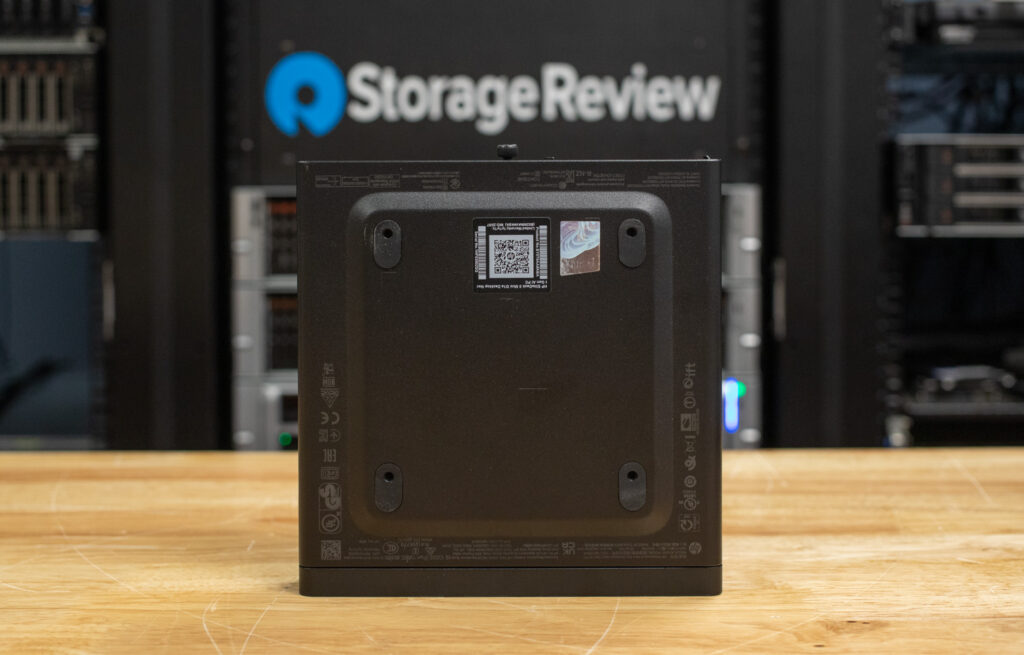
HP includes a standard VESA mounting pattern on the underside, making it easy to use standard mounting brackets.
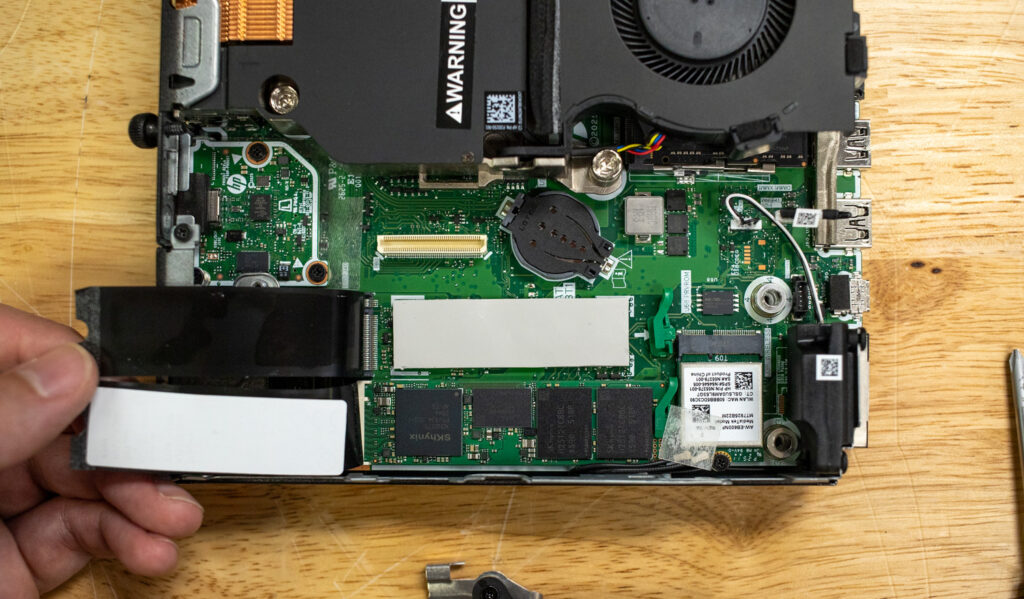
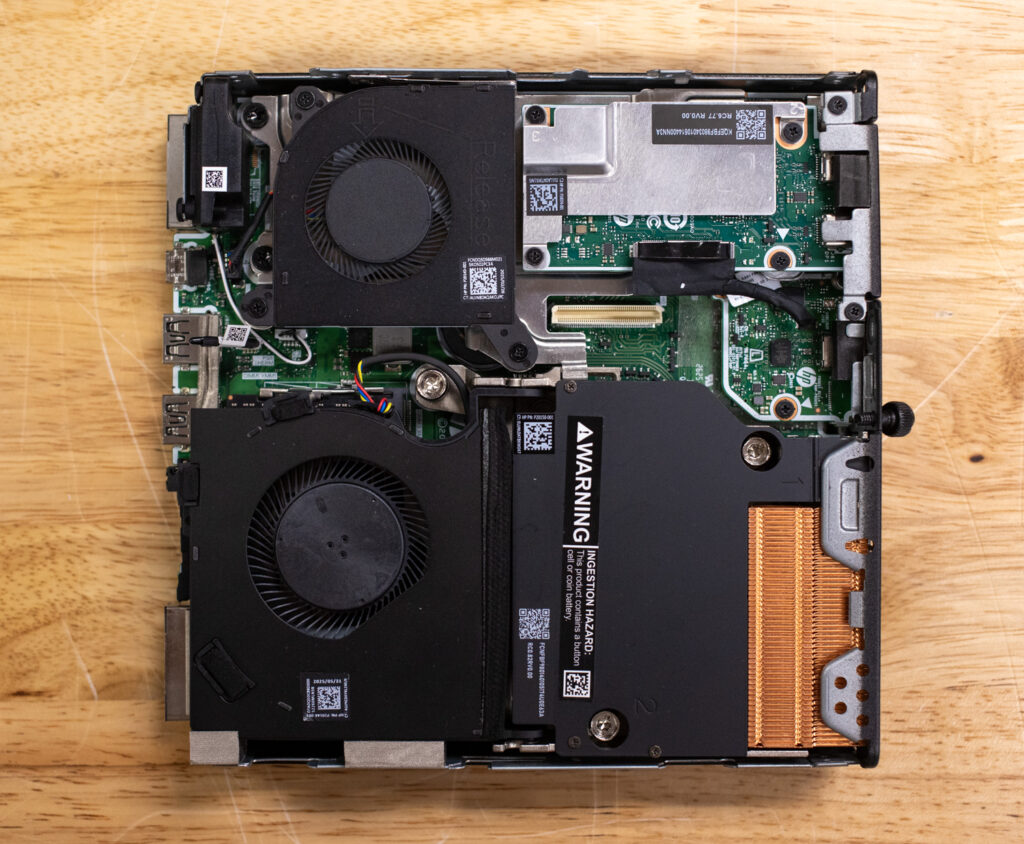
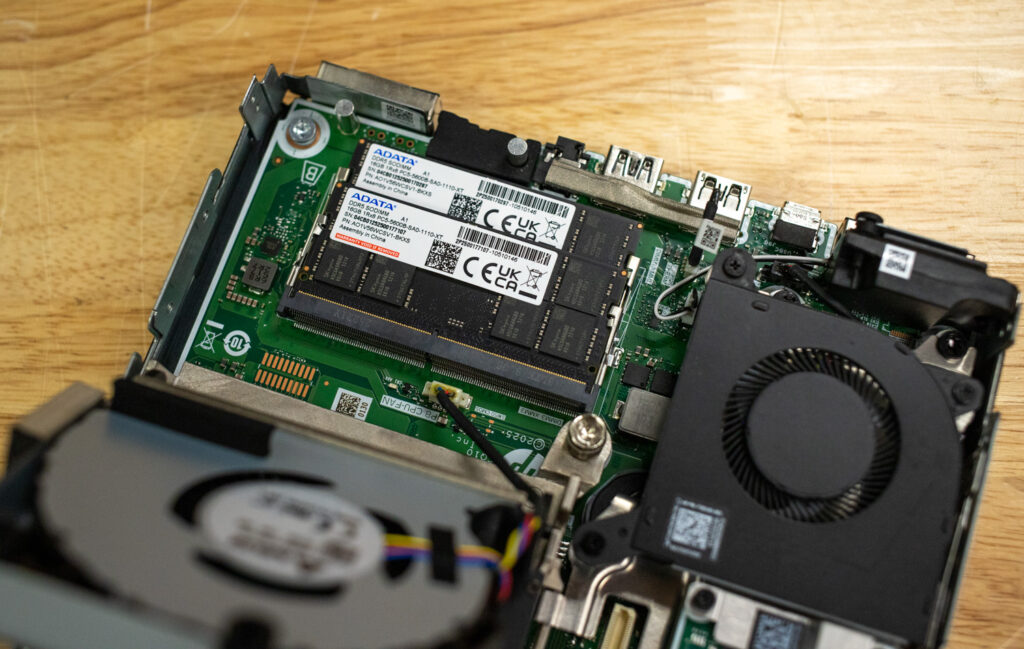
Once inside, it becomes clear how tightly HP has packed the chassis. The RAM sits beneath the fan assembly, which swings upward, so memory swaps don’t require a screwdriver. The SSDs require additional effort, as the display output card and its bracket must be removed before the slots can be accessed. This is where the limited upgrade options of this design become apparent.
Beyond RAM and storage, there isn’t much that can be replaced. While users could remove the small cooling fan, it’s unlikely that HP will offer it as a standalone part. The design is efficient and maximizes space, but accessing services is more difficult compared to systems that place key components directly on the underside of the motherboard.
The built-in speaker is fine for notifications, but it distorts severely on sharper Windows system sounds and isn’t something most users will want to rely on for calls. On the upside, the system stays quiet during everyday use and only becomes modestly audible during sustained storage or CPU tests, never reaching a distracting level.
HP EliteDesk 8 Mini G1a Performance
Specifications:
- CPU: AMD Ryzen 7 AI PRO 350
- Memory: 32GB DDR5-5600 (dual-channel)
- Storage: 1TB TLC NVMe SSD
- Flex IO Module: Thunderbolt 4 + HP Video Port Extender
- Power Adapter: 120W
- Operating System: Windows 11 Pro NG AI Premium
- AI Hardware: Integrated NPU within the Ryzen 7 AI PRO 350
Configurations are available at the HP website and start at $629.
UL Procyon AI Inference Benchmark
The Procyon AI Inference Benchmark delivers reliable and efficient performance testing by streamlining AI inference evaluation across diverse platforms. Developed in collaboration with leading AI hardware vendors, it minimizes complexity from variable models and system configurations to enable consistent, repeatable benchmarking. Optimized to measure CPU, GPU, or AI accelerators, it offers meaningful insights into how well different systems handle real-world AI tasks.
With a Ryzen AI 7 PRO 350 and Radeon 860M configuration, the EliteDesk’s AI inference results perform as expected. It finishes the lighter models quickly but slows down on heavier ones like YOLO and REAL-ESRGAN. The overall Computer Vision score of 103 indicates that this system is designed for modest AI tasks rather than high-throughput pipelines. Performance remains consistent across all models, even though it lags behind discrete-GPU systems.
| CPU Results (Average Time in ms) | HP EliteDesk 8 Mini g1a (AMD Ryzen AI 7 Pro 350) (Radeon 860M) | Lenovo ThinkStation P3 Ultra SFF Gen 2 (Intel Core Ultra 9 285) (NVIDIA RTX 4000 Ada) | Lenovo ThinkStation P3 Tower Gen 2 (Intel Core Ultra 9 285) (NVIDIA RTX 5000 Ada Generation) | Lenovo ThinkStation P3 Tiny Gen 2 (Intel Core Ultra 9 285) (NVIDIA RTX A1000) |
| AI Computer Vision Overall Score | 103 | 157 | 196 | 184 |
| MobileNet V3 | 1.11 ms | 0.99 ms | 0.94 ms | 0.98 ms |
| ResNet 50 | 11.97 ms | 8.52 ms | 6.83 ms | 7.47 ms |
| Inception V4 | 37.27 ms | 25.57 ms | 19.66 ms | 18.94 ms |
| DeepLab V3 | 58.75 ms | 31.42 ms | 24.89 ms | 24.97 ms |
| YOLO V3 | 93.94 ms | 58.88 ms | 43.43 ms | 44.46 ms |
| REAL-ESRGAN | 4,542.25 ms | 2,565.34 ms | 2,019.39 ms | 2,586.87 ms |
UL Procyon: AI Text Generation
The Procyon AI Text Generation Benchmark streamlines AI LLM performance testing by providing a concise and consistent evaluation method. It enables repeated testing across multiple LLM models while minimizing the complexity of large models and the number of variables. Developed in collaboration with leading AI hardware providers, it optimizes the use of local AI accelerators to deliver more reliable, efficient performance assessments. The results measured below were tested using TensorRT.
Text-generation performance results are pretty similar, with lower scores across Phi, Mistral, Llama2, and Llama3 due to the integrated GPU and lower-power NPU. The EliteDesk Mini g1a produces outputs more slowly, particularly in time-to-first-token and tokens-per-second. Despite that, it passes every test cleanly and delivers solid overall performance for a compact business desktop.
| UL Procyon: AI Text Generation | HP EliteDesk 8 Mini g1a (AMD Ryzen AI 7 Pro 350) (Radeon 860M) | Lenovo ThinkStation P3 Ultra SFF Gen 2 (Intel Core Ultra 9 285) (NVIDIA RTX 4000 Ada) | Lenovo ThinkStation P3 Tower Gen 2 (Intel Core Ultra 9 285) (NVIDIA RTX 5000 Ada Generation) | Lenovo ThinkStation P3 Tiny Gen 2 (Intel Core Ultra 9 285) (NVIDIA RTX A1000) |
| Phi Overall Score | 301 | 2,303 | 4,344 | 1,117 |
| Phi Output Time To First Token | 7.692 s | 0.395 s | 0.218 s | 0.808 s |
| Phi Output Tokens Per Second | 27.219 tokens/s | 81.784 tokens/s | 160.757 tokens/s | 39.379 tokens/s |
| Phi Overall Duration | 152.699 s | 35.869 s | 18.356 s | 27.734 s |
| Mistral Overall Score | 242 | 1,977 | 4,136 | 3,045 |
| Mistral Output Time To First Token | 13.678 s | 0.666 s | 0.314 s | 1.398 s |
| Mistral Output Tokens Per Second | 17.534 tokens/s | 57.102 tokens/s | 117.784 tokens/s | 27.734 tokens/s |
| Mistral Overall Duration | 249.621 s | 51.942 s | 25.142 s | 107.361 s |
| Llama3 Overall Score | 206 | 1,759 | 3,611 | 837 |
| Llama3 Output Time To First Token | 12.731 s | 0.628 s | 0.301 s | 1.412 s |
| Llama3 Output Tokens Per Second | 13.308 tokens/s | 47.884 tokens/s | 96.565 tokens/s | 24.323 tokens/s |
| Llama3 Overall Duration | 293.514 s | 61.189 s | 30.285 s | 121.980 s |
| Llama2 Overall Score | 234 | 1,770 | 3,942 | – |
| Llama2 Output Time To First Token | 21.500 s | 1.106 s | 0.502 s | – |
| Llama2 Output Tokens Per Second | 8.732 tokens/s | 25.617 tokens/s | 57.623 tokens/s | – |
| Llama2 Overall Duration | 461.126 s | 112.746 s | 50.269 s | – |
UL Procyon: AI Image Generation
The Procyon AI Image Generation Benchmark provides a consistent and accurate method for measuring AI inference performance across a range of hardware, from low-power NPUs to high-end GPUs. It includes three tests: Stable Diffusion XL (FP16) for high-end GPUs, Stable Diffusion 1.5 (FP16) for moderately powerful GPUs, and Stable Diffusion 1.5 (INT8) for low-power devices. The benchmark uses the optimal inference engine for each system, ensuring fair and comparable results.
Stable Diffusion 1.5 FP16 completes without issue, though the overall score of 169 and the long generation time mean Mini G1a is mainly intended as a light-duty image-generation device. FP16 rendering takes several minutes per test pass, and the system lacks INT8 and SDXL results due to hardware class. Nonetheless, the EliteDesk shows stable results throughout the complete image-generation workflow.
| UL Procyon: AI Image Generation | HP EliteDesk 8 Mini g1a (AMD Ryzen AI 7 Pro 350) (Radeon 860M) | Lenovo ThinkStation P3 Ultra SFF Gen 2 (Intel Core Ultra 9 285) (NVIDIA RTX 4000 Ada) | Lenovo ThinkStation P3 Tower Gen 2 (Intel Core Ultra 9 285) (NVIDIA RTX 5000 Ada Generation) | Lenovo ThinkStation P3 Tiny Gen 2 (Intel Core Ultra 9 285) (NVIDIA RTX A1000) |
| Stable Diffusion 1.5 (FP16) – Overall Score | 169 | 1,316 | 3,734 | 558 |
| Stable Diffusion 1.5 (FP16) – Overall Time | 590.630 s | 75.986 s | 26.779 s | 179.144 s |
| Stable Diffusion 1.5 (FP16) – Image Generation Speed | 36.914 | 4.749 s/image | 1.674 s/image | 11.196 s/image |
| Stable Diffusion 1.5 (INT8) – Overall Score | – | 17,263 | 45,881 | 6,793 |
| Stable Diffusion 1.5 (INT8) – Overall Time | – | 14.482 s | 5.449 s | 36.798 s |
| Stable Diffusion 1.5 (INT8) – Image Generation Speed | – | 1.810 s/image | 0.681 s/image | 4.600 s/image |
| Stable Diffusion XL (FP16) – Overall Score | – | 1,061 | 3,293 | – |
| Stable Diffusion XL (FP16) – Overall Time | – | 565.015 | 182.179 s | – |
| Stable Diffusion XL (FP16) – Image Generation Speed | – | 35.313 s/image | 11.386 s/image | – |
SPECworkstation 4
The SPECworkstation 4.0 benchmark is a comprehensive tool for evaluating all key aspects of workstation performance. It provides a real-world measure of CPU, graphics, accelerator, and disk performance, enabling professionals to make informed decisions about their hardware investments. The benchmark includes a dedicated set of tests focused on AI/ML workloads, including data science tasks and ONNX runtime-based inference tests, reflecting the growing importance of AI/ML in workstation environments. It encompasses seven industry verticals and four hardware subsystems, providing a detailed, relevant measure of today’s workstation performance.
SPECworkstation numbers remain toward the lower end of each category, as expected for an iGPU small-form-factor system. Scores around 1.0 in most verticals show that the EliteDesk is built for general productivity and light workstation tasks.
| SPECworkstation 4.0.0 (Higher is better) | HP EliteDesk 8 Mini g1a (AMD Ryzen AI 7 Pro 350) (Radeon 860M) | Lenovo ThinkStation P3 Ultra SFF Gen 2 (Intel Core Ultra 9 285) (NVIDIA RTX 4000 Ada) | Lenovo ThinkStation P3 Tower Gen 2 (Intel Core Ultra 9 285) (NVIDIA RTX 5000 Ada Generation) | Lenovo ThinkStation P3 Tiny Gen 2 (Intel Core Ultra 9 285) (NVIDIA RTX A1000) |
| Energy | 1.01 | 2.11 | 2.49 | 1.33 |
| Financial Services | 1.02 | 1.52 | 2.44 | 1.62 |
| Life Sciences | 1.02 | 2.51 | 2.84 | 1.80 |
| Media & Entertainment | 1.06 | 2.28 | 2.69 | 1.89 |
| Product Design | 0.98 | 2.28 | 2.46 | 1.77 |
| Productivity & Development | 0.64 | 1.29 | 1.50 | 1.29 |
LuxMark
LuxMark is a GPU benchmark that uses LuxRender, an open-source ray-tracing renderer, to evaluate a system’s performance with highly detailed 3D scenes. This benchmark is relevant for assessing the graphical rendering capabilities of servers and workstations, especially for visual effects and architectural visualization applications, where accurate light simulation is crucial.
LuxMark heavily favors stronger GPUs, so the EliteDesk’s Hallbench score of 1,461 and Food score of 706 land near the bottom of the chart. The scenes render successfully, but the times highlight the Radeon 860M’s limits in ray-traced workloads. Solid scores for its class, though.
| LuxMark (higher is better) | HP EliteDesk 8 Mini g1a (AMD Ryzen AI 7 Pro 350) (Radeon 860M) | Lenovo ThinkStation P3 Ultra SFF Gen 2 (Intel Core Ultra 9 285) (NVIDIA RTX 4000 Ada) | Lenovo ThinkStation P3 Tower Gen 2 (Intel Core Ultra 9 285) (NVIDIA RTX 5000 Ada Generation) | Lenovo ThinkStation P3 Tiny Gen 2 (Intel Core Ultra 9 285) (NVIDIA RTX A1000) |
| Hallbench | 1,461 | 15,054 | 26,792 | 7,423 |
| Food | 706 | 5,612 | 12,562 | 2,860 |
7-Zip Compression
The 7-Zip Compression Benchmark evaluates CPU performance during compression and decompression, measuring GIPS (Giga Instructions Per Second) and CPU usage. Higher GIPS and efficient CPU usage indicate superior performance.
Here, the EliteDesk posts solid CPU numbers, with total ratings around 90 GIPS during compression and decompression. CPU usage remains high and consistent across both workloads, showing good sustained performance for its size. The system trails the larger machines, but its results are strong for a compact office desktop with an iGPU.
| 7-Zip Compression Benchmark (Higher is Better) | HP EliteDesk 8 Mini g1a (AMD Ryzen AI 7 Pro 350) (Radeon 860M) | Lenovo ThinkStation P3 Ultra SFF Gen 2 (Intel Core Ultra 9 285) (NVIDIA RTX 4000 Ada) | Lenovo ThinkStation P3 Tower Gen 2 (Intel Core Ultra 9 285) (NVIDIA RTX 5000 Ada Generation) | Lenovo ThinkStation P3 Tiny Gen 2 (Intel Core Ultra 9 285) (NVIDIA RTX A1000) | |
| Compression | |||||
| Current CPU Usage | 1,501% | 2,129% | 1,899% | 2,030% | |
| Current Rating/Usage | 5.697 GIPS | 7.590 GIPS | 6.970 GIPS | 5.369 GIPS | |
| Current Rating | 85.524 GIPS | 161.558 GIPS | 132.461 GIPS | 109.008 GIPS | |
| Resulting CPU Usage | 1,518% | 2,116% | 1,894% | 2,007% | |
| Resulting Rating/Usage | 5.691 GIPS | 7.689 GIPS | 7.115 GIPS | 5,492 GIPS | |
| Resulting Rating | 86.365 GIPS | 162.405 GIPS | 134.748 GIPS | 110.189 GIPS | |
| Decompression | |||||
| Current CPU Usage | 1,401% | 2,263% | 2,191% | 2,243% | |
| Current Rating/Usage | 6.674 GIPS | 7.184 GIPS | 6.937 GIPS | 6.049 GIPS | |
| Current Rating | 93.511 GIPS | 162.532 GIPS | 152.009 GIPS | 135.698 GIPS | |
| Resulting CPU Usage | 1,409% | 2,243% | 1,979% | 2,232% | |
| Resulting Rating/Usage | 6.674 GIPS | 7.239 GIPS | 7,209 GIPS | 6.479 GIPS | |
| Resulting Rating | 94.100 GIPS | 162.405 GIPS | 142.655 GIPS | 144.454 GIPS | |
| Total Rating | |||||
| Total CPU Usage | 1,463% | 2,179% | 1,937% | 2,120% | |
| Total Rating/Usage | 6.184 GIPS | 7.464 GIPS | 7.162 GIPS | 5.985 GIPS | |
| Total Rating | 90.233 GIPS | 162.530 GIPS | 138.701 GIPS | 127.322 GIPS | |
Blackmagic RAW Speed Test
The Blackmagic RAW Speed Test is a performance benchmark that measures a system’s capabilities for video playback and editing with the Blackmagic RAW codec. It evaluates how well a system decodes and plays back high-resolution video files, reporting frame rates for CPU- and GPU-based processing.
With 58 fps on 8K CPU decoding and 34 fps on 8K OpenCL, the EliteDesk will perform as an entry-level system for high-resolution media work. It handles the tests well for lighter workloads but isn’t designed for real-time 8K projects.
| Blackmagic RAW Speed Test | HP EliteDesk 8 Mini g1a (AMD Ryzen AI 7 Pro 350) (Radeon 860M) | Lenovo ThinkStation P3 Ultra SFF Gen 2 (Intel Core Ultra 9 285)(NVIDIA RTX 4000 Ada) | Lenovo ThinkStation P3 Tower Gen 2 (Intel Core Ultra 9 285) (NVIDIA RTX 5000 Ada Generation) | Lenovo ThinkStation P3 Tiny Gen 2 (Intel Core Ultra 9 285) (NVIDIA RTX A1000) |
|---|---|---|---|---|
| 8K CPU | 58 | 114 | 125 | 86 |
| 8K OPENCL | 34 | 129 | 179 | 61 |
Blackmagic Disk Speed Test
The Blackmagic Disk Speed Test evaluates storage performance by measuring read and write speeds, providing insights into a system’s ability to handle data-intensive tasks, such as video editing and large file transfers.
The installed NVMe drive achieves about 4.9GB/s reads and 4.4GB/s writes, which should keep the system responsive during application launches and file transfers.
| Disk Speed Test (higher is better) | HP EliteDesk 8 Mini g1a (AMD Ryzen AI 7 Pro 350) (Radeon 860M) | Lenovo ThinkStation P3 Ultra SFF Gen 2 (Intel Core Ultra 9 285) (NVIDIA RTX 4000 Ada) | Lenovo ThinkStation P3 Tower Gen 2 (Intel Core Ultra 9 285) (NVIDIA RTX 5000 Ada Generation) | Lenovo ThinkStation P3 Tiny Gen 2 (Intel Core Ultra 9 285) (NVIDIA RTX A1000) |
| Read | 4,889.6 MB/s | 7,229.8 MB/s | 7304.2 MB/s | 6,742.0 MB/s |
| Write | 4,410.3 MB/s | 6,094.6 MB/s | 7,006.2 MB/s | 5,781.6 MB/s |
Blender 4.3
Blender is an open-source 3D modeling application. This benchmark was run using the Blender Benchmark utility. The score is measured in samples per minute, with higher values indicating better performance.
On CPU, the EliteDesk produces 98 samples/min in Monster and similar scaling across the other scenes, giving it solid small-form-factor performance. GPU results are much lower due to the iGPU, with Monster landing at 100 samples/min. Overall, excellent for its class and size.
| Blender CPU (Samples per minute; higher is better) | HP EliteDesk 8 Mini g1a (AMD Ryzen AI 7 Pro 350) (Radeon 860M) | Lenovo ThinkStation P3 Ultra SFF Gen 2 (Intel Core Ultra 9 285) (NVIDIA RTX 4000 Ada) | Lenovo ThinkStation P3 Tower Gen 2 (Intel Core Ultra 9 285) (NVIDIA RTX 5000 Ada Generation) | Lenovo ThinkStation P3 Tiny Gen 2 (Intel Core Ultra 9 285) (NVIDIA RTX A1000) |
| Monster | 98.09 | 202.9 | 163.7 | 179.31 |
| Junkshop | 69.21 | 133.4 | 106.8 | 110.79 |
| Classroom | 52.91 | 100.0 | 80.9 | 77.45 |
| Blender GPU (Samples per minute; higher is better) | HP EliteDesk 8 Mini g1a (AMD Ryzen AI 7 Pro 350) (Radeon 860M) | Lenovo ThinkStation P3 Ultra SFF Gen 2 (Intel Core Ultra 9 285) (NVIDIA RTX 4000 Ada) | Lenovo ThinkStation P3 Tower Gen 2 (Intel Core Ultra 9 285)(NVIDIA RTX 5000 Ada Generation) | Lenovo ThinkStation P3 Tiny Gen 2 (Intel Core Ultra 9 285) (NVIDIA RTX A1000) |
| Monster | 100.1 | 1,763.2 | 3,884.68 | 581.75 |
| Junkshop | 43.6 | 888.7 | 1,743.56 | 363.47 |
| Classroom | 47.4 | 906.0 | 1,876.89 | 323.37 |
y-cruncher
y-cruncher is a multithreaded and scalable program that can compute Pi and other mathematical constants to trillions of digits. Since its launch in 2009, it has become a popular benchmarking and stress-testing application for overclockers and hardware enthusiasts.
The EliteDesk completes the y-cruncher tests predictably, turning in 29.4 seconds at 1B digits and 204 seconds at 5B, as expected based on the specs. As a result, it’s fast enough for occasional heavy numeric workloads.
| Y-Cruncher (Total Computation Time) | HP EliteDesk 8 Mini g1a (AMD Ryzen AI 7 Pro 350) (Radeon 860M) | Lenovo ThinkStation P3 Ultra SFF Gen 2 (Intel Core Ultra 9 285) (NVIDIA RTX 4000 Ada) | Lenovo ThinkStation P3 Tower Gen 2 (Intel Core Ultra 9 285) (NVIDIA RTX 5000 Ada Generation) | Lenovo ThinkStation P3 Tiny Gen 2 (Intel Core Ultra 9 285) (NVIDIA RTX A1000) |
|---|---|---|---|---|
| 1 Billion | 29.418 s | 19.524 s | 22.112 s | 24.063 s |
| 2.5 Billion | 109.052 s | 55.207 s | 68.345 s | 67.223 s |
| 5 Billion | 204.316 s | 122.528 s | 146.977 s | 154.892 s |
| 10 Billion | – | 273.903 s | 340.904 s | – |
| 25 Billion | – | – | – | – |
| 50 Billion | – | – | – | – |
Geekbench 6
Geekbench 6 is a cross-platform benchmark that measures overall system performance.
The EliteDesk posts 2,824 in single-core and 13,012 in multi-core, which are expected from its Ryzen AI 7 PRO 350. In day-to-day use, its responsiveness and multitasking are mostly where they should be for a compact workstation-class mini PC. Moreover, the GPU’s 23,514 Opeust demonstrates the limits of an iGPU rather than any real performance issue.
| Geekbench 6 (higher is better) | HP EliteDesk 8 Mini g1a (AMD Ryzen AI 7 Pro 350) (Radeon 860M) | Lenovo ThinkStation P3 Ultra SFF Gen 2 (Intel Core Ultra 9 285) (NVIDIA RTX 4000 Ada) | Lenovo ThinkStation P3 Tower Gen 2 (Intel Core Ultra 9 285)(NVIDIA RTX 5000 Ada Generation) | Lenovo ThinkStation P3 Tiny Gen 2 (Intel Core Ultra 9 285) (NVIDIA RTX A1000) |
|---|---|---|---|---|
| CPU Single-Core | 2,824 | 3,155 | 3,175 | 3,194 |
| CPU Multi-Core | 13,012 | 20,334 | 21,033 | 17,572 |
| GPU OpenCL | 23,514 | 122,981 | 244,185 | 55,345 |
Cinebench 2024
Cinebench 2024 extends R23’s benchmark capabilities by adding GPU performance evaluation. It continues to test CPU performance but also includes tests that measure the GPU’s ability to handle rendering tasks.
The EliteDesk posts 817 in multi-core and 114 in single-core on Cinebench 2024, indicating it can handle lighter rendering or CPU-driven creative work, though it will lag larger desktops. We did not test for a GPU rendering score.
| Cinebench 2024 (higher is better) | HP EliteDesk 8 Mini g1a (AMD Ryzen AI 7 Pro 350) (Radeon 860M) | Lenovo ThinkStation P3 Ultra SFF Gen 2 (Intel Core Ultra 9 285) (NVIDIA RTX 4000 Ada) | Lenovo ThinkStation P3 Tower Gen 2 (Intel Core Ultra 9 285) (NVIDIA RTX 5000 Ada Generation) | Lenovo ThinkStation P3 Tiny Gen 2 (Intel Core Ultra 9 285) (NVIDIA RTX A1000) |
|---|---|---|---|---|
| Multi-Core | 817 | 1,727 | 1,851 | 1,511 |
| Single-Core | 114 | 139 | 142 | 138 |
| GPU | — | 12,222 | 23,746 | 4,399 |
Conclusion
The EliteDesk 8 Mini G1a effectively leverages its compact size, allowing organizations to place it under a desk, behind a display, or in any space-constrained area. HP’s CPU, memory, and storage options allow teams to customize the system for everything from basic office tasks to more demanding multitasking, and the external I/O layout provides enough flexibility for a wide range of desk setups.
Serviceability is possible, but the internal layout isn’t as accessible as some competing designs. Accessing the memory is easier than it looks (e.g., the fan assembly lifts out of the way), but storage upgrades require removing the rear output card and bracket to expose the M.2 slots. Outside of RAM and SSDs, there’s little else an IT shop can realistically replace, and the small cooling fan is unlikely to be available as a standalone spare. Day-to-day acoustics are good, with the system staying quiet even under moderate load, though the single onboard speaker is thin and tends to peak on basic system sounds.
Overall performance is solid for a compact workstation, with the Ryzen AI processors offering enough CPU and integrated graphics power to support multi-display setups and the AI features in current Windows builds. The integrated Radeon 860M graphics keep pace with everyday office tasks and multi-monitor setups. However, they still sit well behind discrete GPU workstations in rendering, AI inference, and GPU-accelerated benchmarks. Storage performance is good, making the system feel responsive during application launches and large file transfers.
Based on its size, configuration options, and overall versatility, the EliteDesk 8 Mini G1a is a small-form-factor PC that can fit into a wide range of work environments without taking up much space.
Leaderboard: The HP EliteDesk 8 Mini G1a is part of the tested field on our Best Desktops for Local AI and Best Mini PCs leaderboards.


 Amazon