

The Lenovo ThinkPad P1 Gen 9 is Lenovo’s thin flagship mobile workstation. This 16-inch machine carries the premium features the rest of the ThinkPad P line trims to meet weight and price targets. It’s an aluminum chassis that measures 9.87mm at the front edge and weighs under 1.8kg, a 90Wh battery with 140W charging, two Thunderbolt 5 ports, dual M.2 slots with a Gen5 x4 bay, and a choice of an 800-nit 3840×2400 IPS panel or a 120Hz Tandem OLED.
Our review unit pairs the Core Ultra 9 386H with 64GB of LPDDR5X-8533 on an LPCAMM2 module, a 2TB SK hynix Gen5 SSD, the RTX PRO 2000 Blackwell, and the 4K IPS display. Lenovo.com lists the same build with the OLED panel at $7,719 as of October 24, 2026, and sold it for $5,399 two days earlier; Lenovo discounts the P line often enough that the sale price is the better basis for judging it, and we use it in the conclusion.
The site does not list the 4K IPS panel with this processor and GPU, and the closest IPS build, the Core Ultra 7 356H with the RTX PRO 2000, 32GB, and 1TB, is $5,099 after selling for $3,449 on October 22, with build-your-own configurations opening at $3,734 with 16GB and 512GB.
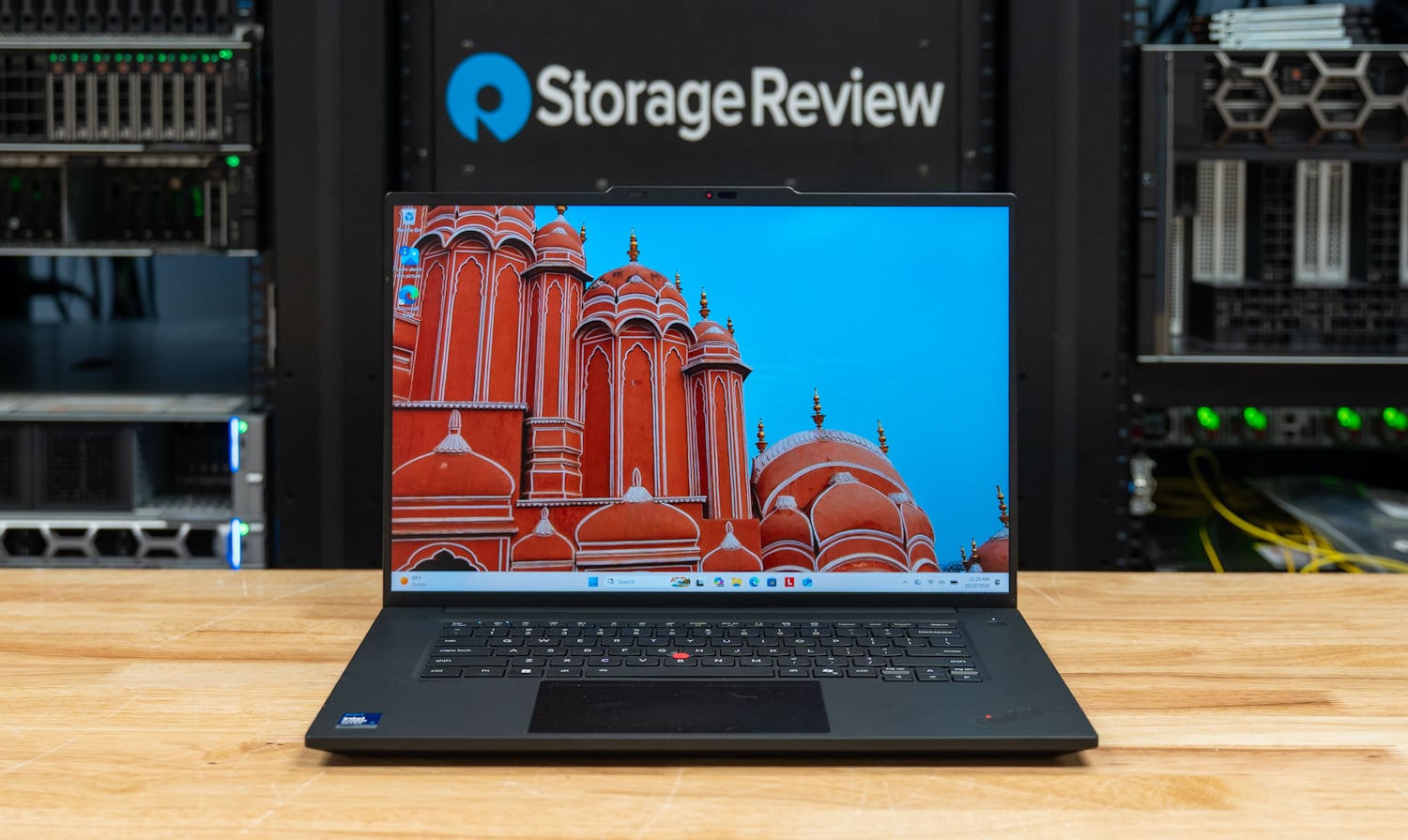
Lenovo targets creative professionals, engineers, and AI developers who want ISV-certified graphics without a P16-class chassis. The Gen 9 is a silicon update in the same body as Gen 8: Intel’s Core Ultra Series 3 with a 50 TOPS NPU replaces Series 2, LPCAMM2 memory climbs from 64GB to 96GB, and the GPU ceiling stays at the RTX PRO 2000 Blackwell with 8GB of GDDR7.
We tested it with the same scripted suite used for the Dell Pro Precision 9 T2 and the RTX Spark notebooks. We then compared its results against the Dell Pro Max 14 Premium, equipped with the previous-generation Core Ultra 9 285H and the same RTX PRO 2000; the Dell Pro Precision 5 16S, with the Core Ultra X9 388H and no discrete GPU; and the HP OmniBook Ultra 16, powered by NVIDIA’s RTX Spark N1X.
Panther Lake earns its place on multi-threaded work. The P1 scored 5,083 in Cinebench 2026 multi-core against 4,292 on the 285H, built LLVM in 309.1 seconds against 393.9, and read 81,712MB/s in STREAM Triad against 62,255, while its single-core Cinebench score of 519.9 sits 7 percent ahead and Speedometer is a wash at 40.6 against 41.5. On the GPU, the P1’s 50W RTX PRO 2000 ran 19 to 27 percent faster than the Dell’s 47W card on MLPerf Client token rates, and the 8GB of GDDR7 kept our 20B-and-up model tiers, and every serving tier above 3B, out of reach.
Key Takeaways
- Multi-threaded CPU work moves a generation ahead: 5,083 in Cinebench 2026 multi-core, 18 percent ahead of the Core Ultra 9 285H with the same GPU, 109.2 GIPS in 7-Zip against 93.4, Blender up 18 to 23 percent across three scenes, and an LLVM build that takes 22 percent less time at 309.1 seconds.
- Single-thread and browser work did not move: Cinebench single-core is 519.9 against 486.0, Speedometer 40.6 against 41.5, and single-threaded Python is within 2 to 5 percent of the 285H in either direction; the 386H gives up 3 percent in single-core to the 5.1GHz Core Ultra X9 388H in the Dell Pro Precision 5 16S.
- The memory system is the quiet upgrade: STREAM Triad reads 81,712MB/s from LPDDR5X-8533 against 62,255 on the 285H, memory latency drops from 173.1 to 116.1 ns, and DGEMM climbs from 391 to 519 GFLOPS.
- 8GB of GDDR7 sets the AI ceiling: MLPerf Client generates Llama 3.1 8B at 64.8 tokens per second and Phi-4-mini at 111.9, ahead of both the Dell’s 47W RTX PRO 2000 and the RTX Spark N1X on the small models, but the 20B and larger tiers in our model-load and coding-agent tests, and the serving tiers above 3B, did not qualify; the 128GB N1X notebook and the 64GB Arc Pro B390 Dell ran every model-load and coding-agent tier.
- The price makes the market confusing: At $7,719 list, the OLED version of our build costs more than the 128GB HP OmniBook Ultra 16 at $6,229.99; at the $5,399 sale price Lenovo ran on October 22, it falls between that machine and the 64GB OmniBook at $4,999.99. The 128GB unit ran every local AI tier the P1 could not, and Ryzen AI Max unified-memory workstations land in the same bracket. The P1’s case is ISV certification, Thunderbolt 5, and the fastest small-model GPU in the group, not local AI capacity.
- Cool enough to hold its score: the 30-minute Cinebench loop settled at 4,811, 0.983 of its first pass at a 3,505MHz mean clock, with the CPU pinned at 94.1C; the 2TB PCB01 reads 10,012MB/s sequentially and peaks at 756.5K IOPS on 4K random reads.
Where the P1 Gen 9 Sits
Lenovo announced the P1 Gen 9 in March alongside the ThinkPad P14s Gen 7 and the P16s Gen 5, with June availability, and calls it the most capable ThinkPad it has built, the thin flagship of the P series. The P16s Gen 5 offers the same Core Ultra Series 3 processors, the same 96GB LPCAMM2 ceiling, and the same RTX PRO 2000 option, so the GPU is no longer what separates the two; the P1 earns its premium with the chassis and what Lenovo fits into it.
Against the P16s, it carries a 90Wh battery in place of 60Wh, a 140W adapter in place of 100W, two Thunderbolt 5 ports and a Thunderbolt 4 in place of two Thunderbolt 4, dual M.2 slots in place of one, an SD Express 7.0 reader, optional 5G, an all-aluminum shell, and the two premium panels, all at 1.77kg against the P16s at 1.79kg.
Above it, the ThinkPad P16 Gen 3 remains the full-power 16-inch with HX silicon and up to the RTX PRO 5000, and the ThinkPad P16v Gen 3 is the value 16 with the 285H and the same RTX PRO 2000 at 2.1kg; neither has moved to Series 3 yet.
The P1’s top GPU is the RTX PRO 2000, with the RTX PRO 1000 below it, unchanged from Gen 8, and the discrete GPU decides the processor: Lenovo does not pair the dGPU with the Arc Pro B390 integrated graphics, so RTX PRO 2000 configurations ship with the Core Ultra 7 356H or Core Ultra 9 386H, which offer the four-Xe-core integrated GPU and top out at 4.9GHz, while the Core Ultra X7 368H and X9 388H with the 12-Xe-core B390 and 5.1GHz are integrated-only builds.
That is why the Dell Pro Precision 5 16S with the X9 388H and B390 is in this comparison: it is the other way to configure a Panther Lake workstation, and together they show what the RTX PRO 2000 buys and what the faster CPU gives back.
Generation over generation, the Gen 9 is the Gen 8 chassis with new silicon. The footprint is 354.4 x 241.2mm vs 354.3 x 241.0; the port set, three display options, and two GPU options are unchanged, and the weight drops from 1.84 to 1.77kg. The change is from Series 2 Arrow Lake-H with a 13 TOPS NPU and LPDDR5X-7467 up to 64GB to Series 3 Panther Lake with a 50 TOPS NPU and LPCAMM2 up to 96GB. Lenovo lists the memory at 8533 MT/s; our unit uses a 9600-rated module running at 8533.
Bygg och design
The P1 Gen 9 is an aluminum clamshell measuring 354.4 x 241.2mm, with 9.87mm at the front edge, 15.8mm at the rear, and a 20.6mm maximum at the feet; Lenovo lists it at 1.77kg. The lid and base are both aluminum; Lenovo reports the top cover is 75 percent recycled aluminum and the bottom 55 percent, and the machine carries MIL-STD-810H testing like the rest of the P line. Our unit is the black finish, which is the only color.

The display is a 16-inch 3840×2400 IPS panel with 800 nits, a 16:10 anti-glare screen, 100 percent DCI-P3 coverage, DisplayHDR 400, Dolby Vision, and X-Rite factory calibration at 60Hz. Lenovo also offers a 1920×1200 500-nit IPS panel on the entry builds and a 3200×2000 Tandem OLED touch panel with pen support, 600 nits SDR and 1,500 nits HDR peak, and a 40 to 120Hz variable refresh rate. The IPS panel on our unit is what most buyers in this segment choose for color work, and at this resolution, Windows defaults to 250 percent scaling.

The keyboard is a six-row ThinkPad layout with a Copilot key, backlighting, and spill resistance, with the TrackPoint and a glass haptic touchpad (85 x 135mm) below it. The power button carries the match-on-chip fingerprint reader, and the 5MP camera above the display pairs an IR sensor for Windows Hello with a physical privacy shutter and computer-vision presence detection. The Wi-Fi model has a pair of 2W speakers with Dolby Atmos; the WWAN model adds a second pair of 1W drivers.

Ports run along both sides, with two Thunderbolt 5 ports with DisplayPort 2.1 and 140W power input, an HDMI 2.1 port, and an audio jack on the left. The right side carries the Thunderbolt 4 port, which Lenovo builds as a replaceable module, the 10Gbps USB-A port with always-on charging, the SD Express 7.0 reader, the Kensington Nano slot, and the Nano-SIM tray on 5G models. There is no onboard Ethernet; Lenovo bundles a USB-C to 2.5GbE adapter in some configurations and lists it as an option in others. The three USB-C ports can drive three external displays at up to 5120×3200 each, or a single 8K60 panel.


The bottom cover comes off for service and carries tamper detection in the BIOS. The LPCAMM2 memory module is customer-replaceable up to 96GB, the two M.2 2280 slots are one Gen5 x4 and one Gen4 x4 with RAID 0 and 1 support, and the 90Wh battery is customer-replaceable with rapid charge to 80 percent in an hour from the 140W USB-C GaN adapter. The 5G module occupies the Gen4 slot on WWAN builds, so a two-drive configuration and 5G are exclusive.

Lenovo ThinkPad P1 Gen 9-specifikationer
| Specifikation | Lenovo ThinkPad P1 Gen 9 (21UE000XUS as tested) |
|---|---|
| plattform | |
| Processorn | Intel Core Ultra 9 386H (Series 3), 16 cores / 16 threads (4P + 8E + 4LPE), P-core 2.1 to 4.9GHz, 18MB Intel Smart Cache, Intel vPro Enterprise Options: Core Ultra 7 356H, Core Ultra 7 366H, Core Ultra X7 368H, Core Ultra X9 388H (X-series with Arc Pro B390, integrated graphics only) |
| NPU | Intel NPU, up to 50 TOPS |
| Minne | 64GB LPDDR5X-8533 on one LPCAMM2 module (dual-channel), customer replaceable; 16GB, 32GB, 64GB, or 96GB |
| Grafiken | NVIDIA RTX PRO 2000 Blackwell Generation Laptop GPU, 8GB GDDR7, 50W TGP as configured Options: RTX PRO 1000 Blackwell 8GB; Intel Arc Pro B390 integrated (X-series CPUs) |
| lagring | 2TB SK hynix PCB01 (HFS002TFM9X179N), M.2 2280 PCIe 5.0 x4, Opal 2.0 Slots: one M.2 2280 PCIe 5.0 x4, one M.2 2280 PCIe 4.0 x4; up to 8TB (2 x 4TB); RAID 0/1 |
| Skärmar | |
| Panel as tested | 16-inch WQUXGA (3840×2400) IPS, 800 nits, 100% DCI-P3, 60Hz, 1500:1, anti-glare, DisplayHDR 400, Dolby Vision, X-Rite factory calibration |
| Panel options | 16-inch WUXGA (1920×1200) IPS, 500 nits, 100% sRGB, 60Hz 16-inch 3.2K (3200×2000) Tandem OLED touch, 600 nits SDR / 1,500 nits HDR, 100% DCI-P3, 40 to 120Hz VRR, pen support |
| Anslutningar | |
| Hamnar | 2 x Thunderbolt 5 (USB PD 3.1, DisplayPort 2.1, 140W in / 15W out) 1 x Thunderbolt 4 (modular) 1 x USB-A 10Gbps, always on 1 x HDMI 2.1 (8K60) 1 x SD Express 7.0 1 x 3.5mm headphone / microphone Kensington Nano slot |
| trådlös | Intel Wi-Fi 7 BE211 2×2 with Bluetooth 5.4 (6.0 hardware ready), vPro Optional Snapdragon X61 5G sub-6 with eSIM (uses the Gen4 M.2 slot); optional NFC |
| ethernet | None onboard; Lenovo USB-C to 2.5GbE adapter |
| Camera and audio | 5MP RGB + IR with privacy shutter and presence detection; dual far-field microphones, Dolby Voice; 2 x 2W speakers, Dolby Atmos (quad speakers on WWAN models) |
| Mått | |
| Batteri och ström | 90Wh, customer replaceable, Rapid Charge to 80% in one hour; 140W USB-C GaN adapter, PD 3.1 |
| Mått | 354.4 x 241.2 x 9.87 / 15.8mm (front / rear), 20.6mm maximum |
| Vikt | From 1.77kg (3.90 lbs) |
| Säkerhet | Discrete TPM 2.0, match-on-chip fingerprint reader in the power button, self-healing BIOS, bottom cover tamper detection, IR camera for Windows Hello |
| Specifikationer | MIL-STD-810H; ISV certification for Altair, AVID, Autodesk, ANSYS, Barco, Bentley, Dassault, Esri, Nemetschek, PTC, Siemens; EPEAT Gold, ENERGY STAR 9.0, TCO 10 |
| Operativsystem | Windows 11 Pro (tested); Windows 11 Home, Ubuntu, Fedora, Red Hat Enterprise Linux 10.2 certified |
| Pris | $7,719 on lenovo.com for the matching configuration with the Tandem OLED panel (21UE0014US) as of October 24, 2026, $5,399 on sale earlier the same week; from $3,734 for the build-your-own Core Ultra 7 356H with the RTX PRO 2000, 16GB, 512GB, and the WUXGA panel |
Testuppsättning och metodik
Our review unit pairs the Core Ultra 9 386H with the RTX PRO 2000 Blackwell, 64GB of LPDDR5X-8533 memory, and a 2TB Gen5 SSD running Windows 11 Pro 25H2. We ran the benchmarks while plugged in, with Windows set to Best performance and Lenovo’s Ultra Performance mode enabled. Battery life will follow in a later update.
Results come from full and Peak-profile runs of sr-client, our scripted client benchmark suite. We used version 1.3 on the P1 and Dell Pro Max 14 and version 1.2 on the Pro Precision 5 16S and OmniBook. Version 1.3 is a maintenance release that corrects run conditions without changing any tests. Each system ran its factory Windows image with the OEM’s drivers and utilities, and the P1 ran NVIDIA driver 597.16.
The suite applies the same settings everywhere: Windows power mode at Best performance, display at 50 percent brightness, all sleep and display timers off, Windows Firewall and UAC prompts off, and VBS and Memory Integrity left on as shipped. Each result is the median of repeated passes, and the suite reruns a test if its spread exceeds 2 percent before accepting it.
The Dell Pro Max 14 Premium is the previous Intel generation with the same RTX PRO 2000, so the two together isolate the CPU platform; the Dell runs its card at 47W against Lenovo’s 50W, which is the only hardware difference on the GPU side. The Dell Pro Precision 5 16S is the same Panther Lake generation in a 16-inch workstation with the Core Ultra X9 388H and the Arc Pro B390 integrated graphics and no discrete GPU, and the HP OmniBook Ultra 16 is NVIDIA’s RTX Spark N1X with 128GB of unified memory, the system that currently leads our local AI tests among notebooks.
| konfiguration | CPU | Minne | GPU | Startdisk | OS och strömläge |
|---|---|---|---|---|---|
| Lenovo ThinkPad P1 Gen 9 (21UE000XUS) | Intel Core Ultra 9 386H, 16C / 16T (4P + 8E + 4LPE) | 64GB LPDDR5X-8533 LPCAMM2 | NVIDIA RTX PRO 2000 Blackwell Laptop GPU, 8GB GDDR7, 50W | SK hynix PCB01 2TB (HFS002TFM9X179N), Gen5 x4 | Windows 11 Pro 25H2 (x64), Lenovo Ultra Performance, Best performance |
| Dell Pro Max 14 Premium (MA14250) | Intel Core Ultra 9 285H, 16C / 16T (6P + 8E + 2LPE) | 64 GB LPDDR5X-8400 | NVIDIA RTX PRO 2000 Blackwell Laptop GPU, 8GB GDDR7, 47W | SK hynix PC811 2TB | Windows 11 Pro 25H2 (x64), Dell Optimizer Ultra Performance |
| Dell Pro Precision 5 16S (PW516260) | Intel Core Ultra X9 388H, 16C / 16T (4P + 8E + 4LPE) | 64GB LPDDR5X-8533 LPCAMM2 | Intel Arc Pro B390 (integrated, 12 Xe cores) | SK hynix PCB01 1TB, Gen5 x4 | Windows 11 Pro 25H2 (x64), Dell Optimizer Ultra Performance |
| HP OmniBook Ultra 16 (16-bk0xxx) | NVIDIA RTX Spark N1X, 20C / 20T (Arm) | 128GB LPDDR5X-9400 (64/64 split) | 6 144-kärnig Blackwell RTX (integrerad, 62.5 GB användbar) | Sandisk PC SN8050S 2TB, Gen5 x4 | Windows 11 Pro 26H1 (Arm64), HP-prestanda |
Two labels recur in the tables: N/A means a test does not apply to the hardware, such as the Cinebench SMT single-core test on chips without SMT, and Not run means a test did not execute, either because the hardware does not qualify (our model-load, coding-agent, and larger serving and image tiers need at least 16GB of GPU-usable memory, and both RTX PRO 2000 machines measure 7.7GB) or, for the NVENC encode on the two RTX PRO 2000 systems, because the driver refused to start it. A handful of fio cells kept a spread above 2 percent after a rerun and are reported as measured.
The P1 exposed CPU temperatures to the suite, and neither Dell did, so the thermal section reports the P1 and the OmniBook with mean clocks for all four. The P1’s main run was completed with Smart App Control on, and we reran its GROMACS and LLM serving tests with it off after it blocked those two binaries; the comparison systems ran with it off.
Lokal AI-prestanda
The RTX PRO 2000’s 8GB of GDDR7 is the main factor in this section. On the small models that fit, the P1 is the fastest system in the group, ahead of the same GPU at 47W in the Dell and ahead of the RTX Spark N1X. On anything larger, the 128GB N1X notebook and the Arc Pro B390 Dell, which can hand its integrated GPU most of 64GB of system memory, run tiers the P1 cannot start. Buyers who want a mobile workstation for local models above about 7B parameters are shopping in a different part of the market than this machine.
MLPerf-klient v2.0
MLPerf Client runs Llama 3.1 8B and Phi-4-mini through five prompt categories and reports time to first token and the token rate after it as a geometric mean across the categories. The engine is llama.cpp on CUDA on the three NVIDIA GPUs and Intel’s native OpenVINO path on the Arc Pro B390, so the Dell Pro Precision 5 16S column is a different runtime on different silicon and reads as what that configuration delivers, not a like-for-like engine comparison. The agentic scenarios run Llama 3.1 8B as a data analyst agent and a software engineering agent that call tools over multiple turns.


| MLPerf-klient v2.0 | Lenovo ThinkPad P1 Gen 9 (386H, RTX PRO 2000) | Dell Pro Max 14 Premium (285H, RTX PRO 2000) | Dell Pro Precision 5 16S (X9 388H, Arc Pro B390) | HP OmniBook Ultra 16 (RTX Spark N1X) |
|---|---|---|---|---|
| Llama 3.1 8B, tid till första token, geomean (s, lägre desto bättre) | 0.345 | 0.441 | 0.214 | 0.274 |
| Llama 3.1 8B, tokenhastighet, geomean (tok/s) | 64.8 | 54.7 | 26.9 | 56.5 |
| Phi-4-mini, tid till första token, geomean (s, lägre desto bättre) | 0.161 | 0.214 | 0.181 | 0.130 |
| Phi-4-mini, tokenhastighet, geomean (tok/s) | 111.9 | 88.0 | 41.4 | 96.8 |
| Dataanalytiker, heltäckande (s, lägre desto bättre) | 49.7 | 61.0 | 84.7 | 53.0 |
| Dataanalytikeragent, tokenhastighet (tok/s) | 58.0 | 45.9 | 25.6 | 48.5 |
| SWE-agent, heltäckande (s, lägre desto bättre) | 43.4 | 52.7 | 65.6 | 45.3 |
| SWE-agent, tokenhastighet (tok/s) | 54.0 | 42.5 | 25.0 | 46.6 |
| Engine and device | llama.cpp, CUDA, NVIDIA RTX PRO 2000 | llama.cpp, CUDA, NVIDIA RTX PRO 2000 | OpenVINO, Intel Arc Pro B390 GPU | llama.cpp, CUDA, NVIDIA RTX Spark N1X |
The P1 generated Llama 3.1 8B at 64.8 tokens per second and Phi-4-mini at 111.9, compared with 54.7 and 88.0 on the Dell’s 47W RTX PRO 2000, leading to 19 and 27 percent higher token rates and 22 to 25 percent less time to first token.
The 3W of TGP is part of that, and the rest is the chassis: the Dell is a 14-inch machine cooling the same card, with the same class of CPU in less volume, and the suite couldn’t read either GPU’s clock or temperature, so we can’t say how much of the gap is thermal. The N1X in the OmniBook sits between the two RTX PRO 2000 systems on token rate, at 56.5 and 96.8, with the fastest time to first token of the NVIDIA group.
The Arc Pro B390 in the Dell Pro Precision 5 16S generated at 26.9 and 41.4 tokens per second through OpenVINO, well under half the P1’s rate, which is the cost of the integrated-only configuration on the small models that both can run. Its time to first token on Llama, 0.214 seconds, is the best in the table, so the prompt side of the OpenVINO path is competitive even where decode is not.
The agentic runs track the token rates: the P1 finished the data analyst agent in 49.7 seconds and the SWE agent in 43.4, against 61.0 and 52.7 on the Dell Pro Max 14 and 53.0 and 45.3 on the OmniBook, with tool phases within about two seconds of each other across the four.
Model Loading and the Coding Agent
Our model-load and coding-agent tests start at gpt-oss:20b, a 12.8GB download that needs about 16GB of GPU-usable memory with its context, and the suite measures each system’s GPU-usable memory before it decides which tiers to run. The RTX PRO 2000 reports 7.7GB, so neither the P1 nor the Dell Pro Max 14 qualified for any tier, and both show as Not run below. The two comparison systems that did run them are here for scale: the Arc Pro B390 can address most of the Dell’s 64GB of system memory, and the N1X addresses 62.5GB of the OmniBook’s 128GB.
| Model load and coding agent | Lenovo ThinkPad P1 Gen 9 (386H, RTX PRO 2000) | Dell Pro Max 14 Premium (285H, RTX PRO 2000) | Dell Pro Precision 5 16S (X9 388H, Arc Pro B390) | HP OmniBook Ultra 16 (RTX Spark N1X) |
|---|---|---|---|---|
| Model load to first token (s, lower is better) | ||||
| gpt-oss:20b, 12.8GB, cold | Inte kört | Inte kört | 5.98 | 6.23 |
| gpt-oss:20b, warm | Inte kört | Inte kört | 4.14 | 3.59 |
| Qwen3.6-35B-A3B, 21.1GB, cold | Inte kört | Inte kört | 9.41 | 9.04 |
| Qwen3.6-35B-A3B, warm | Inte kört | Inte kört | 6.60 | 4.23 |
| Qwen3.6-35B-A3B after swapping models | Inte kört | Inte kört | 13.38 | 4.77 |
| Crush-kodningsmedel | ||||
| gpt-oss:20b, 64K context, wall time (s, lower is better) | Inte kört | Inte kört | 584.2 | 115.3 |
| gpt-oss:20b, 64K context, generation rate (tok/s) | Inte kört | Inte kört | 17.9 | 58.0 |
| Qwen3.6-35B-A3B, 64K context, wall time (s, lower is better) | Inte kört | Inte kört | 351.7 | 72.0 |
| Qwen3.6-35B-A3B, 64K context, generation rate (tok/s) | Inte kört | Inte kört | 38.9 | 89.5 |
| Agent beside Speedometer, agent generation rate (tok/s) | Inte kört | Inte kört | 17.9 | 55.8 |
| Agent beside Speedometer, Speedometer slowdown (x) | Inte kört | Inte kört | 1.60 | 1.73 |
The OmniBook ran the gpt-oss:20b coding task in 115.3 seconds at 58.0 tokens per second, and the Dell Pro Precision 5 16S took 584.2 seconds at 17.9, which is the range a buyer gives up by choosing an 8GB discrete GPU over a large unified pool. The P1’s answer to that workload is the cloud, or a smaller model: the 3B serving tier below is the largest our suite could fit on it, and MLPerf’s 8B models at Q4_0 run because MLPerf sizes its context to the card.
Retrieval-Augmented Generation
The RAG test embeds 20,963 SQuAD passages with nomic-embed-text through Ollama, retrieves the top five for 2,000 questions, and answers them with Phi-4-mini at a 4,096-token context, reporting ingest throughput, retrieval latency and recall, and answer quality and speed. The 3.8B answer model fits within every GPU here, so this is the one local AI test the whole group runs end to end.

| RAG (Ollama 0.40.3) | Lenovo ThinkPad P1 Gen 9 (386H, RTX PRO 2000) | Dell Pro Max 14 Premium (285H, RTX PRO 2000) | Dell Pro Precision 5 16S (X9 388H, Arc Pro B390) | HP OmniBook Ultra 16 (RTX Spark N1X) |
|---|---|---|---|---|
| Inta | ||||
| Passages per second | 165.1 | 151.6 | 80.2 | 119.5 |
| Inbäddningshastighet (tok/s) | 26,740 | 24,554 | 12,992 | 19,352 |
| Ingest wall time (s, lower is better) | 138.8 | 152.2 | 271.7 | 187.0 |
| hämta | ||||
| Återkallelse@5 (%) | 82.8 | 82.8 | 82.7 | 82.8 |
| Query time p50 (ms, lower is better) | 19.33 | 22.13 | 22.20 | 23.33 |
| Query time p95 (ms, lower is better) | 22.10 | 25.59 | 23.91 | 26.12 |
| Answer (Phi-4-mini, ctx 4096) | ||||
| Exact match (%) | 63.25 | 63.25 | 63.00 | 62.75 |
| F1 (%) | 74.4 | 74.4 | 74.2 | 74.0 |
| Time to first token p50 (s, lower is better) | 0.214 | 0.261 | 0.855 | 0.155 |
| Prompt processing (tok/s) | 4,953 | 4,011 | 2,151 | 7,142 |
| Genereringshastighet (tok/s) | 103.5 | 92.6 | 48.3 | 104.4 |
| Question to answer p50 (s, lower is better) | 0.287 | 0.342 | 0.997 | 0.227 |
The P1 embedded 165.1 passages per second and finished ingest in 138.8 seconds, the fastest in the group, ahead of the Dell Pro Max 14 at 151.6 and the OmniBook at 119.5; the Arc Pro B390 took 271.7 seconds. Answer quality is identical across the four, at 63.25 percent exact match and 74.4 F1 within a few tenths, because the model and the retrieved passages are the same; what differs is speed.
The P1 answered a question in 0.287 seconds at the median, with 4,953 tokens per second of prompt processing and 103.5 tokens per second of generation, against 0.342 seconds on the Dell Pro Max 14 and 0.227 on the OmniBook, whose prompt processing at 7,142 tokens per second gives it the fastest answers in the group.
LLM Servering
The serving test runs llama-server with 4,096-token prompts and 1,024-token outputs, sweeping concurrency from one request up to the most the GPU can hold, and reports output throughput, per-user throughput, time to first token, and time per output token.
It debuted with our Dell Pro Precision 9 T2 review, after the OmniBook and the Pro Precision 5 16S were tested, so only the two RTX PRO 2000 systems in this group have run it, and on 8GB only the smallest model in the sweep qualified: Ministral 3 3B Reasoning at Q8_0, with a 2.13GB KV cache and four slots. The 8B, 27B, and 120B tiers show as Not run on both.

| llama-server, Ministral 3 3B Reasoning Q8_0, 4,096 in / 1,024 out | Lenovo ThinkPad P1 Gen 9 (386H, RTX PRO 2000) | Dell Pro Max 14 Premium (285H, RTX PRO 2000) |
|---|---|---|
| 1 concurrent request | ||
| Output throughput (tok/s) | 67.0 | 55.5 |
| Time to first token, median (ms, lower is better) | 890 | 1,089 |
| Time per output token, median (ms, lower is better) | 14.0 | 17.0 |
| 2 concurrent requests | ||
| Output throughput (tok/s) | 68.3 | 65.4 |
| Per-user throughput (tok/s) | 34.1 | 32.7 |
| Time to first token, median (ms, lower is better) | 1,417 | 1,738 |
| 4 concurrent requests | ||
| Output throughput (tok/s) | 168.3 | 141.0 |
| Per-user throughput (tok/s) | 42.1 | 35.2 |
| Time to first token, median (ms, lower is better) | 1,737 | 2,100 |
| Time to first token, p99 (ms, lower is better) | 3,773 | 4,530 |
At one request, the P1 generated 67.0 tokens per second with 890ms time to first token; at four concurrent requests, it reached 168.3 tokens per second of output (42.1 per user), with the median first token at 1,737ms.
The Dell Pro Max 14 trailed at every step: 141.0 tokens per second at four requests and 21 to 23 percent longer to the first token, with the same 47W vs 50W gap the MLPerf numbers show. Scaling from one request to four raised output throughput 2.5x on the P1, so the card has headroom for a few users on a small model; what it does not have is room for the next model up.
CPU-prestanda
The Core Ultra 9 386H is a 16-core part with four Cougar Cove P-cores, eight Darkmont E-cores, and four low-power E-cores, no hyper-threading, and 18MB of last-level cache. Against the 285H in the Dell Pro Max 14, which spends its 16 cores as six P-cores, eight E-cores, and two low-power cores at up to 5.4GHz, it trades two P-cores and 500MHz of peak clock for a newer microarchitecture and a faster memory path. Compared with the X9 388H in the Dell Pro Precision 5 16S, it has the same core layout but runs its P-cores 200MHz slower. The OmniBook’s N1X, meanwhile, brings 20 Arm cores to every all-core test.
Cinebench 2026 och ihållande belastning
Cinebench 2026 renders a scene with Maxon’s Redshift engine on the CPU and scores single-core and multi-core throughput; the SMT single-core test does not apply to any chip here. We follow it with a sustained loop that repeats the multi-core run for about 30 minutes and compares the steady state to the first pass.

| Cinebench 2026 (poäng, högre desto bättre) | Lenovo ThinkPad P1 Gen 9 (386H, RTX PRO 2000) | Dell Pro Max 14 Premium (285H, RTX PRO 2000) | Dell Pro Precision 5 16S (X9 388H, Arc Pro B390) | HP OmniBook Ultra 16 (RTX Spark N1X) |
|---|---|---|---|---|
| Enstaka kärna | 519.9 | 486.0 | 534.8 | 558.6 |
| SMT enkelkärnig | Ej tillämpligt (ingen SMT) | Ej tillämpligt (ingen SMT) | Ej tillämpligt (ingen SMT) | Ej tillämpligt (ingen SMT) |
| Flerkärnig | 5,083 | 4,292 | 4,739 | 7,004 |
| Ihållande loop, första pass | 4,894 | 4,315 | 4,765 | 6,954 |
| Ihållande loop, stationärt tillstånd | 4,811 | 4,257 | 4,468 | 6,942 |
| Steady state / första genomgång | 0.983 | 0.987 | 0.938 | 0.998 |
| Ihållande loop, stationär CPU-klocka (MHz) | 3,505 | 3,396 | 3,294 | 3,231 |
The P1 scored 5,083 multi-core, 18 percent ahead of the 285H’s 4,292 and 7 percent ahead of the X9 388H’s 4,739 in the Dell Pro Precision 5 16S, which runs the same core layout; the OmniBook’s 20-core N1X leads the group at 7,004. On one core, the order flips to clock speed: the 388H’s 534.8 and the N1X’s 558.6 sit ahead of the P1’s 519.9, with the 285H last at 486.0.
Over 30 minutes, the P1 held 4,811, 0.983 of its first pass, at a 3,505MHz mean clock and a 94.1C CPU ceiling, and that steady-state figure is still 2 percent above the Pro Precision 5 16S’s fresh multi-core score. The Dell Pro Precision 5 16S lost the most to heat, settling at 0.938 of its first pass, and the Dell Pro Max 14 held 0.987. The gap between the two Panther Lake machines is the chassis: the same silicon in the P1’s 16-inch aluminum body sustains 8 percent more than it does in the 5 16S.
7-Zip
7-Zips inbyggda benchmark rapporterar LZMA-komprimerings- och dekomprimeringsgenomströmning i giga-instruktioner per sekund, en gång på varje tråd och en gång fäst på en enda kärna. LZMA bygger på heltalsgenomströmning, grenprediktion samt cache- och minneslatens, så det belönar kärnantal och en snabb minnesväg mer än vektorbredd.

| 7-Zip (GIPS, högre desto bättre) | Lenovo ThinkPad P1 Gen 9 (386H, RTX PRO 2000) | Dell Pro Max 14 Premium (285H, RTX PRO 2000) | Dell Pro Precision 5 16S (X9 388H, Arc Pro B390) | HP OmniBook Ultra 16 (RTX Spark N1X) |
|---|---|---|---|---|
| Alla trådar | ||||
| Totalt | 109.2 | 93.4 | 108.4 | 151.2 |
| Komprimera | 116.6 | 97.0 | 116.1 | 157.9 |
| packa | 101.7 | 89.4 | 101.0 | 144.5 |
| En tråd | ||||
| Totalt | 9.49 | 9.13 | 9.80 | 9.09 |
| Komprimera | 8.55 | 7.28 | 8.71 | 7.31 |
| packa | 10.43 | 10.98 | 10.88 | 10.87 |
On 16 threads, the P1 rated 109.2 GIPS against 93.4 on the 285H, a 17 percent lead with compression ahead by 20 percent, and it matched the X9 388H’s 108.4 within a point; the 20-thread N1X leads at 151.2. On one thread, the four systems sit within 8 percent of each other, and the P1’s 8.55 GIPS of single-thread compression against the 285H’s 7.28 is the clearest per-core gain Panther Lake shows anywhere in the suite.
Blender, HandBrake och LLVM
Blender 4.5 renders the Monster, Junkshop, and Classroom scenes with Cycles on the CPU. HandBrake encodes 60 seconds of a 4K60 clip in software with x265 (HEVC, medium preset, quality 22) and SVT-AV1 (preset 8, quality 30). The LLVM test compiles the full LLVM 21.1.4 tree with Clang and Ninja, the suite’s longest all-core workload.


| Testa | Lenovo ThinkPad P1 Gen 9 (386H, RTX PRO 2000) | Dell Pro Max 14 Premium (285H, RTX PRO 2000) | Dell Pro Precision 5 16S (X9 388H, Arc Pro B390) | HP OmniBook Ultra 16 (RTX Spark N1X) |
|---|---|---|---|---|
| Blender 4.5 Monster (prover/min, högre desto bättre) | 135.4 | 112.7 | 129.6 | 210.5 |
| Blender 4.5 Junkshop (prover/min) | 92.8 | 75.4 | 89.8 | 128.0 |
| Blender 4.5 Klassrum (prover/min) | 66.8 | 56.6 | 63.2 | 92.8 |
| HandBrake x265, medium, q22 (fps, högre desto bättre) | 30.3 | 28.9 | 29.5 | 41.2 |
| HandBrake SVT-AV1, förinställning 8, q30 (fps) | 84.5 | 79.8 | 80.8 | 15.4 |
| LLVM 21.1.4 build (s, lägre desto bättre) | 309.1 | 393.9 | 340.1 | 206.6 |
The P1 rendered Monster at 135.4 samples per minute against 112.7 on the 285H and 129.6 on the 388H, leads of 20 and 4 percent that hold across Junkshop and Classroom, and it built LLVM in 309.1 seconds against 393.9 and 340.1, 22 percent less time than the previous generation. The N1X renders and compiles faster still, at 210.5 samples per minute and 206.6 seconds, with four more cores.
HandBrake is where the x86 machines pull together, and the Arm machine splits. x265 ran at 30.3 fps on the P1, 28.9 on the Dell Pro Max 14, and 29.5 on the Pro Precision 5 16S, while SVT-AV1 hit 84.5, 79.8, and 80.8, giving the P1 a 5 to 6 percent edge over the 285H on each encoder. The OmniBook’s x265 result of 41.2 fps is the best in the group, and its SVT-AV1 result of 15.4 is the worst by a wide margin, which that review traced to SVT-AV1’s Arm64 code path and not the silicon.
Stockfish, primesieve, Python och webbläsaren
Stockfish 19 runs its built-in bench on one thread and on every thread; primesieve counts primes to 10^12 on all threads and to 10^11 on one; PyPerformance runs the go, nbody, and regex_compile benchmarks on the fastest core, and Speedometer 3.1 runs in Microsoft Edge with the browser pinned to the discrete GPU where there is one.
| Testa | Lenovo ThinkPad P1 Gen 9 (386H, RTX PRO 2000) | Dell Pro Max 14 Premium (285H, RTX PRO 2000) | Dell Pro Precision 5 16S (X9 388H, Arc Pro B390) | HP OmniBook Ultra 16 (RTX Spark N1X) |
|---|---|---|---|---|
| Stockfish, one thread (Mnps, higher is better) | 1.76 | 1.68 | 1.86 | 1.73 |
| Stockfish, all threads (Mnps) | 15.30 | 12.53 | 14.81 | 16.28 |
| primesieve to 10^12, all threads (s, lower is better) | 11.10 | 14.20 | 11.31 | 9.57 |
| primesieve to 10^11, one thread (s, lower is better) | 10.15 | 9.88 | 9.56 | 12.03 |
| PyPerformance go (ms, lägre desto bättre) | 75.5 | 74.2 | 69.2 | 111.2 |
| PyPerformance nbody (ms, lägre desto bättre) | 58.7 | 61.6 | 53.1 | 80.4 |
| PyPerformance regex_compile (ms, lägre desto bättre) | 71.0 | 69.8 | 65.1 | 84.6 |
| Speedometer 3.1 (score, higher is better) | 40.6 | 41.5 | 42.7 | 36.7 |
Stockfish on all threads reached 15.30 million nodes per second on the P1, compared with 12.53 on the 285H and 14.81 on the 388H, and primesieve finished its all-thread count in 11.10 seconds, down from 14.20 on the Dell Pro Max 14, a 22 percent cut.
The single-thread rows are a wash with the previous generation: the P1’s Python times of 75.5, 58.7, and 71.0ms are within 2 to 5 percent of the 285H in either direction, and the 388H’s extra 200MHz shows up as times 8 to 10 percent lower on the same three tests. Speedometer scores run 40.6 on the P1, 41.5 on the Dell Pro Max 14, and 42.7 on the Pro Precision 5 16S, with the N1X trailing at 36.7 on Edge’s Arm64 build.
GROMACS, OpenBLAS och minne
GROMACS 2025.3 runs the benchMEM molecular dynamics system on 16 cores and reports the best of four rank and thread layouts in nanoseconds of simulation per day. OpenBLAS 0.3.34 solves a dense LU system at N=20,000 and N=40,000 and runs an 8,000-square DGEMM on every physical core, and again on the top core class alone. STREAM measures memory bandwidth with one thread per physical core, the memory latency test reads a 1GiB buffer with 4KiB pages, and the core-to-core test measures cache-line handoff latency across every pair of cores.
We dropped OpenBLAS’s N=10,000 size from the table; its spread stayed above the suite’s limit on two of the four systems after reruns.


| Testa | Lenovo ThinkPad P1 Gen 9 (386H, RTX PRO 2000) | Dell Pro Max 14 Premium (285H, RTX PRO 2000) | Dell Pro Precision 5 16S (X9 388H, Arc Pro B390) | HP OmniBook Ultra 16 (RTX Spark N1X) |
|---|---|---|---|---|
| GROMACS benchMEM, bästa layout (ns/dag, högre desto bättre) | 24.07 | 22.93 | 24.87 | 17.47 |
| OpenBLAS LU solve, N=20000, all cores (GFLOPS, higher is better) | 474 | 321 | 504 | 330 |
| OpenBLAS LU solve, N=40000, all cores (GFLOPS) | 492 | 397 | 460 | 349 |
| OpenBLAS DGEMM, M=8000, all cores (GFLOPS) | 519 | 391 | 527 | 398 |
| OpenBLAS DGEMM, M=8000, top core class (GFLOPS) | 250 | 266 | 262 | 489 |
| STREAM-kopiering (MB/s, högre desto bättre) | 72,548 | 59,090 | 73,595 | 130,790 |
| STREAM-triaden (MB/s) | 81,712 | 62,255 | 82,706 | 122,260 |
| Memory latency, 1GiB, 4KiB pages (ns, lower is better) | 116.1 | 173.1 | 115.5 | 143.1 |
| Core-to-core latency, mean (ns, lower is better) | 92.0 | 59.2 | 88.2 | 156.8 |
| Core-to-core latency, min / max (ns) | 27.6 / 135.5 | 19.0 / 163.9 | 24.2 / 129.4 | 54.1 / 273.6 |
The P1 ran GROMACS at 24.07 ns/day vs. 22.93 on the 285H, and its OpenBLAS DGEMM hit 519 GFLOPS vs. 391, a 33 percent gain, with LU solves up 24 to 48 percent. The two Panther Lake chips land within a few percent of each other on every OpenBLAS row, and the N1X trails both Panther Lake systems on all-core DGEMM at 398 GFLOPS, level with the 285H, while leading on its top core class alone, which is the pattern of a chip whose vector units are narrower per core but more numerous.
The memory results explain much of the multi-core section. STREAM Triad reads 81,712MB/s on the P1 and 82,706 on the Pro Precision 5 16S, both on LPDDR5X-8533, against 62,255 on the 285H’s LPDDR5X-8400, a 31 percent gain from the new memory controller at nearly the same transfer rate; the N1X’s 122,260MB/s from LPDDR5X-9400 is a different class of memory system. Memory latency falls from 173.1 ns on the 285H to 116.1 on the P1, and core-to-core latency rises from 59.2 to 92.0 ns on average, which is the price of Panther Lake’s tile layout and shows up in nothing we ran.
Spel och GPU-kodning
SuperTuxKart 1.5 is the suite’s cross-platform OpenGL game test, run at 1080p on the highest preset with vsync off and reported as average, typical, and steady frame rates.
The FFmpeg NVENC test encodes a 4K60 clip to HEVC at 8Mbps on the GPU’s fixed-function encoder, with Quick Sync standing in on the Arc Pro B390, and on both RTX PRO 2000 systems the NVENC path refused to start under the workstation driver branch NVIDIA ships for the RTX PRO cards, which trails the GeForce branch the other notebooks pull; those cells are marked Not run until the driver catches up. The Media Foundation path chooses the adapter itself and is excluded by design on hybrid-graphics machines.

| Testa | Lenovo ThinkPad P1 Gen 9 (386H, RTX PRO 2000) | Dell Pro Max 14 Premium (285H, RTX PRO 2000) | Dell Pro Precision 5 16S (X9 388H, Arc Pro B390) | HP OmniBook Ultra 16 (RTX Spark N1X) |
|---|---|---|---|---|
| SuperTuxKart 1080p Ultra, average FPS (higher is better) | 179.2 | 150.9 | 166.8 | 225.9 |
| SuperTuxKart 1080p Ultra, typical FPS | 178 | 150 | 165 | 227 |
| SuperTuxKart 1080p Ultra, steady FPS | 67 | 46 | 98 | 143 |
| FFmpeg NVENC HEVC, 4K60 at 8Mbps (fps, higher is better) | Not run (driver) | Not run (driver) | 128 (QSV) | 138 (NVENC) |
The P1 averaged 179.2 fps against 150.9 on the Dell Pro Max 14, a 19 percent lead on the same GPU that matches the AI results, and 166.8 on the Arc Pro B390, which is closer to the discrete card than its AI numbers would suggest; the N1X led at 225.9.
The RTX PRO 2000 isn’t a gaming card, and SuperTuxKart isn’t a demanding game, so this row is a GPU sanity check, not a verdict. The missing NVENC result is the one gap in the P1’s GPU story we couldn’t close in the lab, and it is a driver issue, not a hardware one; the Dell Pro Precision 5 16S encoded HEVC at 128 fps on Quick Sync, and the OmniBook at 138 on NVENC.
Thermals and Clocks Under Load
The suite samples CPU temperature and clock during every test. The P1 reported both; the two Dells exposed clocks but not temperatures to the suite’s sensor path, and no system in the group exposed GPU temperature or power, so the table below carries the P1’s and the OmniBook’s peak CPU temperature and all four systems’ mean clock per test. The P1 idled at 44C before the run.

| Peak CPU temperature / mean CPU clock during the test (MHz) | Lenovo ThinkPad P1 Gen 9 (386H, RTX PRO 2000) | Dell Pro Max 14 Premium (285H, RTX PRO 2000) | Dell Pro Precision 5 16S (X9 388H, Arc Pro B390) | HP OmniBook Ultra 16 (RTX Spark N1X) |
|---|---|---|---|---|
| Cinebench 2026 | 94C / 3,853 | 3,818 | 3,792 | 98C / 2,962 |
| Ihållande loop | 94C / 3,503 | 3,409 | 3,397 | 98C / 3,239 |
| 7-Zip | 94C / 3,854 | 3,768 | 3,936 | 98C / 2,838 |
| Lutfisk | 95C / 3,712 | 3,142 | 3,345 | 98C / 3,269 |
| Blandare | 94C / 3,779 | 3,506 | 3,665 | 98C / 3,123 |
| Handbrake | 94C / 3,764 | 3,469 | 3,718 | 98C / 2,756 |
| LLVM-bygge | 94C / 3,754 | 3,477 | 3,631 | 98C / 3,151 |
| gromacs | 94C / 3,601 | 3,483 | 3,525 | 98C / 3,308 |
| OpenBLAS | 95C / 3,696 | 3,471 | 3,701 | 98C / 3,024 |
| STRÖMMA | 76C / 3,844 | 4,347 | 4,014 | 98C / 3,258 |
| primsikt | 95C / 3,792 | 3,716 | 3,894 | 98C / 2,930 |
| MLPerf-klient | 89C / 3,544 | 3,980 | 2,632 | 93C / 2,114 |
| RAG | 91C / 3,661 | 3,684 | 3,838 | 94C / 2,749 |
| LLM-tjänstgöring | 82C / 3,810 | 4,156 | Inte kört | Inte kört |
| Super Tux Kart | 86C / 3,612 | 3,912 | 3,653 | 95C / 1,957 |
| fio storage | 84C / 3,680 | 3,437 | 3,366 | 94C / 2,359 |
Every all-core CPU test took the P1’s processor to 94 or 95C, which is where Intel lets Panther Lake run, and the clock the chip held at that ceiling is the number that matters: 3,853MHz through Cinebench, 3,779 through Blender, 3,754 through the LLVM build, and 3,503 across the 30-minute loop, against 3,818, 3,506, 3,477, and 3,409 on the 285H in the Dell Pro Max 14 and 3,792, 3,665, 3,631, and 3,397 on the 388H in the Pro Precision 5 16S.
The P1 holds the highest clocks of the three x86 systems on the renders, the build, and the 30-minute loop, and sits within 3 percent of the 388H on 7-Zip, primesieve, and OpenBLAS, which is the chassis doing its job; the memory, serving, and storage tests ran 76 to 84C against 94 to 95C for the all-core CPU tests.
Lagringsprestanda
The P1 ships with a 2TB SK hynix PCB01, the OEM Gen5 x4 drive that also ships in the Surface Laptop Ultra, in the Gen5 slot; the Dell Pro Precision 5 16S carries the 1TB version of the same drive, the Dell Pro Max 14 a 2TB SK hynix PC811, and the OmniBook a 2TB Sandisk SN8050S.
The suite runs fio four corners against the boot drive through the file system and, for reads, against the raw device, at 5GiB and 25GiB footprints; the 25GiB results are below. Sequential tests use 128K transfers at a queue depth of 32 on one job, and random tests use 4K transfers at a queue depth of 32 on 4, 8, and 16 jobs, reporting the peak.


| fio, 25GiB footprint | Lenovo ThinkPad P1 Gen 9 (386H, RTX PRO 2000) | Dell Pro Max 14 Premium (285H, RTX PRO 2000) | Dell Pro Precision 5 16S (X9 388H, Arc Pro B390) | HP OmniBook Ultra 16 (RTX Spark N1X) |
|---|---|---|---|---|
| Sequential 128K, QD32, 1 job | ||||
| Read, file system (MB/s, higher is better) | 10,012 | 7,014 | 9,216 | 13,833 |
| Read, raw device (MB/s) | 9,830 | 7,127 | 9,009 | 12,480 |
| Write, file system (MB/s) | 9,203 | 6,709 | 9,009 | 11,720 |
| Read latency, mean (us, lower is better) | 403.9 | 590.7 | 448.6 | 297.1 |
| Write latency, mean (us, lower is better) | 255.5 | 605.9 | 278.6 | 327.0 |
| Random 4K, QD32, peak jobs | ||||
| Read, file system (IOPS, higher is better) | 756,484 | 762,412 | 780,147 | 437,833 |
| Read, raw device (IOPS) | 1,413,311 | 1,472,760 | 1,224,270 | 1,888,501 |
| Write, file system (IOPS) | 682,019 | 668,194 | 679,108 | 228,354 |
| Random 4K read, file system, by job count | ||||
| 4 jobs (IOPS) | 501,165 | 395,583 | 525,514 | 437,833 |
| 4 jobs, p99 latency (us) | 281 | 379 | 253 | 643 |
| 8 jobs (IOPS) | 672,837 | 665,195 | 736,789 | 426,433 |
| 8 jobs, p99 latency (us) | 578 | 733 | 436 | 815 |
| 16 jobs (IOPS) | 756,484 | 762,412 | 780,147 | 377,545 |
| 16 jobs, p99 latency (us) | 963 | 864 | 995 | 1,122 |
| Random 4K write, file system, by job count | ||||
| 4 jobs (IOPS) | 444,243 | 466,372 | 442,234 | 228,354 |
| 4 jobs, p99 latency (us) | 362 | 342 | 358 | 586 |
| 16 jobs (IOPS) | 682,019 | 668,194 | 679,108 | 221,647 |
| 16 jobs, p99 latency (us) | 963 | 1,876 | 1,012 | 2,638 |
The PCB01 read 10,012MB/s sequentially through the file system and 9,830 from the raw device, wrote 9,203MB/s, and peaked at 756.5K IOPS on 4K random reads through the file system and 1.41M IOPS raw, with random writes at 682.0K IOPS.
Those figures sit within a few percent of the same drive in the Pro Precision 5 16S and well ahead of the PC811 in the Dell Pro Max 14 on sequential work, 7,014MB/s read and 6,709 write, with the 1TB drive in the Dell a few percent ahead on random reads at the top job count. The OmniBook’s SN8050S leads on sequential reads at 13,833MB/s and on raw random reads, and trails badly on random writes at 228.4K IOPS, with 99.99th percentile latency past 3 seconds on both reads and writes at 16 jobs, which that review traced to the Windows on Arm storage path.
Latency is where the P1’s drive earns its Gen5 badge. At four jobs, the 99th percentile for random reads is 281 microseconds, versus 379 on the PC811; at 16 jobs the PC811 is ahead at the 99th percentile, 864 microseconds to the P1’s 963, but the P1’s 99.99th percentile of 12,648 microseconds is a fraction of the Dell Pro Max 14’s 83,362.
Random writes tell the same story at 16 jobs: 963 microseconds at p99 on the P1 against 1,876, with the 99.99th percentile at 4,882 microseconds against 102,236. A workstation that will host a model cache, a scratch volume for renders, or a large project tree will feel the difference in the tails more than in the peaks.
Slutsats
The ThinkPad P1 Gen 9 is the P1 Gen 8 with Panther Lake inside. Panther Lake beats the 285H in the Dell Pro Max 14 on every all-core test, by about 5 percent on the HandBrake encodes and GROMACS and by 13 to 48 percent on everything else, the memory system is 31 percent wider and 33 percent lower in latency, and the chassis holds the chip at higher clocks than the same Panther Lake silicon manages in the Dell Pro Precision 5 16S, so the P1 sustains 8 percent more over 30 minutes than another 16-inch Panther Lake workstation.
Single-thread performance didn’t move, and buyers who weigh browser and office responsiveness above rendering and builds will find the previous generation, or the X9 388H in an integrated-only configuration, just as quick and a little less expensive.

The RTX PRO 2000 at 50W is the fastest RTX PRO 2000 we have reviewed, ahead of the same card at 47W by 19 to 27 percent on MLPerf token rates and 19 percent on serving throughput, and it carries the ISV certifications the P line is designed for. Its 8GB of GDDR7 caps local AI at models of a few billion parameters, and our model-load, coding-agent, and larger serving tiers show as Not run, where a 128GB RTX Spark notebook and the 64GB Arc Pro B390 ran every model-load and coding-agent tier.
Lenovo’s decision to pair the dGPU with the 386H means the P1 buyer also gives up the Arc Pro B390 and the 5.1GHz X9 388H, which is a reasonable trade for certified graphics and a worse one for a developer whose work is local inference.
At $7,719 list for the OLED version of our configuration, and the $5,399 sale price Lenovo ran on October 22, the P1 Gen 9 is priced as the flagship it is. Lenovo discounts the P line often enough that we treat the sale price as the working number, and the premium over the P16s Gen 5 with the same processor and GPU gets the 90Wh battery, Thunderbolt 5, the second M.2 slot, the aluminum chassis, and the 800-nit 4K and Tandem OLED panel options.
Either price puts it in a field that did not exist when the P1 Gen 8 shipped, because the RTX Spark N1X platforms started shipping this month. The HP OmniBook Ultra 16, the closest comparable to the P1 in that group, lists at $4,999.99 with 64GB and $6,229.99 with 128GB, the Surface Laptop Ultra line tops out at $5,899.99, and HP’s ZBook Ultra G3a 16 brings up to 192GB of Ryzen AI Max unified memory to the same segment, with US orders open from $3,149.
Lenovo ships RTX Spark too, on the consumer side of its range. The Yoga 9n 2-i-1 16 we reviewed pairs the 20-core N1X with 64GB for $3,749.99, and the Lenovo Pro 9n 15 carries the 18-core part with 32GB. Neither is a certified workstation, which is why the OmniBook is the comparable here, but the GPU-addressable memory the P1 lacks is already in Lenovo’s own catalog. The 128GB OmniBook and the Surface ran the model-load and coding-agent tiers the P1 could not start, at a cost close enough to have buyers looking hard at their options.
The buyer this changes is the one whose workload is the reason mid-$5,000 notebooks now carry 128GB of GPU-addressable memory; for that person an 8GB discrete card at this price is the wrong purchase, and the P1’s role is the fast, portable client in front of a bigger machine. Lenovo’s answer is the X9 388H build with the Arc Pro B390, the configuration the Dell Pro Precision 5 16S stands in for in this review, and it ran every model-load and coding-agent tier.
For the engineer or colorist who needs a certified mobile workstation under 1.8kg and treats local AI as an 8B-and-under convenience, the P1 is still the ThinkPad to buy, and nothing in the unified-memory group matches its Thunderbolt 5 ports, its LPCAMM2 and dual M.2 serviceability, or its ISV list.
Leader: The Lenovo ThinkPad P1 Gen 9 holds Best Premium Thin-and-Light on our Bästa mobila arbetsstationer leaderboard, and its local AI results appear under Also Tested on our Bästa bärbara datorer för lokal AI styrelse.



 Amazon