---
description: The OWC Mercury Helios is a PCIe enclosure that supports one half-length, full-height PCIe card, interfaces via Thunderbolt and is designed as a notebook...
title: OWC Mercury Helios PCIe Enclosure Review
image: https://www.storagereview.com/wp-content/uploads/2013/06/StorageReview-OWC-Mercury-Helios-PCIe-Enclosure-Thumb.jpg
---

[![Storage Review]()](https://storagereview.com/)

---

[Facebook](https://www.facebook.com/@storagereview) [X (Twitter)](https://twitter.twitter.com/storagereview) [Instagram](https://www.instagram.com/storagereview/) [LinkedIn](https://www.linkedin.com/company/storagereview-com) [YouTube](https://www.youtube.com/user/storagereview?sub_confirmation=1) [Email](mailto:info@storagereview.com) [Spotify](https://open.spotify.com/show/1y6VnznABhHeOSMOmbDTz0) [Reddit](https://www.reddit.com/r/StorageReview/) [Discord](https://discord.gg/TwMHb4azdC) [RSS Feed](https://www.storagereview.com/rss.xml) [TikTok](https://www.tiktok.com/@storagereview)

[Facebook](https://www.facebook.com/@storagereview) [X (Twitter)](https://twitter.com/storagereview) [Instagram](https://www.instagram.com/storagereview/) [LinkedIn](https://www.linkedin.com/company/storagereview-com) [YouTube](https://www.youtube.com/user/storagereview?sub_confirmation=1) [Email](mailto:info@storagereview.com) [Spotify](https://open.spotify.com/show/1y6VnznABhHeOSMOmbDTz0) [Reddit](https://www.reddit.com/r/StorageReview/) [Discord](https://discord.gg/TwMHb4azdC) [RSS Feed](https://www.storagereview.com/rss.xml) [TikTok](https://www.tiktok.com/@storagereview)

[![StorageReview.com]()](https://www.storagereview.com)

≡ Menu

- [Home](https://www.storagereview.com/)
- [Storage Reviews](https://www.storagereview.com/review)
  - [End User Reviews](https://www.storagereview.com/consumer)
  - [Enterprise Reviews](https://www.storagereview.com/enterprise)
  - [Ubiquiti Reviews](https://www.storagereview.com/best/ubiquiti-reviews)
- [SR Merch](https://store.storagereview.com)
- [Leaderboards](https://www.storagereview.com/best)
  - [Best Storage Arrays](https://www.storagereview.com/best/storage-arrays)
  - [Best Enterprise SSDs](https://www.storagereview.com/best/enterprise-ssds)
  - [Best Servers](https://www.storagereview.com/best/servers)
  - [Best Enterprise GPUs](https://www.storagereview.com/best/enterprise-gpus)
  - [Best Desktops for Local AI](https://www.storagereview.com/best/desktops-local-ai)
  - [Best Laptops for Local AI](https://www.storagereview.com/best/laptops-local-ai)
  - [Best Local LLM Tools](https://www.storagereview.com/best/local-llm-tools)
  - [Agentic AI Hardware](https://www.storagereview.com/best/agentic-ai-hardware)
  - [Best SSDs & Hard Drives](https://www.storagereview.com/best_drives)
  - [Best Portable SSDs](https://www.storagereview.com/best/portable-ssds)
  - [Best Business Laptops](https://www.storagereview.com/best/business-laptops)
  - [Best Mobile Workstations](https://www.storagereview.com/best/mobile-workstations)
  - [Best Desktop Workstations](https://www.storagereview.com/best/desktop-workstations)
  - [Best Mini PCs](https://www.storagereview.com/best/mini-pcs)
  - [Best Laptop Battery Life](https://www.storagereview.com/best/laptop-battery-life)
- [Storage Reference Guide](https://www.storagereview.com/storage-reference-guide)
- [About SR](https://www.storagereview.com/about-storagereview)
  - [StorageReview.com Sweepstakes Rules and Regulations](https://www.storagereview.com/storagereview-com-sweepstakes-rules-and-regulations)

Search

[Home](https://www.storagereview.com/) » [Review](https://www.storagereview.com/review) » OWC Mercury Helios PCIe Enclosure Review

# OWC Mercury Helios PCIe Enclosure Review

by storagereview on June 21, 2013

[Client Accessories](https://www.storagereview.com/consumer/client-accessories)  ◇  [End User](https://www.storagereview.com/consumer)

The OWC Mercury Helios is a PCIe enclosure that supports one half-length, full-height PCIe card, interfaces via Thunderbolt and is designed as a notebook companion for creative professionals who need robust performance for their workstation or even on-the-go. With this design incorporating Thunderbolt, OWC is targeting users who have typically found themselves relegated to their desktop workstation for applications that require a PCIe port. The Helios removes this barrier and is lightweight enough at just 2.4 pounds and has small enough dimensions to make it simple to pack up and tote along for business. OWC sells the enclosure bare or with a range of capacities from their OWC Mercury Accelsior E2 PCIe SSD. We recently reviewed the first [Mercury Accelsior](https://www.storagereview.com/owc_mercury_accelsior_pcie_ssd_review), but with the new Accelsior E2, OWC added two 6Gb/s eSATA ports on top of the same performance the first Accelsior provided.

![]()

While users can expect the highest-end performance they could possibly achieve with an external SSD through the Helios, its applications also span a much wider range than just speedy storage. Creatives might want to use the enclosure to use as scratch space for video and audio editing environments, and the design is small enough and portable enough to be shared amongst several computers very easily. While Helios doesn’t support every PCIe card on the market, it does support a solid range of them, covering the core prosumer offerings. Additionally, the Helios has two Thunderbolt ports on the back of the device that enable it be part of a Thunderbolt daisy-chain. This increases its functionality by enabling users to link up their other Thunderbolt devices.

The base OWC Mercury Helios enclosure without a PCIe SSD has an MSRP of $379.99. Users can also buy the enclosure packaged with OWC’s Mercury Accelsior E2 PCIe SSD which is available in 120GB, 240GB, 480GB and 960GB capacities. Pricing for the paired offering is $629.99, $794.99, $1049.99 and $1599.99 respectively. The OWC Mercury Helios enclosure also includes a 3 year warranty with a 48-hour turnaround time.

**OWC Mercury Helios Specifications**

- PCIe cards supported: One half-length (up to 6.5″ long), single width, full-height PCIe card
- Expansion slot: One PCIe 2.0 x8 (x4 mode)
- Port Configuration: Thunderbolt – (2) 20 pin port
- Max Data Transfer Rate: Thunderbolt – 10Gbit/s (or 1250MB/sec)
- Port Bootability: Bootable as long as the specific PCIe card installed is bootable
- Macintosh System Requirements
  - Mac OS X 10.6.8 or later. Including ‘Lion’ 10.7.x, and ‘Mountain Lion’ 10.8.x
  - Available Thunderbolt port.
- Dimensions (WxDxH) 5.7 in (114.78mm) x 8.8 in (223.52mm) x 2.9 in (73.66mm)
- Weight (without card): Approximately 2.4 pounds (1.08kg)

**Design and Build**

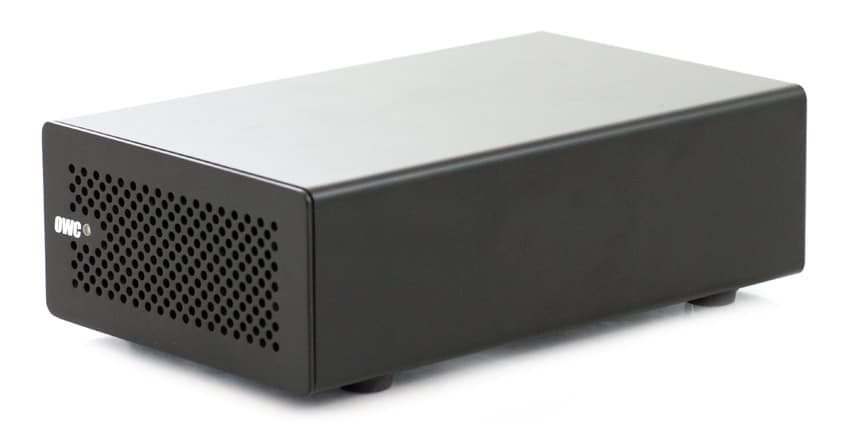
The construction of the OWC Mercury Helios is centered on a black, all-metal enclosure. The Helios really feels solid and could stand up to bumps and jolts that it may experience in transport. This is necessary as it’s an extremely portable enclosure designed often to be paired with notebook computers for performance on-the-go. The enclosure does pick up fingerprints fairly easily, but the color helps to hide them and serves to help the Helios blend in with most environments.

![]()

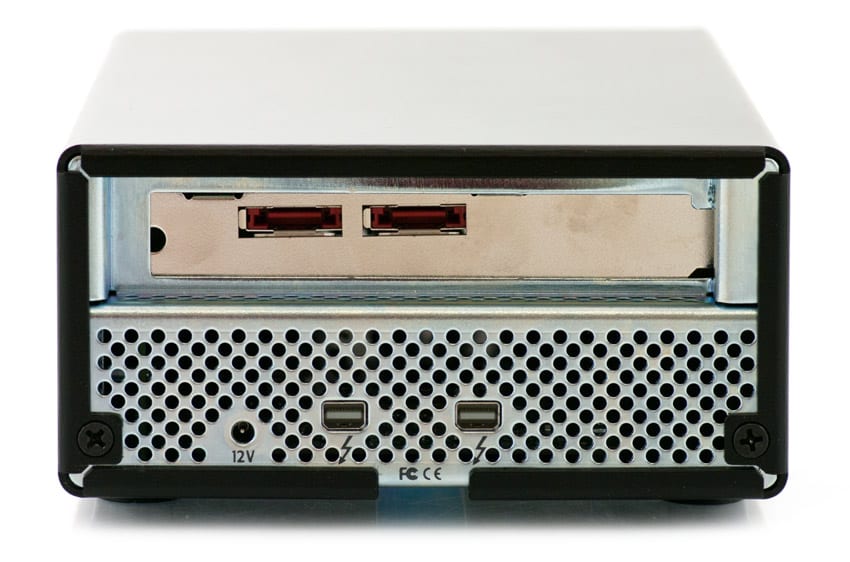
The front of the OWC Mercury Helios features a small LED indicator light and OWC branding as well as a heavily ventilated grille. The sides of the enclosure are feature-less. The bottom is wholly ventilated. Moving to the rear of the unit, there are two Thunderbolt ports and the power port. The upper portion has an open slot for the PCIe card. Rounding out the exterior, four feet on the bottom of the Helios provide friction to keep it from sliding around, and there are also standard model labels on the bottom.

![]()

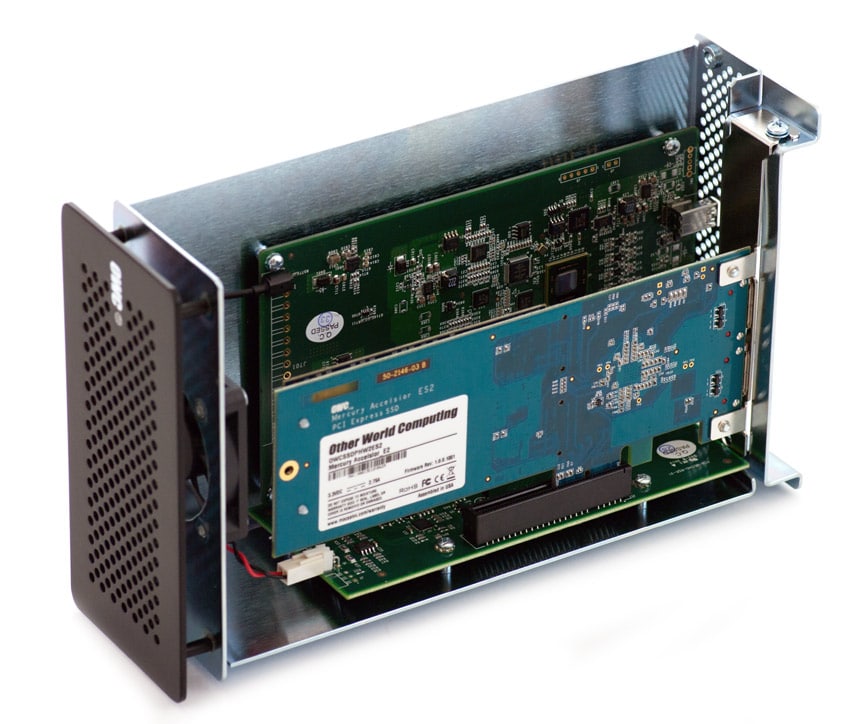
The black metal enclosure is actually a unibody piece that wraps around the silver internal metal construction to which the circuit boards and fan are attached. OWC has left some space between the fan and the exterior for proper ventilation. To remove the exterior shell, users need to remove four screws – two from the back and then two from the bottom. Having done that, users can just push out the inner chassis with their fingers. Installing a PCIe card requires the removal of another screw holding in the PCIe bracket. Users can then insert the card, replace the five screws, and then they can plug in the power and Thunderbolt cables. OWC notes that the Helios will only power if it has DC power and an active Thunderbolt signal. From here, the Helios is good to go since it doesn’t require any drivers, although users should check to ensure that their PCIe card doesn’t require a driver.

**Performance**

We utilized our [Consumer Testing Platform](https://www.storagereview.com/storagereview_consumer_testing_platforms) to measure transfer speeds from two different PCIe cards inside the OWC Mercury Helios using its Thunderbolt interface. First, we tested the Mercury Accelsior PCIe SSD. We started with 2MB sequential read and write testing in which the Accelsior came in at 656.74MB/s and 593.06MB/s respectively, while random large-block transfers measured 608.87MB/s read and 303.88MB/s write. Then we removed the Accelsior card and installed the [OCZ RevoDrive 3 X2](https://www.storagereview.com/ocz_revodrive_3_x2_review_update). Again, we started with 2MB sequential read and write testing and the RevoDrive 3 X2 came in at 829.04MB/s and 727.67MB/s respectively, and random large-block transfers measured 832.68MB/s read and 688.84MB/s write. Overall, both drives delivered a robust amount of throughput, though neither drive saturated the Thunderbolt interface. Also noteworthy, the performance of the OCZ RevoDrive 3 X2 inside the Helios was limited as there is one lane of PCIe versus 4 lanes when installed inside of a workstation computer. When we tested in that environment, it ranged more from 1,150-1,190MB.

**Conclusion**

The OWC Mercury Helios PCIe enclosure provides users with an option to add a PCIe card via Thunderbolt to their system. While it could be used in desktop scenarios, users are also able to be untethered with new access to PCIe cards from notebooks because of the Helios’ portable design which has less length than an iPad and roughly two-thirds the width and because the unit also features two Thunderbolt ports. Those ports enable high-performance transfer rates and daisy-chaining capabilities. Also, since the Helios supports half-length, full-height PCIe cards, it can handle just about any PCIe card currently on the market.

The enclosure that OWC employs for the Helios adds value. Ventilation in the right areas, a sturdy metal construction and active cooling via the included fan mean that users won’t have to worry about heat issues. Additionally, the rigid unibody exterior that wraps around the metal interior ensures that the PCIe card and PCB won’t suffer any damage while the device is in transit. It’s also very easy to access the card in case of maintenance or upgrades.

When we tested the Helios, we installed two PCIe cards: OWC’s own Mercury Accelsior E2 as well as OCZ’s RevoDrive 3 X2. We used our consumer testing platform and performed 2MB sequential and random transfer testing. Overall, both consumer-focused cards delivered plenty of performance to satisfy most users’ needs, though neither was able to reach the approximate 1GB/s Thunderbolt limit. Additionally, as we noted above, the Helios offers 1 lane of PCIe versus 4 in a workstation computer which can limit performance.

**Pros**

- Compatible with most PCIe cards
- Simple PCIe card installation

**Cons**

- Thunderbolt cable not included

**Bottom Line**

The OWC Mercury Helios is a highly portable PCIe expansion enclosure that enables notebook users to achieve robust performance typically reserved for desktop workstations.

[OWC Mercury Helios](http://eshop.macsales.com/item/OWC/HELIOSTB1/)

[Discuss This Review](http://forums.storagereview.com/index.php/topic/34325-owc-mercury-helios-pcie-enclosure-review-discussion/)

**Engage with StorageReview**

[Newsletter](https://www.storagereview.com/storage_newsletter) |  [YouTube](https://www.youtube.com/user/StorageReview "Opens in a new window") | Podcast  [iTunes](https://podcasts.apple.com/gb/podcast/storagereview-com-storage-reviews/id1060681115 "Opens in a new window")/ [Spotify](https://open.spotify.com/show/1y6VnznABhHeOSMOmbDTz0 "Opens in a new window") |  [Instagram](https://www.instagram.com/storagereview/ "Opens in a new window") |  [Twitter](https://twitter.com/storagereview "Opens in a new window") |  [TikTok](https://www.tiktok.com/@storagereview? "Opens in a new window") |  [RSS Feed](https://www.storagereview.com/rss.xml)

![]()

### storagereview

Previous post: [HGST Ultrastar SSD800MM Enterprise SSD Review](https://www.storagereview.com/review/hgst-ultrastar-ssd800mm-enterprise-ssd-review)

Next post: [HGST G-Technology G-RAID mini Review](https://www.storagereview.com/review/hgst-g-technology-g-raid-mini-review)

Trusted Vendors

Products and solutions from our affiliate partners:

- [  
  ![Ubiquiti Logo]()  
   Ubiquiti  
  ](https://store.ui.com/us/en?a_aid=StorageReview "Opens in a new window")
- [  
  ![Newegg Logo]()  
   Newegg  
  ](https://click.linksynergy.com/fs-bin/click?id=g5terNMDhz0&offerid=1207190.18&subid=0&type=4 "Opens in a new window")
- [  
  ![Amazon Logo]() Amazon  
  ](https://amzn.to/4fLJUEW "Opens in a new window")

Newsletter

Subscribe to the StorageReview newsletter to stay up to date on the latest news and reviews. We promise no spam!

1  

Leave this field empty if you’re human:

## Advertisement

Content Categories

[Facebook](https://www.facebook.com/@storagereview) [X](https://twitter.com/storagereview) [Instagram](https://www.instagram.com/storagereview/) [LinkedIn](https://www.linkedin.com/company/storagereview-com) [YouTube](https://www.youtube.com/user/storagereview?sub_confirmation=1) [Email](mailto:info@storagereview.com) [Spotify](https://open.spotify.com/show/1y6VnznABhHeOSMOmbDTz0) [Reddit](https://www.reddit.com/r/StorageReview/) [Discord](https://discord.gg/TwMHb4azdC) [RSS](https://www.storagereview.com/rss.xml) [TikTok](https://www.tiktok.com/@storagereview)

Copyright © 1998-2025 Flying Pig Ventures, LLC Cincinnati, Ohio. All rights reserved.

Manage your privacy

To provide the best experiences, we and our partners use technologies like cookies to store and/or access device information. Consenting to these technologies will allow us and our partners to process personal data such as browsing behavior or unique IDs on this site and show (non-) personalized ads. Not consenting or withdrawing consent, may adversely affect certain features and functions.

Click below to consent to the above or make granular choices. Your choices will be applied to this site only. You can change your settings at any time, including withdrawing your consent, by using the toggles on the Cookie Policy, or by clicking on the manage consent button at the bottom of the screen.

Functional Functional Always active

The technical storage or access is strictly necessary for the legitimate purpose of enabling the use of a specific service explicitly requested by the subscriber or user, or for the sole purpose of carrying out the transmission of a communication over an electronic communications network.

Preferences Preferences

The technical storage or access is necessary for the legitimate purpose of storing preferences that are not requested by the subscriber or user.

Statistics Statistics

The technical storage or access that is used exclusively for statistical purposes. The technical storage or access that is used exclusively for anonymous statistical purposes. Without a subpoena, voluntary compliance on the part of your Internet Service Provider, or additional records from a third party, information stored or retrieved for this purpose alone cannot usually be used to identify you.

Marketing Marketing

The technical storage or access is required to create user profiles to send advertising, or to track the user on a website or across several websites for similar marketing purposes.

Statistics

Marketing

Features

Always active

Special features

Special purposes

Always active

- Manage options
- Manage services
- Manage {vendor\_count} vendors
- [Read more about these purposes](https://cookiedatabase.org/tcf/purposes/)

Accept Deny Manage options Save preferences Manage options

- {title}
- {title}
- {title}

Manage your privacy

To provide the best experiences, we use technologies like cookies to store and/or access device information. Consenting to these technologies will allow us to process data such as browsing behavior or unique IDs on this site. Not consenting or withdrawing consent, may adversely affect certain features and functions.

Functional Functional Always active

The technical storage or access is strictly necessary for the legitimate purpose of enabling the use of a specific service explicitly requested by the subscriber or user, or for the sole purpose of carrying out the transmission of a communication over an electronic communications network.

Preferences Preferences

The technical storage or access is necessary for the legitimate purpose of storing preferences that are not requested by the subscriber or user.

Statistics Statistics

The technical storage or access that is used exclusively for statistical purposes. The technical storage or access that is used exclusively for anonymous statistical purposes. Without a subpoena, voluntary compliance on the part of your Internet Service Provider, or additional records from a third party, information stored or retrieved for this purpose alone cannot usually be used to identify you.

Marketing Marketing

The technical storage or access is required to create user profiles to send advertising, or to track the user on a website or across several websites for similar marketing purposes.

Statistics

Marketing

Features

Always active

Special features

Special purposes

Always active

- Manage options
- Manage services
- Manage {vendor\_count} vendors
- [Read more about these purposes](https://cookiedatabase.org/tcf/purposes/)

Accept Deny Manage options Save preferences Manage options

- {title}
- {title}
- {title}

Manage consent Manage consent

```json
{"@context":"https:\/\/schema.org","@graph":[{"@type":"WebPage","@id":"https:\/\/www.storagereview.com\/review\/owc-mercury-helios-pcie-enclosure-review","url":"https:\/\/www.storagereview.com\/review\/owc-mercury-helios-pcie-enclosure-review","name":"OWC Mercury Helios PCIe Enclosure Review - StorageReview.com","isPartOf":{"@id":"https:\/\/www.storagereview.com\/#website"},"primaryImageOfPage":{"@id":"https:\/\/www.storagereview.com\/review\/owc-mercury-helios-pcie-enclosure-review#primaryimage"},"image":{"@id":"https:\/\/www.storagereview.com\/review\/owc-mercury-helios-pcie-enclosure-review#primaryimage"},"thumbnailUrl":"https:\/\/www.storagereview.com\/wp-content\/uploads\/2013\/06\/StorageReview-OWC-Mercury-Helios-PCIe-Enclosure-Thumb.jpg","datePublished":"2013-06-21T19:57:05+00:00","dateModified":"2020-03-20T16:54:04+00:00","breadcrumb":{"@id":"https:\/\/www.storagereview.com\/review\/owc-mercury-helios-pcie-enclosure-review#breadcrumb"},"inLanguage":"en-US","potentialAction":[{"@type":"ReadAction","target":["https:\/\/www.storagereview.com\/review\/owc-mercury-helios-pcie-enclosure-review"]}]},{"@type":"ImageObject","inLanguage":"en-US","@id":"https:\/\/www.storagereview.com\/review\/owc-mercury-helios-pcie-enclosure-review#primaryimage","url":"https:\/\/www.storagereview.com\/wp-content\/uploads\/2013\/06\/StorageReview-OWC-Mercury-Helios-PCIe-Enclosure-Thumb.jpg","contentUrl":"https:\/\/www.storagereview.com\/wp-content\/uploads\/2013\/06\/StorageReview-OWC-Mercury-Helios-PCIe-Enclosure-Thumb.jpg","width":100,"height":93},{"@type":"BreadcrumbList","@id":"https:\/\/www.storagereview.com\/review\/owc-mercury-helios-pcie-enclosure-review#breadcrumb","itemListElement":[{"@type":"ListItem","position":1,"name":"Home","item":"https:\/\/www.storagereview.com\/"},{"@type":"ListItem","position":2,"name":"Review","item":"https:\/\/www.storagereview.com\/review"},{"@type":"ListItem","position":3,"name":"OWC Mercury Helios PCIe Enclosure Review"}]},{"@type":"WebSite","@id":"https:\/\/www.storagereview.com\/#website","url":"https:\/\/www.storagereview.com\/","name":"StorageReview.com","description":"StorageReview.com is a leading provider of news and reviews throughout the entire IT stack - from the datacenter to the edge, and all points in between.","publisher":{"@id":"https:\/\/www.storagereview.com\/#organization"},"potentialAction":[{"@type":"SearchAction","target":{"@type":"EntryPoint","urlTemplate":"https:\/\/www.storagereview.com\/?s={search_term_string}"},"query-input":{"@type":"PropertyValueSpecification","valueRequired":true,"valueName":"search_term_string"}}],"inLanguage":"en-US"},{"@type":"Organization","@id":"https:\/\/www.storagereview.com\/#organization","name":"StorageReview.com","url":"https:\/\/www.storagereview.com\/","logo":{"@type":"ImageObject","inLanguage":"en-US","@id":"https:\/\/www.storagereview.com\/#\/schema\/logo\/image\/","url":"https:\/\/www.storagereview.com\/wp-content\/uploads\/2020\/02\/Storage-Reviews-2-2.png","contentUrl":"https:\/\/www.storagereview.com\/wp-content\/uploads\/2020\/02\/Storage-Reviews-2-2.png","width":344,"height":61,"caption":"StorageReview.com"},"image":{"@id":"https:\/\/www.storagereview.com\/#\/schema\/logo\/image\/"},"sameAs":["https:\/\/x.com\/storagereview","http:\/\/youtube.com\/user\/storagereview"]}]}
```