---
description: LaCie and beautiful design intuitively go together, thanks to years of LaCie regularly pumping out great looking storage devices. The LaCie 2big 2-bay NAS...
title: LaCie 2big NAS 6TB Review
image: https://www.storagereview.com/wp-content/uploads/2013/01/StorageReview-LaCie-2big-NAS-6TB-thumb.jpg
---

[![Storage Review]()](https://storagereview.com/)

---

[Facebook](https://www.facebook.com/@storagereview) [X (Twitter)](https://twitter.twitter.com/storagereview) [Instagram](https://www.instagram.com/storagereview/) [LinkedIn](https://www.linkedin.com/company/storagereview-com) [YouTube](https://www.youtube.com/user/storagereview?sub_confirmation=1) [Email](mailto:info@storagereview.com) [Spotify](https://open.spotify.com/show/1y6VnznABhHeOSMOmbDTz0) [Reddit](https://www.reddit.com/r/StorageReview/) [Discord](https://discord.gg/TwMHb4azdC) [RSS Feed](https://www.storagereview.com/rss.xml) [TikTok](https://www.tiktok.com/@storagereview)

[Facebook](https://www.facebook.com/@storagereview) [X (Twitter)](https://twitter.com/storagereview) [Instagram](https://www.instagram.com/storagereview/) [LinkedIn](https://www.linkedin.com/company/storagereview-com) [YouTube](https://www.youtube.com/user/storagereview?sub_confirmation=1) [Email](mailto:info@storagereview.com) [Spotify](https://open.spotify.com/show/1y6VnznABhHeOSMOmbDTz0) [Reddit](https://www.reddit.com/r/StorageReview/) [Discord](https://discord.gg/TwMHb4azdC) [RSS Feed](https://www.storagereview.com/rss.xml) [TikTok](https://www.tiktok.com/@storagereview)

[![StorageReview.com](https://www.storagereview.com/wp-content/uploads/2026/07/Storage-Review-2x.png)](https://www.storagereview.com)

≡ Menu

- [Home](https://www.storagereview.com/)
- [Storage Reviews](https://www.storagereview.com/review)
  - [End User Reviews](https://www.storagereview.com/consumer)
  - [Enterprise Reviews](https://www.storagereview.com/enterprise)
  - [Ubiquiti Reviews](https://www.storagereview.com/best/ubiquiti-reviews)
- [SR Merch](https://store.storagereview.com)
- [Leaderboards](https://www.storagereview.com/best)
  - [Best Storage Arrays](https://www.storagereview.com/best/storage-arrays)
  - [Best Enterprise SSDs](https://www.storagereview.com/best/enterprise-ssds)
  - [Best Servers](https://www.storagereview.com/best/servers)
  - [Best Enterprise GPUs](https://www.storagereview.com/best/enterprise-gpus)
  - [Best Desktops for Local AI](https://www.storagereview.com/best/desktops-local-ai)
  - [Best Laptops for Local AI](https://www.storagereview.com/best/laptops-local-ai)
  - [Best Local LLM Tools](https://www.storagereview.com/best/local-llm-tools)
  - [Agentic AI Hardware](https://www.storagereview.com/best/agentic-ai-hardware)
  - [Best SSDs & Hard Drives](https://www.storagereview.com/best_drives)
  - [Best Portable SSDs](https://www.storagereview.com/best/portable-ssds)
  - [Best Business Laptops](https://www.storagereview.com/best/business-laptops)
  - [Best Mobile Workstations](https://www.storagereview.com/best/mobile-workstations)
  - [Best Desktop Workstations](https://www.storagereview.com/best/desktop-workstations)
  - [Best Mini PCs](https://www.storagereview.com/best/mini-pcs)
  - [Best Laptop Battery Life](https://www.storagereview.com/best/laptop-battery-life)
- [Storage Reference Guide](https://www.storagereview.com/storage-reference-guide)
- [About SR](https://www.storagereview.com/about-storagereview)
  - [StorageReview.com Sweepstakes Rules and Regulations](https://www.storagereview.com/storagereview-com-sweepstakes-rules-and-regulations)

Search

[Home](https://www.storagereview.com/) » [Review](https://www.storagereview.com/review) » LaCie 2big NAS 6TB Review

# LaCie 2big NAS 6TB Review

by storagereview on January 22, 2013

[End User](https://www.storagereview.com/consumer)  ◇  [NAS](https://www.storagereview.com/consumer/nas)

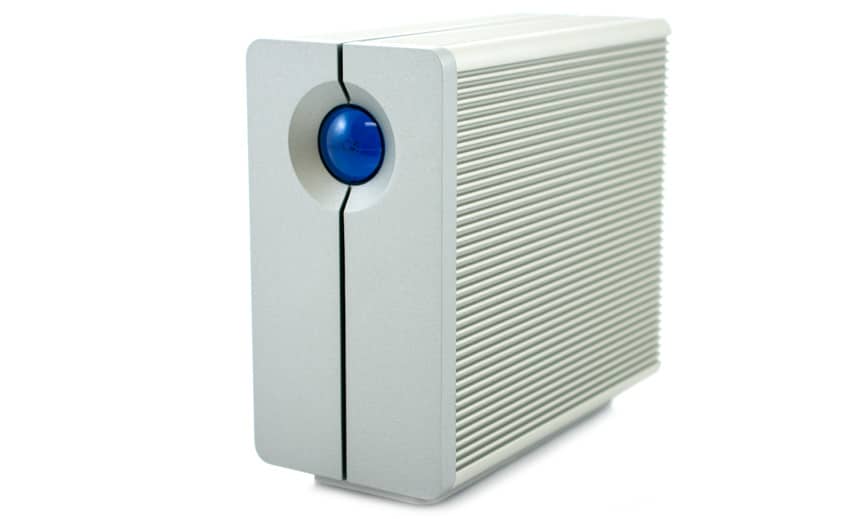
LaCie and beautiful design intuitively go together, thanks to years of LaCie regularly pumping out great looking storage devices. The LaCie 2big 2-bay NAS system is no different, sporting solid-aluminum body. It features LaCie’s NAS OS 3.0, which makes NAS management easy. Out of the box, the 2big NAS comes configured in RAID 1, but has support for RAID 0 configurations.

LaCie ships the 2big units either bare or in a two disk setup with either 2TB or 3TB hard drive capacities. Beyond the networked storage capabilities, the 2big NAS supports a slew of backup and media serving features including Time Machine and Windows Backup. For IT managers and basic users alike, management is non-issue with the NAS OS 3.0 Dashboard. NAS OS 3.0 allows access to set up functions such as users, groups, shares and RAID configuration. The unit also supports wake on LAN and expansion or direct connection via one eSATA and USB 2.0 ports.

![](https://www.storagereview.com/wp-content/uploads/2013/01/StorageReview-LaCie-2big-NAS-6TB.jpg)

The LaCie 2big NAS is available in three models; no drives, 4TB and 6TB. The bare model has a street price of $179.00; 4TB is priced at $419.00, while the 6TB drive is roughly $529.00. Our review model is the 6TB model.

**LaCie 2big NAS Specifications**

- Capacity
  - Bare (2000345)
  - 4 TB (9000225)
  - **6 TB (9000226)**
- Interface: 1 x Gigabit Ethernet 10/100/1000 Base-TX
- Operating System: LaCie NAS OS 3.x
- Processor: ARM 2GHz
- RAM: 256MB
- File System: Ext4
- File Access:
  - Local/cloud hybrid storage Wuala Secure Cloud Storage: Manage cloud, remote, and local storage from a single interface; secure remote access through standard web browser or iOS™/Android™ mobile app
  - Wuala file system integration (W:/ network drive)
  - Compatible with PC, Mac®, Linux, iOS, and Android
- Network Protocols:
  - File Server: SMB, AFP, FTP, SFTP, NFS
  - Web access: HTTP, HTTPS
  - Others: NTP, iSCSI, DHCP, Apple Bonjour™, BitTorrent™, Apipa
- Expansion Ports: 1 x eSATA ; 1 x USB 2.0
- Burst Transfer Rate: Read: 100MB/s; Write: 75MB/s
- RAID Modes: RAID 0, RAID 1
- Dimensions (W x H x L): 3.5 x 6.7 x 7.8 in.
- Weight: Without disks: 6.1 lbs (With two disks: 9.7 lbs)
- Cooling: Ultra-quiet cooling system with self-stabilizing oil-pressure bearing technology

**Design and Build**

LaCie continues with its tradition of providing eloquently designed external storage devices. The 2big NAS is no exception with its solid-aluminum design by Neil Poulton. The aluminum design serves two purposes; eloquent visual effect and thermal heat dispensing. The aluminum casing provides 60% more surface area, which diverts and dissipates heat more efficiently. To help with cooling, LaCie uses a thermo-regulated fan, which turns on and off according to internal temperature. It cools the components while reducing electricity usage by not running as often as some other desktop hard drives. Through our review, the drive remained almost inaudible over sounds of the fans with the computer case. Under heavier use, you can begin to hear the fan kick in, but it’s hardly out of place.

![]()

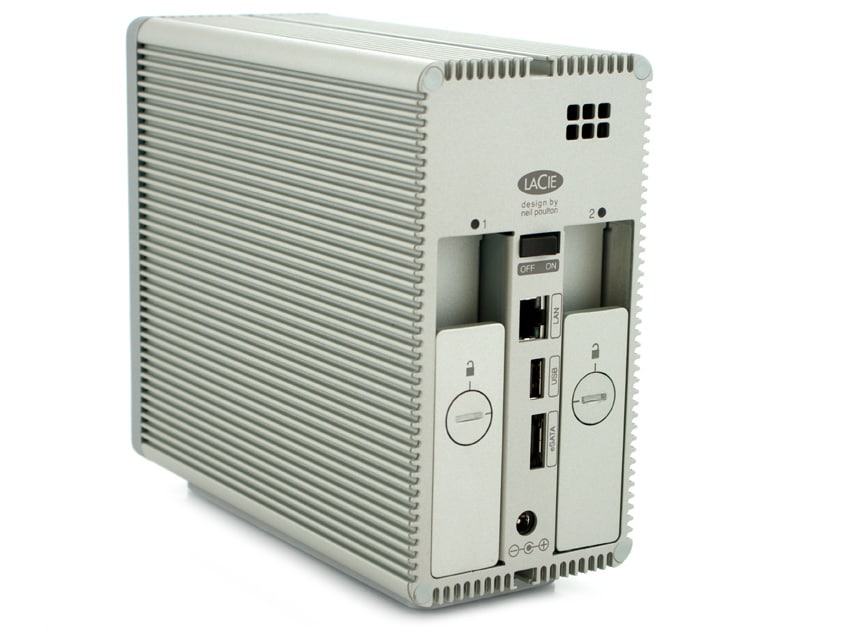
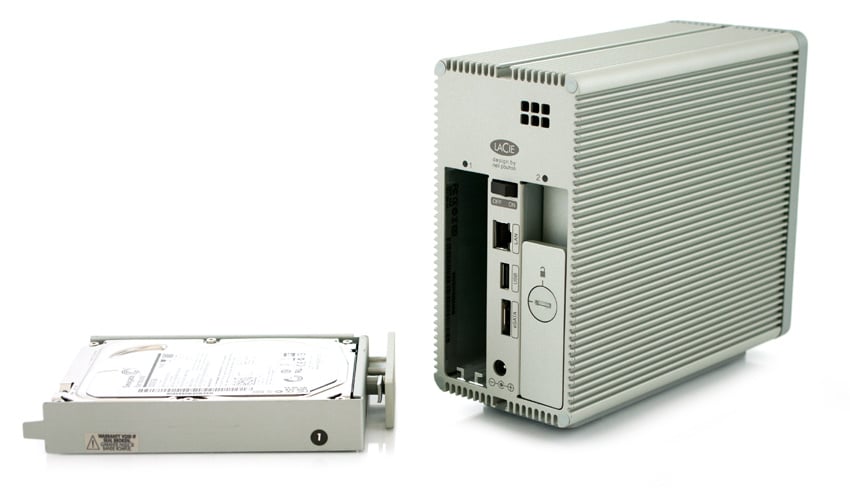
On the front of the device, you see a large iconic blue light, which blinks as the drives are initiated then remains steady during use. The 2big NAS takes around a minute to initialize after turning on before it is usable. On the back of the device, you see two hot swappable drive bays that are locked. LaCie provides a handle tool to unlock the drives but a simple coin can do the trick in a pinch. In addition, there is one Gigabit Ethernet 10/100/1000 Base-TX interface, along with an eSATA and USB 2.0 interface for additional storage, printer or media share features. 

![]()

Inside our 2big NAS 6TB, LaCie is using two Seagate Barracuda 3TB drives (ST3000DM001) to provide 6TB of storage in either RAID 0 or RAID 1. In our review of the [Seagate Barracuda 3TB](https://www.storagereview.com/seagate_barracuda_3tb_review_1tb_platters_st3000dm001), the drive is a SATA 6Gb/s interface and provided almost 200MB/s sequential transfer speeds, with very good performance in our HTPC benchmark. 

**User Interface**

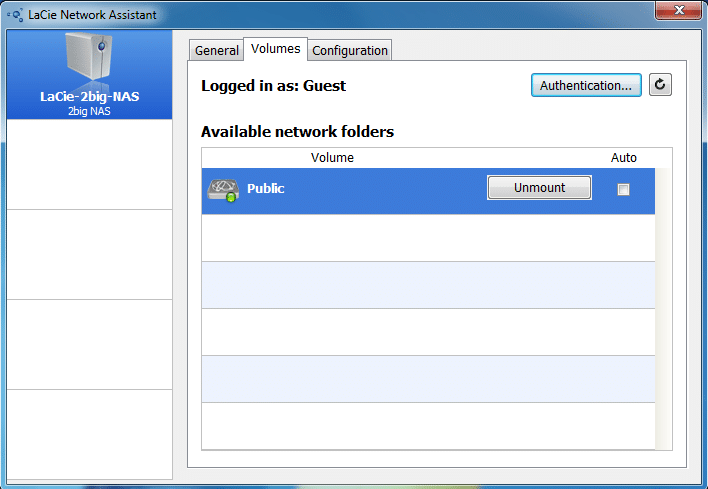
The LaCie 2big NAS comes with a handy Network Assistant that provides general information and easy one click button to mount your NAS drive. Under the General tab, you can access the web-based Dashboard program to fully setup your LaCie 2big NAS or you can use the NAS IP address to access.  

![]()

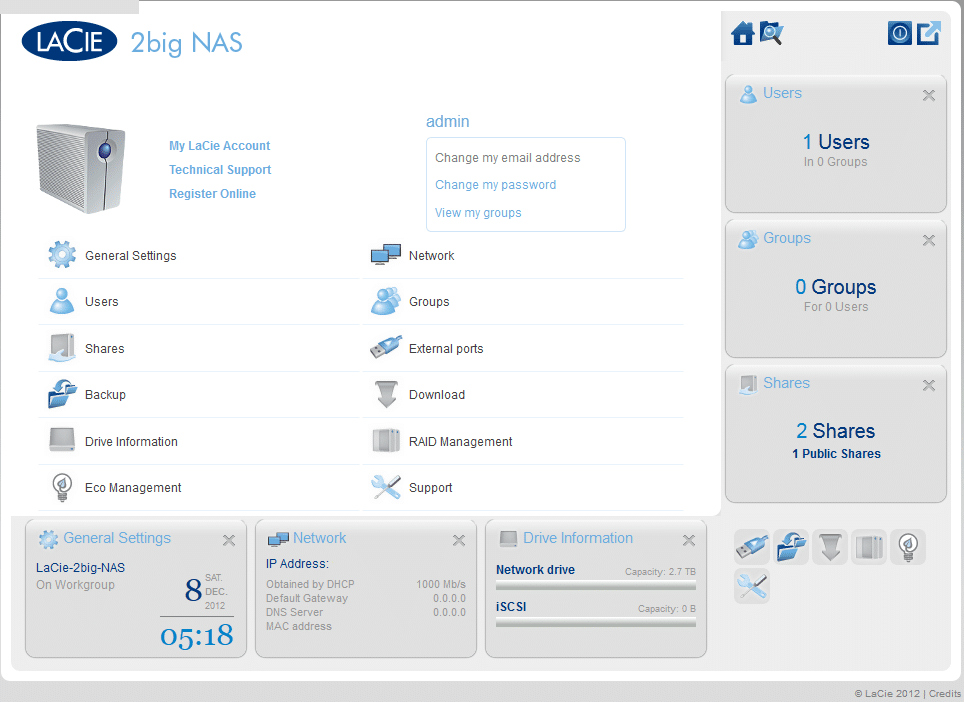
The first time you log onto the 2big NAS Dashboard, you’ll be prompted to set up a logon and password for future access. On the Dashboard, we have a wide range of choices to customize the device, ranging from Users setup, Eco Management to RAID Management. 

![]()

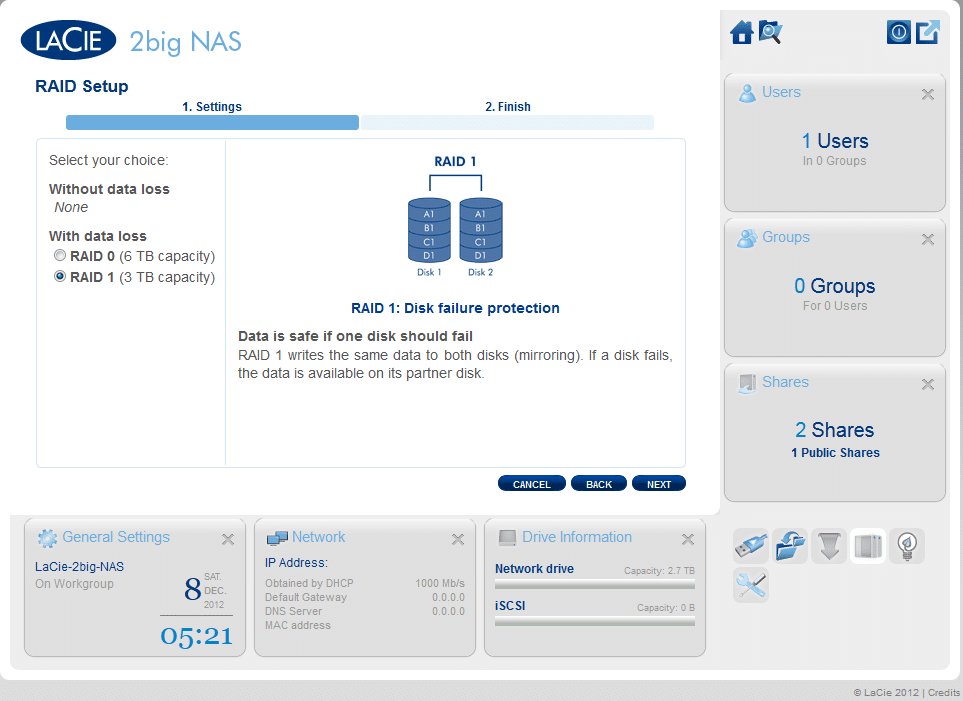
By default, the device is set up in a RAID 1 providing 2.72TB of free space on the drive while the second drive mirrors the first. This is an ideal setup for a network based drive to provide the added security for potential data loss or drive failure. If the main use case for the drive will be as a personal drive with an eye toward performance, users might want to setup the drive in RAID 0 for 6TB of storage and the performance increases due to the RAID 0 setup. 

![]()

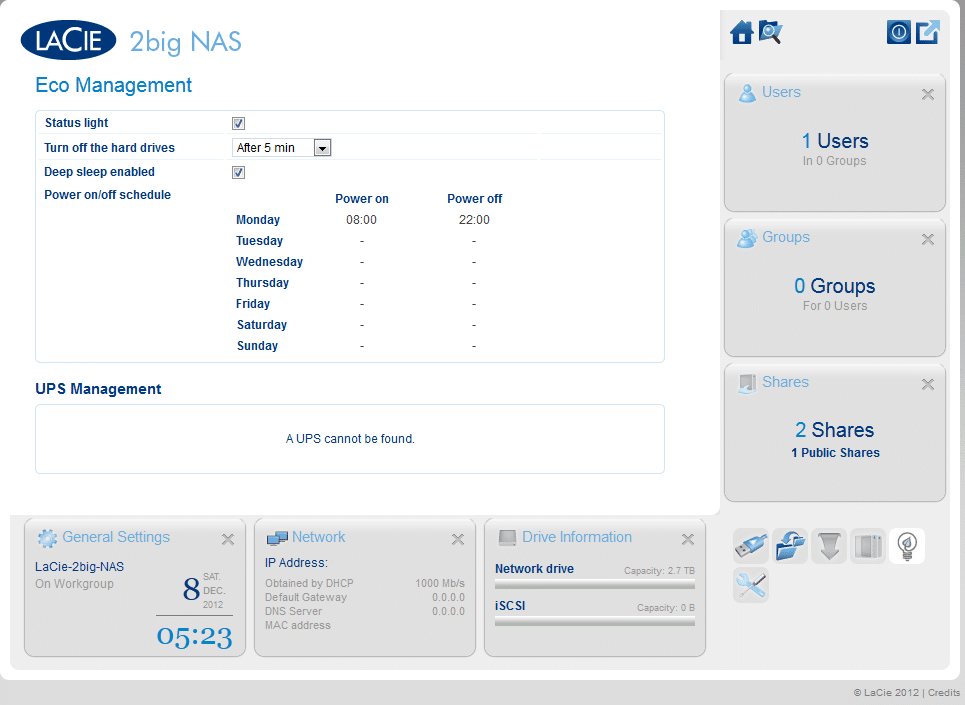
LaCie provided a nice feature on its 2big NAS with the Eco Management function. It provides users the ability to efficiently manage the drive’s power function. With Eco Management, you can set up how long the hard drive stays on after no activity and sleep mode. The Power schedule allows you set up when the drive will power on and power off over the full seven days, when deep sleep is enabled. If you leave it a default, the drive will remain active until the power button is turned off. According to LaCie, In Eco mode the device uses one-tenth the energy of the previous generation of LaCie NAS. 

![]()

**Performance**

To measure performance of the LaCie 2big NAS 6TB, we connected it over our 1GbE network to our [Consumer Testing Platform](https://www.storagereview.com/storagereview_consumer_testing_platforms). Using IOMeter with a 500MB test file, we measured sequential transfer performance of 61.7MB/s read and 54.8MB/s write in the default RAID1 configuration. With 4K random transfers performance measured 192 IOPS read and 930 IOPS write.

**Conclusion**

LaCie continues on its tradition of superior design and simple to use NAS OS with the 2big NAS. Setup out of the box was easy; accessing the system directly over the NAS 0S 3.0 Dashboard. In that process, the administrator has the ability to configure RAID options, users, groups and power management. Performance was acceptable, as we measured sequential transfer performance of 61.7MB/s read and 54.8MB/s write. The 2big NAS matched its stated specifications on sequential write performance but fell a little short on read performance. However, the overall performance will meet the needs for a small-business environment with a limited number of active users at once. 

With its Eco Management function, the 2big NAS takes the drive in the right direction for the "green" movement. With a stated one-tenth of energy usage over previous generations, 2big NAS helps you to reduce power consumption, something all IT managers work towards to drive down TCO. 

**Pros**

- Ease of use
- Eco management
- Superior design and build

**Cons**

-  Average sequential transfer performance

**Bottom Line** 

LaCie has done a good job with the 2big NAS and its NAS OS 3.0. Configuration is simple to set up and with its Eco Management function; the 2big NAS is a good solution for small business or personal users looking to employ a NAS to their network interface. 

[LaCie 2big NAS at Amazon.com](http://www.amazon.com/s/?_encoding=UTF8&camp=1789&creative=390957&field-keywords=LaCie%202big%20NAS&linkCode=ur2&tag=storagereviewcom-20&url=search-alias%3Daps)![]()

[Discuss This Review](http://forums.storagereview.com/index.php/topic/32447-lacie-2big-nas-6tb-review-discussion/)

**Engage with StorageReview**

[Newsletter](https://www.storagereview.com/storage_newsletter) |  [YouTube](https://www.youtube.com/user/StorageReview "Opens in a new window") | Podcast  [iTunes](https://podcasts.apple.com/gb/podcast/storagereview-com-storage-reviews/id1060681115 "Opens in a new window")/ [Spotify](https://open.spotify.com/show/1y6VnznABhHeOSMOmbDTz0 "Opens in a new window") |  [Instagram](https://www.instagram.com/storagereview/ "Opens in a new window") |  [Twitter](https://twitter.com/storagereview "Opens in a new window") |  [TikTok](https://www.tiktok.com/@storagereview? "Opens in a new window") |  [RSS Feed](https://www.storagereview.com/rss.xml)

![]()

### storagereview

Previous post: [Kingston DataTraveler Workspace with Windows To Go Review](https://www.storagereview.com/review/kingston-datatraveler-workspace-with-windows-to-go-review)

Next post: [Netgear Centria Multifunction Wireless Router and NAS Review](https://www.storagereview.com/review/netgear-centria-multifunction-wireless-router-and-nas-review)

Trusted Vendors

Products and solutions from our affiliate partners:

- [  
  ![Ubiquiti Logo](https://www.storagereview.com/wp-content/uploads/2024/11/2-1.webp)  
   Ubiquiti  
  ](https://store.ui.com/us/en?a_aid=StorageReview "Opens in a new window")
- [  
  ![Newegg Logo](https://www.storagereview.com/wp-content/uploads/2025/11/newegg.webp)  
   Newegg  
  ](https://click.linksynergy.com/fs-bin/click?id=g5terNMDhz0&offerid=1207190.18&subid=0&type=4 "Opens in a new window")
- [  
  ![Amazon Logo](https://www.storagereview.com/wp-content/uploads/2025/11/amazon.webp) Amazon  
  ](https://amzn.to/4fLJUEW "Opens in a new window")

Newsletter

Subscribe to the StorageReview newsletter to stay up to date on the latest news and reviews. We promise no spam!

1  

Leave this field empty if you’re human:

## Advertisement

Content Categories

[Facebook](https://www.facebook.com/@storagereview) [X](https://twitter.com/storagereview) [Instagram](https://www.instagram.com/storagereview/) [LinkedIn](https://www.linkedin.com/company/storagereview-com) [YouTube](https://www.youtube.com/user/storagereview?sub_confirmation=1) [Email](mailto:info@storagereview.com) [Spotify](https://open.spotify.com/show/1y6VnznABhHeOSMOmbDTz0) [Reddit](https://www.reddit.com/r/StorageReview/) [Discord](https://discord.gg/TwMHb4azdC) [RSS](https://www.storagereview.com/rss.xml) [TikTok](https://www.tiktok.com/@storagereview)

Copyright © 1998-2025 Flying Pig Ventures, LLC Cincinnati, Ohio. All rights reserved.

Manage your privacy

To provide the best experiences, we and our partners use technologies like cookies to store and/or access device information. Consenting to these technologies will allow us and our partners to process personal data such as browsing behavior or unique IDs on this site and show (non-) personalized ads. Not consenting or withdrawing consent, may adversely affect certain features and functions.

Click below to consent to the above or make granular choices. Your choices will be applied to this site only. You can change your settings at any time, including withdrawing your consent, by using the toggles on the Cookie Policy, or by clicking on the manage consent button at the bottom of the screen.

Functional Functional Always active

The technical storage or access is strictly necessary for the legitimate purpose of enabling the use of a specific service explicitly requested by the subscriber or user, or for the sole purpose of carrying out the transmission of a communication over an electronic communications network.

Preferences Preferences

The technical storage or access is necessary for the legitimate purpose of storing preferences that are not requested by the subscriber or user.

Statistics Statistics

The technical storage or access that is used exclusively for statistical purposes. The technical storage or access that is used exclusively for anonymous statistical purposes. Without a subpoena, voluntary compliance on the part of your Internet Service Provider, or additional records from a third party, information stored or retrieved for this purpose alone cannot usually be used to identify you.

Marketing Marketing

The technical storage or access is required to create user profiles to send advertising, or to track the user on a website or across several websites for similar marketing purposes.

Statistics

Marketing

Features

Always active

Always active

- Manage options
- Manage services
- Manage {vendor\_count} vendors
- [Read more about these purposes](https://cookiedatabase.org/tcf/purposes/)

Accept Deny Manage options Save preferences Manage options

- {title}
- {title}
- {title}

Manage your privacy

To provide the best experiences, we use technologies like cookies to store and/or access device information. Consenting to these technologies will allow us to process data such as browsing behavior or unique IDs on this site. Not consenting or withdrawing consent, may adversely affect certain features and functions.

Functional Functional Always active

The technical storage or access is strictly necessary for the legitimate purpose of enabling the use of a specific service explicitly requested by the subscriber or user, or for the sole purpose of carrying out the transmission of a communication over an electronic communications network.

Preferences Preferences

The technical storage or access is necessary for the legitimate purpose of storing preferences that are not requested by the subscriber or user.

Statistics Statistics

The technical storage or access that is used exclusively for statistical purposes. The technical storage or access that is used exclusively for anonymous statistical purposes. Without a subpoena, voluntary compliance on the part of your Internet Service Provider, or additional records from a third party, information stored or retrieved for this purpose alone cannot usually be used to identify you.

Marketing Marketing

The technical storage or access is required to create user profiles to send advertising, or to track the user on a website or across several websites for similar marketing purposes.

Statistics

Marketing

Features

Always active

Always active

- Manage options
- Manage services
- Manage {vendor\_count} vendors
- [Read more about these purposes](https://cookiedatabase.org/tcf/purposes/)

Accept Deny Manage options Save preferences Manage options

- {title}
- {title}
- {title}

Manage consent Manage consent

```json
{"@context":"https:\/\/schema.org","@graph":[{"@type":"WebPage","@id":"https:\/\/www.storagereview.com\/review\/lacie-2big-nas-6tb-review","url":"https:\/\/www.storagereview.com\/review\/lacie-2big-nas-6tb-review","name":"LaCie 2big NAS 6TB Review - StorageReview.com","isPartOf":{"@id":"https:\/\/www.storagereview.com\/#website"},"primaryImageOfPage":{"@id":"https:\/\/www.storagereview.com\/review\/lacie-2big-nas-6tb-review#primaryimage"},"image":{"@id":"https:\/\/www.storagereview.com\/review\/lacie-2big-nas-6tb-review#primaryimage"},"thumbnailUrl":"https:\/\/www.storagereview.com\/wp-content\/uploads\/2013\/01\/StorageReview-LaCie-2big-NAS-6TB-thumb.jpg","datePublished":"2013-01-22T15:50:38+00:00","dateModified":"2020-02-06T10:15:42+00:00","breadcrumb":{"@id":"https:\/\/www.storagereview.com\/review\/lacie-2big-nas-6tb-review#breadcrumb"},"inLanguage":"en-US","potentialAction":[{"@type":"ReadAction","target":["https:\/\/www.storagereview.com\/review\/lacie-2big-nas-6tb-review"]}]},{"@type":"ImageObject","inLanguage":"en-US","@id":"https:\/\/www.storagereview.com\/review\/lacie-2big-nas-6tb-review#primaryimage","url":"https:\/\/www.storagereview.com\/wp-content\/uploads\/2013\/01\/StorageReview-LaCie-2big-NAS-6TB-thumb.jpg","contentUrl":"https:\/\/www.storagereview.com\/wp-content\/uploads\/2013\/01\/StorageReview-LaCie-2big-NAS-6TB-thumb.jpg","width":100,"height":76},{"@type":"BreadcrumbList","@id":"https:\/\/www.storagereview.com\/review\/lacie-2big-nas-6tb-review#breadcrumb","itemListElement":[{"@type":"ListItem","position":1,"name":"Home","item":"https:\/\/www.storagereview.com\/"},{"@type":"ListItem","position":2,"name":"Review","item":"https:\/\/www.storagereview.com\/review"},{"@type":"ListItem","position":3,"name":"LaCie 2big NAS 6TB Review"}]},{"@type":"WebSite","@id":"https:\/\/www.storagereview.com\/#website","url":"https:\/\/www.storagereview.com\/","name":"StorageReview.com","description":"StorageReview.com is a leading provider of news and reviews throughout the entire IT stack - from the datacenter to the edge, and all points in between.","publisher":{"@id":"https:\/\/www.storagereview.com\/#organization"},"potentialAction":[{"@type":"SearchAction","target":{"@type":"EntryPoint","urlTemplate":"https:\/\/www.storagereview.com\/?s={search_term_string}"},"query-input":{"@type":"PropertyValueSpecification","valueRequired":true,"valueName":"search_term_string"}}],"inLanguage":"en-US"},{"@type":"Organization","@id":"https:\/\/www.storagereview.com\/#organization","name":"StorageReview.com","url":"https:\/\/www.storagereview.com\/","logo":{"@type":"ImageObject","inLanguage":"en-US","@id":"https:\/\/www.storagereview.com\/#\/schema\/logo\/image\/","url":"https:\/\/www.storagereview.com\/wp-content\/uploads\/2020\/02\/Storage-Reviews-2-2.png","contentUrl":"https:\/\/www.storagereview.com\/wp-content\/uploads\/2020\/02\/Storage-Reviews-2-2.png","width":344,"height":61,"caption":"StorageReview.com"},"image":{"@id":"https:\/\/www.storagereview.com\/#\/schema\/logo\/image\/"},"sameAs":["https:\/\/x.com\/storagereview","http:\/\/youtube.com\/user\/storagereview"]}]}
```