

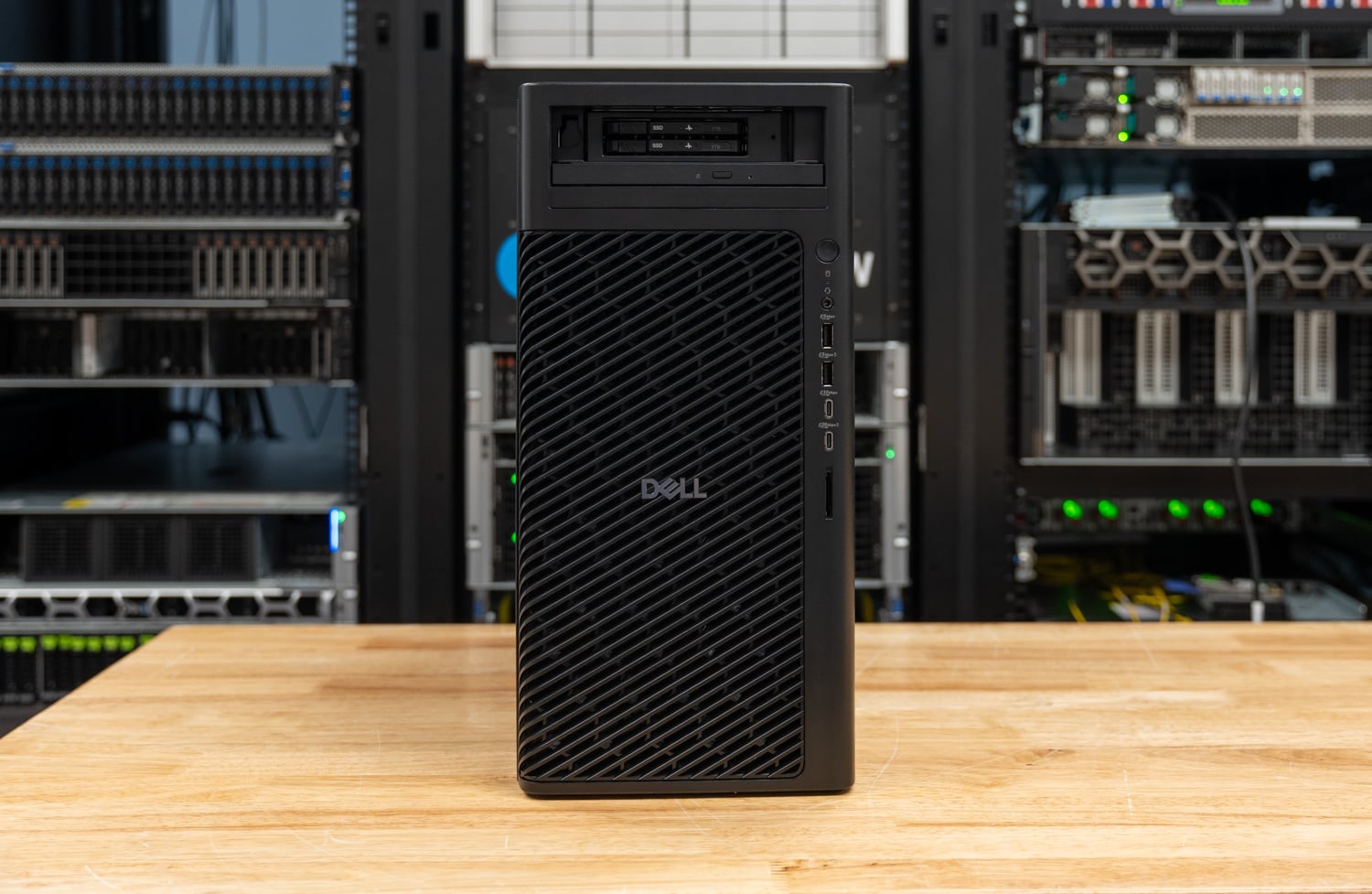
The Dell Pro Precision 9 T2 is the Xeon version of the single-GPU tower we reviewed a year ago as the Dell Pro Max Torre T2, and it arrives with two changes at once: a new name, as Dell moves its workstations back under the Precision brand, and a new platform, with Intel’s Xeon 6 replacing the Core Ultra 9 285K inside the same 32-liter chassis. Our unit shipped with the 24-core Xeon 658X, 128GB of DDR5-6400 RDIMM ECC, the 300W RTX PRO 6000 Blackwell Max-Q, and two 2TB E3.S Gen5 drives striped in the front FlexBay. Configured the same way on Dell.com, it lists at about $28,300.
We tested it as a matrix: the Pro Precision 9 T2 ran our full suite with the Max-Q card it shipped with and again with the 600W RTX PRO 6000 Blackwell pulled from our Pro Max Tower T2, and the Core-based T2 ran both cards too, so all the results below have four columns, and each pair isolates one variable: the CPU platform, or the GPU’s power limit. The suite is the same one that ran on last week’s RTX Spark notebooks, with a few additions that debut here.
The Xeon buys throughput and gives back latency. The Pro Precision 9 T2 scored 12,322 in Cinebench 2026 multi-core against 8,856 on the Core T2, built LLVM in 140.2 seconds against 182.5, and read 122,233MB/s in STREAM Triad against 33,003, while its single-core Cinebench score of 454.1 trails the 285K’s 564.4 and its Speedometer score of 36.8 trails 46.3. The 600W card adds about 7 to 20 percent on LLM decode and 20 to 39 percent on prompt processing and diffusion in either tower, and in the Xeon tower it costs the CPU 4 to 5 percent on all-core work.
Punti chiave
- Xeon 6 is a throughput platform in a single-socket tower: 12,322 in Cinebench 2026 multi-core, 39 percent ahead of the Core Ultra 9 285K in the same chassis, 289.6 GIPS in 7-Zip against 174.8, DGEMM at 1,638 GFLOPS against 768, and 3.7x the memory bandwidth from four channels of DDR5-6400.
- The 285K still owns per-thread speed: the Xeon trails it by 20 percent in Cinebench single-core, 21 percent in Speedometer, and 20 to 31 percent in single-threaded Python, with core-to-core latency of 56.2 ns against 38.1.
- The GPU decides the AI results, and the 600W card earns its power on prompts: MLPerf Llama 3.1 8B generates at 230.9 tokens per second with the Max-Q and 252.8 with the 600W card, while time to first token drops from 0.082 to 0.059 seconds and Qwen-Image 20B renders a 1024×1024 image in 19.7 seconds against 26.1.
- The 600W card taxes the Xeon’s CPU work by 4 to 5 percent: Cinebench multi-core fell from 12,322 to 11,705 and the 30-minute sustained loop from 12,328 to 11,764, with steady-state clocks down from 4,274 to 4,178MHz; the same swap changed nothing in the Core T2.
- E3.S in the FlexBay, striped by VROC by Graid: the front bay takes two E3.S Gen5 drives, a first for a tower workstation in our lab, and Dell’s RAID0 boot option builds them into a 4,097GB volume with VROC by Graid Technology. The stripe reads 9,332MB/s sequentially and peaks at 840.1K IOPS on 4K random reads, against 1.78M IOPS from the single Gen5 M.2 in the Core T2.
From Pro Max to Pro Precision
Dell retired the Precision name at the start of 2025, when every workstation became a Dell Pro Max, and it has now brought it back. On October 7, Dell renamed its GB10 and GB300 desksides from Dell Pro Max to Dell Pro Precision, and Dell.com lists the Pro Precision 9 T2 alongside new T4 and T6 towers under the same brand. Pro Max remains for the Core-based machines, so the Core Ultra tower we reviewed last year is still sold as the Dell Pro Max Tower T2, and the Xeon tower reviewed here is the Dell Pro Precision 9 T2, model PW9T2260.
The T4 and T6 made the same move to Xeon 6 with the rename, and Dell positions the three towers by expansion. The Pro Precision 9 T4 (PW9T4260) runs the same processor list up to the 86-core Xeon 698X, adds 16 DIMM slots for up to 4TB of DDR5-6400 on all eight memory channels, and takes a single 600W RTX PRO 6000 or two Max-Q cards on a 1500W supply, with a 2400W chassis as an option.
The Pro Precision 9 T6 (PW9T6260) is the top of the line, with six slots, a 2400W supply, and room for two 600W RTX PRO 6000 cards, three Max-Q cards, or up to five RTX PRO 5000s. The T2 is the single-GPU, four-channel entry to the family.
The naming accuracy matters because the two towers are identical from the outside, sharing the same 32-liter chassis at 387 x 187.7 x 438mm, the same bezel and front FlexBay, and the same RTX PRO 6000 Blackwell options in Dell’s configurator, so the difference is the board. Where the Pro Max Tower T2 pairs the 24-core Core Ultra 9 285K with four DIMM slots of unbuffered DDR5, the Pro Precision 9 T2 moves to Intel’s Xeon 6 for workstations, the Granite Rapids-WS platform we reviewed on a bare board in June, with registered ECC memory, more PCIe lanes, and a 250W processor in the top configuration.

Dell offers six Xeon 6 processors in the Pro Precision 9 T2, from the 12-core Xeon 634 at 150W to the 24-core 658X at 250W in our unit, and the step from the 634 to the 658X is a $1,560 option. The 658X runs 24 cores and 48 threads at 3.0GHz base and 4.9GHz turbo with 144MB of L3, three times the 285K’s 36MB, and it supports AVX-512 and AMX, neither of which the 285K has. The chip carries eight DDR5-6400 channels and 128 Gen5 lanes; the T2 breaks out four DIMM slots and five expansion slots, and the larger T4 and T6 expose the rest.
| Piattaforma | Dell Pro Precision 9 T2 (as tested) | Dell Pro Max Tower T2 (as tested) |
|---|---|---|
| Processore | Intel Xeon 658X, 24 cores / 48 threads, 3.0 to 4.9GHz, 144MB L3, 250W | Intel Core Ultra 9 285K, 24 cores / 24 threads (8P + 16E), up to 5.7GHz, 36MB L3, 125W |
| Instruction sets | AVX-512, AMX | AVX2 (no AVX-512), Intel AI Boost NPU |
| Memorie | 4 x 32GB DDR5-6400 RDIMM ECC (four channels; 1TB maximum) | 4 x 32GB DDR5-4400 ECC UDIMM |
| Espansione | Gen5 x16, Gen5 x4, Gen4 x16, two Gen4 x8 (one x4 electrical) | Gen5 x16, one Gen4 x4 and two Gen3 x4 |
| Boot storage as tested | 2 x 2TB E3.S Gen5 NVMe in the front FlexBay, RAID0 (VROC by Graid Technology), 4,097GB | 2TB SK hynix PCB01 M.2 Gen5 (single drive) |
| Internal M.2 | 3 x M.2 2280 Gen5 | 1 x Gen5 and 2 x Gen4 M.2 |
| Alimentazione elettrica | 750W standard; 500W or 1500W optional (1500W as tested) | 360W, 500W, or 1500W (80 Plus Platinum) |
| Graphics as tested | RTX PRO 6000 Blackwell Max-Q (300W) as shipped; 600W card also tested | RTX PRO 6000 Blackwell (600W) as shipped; Max-Q card also tested |
| Telaio | 387 x 187.7 x 438mm, 11.6 to 21.8kg | 387 x 187.7 x 438mm, 8.17 to 23kg |
The Core T2 booted from a single M.2 drive, while our Pro Precision 9 T2 came with Dell’s FlexBay NVMe boot configuration: two hot-pluggable E3.S Gen5 drives behind the front bezel, striped into one 4,097GB volume by the RAID0 boot option. E3.S is the enterprise form factor we have been asking tower vendors for, since it moves the capacity ceiling well past M.2 and the drives come out the front without opening the chassis. The RAID layer is VROC di Graid Technology, the Intel VROC code Graid took over last year and relaunched at Computex, and this is the first workstation in our lab to ship with it.

The 600W card needs a little extra room; the Max-Q does not. Our unit shipped with an Intel E810-XXV dual-port 25GbE adapter in the slot next to the GPU, and to install the 600W RTX PRO 6000 we had to remove it; the card’s cooler occupies the adjacent slot’s space as well as the slot’s power. Buyers who want the full-power card and a high-speed NIC should plan the slot layout before ordering, and a 1500W supply is the only reasonable pairing for it; our unit had the 1500W option, a $40 upgrade from the 750W standard supply.
Costruire e disegnare
The Pro Precision 9 T2 uses the same tool-less tower as the Pro Max version, with a full-height mesh front grille for intake, a side latch and captive thumbscrew for the side panel, and the FlexBay and optional slim optical drive behind the lower bezel. Dell lists the chassis at 11.6kg empty and up to 21.8kg configured, and ours, with the 1500W supply, the 658X’s cooler, and a two-slot GPU, sits toward the top of that range.

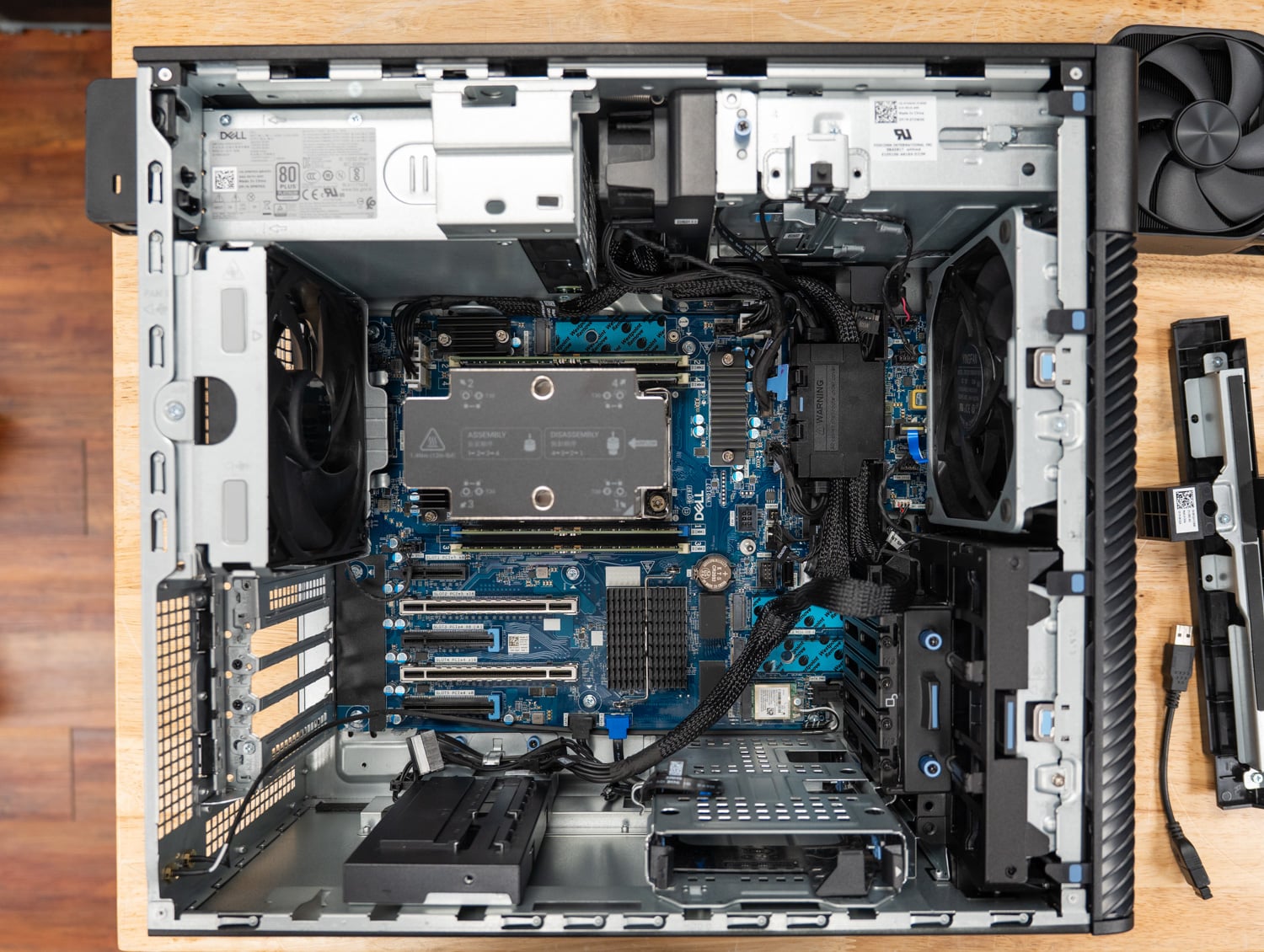
The inside of the chassis is built around airflow, and Dell directs the air exactly where it needs to go. The large cooling shroud, which keeps the DIMMs cool and moves hot air from the CPU straight out of the chassis, has a fan integrated into the shroud itself. With the case open, you can see how the shroud works into the structural layout of the chassis, resting its lower edge on the GPU support bracket and fitting snugly against the side cover.

Inside, the layout follows the Pro Max tower’s: the processor and four DIMM slots sit above the expansion area, the GPU in the Gen5 x16 slot is supported at its far end by a retention bracket, and the power supply mounts at the rear with a handle for tool-less removal. All five slots are full height: slot 2 is the Gen5 x16 for the GPU, slot 1 is Gen5 x4, and the other three are Gen4, one x16 and two open-ended x8, for a NIC, a storage card, or a second GPU. Three internal M.2 2280 Gen5 slots and two 3.5-inch SATA bays sit behind the front E3.S bay.

Front I/O is a headset jack, a 20Gbps USB-C port with PowerShare, a 10Gbps USB-C port, two USB-A ports, and an optional SD slot. The rear carries audio line-out, 20Gbps and 10Gbps USB-C ports, two USB 2.0 ports with SmartPower, two USB-A 5Gbps ports, 1GbE, an optional module slot that takes a 5GbE NIC or two more USB-A ports, and an optional legacy serial port. Our unit added the MediaTek MT7925 Wi-Fi 7 card in the internal M.2 2230 slot and the Intel E810-XXV 25GbE card, the one that came out for the 600W GPU.

Dell Pro Precision 9 T2 Specifications
| Specificazione | Dell Pro Precision 9 T2 (PW9T2260) |
|---|---|
| Panoramica della piattaforma | |
| Opzioni del processore | Intel Xeon 634 (12C, 150W), 636 (12C, 170W), 638 (16C, 180W), 654 (18C, 200W), 656 (20C, 210W), 658X (24C / 48T, 144MB L3, 250W) Xeon 658X as tested |
| Memorie | DDR5 RDIMM ECC, 5600 or 6400 MT/s, four slots, up to 1TB (4 x 256GB) 128GB (4 x 32GB) DDR5-6400 as tested |
| Opzioni grafiche | NVIDIA RTX A400, A1000, RTX PRO 2000 / 4000 / 4500 / 5000 / 6000 Blackwell (600W) / 6000 Blackwell Max-Q (300W), A800 Active; AMD Radeon Pro W7400; dual and triple configurations on selected cards RTX PRO 6000 Blackwell Max-Q Workstation Edition, 96GB GDDR7, as tested |
| Archiviazione | Front FlexBay: up to two E3.S / NVMe drives plus optional slim ODD, or one 3.5-inch SATA bay Internal: 3 x M.2 2280 Gen5 NVMe, 2 x 3.5-inch SATA RAID: Intel VMD with VROC by Graid Technology (RAID0 boot, internal RAID0) 2 x 2TB E3.S Gen5 NVMe in RAID0 (4,097GB) as tested |
| Espansione | Slot 1: Gen5 x4; Slot 2: Gen5 x16; Slot 3: Gen4 x8 (x4 electrical, open-ended); Slot 4: Gen4 x16; Slot 5: Gen4 x8 (open-ended); M.2 2230 for Wi-Fi |
| I / O | |
| Porte anteriori | 1 x USB-C 20Gbps with PowerShare, 1 x USB-C 10Gbps, 1 x USB-A 5Gbps with PowerShare, 1 x USB-A 5Gbps, headset jack, optional SD slot |
| Porte posteriori | 1 x USB-C 20Gbps, 1 x USB-C 10Gbps, 2 x USB 2.0 (SmartPower), 2 x USB-A 5Gbps, audio line-out, 1 x RJ45 1GbE, optional 5GbE or dual USB-A module, optional serial |
| Networking as tested | Intel E810-XXV DA2 dual-port 25GbE SFP28 (removed for the 600W GPU runs); MediaTek MT7925 Wi-Fi 7, Bluetooth 5.4 |
| Potenza e Fisico | |
| Alimentazione elettrica | 750W standard; 500W or 1500W optional; 1500W as tested |
| Dimensioni | 387 x 187.7 x 438 mm (15.23 x 7.38 x 17.24 pollici) |
| Peso | 11.6kg (25.57 lb) minimum to 21.8kg (48.06 lb) maximum |
| Sistema operativo | Windows 11 Pro for Workstations (as tested) or Ubuntu Linux 24.04 LTS |
| Gestione e sicurezza | Intel vPro, TPM 2.0, chassis intrusion switch, lockable bezel options, Kensington slot |
| Prezzo | Dell.com base configuration $3,978 (Xeon 634, 16GB, RTX A400, 256GB, 750W); about $28,300 as tested (Xeon 658X, 128GB DDR5-6400, RTX PRO 6000 Max-Q, 2 x 2TB Gen5 FlexBay drives in RAID0, 1500W, 25GbE, Wi-Fi 7), Dell.com pricing as of October 19, 2026 |
That price comes with two caveats. Dell.com’s configurator lists the FlexBay drives as 2TB M.2 2280 Gen5 modules at $1,700 each, while the drives in our unit are E3.S, and we have asked Dell when the E3.S option appears online. And Dell is candid that few business workstations are bought at web price, so treat the $28,300 as a ceiling that volume and contract pricing come in under. The memory and the GPU account for $19,090 of it, and the GPU option costs the same whether you pick the 300W or the 600W card.
Dell puts this exact review unit at $31,700 as tested, a figure that adds the E810-XXV 25GbE adapter, Wi-Fi 7, the optical drive, and three years of ProSupport to the build we priced.

Test Setup e Metodologia
Every result in this review comes from sr-client 1.2, our scripted Windows client benchmark suite, on its full run profile, using Dell’s factory Windows image with Dell’s drivers and NVIDIA driver 596.71 on all four configurations. The suite applies the same settings everywhere: Windows power mode at Best performance, all sleep and display-off timers disabled, Windows Firewall and UAC prompts off, VBS and Memory Integrity left on as shipped. Each result is the median of repeated passes, and the suite reruns a test whose spread exceeds 2 percent before accepting it.
The four configurations below are two towers and two GPUs. The Pro Precision 9 T2 ran the full suite with its Max-Q card and again with the 600W RTX PRO 6000 Blackwell from our Pro Max Tower T2, and the Pro Max Tower T2 ran both cards in turn, so the GPU columns within a tower differ only in the card and the tower columns within a GPU differ only in the platform. The Core T2’s drive is the single 2TB Gen5 M.2 it shipped with, and the Xeon T2’s is its two-drive E3.S stripe, so the storage and model-loading rows compare those as configured.
| Configurazione | CPU | Memorie | GPU | unità di avvio | OS and power mode |
|---|---|---|---|---|---|
| Dell Pro Precision 9 T2 (PW9T2260), Max-Q | Intel Xeon 658X, 24C / 48T, 250W | 128GB DDR5-6400 RDIMM ECC (4 x 32GB) | NVIDIA RTX PRO 6000 Blackwell Max-Q Workstation Edition, 300W, 96GB | 2 x 2TB E3.S Gen5 NVMe, VROC RAID0 (4,097GB boot volume) | Windows 11 Pro for Workstations 25H2, Best performance |
| Dell Pro Precision 9 T2 (PW9T2260), 600W | Intel Xeon 658X, 24C / 48T, 250W | 128GB DDR5-6400 RDIMM ECC (4 x 32GB) | NVIDIA RTX PRO 6000 Blackwell Workstation Edition, 600W, 96GB | 2 x 2TB E3.S Gen5 NVMe, VROC RAID0 (4,097GB boot volume) | Windows 11 Pro for Workstations 25H2, Best performance |
| Dell Pro Max Tower T2 (FCT2250), Max-Q | Intel Core Ultra 9 285K, 24C / 24T, 125W | 128GB DDR5-4400 ECC (4 x 32GB) | NVIDIA RTX PRO 6000 Blackwell Max-Q Workstation Edition, 300W, 96GB | SK hynix PCB01 2TB, Gen5 x4 | Windows 11 Pro 26H2, Best performance |
| Dell Pro Max Tower T2 (FCT2250), 600W | Intel Core Ultra 9 285K, 24C / 24T, 125W | 128GB DDR5-4400 ECC (4 x 32GB) | NVIDIA RTX PRO 6000 Blackwell Workstation Edition, 600W, 96GB | SK hynix PCB01 2TB, Gen5 x4 | Windows 11 Pro 26H2, Best performance |
Several tests debut here, starting with LLM serving, which runs llama-server with four models and sweeps concurrency from one request up to the most that fit in GPU memory, reporting total and per-user throughput, time to first token, and time per output token. The image generation test renders 1024×1024 images with FLUX.2 klein 4B, Z-Image Turbo 6B, and Qwen-Image 20B at Q4_0, Q8_0, and BF16 weights, and scores the quantized outputs against BF16 with PSNR and SSIM, so speed and fidelity sit side by side. The coding agent test now runs on Crush, and the agent-beside-user test uses a revised method that holds the browser benchmark to three full passes.
Three labels recur in the tables, starting with N/A, which means a test does not apply to the hardware: SMT single-core on the 285K, which has no SMT, and the OpenBLAS top-core-class rows on the Xeon, whose 24 cores are one class. Partial marks a result the suite accepted with a note, most often a coding agent tier where one of three runs failed its tests. Neither desktop exposed CPU or GPU temperatures to the suite’s sensor path, so this review reports mean CPU clocks per test in place of a thermal table.
Prestazioni locali dell'IA
With 96GB of GDDR7 on every configuration, model capacity is a given, and every tier of our local AI suite runs on all four. The results therefore split along the GPU power limit: where a test is bound by memory bandwidth, the Max-Q and 600W cards run close together, and where it is bound by compute, the 600W card pulls ahead. The CPU platform rarely matters, and where it does, the direction is worth noting.
Client MLPerf v2.0
MLPerf Client runs Llama 3.1 8B and Phi-4-mini through five prompt categories and reports time to first token and the token rate after it, as a geometric mean across the categories, with llama.cpp on CUDA as the engine on every configuration. The agentic scenarios run Llama 3.1 8B as a data analyst agent and a software engineering agent that call tools over multiple turns.

| Client MLPerf v2.0 | Pro Precision 9 T2, Max-Q 300W | Pro Precision 9 T2, 600W | Pro Max Tower T2, Max-Q 300W | Pro Max Tower T2, 600W |
|---|---|---|---|---|
| Llama 3.1 8B, tempo al primo token, media geometrica (s, minore è meglio) | 0.082 | 0.059 | 0.082 | 0.060 |
| Llama 3.1 8B, tasso di cambio token, media geometrica (tok/s) | 230.9 | 252.8 | 230.0 | 246.7 |
| Phi-4-mini, tempo al primo token, media geometrica (s, minore è meglio) | 0.045 | 0.034 | 0.044 | 0.034 |
| Phi-4-mini, tasso di token, media geometrica (tok/s) | 345.9 | 379.0 | 351.0 | 374.3 |
| Agente di analisi dati, end-to-end (s, minore è meglio) | 17.5 | 15.7 | 16.2 | 14.4 |
| Agente di analisi dati, tariffa in token (tok/s) | 202.9 | 223.9 | 202.3 | 218.4 |
| Agente SWE, end-to-end (s, minore è meglio) | 16.2 | 14.9 | 14.6 | 13.5 |
| Agente SWE, tasso di cambio token (tok/s) | 197.5 | 214.6 | 195.5 | 210.2 |
The Max-Q card generated Llama 3.1 8B at 230.9 tokens per second in the Xeon tower and 230.0 in the Core tower, and Phi-4-mini at 345.9 and 351.0, which is the same GPU doing the same work. The 600W card raised those to 252.8 and 379.0 tokens per second in the Xeon tower, a gain of about 9 percent, and cut time to first token on Llama from 0.082 to 0.059 seconds, a 28 percent reduction. Prompt processing is compute-bound, and decode is bandwidth-bound, and the two cards share the same memory, so the power limit shows up far more in the first token than in the ones after it.
The agentic scenarios are where the CPU platform appears. The data analyst agent finished in 16.2 seconds on the Core T2 with the Max-Q card and 17.5 on the Xeon T2, and the SWE agent in 14.6 against 16.2, with the Xeon’s tool-call phases taking about 1.5 seconds longer in each. The token rates match within 1 percent, so the difference is the tools running on the CPU between model calls, where the 285K’s faster cores finish sooner.
Caricamento del modello
This test times a local model in Ollama from drive to its first generated token, cold (file cache flushed) and warm (file already in memory), and reports how fast the drive was read during the cold load, when the weights arrived in GPU memory, and a load efficiency figure that compares the read rate during the load to the drive’s 1MB sequential ceiling. With 96GB of VRAM, all three tiers run: gpt-oss:20b at 12.8GB, Qwen3.6-35B-A3B at 21.1GB, and gpt-oss:120b at 60.9GB.

| Caricamento del modello (mappatura della memoria attiva) | Pro Precision 9 T2, Max-Q 300W | Pro Precision 9 T2, 600W | Pro Max Tower T2, Max-Q 300W | Pro Max Tower T2, 600W |
|---|---|---|---|---|
| gpt-oss:20b, caricamento a freddo sul primo token (s, minore è meglio) | 9.68 | 9.02 | 7.41 | 7.23 |
| gpt-oss:20b, caricamento a caldo sul primo token (s, minore è meglio) | 7.52 | 7.18 | 6.60 | 6.61 |
| gpt-oss:20b, arrival in GPU memory, cold (s, lower is better) | 4.44 | 4.33 | 3.00 | 2.95 |
| Qwen3.6-35B-A3B, caricamento a freddo del primo token (s, minore è meglio) | 13.31 | 12.32 | 11.62 | 11.01 |
| Qwen3.6-35B-A3B, caricare a caldo il primo token (s, più basso è meglio) | 11.63 | 10.75 | 10.35 | 9.99 |
| gpt-oss:120b, caricamento a freddo sul primo token (s, minore è meglio) | 32.06 | 32.44 | 28.54 | 28.11 |
| gpt-oss:120b, caricamento a caldo sul primo token (s, minore è meglio) | 27.18 | 26.49 | 25.58 | 25.73 |
| gpt-oss:120b, velocità di lettura durante il caricamento a freddo (MB/s) | 9,875 | 9,106 | 11,633 | 11,248 |
| gpt-oss:120b, arrival in GPU memory, cold (s, lower is better) | 11.33 | 11.57 | 7.74 | 7.63 |
| gpt-oss:120b load after swapping from gpt-oss:20b (s, lower is better) | 14.30 | 13.97 | 11.89 | 11.93 |
| Drive ceiling, DiskSpd 1MB sequential read (MB/s) | 11,306 | 11,296 | 11,563 | 11,646 |
The Core T2 loads every model faster, and the drive is the reason. gpt-oss:120b reached its first token in 28.54 seconds cold on the Core T2 against 32.06 on the Xeon T2, with the 61GB of weights arriving in GPU memory in 7.74 seconds against 11.33. The single PCB01 fed the load at 11,633MB/s, right at its 11,563MB/s DiskSpd ceiling, while the E3.S stripe fed it at 9,875MB/s against a 11,306MB/s ceiling of its own. The RAID volume reads large blocks nearly as fast as the single drive but does not sustain that rate through Ollama’s memory-mapped loading path.
Warm loads narrow the gap to a second or two, since the file is already in system memory and what remains is the transfer into VRAM and llama.cpp’s setup: 27.18 seconds on the Xeon T2 against 25.58 for gpt-oss:120b, and 7.52 against 6.60 for gpt-oss:20b. The GPU’s power limit makes no consistent difference to loading, as expected.
Agente di codifica
Crush, a terminal coding agent, drives a local model served by Ollama through a fixed coding task in a pinned repository, with up to three rounds to make the repository’s 11 tests pass; we report the median wall time of three runs, how many succeeded, and the generation rate. Wall time depends on how many tool calls and tokens the model decides to spend, which varies run to run, so the generation rate is the cleaner hardware comparison. The agent-beside-user test runs the agent and Speedometer together and reports how much each slows the other.

| Crush coding agent | Pro Precision 9 T2, Max-Q 300W | Pro Precision 9 T2, 600W | Pro Max Tower T2, Max-Q 300W | Pro Max Tower T2, 600W |
|---|---|---|---|---|
| Tier S, gpt-oss:20b, 64K context | ||||
| Wall time, median (s, lower is better) | 55.1 | 99.8 | 57.2 | 43.2 |
| Successes (of 3) | 3 | 2 | 3 | 2 |
| Generation rate (tok/s) | 214.1 | 237.9 | 218.0 | 237.7 |
| Tier M, Qwen3.6-35B-A3B, 64K context | ||||
| Wall time, median (s, lower is better) | 35.2 | 27.0 | 86.7 | 32.1 |
| Successes (of 3) | 3 | 3 | 3 | 3 |
| Generation rate (tok/s) | 234.5 | 242.9 | 223.3 | 245.8 |
| Tier L, Qwen3.6-35B-A3B, 128K context | ||||
| Wall time, median (s, lower is better) | 38.1 | 30.6 | 74.1 | 58.8 |
| Successes (of 3) | 3 | 3 | 3 | 3 |
| Generation rate (tok/s) | 222.9 | 237.0 | 231.1 | 252.8 |
| Tier W, gpt-oss:120b, 128K context | ||||
| Wall time, median (s, lower is better) | 49.1 | 37.9 | 56.6 | 30.8 |
| Successes (of 3) | 3 | 3 | 3 | 3 |
| Generation rate (tok/s) | 160.9 | 177.1 | 158.5 | 174.4 |
| Agent beside the user (gpt-oss:20b and Speedometer together) | ||||
| Tachimetro accanto all'agente (punteggio) | 36.6 | 36.7 | 43.2 | 45.2 |
| Speedometer slowdown (x, lower is better) | 1.005 | 1.011 | 1.053 | 1.044 |
| Agent generation rate beside Speedometer (tok/s) | 218.2 | 231.6 | 212.4 | 229.2 |
| Agent slowdown (x, lower is better) | 1.006 | 1.009 | 1.023 | 0.998 |
Every configuration completed all three runs of the tier W task with gpt-oss:120b, the largest model in the suite, generating at 160.9 to 177.1 tokens per second in the Xeon tower and 158.5 to 174.4 in the Core tower, with the 600W card worth about 10 percent in each. The Qwen3.6 tasks also passed three of three everywhere, at 223 to 253 tokens per second. gpt-oss:20b is the model that stumbled: the tier S task lost one of three runs on two of the four configurations, and its 128K-context tier M task (not shown) lost at least one run everywhere, a model behavior that the hardware does not change.
Running the agent and a browser benchmark at once costs almost nothing on a tower with a discrete GPU and 24 cores to spare. Speedometer slowed by 1.005x on the Xeon T2 and 1.053x on the Core T2 with the agent running, and the agent’s generation rate moved by 2 percent or less in every case. The Xeon T2’s Speedometer score of 36.6 beside the agent is lower than the Core T2’s 43.2 for the same reason it is lower alone: the 285K’s per-core speed.
Generazione aumentata di recupero
Our RAG test embeds 20,963 SQuAD v1.1 passages with nomic-embed-text, retrieves the top five passages for each of 2,000 questions, and answers 400 of them with Phi-4-mini, scoring exact match and F1 against the reference answers. The models are small, so the test measures the whole pipeline, including the CPU-side vector search between the GPU phases.

| RAG | Pro Precision 9 T2, Max-Q 300W | Pro Precision 9 T2, 600W | Pro Max Tower T2, Max-Q 300W | Pro Max Tower T2, 600W |
|---|---|---|---|---|
| Tempo di ingestione, 20,963 passaggi (s, minore è meglio) | 128.5 | 125.5 | 108.1 | 103.0 |
| Embedding rate (tok/s) | 29,875 | 30,592 | 35,165 | 37,508 |
| Tempo di recupero della query, p50 (ms, un valore inferiore è migliore) | 30.6 | 27.2 | 23.4 | 18.7 |
| Risposta, tempo Phi-4-mini al primo token, p50 (s, minore è meglio) | 0.099 | 0.087 | 0.089 | 0.083 |
| Risposta, elaborazione rapida (tok/s) | 20,318 | 26,549 | 21,356 | 26,619 |
| Risposta, velocità di generazione (tok/s) | 296.4 | 337.8 | 324.3 | 344.1 |
| Domanda a cui rispondere, p50 (s, più basso è meglio) | 0.152 | 0.133 | 0.130 | 0.120 |
| Recall@5 (%) | 82.7 | 82.7 | 82.7 | 82.7 |
| Risposta F1 (%) | 74.65 | 74.65 | 74.65 | 74.65 |
The Core T2 is quicker through this pipeline. It ingested the corpus in 108.1 seconds against 128.5 on the Xeon T2 with the same Max-Q card, retrieved in 23.4 ms against 30.6 at the median, and answered a question in 0.130 seconds against 0.152. Embedding and retrieval both have CPU-bound stages, and those favor the 285K. The 600W card lifted prompt processing by 25 to 30 percent on both platforms, from 20,318 to 26,549 tokens per second on the Xeon T2, and accuracy was identical across all four configurations, as it should be with the same models at temperature 0.
LLM Serving
The serving test runs llama-server with Ministral 3 3B and 8B (4,096-token prompts, 1,024-token outputs), Qwen3.8 27B, and gpt-oss 120B (8,192-token prompts), allocates as many slots as fit in GPU memory after the weights, and then sweeps concurrency from one request up to that limit. We report total throughput (prompt and output tokens together), output throughput, time to first token, and time per output token at the median. On a 96GB card, gpt-oss 120B fits 64 slots with 22.5GiB of KV cache, Qwen3.8 27B fits eight, and the two Ministral models fit four at their context.

| llama-server, gpt-oss 120B, 8,192-token prompts, 1,024-token outputs | Pro Precision 9 T2, Max-Q 300W | Pro Precision 9 T2, 600W | Pro Max Tower T2, Max-Q 300W | Pro Max Tower T2, 600W |
|---|---|---|---|---|
| 1 concurrent: output throughput (tok/s) | 160.6 | 182.7 | 158.4 | 179.0 |
| 1 concurrent: time to first token, median (ms, lower is better) | 1,241 | 918 | 1,238 | 923 |
| 1 concurrent: time per output token, median (ms, lower is better) | 5.03 | 4.58 | 5.11 | 4.70 |
| 8 concurrent: total throughput (tok/s) | 2,088 | 2,460 | 2,154 | 2,534 |
| 8 concurrent: output per user (tok/s) | 29.0 | 34.2 | 29.9 | 35.2 |
| 8 concurrent: time to first token, median (ms, lower is better) | 2,847 | 2,152 | 2,856 | 2,121 |
| 64 concurrent: total throughput (tok/s) | 3,296 | 3,805 | 3,531 | 4,220 |
| 64 concurrent: output per user (tok/s) | 5.7 | 6.6 | 6.1 | 7.3 |
| 64 concurrent: time to first token, median (ms, lower is better) | 4,315 | 3,491 | 4,607 | 3,622 |
| 64 concurrent: time per output token, median (ms, lower is better) | 163.0 | 141.3 | 152.7 | 126.3 |
A single user gets gpt-oss 120B at 160.6 tokens per second on the Max-Q card and 182.7 on the 600W card, with the first token arriving in 1,241 and 918 ms after an 8,192-token prompt. Loading the card with 64 concurrent requests raised total throughput to 3,296 tokens per second on the Max-Q and 3,805 on the 600W card, at the cost of 5.7 and 6.6 tokens per second per user and first tokens of 4.3 and 3.5 seconds. The curve flattens between 4 and 32 concurrent requests and jumps again at 64, where the batch finally amortizes the long prompts.

| llama-server, output throughput at the highest concurrency that fits (tok/s) | Pro Precision 9 T2, Max-Q 300W | Pro Precision 9 T2, 600W | Pro Max Tower T2, Max-Q 300W | Pro Max Tower T2, 600W |
|---|---|---|---|---|
| Ministral 3 3B Reasoning, 4 concurrent | 562.5 | 600.4 | 576.8 | 625.3 |
| Ministral 3 8B Reasoning, 4 concurrent | 375.8 | 445.1 | 377.9 | 446.3 |
| Qwen3.8 27B, 8 concurrent | 153.1 | 189.6 | 152.2 | 187.3 |
| gpt-oss 120B, 64 concurrent | 366.3 | 422.8 | 392.3 | 468.9 |
| Single request output throughput (tok/s) | ||||
| Ministral 3 3B Reasoning | 232.1 | 241.8 | 232.1 | 246.0 |
| Ministral 3 8B Reasoning | 165.0 | 183.3 | 164.1 | 180.4 |
| Qwen3.8 27B | 54.0 | 63.7 | 54.1 | 63.0 |
| gpt-oss 120B | 160.6 | 182.7 | 158.4 | 179.0 |
The dense Qwen3.8 27B is the slowest model here for a single user at 54.0 tokens per second on the Max-Q, because every token touches all 27 billion parameters, while the mixture-of-experts gpt-oss 120B runs 3.0x faster despite being four times larger on disk. The 600W card’s advantage is widest on the dense model, 24 percent at eight concurrent requests, and narrowest on Ministral 3B at about 7 percent. The two towers are within about 3 percent everywhere except the 64-request gpt-oss case, where the Core T2 led by 7 to 11 percent with either card, so the server’s CPU-side work at that batch size favors the faster cores.
Generazione di immagini
The image generation test renders 1024×1024 images with three diffusion models at three weight precisions and reports the time per image, the denoising rate, and the GPU memory the weights occupy. It also renders the same seed at BF16 and scores the Q4_0 and Q8_0 outputs against it with PSNR and SSIM, which puts a number on what quantization costs in the picture.

| Image generation, 1024×1024 | Pro Precision 9 T2, Max-Q 300W | Pro Precision 9 T2, 600W | Pro Max Tower T2, Max-Q 300W | Pro Max Tower T2, 600W |
|---|---|---|---|---|
| FLUX.2 klein 4B, 4 steps | ||||
| Q8_0: seconds per image (lower is better) | 1.66 | 1.37 | 1.59 | 1.30 |
| Q8_0: images per minute | 36.2 | 43.7 | 37.6 | 46.0 |
| BF16: seconds per image (lower is better) | 1.60 | 1.34 | 1.55 | 1.27 |
| Z-Image Turbo 6B, 8 steps | ||||
| Q8_0: seconds per image (lower is better) | 3.82 | 2.89 | 3.78 | 2.82 |
| Q8_0: images per minute | 15.7 | 20.7 | 15.9 | 21.3 |
| BF16: seconds per image (lower is better) | 3.61 | 2.76 | 3.56 | 2.68 |
| Qwen-Image 20B, 20 steps | ||||
| Q4_0: seconds per image (lower is better) | 25.60 | 19.11 | 25.57 | 18.97 |
| Q8_0: seconds per image (lower is better) | 26.08 | 19.66 | 26.02 | 19.42 |
| BF16: seconds per image (lower is better) | 26.17 | 20.45 | 26.05 | 20.28 |
| Q8_0: images per minute | 2.30 | 3.05 | 2.31 | 3.09 |
| BF16: GPU memory for weights (GiB) | 45.3 | 45.3 | 45.3 | 45.3 |
Diffusion is compute-bound, and the 600W card shows it: Qwen-Image 20B at Q8_0 took 26.1 seconds per image on the Max-Q and 19.7 on the 600W card in the Xeon tower, a 33 percent gain in images per minute, with Z-Image Turbo gaining 32 percent and FLUX.2 klein 21 percent. The CPU platform is irrelevant here, with the two towers within 1 percent on every row except server start, where the Xeon T2’s RAID volume takes a few seconds longer to load the weights.
| Quantization fidelity against BF16 (same seed) | Pro Precision 9 T2, Max-Q 300W | Pro Precision 9 T2, 600W | Pro Max Tower T2, Max-Q 300W | Pro Max Tower T2, 600W |
|---|---|---|---|---|
| PSNR (dB, higher is better) / SSIM (higher is better) | ||||
| FLUX.2 klein 4B, Q4_0 | 17.5 / 0.788 | 17.5 / 0.788 | 17.5 / 0.788 | 17.5 / 0.788 |
| FLUX.2 klein 4B, Q8_0 | 32.9 / 0.987 | 32.9 / 0.987 | 32.9 / 0.987 | 32.9 / 0.987 |
| Z-Image Turbo 6B, Q4_0 | 19.6 / 0.752 | 19.6 / 0.752 | 19.6 / 0.752 | 19.6 / 0.752 |
| Z-Image Turbo 6B, Q8_0 | 28.5 / 0.938 | 28.5 / 0.938 | 28.5 / 0.938 | 28.5 / 0.938 |
| Qwen-Image 20B, Q4_0 | 22.3 / 0.792 | 22.3 / 0.792 | 22.3 / 0.792 | 22.3 / 0.792 |
| Qwen-Image 20B, Q8_0 | 35.8 / 0.985 | 35.8 / 0.985 | 35.8 / 0.985 | 35.8 / 0.985 |
The fidelity rows are identical across the four configurations, since the output depends on the weights and not the hardware. Q8_0 reproduces the BF16 image at an SSIM of 0.938 to 0.987 and 28 to 36 dB PSNR, while Q4_0 falls to 0.75 to 0.79 SSIM and 18 to 22 dB, which is a different picture. On a 96GB card there is no memory reason to run these models below Q8_0; Qwen-Image’s BF16 weights fit at 45.3GiB, and BF16 rendered as fast as Q8_0 or slightly faster on all three models, since the Q8_0 path spends time dequantizing.
Prestazioni della CPU
The two processors split our CPU suite along a clean line. Where a test uses all the cores, the Xeon 658X wins by 27 to 150 percent in most of them, and the wider the vectors and the heavier the memory traffic, the larger its margin. Where a test runs on one thread or a few, the Core Ultra 9 285K wins by 13 to 31 percent on the strength of a 5.7GHz P-core against a 4.9GHz Xeon core with higher cache and memory latency. The 600W GPU’s effect on the Xeon’s all-core results is covered with each table and summarized in the clock section.
Cinebench 2026 e carico sostenuto
Cinebench 2026 renderizza una scena con il motore Redshift di Maxon sulla CPU e valuta le prestazioni single-core, SMT single-core (due thread su un singolo core fisico) e multi-core. Successivamente, eseguiamo un ciclo continuo che ripete l'esecuzione multi-core per circa 30 minuti e confrontiamo il risultato a regime con quello della prima passata.

| Cinebench 2026 (punti, più alto è il punteggio, meglio è) | Pro Precision 9 T2, Max-Q 300W | Pro Precision 9 T2, 600W | Pro Max Tower T2, Max-Q 300W | Pro Max Tower T2, 600W |
|---|---|---|---|---|
| Single core | 454.1 | 455.6 | 564.4 | 564.5 |
| singolo nucleo SMT | 599.1 | 601.0 | N/A (no SMT) | N/A (no SMT) |
| Multi-core | 12,322 | 11,705 | 8,856 | 8,838 |
| Ciclo sostenuto, primo passaggio | 12,201 | 11,731 | 8,717 | 8,788 |
| Ciclo sostenuto, stato stazionario | 12,328 | 11,764 | 8,825 | 8,844 |
| Stato stazionario / primo passaggio | 1.010 | 1.003 | 1.012 | 1.006 |
| Sustained loop, steady-state CPU clock (MHz) | 4,274 | 4,178 | 4,669 | 4,690 |
The 658X scored 12,322 multi-core with the Max-Q card installed, 39 percent ahead of the 285K’s 8,856, and held 12,328 through the 30-minute loop, a steady state 1 percent above its first pass. On one core the order reverses: the 285K scored 564.4 against the Xeon’s 454.1, and it takes two threads on one Xeon core, at 599.1, to pass the 285K’s single-thread figure.
Swapping in the 600W card took the Xeon’s multi-core score to 11,705 and its steady state to 11,764, 5 percent lower, with the steady-state clock down from 4,274 to 4,178MHz. The Core T2 showed no such change, at 8,856 and 8,838. The suite did not capture CPU or GPU temperatures on either tower, so we cannot say whether the 250W processor is losing to the 600W card’s heat or to a shared power budget, only that it loses 4 to 5 percent on every all-core test with the larger card in the chassis.
7-Zip
7-Zip’s built-in benchmark reports LZMA compression and decompression throughput in giga-instructions per second, once on every thread and once pinned to a single core. LZMA leans on integer throughput, branch prediction, and cache and memory latency, so it rewards core count and a fast memory path more than vector width.

| 7-Zip (GIPS, più alto è, meglio è) | Pro Precision 9 T2, Max-Q 300W | Pro Precision 9 T2, 600W | Pro Max Tower T2, Max-Q 300W | Pro Max Tower T2, 600W |
|---|---|---|---|---|
| Tutti i thread | ||||
| Totale | 289.6 | 288.9 | 174.8 | 175.7 |
| Comprimere | 276.4 | 273.5 | 151.5 | 151.9 |
| Decomprimere | 303.0 | 304.4 | 198.1 | 199.4 |
| One thread | ||||
| Totale | 8.74 | 8.05 | 10.82 | 10.83 |
| Comprimere | 8.66 | 7.80 | 9.31 | 9.31 |
| Decomprimere | 8.83 | 8.30 | 12.33 | 12.34 |
On 48 threads, the Xeon rated 289.6 GIPS against the 285K’s 174.8 on 24, a 66 percent lead, with compression ahead by 82 percent and decompression by 53. On one thread, the 285K led at 10.82 GIPS against 8.74, and the gap widened with the 600W card in the Xeon tower, to 8.05, in line with the lower clocks that configuration ran at.
Blender, HandBrake e LLVM
Blender 4.5 renderizza le scene Monster, Junkshop e Classroom con Cycles sulla CPU. HandBrake codifica 60 secondi di una clip 4K60 in software con x265 (HEVC, preset medio, qualità 22) e SVT-AV1 (preset 8, qualità 30). Il test LLVM compila l'intero albero LLVM 21.1.4 con Clang e Ninja, il carico di lavoro all-core più lungo della suite.


| Test | Pro Precision 9 T2, Max-Q 300W | Pro Precision 9 T2, 600W | Pro Max Tower T2, Max-Q 300W | Pro Max Tower T2, 600W |
|---|---|---|---|---|
| Blender 4.5 Monster (samples/min, higher is better) | 366.2 | 339.0 | 259.6 | 257.7 |
| Blender 4.5 Junkshop (samples/min) | 238.1 | 228.0 | 166.2 | 166.8 |
| Blender 4.5 Classroom (samples/min) | 187.2 | 169.2 | 132.5 | 132.3 |
| HandBrake x265, medium, q22 (fps, higher is better) | 46.9 | 46.1 | 47.0 | 47.2 |
| HandBrake SVT-AV1, preset 8, q30 (fps) | 64.0 | 65.0 | 117.5 | 118.6 |
| LLVM 21.1.4 build (s, lower is better) | 140.2 | 142.1 | 182.5 | 182.5 |
The Xeon rendered Monster at 366.2 samples per minute against 259.6 on the 285K, a 41 percent lead that holds within two points across all three scenes, and it built LLVM in 140.2 seconds against 182.5, 23 percent less time. With the 600W card installed, the Xeon’s Blender scores dropped by 7 to 10 percent, the highest cost of the card anywhere in the CPU suite.
HandBrake split along encoder lines: x265 at the medium preset ran at 46.9 fps on the Xeon and 47.0 on the 285K, a tie, while SVT-AV1 at preset 8 ran at 64.0 fps on the Xeon against 117.5 on the 285K.
We spent an afternoon on that gap, and it is a per-thread result. The encoder tops out at Level of Parallelism 6 at this preset and keeps about nine logical processors’ worth of work busy on the Xeon; forcing its AVX2 kernels in place of AVX-512 changed nothing (63.8 against 63.9 fps), and pinning it to one thread per physical core came in 2 percent slower (62.6 fps), so neither the vector path nor SMT scheduling is the cause. What remains is the Xeon core itself and the mesh between cores, which a pipelined encoder waiting on handoffs between stages feels on every frame.
Stockfish, primesieve, Python e il browser
Stockfish’s built-in bench reports chess search speed in millions of nodes per second. primesieve counts the primes below 10^12 on all threads and below 10^11 on one thread. PyPerformance runs three CPython benchmarks (go, nbody, and regex_compile) pinned to one fast core, and Speedometer 3.1 measures web application responsiveness in Microsoft Edge.
| Test | Pro Precision 9 T2, Max-Q 300W | Pro Precision 9 T2, 600W | Pro Max Tower T2, Max-Q 300W | Pro Max Tower T2, 600W |
|---|---|---|---|---|
| Banco da pesca Stockfish, tutte le filettature (Mnps, maggiore è il valore, migliore è la filettatura) | 40.87 | 39.17 | 30.10 | 30.63 |
| Banco da pesca Stockfish, una filettatura (Mnps, più alto è meglio) | 1.65 | 1.60 | 1.99 | 1.99 |
| primesieve 1e12, tutti i fili (s, più basso è meglio) | 7.69 | 7.51 | 6.77 | 6.84 |
| primesieve 1e11, un filo (s, più basso è meglio) | 10.09 | 10.76 | 8.72 | 8.72 |
| PyPerformance go (ms, un valore inferiore è migliore) | 91.4 | 91.0 | 64.8 | 64.9 |
| PyPerformance nbody (ms, un valore inferiore è migliore) | 68.3 | 68.8 | 54.3 | 53.8 |
| PyPerformance regex_compile (ms, un valore inferiore è migliore) | 88.6 | 90.5 | 61.1 | 61.2 |
| Speedometer 3.1, Edge (punteggio, più alto è, meglio è) | 36.8 | 37.3 | 46.3 | 46.5 |
Stockfish on 48 threads reached 40.87 Mnps on the Xeon against 30.10 on the 285K, and on one thread the 285K led at 1.99 against 1.65. primesieve is the one all-thread test the 285K wins, at 6.77 seconds against 7.69, since its sieve fits in cache and scales with clock as much as with cores. The single-threaded rows all go to the 285K by 13 to 31 percent: PyPerformance go in 64.8 ms against 91.4, regex_compile in 61.1 against 88.6, and Speedometer at 46.3 against 36.8.
That browser number is the one a buyer feels at the desk. A Speedometer score of 36.8 is still quick in absolute terms, but it is a fifth below the Core tower in the same chassis, and anyone choosing the Xeon for its throughput should expect the interactive side of the machine to be a step slower than a Core Ultra desktop.
GROMACS, OpenBLAS e Memoria
GROMACS runs the benchMEM molecular dynamics case on 16 cores in four rank-and-thread layouts and reports nanoseconds of simulated time per day for the best layout. Our OpenBLAS test runs an HPL-style double-precision LU solve at three problem sizes and a DGEMM matrix multiply on all cores, and on the 285K again on its eight P-cores alone; the Xeon’s 24 cores are one class, so those rows do not apply. STREAM measures sustained memory bandwidth, and the latency rows measure a single access to memory and between cores.

| Test (punteggio più alto è migliore) | Pro Precision 9 T2, Max-Q 300W | Pro Precision 9 T2, 600W | Pro Max Tower T2, Max-Q 300W | Pro Max Tower T2, 600W |
|---|---|---|---|---|
| GROMACS benchMEM, miglior layout (ns/giorno) | 47.39 | 47.91 | 37.30 | 37.07 |
| OpenBLAS LU N=10000, tutti i core (GFLOPS) | 570.3 | 517.3 | 519.7 | 523.1 |
| OpenBLAS LU N=20000, tutti i core (GFLOPS) | 1,208.6 | 1,100.6 | 633.2 | 631.8 |
| OpenBLAS LU N=40000, tutti i core (GFLOPS) | 1,659.2 | 1,613.7 | 667.9 | 669.5 |
| OpenBLAS LU N=20000, P-cores only (GFLOPS) | N/A (one core class) | N/A (one core class) | 515.2 | 517.7 |
| OpenBLAS DGEMM M=8000, tutti i core (GFLOPS) | 1,637.8 | 1,750.9 | 768.2 | 767.6 |
| OpenBLAS DGEMM M=8000, P-cores only (GFLOPS) | N/A (one core class) | N/A (one core class) | 565.3 | 566.5 |
This is where AVX-512, 144MB of L3, and four channels of DDR5-6400 compound. DGEMM reached 1,638 GFLOPS on the Xeon against 768 on the 285K, and the N=40000 LU solve, which streams 11.9GB through memory, ran at 1,659 against 668 GFLOPS, 2.5x the Core tower. The 285K’s result barely moves from N=20000 to N=40000 because it is bandwidth-bound by then, while the Xeon keeps scaling. GROMACS on 16 cores favored the Xeon by 27 percent at 47.39 ns/day.

| Test | Pro Precision 9 T2, Max-Q 300W | Pro Precision 9 T2, 600W | Pro Max Tower T2, Max-Q 300W | Pro Max Tower T2, 600W |
|---|---|---|---|---|
| Copia STREAM (MB/s, valore più alto è migliore) | 106,698 | 106,512 | 39,477 | 39,426 |
| Scala STREAM (MB/s) | 105,368 | 105,180 | 39,788 | 39,801 |
| STREAM Aggiungi (MB/s) | 119,520 | 119,332 | 36,324 | 36,306 |
| Triade STREAM (MB/s) | 122,233 | 122,135 | 33,003 | 33,014 |
| Latenza della memoria, buffer da 1 GiB, pagine da 4 KiB (ns, un valore inferiore è migliore) | 148.3 | 147.8 | 135.2 | 135.4 |
| Latenza tra i core, media di tutte le coppie (ns, valore inferiore è migliore) | 56.2 | 56.0 | 38.1 | 38.2 |
| Core-to-core latency, minimum pair (ns) | 4.6 | 4.6 | 18.6 | 18.6 |
| Core-to-core latency, maximum pair (ns) | 65.7 | 66.8 | 44.7 | 44.5 |
STREAM Triad ran at 122,233MB/s on the Xeon T2 and 33,003 on the Core T2, 3.7x the bandwidth, from four channels of DDR5-6400 RDIMM against four of DDR5-4400 UDIMM on a platform that cannot keep up with its DIMMs. The cost is latency: 148.3 ns to memory on the Xeon against 135.2 on the 285K, and 56.2 ns between cores on average against 38.1. The Xeon’s 4.6 ns minimum is a pair of SMT siblings on one core, and its 65.7 ns maximum is a trip across the mesh.
Gaming
SuperTuxKart 1.5 runs its built-in benchmark at 1080p fullscreen on the highest preset with vsync off, and we report the average and the steady frame rate. At this resolution, the GPU has headroom to spare, so the result follows the CPU, and the test stands in for the many professional viewports that are limited the same way. The NVENC pass of our encode test did not complete on these systems and is omitted.

| SuperTuxKart 1.5, 1080p Ultra, vsync off (fps, higher is better) | Pro Precision 9 T2, Max-Q 300W | Pro Precision 9 T2, 600W | Pro Max Tower T2, Max-Q 300W | Pro Max Tower T2, 600W |
|---|---|---|---|---|
| Media | 304.6 | 323.2 | 359.1 | 383.5 |
| Tipico | 304 | 322 | 354 | 376 |
| Costante | 161 | 174 | 122 | 135 |
The Core T2 averaged 359.1 fps with the Max-Q card against 304.6 on the Xeon T2, the single-thread gap again, while the Xeon tower held a higher steady frame rate at 161 fps against 122, with fewer dips. The 600W card added about 6 percent to the average in both towers.
Clocks Under Load
Neither tower reported CPU or GPU temperatures through the suite’s sensor path, so the thermal table we usually publish is replaced here with the mean CPU clock during each test, which is the number that explains the 600W card’s effect on the Xeon. With the Max-Q installed, the 658X held 4,269MHz through the 30-minute sustained loop and 4,040 to 4,480MHz in the shorter all-core tests. With the 600W card in the chassis, most of those tests ran lower, by up to 300MHz, and all of them scored lower.

| Mean CPU clock during the test (MHz) | Pro Precision 9 T2, Max-Q 300W | Pro Precision 9 T2, 600W | Pro Max Tower T2, Max-Q 300W | Pro Max Tower T2, 600W |
|---|---|---|---|---|
| Cinebench 2026 | 4,477 | 4,470 | 4,789 | 4,786 |
| Ciclo sostenuto | 4,269 | 4,182 | 4,663 | 4,682 |
| 7-Zip | 4,414 | 4,307 | 4,854 | 4,837 |
| Stoccafisso | 4,291 | 3,995 | 4,749 | 4,741 |
| Frullatore | 4,258 | 4,253 | 4,582 | 4,552 |
| HandBrake | 4,188 | 4,180 | 4,601 | 4,622 |
| LLVM build | 4,202 | 4,258 | 4,582 | 4,585 |
| GROMACS | 4,288 | 4,290 | 4,664 | 4,694 |
| ApriBLAS | 4,039 | 3,979 | 4,766 | 4,761 |
| STREAM | 4,321 | 4,326 | 4,687 | 4,676 |
| primosetaccio | 4,441 | 4,268 | 4,814 | 4,810 |
| Client MLPerf | 4,191 | 4,138 | 3,814 | 3,686 |
| Agente di codifica | 4,134 | 4,100 | 4,239 | 4,213 |
| LLM serving | 4,261 | 4,169 | 4,229 | 4,209 |
| Generazione di immagini | 4,044 | 4,008 | 3,702 | 3,837 |
| RAG | 4,178 | 4,197 | 4,172 | 4,108 |
| SuperTuxKart | 4,239 | 4,211 | 4,637 | 4,649 |
Stockfish fell from 4,291 to 3,995MHz, primesieve from 4,441 to 4,268, 7-Zip from 4,414 to 4,307, and the sustained loop from 4,269 to 4,182, while the 285K ran within 20MHz of itself in every all-core test regardless of the card.
The mean clock is not the whole explanation. Cinebench and Blender averaged within 10MHz of their Max-Q figures and still lost 5 to 10 percent, which points at short excursions the per-test mean smooths over. The 658X draws up to 250W, the 600W card another 600W, and both exhaust into the same 32-liter volume behind one front intake; whether the limiter is the processor’s thermal headroom or a platform power cap is a question our next pass with external power and temperature logging will answer. For now, buyers running all-core CPU work should know that the Max-Q configuration is the faster one on the CPU side.
Prestazioni di archiviazione
Our storage test runs fio’s four corners against the boot drive at 5GB and 25GB footprints, through the file system and again against the raw device, and reports the 25GB results here. On the Core T2 the boot drive is a single 2TB SK hynix PCB01 on Gen5 x4; on the Pro Precision 9 T2 it is the two E3.S Gen5 drives in the FlexBay, striped into a 4,097GB RAID0 volume by VROC by Graid Technology. BitLocker was off on all four configurations, so the file system rows measure NTFS and the RAID layer, not encryption.


| fio, ingombro 25 GB, QD32 | Pro Precision 9 T2, Max-Q 300W | Pro Precision 9 T2, 600W | Pro Max Tower T2, Max-Q 300W | Pro Max Tower T2, 600W |
|---|---|---|---|---|
| Lettura sequenziale 128K, file system (MB/s) | 9,332 | 9,255 | 11,377 | 11,406 |
| Lettura sequenziale 128K, dispositivo raw (MB/s) | 10,782 | 10,675 | 11,186 | 11,444 |
| Scrittura sequenziale 128K (MB/s) | 6,507 | 6,496 | 7,401 | 7,371 |
| 1MB prefill read, QD32 (MB/s) | 4,617 | 4,679 | 6,440 | 6,346 |
| Lettura casuale 4K, file system, picco (IOPS) | 840,075 | 853,615 | 1,778,576 | 1,756,968 |
| Lettura casuale 4K, dispositivo raw, picco (IOPS) | 1,107,862 | 1,120,737 | 2,297,681 | 2,294,800 |
| Scrittura casuale 4K, picco (IOPS) | 557,512 | 550,505 | 957,461 | 921,774 |
| Lettura casuale raw/del file system | 1.32x | 1.31x | 1.29x | 1.31x |
| Lettura casuale 4K, 4 processi, latenza p99 (US, minore è meglio) | 506 | 485 | 183 | 185 |
| Lettura casuale 4K, 16 processi, latenza p99.99 (US, minore è meglio) | 15,270 | 23,462 | 676 | 676 |
| Scrittura casuale 4K, 4 processi, latenza p99 (US, minore è meglio) | 610 | 594 | 228 | 228 |
| Temperatura massima del motore (°C) | N/A (behind RAID) | N/A (behind RAID) | 50 | 57 |
The stripe is not faster than the single drive, and on small blocks it is well behind it. The two E3.S drives read 9,332MB/s sequentially through NTFS and 10,782 from the raw volume, against 11,377 and 11,186 for the PCB01, and wrote 6,507MB/s against 7,401. On 4K random reads, the volume peaked at 840.1K IOPS through the file system and 1.11M raw, against 1.78M and 2.30M for the single drive, and random writes at 557.5K IOPS against 957.5K. The raw-to-file-system ratio is about 1.3x on both, so NTFS costs the same on each; the difference is the VROC layer sitting under both paths.
Tail latency follows: at 16 jobs, the slowest 0.01 percent of random reads took 15.3 ms on the volume against 0.68 ms on the single drive, and the 4-job p99 read latency was 506 us against 183. Software RAID across two NVMe devices adds a CPU hop to every I/O, and the fio CPU readings show it, at 80 percent on the sequential passes against 40 percent on the Core T2. The volume also hides the drives’ SMART data, so the suite could not log their temperature.
None of that makes the FlexBay the wrong choice. It gives the T2 front-serviceable, hot-pluggable drives in a form factor that scales to capacities M.2 cannot reach, and a 4TB boot volume from two drives is convenient. It does mean that a buyer whose workload is small-block random I/O, a local database or a heavily cached model directory, should look at a single E3.S drive without the stripe, or at the internal M.2 slots, where the Core T2’s results show what one Gen5 drive does in this chassis.
Conclusione
The Dell Pro Precision 9 T2 is the Pro Max Tower T2 with a workstation processor in it, and the review data says that is exactly what buyers should expect. In the same 32-liter chassis, the Xeon 658X delivers 39 percent more Cinebench multi-core throughput, 3.7x the memory bandwidth, double the DGEMM rate, and a 24-core, 48-thread processor with AVX-512, AMX, registered ECC memory, and a path to 1TB. It gives back 13 to 31 percent on single-threaded work, from primesieve to Python, and buyers who spend their day in a viewport or a terminal will notice that.

The GPU decision is the one this review was built to help buyers understand. The Max-Q and 600W RTX PRO 6000 cards share 96GB of memory and decode within 7 to 20 percent of each other, and the 600W card earns its power on prompt processing, where time to first token drops by a third or more, and on diffusion, where images arrive 20 to 34 percent faster.
In the Xeon tower, the 600W card also costs the processor 4 to 5 percent on all-core work and requires the slot next to it, which in our unit meant removing the 25GbE adapter. For a tower whose owner runs CPU renders and simulations as well as local models, the Max-Q card Dell ships is the balanced choice; for one that serves models to a team or renders images all day, the 600W card is worth the slot and the 1500W supply.
E3.S in the FlexBay is the form factor we have wanted in a tower for years; VROC by Graid Technology is a credible pairing for the RAID stack. It is slower on small random I/O than the single M.2 drive in the Core T2, by about half on 4K reads and writes, and a buyer who does not need a RAID’d boot volume could consider one E3.S drive or the internal M.2 slots instead.
On the other hand, with E3.S SSDs topping 60TB now, users with extreme data use cases get access to a whole new world that before would have meant external enclosures or mounting a shared storage volume, with flash pricing as the practical limit.
At about $28,300 as configured on Dell.com, before the volume pricing most business buyers see, the Pro Precision 9 T2 lists about $4,500 above a Pro Max Tower T2 configured the same way today: a 285K, 128GB of DDR5-4400 ECC, the RTX PRO 6000, a 2TB Gen5 drive, and the 1500W supply come to about $23,800, with the GPU and memory options on the two towers within $900 of each other. The second FlexBay drive is $1,700 of that gap, and the rest is the Xeon platform.
What it buys is a single-socket tower that behaves like a small server under all-core load, in the same footprint as a desktop, and that is the case for the Precision name coming back.
Classifica: The Dell Pro Precision 9 T2 holds Best Overall Desktop Workstation on our Le migliori postazioni di lavoro desktop leaderboard, and its RTX PRO 6000 results also appear on our Le migliori GPU aziendali bordo.



 Amazon