

Na przestrzeni lat pojawiło się wiele metod zarządzania zasobami serwerów poza pasmem (OOB). Dwie, które nadal cieszą się dużą popularnością, to przełączniki KVM (klawiatura/wideo/mysz), często obsługujące protokół IP, oraz pewien rodzaj zarządzania Lights Out, taki jak iLO (Integrated Lights Out Management) firmy HP. Wszystkie rozwiązania zarządzania poza pasmem mogą ułatwić konserwację i obsługę serwerów w innym miejscu, niezależnie od tego, czy znajdują się one w tym samym budynku, czy na drugim końcu świata.
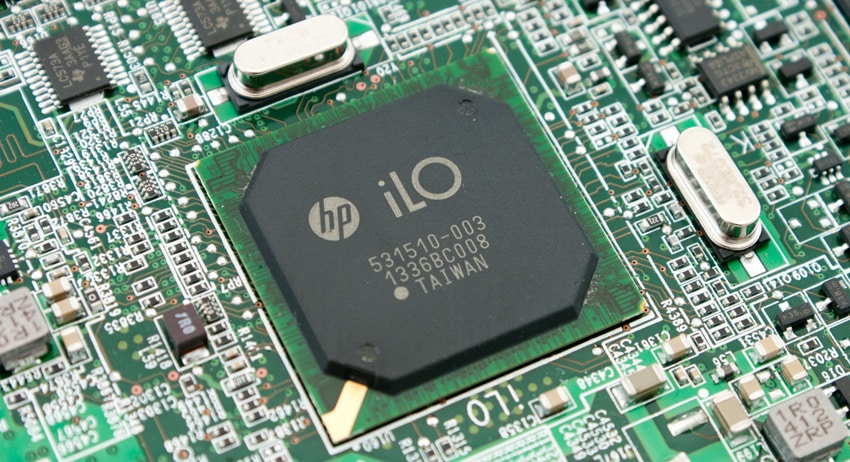
Rozwiązania Lights Out Management, takie jak HP iLO, przewyższają rozwiązania KVM, ponieważ dodają funkcje takie jak zarządzanie energią do zdalnego zarządzania serwerem. Niektóre z nich oferują znacznie więcej możliwości, takich jak: kontrola wydajności sprzętu, monitorowanie stanu i pomoc w konfiguracji. HP iLO oferuje również szybszy czas rozwiązywania problemów dzięki funkcjom zdalnego dostępu i rozwiązywania problemów, które umożliwiają użytkownikom zdalny dostęp do serwera za pomocą standardowego w branży interfejsu skryptowego, konsoli zdalnej lub funkcji nośników wirtualnych, umożliwiając wykonywanie podstawowych funkcji zarządzania. Ponadto, wbudowane wsparcie (Direct Connect i Remote Support) redukuje czas, koszty i złożoność.
Co kilka lat HP ulepsza możliwości swoich procesorów zarządzających. W serwerach HP oznaczonych jako modele „G8” i „G9” dostępna jest wersja iLO4, co mniej więcej odpowiada serwerom dostępnym na rynku od 2012 roku. W ciągu ostatnich lat recenzowaliśmy różne serwery HP kompatybilne z iLO4: HP DL360p Gen8 , DL360 Gen9 i DL380p Gen8.
Krótka lista funkcji iLO4 obejmuje:
- Konsola zdalna (również w poprzednich wersjach)
- Kontrola mocy (również w poprzednich wersjach)
- Zarządzanie wirtualnymi mediami (również w poprzednich wersjach)
- Zarządzanie bez agentów
- Aktywny System Zdrowia
- Wbudowane zdalne wsparcie
- Federacja iLO Discovery & Health
- RESTful API
HP iLO w wersji 2.0 oferuje również interfejsy API RESTful, czyli nowy interfejs do zarządzania serwerem HP ProLiant Gen9, który służy do konfiguracji, inwentaryzacji i monitorowania serwera. Interfejs API HP RESTful zmniejsza złożoność konfiguracji serwera HP ProLiant Gen9, udostępniając zawartość niezależnie od lokalizacji – czy to programowanie bezpośrednio w poszczególnych narzędziach, w sieci, czy za pośrednictwem narzędzia interfejsu HP RESTful. Ponieważ interfejs wykorzystuje język REST lub język narzędzia, używa również tego samego zestawu poleceń, niezależnie od unikalnego języka narzędzi. Inne zalety interfejsu API RESTful obejmują łatwiejszy dostęp do informacji, co eliminuje konieczność uruchamiania skryptów i udostępniania serwera przez wiele narzędzi; zdalne i bezpieczne funkcje wykorzystujące protokół HTTPS; oraz możliwość tworzenia skryptów i udostępniania nowych funkcji z niewielkimi lub żadnymi zależnościami od aktualizacji oprogramowania sprzętowego.
Firma HP oferuje dwie opcje programowania interfejsu API RESTful: interfejs API RESTful firmy HP, który umożliwia bezpośrednie programowanie i całkowity dostęp bez użycia narzędzi
do tworzenia niestandardowych skryptów, a także możliwość tworzenia własnych integracji z otwartymi opcjami programowania; oraz narzędzie HP RESTful Interface Tool, które umożliwia proste tworzenie skryptów za pomocą powłok poleceń. Aby uzyskać więcej informacji, zapoznaj się z dokumentem HP. krótki opis rozwiązania.
Szybki start
Firma HP udostępnia instrukcję instalacji iLO, ale podstawowa konfiguracja jest dość prosta. Podłącz połączenie Ethernet do portu zarządzania iLO z tyłu serwera. Podstawowe informacje o sieci i użytkowniku można skonfigurować podczas uruchamiania systemu, naciskając klawisz F8 po wyświetleniu monitu. W tym trybie można ustawić informacje o sieci, takie jak adres IP, maska sieci i brama, a także zmienić wbudowane informacje o użytkowniku w razie potrzeby. Po uruchomieniu dostęp do głównego interfejsu iLO można uzyskać za pomocą przeglądarki internetowej z adresem IP przypisanym do iLO.
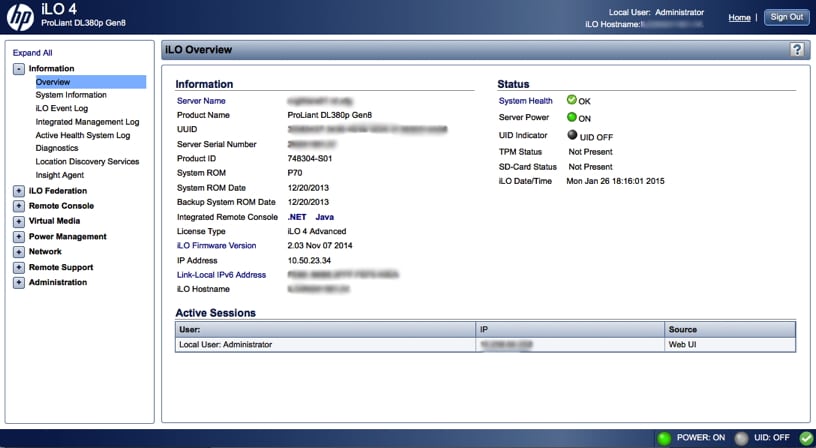
Interfejs jest bardzo przyjazny dla użytkownika, z nawigacyjnym widokiem drzewa po lewej stronie. Opcje najwyższego poziomu obejmują: Informacje, Federację iLO, Konsolę zdalną, Nośniki wirtualne, Zarządzanie energią, Sieć, Zdalne wsparcie i Administrację. Każda z tych gałęzi iLO posiada podmenu, do którego można uzyskać dostęp, klikając odpowiednią ikonę +. Dodatkowo, gałąź BL c-Class jest uwzględniana, gdy używany jest serwer typu blade ProLiant, a gałąź Narzędzie zdalnego zarządzania (Nazwa gałęzi) jest uwzględniana, gdy narzędzie do zdalnego zarządzania jest używane z iLO.
Rys. 1 (Przegląd)
Standardowe funkcje Lights Out
Konsola zdalna:
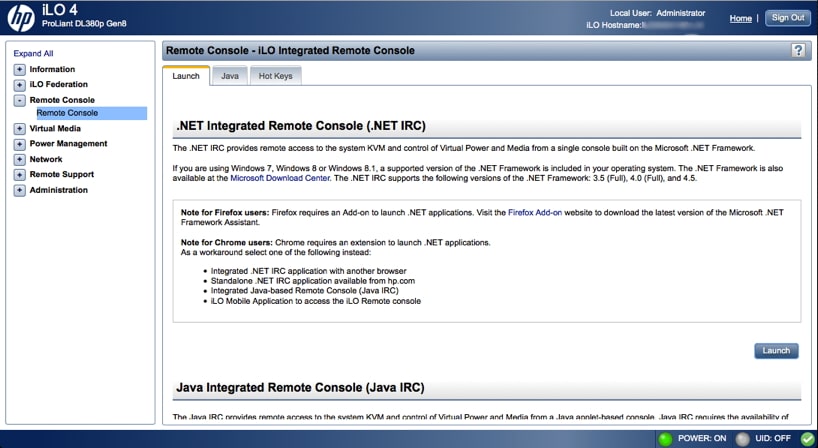
Jak w przypadku większości rozwiązań, można uzyskać dostęp do zdalnej konsoli, aby sprawdzić działanie systemu lub pracować z nim, całkowicie niezależnie od działania dowolnego systemu operacyjnego. W iLO4 dostępne są 3 opcje: interfejs .Net, interfejs Java lub aplikacja mobilna.
Platforma .NET zapewnia dostęp do klawiatury, wideo i myszy (lub KVM) systemu oraz umożliwia sterowanie urządzeniami Virtual Power i Virtual Media z jednej konsoli za pośrednictwem przeglądarki na kliencie Windows. Platforma .NET obsługuje funkcje przechwytywania konsoli, konsoli współdzielonej, folderów wirtualnych i multimediów skryptowych (oprócz standardowych funkcji).
Java zapewnia również dostęp do przełącznika KVM systemu, co pozwala na sterowanie funkcjami Virtual Power i Virtual Media z konsoli opartej na Javie. Zawiera także narzędzie do tworzenia obrazów dysków iLO i Scripted Media.
Aplikacja mobilna iLO (iOS i Android) umożliwia dostęp do zintegrowanej konsoli zdalnej ze smartfona lub tabletu.
Rys. 2 (Konsola zdalna)
Media wirtualne:
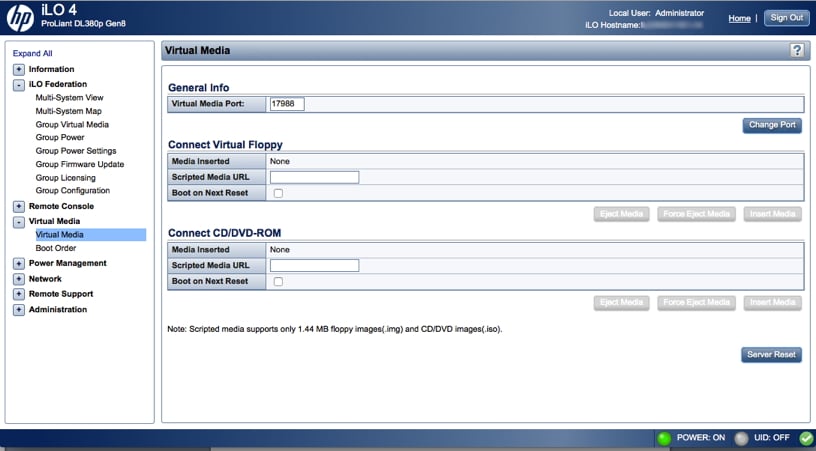
Z funkcją zdalnej konsoli ściśle powiązane jest zarządzanie wirtualnymi nośnikami, umożliwiające montowanie obrazów dysków na potrzeby instalacji. Chociaż funkcja wirtualnych nośników obsługuje obrazy ISO o rozmiarze do 8 TB, maksymalny rozmiar pliku zależy również od innych czynników, w tym od limitu rozmiaru pojedynczego pliku dla systemu plików, w którym przechowywany jest obraz ISO, oraz od poleceń SCSI obsługiwanych przez system operacyjny serwera.
Jeśli używasz iLO po raz pierwszy, system operacyjny hosta może poprosić użytkownika o wypełnienie formularza kreatora Znaleziono nowy sprzęt.
W tej sekcji można również zmienić kolejność rozruchu systemu.
Rys. 3 (Media wirtualne)
Regulacja mocy:
Możliwość bezpośredniego kontrolowania poboru mocy przez system może mieć kluczowe znaczenie w przypadku odzyskiwania systemu, w którym nastąpiła awaria systemu operacyjnego, lub w przypadku problemów ze sprzętem.
Rys. 4 (Regulacja mocy)
Opcje zaawansowane
Federacja iLO:
Procesor iLO serwera może wykrywać inne procesory iLO za pomocą kilku metod, w tym multicast. Domyślnie system wykrywa inne procesory w tej samej sieci za pomocą multicastu (w zależności od konfiguracji sieci).
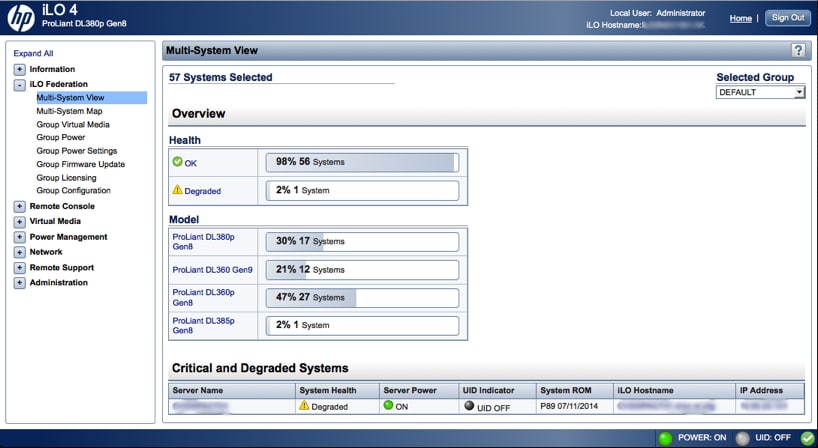
Pozwala to na interesujący grupowy widok systemów i ich stanu. Poniższy rysunek przedstawia przykład grupy wykrytych serwerów i wskazuje, że jeden z nich jest obecnie w stanie degradacji. Można również połączyć się bezpośrednio z iLO zdegradowanego systemu.
Oto lista funkcji i ich funkcjonalności w ramach Federacji iLO. Niektóre z nich wymagają licencji Advanced (zobacz również sekcję Licencja):
- Widok wielosystemowy – pokazuje inne wykryte procesory iLO i statusy tych systemów.
- Mapa wielu systemów – pokazuje systemy iLO typu peer-to-peer.
- Grupowe wirtualne nośniki danych – sterowanie wsadowe wirtualnymi nośnikami danych w grupach serwerów.
- Zasilanie grupy – grupowa kontrola zasilania w grupach serwerów.
- Ustawienia zasilania grupy – zbiorcze ograniczanie zużycia energii w grupach serwerów.
- Aktualizacja oprogramowania sprzętowego grupy – wyświetlanie wersji oprogramowania sprzętowego i opcjonalnie aktualizacja wsadowa w grupach serwerów.
- Licencjonowanie grupowe – zbiorcze stosowanie kluczy aktywacji licencji w grupach serwerów.
- Konfiguracja grupy – zdefiniuj grupy serwerów i dostęp.
Rys. 5 (Widok wielokrotny)
Stan serwera:
Stan został omówiony w widoku federacyjnym powyżej. Istnieje jednak wiele kategorii stanu, które można przeglądać. W tym obszarze można również sprawdzić informacje o opcjach sprzętowych zainstalowanych w systemie.
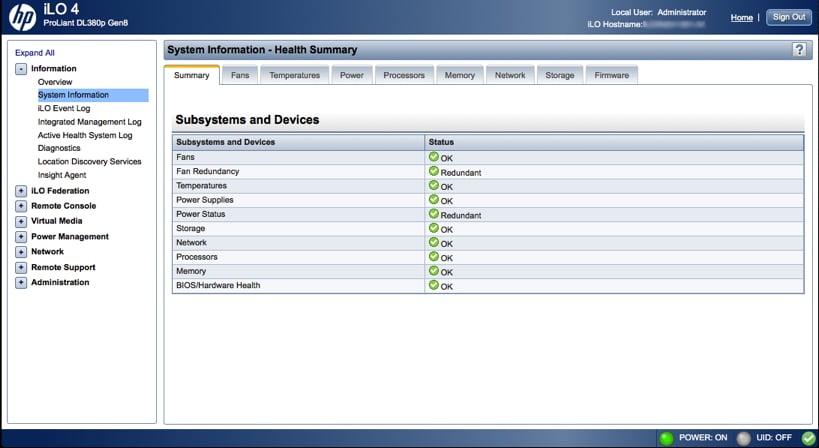
Na stronie Podsumowanie stanu wyświetlany jest stan monitorowanych podsystemów i urządzeń, który będzie się różnić w zależności od typu serwera.
Jeśli serwer jest wyłączony, informacje o stanie systemu będą wyświetlane na dzień ostatniego wyłączenia zasilania. Ponadto informacje o stanie systemu są aktualizowane tylko po włączeniu serwera i zakończeniu testu POST.
Rys. 6 (Przegląd stanu zdrowia)
Zarządzanie energią:
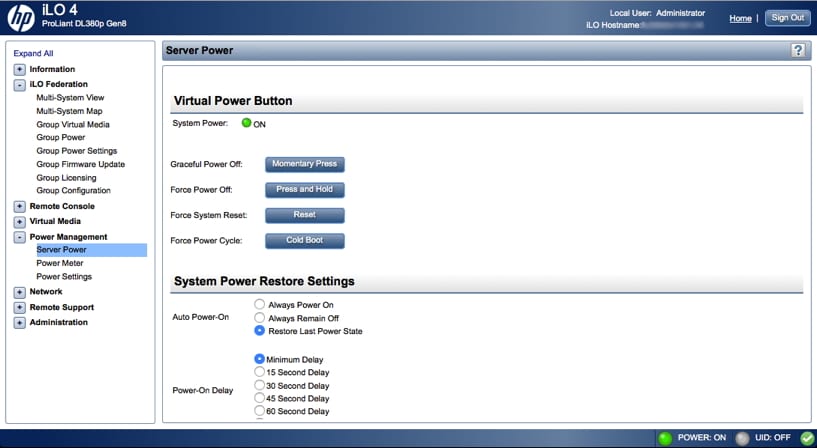
Można kontrolować różne ustawienia, aby zrównoważyć zużycie energii i wydajność. Można również wyświetlić bieżące zużycie energii oraz dane dotyczące różnych przedziałów czasowych w formie wykresu. Menu zarządzania energią zawiera trzy dostępne opcje: Zasilanie serwera, Miernik energii i Ustawienia zasilania.
Na stronie Zasilanie serwera w sekcji Wirtualny przycisk zasilania użytkownicy mogą sprawdzić aktualny stan zasilania serwera, a także dostępne opcje zdalnego sterowania zasilaniem serwera.
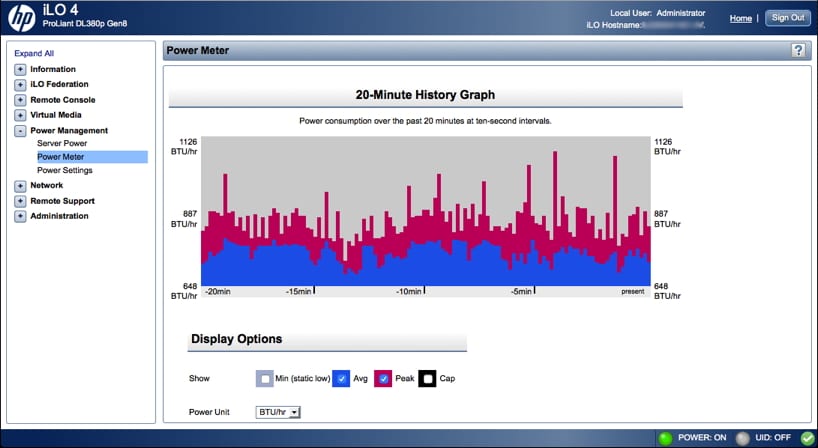
Strona miernika mocy wyświetla zużycie energii przez serwer w określonym przedziale czasowym. Użytkownicy mają dostęp do wykresów obejmujących 24-godzinny wykres historii, który pokazuje zużycie energii przez serwer w ciągu ostatnich 24 godzin, oraz 20-minutowy wykres historii, który pokazuje zużycie energii przez serwer w ciągu ostatnich 20 minut. Dostępna jest również opcja historii mocy, która wyświetla odczyty mocy (średnią, maksymalną i minimalną) z trzech okresów: 5 minut, 20 minut i 24 godzin.
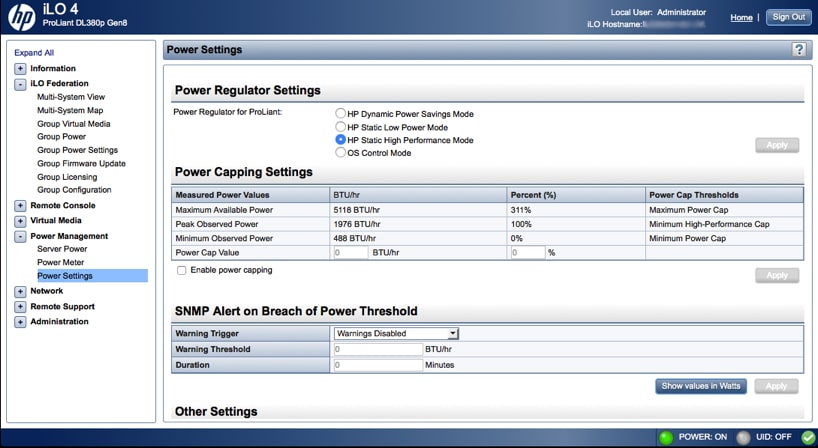
Ustawienia zasilania umożliwiają użytkownikom sterowanie i przeglądanie funkcji zarządzania energią serwera, które różnią się w zależności od konfiguracji serwera.
Rys. 7 (Ustawienia zasilania)
Rys. 8 (Miernik mocy)
Inne zaawansowane funkcje
Kolejną funkcją wartą rozważenia jest integracja z istniejącym systemem HP System Insight Manager (SIM). Procesor iLO można połączyć z serwerem na karcie SIM, a uwierzytelnianie SSO można skonfigurować tak, aby przeskakiwało bezpośrednio z obiektu serwera w konsoli SIM do iLO tego systemu.
Integracja katalogu/domeny pozwala na wykorzystanie istniejącego katalogu (takiego jak Active Directory) do obsługi uwierzytelniania i autoryzacji użytkowników iLO. Centralizuje to zarządzanie hasłami w jednym miejscu, co zwiększa skalowalność zarządzania wieloma systemami obsługującymi iLO. Jest to możliwe dzięki skonfigurowaniu protokołu Kerberos tak, aby automatycznie uwierzytelniał się po zalogowaniu użytkownika do domeny, bez ponownego monitowania o dostęp do iLO.
Licencje
Rozwiązanie HP iLO jest dostępne w trzech różnych licencjach, w zależności od potrzeb biznesowych. Licencja HP iLO Advanced jest przeznaczona dla przedsiębiorstw, które potrzebują inteligentnej funkcjonalności zdalnej dla wszystkich serwerów HP ProLiant i umożliwia pełne wdrożenie iLO Federation.
Licencja HP iLO Essentials jest przeznaczona dla małych i średnich firm i oferuje pełne zdalne zarządzanie serwerem za pośrednictwem zintegrowanej konsoli zdalnej (IRC), nośników wirtualnych oraz wbudowanego szybkiego wykrywania wszystkich urządzeń iLO. Licencja ta jest dostępna dla wszystkich serwerów HP ProLiant Gen8 serii e, HP MicroServer Gen8 i HP ProLiant Gen9 serii 100 i niższych.
Licencja HP iLO Scale-Out jest przeznaczona dla dostawców hostingu internetowego, usług w chmurze oraz centrów danych o wysokiej wydajności, które muszą zarządzać środowiskami o dużej skalowalności. Licencja ta jest dostępna dla serwerów HP ProLiant Gen8 DL 160, wszystkich serwerów HP ProLiant Gen8 SL i BL oraz serwerów HP ProLiant Gen9 SL.
Wniosek
HP iLO4 to potężne narzędzie do zarządzania, a także centralny element kompleksowego rozwiązania do zarządzania w połączeniu z HP SIM/SUM. Możliwości zarządzania znacznie przewyższają możliwości większości rozwiązań KVM i ściśle integrują się z innymi produktami HP i infrastrukturą klienta. Chociaż wielu nabywców niewielkiej liczby serwerów nie bierze pod uwagę zarządzania przy podejmowaniu decyzji o zakupie, być może powinni. HP iLO 4 znacznie ułatwia zarządzanie serwerami, nie tylko na dużą skalę. Nawet małe organizacje mogą skorzystać z podstawowej licencji Essentials, która oferuje szereg kluczowych funkcji, w tym pełne zdalne zarządzanie serwerami.
Omów tę recenzję


 Amazon