---
description: Intel consistently releases firmware updates to their SSDs to correct issues that may arise with operation, and perhaps more importantly for consumers, to...
title: Intel SSD Toolbox Review
image: https://www.storagereview.com/wp-content/uploads/2020/01/StorageReview-Intel-665p-Thumb.jpg
---

[![Storage Review]()](https://storagereview.com/)

---

[Facebook](https://www.facebook.com/@storagereview) [X (Twitter)](https://twitter.twitter.com/storagereview) [Instagram](https://www.instagram.com/storagereview/) [LinkedIn](https://www.linkedin.com/company/storagereview-com) [YouTube](https://www.youtube.com/user/storagereview?sub_confirmation=1) [Email](mailto:info@storagereview.com) [Spotify](https://open.spotify.com/show/1y6VnznABhHeOSMOmbDTz0) [Reddit](https://www.reddit.com/r/StorageReview/) [Discord](https://discord.gg/TwMHb4azdC) [RSS Feed](https://www.storagereview.com/rss.xml) [TikTok](https://www.tiktok.com/@storagereview)

[Facebook](https://www.facebook.com/@storagereview) [X (Twitter)](https://twitter.com/storagereview) [Instagram](https://www.instagram.com/storagereview/) [LinkedIn](https://www.linkedin.com/company/storagereview-com) [YouTube](https://www.youtube.com/user/storagereview?sub_confirmation=1) [Email](mailto:info@storagereview.com) [Spotify](https://open.spotify.com/show/1y6VnznABhHeOSMOmbDTz0) [Reddit](https://www.reddit.com/r/StorageReview/) [Discord](https://discord.gg/TwMHb4azdC) [RSS Feed](https://www.storagereview.com/rss.xml) [TikTok](https://www.tiktok.com/@storagereview)

[![StorageReview.com](https://www.storagereview.com/wp-content/uploads/2026/07/Storage-Review-2x.png)](https://www.storagereview.com)

≡ Menu

- [Home](https://www.storagereview.com/)
- [Storage Reviews](https://www.storagereview.com/review)
  - [Consumer Reviews](https://www.storagereview.com/consumer)
  - [Enterprise Reviews](https://www.storagereview.com/enterprise)
  - [Ubiquiti Reviews](https://www.storagereview.com/best/ubiquiti-reviews)
- [SR Merch](https://store.storagereview.com)
- [Leaderboards](https://www.storagereview.com/best)
  - [Best Storage Arrays](https://www.storagereview.com/best/storage-arrays)
  - [Best Enterprise SSDs](https://www.storagereview.com/best/enterprise-ssds)
  - [Best Servers](https://www.storagereview.com/best/servers)
  - [Best Desktops for Local AI](https://www.storagereview.com/best/desktops-local-ai)
  - [Best Laptops for Local AI](https://www.storagereview.com/best/laptops-local-ai)
  - [Best Local LLM Tools](https://www.storagereview.com/best/local-llm-tools)
  - [Agentic AI Hardware](https://www.storagereview.com/best/agentic-ai-hardware)
  - [Best SSDs & Hard Drives](https://www.storagereview.com/best_drives)
  - [Best Portable SSDs](https://www.storagereview.com/best/portable-ssds)
  - [Best Business Laptops](https://www.storagereview.com/best/business-laptops)
  - [Best Mobile Workstations](https://www.storagereview.com/best/mobile-workstations)
  - [Best Desktop Workstations](https://www.storagereview.com/best/desktop-workstations)
  - [Best Laptop Battery Life](https://www.storagereview.com/best/laptop-battery-life)
- [Storage Reference Guide](https://www.storagereview.com/storage-reference-guide)
- [About SR](https://www.storagereview.com/about-storagereview)
  - [StorageReview.com Sweepstakes Rules and Regulations](https://www.storagereview.com/storagereview-com-sweepstakes-rules-and-regulations)

Search

[Home](https://www.storagereview.com/) » [Review](https://www.storagereview.com/review) » Intel SSD Toolbox Review

# Intel SSD Toolbox Review

by Lyle Smith on February 2, 2020

[Client Software](https://www.storagereview.com/consumer/client-software)  ◇  [Consumer](https://www.storagereview.com/consumer)

As always, we’ll note that firmware updates are generally non-destructive, but can sometimes adversely affect your data (e.g., unexpected errors or faults). While updates will specify if they are destructive, step number one when updating the firmware is to always backup important data just to be safe. After we complete this step, it was time for us to move on to running the client.

For those that prefer a video walkthrough of Intel’s SSD Toolbox, please see below from our [YouTube channel](https://www.youtube.com/user/storagereview?sub_confirmation=1).

## How To Update Intel SSD Firmware

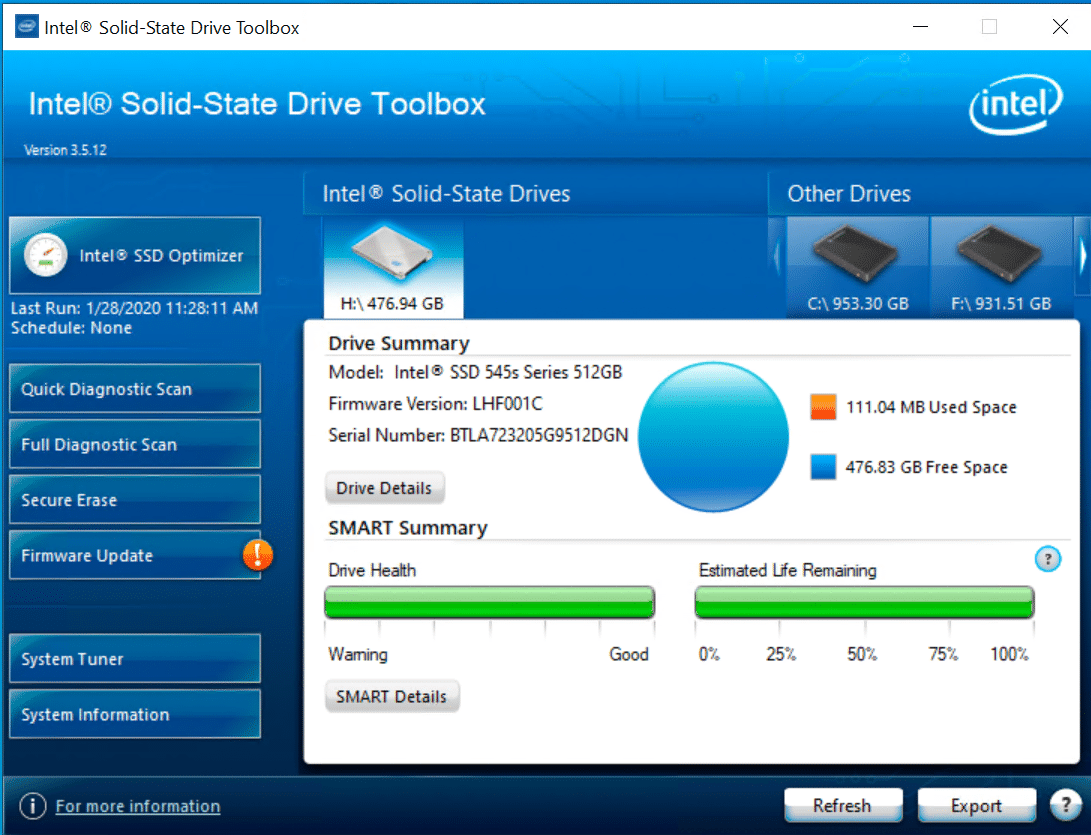
For the purposes of this guide, we’re managing an Intel SSD 545s Series. We downloaded the Intel SSD Toolbox and got started. From the outset, you can select any installed SSD. If you select an Intel SSD, you can utilize the Intel SSD Optimizer, perform diagnostic scans, run the firmware updates and execute a Secure Erase. (Note: [Only Windows 7 supports secure erase, newer operating systems like Windows 8/8,1 and 10 block Secure Erase](https://www.intel.com/content/www/us/en/support/articles/000006011/memory-and-storage.html).) To secure erase through a newer operating system users will need to create a bootable thumbdrive to perform the task outside of the OS.

![](https://www.storagereview.com//wp-content/uploads/2020/02/Capture1.PNG)

A “!” icon displays on the Firmware Update button if an update is available, as seen above.

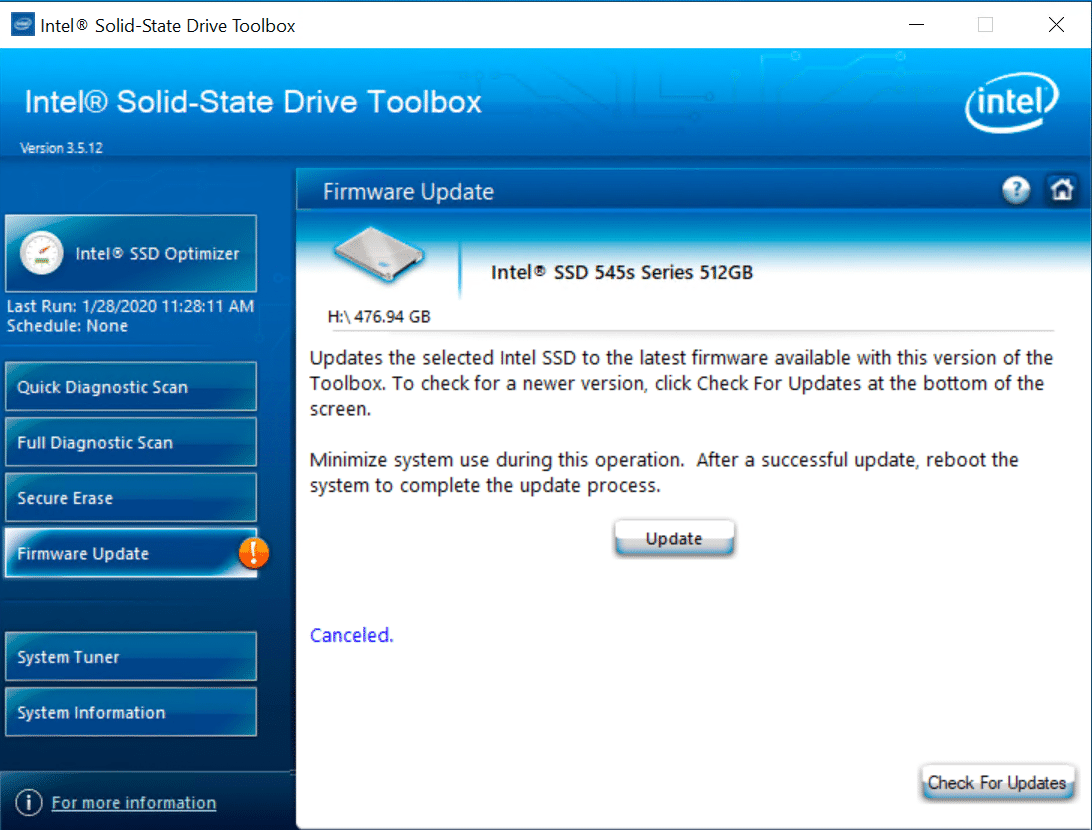
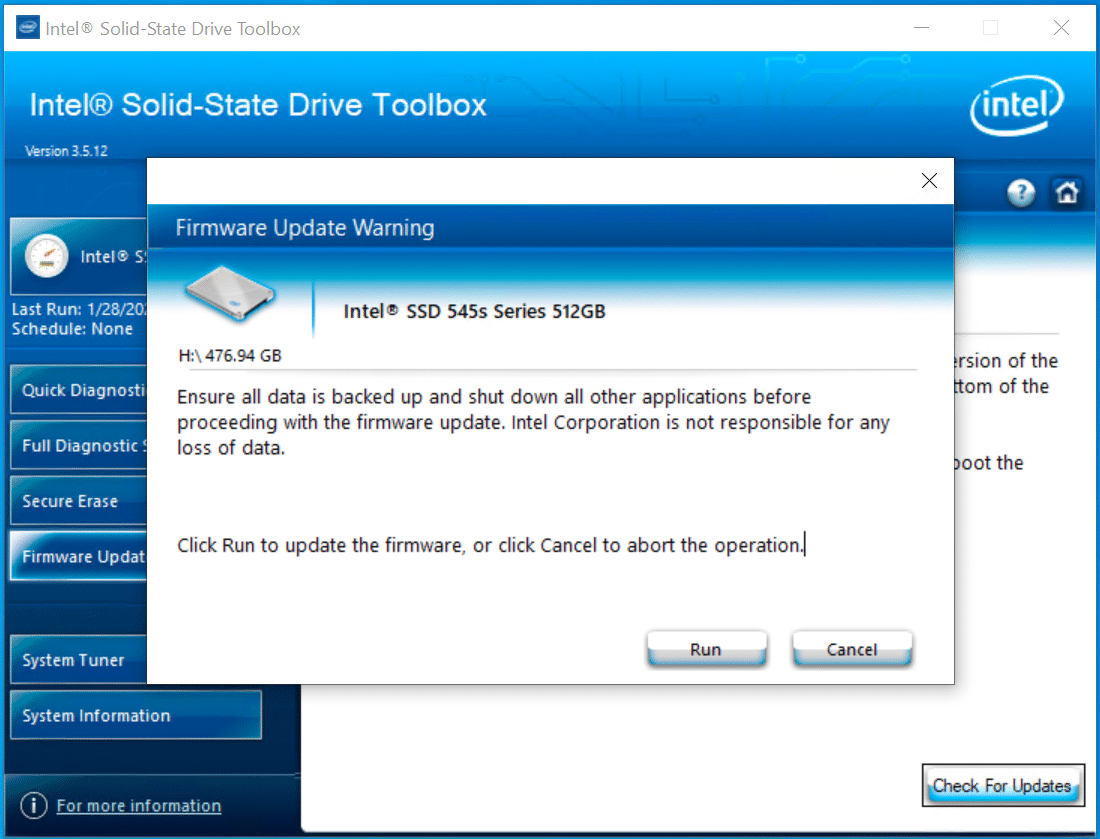
Even if you have non-Intel SSDs installed, you can still look at the Drive and SMART details, which isn’t always an option in other firmware upgrade applications (e.g., the Kingston SSD Manager). Our Intel SSD 545s was auto-selected. When we clicked on firmware update, Intel alerts you to back up your data, which we already had done on another SSD (see below).

![]() ![]()

After clicking Run, the update took roughly a couple to complete. The system needs to restart for the process to complete. In some firmware update clients, the restart is performed immediately and automatically. Thankfully, Intel provides the option to restart manually.

After the restart, the SSD has the latest firmware on it, and you’re all set. The process Intel provides users is highly intuitive and can be completed without any hassle. Even for someone without any experience doing so previously, it should only take a few minutes (outside of data backup if that has yet to be done). Though the Toolbox’s GUI hasn’t been updated in quite some time, it is still fairly clean and provides features for users who want to tune their drive or view information such as the SMART details.

Overall, the experience was simple; Intel has done well to create a good application that works across almost all of both their consumer and enterprise SSDs.

There’s a lot more you can do other than updating the firmware. When you first load the SSD Toolbox,  it scans your computer for hard drives, including non-Intel SSDs and HDDs. You can easily scroll through all your “other drives” by clicking the arrow icons. Click refresh to re-scan.

The Drive Summary displays information about your drive including the firmware version, used/free space, serial number, and a SMART summary.

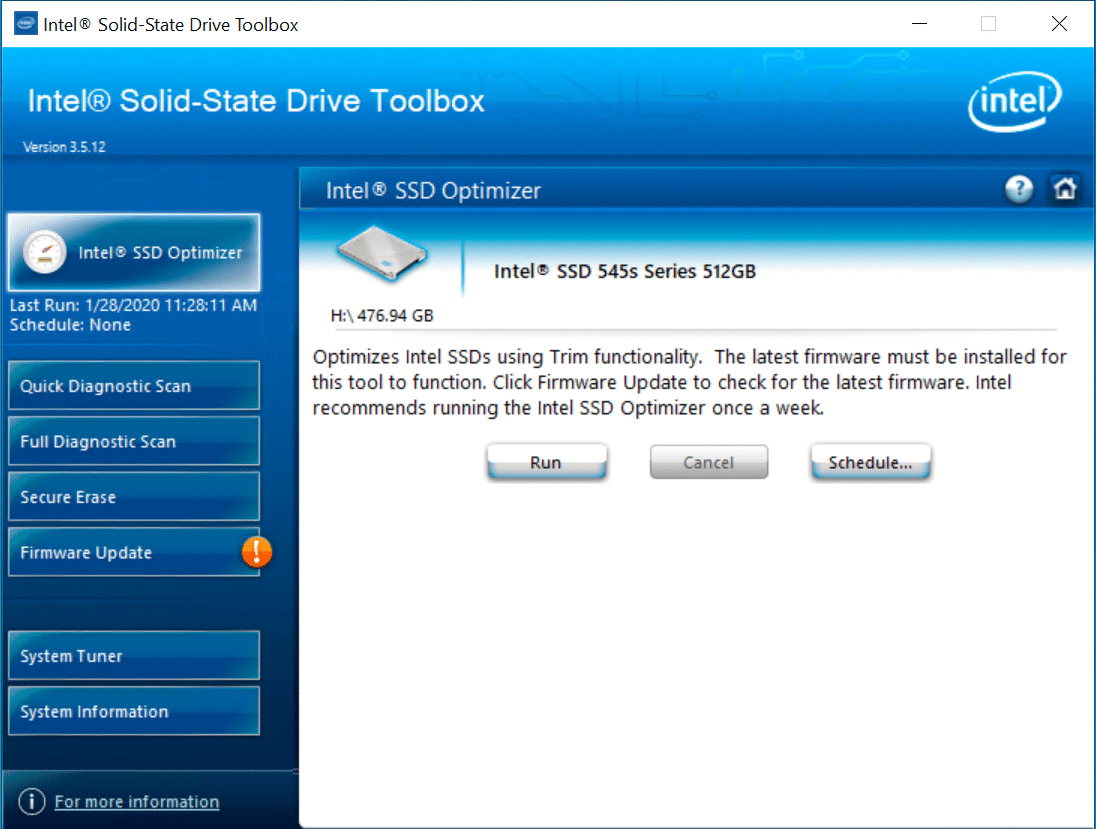
The Intel SSD Optimizer removes deleted data files from NAND flash management blocks on supported SSD (via the Trim functionality), to help retain its out-of-the-box performance. Besides manually. You can also have it run automatically on a daily, weekly or monthly schedule, Intel recommends weekly.

![]()

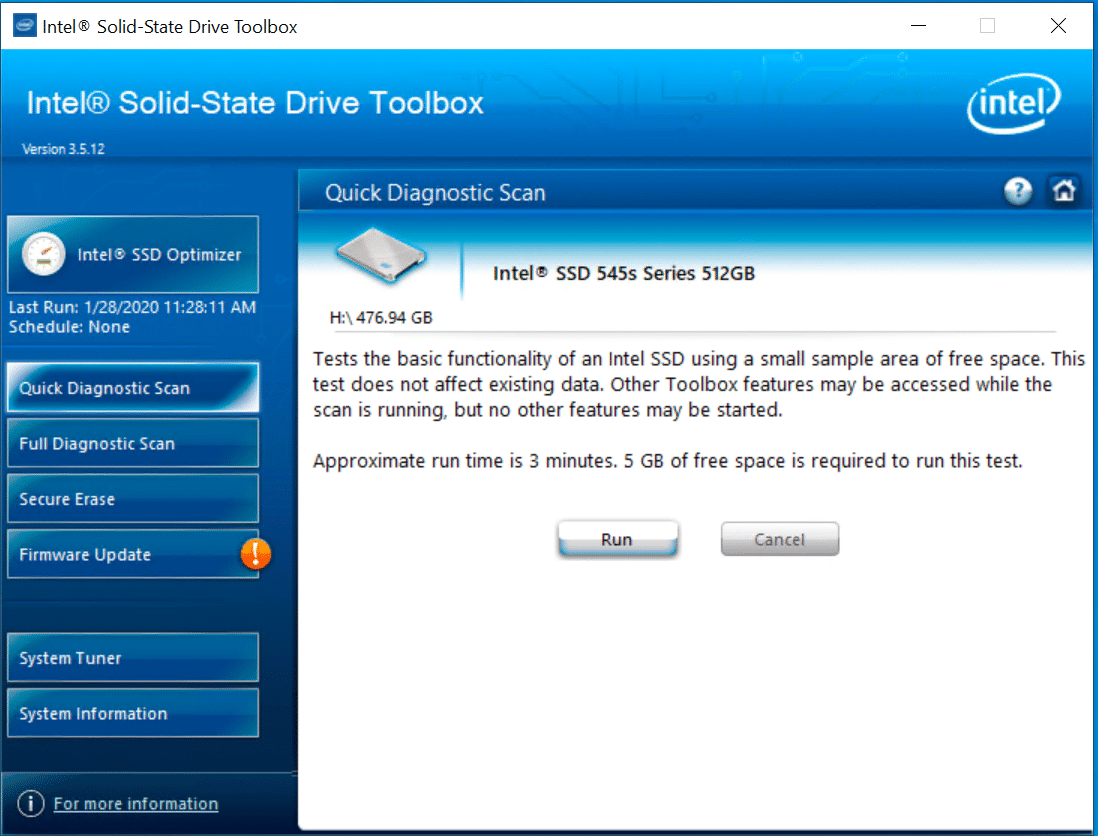
The Quick Diagnostic Scan tests and analyzes the basic functionality of a drive. The read scan checks 1.5GB of data for read errors, while the data integrity scan creates 1GB of random data and then writes it to unused areas of an Intel SSD. It then compares it for data integrity.

![]()

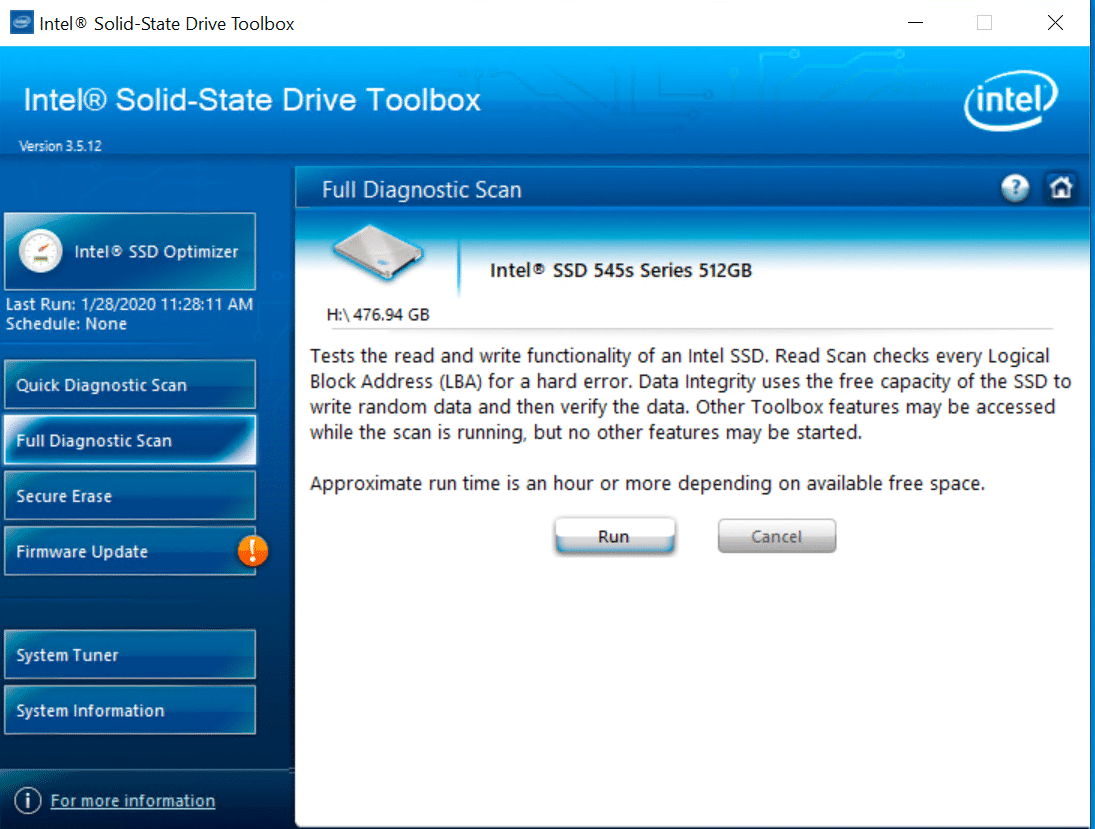
The Full Diagnostic Scan puts Intel SSDs through an overall health evaluation. This includes two tests; the read scan, which checks every logical block address for read errors; and the data integrity scan, which uses free space on the drive to write random data then checks its integrity during the read back.

![]()

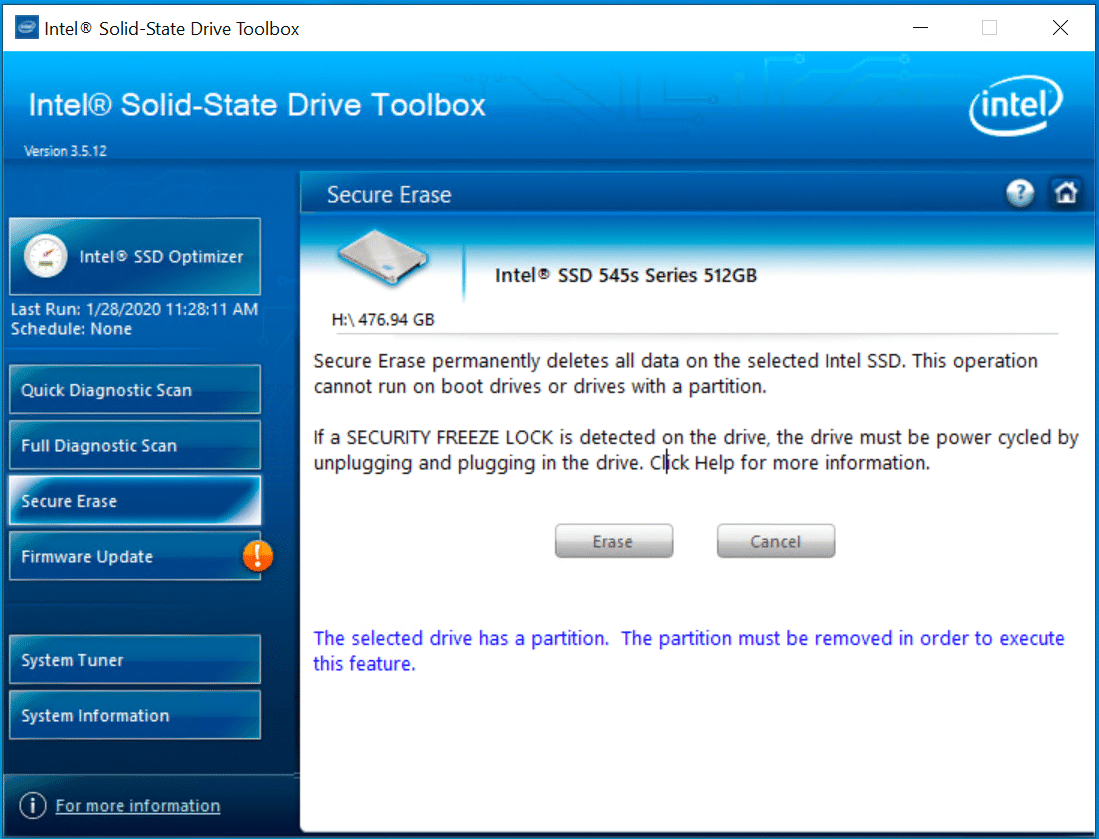
Secure Erase permanently deletes all files on non-boot SSDs; partitions also must be removed before this action can take place.

![]()

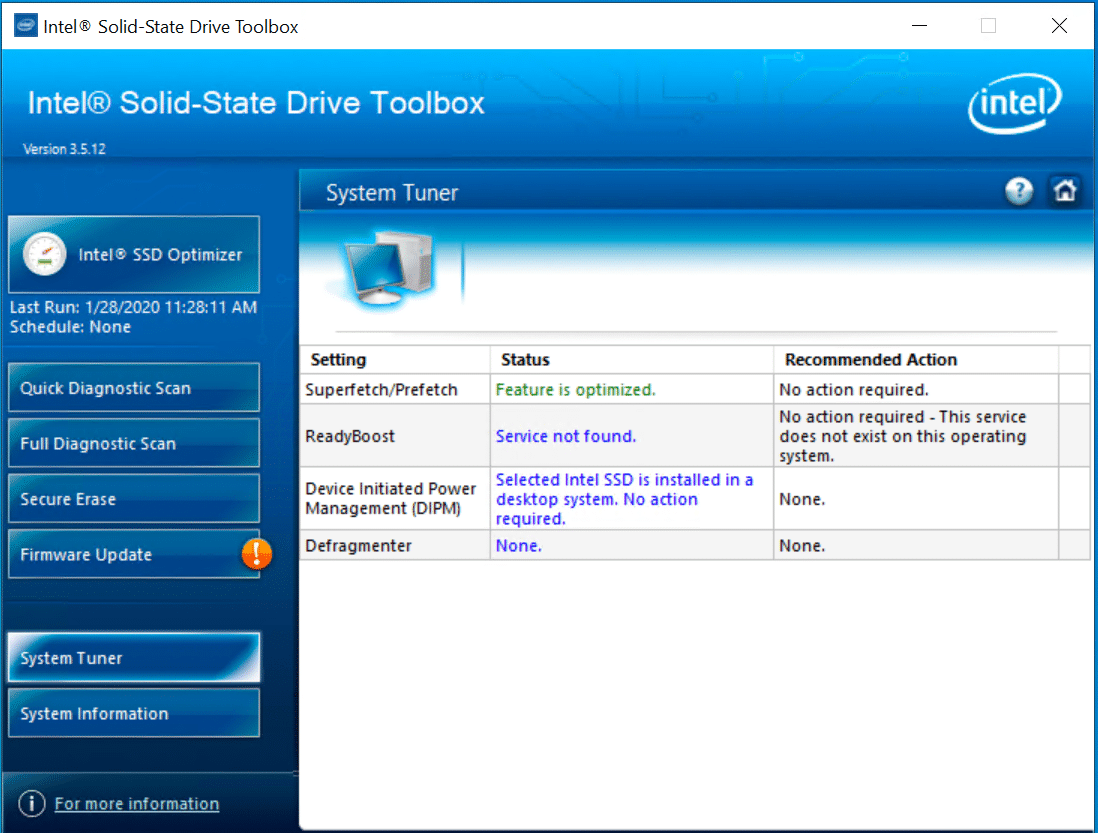
The System Tuner allows users to adjust settings to improve performance, power and endurance of their Intel SSDs. This option is only available if your system requires it, and will be noted by a “!” on the left nav bar like when a firmware update is needed.

![]()

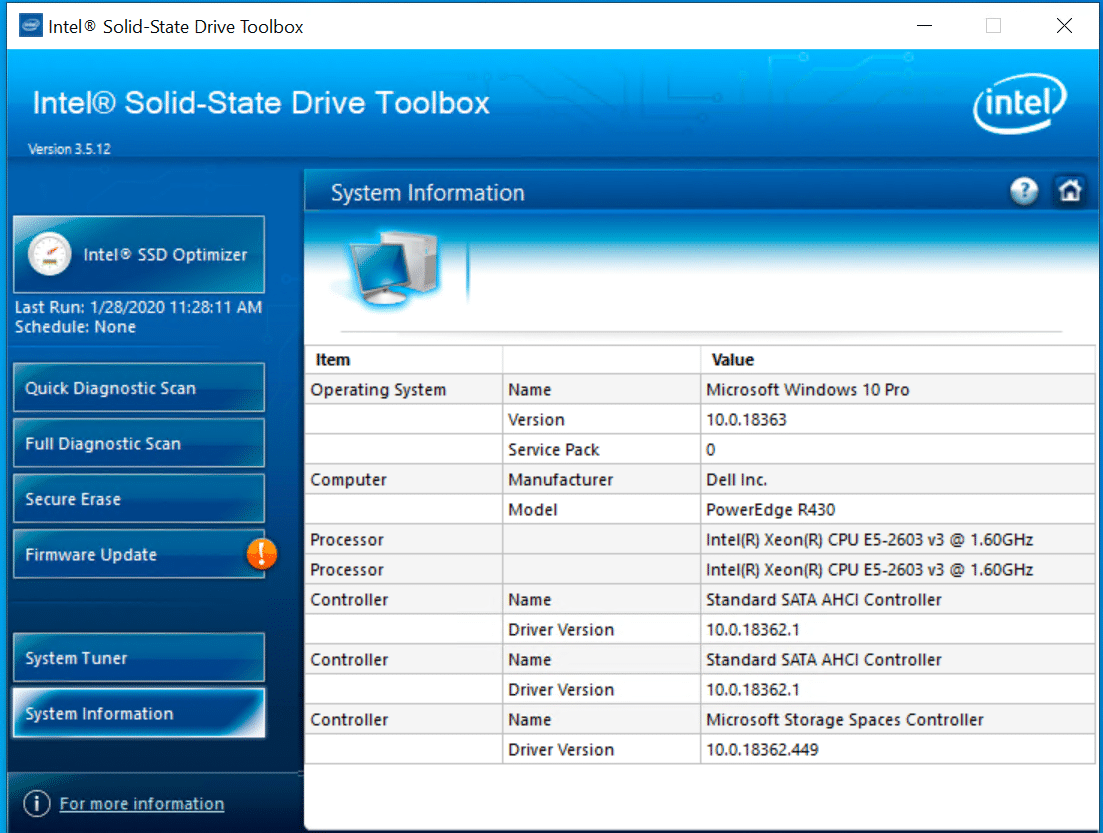
The System Information section displays detailed information of the computer the Intel SSD is installed on, including the operating system, model and manufacturer, processor(s), and controller.

![]()

## Conclusion

The Intel SSD Toolbox is functional, it takes care of most tasks the competitive tools offer, outside of a couple of small things like the performance testing tool Samsung provides. SSD Toolbox isn’t pretty or modern though, it hasn’t fundamentally been updated from a UI perspective, since Intel released it many years ago. At this point the SSD Toolbox could definitely use a facelift, the quality of Intel’s SSDs doesn’t really align with the software. Even so, it’s quite a bit better than other competitive offerings and at the end of the day gets the job done, just with very little fanfare.

Editor’s note: Intel Toolbox was replaced by [Intel MAS Tool](https://www.storagereview.com/review/intel-memory-and-storage-mas-tool-review) in 2020.

[Intel SSD Toolbox](https://downloadcenter.intel.com/download/29205/Intel-Solid-State-Drive-Toolbox)

[Discuss on Reddit](https://www.reddit.com/r/StorageReview/comments/ext2gv/intel_ssd_toolbox_review/)

**Engage with StorageReview**

[Newsletter](https://www.storagereview.com/storage_newsletter) |  [YouTube](https://www.youtube.com/user/StorageReview "Opens in a new window") | Podcast  [iTunes](https://podcasts.apple.com/gb/podcast/storagereview-com-storage-reviews/id1060681115 "Opens in a new window")/ [Spotify](https://open.spotify.com/show/1y6VnznABhHeOSMOmbDTz0 "Opens in a new window") |  [Instagram](https://www.instagram.com/storagereview/ "Opens in a new window") |  [Twitter](https://twitter.com/storagereview "Opens in a new window") |  [TikTok](https://www.tiktok.com/@storagereview? "Opens in a new window") |  [RSS Feed](https://www.storagereview.com/rss.xml)

![]()

### Lyle Smith

Lyle is a writer for StorageReview, covering a broad set of end user and enterprise IT topics.

Previous post: [Kingston DC1000B SSD Review](https://www.storagereview.com/review/kingston-dc1000b-ssd-review)

Next post: [Western Digital SSD Dashboard Review](https://www.storagereview.com/review/western-digital-ssd-dashboard-review)

Trusted Vendors

Products and solutions from our affiliate partners:

- [  
  ![Ubiquiti Logo](https://www.storagereview.com/wp-content/uploads/2024/11/2-1.webp)  
   Ubiquiti](https://store.ui.com/us/en?a_aid=StorageReview "Opens in a new window")
- [  
  ![Newegg Logo](https://www.storagereview.com/wp-content/uploads/2025/11/newegg.webp)  
   Newegg](https://click.linksynergy.com/fs-bin/click?id=g5terNMDhz0&offerid=1207190.18&subid=0&type=4 "Opens in a new window")
- [  
  ![Amazon Logo](https://www.storagereview.com/wp-content/uploads/2025/11/amazon.webp) Amazon](https://amzn.to/4fLJUEW "Opens in a new window")

Newsletter

Subscribe to the StorageReview newsletter to stay up to date on the latest news and reviews. We promise no spam!

1  

Leave this field empty if you’re human:

## Advertisement

Content Categories

[Facebook](https://www.facebook.com/@storagereview) [X](https://twitter.com/storagereview) [Instagram](https://www.instagram.com/storagereview/) [LinkedIn](https://www.linkedin.com/company/storagereview-com) [YouTube](https://www.youtube.com/user/storagereview?sub_confirmation=1) [Email](mailto:info@storagereview.com) [Spotify](https://open.spotify.com/show/1y6VnznABhHeOSMOmbDTz0) [Reddit](https://www.reddit.com/r/StorageReview/) [Discord](https://discord.gg/TwMHb4azdC) [RSS](https://www.storagereview.com/rss.xml) [TikTok](https://www.tiktok.com/@storagereview)

Copyright © 1998-2025 Flying Pig Ventures, LLC Cincinnati, Ohio. All rights reserved.

Manage your privacy

To provide the best experiences, we and our partners use technologies like cookies to store and/or access device information. Consenting to these technologies will allow us and our partners to process personal data such as browsing behavior or unique IDs on this site and show (non-) personalized ads. Not consenting or withdrawing consent, may adversely affect certain features and functions.

Click below to consent to the above or make granular choices. Your choices will be applied to this site only. You can change your settings at any time, including withdrawing your consent, by using the toggles on the Cookie Policy, or by clicking on the manage consent button at the bottom of the screen.

Functional Functional Always active

The technical storage or access is strictly necessary for the legitimate purpose of enabling the use of a specific service explicitly requested by the subscriber or user, or for the sole purpose of carrying out the transmission of a communication over an electronic communications network.

Preferences Preferences

The technical storage or access is necessary for the legitimate purpose of storing preferences that are not requested by the subscriber or user.

Statistics Statistics

The technical storage or access that is used exclusively for statistical purposes. The technical storage or access that is used exclusively for anonymous statistical purposes. Without a subpoena, voluntary compliance on the part of your Internet Service Provider, or additional records from a third party, information stored or retrieved for this purpose alone cannot usually be used to identify you.

Marketing Marketing

The technical storage or access is required to create user profiles to send advertising, or to track the user on a website or across several websites for similar marketing purposes.

Statistics

Marketing

Features

Always active

Always active

- Manage options
- Manage services
- Manage {vendor\_count} vendors
- [Read more about these purposes](https://cookiedatabase.org/tcf/purposes/)

Accept Deny Manage options Save preferences Manage options

- {title}
- {title}
- {title}

Manage your privacy

To provide the best experiences, we use technologies like cookies to store and/or access device information. Consenting to these technologies will allow us to process data such as browsing behavior or unique IDs on this site. Not consenting or withdrawing consent, may adversely affect certain features and functions.

Functional Functional Always active

The technical storage or access is strictly necessary for the legitimate purpose of enabling the use of a specific service explicitly requested by the subscriber or user, or for the sole purpose of carrying out the transmission of a communication over an electronic communications network.

Preferences Preferences

The technical storage or access is necessary for the legitimate purpose of storing preferences that are not requested by the subscriber or user.

Statistics Statistics

The technical storage or access that is used exclusively for statistical purposes. The technical storage or access that is used exclusively for anonymous statistical purposes. Without a subpoena, voluntary compliance on the part of your Internet Service Provider, or additional records from a third party, information stored or retrieved for this purpose alone cannot usually be used to identify you.

Marketing Marketing

The technical storage or access is required to create user profiles to send advertising, or to track the user on a website or across several websites for similar marketing purposes.

Statistics

Marketing

Features

Always active

Always active

- Manage options
- Manage services
- Manage {vendor\_count} vendors
- [Read more about these purposes](https://cookiedatabase.org/tcf/purposes/)

Accept Deny Manage options Save preferences Manage options

- {title}
- {title}
- {title}

Manage consent Manage consent

```json
{"@context":"https:\/\/schema.org","@graph":[{"@type":"WebPage","@id":"https:\/\/www.storagereview.com\/review\/intel-ssd-toolbox-review","url":"https:\/\/www.storagereview.com\/review\/intel-ssd-toolbox-review","name":"Intel SSD Toolbox Review - StorageReview.com","isPartOf":{"@id":"https:\/\/www.storagereview.com\/#website"},"primaryImageOfPage":{"@id":"https:\/\/www.storagereview.com\/review\/intel-ssd-toolbox-review#primaryimage"},"image":{"@id":"https:\/\/www.storagereview.com\/review\/intel-ssd-toolbox-review#primaryimage"},"thumbnailUrl":"https:\/\/www.storagereview.com\/wp-content\/uploads\/2020\/01\/StorageReview-Intel-665p-Thumb.jpg","datePublished":"2020-02-02T18:49:14+00:00","dateModified":"2021-01-26T21:31:18+00:00","breadcrumb":{"@id":"https:\/\/www.storagereview.com\/review\/intel-ssd-toolbox-review#breadcrumb"},"inLanguage":"en-US","potentialAction":[{"@type":"ReadAction","target":["https:\/\/www.storagereview.com\/review\/intel-ssd-toolbox-review"]}]},{"@type":"ImageObject","inLanguage":"en-US","@id":"https:\/\/www.storagereview.com\/review\/intel-ssd-toolbox-review#primaryimage","url":"https:\/\/www.storagereview.com\/wp-content\/uploads\/2020\/01\/StorageReview-Intel-665p-Thumb.jpg","contentUrl":"https:\/\/www.storagereview.com\/wp-content\/uploads\/2020\/01\/StorageReview-Intel-665p-Thumb.jpg","width":100,"height":69},{"@type":"BreadcrumbList","@id":"https:\/\/www.storagereview.com\/review\/intel-ssd-toolbox-review#breadcrumb","itemListElement":[{"@type":"ListItem","position":1,"name":"Home","item":"https:\/\/www.storagereview.com\/"},{"@type":"ListItem","position":2,"name":"Review","item":"https:\/\/www.storagereview.com\/review"},{"@type":"ListItem","position":3,"name":"Intel SSD Toolbox Review"}]},{"@type":"WebSite","@id":"https:\/\/www.storagereview.com\/#website","url":"https:\/\/www.storagereview.com\/","name":"StorageReview.com","description":"StorageReview.com is a leading provider of news and reviews throughout the entire IT stack - from the datacenter to the edge, and all points in between.","publisher":{"@id":"https:\/\/www.storagereview.com\/#organization"},"potentialAction":[{"@type":"SearchAction","target":{"@type":"EntryPoint","urlTemplate":"https:\/\/www.storagereview.com\/?s={search_term_string}"},"query-input":{"@type":"PropertyValueSpecification","valueRequired":true,"valueName":"search_term_string"}}],"inLanguage":"en-US"},{"@type":"Organization","@id":"https:\/\/www.storagereview.com\/#organization","name":"StorageReview.com","url":"https:\/\/www.storagereview.com\/","logo":{"@type":"ImageObject","inLanguage":"en-US","@id":"https:\/\/www.storagereview.com\/#\/schema\/logo\/image\/","url":"https:\/\/www.storagereview.com\/wp-content\/uploads\/2020\/02\/Storage-Reviews-2-2.png","contentUrl":"https:\/\/www.storagereview.com\/wp-content\/uploads\/2020\/02\/Storage-Reviews-2-2.png","width":344,"height":61,"caption":"StorageReview.com"},"image":{"@id":"https:\/\/www.storagereview.com\/#\/schema\/logo\/image\/"},"sameAs":["https:\/\/x.com\/storagereview","http:\/\/youtube.com\/user\/storagereview"]}]}
```