---
description: The NETGEAR WAX214 wireless access point is a great addition to the company’s growing WiFi 6 Business Essentials portfolio.
title: NETGEAR WAX214 Wireless Access Point Review
image: https://www.storagereview.com/wp-content/uploads/2021/03/Netgear-WAX214-fancy.jpg
---

[![Storage Review]()](https://storagereview.com/)

---

[Facebook](https://www.facebook.com/@storagereview) [X (Twitter)](https://twitter.twitter.com/storagereview) [Instagram](https://www.instagram.com/storagereview/) [LinkedIn](https://www.linkedin.com/company/storagereview-com) [YouTube](https://www.youtube.com/user/storagereview?sub_confirmation=1) [Email](mailto:info@storagereview.com) [Spotify](https://open.spotify.com/show/1y6VnznABhHeOSMOmbDTz0) [Reddit](https://www.reddit.com/r/StorageReview/) [Discord](https://discord.gg/TwMHb4azdC) [RSS Feed](https://www.storagereview.com/rss.xml) [TikTok](https://www.tiktok.com/@storagereview)

[Facebook](https://www.facebook.com/@storagereview) [X (Twitter)](https://twitter.com/storagereview) [Instagram](https://www.instagram.com/storagereview/) [LinkedIn](https://www.linkedin.com/company/storagereview-com) [YouTube](https://www.youtube.com/user/storagereview?sub_confirmation=1) [Email](mailto:info@storagereview.com) [Spotify](https://open.spotify.com/show/1y6VnznABhHeOSMOmbDTz0) [Reddit](https://www.reddit.com/r/StorageReview/) [Discord](https://discord.gg/TwMHb4azdC) [RSS Feed](https://www.storagereview.com/rss.xml) [TikTok](https://www.tiktok.com/@storagereview)

[![StorageReview.com](https://www.storagereview.com/wp-content/uploads/2026/07/Storage-Review-2x.png)](https://www.storagereview.com)

≡ Menu

- [Home](https://www.storagereview.com/)
- [Storage Reviews](https://www.storagereview.com/review)
  - [Consumer Reviews](https://www.storagereview.com/consumer)
  - [Enterprise Reviews](https://www.storagereview.com/enterprise)
  - [Ubiquiti Reviews](https://www.storagereview.com/best/ubiquiti-reviews)
- [SR Merch](https://store.storagereview.com)
- [Leaderboards](https://www.storagereview.com/best)
  - [Best Storage Arrays](https://www.storagereview.com/best/storage-arrays)
  - [Best Enterprise SSDs](https://www.storagereview.com/best/enterprise-ssds)
  - [Best Servers](https://www.storagereview.com/best/servers)
  - [Best Desktops for Local AI](https://www.storagereview.com/best/desktops-local-ai)
  - [Best Laptops for Local AI](https://www.storagereview.com/best/laptops-local-ai)
  - [Best Local LLM Tools](https://www.storagereview.com/best/local-llm-tools)
  - [Agentic AI Hardware](https://www.storagereview.com/best/agentic-ai-hardware)
  - [Best SSDs & Hard Drives](https://www.storagereview.com/best_drives)
  - [Best Portable SSDs](https://www.storagereview.com/best/portable-ssds)
  - [Best Business Laptops](https://www.storagereview.com/best/business-laptops)
  - [Best Mobile Workstations](https://www.storagereview.com/best/mobile-workstations)
  - [Best Desktop Workstations](https://www.storagereview.com/best/desktop-workstations)
  - [Best Laptop Battery Life](https://www.storagereview.com/best/laptop-battery-life)
- [Storage Reference Guide](https://www.storagereview.com/storage-reference-guide)
- [About SR](https://www.storagereview.com/about-storagereview)
  - [StorageReview.com Sweepstakes Rules and Regulations](https://www.storagereview.com/storagereview-com-sweepstakes-rules-and-regulations)

Search

[Home](https://www.storagereview.com/) » [Review](https://www.storagereview.com/review) » NETGEAR WAX214 Wireless Access Point Review

# NETGEAR WAX214 Wireless Access Point Review

by Lyle Smith on March 31, 2021

[Client Accessories](https://www.storagereview.com/consumer/client-accessories)  ◇  [Consumer](https://www.storagereview.com/consumer)

The NETGEAR WAX214 is a dual-band wireless access point (WAP) and the newest addition to the company’s Business Essentials line of affordable and easy-to-deploy networking devices. More specifically, the WAX214 is a WiFi 6 solution for smaller businesses looking to offer their customers high-performance wireless internet access isolated from their own internal network. The WAX214 is also ideal for those looking for a cost-effective solution that offers some fairly comprehensive security and management features for their wireless networks.

![Netgear WAX214 front](https://www.storagereview.com/wp-content/uploads/2021/03/Netgear-WAX214-front.jpg)

The Netgear WAX214 allows businesses to establish up to four separate wireless sub-networks, each with separate dedicated SSIDs. This means that a single WAX214 can separate network traffic from business and personal use very easily and customize different levels of security within your network, which can improve overall performance. Moreover, the new access point supports WPA3 authentication and encryption as well as DHCP NAT for enhanced firewall security.

The WAX214 features WiFi 6, the newest wireless technology available and leveraged by most current-gen smartphones and laptops. It offers quadruple device capacity over WiFi 5 so businesses can have numerous client connections (and 12 streams at once) without having to worry about speed or reliability issues. Other improvements over the last-gen include more data throughput, better power efficiency for WAPs like the WAX214, and more suitableness for 8K streaming. WiFi 6 is also completely backward-compatible with other versions, so businesses don’t have to worry about compatibility issues with their customers.

The WA214 also offers Power over Ethernet (PoE) functionality, meaning that it is both powered and has network connectivity using just a single network cable. This is ideal for those who might have areas with limited access to power outlets.

Backed by a 3-year warranty, the [NETGEAR WAX214 goes for roughly $120](https://amzn.to/3rygNek) for the PoE-only model and $130 for the version that ships with an AC power cord.

## **NETGEAR WAX214 Specifications**

| **Feature** | **WAX214** |
| --- | --- |
| **WiFi Technology** | WiFi 6 (802.11ax) |
| **Standards Supported** | 802.11b/g/n/ac/ax |
| **Frequencies** | 2.4GHz, 5.0GHz |
| **# of SSIDs** | 4 |
| **Speed** | 1.8Gbps (AX1800) |
| **Ethernet Port** | One 1GbE port |
| **Dimensions (LxWxH)** | 6.33 x 6.33 × 1.31 in (160.9 × 160.9 x 33.28 mm) |
| **Weight** | 0.84lb (380g) |

## **NETGEAR WAX214 Design and Build**

The NETGEAR WAX214 features a compact plastic build with some mounting options and is ideal for smaller areas like showrooms, retail stores, conference rooms, and lobbies. Compared to the WAX204, it feels and looks a lot more like a consumer model or prosumer device than an enterprise WAP. It has a crossover SMB type of vibe to it. That said, it still looks good and has a quality feeling to it when handled.

![Netgear WAX214 with info]()

On the top panel, it’s branded with the NETGEAR logo with the status LEDs on the bottom: 5Ghz, 2.4Ghz, network, and power.

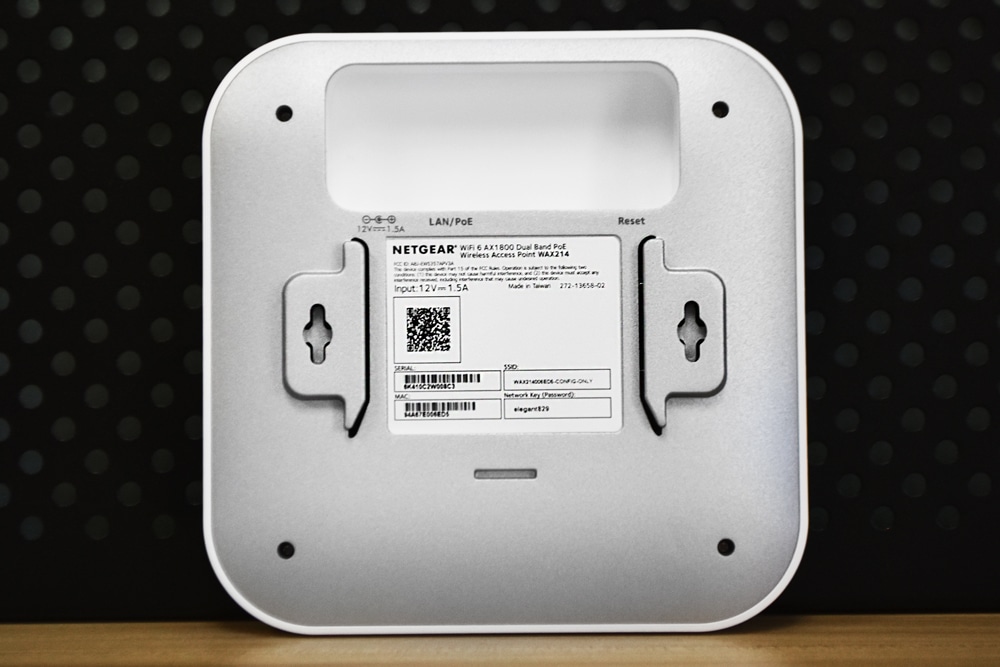
Flipping the access point over shows the LAN/PoE port, power, and reset functionality, which are all located inside a small concaved area to help make wall mounting a bit easier. You’ll also notice the mount slots on either side of the back panel.

![Netgear WAX214 bottom]()

## **NETGEAR WAX214** **Management **

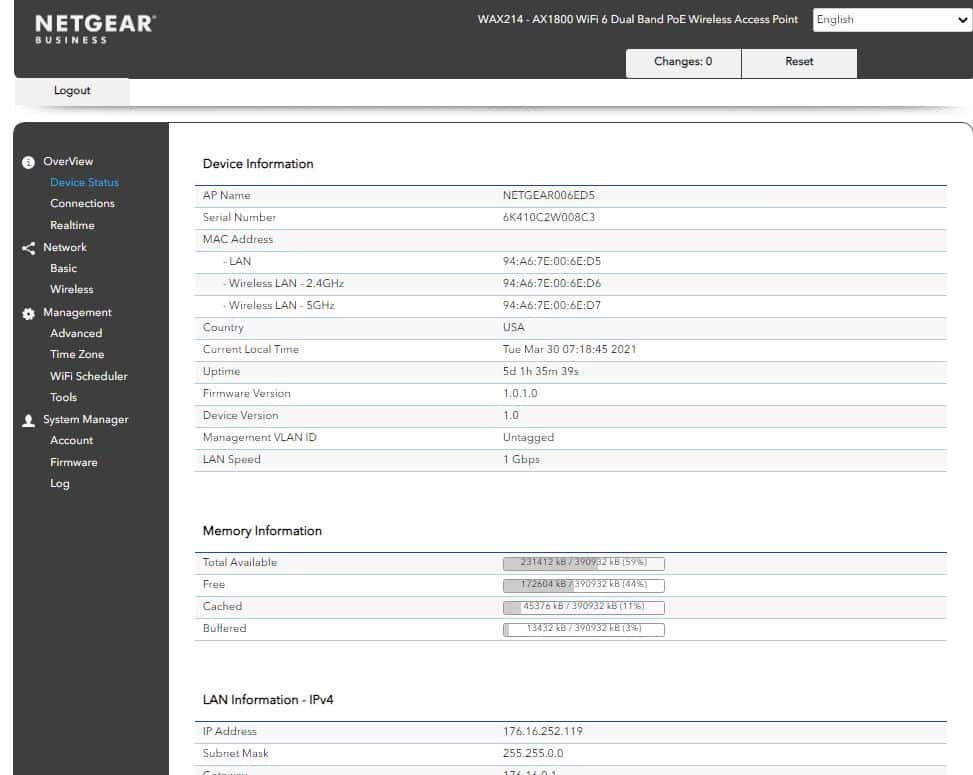
The NETGEAR access points are managed locally via a web-based user interface. Once you set up your access point, simply type the WAX214’s IP address in a browser and you’ll be able to log into a dashboard with your credentials. Once in, you’ll see a very modern GUI that features four main sections: Overview, Network, Management, and System Manager. After checking out each option, we found it very easy to navigate, highlighted by its clean and responsive interface.

In the Device Status area of the Overview section, you’ll see all the access point’s detailed information including the name, MAC address, serials numbers, location, firmware versions, and memory/LAN information.

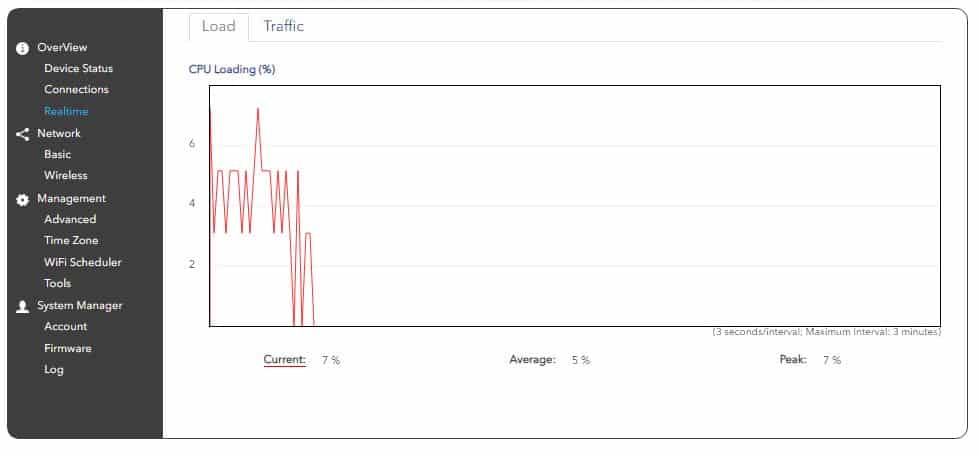
![]() In the Realtime section, you can analyze CPU loading and network traffic via a simple line graph. Soon as this section loaded, the GUI immediately started gathering data so you won’t have to wait very long to see what’s going on with your access point.

![]()

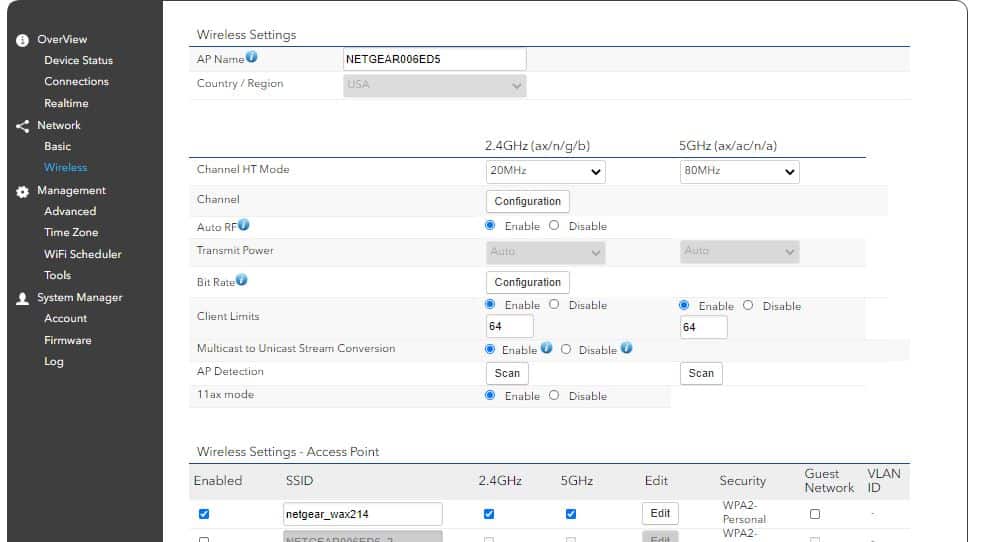
The Network > Wireless section allows you to configure detailed wireless settings of an access point for both 2.4GHz and 5GHz connections. This includes the Channel HT Mode and client limits, as well as enabling/disabling the Auto RF, 11ax mode, and multicast settings.

![]()

This is where you add and configure your SSIDs as well (max of 4). You can name them, enabled/disable 2.4/5GHz connections, edit their respective settings, and enable Guest networks.

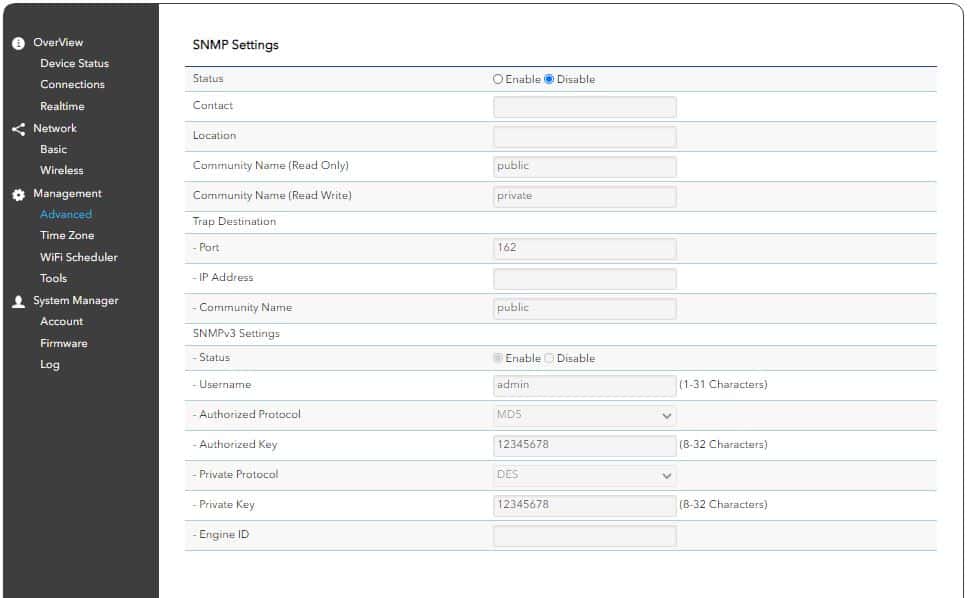
In the Advanced setting under Management, you can change SNMP, CLI, and SSH settings and you can also configure email alerts.

![]()

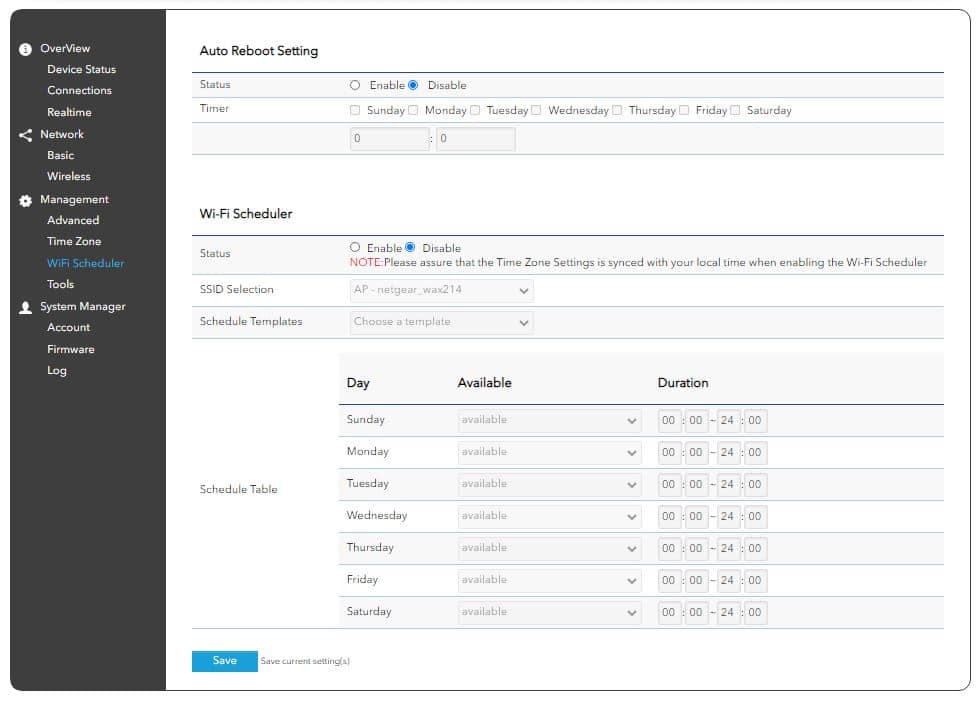
With the wireless scheduler option, we were able to easily set when the WAX214 is available using the Schedule Table. You can also set when to automatically reboot the access point, which is a good idea to do on a weekly basis.

![]()

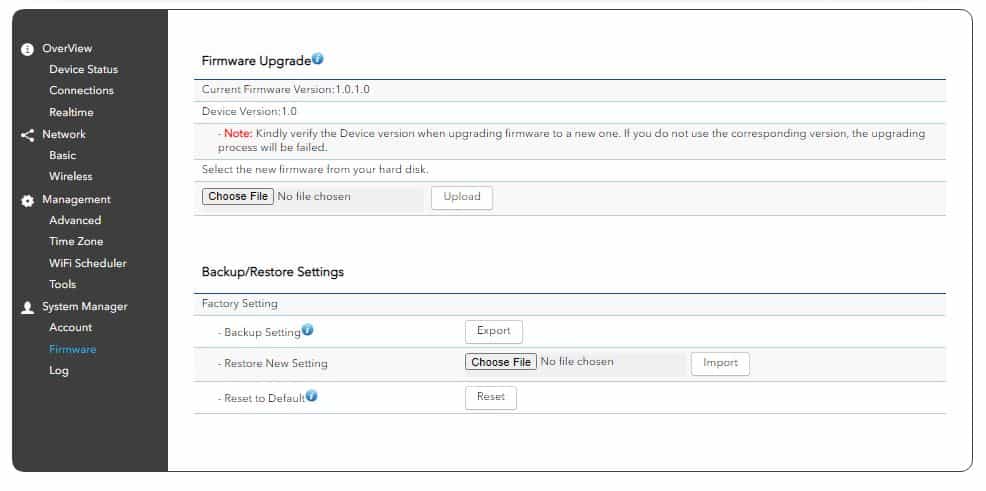
The Firmware area allows you to manually upgrade or downgrade the access point’s firmware (files available for download on the NETGEAR website) and to back up and restore settings. It also allows users to reset the AP to its factory settings. Giving users the ability to do this remotely can certainly come in handy if an unknown setting was changed by mistake and it’s causing issues with the access point.

![]()

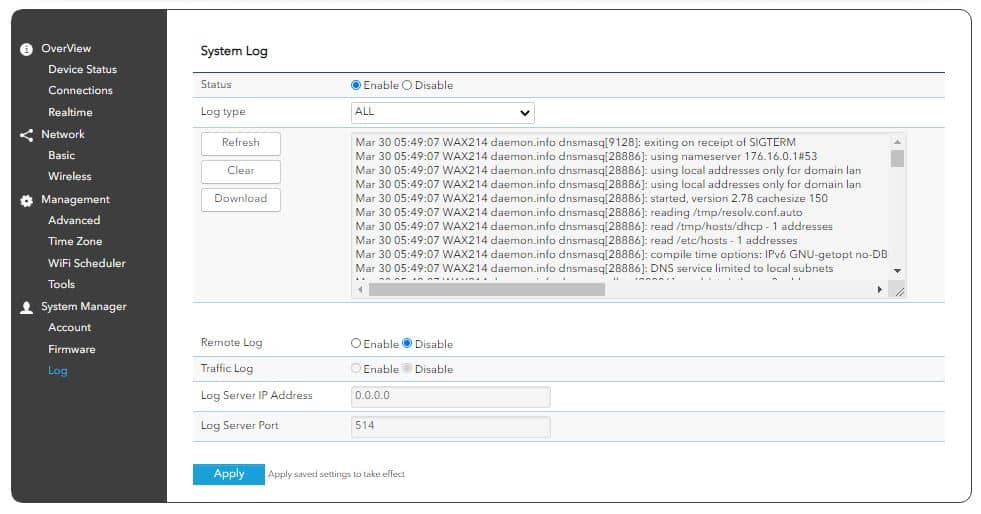
In the Log section, you can easily set it to automatically record all events with the access point. Users can then easily download the log-in.TAR format, which then extracts to a .TXT file.

![]()

## **Conclusion**

The NETGEAR WAX214 wireless access point is a great addition to the company’s WiFi 6 Business Essentials portfolio. While products like the WAX204 (an access point from the same family) feature a much more enterprise form factor with some versatile wall/ceiling mount capabilities, the WAX204 is more of a consumer/prosumer-grade device with some SMB vibes. This makes it a more cost-effective solution for organizations that only have a smaller area of WiFi access to cover. The WAX214 is also PoE-powered, which is ideal for businesses who might not have access to power outlets in the areas they want to install their access points.

![Netgear WAX214 logo]()

Overall, the WAX214 does a great job of creating a secure, customized, and performance-driven network for SMBs and their on-site customers.  The WAX214 supports up to four separate wireless sub-networks with their own individual, dedicated SSIDs, which allows admins to easily separate network traffic from business and personal to get the best possible performance.

The WAZ214 also allows businesses to customize different levels of security within a network, which already features WPA3 authentication and encryption support and DHCP NAT enhanced firewall security. All of this functionality is managed through NETGEAR’s remote, web-based software. Smaller businesses will certainly find it very handy and easy-to-use when creating a wireless network that best suits their needs.

[NETGEAR WAX214 Wireless Access Point on Amazon](https://amzn.to/3rygNek)

**Engage with StorageReview**

[Newsletter](https://www.storagereview.com/storage_newsletter) |  [YouTube](https://www.youtube.com/user/StorageReview "Opens in a new window") | Podcast  [iTunes](https://podcasts.apple.com/gb/podcast/storagereview-com-storage-reviews/id1060681115 "Opens in a new window")/ [Spotify](https://open.spotify.com/show/1y6VnznABhHeOSMOmbDTz0 "Opens in a new window") |  [Instagram](https://www.instagram.com/storagereview/ "Opens in a new window") |  [Twitter](https://twitter.com/storagereview "Opens in a new window") |  [TikTok](https://www.tiktok.com/@storagereview? "Opens in a new window") |  [RSS Feed](https://www.storagereview.com/rss.xml)

![]()

### Lyle Smith

Lyle is a writer for StorageReview, covering a broad set of end user and enterprise IT topics.

Previous post: [Intel NUC 11 Compute Element Review (Elk Bay)](https://www.storagereview.com/review/intel-nuc-11-compute-element-review-elk-bay)

Next post: [Seagate Nytro 3332 SAS SSD Review](https://www.storagereview.com/review/seagate-nytro-3332-sas-ssd-review)

Trusted Vendors

Products and solutions from our affiliate partners:

- [  
  ![Ubiquiti Logo](https://www.storagereview.com/wp-content/uploads/2024/11/2-1.webp)  
   Ubiquiti](https://store.ui.com/us/en?a_aid=StorageReview "Opens in a new window")
- [  
  ![Newegg Logo](https://www.storagereview.com/wp-content/uploads/2025/11/newegg.webp)  
   Newegg](https://click.linksynergy.com/fs-bin/click?id=g5terNMDhz0&offerid=1207190.18&subid=0&type=4 "Opens in a new window")
- [  
  ![Amazon Logo](https://www.storagereview.com/wp-content/uploads/2025/11/amazon.webp) Amazon](https://amzn.to/4fLJUEW "Opens in a new window")

Newsletter

Subscribe to the StorageReview newsletter to stay up to date on the latest news and reviews. We promise no spam!

1  

Leave this field empty if you’re human:

## Advertisement

Content Categories

[Facebook](https://www.facebook.com/@storagereview) [X](https://twitter.com/storagereview) [Instagram](https://www.instagram.com/storagereview/) [LinkedIn](https://www.linkedin.com/company/storagereview-com) [YouTube](https://www.youtube.com/user/storagereview?sub_confirmation=1) [Email](mailto:info@storagereview.com) [Spotify](https://open.spotify.com/show/1y6VnznABhHeOSMOmbDTz0) [Reddit](https://www.reddit.com/r/StorageReview/) [Discord](https://discord.gg/TwMHb4azdC) [RSS](https://www.storagereview.com/rss.xml) [TikTok](https://www.tiktok.com/@storagereview)

Copyright © 1998-2025 Flying Pig Ventures, LLC Cincinnati, Ohio. All rights reserved.

Manage your privacy

To provide the best experiences, we and our partners use technologies like cookies to store and/or access device information. Consenting to these technologies will allow us and our partners to process personal data such as browsing behavior or unique IDs on this site and show (non-) personalized ads. Not consenting or withdrawing consent, may adversely affect certain features and functions.

Click below to consent to the above or make granular choices. Your choices will be applied to this site only. You can change your settings at any time, including withdrawing your consent, by using the toggles on the Cookie Policy, or by clicking on the manage consent button at the bottom of the screen.

Functional Functional Always active

The technical storage or access is strictly necessary for the legitimate purpose of enabling the use of a specific service explicitly requested by the subscriber or user, or for the sole purpose of carrying out the transmission of a communication over an electronic communications network.

Preferences Preferences

The technical storage or access is necessary for the legitimate purpose of storing preferences that are not requested by the subscriber or user.

Statistics Statistics

The technical storage or access that is used exclusively for statistical purposes. The technical storage or access that is used exclusively for anonymous statistical purposes. Without a subpoena, voluntary compliance on the part of your Internet Service Provider, or additional records from a third party, information stored or retrieved for this purpose alone cannot usually be used to identify you.

Marketing Marketing

The technical storage or access is required to create user profiles to send advertising, or to track the user on a website or across several websites for similar marketing purposes.

Statistics

Marketing

Features

Always active

Always active

- Manage options
- Manage services
- Manage {vendor\_count} vendors
- [Read more about these purposes](https://cookiedatabase.org/tcf/purposes/)

Accept Deny Manage options Save preferences Manage options

- {title}
- {title}
- {title}

Manage your privacy

To provide the best experiences, we use technologies like cookies to store and/or access device information. Consenting to these technologies will allow us to process data such as browsing behavior or unique IDs on this site. Not consenting or withdrawing consent, may adversely affect certain features and functions.

Functional Functional Always active

The technical storage or access is strictly necessary for the legitimate purpose of enabling the use of a specific service explicitly requested by the subscriber or user, or for the sole purpose of carrying out the transmission of a communication over an electronic communications network.

Preferences Preferences

The technical storage or access is necessary for the legitimate purpose of storing preferences that are not requested by the subscriber or user.

Statistics Statistics

The technical storage or access that is used exclusively for statistical purposes. The technical storage or access that is used exclusively for anonymous statistical purposes. Without a subpoena, voluntary compliance on the part of your Internet Service Provider, or additional records from a third party, information stored or retrieved for this purpose alone cannot usually be used to identify you.

Marketing Marketing

The technical storage or access is required to create user profiles to send advertising, or to track the user on a website or across several websites for similar marketing purposes.

Statistics

Marketing

Features

Always active

Always active

- Manage options
- Manage services
- Manage {vendor\_count} vendors
- [Read more about these purposes](https://cookiedatabase.org/tcf/purposes/)

Accept Deny Manage options Save preferences Manage options

- {title}
- {title}
- {title}

Manage consent Manage consent

```json
{"@context":"https:\/\/schema.org","@graph":[{"@type":"WebPage","@id":"https:\/\/www.storagereview.com\/review\/netgear-wax214-wireless-access-point-review","url":"https:\/\/www.storagereview.com\/review\/netgear-wax214-wireless-access-point-review","name":"NETGEAR WAX214 Wireless Access Point Review - StorageReview.com","isPartOf":{"@id":"https:\/\/www.storagereview.com\/#website"},"primaryImageOfPage":{"@id":"https:\/\/www.storagereview.com\/review\/netgear-wax214-wireless-access-point-review#primaryimage"},"image":{"@id":"https:\/\/www.storagereview.com\/review\/netgear-wax214-wireless-access-point-review#primaryimage"},"thumbnailUrl":"https:\/\/www.storagereview.com\/wp-content\/uploads\/2021\/03\/Netgear-WAX214-fancy.jpg","datePublished":"2021-03-31T15:27:09+00:00","description":"The NETGEAR WAX214 wireless access point is a great addition to the company’s growing WiFi 6 Business Essentials portfolio.","breadcrumb":{"@id":"https:\/\/www.storagereview.com\/review\/netgear-wax214-wireless-access-point-review#breadcrumb"},"inLanguage":"en-US","potentialAction":[{"@type":"ReadAction","target":["https:\/\/www.storagereview.com\/review\/netgear-wax214-wireless-access-point-review"]}]},{"@type":"ImageObject","inLanguage":"en-US","@id":"https:\/\/www.storagereview.com\/review\/netgear-wax214-wireless-access-point-review#primaryimage","url":"https:\/\/www.storagereview.com\/wp-content\/uploads\/2021\/03\/Netgear-WAX214-fancy.jpg","contentUrl":"https:\/\/www.storagereview.com\/wp-content\/uploads\/2021\/03\/Netgear-WAX214-fancy.jpg","width":1000,"height":667,"caption":"Netgear WAX214 logo"},{"@type":"BreadcrumbList","@id":"https:\/\/www.storagereview.com\/review\/netgear-wax214-wireless-access-point-review#breadcrumb","itemListElement":[{"@type":"ListItem","position":1,"name":"Home","item":"https:\/\/www.storagereview.com\/"},{"@type":"ListItem","position":2,"name":"Review","item":"https:\/\/www.storagereview.com\/review"},{"@type":"ListItem","position":3,"name":"NETGEAR WAX214 Wireless Access Point Review"}]},{"@type":"WebSite","@id":"https:\/\/www.storagereview.com\/#website","url":"https:\/\/www.storagereview.com\/","name":"StorageReview.com","description":"StorageReview.com is a leading provider of news and reviews throughout the entire IT stack - from the datacenter to the edge, and all points in between.","publisher":{"@id":"https:\/\/www.storagereview.com\/#organization"},"potentialAction":[{"@type":"SearchAction","target":{"@type":"EntryPoint","urlTemplate":"https:\/\/www.storagereview.com\/?s={search_term_string}"},"query-input":{"@type":"PropertyValueSpecification","valueRequired":true,"valueName":"search_term_string"}}],"inLanguage":"en-US"},{"@type":"Organization","@id":"https:\/\/www.storagereview.com\/#organization","name":"StorageReview.com","url":"https:\/\/www.storagereview.com\/","logo":{"@type":"ImageObject","inLanguage":"en-US","@id":"https:\/\/www.storagereview.com\/#\/schema\/logo\/image\/","url":"https:\/\/www.storagereview.com\/wp-content\/uploads\/2020\/02\/Storage-Reviews-2-2.png","contentUrl":"https:\/\/www.storagereview.com\/wp-content\/uploads\/2020\/02\/Storage-Reviews-2-2.png","width":344,"height":61,"caption":"StorageReview.com"},"image":{"@id":"https:\/\/www.storagereview.com\/#\/schema\/logo\/image\/"},"sameAs":["https:\/\/x.com\/storagereview","http:\/\/youtube.com\/user\/storagereview"]}]}
```