

Dysk Seagate Enterprise Capacity 6TB V.4 jest reklamowany jako „najszybszy na świecie” dysk twardy typu nearline dostępny obecnie na rynku, z deklarowaną wydajnością o 25% wyższą niż konkurencyjne produkty. Z prędkością roboczą 7200 obr./min, dysk Seagate V.4 jest również dostępny w wersjach o pojemności 5 TB, 4 TB i 2 TB. Każdy typ można nabyć z interfejsem SAS 12 Gb/s lub SATA 6 Gb/s, co pozwala na łatwą integrację z obecnymi systemami. Seagate obsługuje również opcjonalne szyfrowanie SED i FIPS.
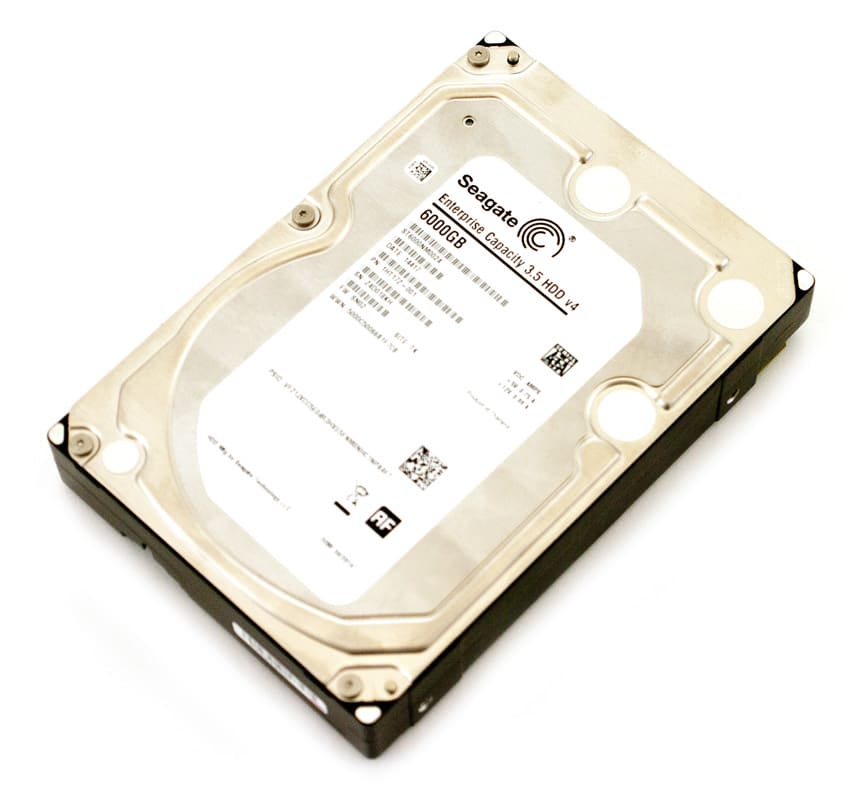
Potrzeby w zakresie wysokiej jakości i niezawodności pamięci masowej gwałtownie rosną. Firmy mogą nadal dodawać dyski twarde o pojemności 4 TB, ale istnieje górny limit pojemności, jaką można dodać do istniejącej sieci. Dzięki dyskowi Seagate 6TB V.4 użytkownicy mogą dodać 50% dodatkowej pamięci masowej w tej samej przestrzeni rackowej U. Użytkownicy otrzymają nie tylko 2 TB dodatkowej przestrzeni na dysk twardy w danej obudowie, ale także będą mogli wybierać między dyskami SED lub SED klasy rządowej z certyfikatem FIPS 140-2, a wszystko to z technologią Seagate Instant Secure Erase. Zbudowany na sprawdzonych w praktyce platformach ósmej generacji, dysk Seagate Enterprise Capacity 6TB V.4 został stworzony, aby zapewnić wysoką pojemność i niezawodną pracę 24 godziny na dobę, 7 dni w tygodniu bez utraty wydajności.
Dysk Seagate Enterprise Capacity 6TB 3.5 HDDv4 jest objęty 5-letnią ograniczoną gwarancją i w momencie publikacji tej recenzji jego cena detaliczna wynosiła około 600.00 dolarów. Nasza recenzja obejmuje 16 dysków o pojemności 6 TB z interfejsem SATA.
Specyfikacja dysku twardego Seagate Enterprise o pojemności 6 TB i pojemności 3.5 cala:
- Model
- SAS: ST6000NM0014, ST6000NM0034, ST6000NM0054, ST6000NM0104
- SATA: ST6000NM0004, ST6000NM0024, ST6000NM0044, ST6000NM0084
- Interfejs: SAS 12 Gb/s, SATA 6 Gb/s
- Pojemność (GB): 6TB
- Rozmiar sektora (zmienny, bajtów/sektor): 512/4096
- Maksymalna gęstość powierzchniowa (Gb/sq. cal): 643/633
- Współczynnik kształtu: dysk twardy 3.5 cala
- Wydajność:
- Prędkość obrotowa (obr./min): 7200
- Prędkości dostępu do interfejsu (Gb/s): 12.0, 6.0, 3.0 (SAS), 6.0, 3.0, 1.5 (SATA)
- Niezawodność:
- Współczynnik błędów (nieodwracalny, odczytane bity): 1 na 10^15
- Średni czas między awariami (M godzin): 1.4
- Dostępność (godz./dzień x dni/tydz.): 24×7
- Niezawodność – gwarancja (lata): 5
- Zasilanie
- Wymagania: +5 VDC i +12 VDC
- Typowa praca, losowy odczyt (W): 11.86 (SAS), 11.27 (SATA)
- Bezczynność (W, średnia): 7.97 (SAS), 6.9 (SATA)
- Fizyczny rozmiar
- Wymiary (wys. x szer. x gł., mm): 26.1 x 101.85 x 147.0
- Waga (g): 780
- Środowiskowe (operacyjne)
- Temperatura otoczenia: od 5º do 60º C
- Wstrząs (fala półsinusoidalna): 70
- Środowiskowe (nieoperacyjne)
- Wstrząs (fala półsinusoidalna): 250
- Wibracje (10 do 500 Hz): 5.0 (SATA), 4.9 (SAS)
Projektuj i buduj
Dyski twarde Seagate Enterprise o pojemności 6 TB wyglądają podobnie do standardowych odpowiedników. Nie rzucają się w oczy, są funkcjonalne. Górna część dysku jest w całości srebrna, z wkładką pośrodku, która zapewnia ochronę głowicy. Na górze znajduje się również sześć śrub umożliwiających dostęp do wewnętrznych części dysku.
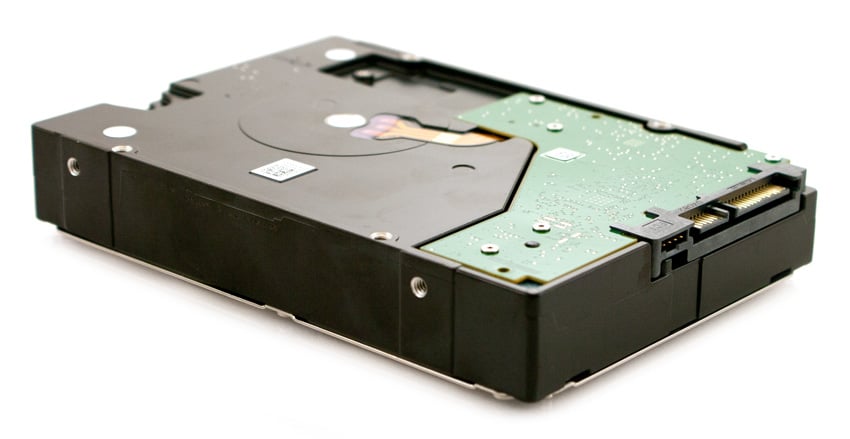
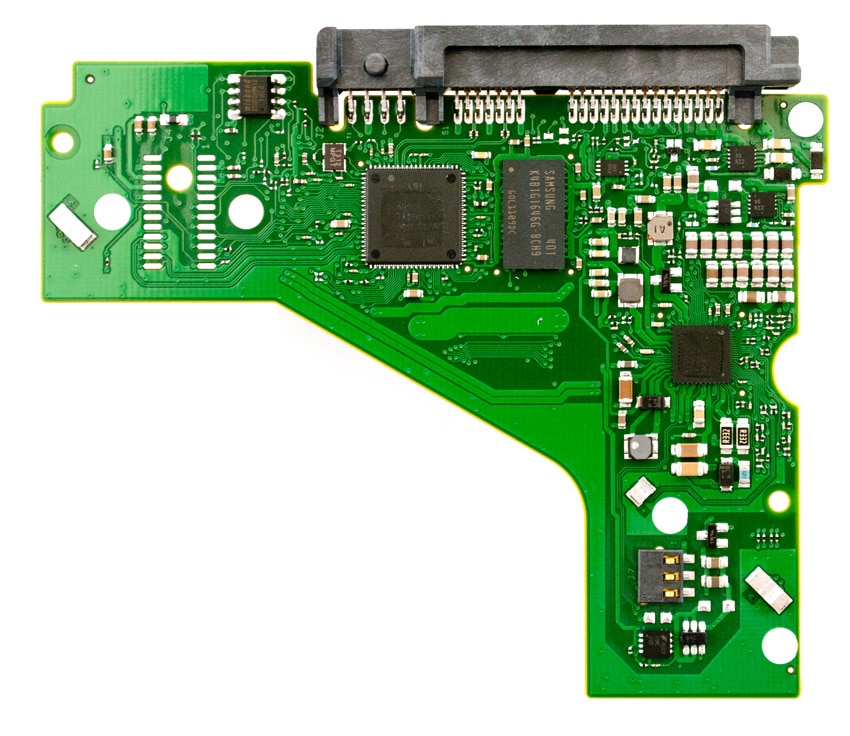
Z punktu widzenia projektowania najbardziej zauważalne jest to, że aby zrobić miejsce na szósty talerz, Seagate musiał przesunąć środkowe otwory na śruby. Zniknęły one całkowicie po bokach, a te na dole zostały przesunięte do tyłu. Istnieje ryzyko, że dyski staną się niekompatybilne z tackami dysków beznarzędziowymi i starszymi tackami, w których nie uwzględniono przeniesienia do tylnego punktu mocowania na spodzie dysku.
Testowanie tła i porównań
Do testów wykorzystaliśmy 16 dysków twardych SATA Seagate o pojemności 6TB.
Porównanie dysków twardych klasy Enterprise na potrzeby tej recenzji:
- Seagate Constellation ES.2 3TB
- HGST Ultrastar He6 6TB
- Western Digital RE4 4TB
- Seagate Constellation CS 3TB
- Western Digital SE 4TB
Wszystkie dyski twarde klasy korporacyjnej są poddawane testom porównawczym na tej samej platformie testowej.
Do testów syntetycznego FIO używamy serwera ThinkServer RD240 skonfigurowanego z następującym systemem:
- 2 x Intel Xeon X5650 (2.66 GHz, pamięć podręczna 12 MB)
- Windows Server 2008 Standard Edition R2 SP1 64-bit i CentOS 6.2 64-bit
- Chipset Intel 5500+ ICH10R
- Pamięć – 8 GB (2 x 4 GB) 1333 MHz DDR3 Registered RDIMM
- Karta HBA LSI 9211 SAS/SATA 6.0 Gb/s
Testy aplikacji odbywają się w unikalnym środowisku, szczegółowo opisanym na każdej stronie benchmarku . W przypadku testowania 16 dysków, do środowiska dodano dysk JBOD iXsystems Titan 316J i podłączono go do odpowiedniego klastra za pomocą zewnętrznego kabla SAS.
Analiza wydajności aplikacji
Na rynku korporacyjnym istnieje ogromna różnica między tym, jak produkty deklarują swoją wydajność na papierze, a tym, jak działają w rzeczywistym środowisku produkcyjnym. Rozumiemy wagę oceny pamięci masowej jako elementu większych systemów, a przede wszystkim tego, jak responsywna jest pamięć masowa w interakcji z kluczowymi aplikacjami korporacyjnymi. W tym celu przeprowadziliśmy testy aplikacji, w tym testy wydajności MySQL za pośrednictwem SysBench oraz wydajności SQL Server za pośrednictwem Benchmark Factory.
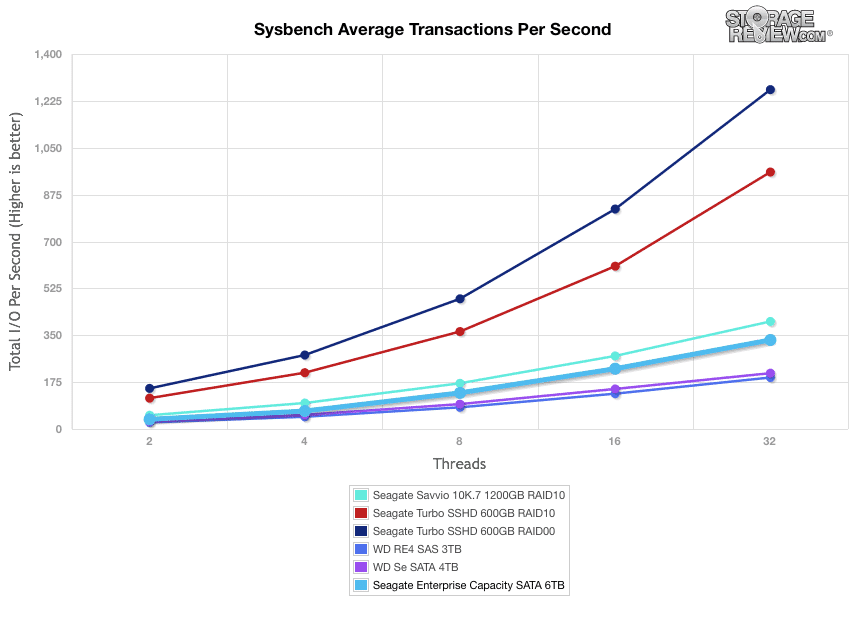
Nasz pierwszy test aplikacji polega na teście bazy danych MySQL Percona za pomocą SysBench , który mierzy wydajność aktywności OLTP. W tej konfiguracji testowej używamy grupy serwerów Lenovo ThinkServer RD630 i ładujemy środowisko bazy danych na pojedynczy dysk SATA, SAS lub PCIe lub grupę dysków twardych za pomocą karty RAID LSI 9286-8e. Test ten mierzy średnią liczbę transakcji na sekundę (TPS), średnie opóźnienie, a także średnie opóźnienie 99. percentyla w zakresie od 2 do 32 wątków. Percona i MariaDB korzystają z interfejsów API aplikacji obsługujących pamięć flash Fusion-io w najnowszych wersjach swoich baz danych, jednak na potrzeby tego porównania testujemy każde urządzenie w jego „starszym” trybie pamięci blokowej.
Przy rozmiarze bazy danych roboczej wynoszącym około 333 GB, sprawdziliśmy wydajność w obu macierzach RAID10, używając dysku Seagate Enterprise o pojemności 6 TB. Dysk Seagate 6 TB uzyskał wynik nieco poniżej średniej, osiągając szczyt 332.34 TPS, przewyższając porównywalne dyski WD RE4 i SE.
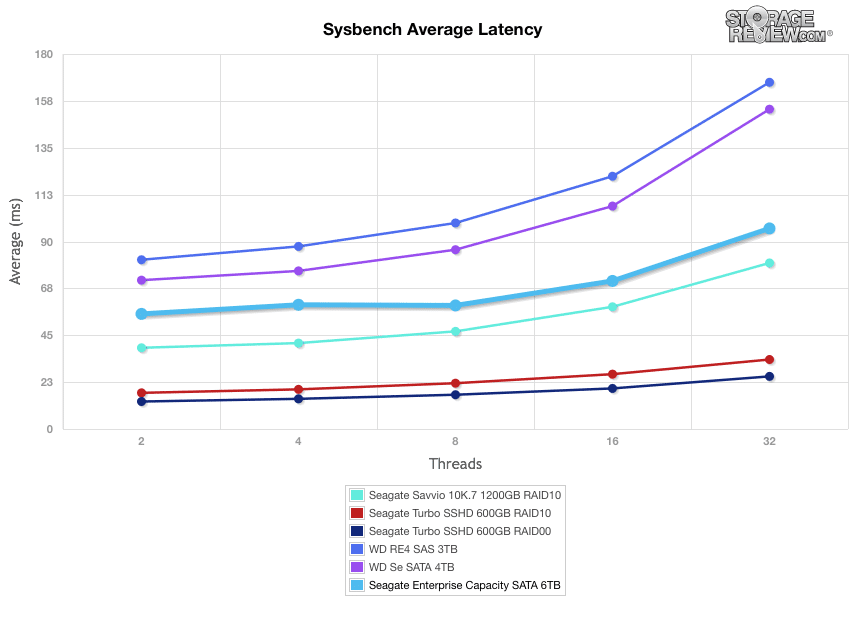
Pomiar średniego opóźnienia w naszym teście Sysbench MySQL wykazał, że dysk Seagate 6TB uzyskał lepsze wyniki niż oba dyski WD, charakteryzując się niższym średnim opóźnieniem.
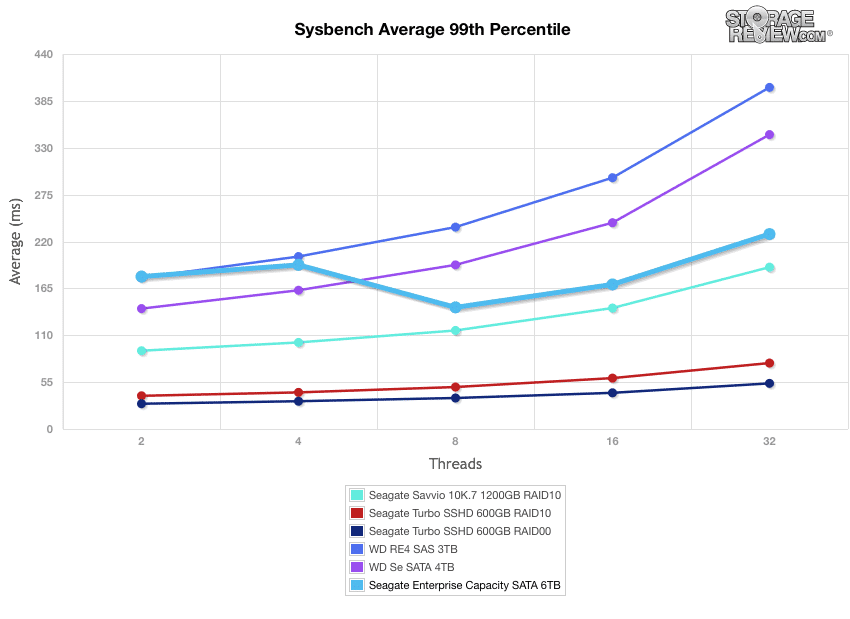
Porównując 99. percentyl opóźnienia podczas testu Sysbench TPC-C, można zauważyć podobne wyniki do powyższych, a Seagate 6TB działa lepiej niż porównywalne dyski WD SAS i SATA.
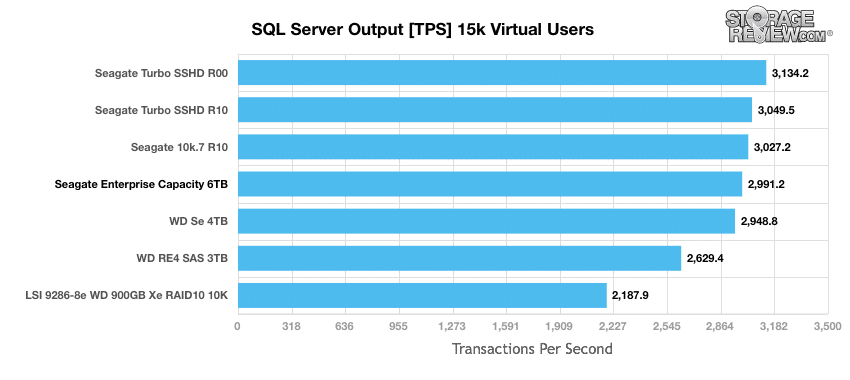
Protokół testowania OLTP dla Microsoft SQL Server firmy StorageReview wykorzystuje aktualną wersję roboczą testu Benchmark C (TPC-C) opracowanego przez Transaction Processing Performance Council – internetowego testu porównawczego przetwarzania transakcji, który symuluje działania występujące w złożonych środowiskach aplikacji. Test TPC-C jest bliższy niż syntetyczne testy wydajnościowe, jeśli chodzi o ocenę mocnych stron i wąskich gardeł infrastruktury pamięci masowej w środowiskach baz danych. W tym teście nasz protokół SQL Server wykorzystuje bazę danych SQL Server o pojemności 333 GB (w skali 1,500) i mierzy wydajność transakcyjną oraz opóźnienia przy obciążeniu 15 000 użytkowników wirtualnych.
Jeśli chodzi o wydajność transakcyjną każdej konfiguracji dysku, Seagate 6TB radzi sobie całkiem nieźle, uzyskując wynik nieco poniżej 3,000 TPS, ponownie pokonując dyski WD i niewiele ustępując dyskom Seagate Savvio 10K.7.
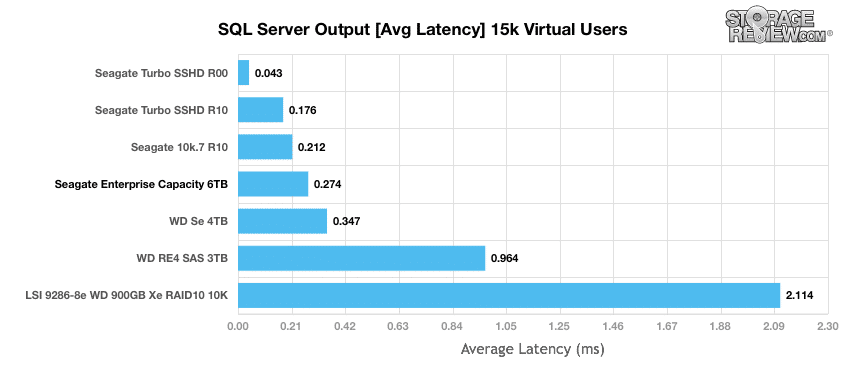
Porównując średnie opóźnienia pomiędzy poszczególnymi konfiguracjami pamięci masowej, ponownie widzimy podobne wyniki.
Analiza syntetycznego obciążenia przedsiębiorstwa
Nasz proces testowania dysków twardych klasy enterprise polega na wstępnym przygotowaniu każdego dysku do pracy w stanie ustalonym przy takim samym obciążeniu, z jakim urządzenie będzie testowane, przy dużym obciążeniu 16 wątków i kolejce oczekujących 16 wątków na wątek, a następnie testowaniu w określonych odstępach czasu z wykorzystaniem wielu profili głębokości wątków/kolejek, aby pokazać wydajność przy lekkim i intensywnym użytkowaniu. Ponieważ dyski twarde bardzo szybko osiągają swój nominalny poziom wydajności, przedstawiamy na wykresie tylko główne sekcje każdego testu.
Wstępne kondycjonowanie i podstawowe testy stanu stacjonarnego:
- Przepustowość (łączna liczba operacji wejścia/wyjścia na sekundę odczytu i zapisu)
- Średnie opóźnienie (średnie opóźnienie odczytu i zapisu)
- Maksymalne opóźnienie (maksymalne opóźnienie odczytu lub zapisu)
- Odchylenie standardowe opóźnienia (uśrednione odchylenie standardowe odczytu i zapisu)
Nasza analiza obciążenia syntetycznego w przedsiębiorstwie obejmuje cztery profile oparte na rzeczywistych zadaniach. Profile te zostały opracowane, aby ułatwić porównywanie z naszymi poprzednimi testami porównawczymi, a także powszechnie publikowanymi wartościami, takimi jak maksymalna prędkość odczytu i zapisu 4K oraz 8K 70/30, powszechnie stosowana w dyskach korporacyjnych.
- 4K
- 100% odczytu lub 100% zapisu
- 100% 4 tys.
- 8K 70/30
- 70% czytania, 30% pisania
- 100% 8 tys.
- 128K (sekwencyjnie)
- 100% odczytu lub 100% zapisu
- 100% 128 tys.
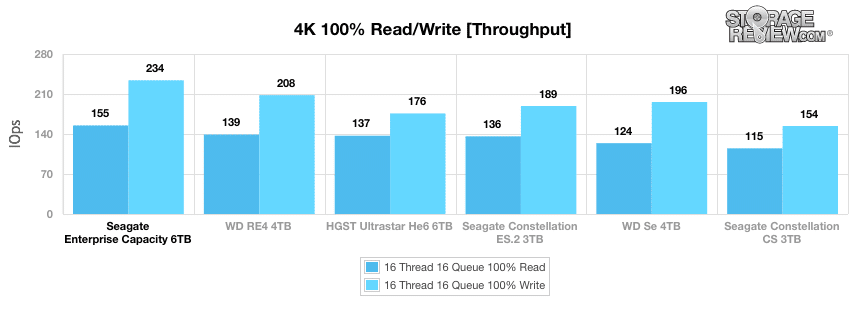
W pierwszym z naszych obciążeń korporacyjnych zmierzyliśmy długą próbkę losowej wydajności 4k przy 100% aktywności zapisu i 100% aktywności odczytu, aby uzyskać szczytowe, ciągłe wyniki losowego wejścia/wyjścia. Dysk Seagate Enterprise Capacity 6TB okazał się najlepszy zarówno pod względem wydajności zapisu, jak i odczytu, osiągając odpowiednio 234 i 155 IOPS.
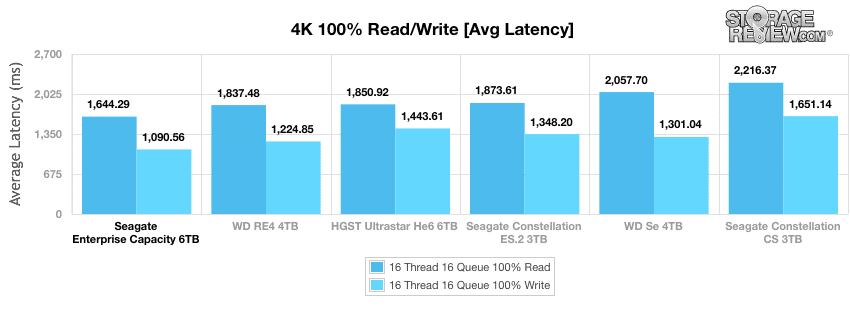
W naszym głównym segmencie średnich opóźnień przy obciążeniu 16T/16Q dysk Seagate 6TB ponownie przewyższył inne dyski, uzyskując najniższe średnie opóźnienie zapisu i odczytu, wynoszące odpowiednio 1090.56 ms i 1644.29 ms
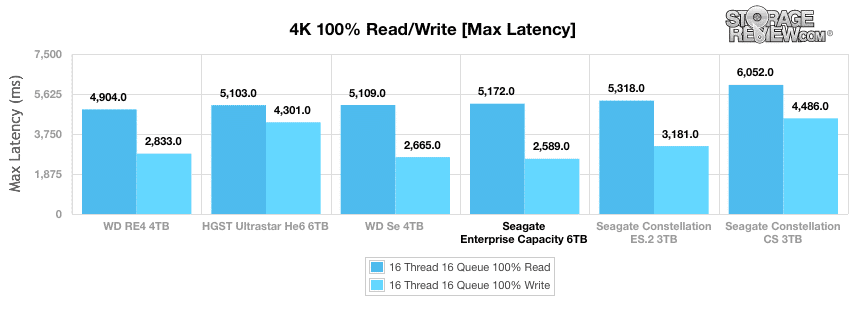
Mierząc tylko aktywność odczytu, Seagate 6TB spadł na trzecie miejsce pod względem maksymalnego opóźnienia z prędkością odczytu 5172 ms. Zarówno Western Digital Se 4TB, jak i HGST Ultrastar He6 6TB pokonały go, ale tylko o około 60 ms. Z drugiej strony, dysk ten wypadł najlepiej z maksymalnym opóźnieniem zapisu, wynoszącym 2589 ms.
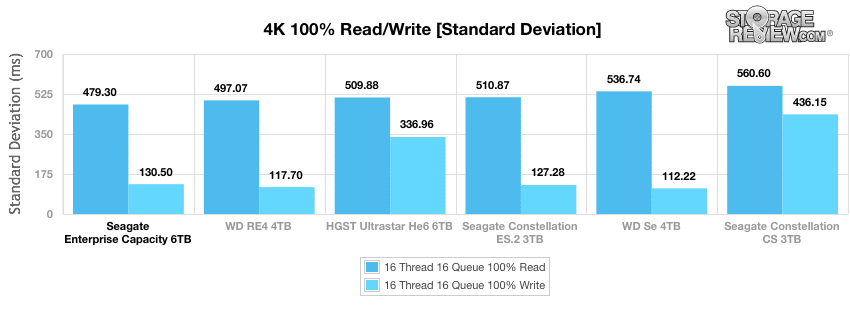
Analizując spójność opóźnień 4K w naszej sekcji odchylenia standardowego, Seagate 6TB wykazał się najlepszą szybkością odczytu na poziomie 479.3 ms, jednak przy szybkości zapisu na poziomie 130.5 ms spadł na czwarte miejsce za Western Digital Se 4TB, Western Digital RE4 4TB i Seagate Constellation ES.2.
W porównaniu ze stałym obciążeniem 16 wątków i 16 kolejek, jakie zastosowaliśmy w teście zapisu 100% 4k, nasze profile obciążenia mieszanego skalują wydajność w szerokim zakresie kombinacji wątków/kolejek. W tych testach intensywność obciążenia rozciąga się od 2 wątków i 2 kolejek do 16 wątków i 16 kolejek. W rozszerzonym teście 8k 70/30, dysk Seagate 6TB osiągnął najwyższą przepustowość, osiągając 214 IOPS.
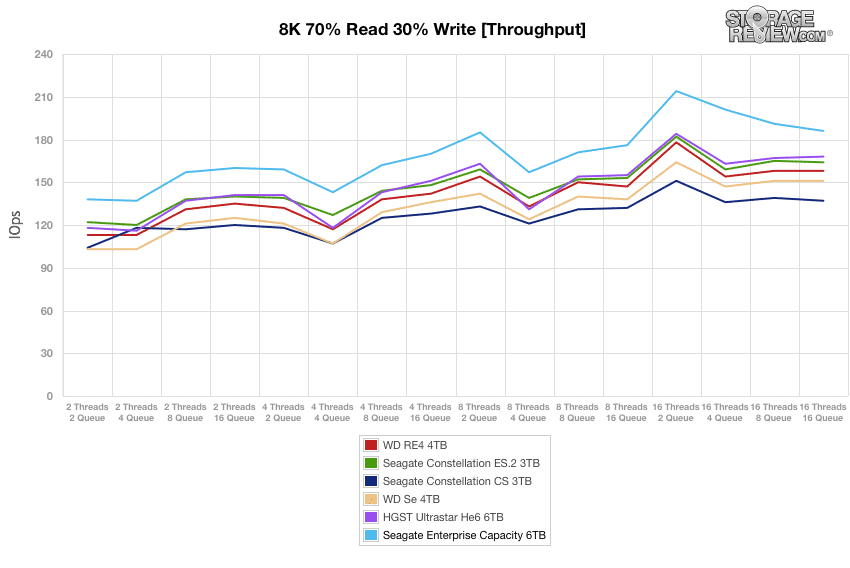
Jeśli chodzi o średni czas reakcji 8k 70/30, Seagate 6TB ponownie okazał się najlepszym dyskiem, wykazując się najniższym opóźnieniem.
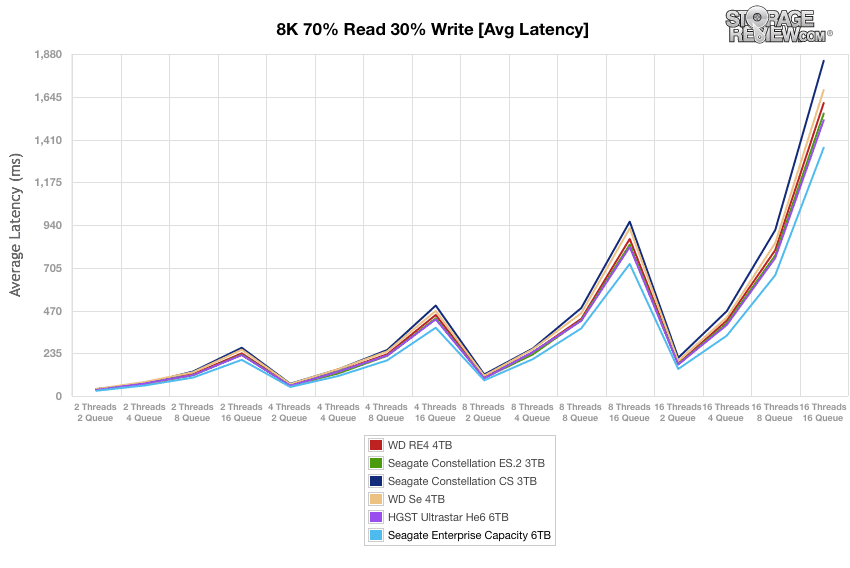
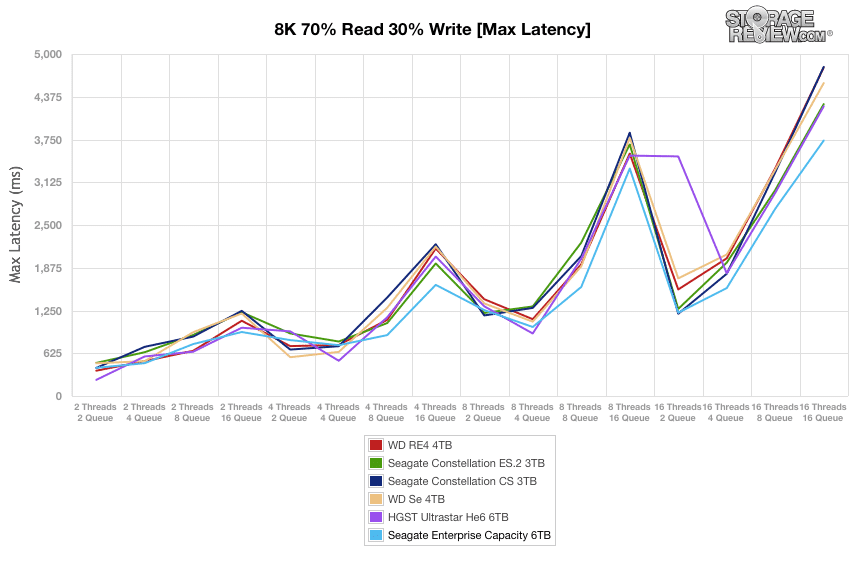
Podczas naszych głównych testów przy różnych poziomach głębokości wątków i kolejek dysk Seagate 6TB plasował się w czołówce rankingu i charakteryzował się najniższą średnią maksymalną prędkością opóźnienia spośród wszystkich dysków twardych.
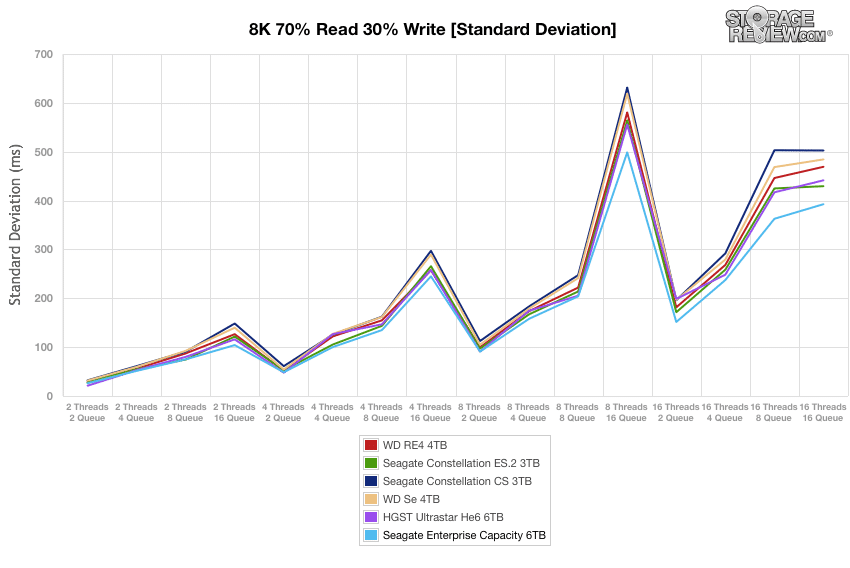
W całym spektrum wątków/kolejek dysk Seagate 6TB charakteryzował się najniższymi prędkościami niemal przez cały czas trwania testu i miał najniższą średnią.
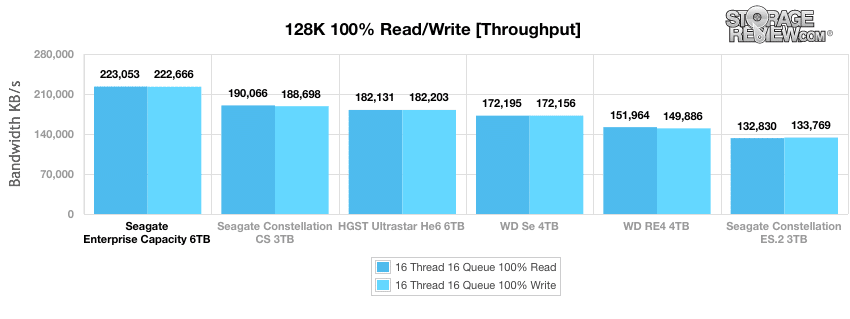
Nasz test obciążenia syntetycznego Enterprise 128 KB to sekwencyjny test dużych bloków, który pokazuje najwyższą sekwencyjną prędkość transferu dla dysku talerzowego. Biorąc pod uwagę wydajność 128 KB przy 100% aktywności zapisu i 100% aktywności odczytu, dysk Seagate 6TB osiągnął imponujące wyniki: 223 053 KB/s odczytu i 222 666 KB/s zapisu, zajmując pierwsze miejsce w obu kategoriach, znacznie wyprzedzając inne dyski twarde.
Wniosek
Seagate Enterprise Capacity 6TB V.4 to 3.5-calowy dysk twardy z wrzecionem 7200 obr./min i sprawdzoną niezawodnością Seagate. Dostępny jest w wielu modelach, w tym o innej pojemności, takiej jak 5 TB, 4 TB i 2 TB, z łącznością SAS 12 Gb/s lub SATA 6 Gb/s, co ułatwia integrację. Dysk posiada certyfikat FIPS SED, co gwarantuje maksymalne bezpieczeństwo. 3.5-calowy dysk twardy Seagate Enterprise Capacity 6TB V.4 to idealne rozwiązanie dla firm, które chcą zwiększyć swoją pojemność, zachowując jednocześnie tę samą przestrzeń.
Ogólnie rzecz biorąc, dysk Seagate Enterprise Capacity 6TB wypadł dobrze w naszych testach korporacyjnych i dobrze wypadł w porównaniu z podobnymi dyskami twardymi w naszej analizie wydajności aplikacji. W losowym teście 4K, Seagate 6TB okazał się najlepszy z 234 IOPS zapisu i 155 IOPS odczytu. Uzyskał również najwyższą przepustowość w naszym teście 8K 70/30. Ogólnie rzecz biorąc, Seagate miał najniższe średnie opóźnienie spośród testowanych dysków. W naszym syntetycznym obciążeniu 128K, Seagate 6TB osiągnął imponujące wyniki, osiągając 223 MB/s zarówno przy odczycie, jak i zapisie, co plasuje go na szczycie grupy.
Rynek dysków 6 TB jest dość wąski, jedynie HGST oferuje konkurencyjny produkt, który jest również dostępny z interfejsem SATA lub SAS. Problemem dla HGST jest jednak to, że obecnie ich platforma opiera się na nowej technologii, co oznacza, że nie jest sprawdzona. Seagate postawił na tradycyjną konstrukcję, która jest również znacznie szybsza i tańsza, i to z dużą przewagą. Dysk helowy ma przewagę w poborze mocy, ale w większości zastosowań Seagate go deklasuje. Decyzja HGST o wyborze technologii dysków hermetycznych może przechylić szalę na ich korzyść, gdy będą mogli przejść na 8 TB i 10 TB na tej platformie, ale to temat na inny artykuł. Dzisiaj, jeśli potrzebujesz 6 TB i chcesz najszybszego i najtańszego rozwiązania, Seagate jest zdecydowanym zwycięzcą.
ZALETY
- Fantastyczna wydajność aplikacji w obciążeniach MySQL i SQL Server
- Zajmuje pierwsze miejsce w rankingach wydajności syntetycznej, z wyraźną przewagą w transferach sekwencyjnych
- Trzyma się tradycyjnej i sprawdzonej konstrukcji nieuszczelnionej
- Cena niższa niż w przypadku HGST Helium
Wady
- Pobiera więcej energii niż model HGST Helium 6TB
Bottom Line
Dysk Seagate Enterprise Capacity 6TB 3.5 HDDv4 to wydajny dysk o dużej pojemności, który może zapewnić nawet o 50% większą pojemność niż obecnie dostępne dyski. Wyróżnia się stosunkowo niską ceną, a ponadto oferuje wszystkie funkcje interfejsu i bezpieczeństwa, jakich potrzebuje przedsiębiorstwo.
Strona produktu Seagate Enterprise o pojemności 6 TB
Seagate Enterprise Pojemność 6 TB w Amazon


 Amazon