---
description: WD continues to expand the capacities of its popular Red brand of HDDs with the latest being 10TB. With this new bump up in capacity an 8-bay NAS can have...
title: WD Red 10TB Review
image: https://www.storagereview.com/wp-content/uploads/2017/07/StorageReview-WD-Red-10TB-Thumb.jpg
---

[![Storage Review]()](https://storagereview.com/)

---

[Facebook](https://www.facebook.com/@storagereview) [X (Twitter)](https://twitter.twitter.com/storagereview) [Instagram](https://www.instagram.com/storagereview/) [LinkedIn](https://www.linkedin.com/company/storagereview-com) [YouTube](https://www.youtube.com/user/storagereview?sub_confirmation=1) [Email](mailto:info@storagereview.com) [Spotify](https://open.spotify.com/show/1y6VnznABhHeOSMOmbDTz0) [Reddit](https://www.reddit.com/r/StorageReview/) [Discord](https://discord.gg/TwMHb4azdC) [RSS Feed](https://www.storagereview.com/rss.xml) [TikTok](https://www.tiktok.com/@storagereview)

[Facebook](https://www.facebook.com/@storagereview) [X (Twitter)](https://twitter.com/storagereview) [Instagram](https://www.instagram.com/storagereview/) [LinkedIn](https://www.linkedin.com/company/storagereview-com) [YouTube](https://www.youtube.com/user/storagereview?sub_confirmation=1) [Email](mailto:info@storagereview.com) [Spotify](https://open.spotify.com/show/1y6VnznABhHeOSMOmbDTz0) [Reddit](https://www.reddit.com/r/StorageReview/) [Discord](https://discord.gg/TwMHb4azdC) [RSS Feed](https://www.storagereview.com/rss.xml) [TikTok](https://www.tiktok.com/@storagereview)

[![StorageReview.com](https://www.storagereview.com/wp-content/uploads/2026/07/Storage-Review-2x.png)](https://www.storagereview.com)

≡ Menu

- [Home](https://www.storagereview.com/)
- [Storage Reviews](https://www.storagereview.com/review)
  - [Consumer Reviews](https://www.storagereview.com/consumer)
  - [Enterprise Reviews](https://www.storagereview.com/enterprise)
  - [Ubiquiti Reviews](https://www.storagereview.com/best/ubiquiti-reviews)
- [SR Merch](https://store.storagereview.com)
- [Leaderboards](https://www.storagereview.com/best)
  - [Best Storage Arrays](https://www.storagereview.com/best/storage-arrays)
  - [Best Enterprise SSDs](https://www.storagereview.com/best/enterprise-ssds)
  - [Best Servers](https://www.storagereview.com/best/servers)
  - [Best Desktops for Local AI](https://www.storagereview.com/best/desktops-local-ai)
  - [Best Laptops for Local AI](https://www.storagereview.com/best/laptops-local-ai)
  - [Best Local LLM Tools](https://www.storagereview.com/best/local-llm-tools)
  - [Agentic AI Hardware](https://www.storagereview.com/best/agentic-ai-hardware)
  - [Best SSDs & Hard Drives](https://www.storagereview.com/best_drives)
  - [Best Portable SSDs](https://www.storagereview.com/best/portable-ssds)
  - [Best Business Laptops](https://www.storagereview.com/best/business-laptops)
  - [Best Mobile Workstations](https://www.storagereview.com/best/mobile-workstations)
  - [Best Desktop Workstations](https://www.storagereview.com/best/desktop-workstations)
  - [Best Laptop Battery Life](https://www.storagereview.com/best/laptop-battery-life)
- [Storage Reference Guide](https://www.storagereview.com/storage-reference-guide)
- [About SR](https://www.storagereview.com/about-storagereview)
  - [StorageReview.com Sweepstakes Rules and Regulations](https://www.storagereview.com/storagereview-com-sweepstakes-rules-and-regulations)

Search

[Home](https://www.storagereview.com/) » [Review](https://www.storagereview.com/review) » WD Red 10TB Review

# WD Red 10TB Review

by Adam Armstrong on July 7, 2017

[Client HDD](https://www.storagereview.com/consumer/client-hdd)  ◇  [Consumer](https://www.storagereview.com/consumer)

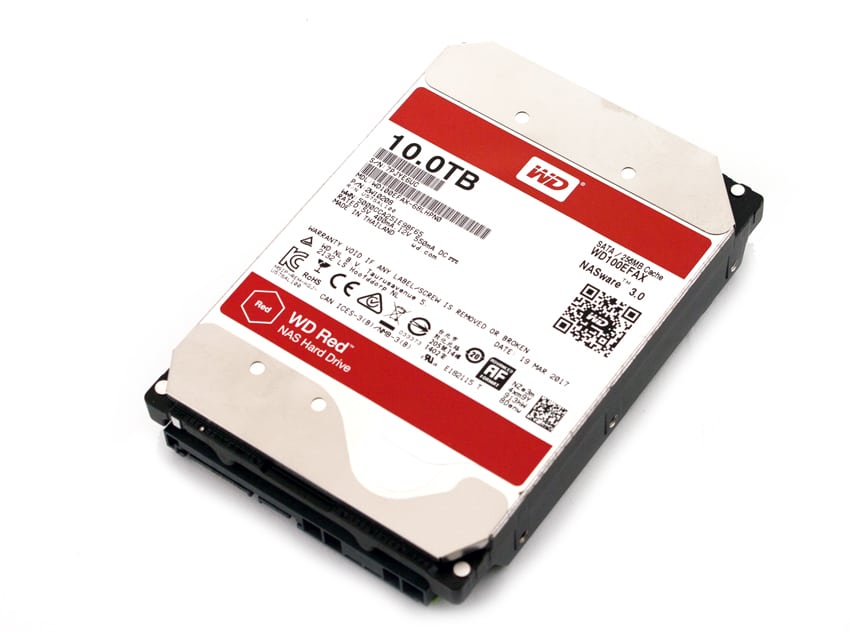
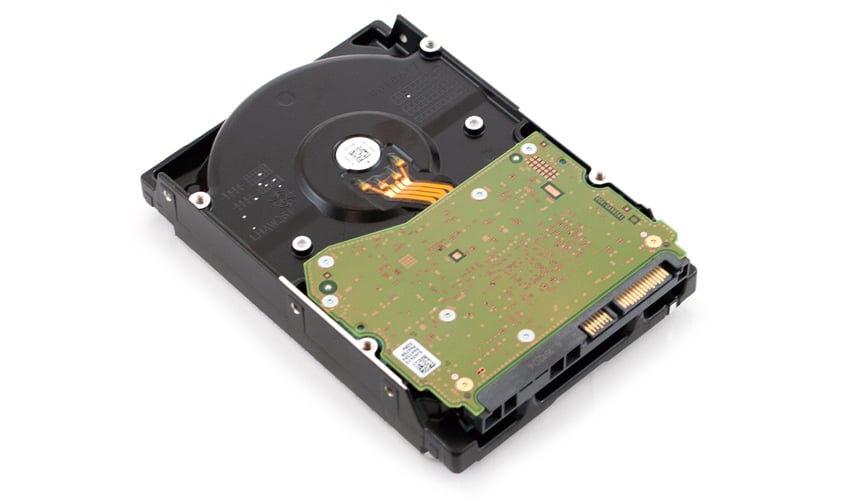
WD continues to expand the capacities of its popular Red brand of HDDs with the latest being 10TB. With this new bump up in capacity an 8-bay NAS can have a whopping 80TB of capacity without adding any expansion units. The HDDs come in 3.5” form factor making them a simple drop in replacement for lower capacity HDDs that users are looking to upgrade. As with the [8TB Red](https://www.storagereview.com/wd_red_8tb_review), WD is using its HelioSeal helium-technology and NASware 3.0.

![](https://www.storagereview.com/wp-content/uploads/2017/12/StorageReview-WD-Red-10TB.jpg)

Like the rest of the Red line, this higher capacity drive has been designed specifically to run in a NAS environment. NASware 3.0, mentioned above, further extends this by allowing for seamless integration, extensive data protection, and optimal performance particularly in demanding NAS environments. The drive can run in the always-on nature of a NAS environment while using lower power and producing less energy. With the 10TB, WD has upgraded the cache to 256MB, however it still leverages 5,400 RPM spindle speed.

![]()

The WD Red 10TB HDD comes with a 3-year limited warranty and can be picked up now for under $400.

**WD Red 10TB specifications:**

- Model Number: WD100EFAX
- Interface: SATA 6 Gb/s
- Capacity: 10TB
- Form factor: 3.5”
- Cache: 256MB
- RPM: 5,400
- Advanced Format
- Native Command Queuing
- Power Management
  - 12VDC-/+10% (A, peak): 1.79
- Temperature (°C)
  - Operating:  0 to 65
  - Non-operating: -40 to 70
- Shock (Gs)
  - Operating (2ms, read/write): 30
  - Operating (2ms, read): 65
  - Non-operating (2ms): 250
- Acoustics (dBA)
- Idle: 20
- Seek (average): 29
- Physical Dimensions
  - Height (in/mm, max) 1.028/26.1
  - Length (in/mm, max) 5.787/147
  - Width (in/mm, ± .01in) 4/101.6
  - Weight (lb/kg, ± 10%) 1.43/0.65
- Warranty: 3 years

**Enterprise Synthetic Workload Analysis**

Our enterprise hard drive benchmark process preconditions each drive into steady-state with the same workload the device will be tested with under a heavy load of 16 threads with an outstanding queue of 16 per thread, and then tested in set intervals in multiple thread/queue depth profiles to show performance under light and heavy usage. Since hard drives reach their rated performance level very quickly, we only graph out the main sections of each test.

- 4k
  - 100% Read or 100% Write
  - 100% 4k
- 8k 70/30
  - 70% Read, 30% Write
  - 100% 8k
- 128k (Sequential)
  - 100% Read or 100% Write
  - 100% 128k

![]()

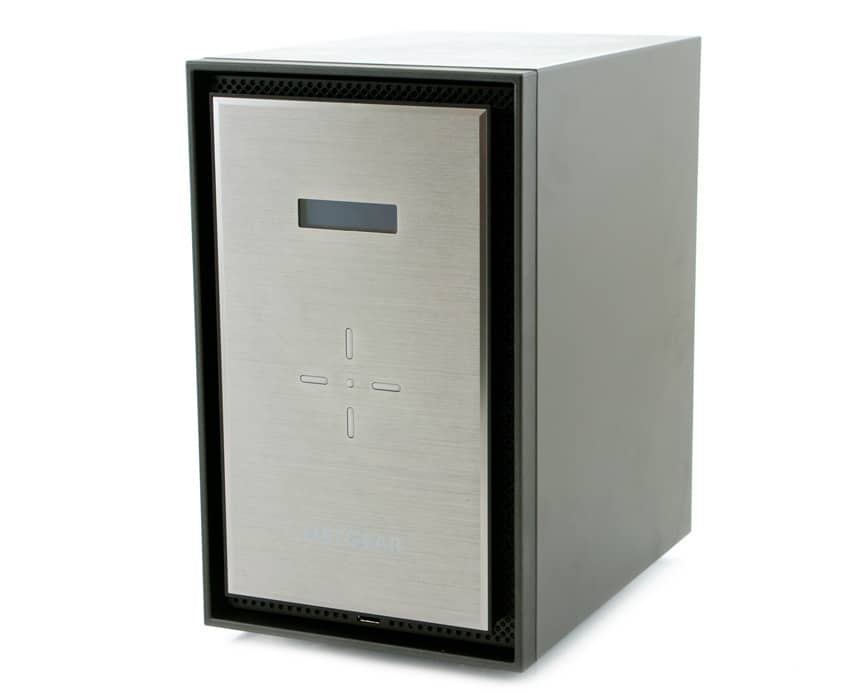
In the following section of this review, we will show the WD 10TB Red performance in both iSCSI and CIFS configurations inside a [Netgear 628X](https://www.storagereview.com/netgear_readynas_628x_nas_review) (RAID6).

We will be including the following drives as comparables in the Netgear 628X configuration:

- [Seagate IronWolf ](https://www.storagereview.com/seagate_nas_hdd_review)(10TB, 7,200RPM)
- [Toshiba N300 NAS](https://www.storagereview.com/toshiba_n300_nas_hdd_review) (8TB, 7,200RPM)

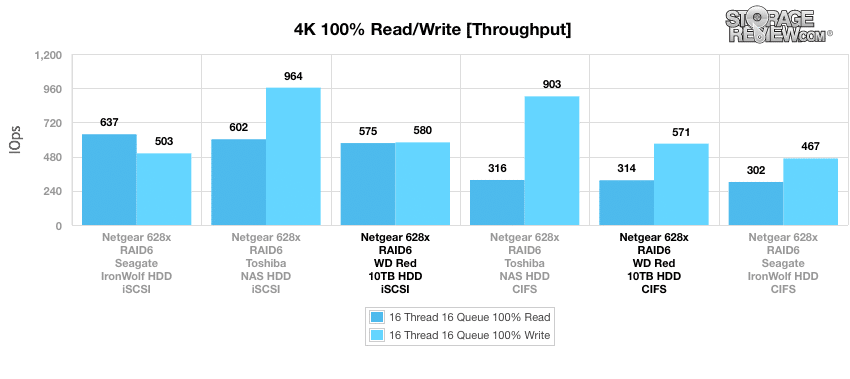
Looking at our 4k random performance, the WD Red 10TB hit 571 IOPS write and 314 IOPS read in CIFS and 580 IOPS write and 575 IOPS read in iSCSI. The WD 10TB had better write performance than the Seagate IronWolf in both configurations but much slower than the Toshiba N300. For reads, the WD ran close to the Toshiba, through the Seagate’s iSCSI performance was the best overall at 637 IOPS.

![]()

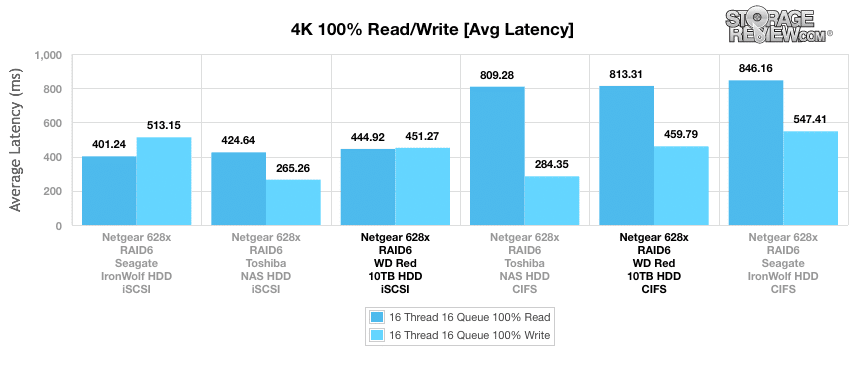
Next we look at 4k average latency. The WD 10TB Red hit latencies of 459.79ms write in CIFS and 451.27ms write in iSCSI. Read latencies showed 813.31ms in CIFS and 444.92ms in iSCSI. Again we saw better overall performance from the Toshiba N300, though the WD drive had very close read latency in CIFS (813.31ms to 809.28ms). The Seagate IronWolf placed at the bottom on the pack again in all measurements except iSCSI read.

![]()

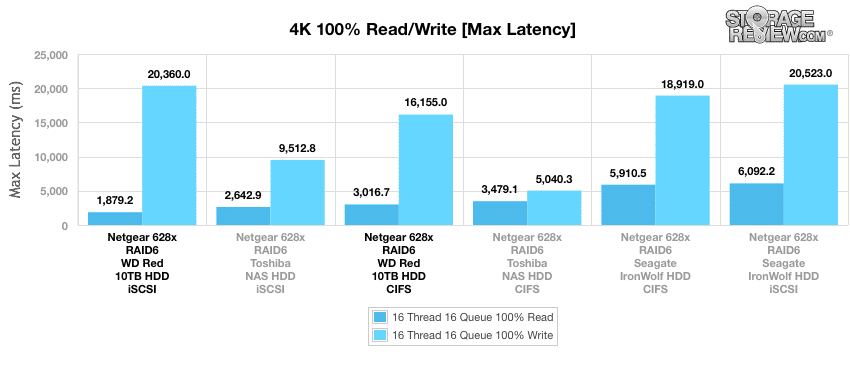
With 4k max latency the WD Red 10TB landed in the middle of the pack with write latencies of 16,155ms CIFS and 20,360ms iSCSI, and read latencies of 3,016.7ms CIFS and 1,879.2ms iSCSI.

![]()

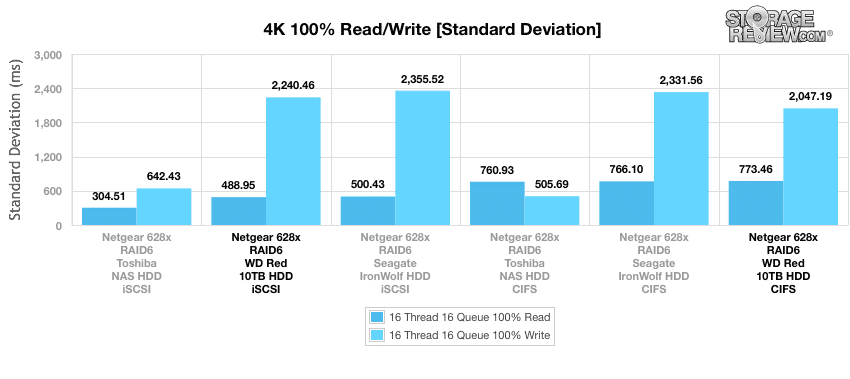
Standard deviation gave us similar placement with the WD Red 10TB finding itself in the middle of the pack with write latencies of 2,047.19ms CIFS and 2,240.46ms iSCSI and read latencies of 773.46ms CIFS and 488.95ms iSCSI.

![]()

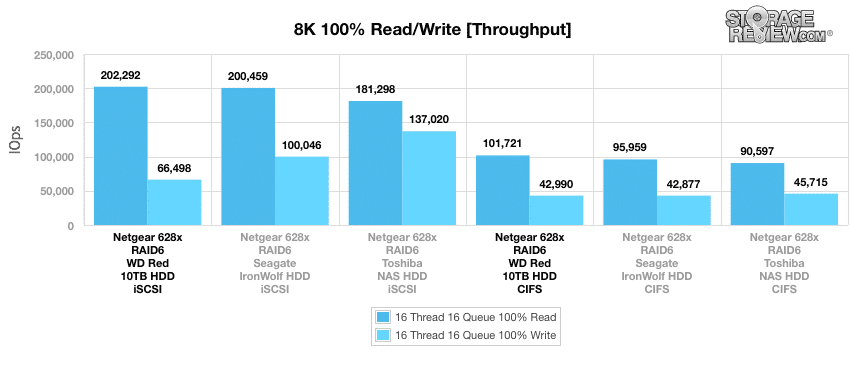
The next benchmark tests the drives under 100% read/write activity, but this time at 8k sequential throughput. The WD Red 10TB gave the best overall read scores with 202,292 IOPS in iSCSI and 101,721 IOPS in CIFS. On the flips side the WD had the lowest iSCSI write score, 66,498 IOPS, and came in second in CIFS write with 42,990 IOPS.

![]()

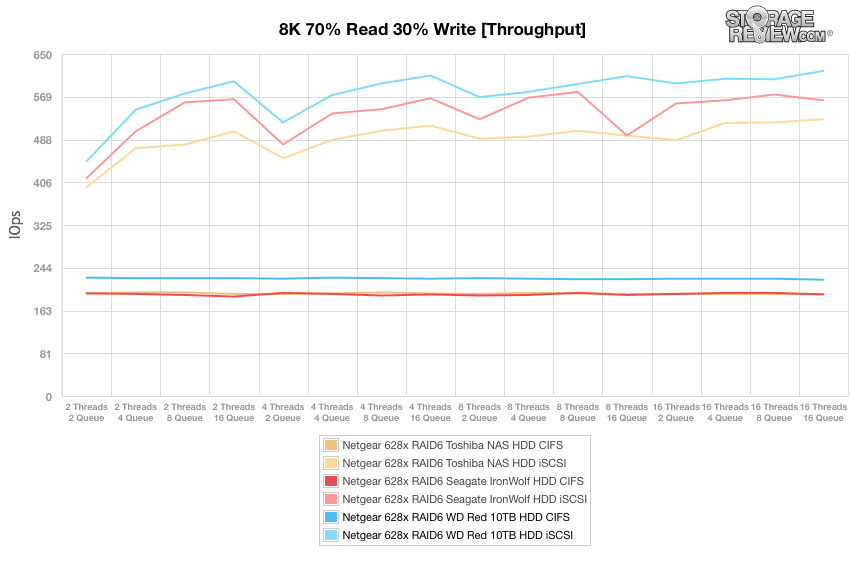
Our next test shifts focus from a pure 8k sequential 100% read/write scenario to a mixed 8k 70/30 workload, where we will show how performance scales in a setting from 2T/2Q up to 16T/16Q. In CIFS, the WD 10TB Red had a fairly consistent performance floating just north of 200 IOPS from start to finish making it the top performer. The WD also took the top spot in iSCSI peaking at 618 IOPS.

![]()

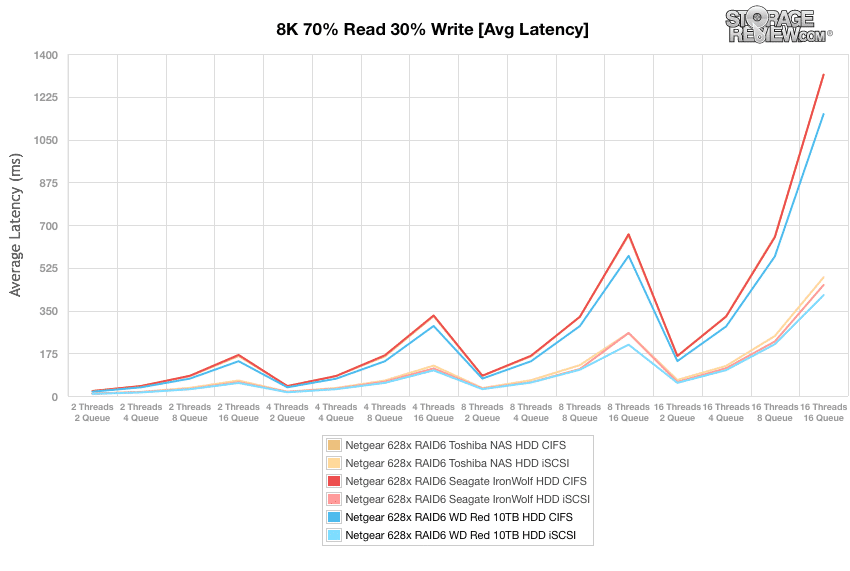
With average latency, the WD 10TB Red was able to once again give the best performance in both configurations. While it was the top performer in both it did pull away to a slightly higher lead in CIFS configuration.

![]()

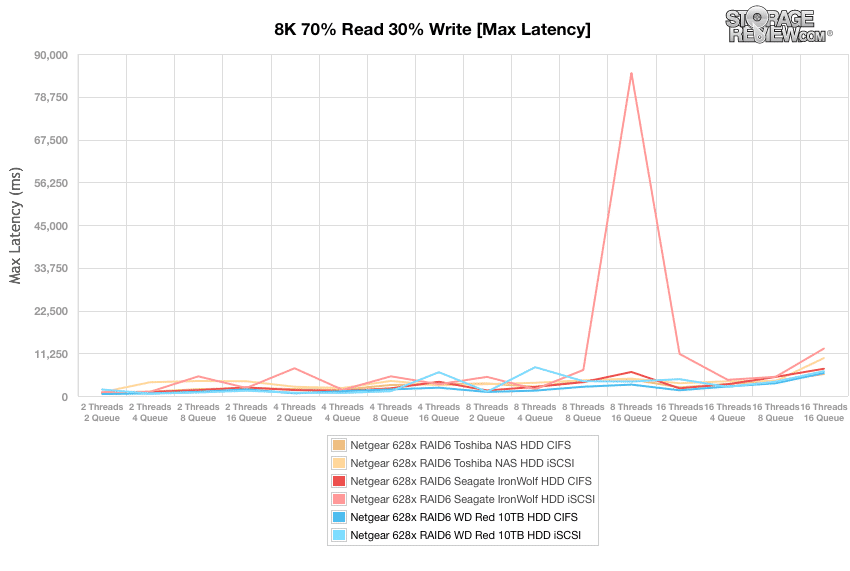
Looking at max latency, the WD 10TB Red again showed good performance with the CIFS configuration being more consistent and lower by far.

![]()

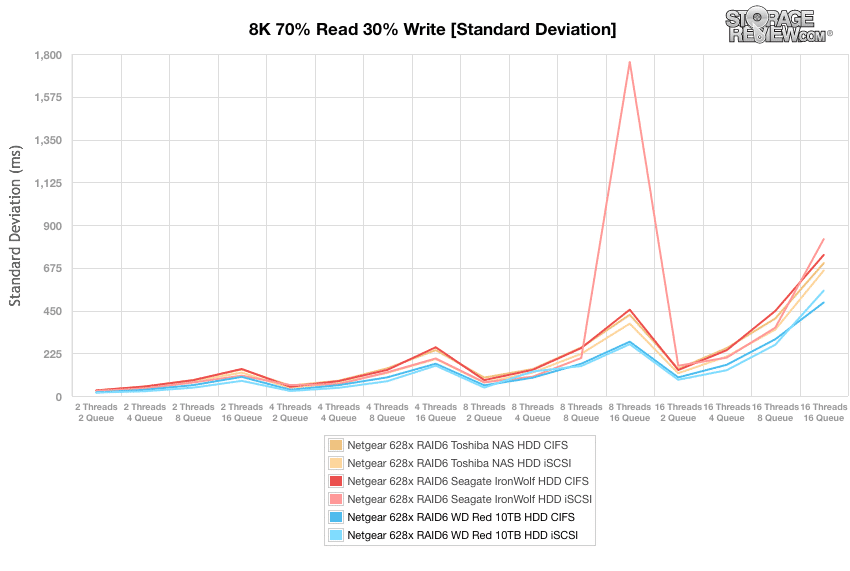
Standard deviation once again showed the WD 10TB Red to be the overall best performer in both configurations.

![]()

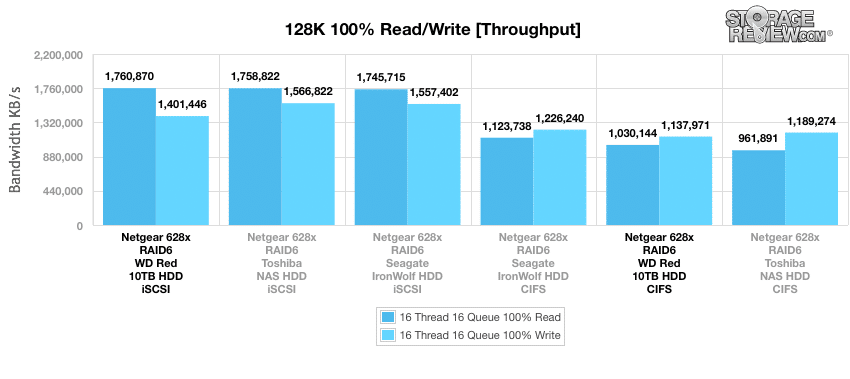
Our last test is the 128k benchmark, which is a large-block sequential test that shows the highest sequential transfer speed. The WD Red 10TB had the best overall read score with 1.76GB/s in iSCSI. The drive saw the lowest write score in iSCSI with 1.4GB/s. In CIFS configuration the drive saw a read score of 1.03GB/s and a write score of 1.14GB/s placing it in the middle read and on the lower end in write.

![]()

**Conclusion**

The latest iteration of the WD Red HDD is a 10TB version. Leveraging WD’s HelioSeal helium-technology, users can now hit a maximum of 80TB in an 8-Bay NAS without expansion units. Like the rest of the Red HDD line, the new 10TB is designed to run in the always-on nature of a NAS environment. The drive also utilizes NASware 3.0 to further add to reliability and efficiency making it an ideal choice from SMB to larger businesses. WD has bumped up the cache to 256MB but the drive retains its 5,400 RPM spindle speed.

Looking at performance we tested 8 drives in the Netgear 628X, the WD 10TB Red was able to provide some decent numbers throughout our benchmarks. In our 4k benchmarks the WD drive hit numbers as high as 580 IOPS write and 575 IOPS read with latencies as low as 444.92ms read and 451.27ms write. In our 8k sequential the WD drive had the best read scores in both configurations. Our mixed 8k 70/30 workload showed the 10TB WD drive to be the best performer overall. And with the large-block sequential test the drive gave the best read performance with 1.76GB/s.

**Pros**

- Strong large-block sequential read score
- Great 8k 70/30 results
- Good price to capacity ratio

**Cons**

- Had the lowest write scores on a few benchmarks

**The Bottom Line**

The WD Red 10TB is perfect for those looking to add capacity to their NAS and need a fair amount of performance to go along with it.

[WD Red 10TB on Amazon](http://amzn.to/2u0ehEi)

[Discuss this review](http://forums.storagereview.com/index.php?/topic/40035-wd-red-10tb-review-discussion/)

[Sign up for the StorageReview newsletter](https://www.storagereview.com/storagereview_newsletter_signup)

**Engage with StorageReview**

[Newsletter](https://www.storagereview.com/storage_newsletter) |  [YouTube](https://www.youtube.com/user/StorageReview "Opens in a new window") | Podcast  [iTunes](https://podcasts.apple.com/gb/podcast/storagereview-com-storage-reviews/id1060681115 "Opens in a new window")/ [Spotify](https://open.spotify.com/show/1y6VnznABhHeOSMOmbDTz0 "Opens in a new window") |  [Instagram](https://www.instagram.com/storagereview/ "Opens in a new window") |  [Twitter](https://twitter.com/storagereview "Opens in a new window") |  [TikTok](https://www.tiktok.com/@storagereview? "Opens in a new window") |  [RSS Feed](https://www.storagereview.com/rss.xml)

![]()

### Adam Armstrong

Adam is the chief news editor for StorageReview.com, managing our internal and freelance content teams.

Previous post: [Toshiba N300 NAS HDD Review (8TB)](https://www.storagereview.com/review/toshiba-n300-nas-hdd-review-8tb)

Next post: [Dell Precision 5720 All-in-one Workstation Review](https://www.storagereview.com/review/dell-precision-5720-all-in-one-workstation-review)

Trusted Vendors

Products and solutions from our affiliate partners:

- [  
  ![Ubiquiti Logo](https://www.storagereview.com/wp-content/uploads/2024/11/2-1.webp)  
   Ubiquiti](https://store.ui.com/us/en?a_aid=StorageReview "Opens in a new window")
- [  
  ![Newegg Logo](https://www.storagereview.com/wp-content/uploads/2025/11/newegg.webp)  
   Newegg](https://click.linksynergy.com/fs-bin/click?id=g5terNMDhz0&offerid=1207190.18&subid=0&type=4 "Opens in a new window")
- [  
  ![Amazon Logo](https://www.storagereview.com/wp-content/uploads/2025/11/amazon.webp) Amazon](https://amzn.to/4fLJUEW "Opens in a new window")

Newsletter

Subscribe to the StorageReview newsletter to stay up to date on the latest news and reviews. We promise no spam!

1  

Leave this field empty if you’re human:

## Advertisement

Content Categories

[Facebook](https://www.facebook.com/@storagereview) [X](https://twitter.com/storagereview) [Instagram](https://www.instagram.com/storagereview/) [LinkedIn](https://www.linkedin.com/company/storagereview-com) [YouTube](https://www.youtube.com/user/storagereview?sub_confirmation=1) [Email](mailto:info@storagereview.com) [Spotify](https://open.spotify.com/show/1y6VnznABhHeOSMOmbDTz0) [Reddit](https://www.reddit.com/r/StorageReview/) [Discord](https://discord.gg/TwMHb4azdC) [RSS](https://www.storagereview.com/rss.xml) [TikTok](https://www.tiktok.com/@storagereview)

Copyright © 1998-2025 Flying Pig Ventures, LLC Cincinnati, Ohio. All rights reserved.

Manage your privacy

To provide the best experiences, we and our partners use technologies like cookies to store and/or access device information. Consenting to these technologies will allow us and our partners to process personal data such as browsing behavior or unique IDs on this site and show (non-) personalized ads. Not consenting or withdrawing consent, may adversely affect certain features and functions.

Click below to consent to the above or make granular choices. Your choices will be applied to this site only. You can change your settings at any time, including withdrawing your consent, by using the toggles on the Cookie Policy, or by clicking on the manage consent button at the bottom of the screen.

Functional Functional Always active

The technical storage or access is strictly necessary for the legitimate purpose of enabling the use of a specific service explicitly requested by the subscriber or user, or for the sole purpose of carrying out the transmission of a communication over an electronic communications network.

Preferences Preferences

The technical storage or access is necessary for the legitimate purpose of storing preferences that are not requested by the subscriber or user.

Statistics Statistics

The technical storage or access that is used exclusively for statistical purposes. The technical storage or access that is used exclusively for anonymous statistical purposes. Without a subpoena, voluntary compliance on the part of your Internet Service Provider, or additional records from a third party, information stored or retrieved for this purpose alone cannot usually be used to identify you.

Marketing Marketing

The technical storage or access is required to create user profiles to send advertising, or to track the user on a website or across several websites for similar marketing purposes.

Statistics

Marketing

Features

Always active

Always active

- Manage options
- Manage services
- Manage {vendor\_count} vendors
- [Read more about these purposes](https://cookiedatabase.org/tcf/purposes/)

Accept Deny Manage options Save preferences Manage options

- {title}
- {title}
- {title}

Manage your privacy

To provide the best experiences, we use technologies like cookies to store and/or access device information. Consenting to these technologies will allow us to process data such as browsing behavior or unique IDs on this site. Not consenting or withdrawing consent, may adversely affect certain features and functions.

Functional Functional Always active

The technical storage or access is strictly necessary for the legitimate purpose of enabling the use of a specific service explicitly requested by the subscriber or user, or for the sole purpose of carrying out the transmission of a communication over an electronic communications network.

Preferences Preferences

The technical storage or access is necessary for the legitimate purpose of storing preferences that are not requested by the subscriber or user.

Statistics Statistics

The technical storage or access that is used exclusively for statistical purposes. The technical storage or access that is used exclusively for anonymous statistical purposes. Without a subpoena, voluntary compliance on the part of your Internet Service Provider, or additional records from a third party, information stored or retrieved for this purpose alone cannot usually be used to identify you.

Marketing Marketing

The technical storage or access is required to create user profiles to send advertising, or to track the user on a website or across several websites for similar marketing purposes.

Statistics

Marketing

Features

Always active

Always active

- Manage options
- Manage services
- Manage {vendor\_count} vendors
- [Read more about these purposes](https://cookiedatabase.org/tcf/purposes/)

Accept Deny Manage options Save preferences Manage options

- {title}
- {title}
- {title}

Manage consent Manage consent

```json
{"@context":"https:\/\/schema.org","@graph":[{"@type":"WebPage","@id":"https:\/\/www.storagereview.com\/review\/wd-red-10tb-review","url":"https:\/\/www.storagereview.com\/review\/wd-red-10tb-review","name":"WD Red 10TB Review - StorageReview.com","isPartOf":{"@id":"https:\/\/www.storagereview.com\/#website"},"primaryImageOfPage":{"@id":"https:\/\/www.storagereview.com\/review\/wd-red-10tb-review#primaryimage"},"image":{"@id":"https:\/\/www.storagereview.com\/review\/wd-red-10tb-review#primaryimage"},"thumbnailUrl":"https:\/\/www.storagereview.com\/wp-content\/uploads\/2017\/07\/StorageReview-WD-Red-10TB-Thumb.jpg","datePublished":"2017-07-07T17:37:57+00:00","dateModified":"2020-10-21T13:20:58+00:00","breadcrumb":{"@id":"https:\/\/www.storagereview.com\/review\/wd-red-10tb-review#breadcrumb"},"inLanguage":"en-US","potentialAction":[{"@type":"ReadAction","target":["https:\/\/www.storagereview.com\/review\/wd-red-10tb-review"]}]},{"@type":"ImageObject","inLanguage":"en-US","@id":"https:\/\/www.storagereview.com\/review\/wd-red-10tb-review#primaryimage","url":"https:\/\/www.storagereview.com\/wp-content\/uploads\/2017\/07\/StorageReview-WD-Red-10TB-Thumb.jpg","contentUrl":"https:\/\/www.storagereview.com\/wp-content\/uploads\/2017\/07\/StorageReview-WD-Red-10TB-Thumb.jpg","width":100,"height":98},{"@type":"BreadcrumbList","@id":"https:\/\/www.storagereview.com\/review\/wd-red-10tb-review#breadcrumb","itemListElement":[{"@type":"ListItem","position":1,"name":"Home","item":"https:\/\/www.storagereview.com\/"},{"@type":"ListItem","position":2,"name":"Review","item":"https:\/\/www.storagereview.com\/review"},{"@type":"ListItem","position":3,"name":"WD Red 10TB Review"}]},{"@type":"WebSite","@id":"https:\/\/www.storagereview.com\/#website","url":"https:\/\/www.storagereview.com\/","name":"StorageReview.com","description":"StorageReview.com is a leading provider of news and reviews throughout the entire IT stack - from the datacenter to the edge, and all points in between.","publisher":{"@id":"https:\/\/www.storagereview.com\/#organization"},"potentialAction":[{"@type":"SearchAction","target":{"@type":"EntryPoint","urlTemplate":"https:\/\/www.storagereview.com\/?s={search_term_string}"},"query-input":{"@type":"PropertyValueSpecification","valueRequired":true,"valueName":"search_term_string"}}],"inLanguage":"en-US"},{"@type":"Organization","@id":"https:\/\/www.storagereview.com\/#organization","name":"StorageReview.com","url":"https:\/\/www.storagereview.com\/","logo":{"@type":"ImageObject","inLanguage":"en-US","@id":"https:\/\/www.storagereview.com\/#\/schema\/logo\/image\/","url":"https:\/\/www.storagereview.com\/wp-content\/uploads\/2020\/02\/Storage-Reviews-2-2.png","contentUrl":"https:\/\/www.storagereview.com\/wp-content\/uploads\/2020\/02\/Storage-Reviews-2-2.png","width":344,"height":61,"caption":"StorageReview.com"},"image":{"@id":"https:\/\/www.storagereview.com\/#\/schema\/logo\/image\/"},"sameAs":["https:\/\/x.com\/storagereview","http:\/\/youtube.com\/user\/storagereview"]}]}
```