

Currently priced at $799 on the Ubiquiti website, the UNAS Pro 8 is a 2U rackmount NAS designed for higher-capacity file storage and shared workloads, featuring eight 2.5/3.5-inch drive bays alongside two M.2 NVMe SSD slots for cache acceleration. This configuration targets environments that need increased throughput and lower latency while maintaining a compact rack footprint.
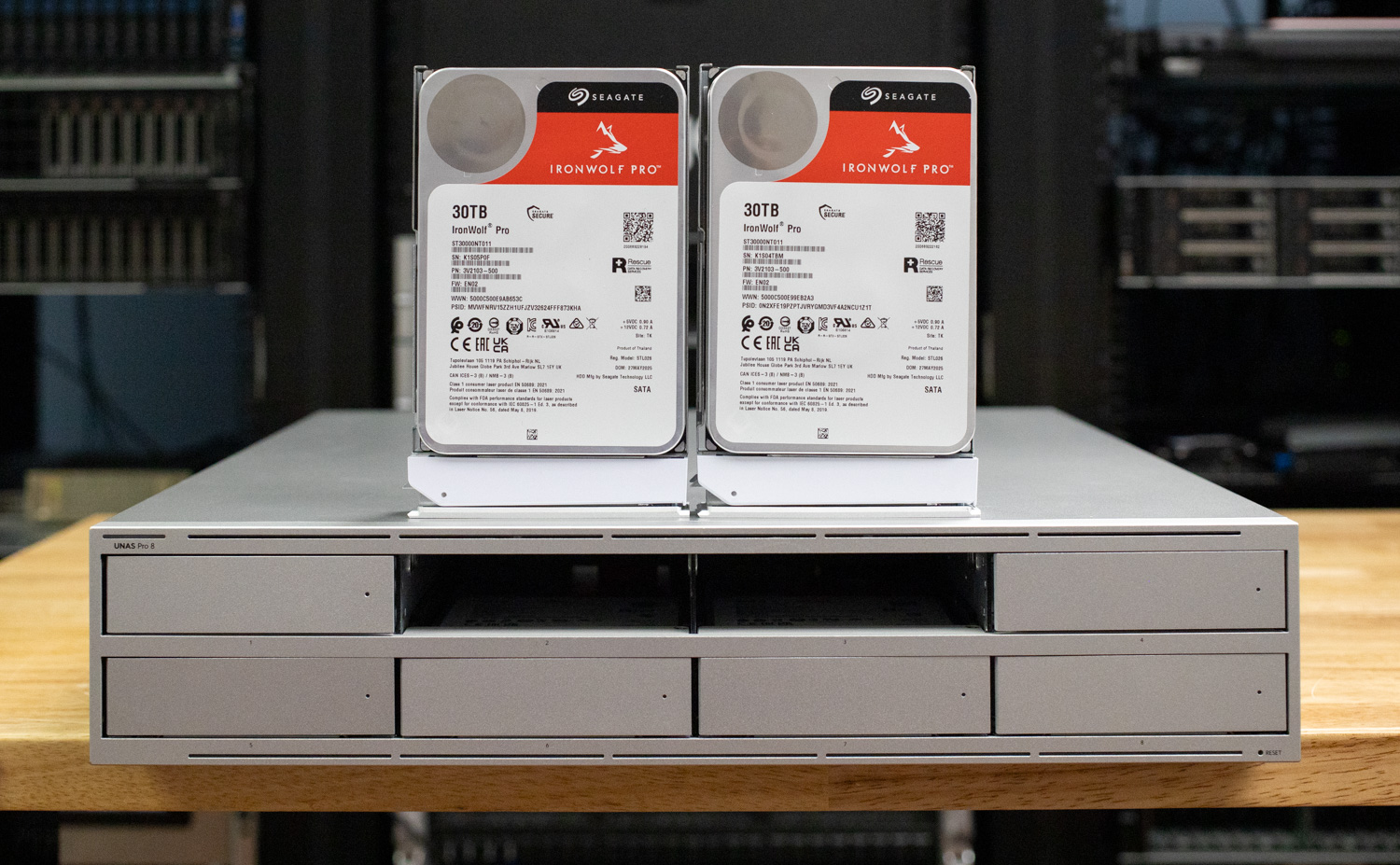
The system supports high-availability 10GbE networking and hot-swappable, redundant power supplies, making it suitable for deployments where uptime and serviceability are essential. Internally, the UNAS 8 is powered by a quad-core ARM Cortex-A57 processor running at 2.0GHz and is equipped with 16GB of memory, providing the resources needed to handle concurrent file access and sustained workloads over fast network links.
This platform positions the UNAS 8 as a step up from smaller UniFi NAS offerings, focusing on density, redundancy, and 10GbE connectivity for lab, enterprise edge, and shared storage use cases.
Ubiquiti UNAS Pro 8 Specifications
The table below outlines the hardware and physical specifications.
| Specification | Details |
|---|---|
| Overview | |
| Dimensions | 442.4 × 480 × 87.4 mm (17.4 × 18.9 × 3.4″) |
| Storage Capacity | (8) 3.5″ drive bays (2) M.2 NVMe bays |
| Networking Interface | (2) 10G SFP+ (10G Only) (1) 10 GbE RJ45 (10G/5G/2.5G/1G/100M) |
| Power Redundancy | ✓ |
| Form Factor | Rack mount (2U) |
| Hardware | |
| Hard Drive Capacity | (8) 2.5/3.5″ HDD / SSD support (2) M.2 NVMe SSD support |
| Max. Power Budget for Drives | 225W |
| Max. Power Consumption | 250W |
| Power Method | (2) AC input, Hot-swappable power modules |
| Power Supply | (2) Hot-swappable AC/DC 550W power modules |
| Processor | Quad-Core ARM® Cortex®-A57 at 2.0 GHz |
| Memory | 16 GB |
| Management | Ethernet |
| RF Interface | Bluetooth 4.1 |
| Weight | 11.5 kg (25.35 lb) |
| Enclosure Material | SGCC steel |
| Mount Material | SGCC steel |
| LED Indicators | |
| Ethernet | ✓ |
| SFP+ | ✓ |
UNAS Pro 8 Build and Design
The Ubiquiti NAS makes a strong first impression with a solid, purpose-built SGCC steel chassis that feels more in line with traditional rackmount storage appliances than consumer-focused NAS systems. Weighing 25.35 lbs and housed in a 2U form factor, it measures 17.4 × 18.9 × 3.4 inches, making it the largest UniFi gear we’ve handled to date. The design clearly prioritizes airflow and drive density over front-panel embellishments.
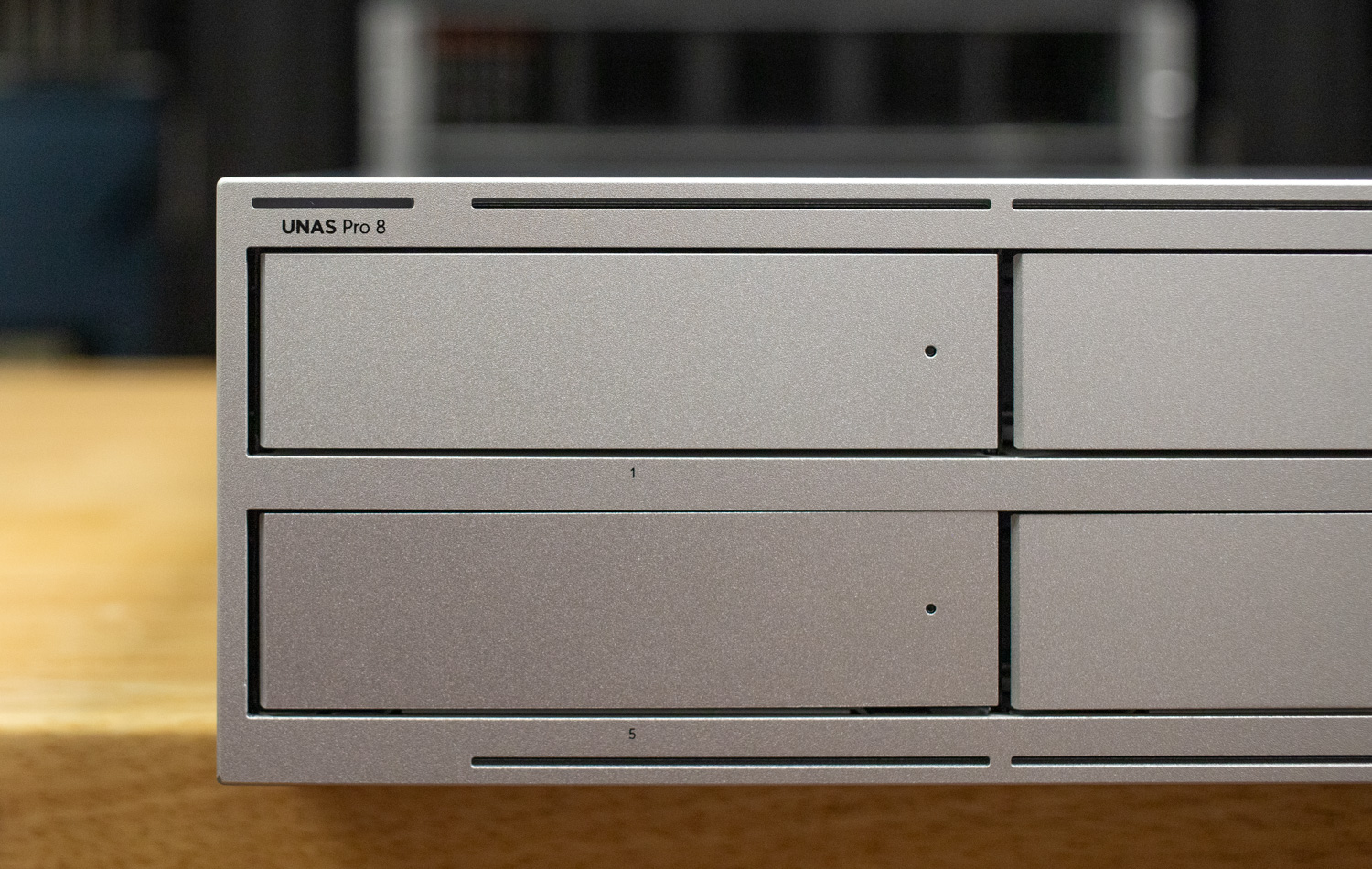
The front of the chassis showcases eight 3.5-inch drive bays, leaving no room for an integrated display like the one found on the previously reviewed UNAS 2 or UNAS Pro models. Instead, UniFi opts for a cleaner, more storage-dense layout. Each bay features a single indicator LED that provides both status and activity information, keeping visual noise to a minimum while still offering at-a-glance health checks.
Drive installation is effortless with tool-less trays for 3.5-inch drives. Additionally, each caddy supports 2.5-inch and 3.5-inch SATA SSDs or HDDs, offering flexibility for mixed-media configurations or future upgrades. The caddies themselves feel rigid and well-machined, with no noticeable flex during installation or removal, reinforcing the UNAS 8’s enterprise-leaning design philosophy.
On the rear right side, the UNAS supports an optional redundant power supply, with the secondary PSU available for purchase separately. Each unit is rated at 550W, which is well above the system’s 250W maximum power draw, providing ample headroom for a fully populated chassis and sustained operation. The PSU modules are hot-swappable, allowing replacement without taking the system offline when configured for redundancy.
Cooling is handled by two large rear-mounted fans that pull air through the drive bays and exhaust it out the back of the chassis. The layout is straightforward and functional, prioritizing consistent airflow across the drives and internal components rather than compactness or cosmetic design. Overall, the rear of the UNAS 8 reflects a practical focus on serviceability and thermal stability.
For connectivity, the UNAS 8 includes (2) 10G SFP+ ports (10G only) alongside (1) 10GbE RJ45 port that supports 10G/5G/2.5G/1G/100M, offering flexibility for both DAC/fiber and copper-based deployments.
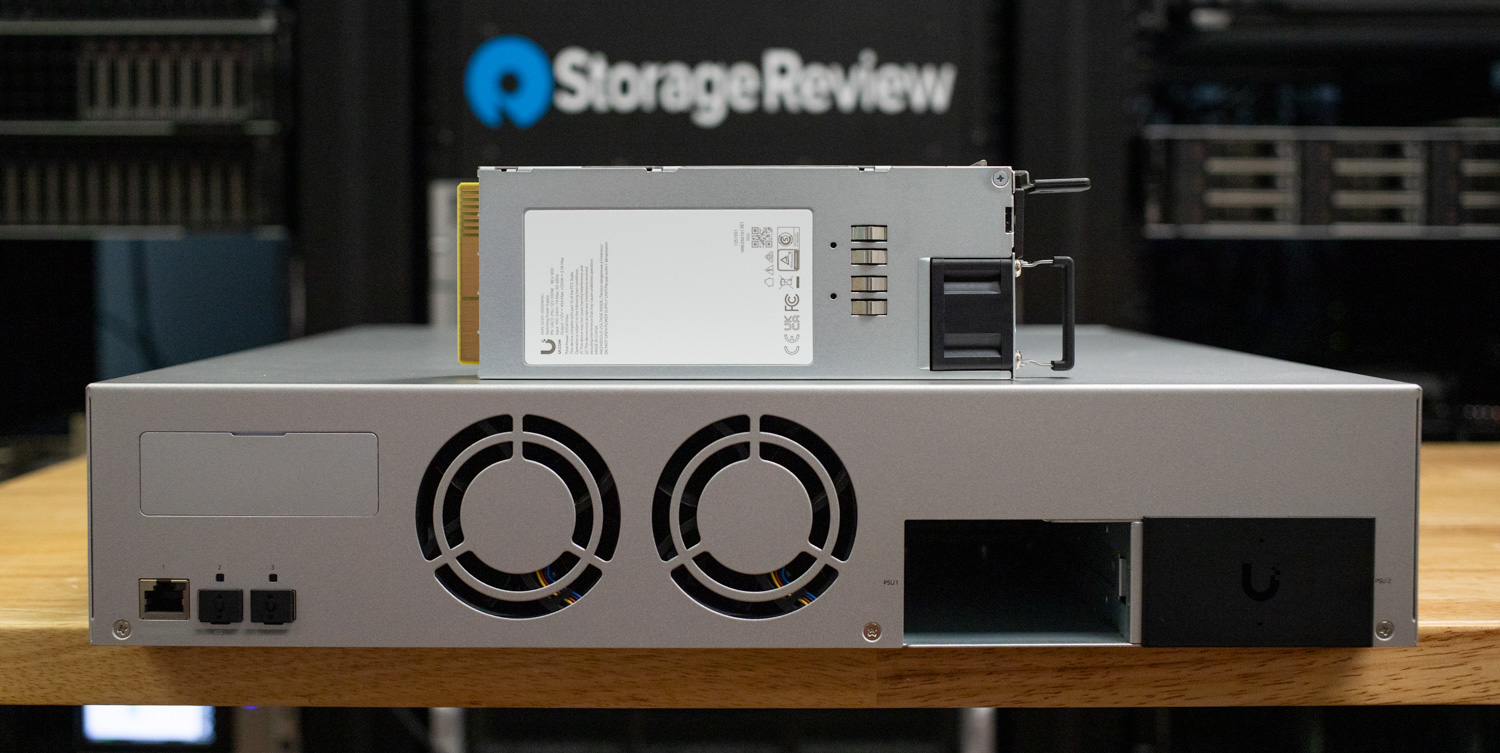
One notable addition on the rear of the UNAS 8 is support for (2) M.2 NVMe SSDs. These slots provide a path for SSD-based cache to accelerate workloads without consuming the primary 3.5-inch drive bays. The NVMe trays are not included by default and must be purchased separately. Still, the option gives the UNAS 8 flexibility for users who want to add read/write cache or tiered performance using solid-state storage. This approach keeps the base system focused on capacity while still allowing targeted performance upgrades where needed.
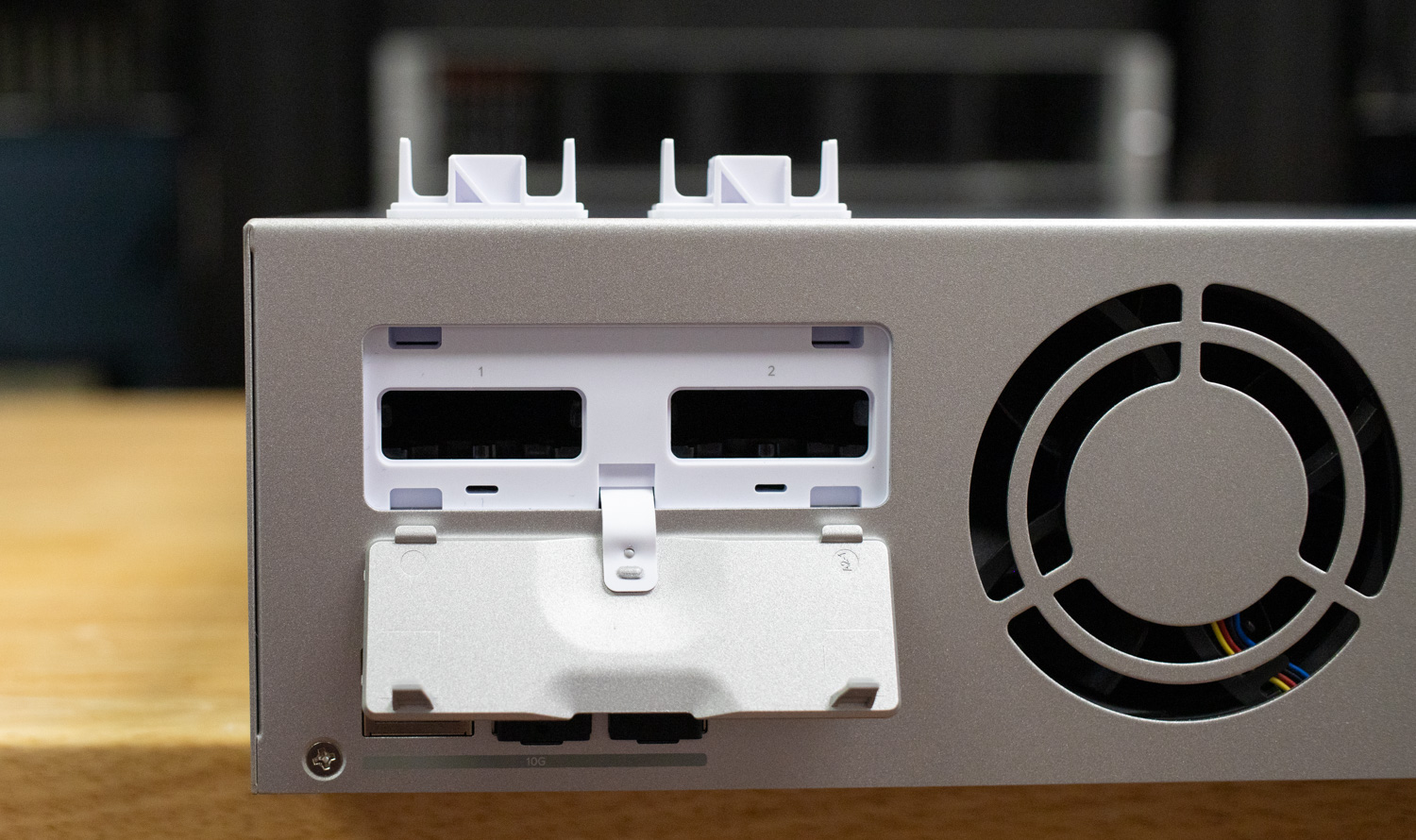
When the NVMe SSDs are not installed, the UNAS 8 ships with two fitted dust covers that seal the M.2 openings.
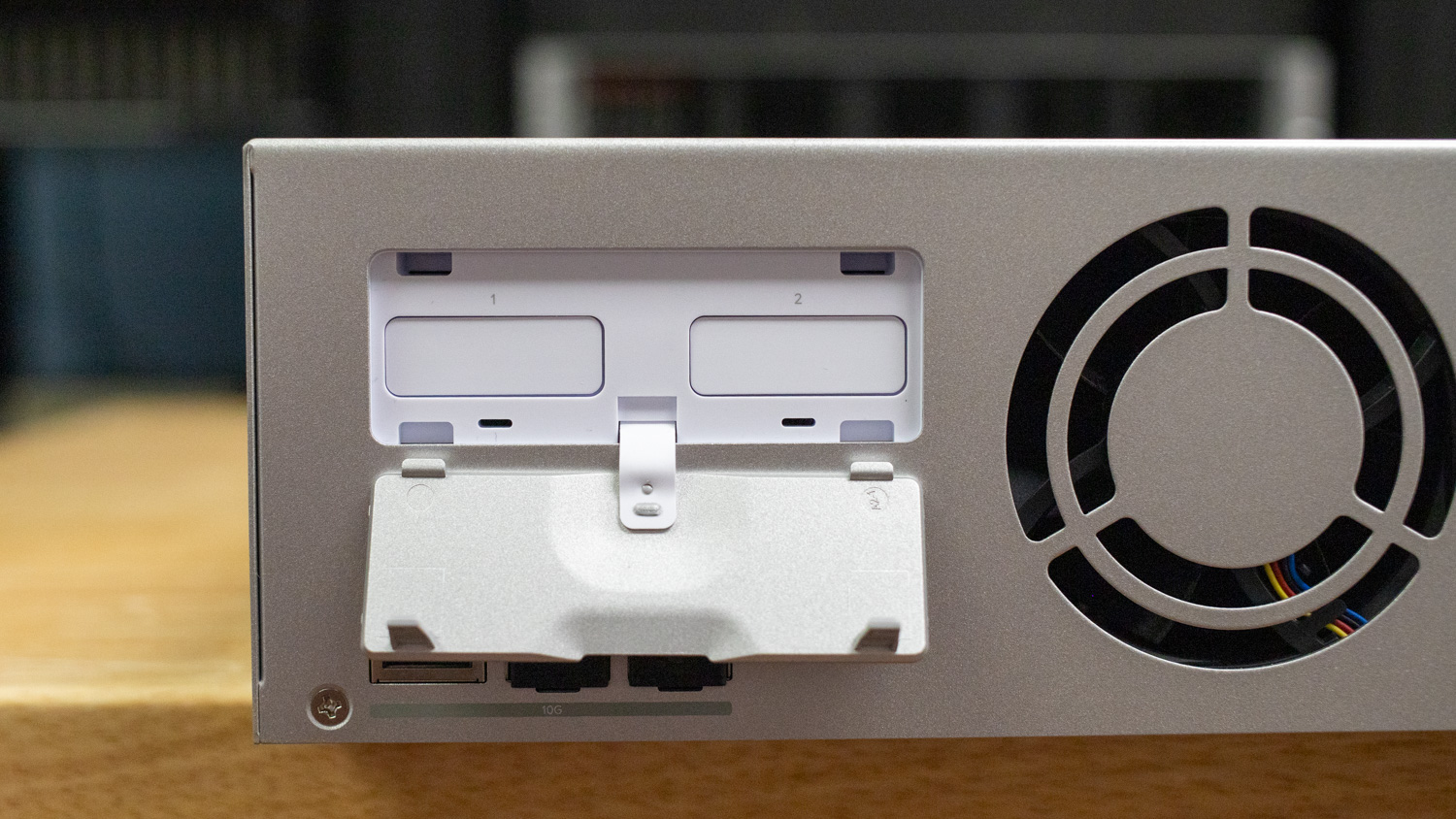
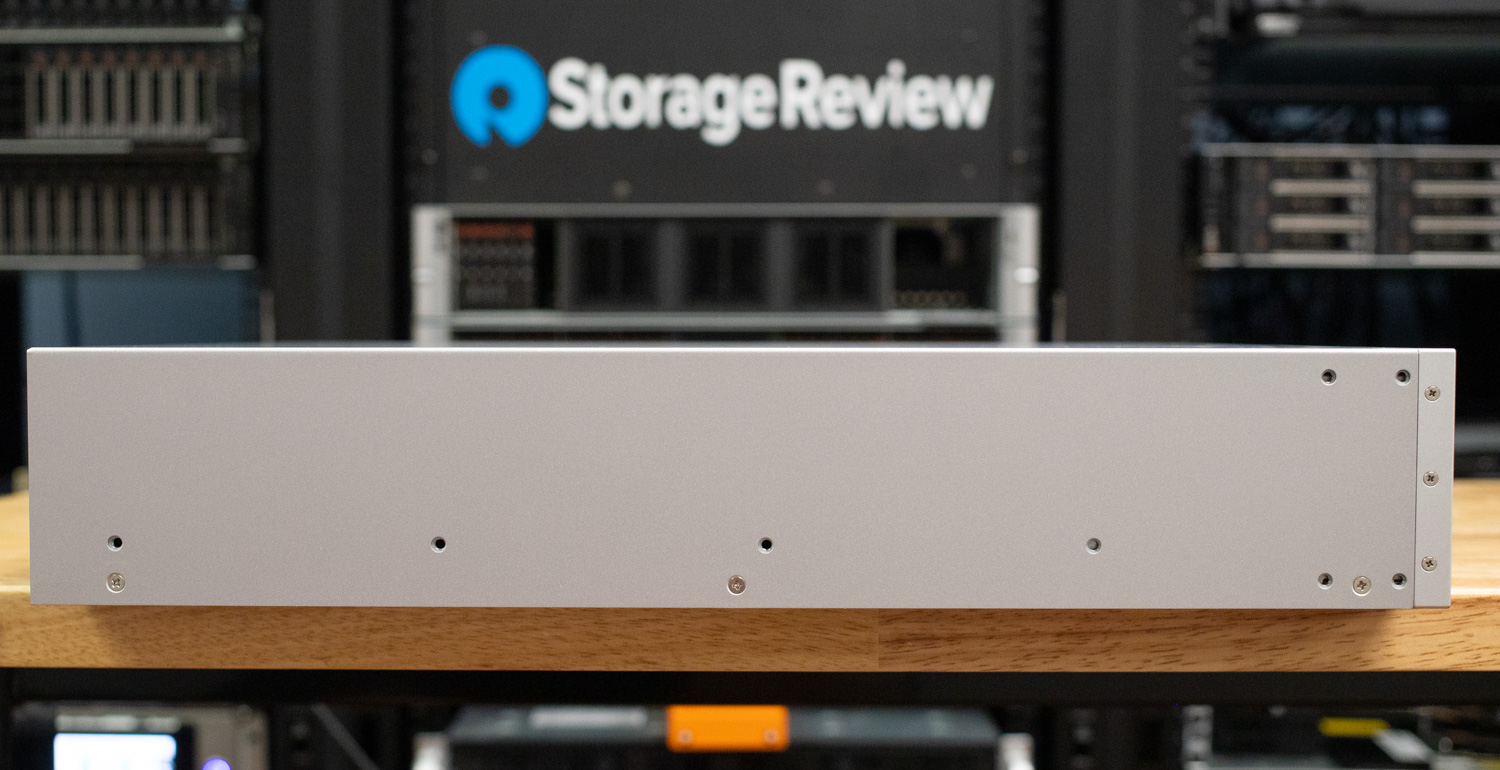
Along the sides of the UNAS 8, UniFi includes threaded, pre-drilled mounting points for the included rack ears and rail kit. This allows the chassis to be securely installed in standard server racks using supplied cage nuts, making the system suitable for permanent rack deployments rather than shelf mounting.
UniFi Drive Overview
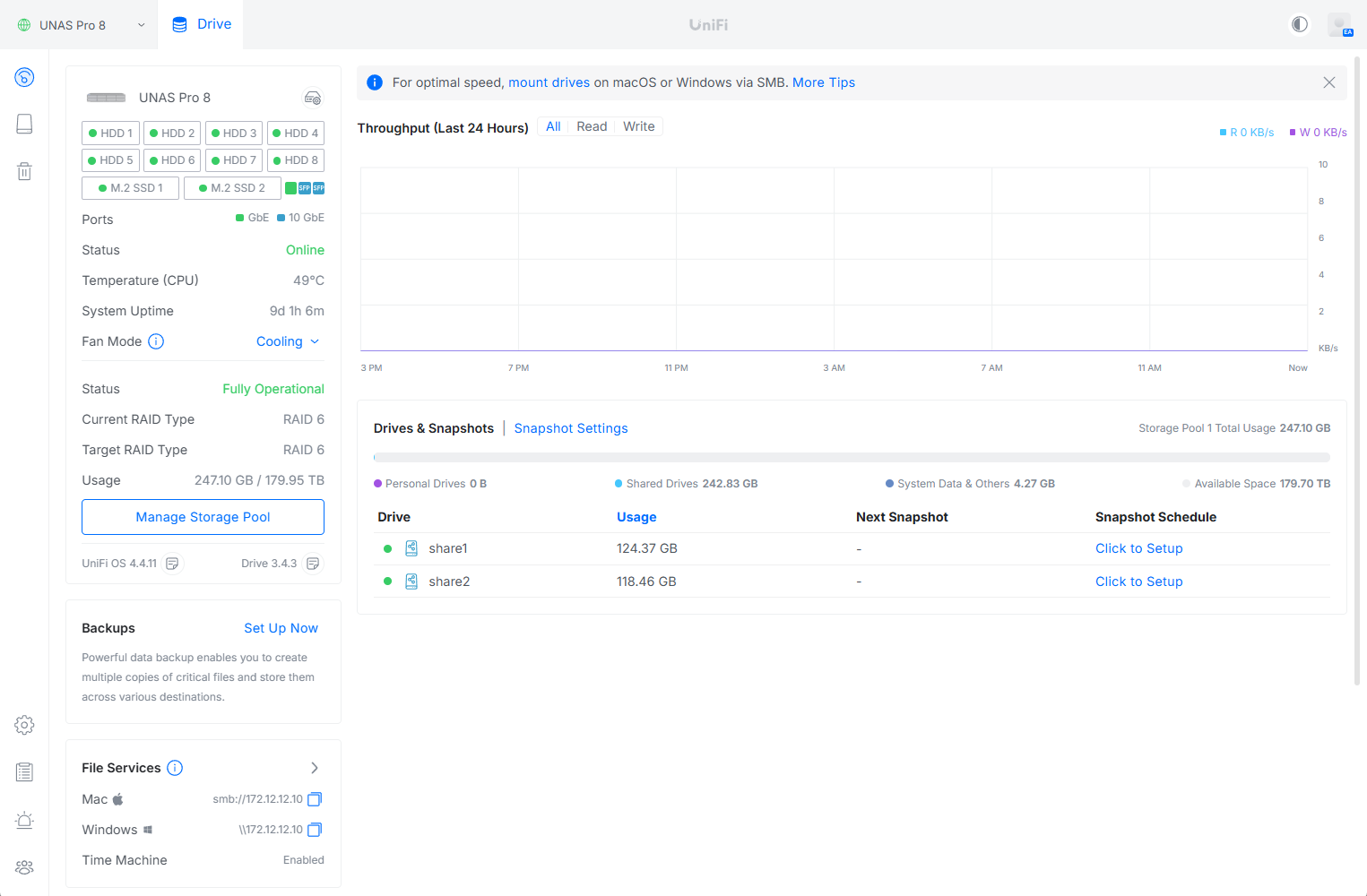
In the UniFi Drive web interface, the UNAS 8 dashboard provides a clean, at-a-glance view of system health and activity. Quick stats surface immediately, including drive status, network connectivity, CPU temperature, uptime, and installed UniFi OS and Drive versions. Storage utilization is clearly broken down by pool usage and available capacity, while the throughput graph provides a rolling view of read and write activity over the last 24 hours. Overall, the interface prioritizes visibility and simplicity, making it easy to confirm operational status and storage consumption without digging through multiple menus.
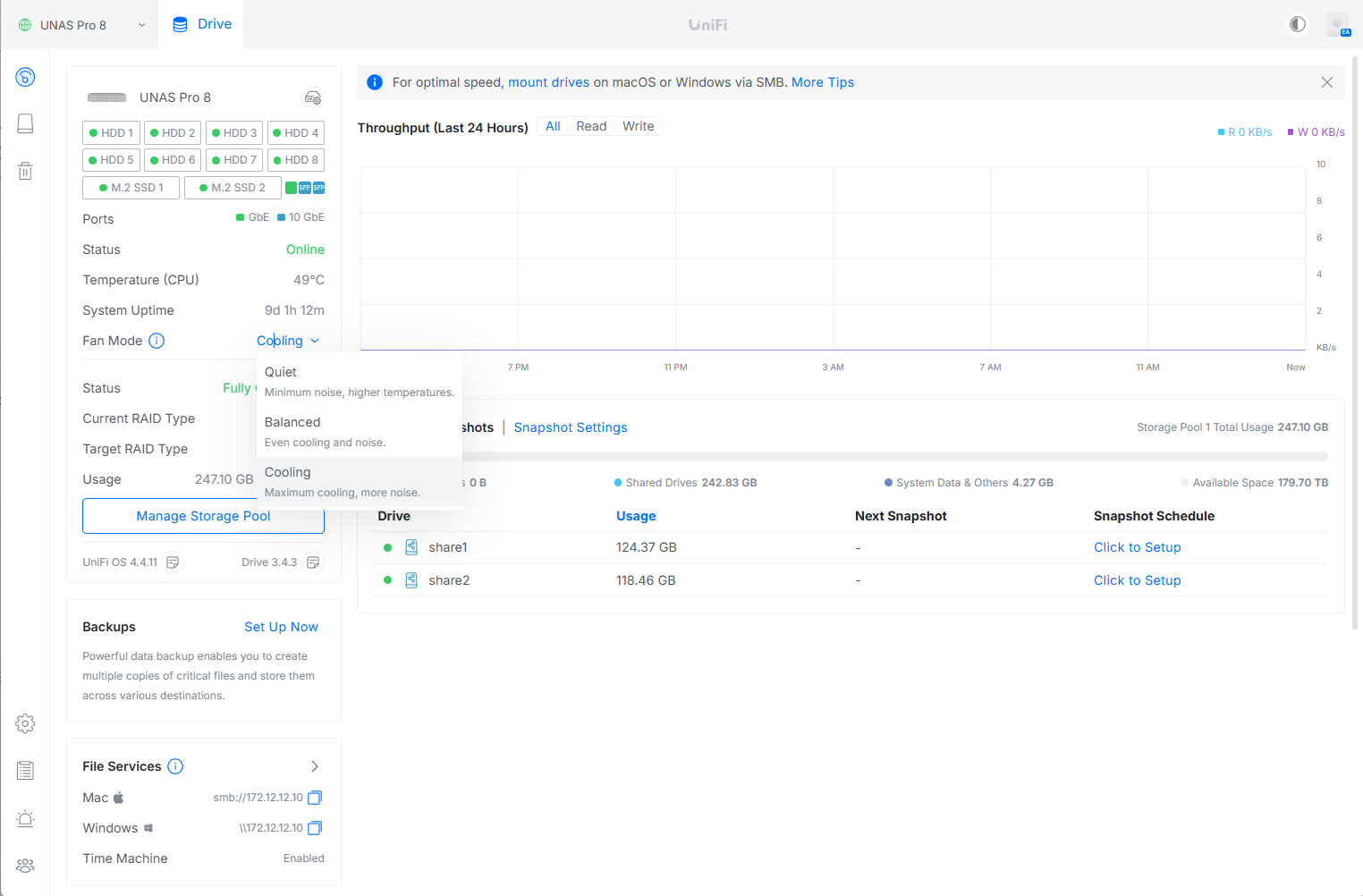
One notable feature we appreciate in the UniFi Drive platform is the ability to adjust the system’s cooling profile. With all eight drive bays populated and the dual M.2 slots in use, internal temperatures can rise quickly under sustained load. UniFi exposes this control directly in the web interface, offering Quiet, Balanced, and Cooling modes that clearly outline the trade-off between acoustics and thermal performance. In our testing, we set the UNAS to Cooling mode to prioritize maximum airflow and thermal headroom, ensuring consistent performance during extended usage.
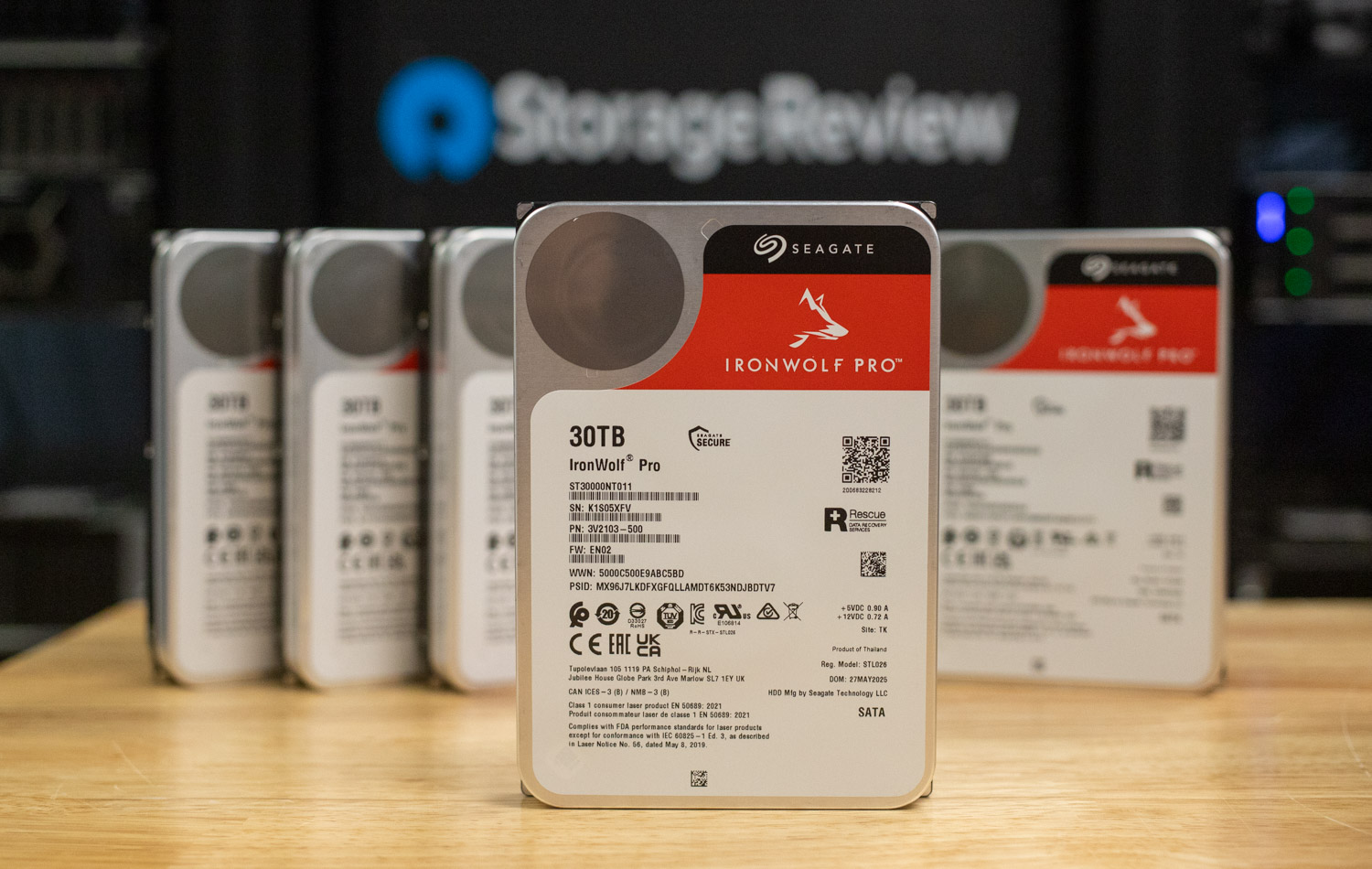
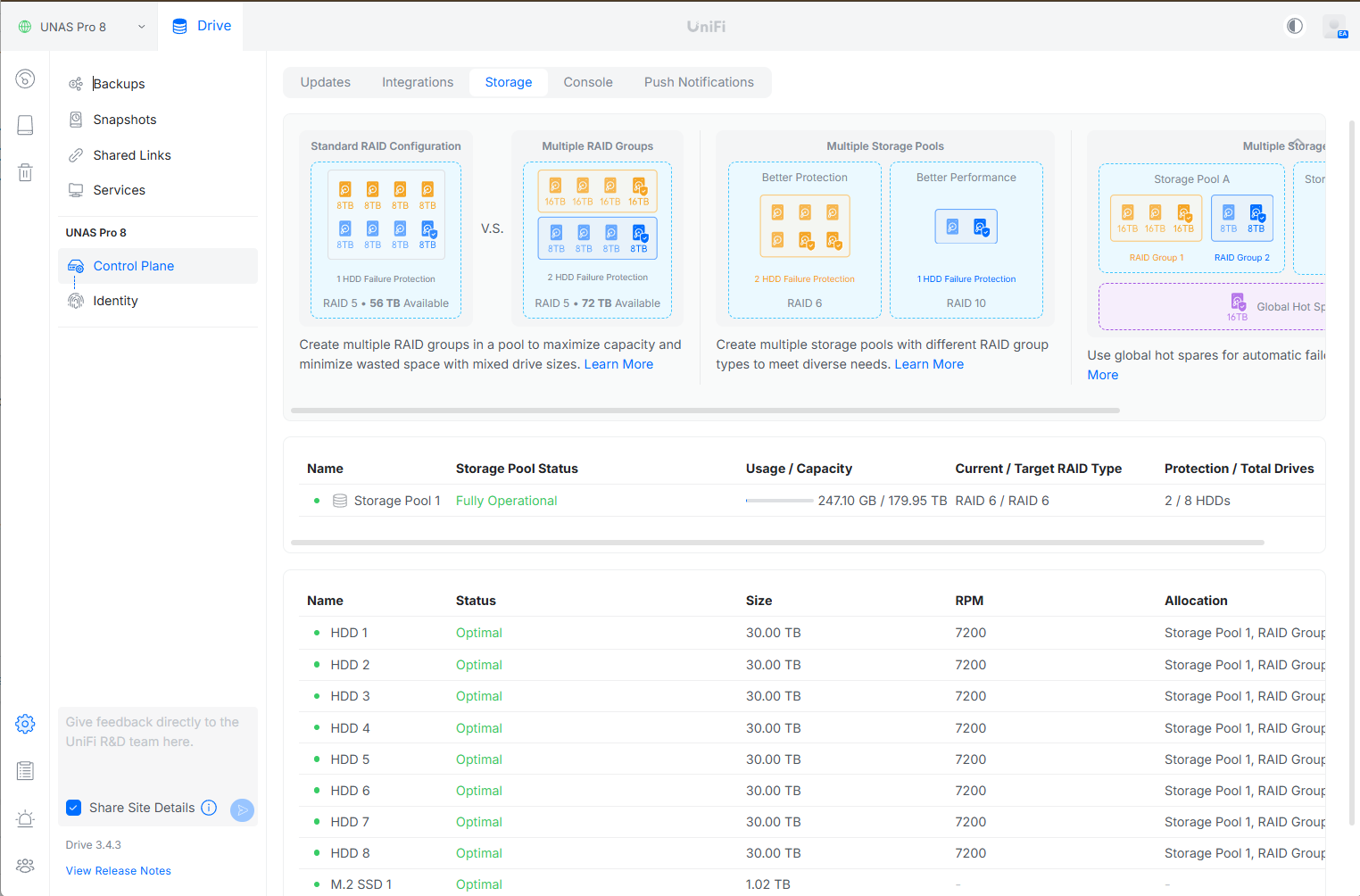
Moving into the Storage plane, we populated the UNAS Pro 8 with our recently reviewed 30 TB Seagate IronWolf NAS drives. All eight drives were detected immediately with no issues, allowing us to quickly build a RAID 6 storage pool. This configuration provides roughly 180 TB of raw capacity while maintaining dual-disk fault tolerance. In addition, two 1TB M.2 SSDs were installed to serve as cache drives, further enhancing responsiveness for mixed workloads.
Beyond initial setup, the Storage interface offers clear visibility into both drive-level and pool-level health. Individual disks report status, capacity, and rotational speed, while the pool view summarizes utilization, protection level, and operational state. This layout makes it easy to verify system integrity at a glance and simplifies ongoing monitoring as the array fills over time.
The UNAS Pro 8 supports multiple backup options directly within the UniFi Drive platform, giving administrators flexibility in implementing data protection. Backups can be targeted to another UNAS system for appliance-to-appliance replication, a standard CIFS/SMB server, or supported cloud services, covering both on-prem and off-site use cases. The interface allows granular selection of source data, destination folders, and behavior rules such as incremental folder updates or full replacements. Scheduling is equally straightforward, with daily, weekly, or monthly execution windows, making it easy to align backups with maintenance periods and bandwidth availability.

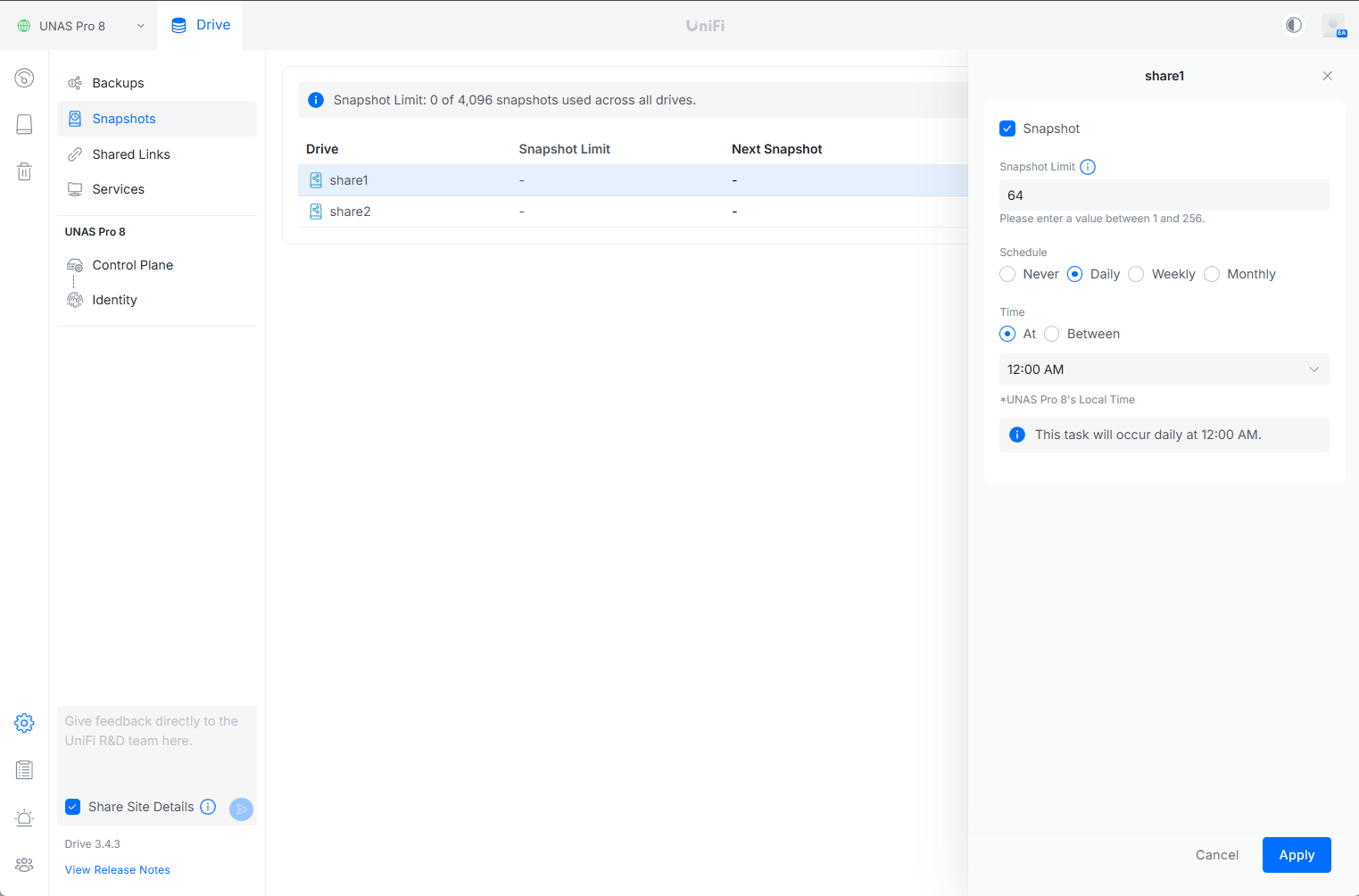
Snapshots on the UNAS Pro 8 are configured on a per-share basis, giving administrators precise control over data protection policies. Each share can have its own snapshot limit and schedule, with intervals that range from daily to weekly or monthly, depending on retention and recovery requirements. The interface clearly shows snapshot usage across the system, helping prevent overconsumption while maintaining sufficient restore points.
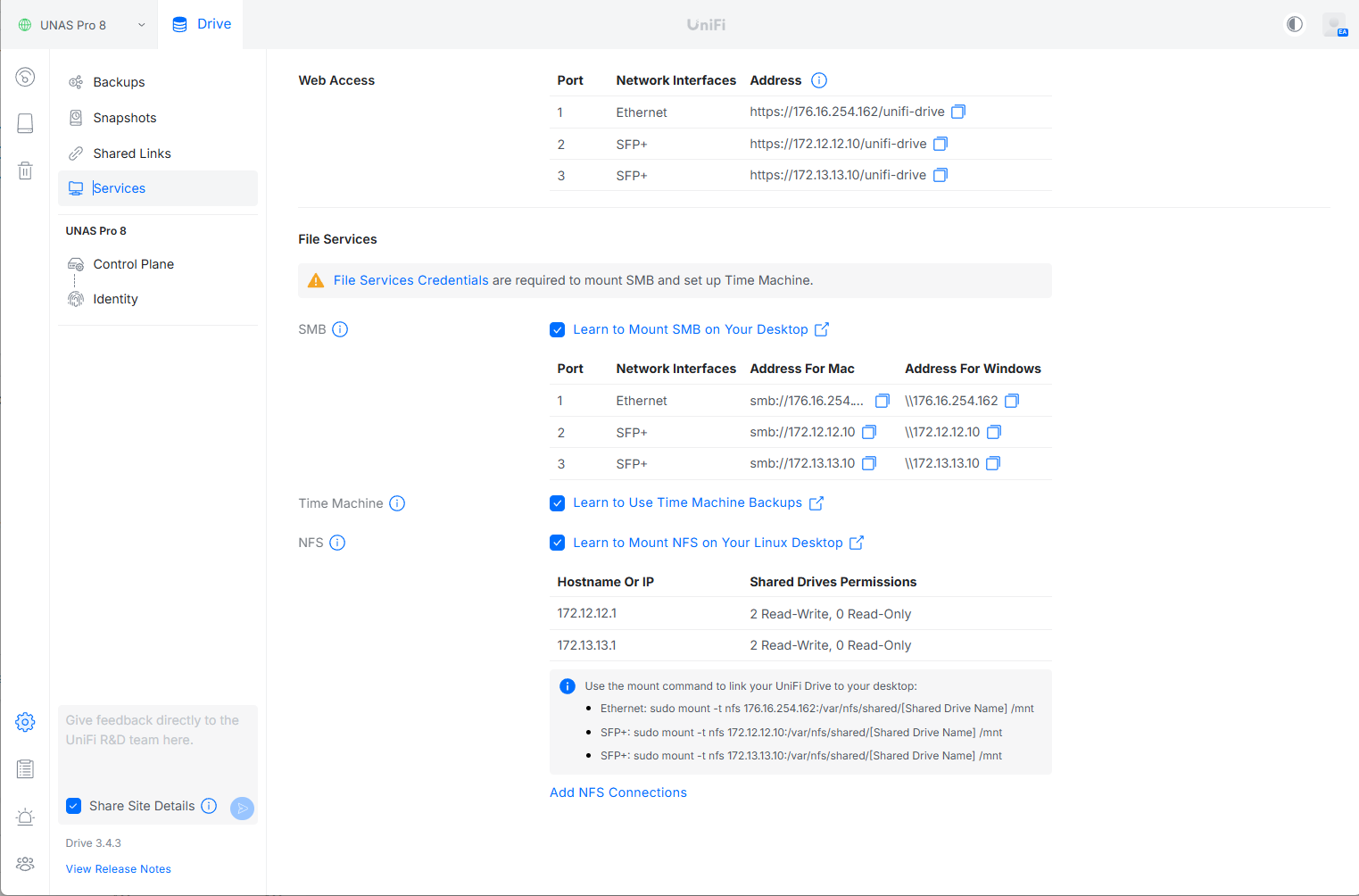
File services on the UNAS Pro 8 are centrally managed in the Services section of the UniFi Drive interface. From here, administrators can enable and configure SMB for Windows and macOS file sharing, NFS for Linux and Unix-based workloads, and native Apple Time Machine support for macOS backups. Each service clearly exposes the relevant network interfaces, mount paths, and access details, making it easy to integrate the UNAS into mixed operating system environments.
For business environments, the UNAS Pro 8 includes an Identity section that enables site-level branding and centralized user management. Administrators can customize the site logo, manage access credentials, and integrate with external directories such as Google Workspace, Microsoft Entra ID, or Active Directory for streamlined authentication.

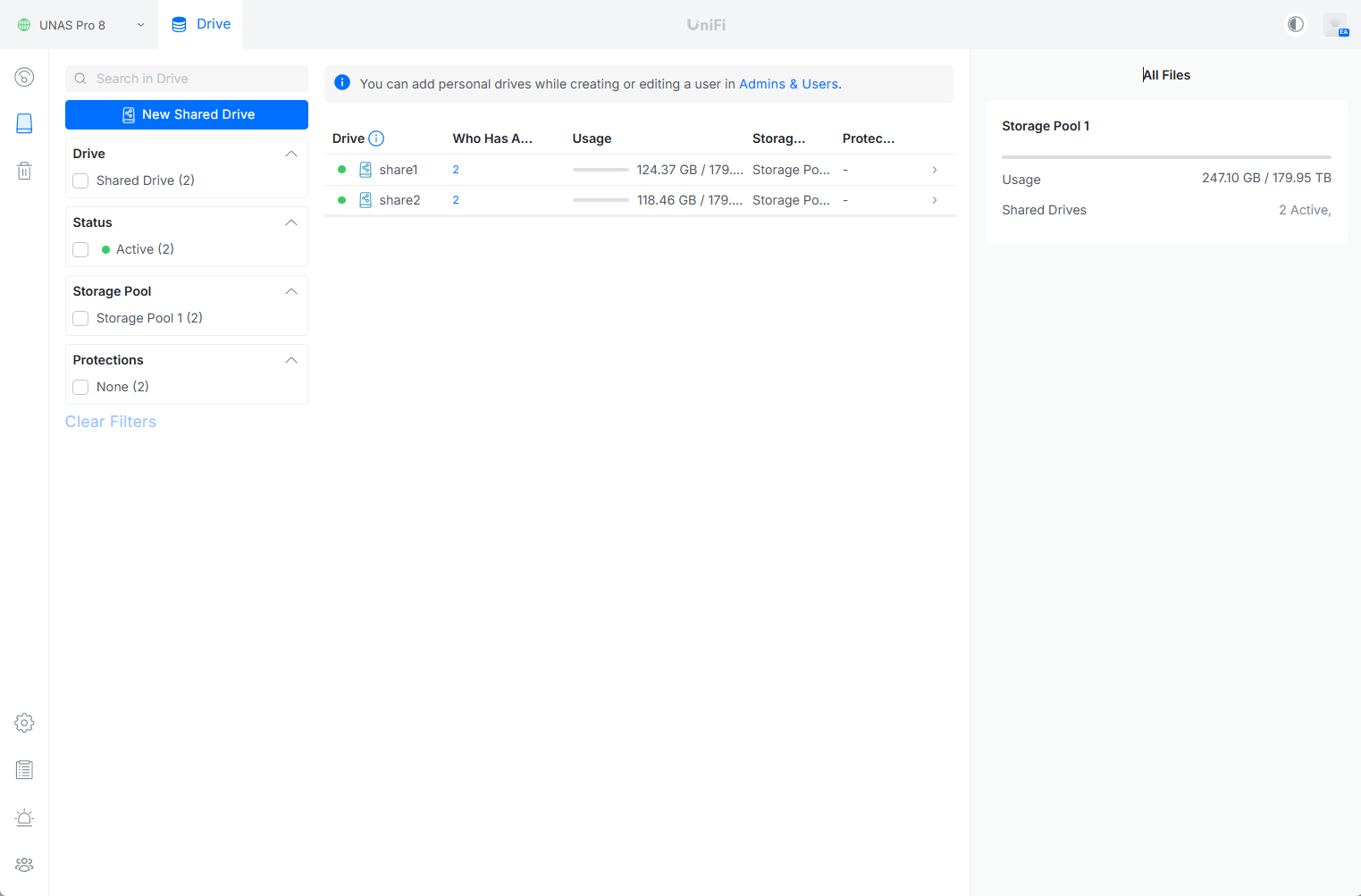
Shared drives are created and managed from the Drive section of the UniFi Drive dashboard, accessible via the drive icon beneath the main dashboard. Each shared drive can be independently configured with snapshot policies, compression settings, and user access controls, making it easy to tailor storage behavior to specific teams or workloads. Permissions can be applied at both the share and folder level, allowing for granular control over who can view, modify, or manage content within each directory.
Within each share, UniFi Drive provides straightforward file management tools, including the ability to move, copy, duplicate, and organize files directly through the web interface. This reduces reliance on external clients for routine administrative tasks and keeps day-to-day management centralized within the UniFi ecosystem.
For external collaboration, UniFi Drive supports sharing files and folders via secure links or QR codes. These shared links can be configured with expiration dates, access limits, and usage controls, ensuring temporary access without exposing full user credentials. This makes UniFi Drive well-suited for distributing large files to contractors or partners while maintaining tight control over availability and security.
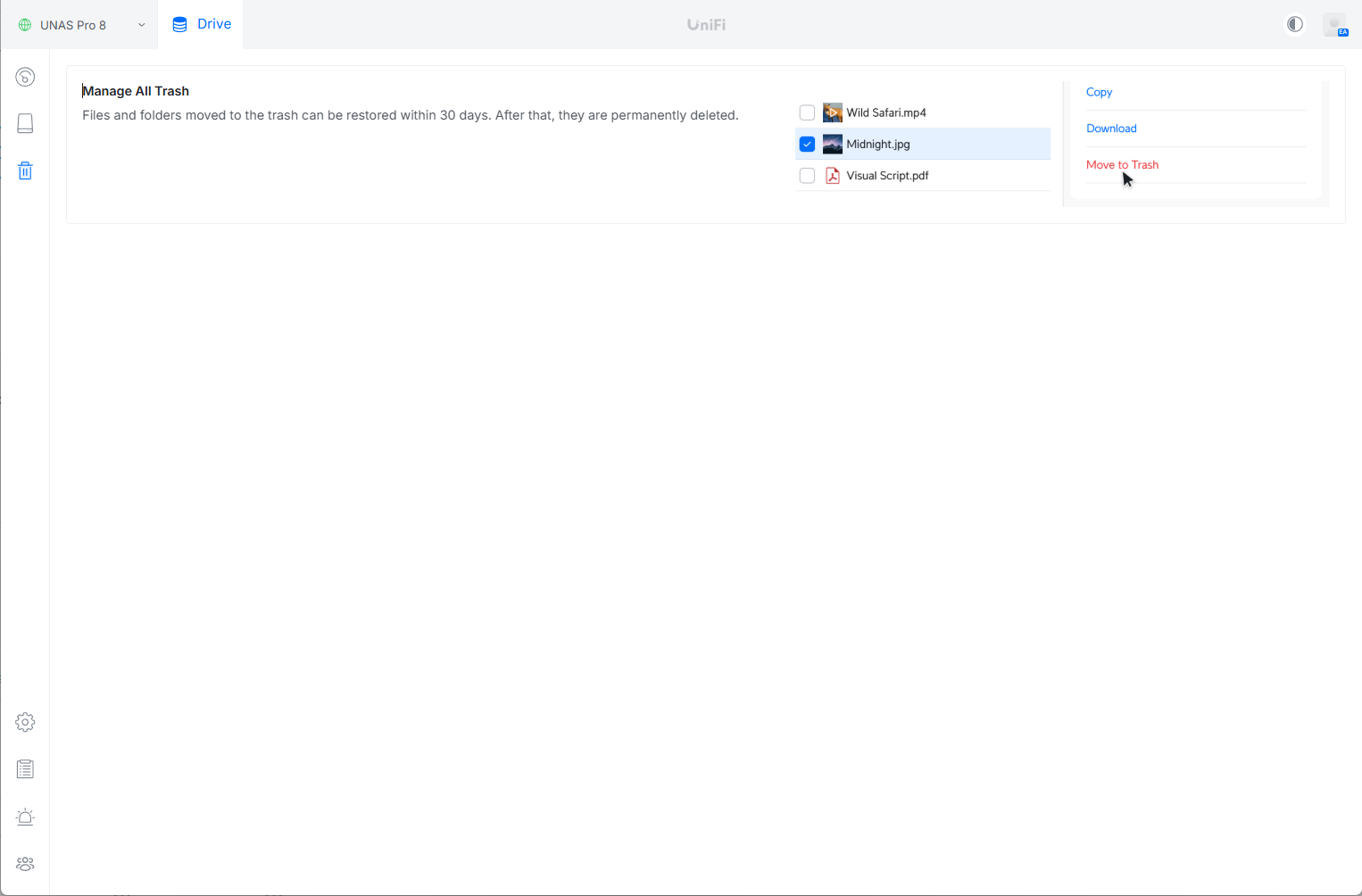
UniFi Drive includes a dedicated Trash section that provides clear visibility and control over deleted files and folders. When content is removed from a shared drive, it is moved to the Trash rather than being immediately erased, allowing for easy recovery if files are deleted accidentally. From this view, administrators and authorized users can copy files back to active storage, download them locally, or permanently delete them as needed. Files retained in the Trash are automatically preserved for up to 30 days, after which they are permanently deleted by the system.
UNAS 8 Performance
To evaluate the storage performance of the UNAS 8, we used industry-standard metrics and the FIO benchmarking tool. A dedicated server was used as the load generator and connected to the test environment over two 10GbE network links. The UNAS 8 was also connected to the same switch using its native 10GbE interfaces, ensuring all workloads traversed real network paths rather than synthetic or loopback tests.
Evaluation Configuration
For this evaluation, the UNAS 8 was configured in a RAID 6 layout using the installed 30TB hard drives, providing a balance of capacity, fault tolerance, and sustained throughput. Additionally, two 1TB SSDs were configured as a combined read-and-write cache to accelerate active workloads and reduce latency in mixed I/O scenarios. We used a Dell PowerEdge R740xd for all benchmark tests, which served as the centralized load generator for all FIO workloads.
This configuration allowed us to fully exercise the UNAS 8 without network saturation becoming a limiting factor, while maintaining realistic NFS access patterns representative of production deployments with sync and asynchronous access. With the client and storage platform operating at 10GbE, performance results reflect the capabilities of the storage subsystem rather than link constraints.
In this section, we focus on the following FIO benchmarks:
- Random Read
- Random Write
- Sequential Read
- Sequential Write
1M sequential read – Bandwidth
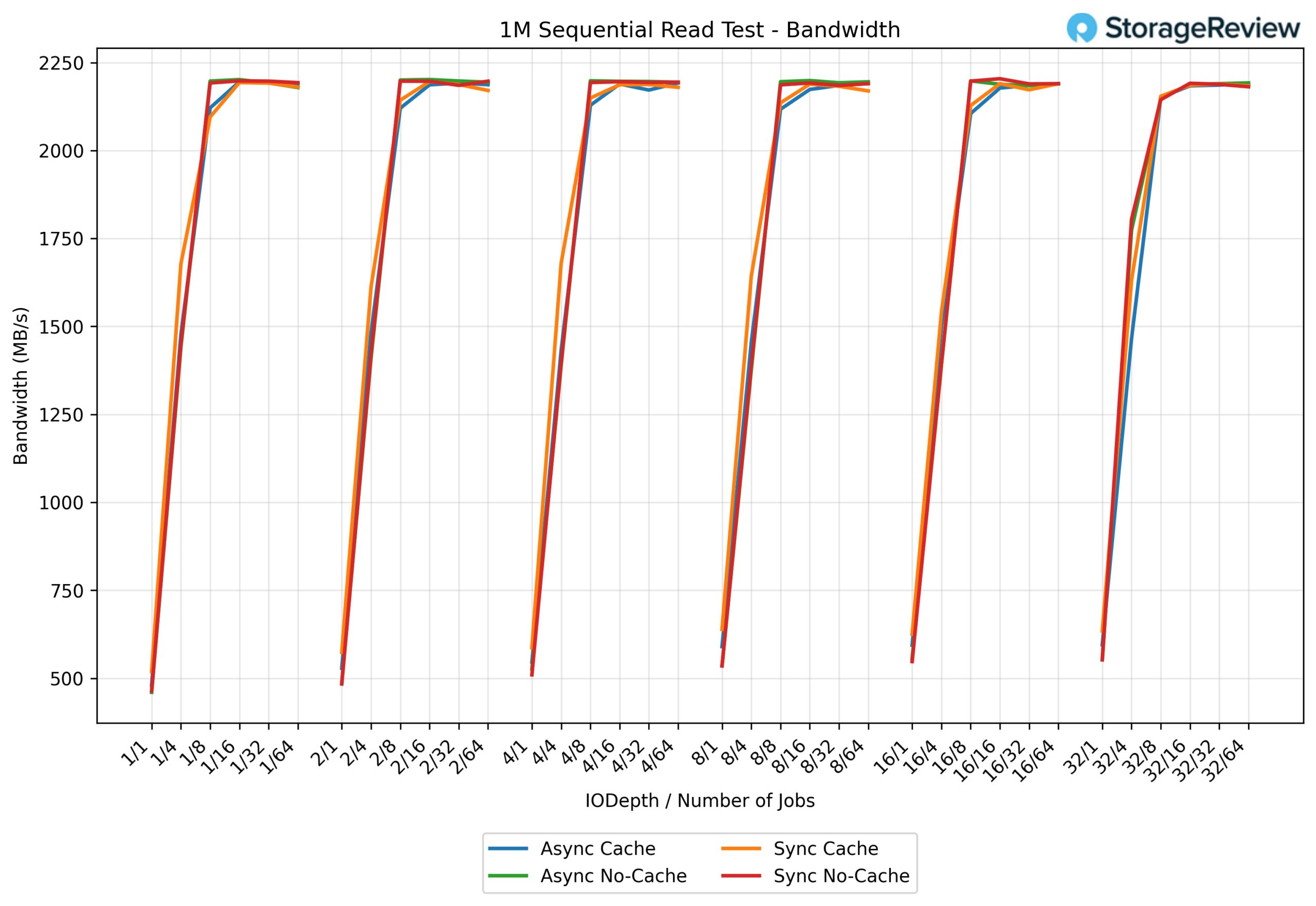
In the 1M sequential read test, the UNAS Pro 8 shows a rapid performance ramp as concurrency increases. At lower queue depths and job counts, throughput starts around 500-600 MB/s, but quickly climbs through the mid-range, surpassing 1.5 GB/s by the 8Q/8T to 16Q/16T range. At higher concurrency, the system reaches a stable plateau just over 2.2 GB/s, where performance remains consistent through the top end of the test. At peak, this level of throughput approaches saturating the combined 20 GbE bandwidth provided by the dual 10 GbE interfaces, with the remaining headroom primarily due to protocol and filesystem overhead rather than storage limitations.
1M sequential read – Latency
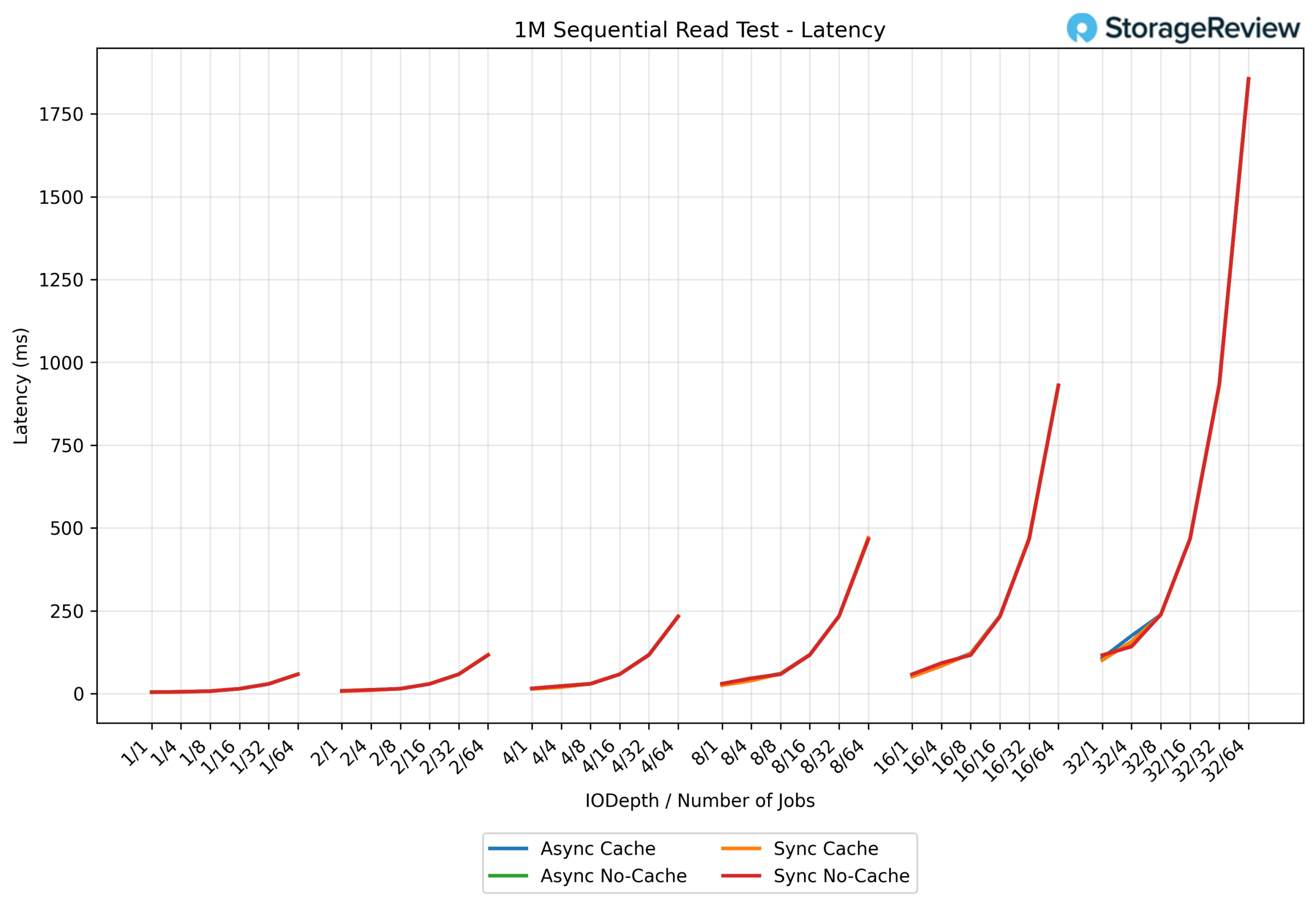
In the 1M sequential read latency test, latency remains tightly grouped throughout the test, following a smooth, predictable curve as load increases. At the low end, latency ranges from 2-5 ms and stays under 10 ms through the early workload levels. As the test moves into the mid-range, latency increases steadily into the 25-75 ms range, reflecting the system ramping toward higher throughput. At the top end of the test, latency rises sharply, climbing into the hundreds of milliseconds and peaking at approximately 1.8 seconds under maximum concurrency 32/64.
1M sequential write – Bandwidth
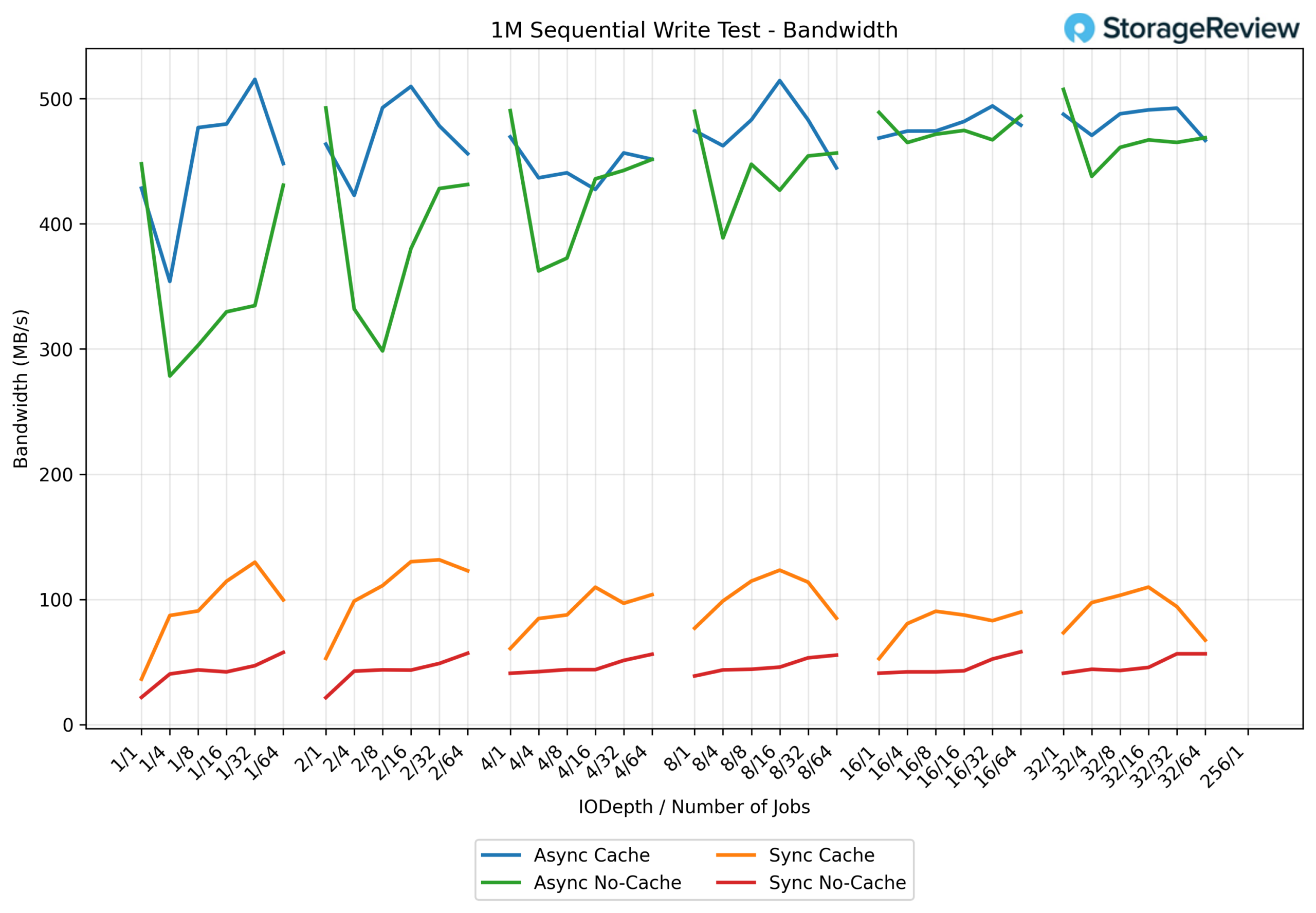
In the 1M sequential write test, the UNAS Pro 8 shows clear separation between the four tested configurations, highlighting the impact of sync behavior and caching on sustained write throughput.
The Async Cache configuration delivers the highest overall performance, ramping quickly and sustaining peak bandwidth between 480 MB/s and 515 MB/s as concurrency increases. This represents the upper ceiling of the platform for large-block sequential writes.
With Async No-Cache, throughput is slightly lower but still strong, generally settling in the 430-490 MB/s range once the system reaches steady state. While it lacks the additional buffering benefits, performance remains consistent and predictable at higher queue depths.
The Sync Cache configuration trails the async modes, peaking at 100-130 MB/s. While significantly slower, it maintains a relatively stable curve as load increases, reflecting the cost of synchronous write guarantees even with cache assistance.
Finally, Sync No-Cache delivers the lowest throughput, operating primarily in the 40-60 MB/s range throughout the test. This behavior is expected for fully synchronous, parity-protected HDD writes without caching and represents a durability-first configuration rather than a performance-oriented one.
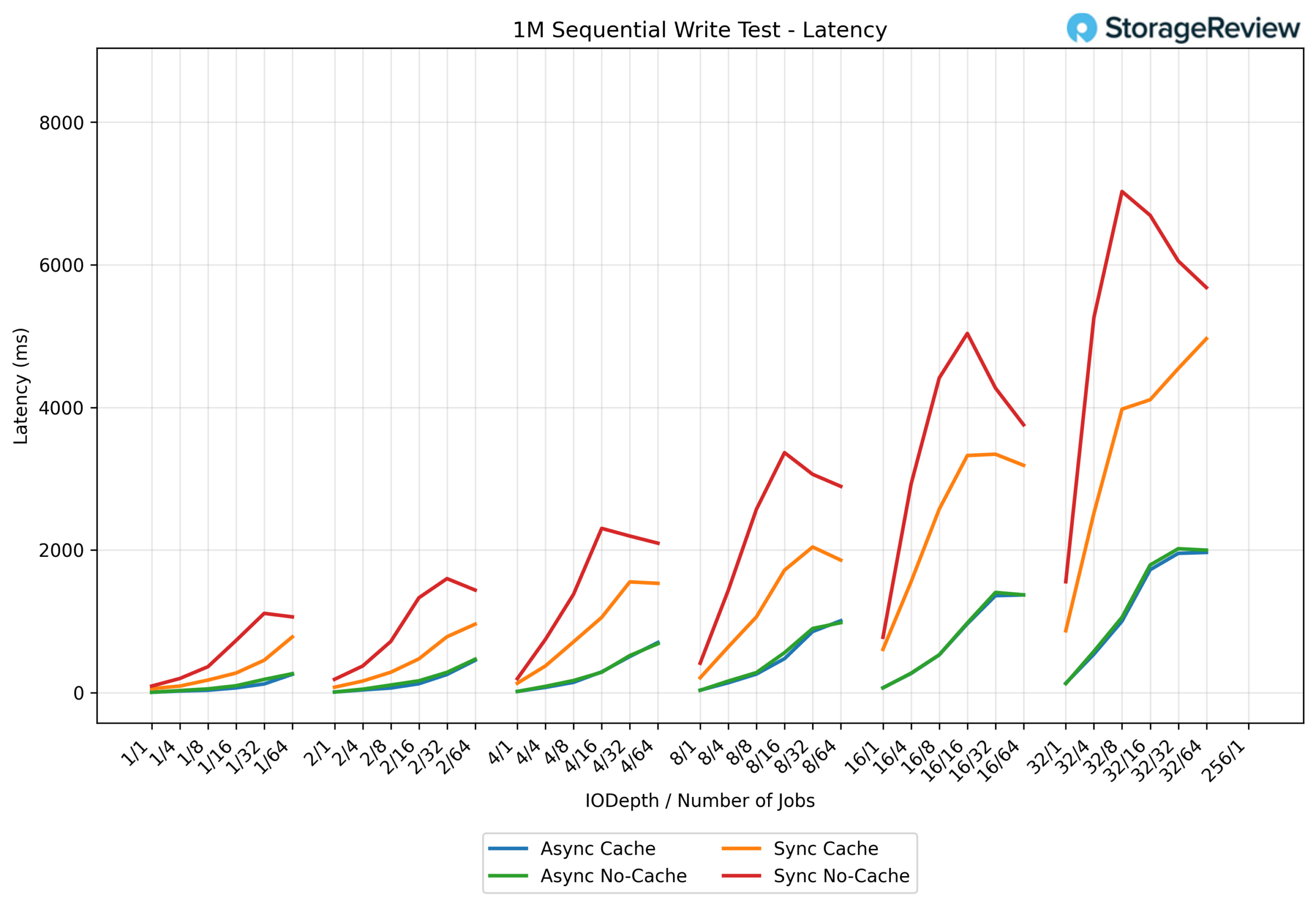
1M sequential write – Latency
The 1M sequential write latency results show clear separation between asynchronous and synchronous write behavior, with latency increasing predictably as queue depth and job count rise.
Both Async Cache and Async No-Cache maintain relatively controlled latency throughout the test. At low queue depths, latency ranges from 50-100 ms and gradually increases through the mid-range, reaching approximately 500-900 ms. At the top end of the workload, latency for both async modes peaks around 1.8-2.0 seconds, indicating steady saturation without runaway queuing.
The Sync Cache configuration exhibits significantly higher latency under load. Early in the test, latency already climbs into the hundreds of milliseconds, rising through the mid-range to roughly 1.5-3.0 seconds. At maximum concurrency, sync cached writes experience latencies of approximately 4.5-5.0 seconds, reflecting the cost of synchronous commit behavior even with cache assistance.
The most extreme behavior appears in Sync No-Cache, where latency escalates sharply as concurrency increases. Mid-range workloads push latency beyond 2-3 seconds, and at the top end, latency spikes dramatically, peaking at 6.5-8.6 seconds. This steep curve is characteristic of fully synchronous, parity-protected HDD writes without buffering, where the system prioritizes data integrity over responsiveness.
4K random read – IOPS
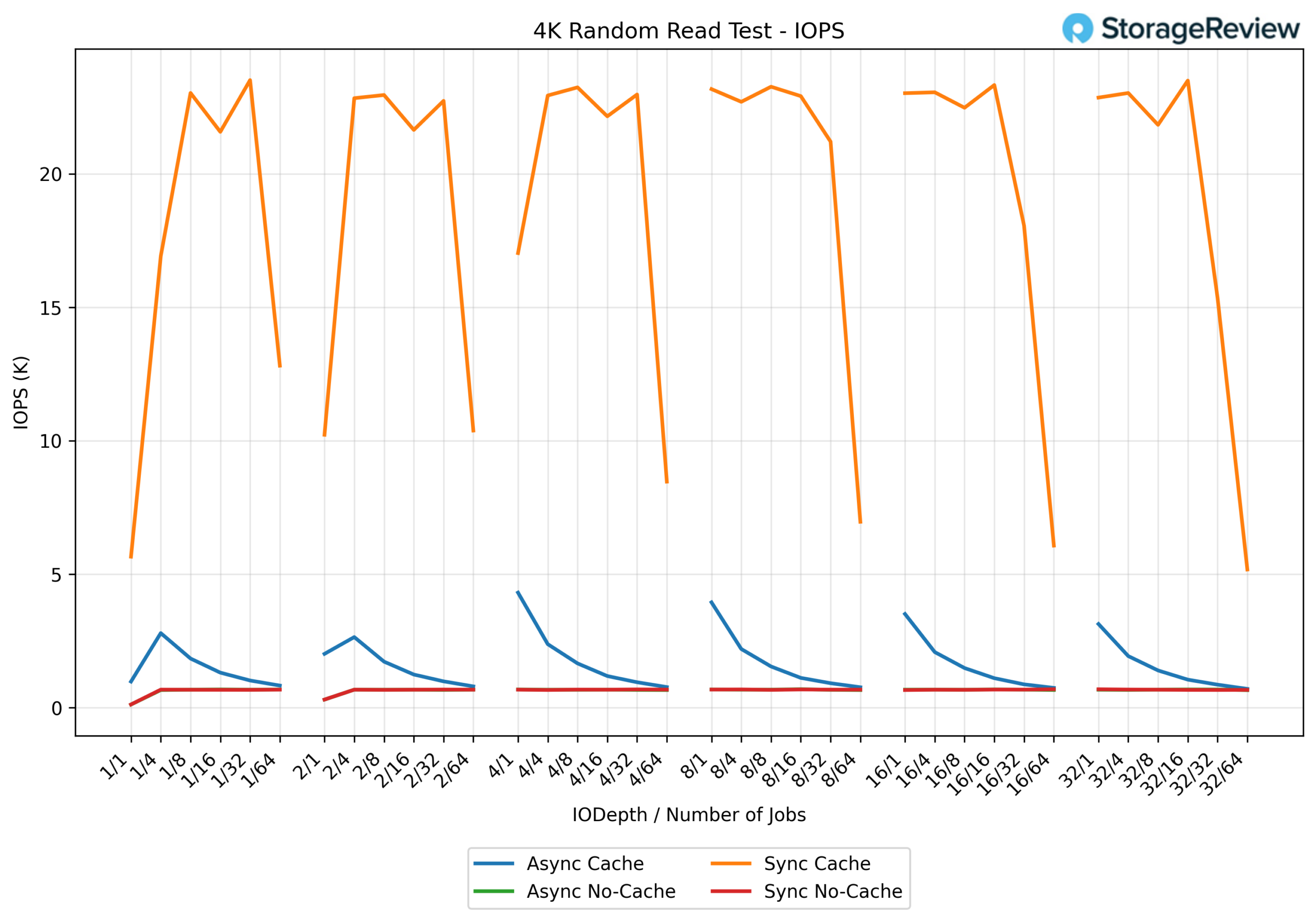
The 4K random read test highlights the impact of sync behavior on small-block performance and clearly separates the four configurations.
The Sync Cache configuration delivers the highest IOPS by a wide margin. At low queue depths, performance starts around 5-6K IOPS and rapidly ramps in the mid-range, peaking between 22K and 23.5K IOPS. As concurrency continues to increase, IOPS begin to taper slightly at the top end, dropping into the 15-18K IOPS range, indicating saturation and queue contention rather than instability.
With Async Cache, performance is significantly lower but more consistent. IOPS generally range from 2-4.3K, with the highest values at lower queue depths before gradually declining as concurrency increases. This downward slope reflects the system shifting from cache-assisted responsiveness to disk-bound behavior.
Both Async No-Cache and Sync No-Cache cluster at the bottom of the chart, delivering comparatively modest performance. These configurations operate primarily in the 0.6-1.0K IOPS range across most of the test, with minimal scaling at higher queue depths. This flat curve is typical of HDD-based random read workloads without caching, where mechanical latency dominates.
4K random read – Latency
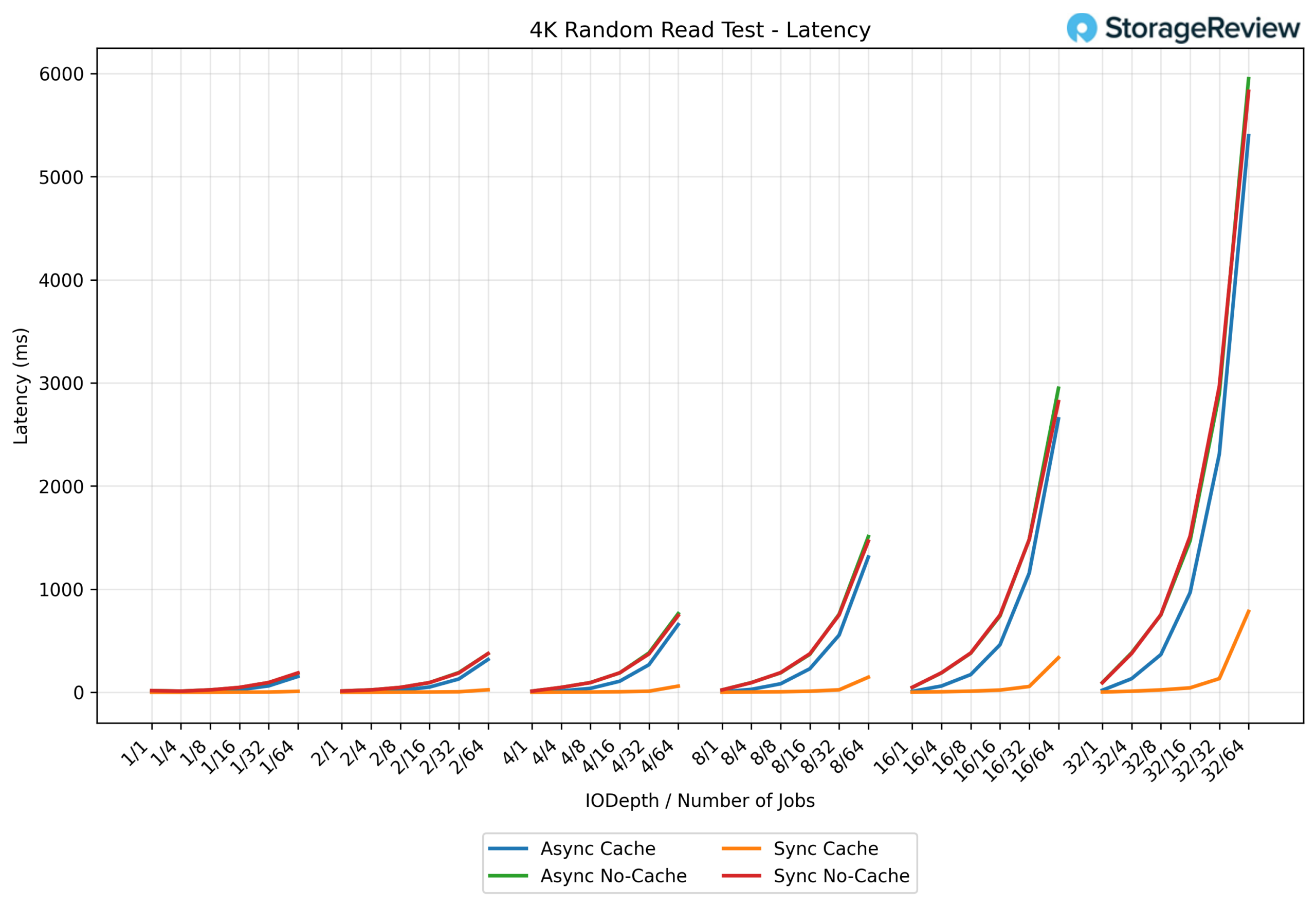
The 4K random read latency results show a clear and expected progression as concurrency increases, with latency remaining well-controlled at low queue depths before rising sharply once the system becomes saturated.
At the low end of the test, latency across all four configurations stays relatively low, generally in the 5-20 ms range. As the workload moves into the mid-range, latency begins to diverge. Both Async Cache and Async No-Cache climb steadily into the 100-400 ms range, reflecting increased queuing as random I/O pressure builds on the HDD array.
At higher queue depths and job counts, latency increases rapidly. In the upper mid-range, async configurations push into the 700-1,500 ms range, while the system approaches saturation. At the top end of the test, latency spikes dramatically, with Async Cache peaking at roughly 5.4 seconds, Async No-Cache at approximately 5.8 seconds, and Sync No-Cache at approximately 6.0 seconds.
The Sync Cache configuration stands apart, maintaining comparatively lower latency throughout the test. Even at the highest concurrency levels, sync cached reads remain under 1 second, peaking around 750-800 ms, indicating that synchronous reads with caching help limit queue buildup under heavy random workloads.
4K random write – IOPS
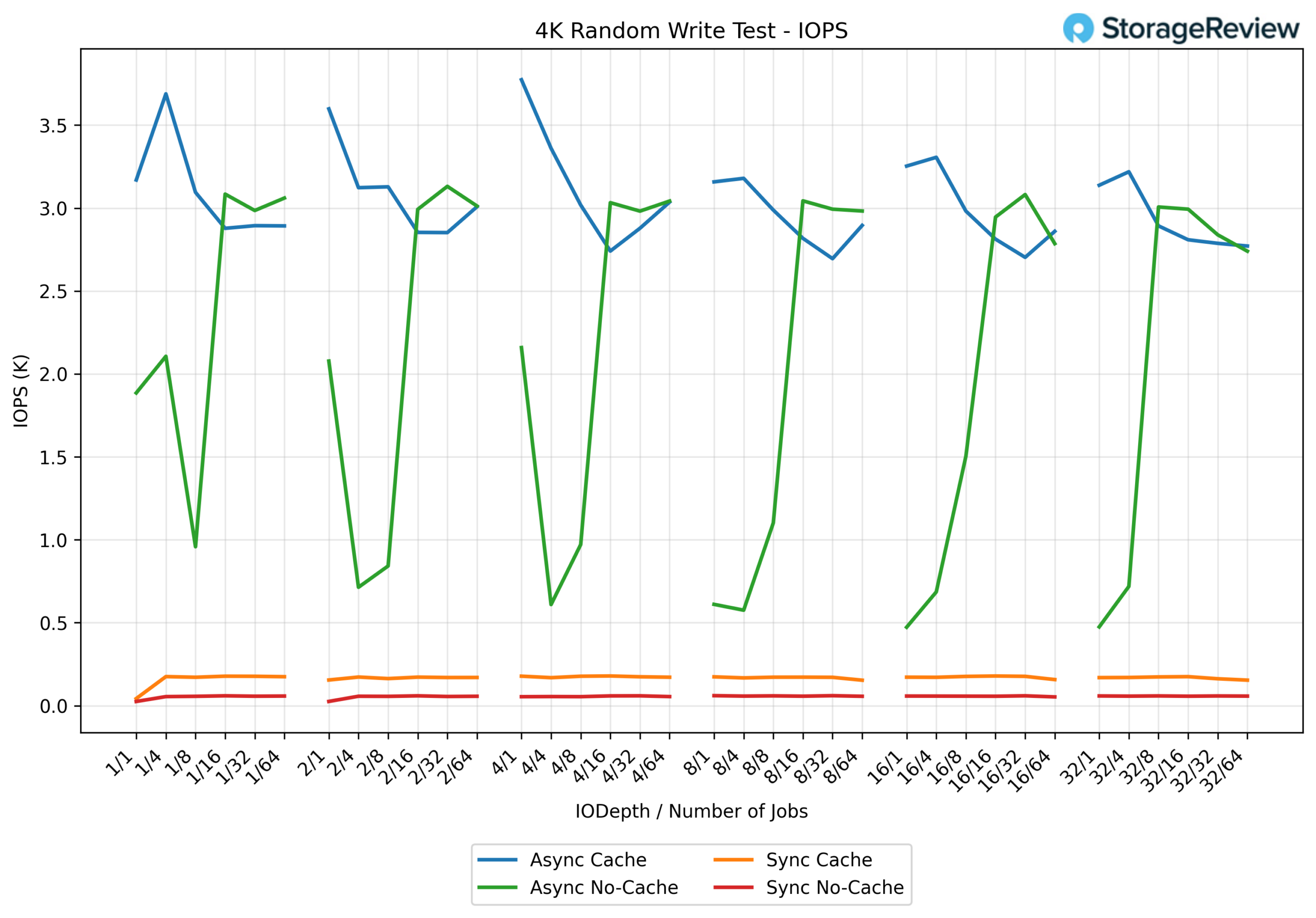
The 4K random write test further illustrates how write semantics and caching behavior shape small-block performance on the UNAS Pro 8, with clear separation across the four configurations.
The Async Cache configuration delivers the strongest overall results, leading the chart across most queue depths. Performance starts around 3.1-3.3K IOPS and peaks near 3.7-3.8K IOPS at lower to mid queue depths before gradually settling into the 2.8-3.2K IOPS range at higher concurrency. This gentle downward slope reflects the system transitioning from cache-assisted bursts to steady-state disk-backed writes.
With Async No-Cache, performance is more variable. IOPS typically range from 0.6K to 3.1K, with noticeable dips at lower queue depths, followed by sharp recoveries as concurrency increases. This sawtooth pattern is characteristic of HDD-backed random writes without caching, where mechanical latency dominates until enough outstanding I/O is present to keep the array busy.
The Sync Cache configuration operates well below the async modes, remaining largely flat at 0.15-0.18K IOPS throughout the test. While caching helps smooth behavior, the synchronous write requirement significantly limits throughput for small-block workloads.
Finally, Sync No-Cache delivers the lowest performance overall, hovering around 0.040.06K IOPS across all queue depths. This flat, bottom-bound curve reflects the cost of fully synchronous, parity-protected random writes on spinning media, where durability and strict write ordering take precedence over performance.
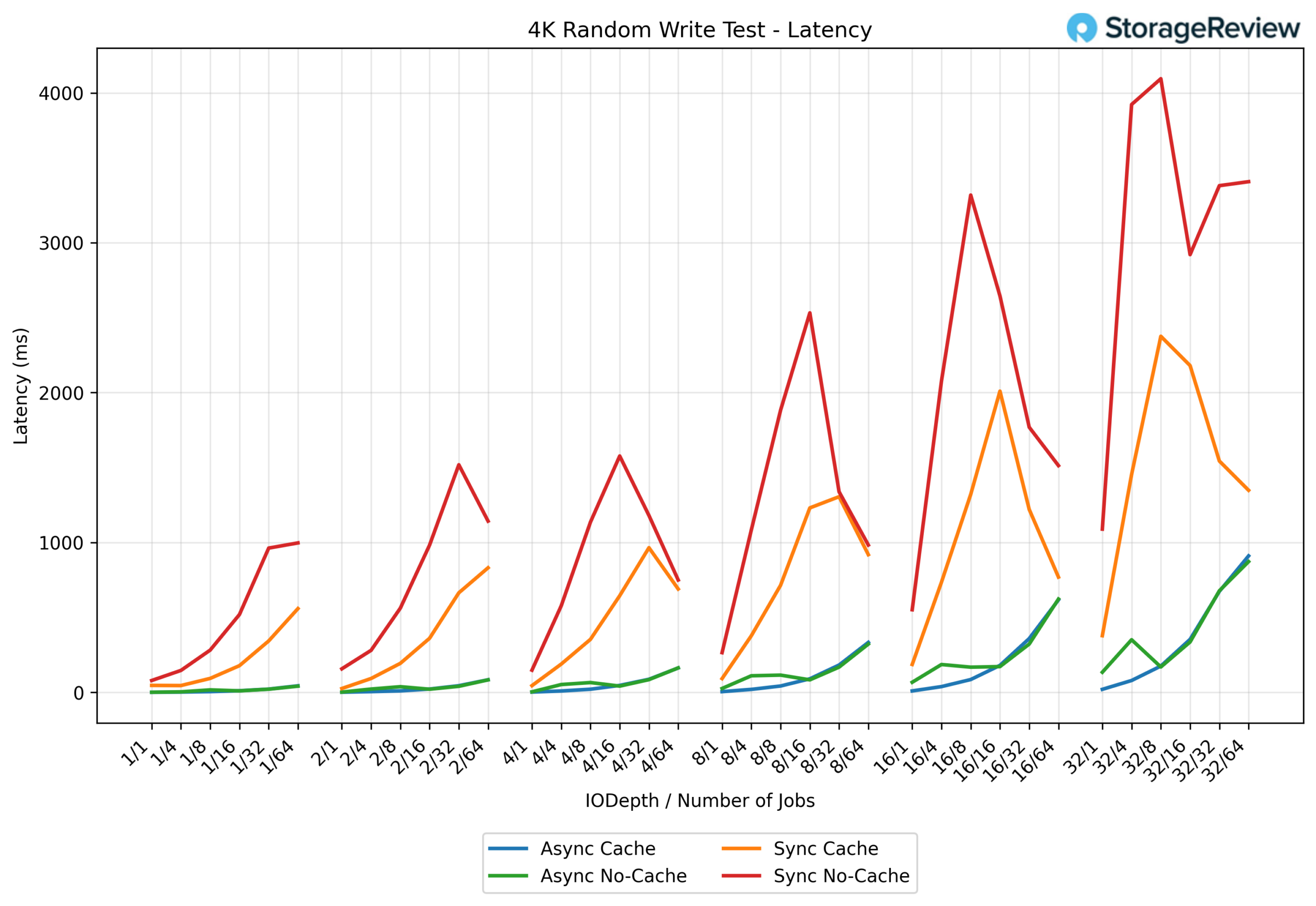
4K random write – Latency
The 4K random write latency results clearly show how quickly latency escalates as concurrency increases, with a distinct separation between asynchronous and synchronous behavior.
At the lowest queue depths, Async Cache and Async No-Cache remain well controlled, generally staying in the 5-40 ms range. As the workload moves into the mid-range (QD4–QD8), latency rises gradually into the 50-150 ms range, reflecting increasing random write pressure without sudden instability.
Once the test reaches higher concurrency, latency begins to climb more noticeably. At QD16, async modes move into the 180-350 ms range, and at the top end of the test (QD32 / 64 jobs), latency peaks around 800-900 ms. The curve here is smooth and progressive, indicating saturation rather than abrupt queuing collapse.
The synchronous configurations behave very differently. Sync Cache starts higher even at minimal load, entering the 50-150 ms range early, then climbing rapidly through the mid-range into the 700-1,300 ms range. At the highest queue depths, sync-cached writes peak at 2.1-2.4 seconds.
The most extreme behavior is seen with Sync No-Cache. Mid-range workloads already push latency past 1.5 seconds, and at higher concurrency levels, latency spikes sharply, reaching 3.3 seconds at QD16 and peaking at approximately 4.1 seconds at QD32. The jagged, sawtooth shape of the curve reflects severe queuing and write-ordering pressure on spinning disks under fully synchronous random writes.
Conclusion
The Ubiquiti UNAS Pro 8 firmly establishes itself as UniFi’s most enterprise-leaning NAS to date, balancing capacity density, redundancy, and high-speed networking in a compact 2U form factor. Priced at $799, it occupies a clear step above smaller UniFi NAS offerings while remaining far more accessible than traditional enterprise storage platforms.
With eight evenly paired drive bays, the NAS aligns naturally with RAID 6 and other parity-protected layouts that benefit from symmetrical disk groupings. This makes it easier to design for both capacity and fault tolerance. The inclusion of two dedicated M.2 NVMe cache slots adds meaningful flexibility, allowing administrators to accelerate mixed workloads without consuming primary storage bays.
From a platform standpoint, the combination of dual 10GbE SFP+ ports, an additional 10GbE RJ45 interface, and support for hot-swappable redundant power supplies positions the UNAS Pro 8 squarely as a business- and enterprise-class storage solution. These capabilities make it well-suited for deployments that require uptime, serviceability, and predictable performance, including lab environments, edge locations, and shared departmental storage.
Performance testing reinforces this positioning. Sequential read throughput scales efficiently and approaches the practical limits of aggregated 10GbE networking, while async write modes with caching provide substantial gains for throughput-oriented workloads. At the same time, clearly defined performance limits under synchronous and no-cache configurations set realistic expectations for durability-first use cases on spinning media. This makes the system easier to size correctly and deploy with confidence.
The Pro 8 is also a strong fit for media-heavy environments, including video production teams and organizations managing large content libraries. High sequential read performance, large raw capacity, and UniFi Drive’s snapshot and sharing features make it well-suited for collaborative workflows that involve large files and sustained access patterns.
There are a few practical considerations. The included rail kit, while functional once installed, feels less rigid than the chassis itself and shows some flex during mounting. It adequately supports the system in rack deployments, but it is an area where refinements with sliding rails would better match the otherwise solid, appliance-grade design.
Overall, the UNAS Pro 8 represents a meaningful step forward for UniFi storage. It combines drive-bay density, dual-cache expandability, redundant power options, and expanded 10GbE connectivity into a cohesive platform designed for professional use. For organizations already invested in the Ubiquiti ecosystem or seeking a clean, centrally managed NAS with enterprise-grade features, the UNAS 8 stands out as a compelling, well-balanced storage solution.


 Amazon