---
description: The Plugable Thunderbolt 4 and USB4 hub is a newer addition to Plugable&#039;s line of accessories. The Thunderbolt 4 and USB4 hub offers users three...
title: Plugable Thunderbolt 4 and USB4 Hub Review
image: https://www.storagereview.com/wp-content/uploads/2022/08/StorageReview-Plugable-TB4-Hub-5.jpg
---

[![Storage Review]()](https://storagereview.com/)

---

[Facebook](https://www.facebook.com/@storagereview) [X (Twitter)](https://twitter.twitter.com/storagereview) [Instagram](https://www.instagram.com/storagereview/) [LinkedIn](https://www.linkedin.com/company/storagereview-com) [YouTube](https://www.youtube.com/user/storagereview?sub_confirmation=1) [Email](mailto:info@storagereview.com) [Spotify](https://open.spotify.com/show/1y6VnznABhHeOSMOmbDTz0) [Reddit](https://www.reddit.com/r/StorageReview/) [Discord](https://discord.gg/TwMHb4azdC) [RSS Feed](https://www.storagereview.com/rss.xml) [TikTok](https://www.tiktok.com/@storagereview)

[Facebook](https://www.facebook.com/@storagereview) [X (Twitter)](https://twitter.com/storagereview) [Instagram](https://www.instagram.com/storagereview/) [LinkedIn](https://www.linkedin.com/company/storagereview-com) [YouTube](https://www.youtube.com/user/storagereview?sub_confirmation=1) [Email](mailto:info@storagereview.com) [Spotify](https://open.spotify.com/show/1y6VnznABhHeOSMOmbDTz0) [Reddit](https://www.reddit.com/r/StorageReview/) [Discord](https://discord.gg/TwMHb4azdC) [RSS Feed](https://www.storagereview.com/rss.xml) [TikTok](https://www.tiktok.com/@storagereview)

[![StorageReview.com](https://www.storagereview.com/wp-content/uploads/2026/07/Storage-Review-2x.png)](https://www.storagereview.com)

≡ Menu

- [Home](https://www.storagereview.com/)
- [Storage Reviews](https://www.storagereview.com/review)
  - [Consumer Reviews](https://www.storagereview.com/consumer)
  - [Enterprise Reviews](https://www.storagereview.com/enterprise)
  - [Ubiquiti Reviews](https://www.storagereview.com/best/ubiquiti-reviews)
- [SR Merch](https://store.storagereview.com)
- [Leaderboards](https://www.storagereview.com/best)
  - [Best Storage Arrays](https://www.storagereview.com/best/storage-arrays)
  - [Best Enterprise SSDs](https://www.storagereview.com/best/enterprise-ssds)
  - [Best Servers](https://www.storagereview.com/best/servers)
  - [Best Desktops for Local AI](https://www.storagereview.com/best/desktops-local-ai)
  - [Best Laptops for Local AI](https://www.storagereview.com/best/laptops-local-ai)
  - [Best Local LLM Tools](https://www.storagereview.com/best/local-llm-tools)
  - [Agentic AI Hardware](https://www.storagereview.com/best/agentic-ai-hardware)
  - [Best SSDs & Hard Drives](https://www.storagereview.com/best_drives)
  - [Best Portable SSDs](https://www.storagereview.com/best/portable-ssds)
  - [Best Business Laptops](https://www.storagereview.com/best/business-laptops)
  - [Best Mobile Workstations](https://www.storagereview.com/best/mobile-workstations)
  - [Best Desktop Workstations](https://www.storagereview.com/best/desktop-workstations)
  - [Best Laptop Battery Life](https://www.storagereview.com/best/laptop-battery-life)
- [Storage Reference Guide](https://www.storagereview.com/storage-reference-guide)
- [About SR](https://www.storagereview.com/about-storagereview)
  - [StorageReview.com Sweepstakes Rules and Regulations](https://www.storagereview.com/storagereview-com-sweepstakes-rules-and-regulations)

Search

[Home](https://www.storagereview.com/) » [Review](https://www.storagereview.com/review) » Plugable Thunderbolt 4 and USB4 Hub Review

# Plugable Thunderbolt 4 and USB4 Hub Review

by Conner Crull on August 5, 2022

[Client Accessories](https://www.storagereview.com/consumer/client-accessories)  ◇  [Consumer](https://www.storagereview.com/consumer)

The Plugable Thunderbolt 4 and USB4 hub is a newer addition to Plugable’s line of accessories. The Thunderbolt 4 and USB4 hub offers users three additional Thunderbolt 4 ports that also function as Thunderbolt 3 along with a front Thunderbolt connection supporting up to 60W charging power. This hub is designed for those looking to increase productivity by expanding the number of displays or for those that need the ability to daisy-chain up to six different devices.

## Plugable Thunderbolt 4 Hub

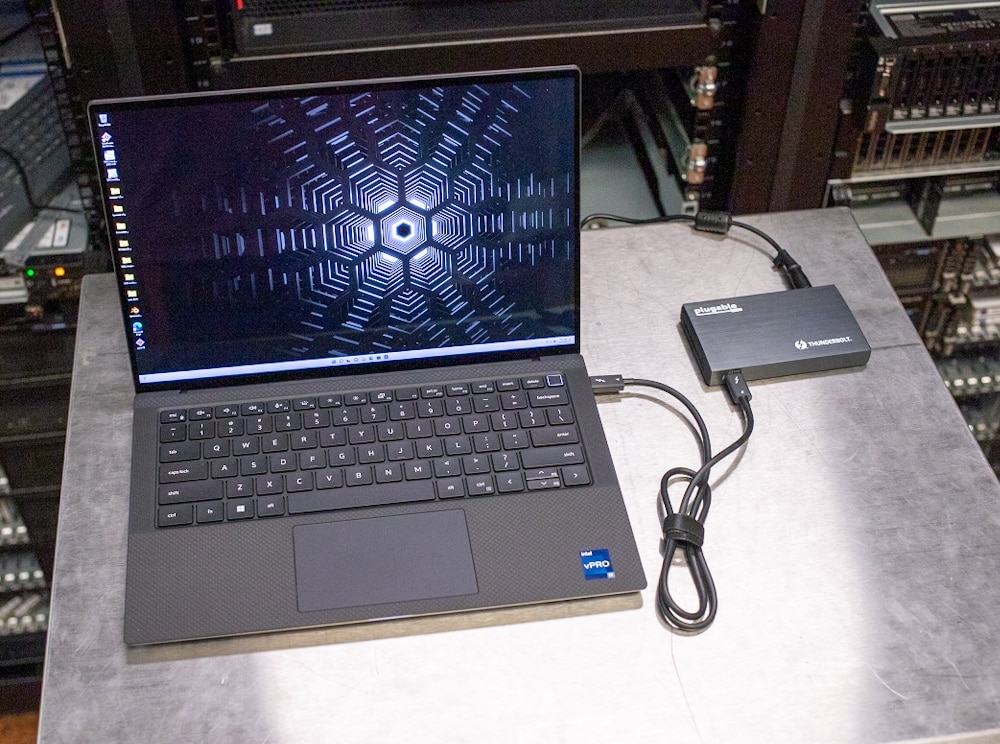
Regarding connectivity, the Plugable Thunderbolt 4 and USB4 hub offers up to three more Thunderbolt ports for users that support up to 40Gbps of data as well as 15W of power. The hub also features a 60W power delivery port on the front, which means that it gives users access to use this as a way to charge their notebook or MacBook without having to worry about another outlet nearby.

![StorageReview-Plugable-TB4-Hub-5](https://www.storagereview.com/wp-content/uploads/2022/08/StorageReview-Plugable-TB4-Hub-5.jpg)

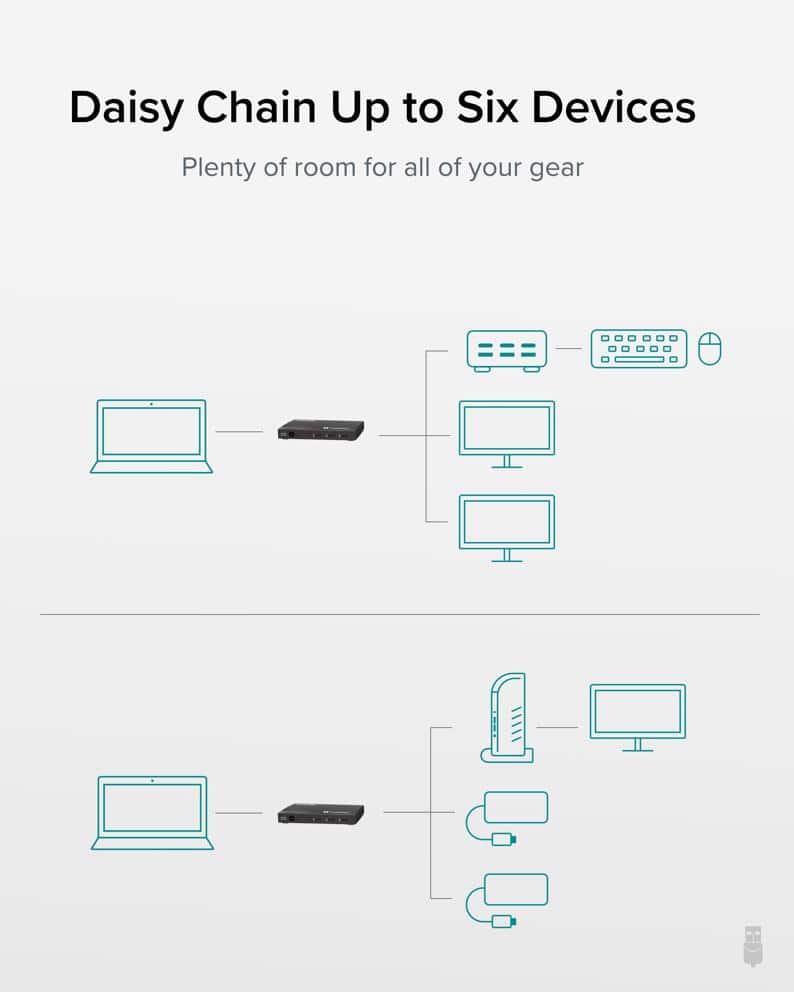
Daisy-chaining this Thunderbolt 4 hub can provide up to six different devices connected. Plugable shows that one port can go to another hub that can hold all the accessories like a mouse and keyboard that a user might need as well as going to two other monitors to give a total of three screens with accessories. Plugable also shows that this hub can go to one of their docks that can connect to another monitor along with using the two other ports as adapters for more devices.![Plugable-six-device-diagram]()

When dealing with a multi-monitor setup, it is important to note the limitations that the Plugable has when it comes to the number of displays. With Thunderbolt 4 Windows Systems (Windows 10+), the Thunderbolt 4 hub can support dual displays with 4K @60Hz or a single 8K@30Hz display. For Thunderbolt 3 and USB4 Mac Systems, dual 4K displays @60Hz or single at 4K@60Hz. Lastly, for USB-C Mac Systems, it can support a single 4K display @30Hz.

The Plugable Thunderbolt 4 and USB4 Hub comes with a 2-year limited part and labor warranty as well as Seattle-based email support and currently goes for [$199.00 on Amazon](https://amzn.to/3d9ewEK).

## Plugable Thunderbolt 4 Hub Specifications

| Model | TBT4-HUB3C |
| --- | --- |
| Color | Brushed Gray |
| Connectivity | **Front Components:** 1 x Thunderbolt™ port with 60W power delivery**Back Components:** 1 AC adapter port 3 x Thunderbolt™ ports with 15W power delivery |
| Max Display Resolution | Up to two 4K displays at 60Hz, one 8K display at 30Hz, or one 6K on M1 Macs |
| Compatible operating system | Windows (10+) Thunderbolt 4 and USB4 systems, macOS (11+) |
| In the Box | Dock, power supply, power cord, warranty |
| Warranty | 2-year limited parts and labor warranty as well as Seattle-based email support |

## Design and Build

Hubs and docking stations come in many different shapes and sizes and with the Plugable Thunderbolt 4, the story isn’t any different. The Thunderbolt 4 hub is quite compact but has a nice weight to it where once cables are plugged in, the cables won’t move the device around and it will stay stationary.

![StorageReview-Plugable-TB4-Hub-1]()

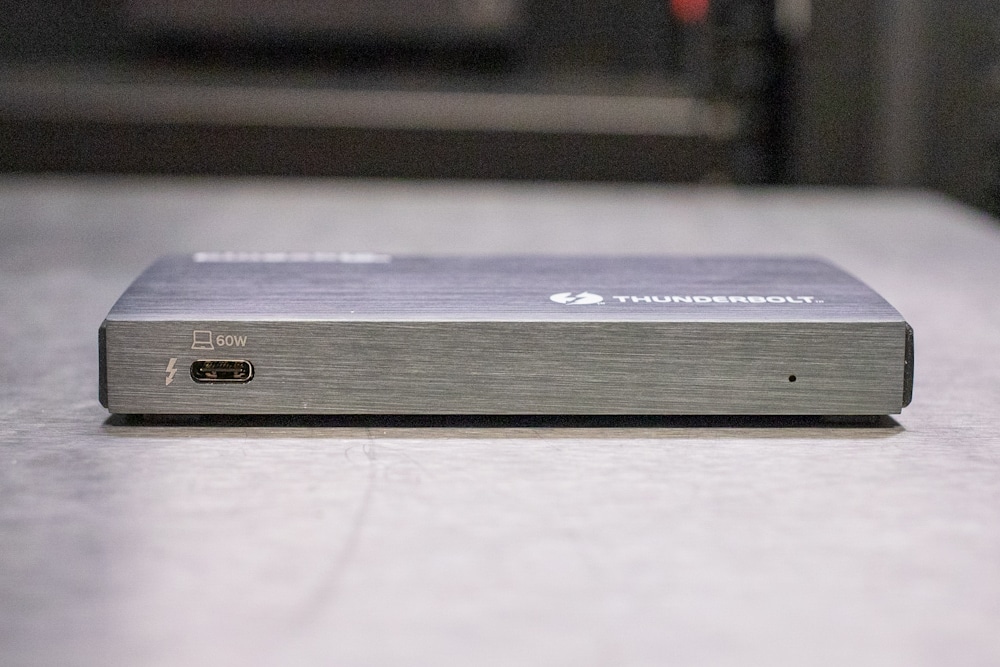
On the front of the Plugable Thunderbolt 4 dock, there is a single port on the left side of the front. Next to the port, there is also a little lighting bolt to signify that it is a Thunderbolt port, along with a laptop symbol and the 60W power delivery symbol.

The top of the device features the Plugable symbol on the top left along with the Thunderbolt symbol and the word “Thunderbolt” on the bottom right.

![StorageReview-Plugable-TB4-Hub-3]()

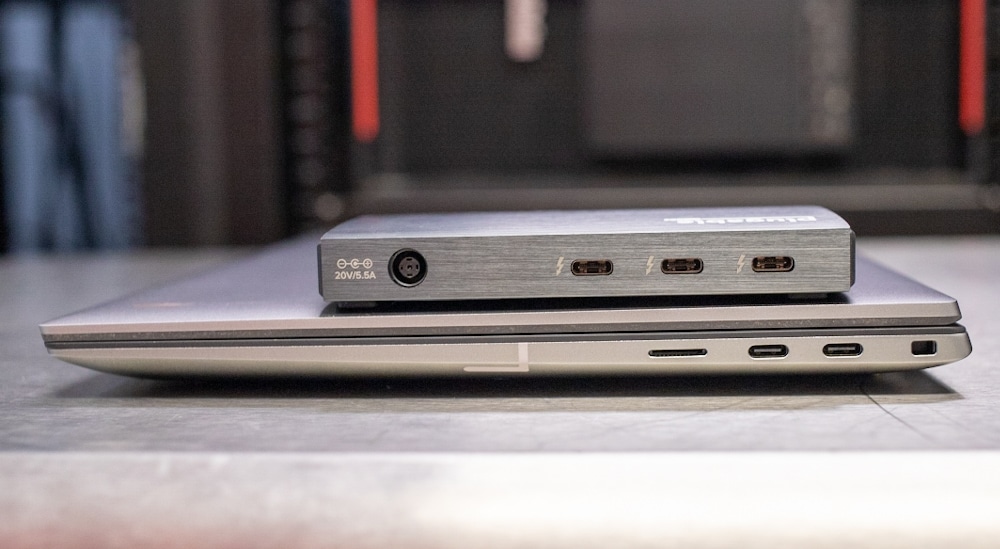
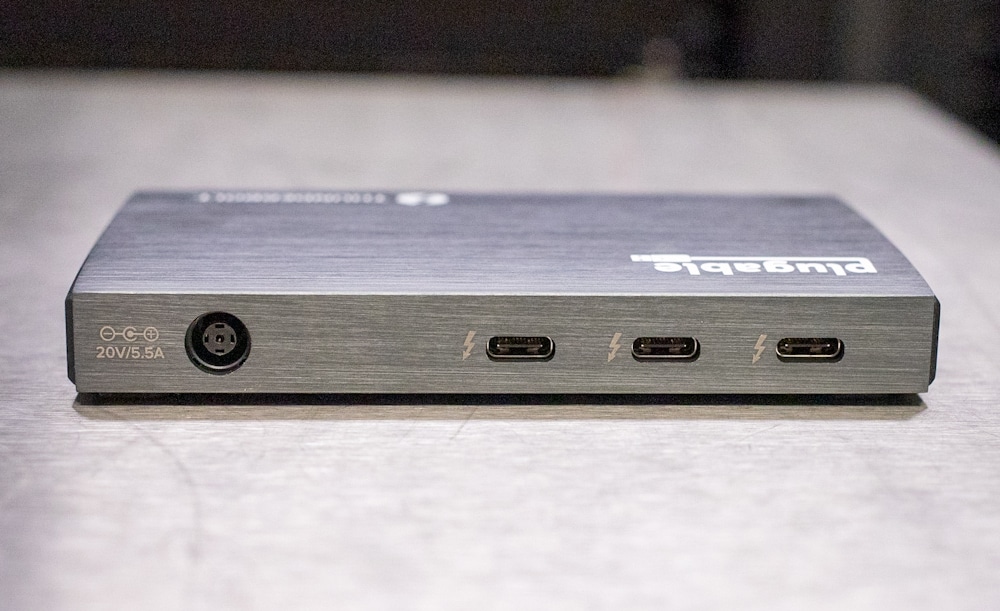
On the rear, starting from the left, there is the power adapter port that utilizes a power outlet similar to one that a notebook uses. Moving to the right, there are the three Thunderbolt 4/USB4 ports. Each port is also signified with a Thunderbolt symbol. The hub includes a power adaptor that plugs in on the left side as seen below.

![StorageReview-Plugable-TB4-Hub-2]()

At the bottom of the Plugable Thunderbolt 4 hub, there are four standoffs that allow the device to sit slightly off the table/desk where it is deployed so that the heat from the device doesn’t directly transfer to whatever it is sitting on.

## Plugable USB-C Voltage and Amperage Meter

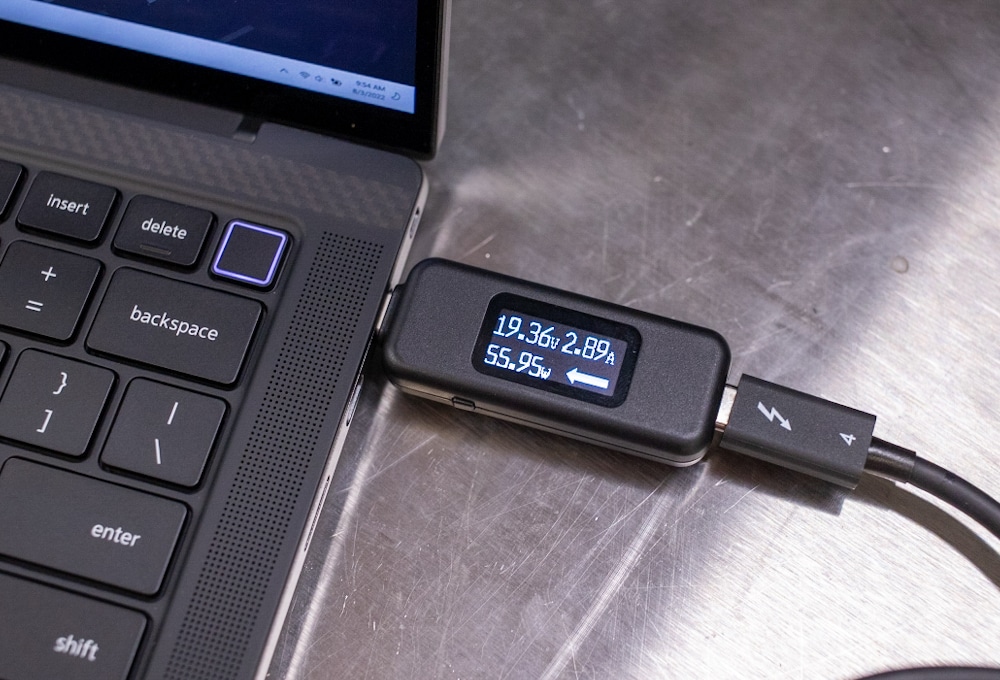
Along with the Plugable Thunderbolt 4 and USB4 hub, the company also sent us their [USB-C Voltage and Amperage Meter](https://plugable.com/products/usbc-vameter) that is able to measure the voltage and amps of USB-C devices. This meter is bi-directional and is able to pass through USB data so it is able to be used in line with other devices.

![StorageReview-Plugable-TB4-Hub-6]()

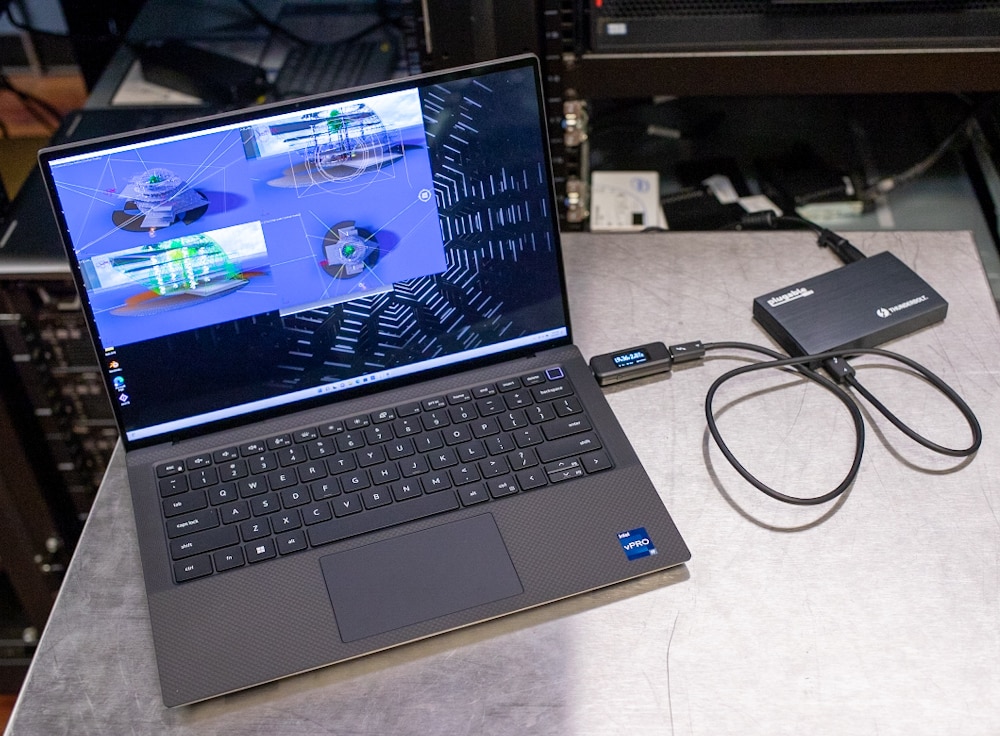
As for looking at the actual meter while we have it connected, the device that we used it with was the [Dell Precision 5470](https://www.storagereview.com/review/dell-precision-5470-review) workstation. The Plugable hub is able to push out 60W through its PD port, and as pictured, we were able to get 55.95W, so it was pretty close to the listed max, which is pretty good.

## Conclusion

Depending on your needs, the Plugable Thunderbolt 4 and USB4 hub can be very useful as it offers the ability to have a multi-monitor setup along with the functionality of creating a daisy chain of up to six devices including a monitor and accessories. This hub is especially useful for MacBook and notebook users who don’t have a lot of Thunderbolt ports to share as this can offer up to three more as well as charge the MacBook or notebook simultaneously. It’s also small enough to be a nice addition to your “go bag.”

![StorageReview-Plugable-TB4-Hub-7]()

As with any hub or dock that is on the market currently, there are some limitations and important things to remember when it comes to this Thunderbolt 4 and USB4 hub. The first is the support of M1 Macs, meaning that while Plugable says you can have a dual monitor setup with Macs, the current M1 only supports a single external display when it comes to Thunderbolt 3 and USB4 Mac systems. The other thing to note is the power source for this hub. It is just like one that a notebook would use so it is quite large and bulky so it will need to be hidden if you are looking for a clean setup.

Overall, for notebook and MacBook users, the Plugable Thunderbolt 4 and USB4 hub is a great way to add more Thunderbolt or USB4 connectivity to your device as well as power it directly. It works especially great for those that also are looking to increase the number of displays in a setup and possibly need the ability to daisy-chain devices. At $200, it’s not inexpensive, but for the right use case, it can make a ton of sense.

[Plugable Thunderbolt 4 Hub on Amazon](https://amzn.to/3d9ewEK)

**Engage with StorageReview**

[Newsletter](https://www.storagereview.com/storage_newsletter) |  [YouTube](https://www.youtube.com/user/StorageReview "Opens in a new window") | Podcast  [iTunes](https://podcasts.apple.com/gb/podcast/storagereview-com-storage-reviews/id1060681115 "Opens in a new window")/ [Spotify](https://open.spotify.com/show/1y6VnznABhHeOSMOmbDTz0 "Opens in a new window") |  [Instagram](https://www.instagram.com/storagereview/ "Opens in a new window") |  [Twitter](https://twitter.com/storagereview "Opens in a new window") |  [TikTok](https://www.tiktok.com/@storagereview? "Opens in a new window") |  [RSS Feed](https://www.storagereview.com/rss.xml)

![]()

### Conner Crull

Previous post: [Edge Inferencing with SuperMicro Edge Server](https://www.storagereview.com/review/edge-inferencing-with-supermicro-edge-server)

Next post: [Dell Precision 5470 Review](https://www.storagereview.com/review/dell-precision-5470-review)

Trusted Vendors

Products and solutions from our affiliate partners:

- [  
  ![Ubiquiti Logo](https://www.storagereview.com/wp-content/uploads/2024/11/2-1.webp)  
   Ubiquiti](https://store.ui.com/us/en?a_aid=StorageReview "Opens in a new window")
- [  
  ![Newegg Logo](https://www.storagereview.com/wp-content/uploads/2025/11/newegg.webp)  
   Newegg](https://click.linksynergy.com/fs-bin/click?id=g5terNMDhz0&offerid=1207190.18&subid=0&type=4 "Opens in a new window")
- [  
  ![Amazon Logo](https://www.storagereview.com/wp-content/uploads/2025/11/amazon.webp) Amazon](https://amzn.to/4fLJUEW "Opens in a new window")

Newsletter

Subscribe to the StorageReview newsletter to stay up to date on the latest news and reviews. We promise no spam!

1  

Leave this field empty if you’re human:

## Advertisement

Content Categories

[Facebook](https://www.facebook.com/@storagereview) [X](https://twitter.com/storagereview) [Instagram](https://www.instagram.com/storagereview/) [LinkedIn](https://www.linkedin.com/company/storagereview-com) [YouTube](https://www.youtube.com/user/storagereview?sub_confirmation=1) [Email](mailto:info@storagereview.com) [Spotify](https://open.spotify.com/show/1y6VnznABhHeOSMOmbDTz0) [Reddit](https://www.reddit.com/r/StorageReview/) [Discord](https://discord.gg/TwMHb4azdC) [RSS](https://www.storagereview.com/rss.xml) [TikTok](https://www.tiktok.com/@storagereview)

Copyright © 1998-2025 Flying Pig Ventures, LLC Cincinnati, Ohio. All rights reserved.

Manage your privacy

To provide the best experiences, we and our partners use technologies like cookies to store and/or access device information. Consenting to these technologies will allow us and our partners to process personal data such as browsing behavior or unique IDs on this site and show (non-) personalized ads. Not consenting or withdrawing consent, may adversely affect certain features and functions.

Click below to consent to the above or make granular choices. Your choices will be applied to this site only. You can change your settings at any time, including withdrawing your consent, by using the toggles on the Cookie Policy, or by clicking on the manage consent button at the bottom of the screen.

Functional Functional Always active

The technical storage or access is strictly necessary for the legitimate purpose of enabling the use of a specific service explicitly requested by the subscriber or user, or for the sole purpose of carrying out the transmission of a communication over an electronic communications network.

Preferences Preferences

The technical storage or access is necessary for the legitimate purpose of storing preferences that are not requested by the subscriber or user.

Statistics Statistics

The technical storage or access that is used exclusively for statistical purposes. The technical storage or access that is used exclusively for anonymous statistical purposes. Without a subpoena, voluntary compliance on the part of your Internet Service Provider, or additional records from a third party, information stored or retrieved for this purpose alone cannot usually be used to identify you.

Marketing Marketing

The technical storage or access is required to create user profiles to send advertising, or to track the user on a website or across several websites for similar marketing purposes.

Statistics

Marketing

Features

Always active

Always active

- Manage options
- Manage services
- Manage {vendor\_count} vendors
- [Read more about these purposes](https://cookiedatabase.org/tcf/purposes/)

Accept Deny Manage options Save preferences Manage options

- {title}
- {title}
- {title}

Manage your privacy

To provide the best experiences, we use technologies like cookies to store and/or access device information. Consenting to these technologies will allow us to process data such as browsing behavior or unique IDs on this site. Not consenting or withdrawing consent, may adversely affect certain features and functions.

Functional Functional Always active

The technical storage or access is strictly necessary for the legitimate purpose of enabling the use of a specific service explicitly requested by the subscriber or user, or for the sole purpose of carrying out the transmission of a communication over an electronic communications network.

Preferences Preferences

The technical storage or access is necessary for the legitimate purpose of storing preferences that are not requested by the subscriber or user.

Statistics Statistics

The technical storage or access that is used exclusively for statistical purposes. The technical storage or access that is used exclusively for anonymous statistical purposes. Without a subpoena, voluntary compliance on the part of your Internet Service Provider, or additional records from a third party, information stored or retrieved for this purpose alone cannot usually be used to identify you.

Marketing Marketing

The technical storage or access is required to create user profiles to send advertising, or to track the user on a website or across several websites for similar marketing purposes.

Statistics

Marketing

Features

Always active

Always active

- Manage options
- Manage services
- Manage {vendor\_count} vendors
- [Read more about these purposes](https://cookiedatabase.org/tcf/purposes/)

Accept Deny Manage options Save preferences Manage options

- {title}
- {title}
- {title}

Manage consent Manage consent

```json
{"@context":"https:\/\/schema.org","@graph":[{"@type":"WebPage","@id":"https:\/\/www.storagereview.com\/review\/plugable-thunderbolt-4-and-usb4-hub-review","url":"https:\/\/www.storagereview.com\/review\/plugable-thunderbolt-4-and-usb4-hub-review","name":"Plugable Thunderbolt 4 and USB4 Hub Review - StorageReview.com","isPartOf":{"@id":"https:\/\/www.storagereview.com\/#website"},"primaryImageOfPage":{"@id":"https:\/\/www.storagereview.com\/review\/plugable-thunderbolt-4-and-usb4-hub-review#primaryimage"},"image":{"@id":"https:\/\/www.storagereview.com\/review\/plugable-thunderbolt-4-and-usb4-hub-review#primaryimage"},"thumbnailUrl":"https:\/\/www.storagereview.com\/wp-content\/uploads\/2022\/08\/StorageReview-Plugable-TB4-Hub-5.jpg","datePublished":"2022-08-05T15:31:45+00:00","dateModified":"2022-08-08T15:31:44+00:00","breadcrumb":{"@id":"https:\/\/www.storagereview.com\/review\/plugable-thunderbolt-4-and-usb4-hub-review#breadcrumb"},"inLanguage":"en-US","potentialAction":[{"@type":"ReadAction","target":["https:\/\/www.storagereview.com\/review\/plugable-thunderbolt-4-and-usb4-hub-review"]}]},{"@type":"ImageObject","inLanguage":"en-US","@id":"https:\/\/www.storagereview.com\/review\/plugable-thunderbolt-4-and-usb4-hub-review#primaryimage","url":"https:\/\/www.storagereview.com\/wp-content\/uploads\/2022\/08\/StorageReview-Plugable-TB4-Hub-5.jpg","contentUrl":"https:\/\/www.storagereview.com\/wp-content\/uploads\/2022\/08\/StorageReview-Plugable-TB4-Hub-5.jpg","width":1000,"height":744,"caption":"StorageReview-Plugable-TB4-Hub-5"},{"@type":"BreadcrumbList","@id":"https:\/\/www.storagereview.com\/review\/plugable-thunderbolt-4-and-usb4-hub-review#breadcrumb","itemListElement":[{"@type":"ListItem","position":1,"name":"Home","item":"https:\/\/www.storagereview.com\/"},{"@type":"ListItem","position":2,"name":"Review","item":"https:\/\/www.storagereview.com\/review"},{"@type":"ListItem","position":3,"name":"Plugable Thunderbolt 4 and USB4 Hub Review"}]},{"@type":"WebSite","@id":"https:\/\/www.storagereview.com\/#website","url":"https:\/\/www.storagereview.com\/","name":"StorageReview.com","description":"StorageReview.com is a leading provider of news and reviews throughout the entire IT stack - from the datacenter to the edge, and all points in between.","publisher":{"@id":"https:\/\/www.storagereview.com\/#organization"},"potentialAction":[{"@type":"SearchAction","target":{"@type":"EntryPoint","urlTemplate":"https:\/\/www.storagereview.com\/?s={search_term_string}"},"query-input":{"@type":"PropertyValueSpecification","valueRequired":true,"valueName":"search_term_string"}}],"inLanguage":"en-US"},{"@type":"Organization","@id":"https:\/\/www.storagereview.com\/#organization","name":"StorageReview.com","url":"https:\/\/www.storagereview.com\/","logo":{"@type":"ImageObject","inLanguage":"en-US","@id":"https:\/\/www.storagereview.com\/#\/schema\/logo\/image\/","url":"https:\/\/www.storagereview.com\/wp-content\/uploads\/2020\/02\/Storage-Reviews-2-2.png","contentUrl":"https:\/\/www.storagereview.com\/wp-content\/uploads\/2020\/02\/Storage-Reviews-2-2.png","width":344,"height":61,"caption":"StorageReview.com"},"image":{"@id":"https:\/\/www.storagereview.com\/#\/schema\/logo\/image\/"},"sameAs":["https:\/\/x.com\/storagereview","http:\/\/youtube.com\/user\/storagereview"]}]}
```