---
description: When OWC made the first MacBook Air SSD replacement earlier this year, they vowed to also release an external storage solution so buyers who were...
title: OWC Mercury On-The-Go USB 3.0 Enclosure for Apple MacBook Air SSD Review
image: https://www.storagereview.com/wp-content/uploads/2011/11/OWC-MacBook-Air-SSD-Enclosure.jpg
---

[![Storage Review]()](https://storagereview.com/)

---

[Facebook](https://www.facebook.com/@storagereview) [X (Twitter)](https://twitter.twitter.com/storagereview) [Instagram](https://www.instagram.com/storagereview/) [LinkedIn](https://www.linkedin.com/company/storagereview-com) [YouTube](https://www.youtube.com/user/storagereview?sub_confirmation=1) [Email](mailto:info@storagereview.com) [Spotify](https://open.spotify.com/show/1y6VnznABhHeOSMOmbDTz0) [Reddit](https://www.reddit.com/r/StorageReview/) [Discord](https://discord.gg/TwMHb4azdC) [RSS Feed](https://www.storagereview.com/rss.xml) [TikTok](https://www.tiktok.com/@storagereview)

[Facebook](https://www.facebook.com/@storagereview) [X (Twitter)](https://twitter.com/storagereview) [Instagram](https://www.instagram.com/storagereview/) [LinkedIn](https://www.linkedin.com/company/storagereview-com) [YouTube](https://www.youtube.com/user/storagereview?sub_confirmation=1) [Email](mailto:info@storagereview.com) [Spotify](https://open.spotify.com/show/1y6VnznABhHeOSMOmbDTz0) [Reddit](https://www.reddit.com/r/StorageReview/) [Discord](https://discord.gg/TwMHb4azdC) [RSS Feed](https://www.storagereview.com/rss.xml) [TikTok](https://www.tiktok.com/@storagereview)

[![StorageReview.com](https://www.storagereview.com/wp-content/uploads/2026/07/Storage-Review-2x.png)](https://www.storagereview.com)

≡ Menu

- [Home](https://www.storagereview.com/)
- [Storage Reviews](https://www.storagereview.com/review)
  - [Consumer Reviews](https://www.storagereview.com/consumer)
  - [Enterprise Reviews](https://www.storagereview.com/enterprise)
  - [Ubiquiti Reviews](https://www.storagereview.com/best/ubiquiti-reviews)
- [SR Merch](https://store.storagereview.com)
- [Leaderboards](https://www.storagereview.com/best)
  - [Best Storage Arrays](https://www.storagereview.com/best/storage-arrays)
  - [Best Enterprise SSDs](https://www.storagereview.com/best/enterprise-ssds)
  - [Best Servers](https://www.storagereview.com/best/servers)
  - [Best Desktops for Local AI](https://www.storagereview.com/best/desktops-local-ai)
  - [Best Laptops for Local AI](https://www.storagereview.com/best/laptops-local-ai)
  - [Best Local LLM Tools](https://www.storagereview.com/best/local-llm-tools)
  - [Agentic AI Hardware](https://www.storagereview.com/best/agentic-ai-hardware)
  - [Best SSDs & Hard Drives](https://www.storagereview.com/best_drives)
  - [Best Portable SSDs](https://www.storagereview.com/best/portable-ssds)
  - [Best Business Laptops](https://www.storagereview.com/best/business-laptops)
  - [Best Mobile Workstations](https://www.storagereview.com/best/mobile-workstations)
  - [Best Desktop Workstations](https://www.storagereview.com/best/desktop-workstations)
  - [Best Mini PCs](https://www.storagereview.com/best/mini-pcs)
  - [Best Laptop Battery Life](https://www.storagereview.com/best/laptop-battery-life)
- [Storage Reference Guide](https://www.storagereview.com/storage-reference-guide)
- [About SR](https://www.storagereview.com/about-storagereview)
  - [StorageReview.com Sweepstakes Rules and Regulations](https://www.storagereview.com/storagereview-com-sweepstakes-rules-and-regulations)

Search

[Home](https://www.storagereview.com/) » [Review](https://www.storagereview.com/review) » OWC Mercury On-The-Go USB 3.0 Enclosure for Apple MacBook Air SSD Review

# OWC Mercury On-The-Go USB 3.0 Enclosure for Apple MacBook Air SSD Review

by Brian Beeler on November 2, 2011

[Client Accessories](https://www.storagereview.com/consumer/client-accessories)  ◇  [Consumer](https://www.storagereview.com/consumer)

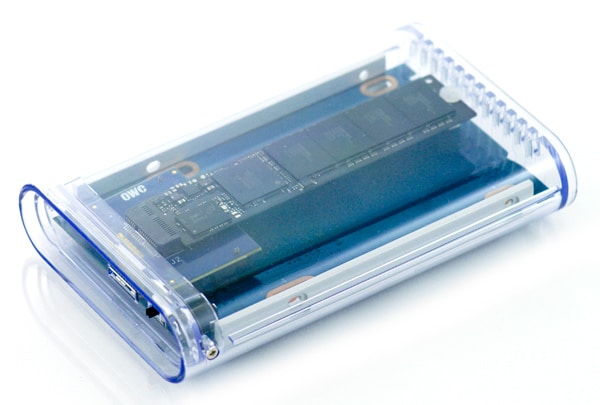
When OWC made the first MacBook Air SSD replacement earlier this year, they vowed to also release an external storage solution so buyers who were upgrading could also use their old SSD for external storage. OWC has made good on the promise, releasing adaptations of [two of their 2.5″ drive enclosures](https://www.storagereview.com/owc_announces_external_enclosures_macbook_air_ssd). The Mercury On-The-Go is the first to hit our test bench. The enclosure features an polycarbonate acrylic outer shell to deliver the style, with a USB 3.0 interface that’s Mac and PC friendly.

![](https://www.storagereview.com/wp-content/uploads/2011/11/OWC-MacBook-Air-SSD-Enclosure.jpg)

The biggest trick in getting these enclosures to market is that OWC had to design an interposer card to get from Apple’s proprietary SSD interface to standard SATA. The little PCB may not look like much, but it’s quite an innovation and it’s the only one that we know of on the market. The card opens up new life for the sluggish SATA 3Gb/s SSD Apple uses when upgrading a MacBook Air to [OWC’s Aura Pro Express 6G](https://www.storagereview.com/owc_mercury_aura_pro_express_6g_review) or their first generation [Aura Pro Express SSD](https://www.storagereview.com/owc_mercury_aura_pro_express_ssd_review_240gb).

**Design and Build**

It should be noted that the enclosure isn’t new for the MacBook Air SSD, OWC has sold this case for standard SATA drive use for some time. This is of course the first time it’s being used with their interface card though, which lets users get more life out of their stock MacBook Air SSD.

![]()

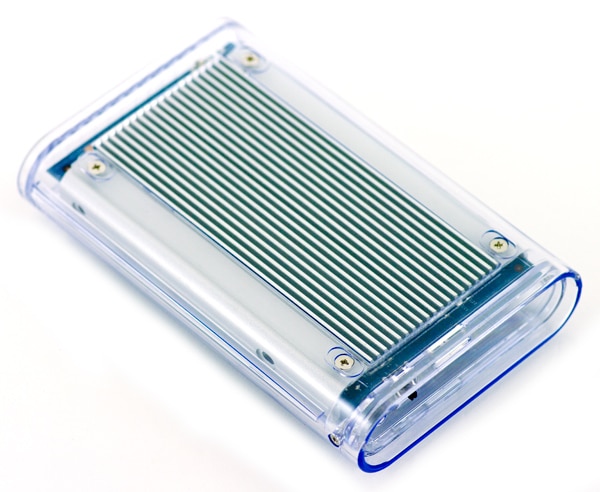
The enclosure body is transparent acrylic all the way around, except for the cutout on the bottom for the aluminum heat sync. While not exactly necessary for this use, the slatted bottom does give the enclosure a bit more texture when handling the unit and adds to the clean, elegant look. Being able to see the SSD inside adds a bit extra to the “cool factor,” it immediately reminded me of my first Swatch watch, which was clear plastic, showing all the parts inside.

![]()

Overall the enclosure feels very sturdy, with no flex even under extreme pressure. It will certainly stand up to road warrior use. If you’re afraid of scratching the case, OWC also includes a pouch for the enclosure which has plenty of storage room for the cable and other accessories as well.

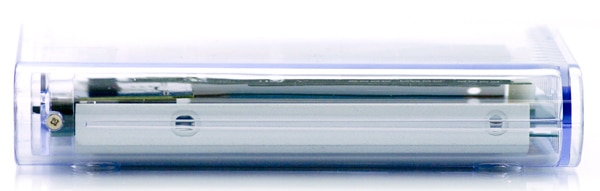
The front of the enclosure is vented and ribbed, and shows the tiny blue LED at the end of the PCB. The light is solid blue when the enclosure is on and blinks when the drive is being accessed.

![]()

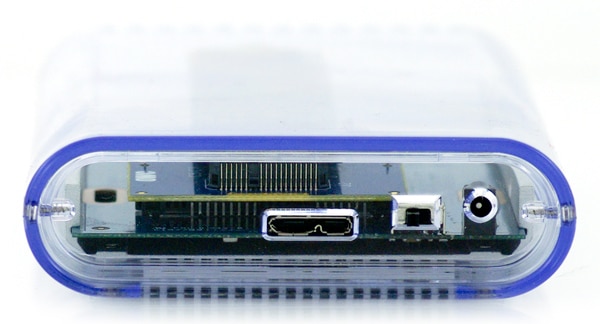
The back of the unit houses the USB 3.0 port, along with an on/off switch and optional power adaptor. The on/off switch is a very nice touch and something that’s not seen very often in 2.5″ enclosures.

Inserting the stock MacBook Air SSD into the Mercury On-The-Go is simple. Two screws on the side of the enclosure are removed and the PCB slides out. The Apple SSD gets inserted into the OWC card, with the rear being seated on a nylon support to keep the drive from flopping about. From there the drive may be connected and formatted for Mac or PC use. OWC includes a surprisingly robust manual that covers both of these procedures for those who are unfamiliar.

**Performance**

Given most buyers of this enclosure will be those who upgraded their MacBook Air SSDs and have their old drive still laying around, this easily fits into the high-performance category since an SSD will be inside. Fast transfer speeds are a must, which is why USB 3.0 is a perfect go-to interface choice for multi-platform compatibility, even for MacBook Air users, who have to make due with USB 2.0. Thunderbolt may have been nice, but it’s a technology that isn’t quite mainstream yet.

We measured the performance of the original 128GB Toshiba-powered Apple SSD with CrystalDiskMark and found speeds measuring 184MB/s read and 154MB/s write, which saturates our USB 3.0 connection. While the MacBook Air can’t take advantage of these speeds through its USB 2.0 port, using it with another computer such as a desktop for backups or file transfers makes it very worthwhile.

**Conclusion**

For buyers of the OWC Aura Pro Express 6G SSD, the new Mercury On-The-Go USB 3.0 enclosure is a must for external storage if you hold on to the stock SSD. This enclosure breathes new life into the old MacBook Air SSD, which with its proprietary interface, may go unused otherwise. The USB 3.0 version of this case offered plenty of speed, topping 184MB/s read and 154MB/s write in our tests.

In terms of looks, we haven’t seen a more eye-catching design than the plexiglass OWC enclosure to date. Matching looks with performance, this case offers the perfect blend to suit any mobile user’s needs. If we can complain about anything, the case is bit large for the gumstick SSD, although there is a minimum width associated with the SATA connection with limits OWC’s creativity for now.

Overall though we really enjoy the Mercury On-The-Go for its innovative SSD adaptor, stylish design and great performance.

[Product Page](http://eshop.macsales.com/item/Other+World+Computing/SSDAPOTGU3/)

**Engage with StorageReview**

[Newsletter](https://www.storagereview.com/storage_newsletter) |  [YouTube](https://www.youtube.com/user/StorageReview "Opens in a new window") | Podcast  [iTunes](https://podcasts.apple.com/gb/podcast/storagereview-com-storage-reviews/id1060681115 "Opens in a new window")/ [Spotify](https://open.spotify.com/show/1y6VnznABhHeOSMOmbDTz0 "Opens in a new window") |  [Instagram](https://www.instagram.com/storagereview/ "Opens in a new window") |  [Twitter](https://twitter.com/storagereview "Opens in a new window") |  [TikTok](https://www.tiktok.com/@storagereview? "Opens in a new window") |  [RSS Feed](https://www.storagereview.com/rss.xml)

![]()

### Brian Beeler

Brian is located in Cincinnati, Ohio and is the chief analyst and President of StorageReview.com.

Previous post: [Seagate Barracuda 3TB Review (1TB Platters – ST3000DM001)](https://www.storagereview.com/review/seagate-barracuda-3tb-review-1tb-platters-st3000dm001)

Next post: [Plextor PX-M2P SSD Review (256GB)](https://www.storagereview.com/review/plextor-px-m2p-ssd-review-256gb)

Trusted Vendors

Products and solutions from our affiliate partners:

- [  
  ![Ubiquiti Logo](https://www.storagereview.com/wp-content/uploads/2024/11/2-1.webp)  
   Ubiquiti  
  ](https://store.ui.com/us/en?a_aid=StorageReview "Opens in a new window")
- [  
  ![Newegg Logo](https://www.storagereview.com/wp-content/uploads/2025/11/newegg.webp)  
   Newegg  
  ](https://click.linksynergy.com/fs-bin/click?id=g5terNMDhz0&offerid=1207190.18&subid=0&type=4 "Opens in a new window")
- [  
  ![Amazon Logo](https://www.storagereview.com/wp-content/uploads/2025/11/amazon.webp) Amazon  
  ](https://amzn.to/4fLJUEW "Opens in a new window")

Newsletter

Subscribe to the StorageReview newsletter to stay up to date on the latest news and reviews. We promise no spam!

1  

Leave this field empty if you’re human:

## Advertisement

Content Categories

[Facebook](https://www.facebook.com/@storagereview) [X](https://twitter.com/storagereview) [Instagram](https://www.instagram.com/storagereview/) [LinkedIn](https://www.linkedin.com/company/storagereview-com) [YouTube](https://www.youtube.com/user/storagereview?sub_confirmation=1) [Email](mailto:info@storagereview.com) [Spotify](https://open.spotify.com/show/1y6VnznABhHeOSMOmbDTz0) [Reddit](https://www.reddit.com/r/StorageReview/) [Discord](https://discord.gg/TwMHb4azdC) [RSS](https://www.storagereview.com/rss.xml) [TikTok](https://www.tiktok.com/@storagereview)

Copyright © 1998-2025 Flying Pig Ventures, LLC Cincinnati, Ohio. All rights reserved.

Manage your privacy

To provide the best experiences, we and our partners use technologies like cookies to store and/or access device information. Consenting to these technologies will allow us and our partners to process personal data such as browsing behavior or unique IDs on this site and show (non-) personalized ads. Not consenting or withdrawing consent, may adversely affect certain features and functions.

Click below to consent to the above or make granular choices. Your choices will be applied to this site only. You can change your settings at any time, including withdrawing your consent, by using the toggles on the Cookie Policy, or by clicking on the manage consent button at the bottom of the screen.

Functional Functional Always active

The technical storage or access is strictly necessary for the legitimate purpose of enabling the use of a specific service explicitly requested by the subscriber or user, or for the sole purpose of carrying out the transmission of a communication over an electronic communications network.

Preferences Preferences

The technical storage or access is necessary for the legitimate purpose of storing preferences that are not requested by the subscriber or user.

Statistics Statistics

The technical storage or access that is used exclusively for statistical purposes. The technical storage or access that is used exclusively for anonymous statistical purposes. Without a subpoena, voluntary compliance on the part of your Internet Service Provider, or additional records from a third party, information stored or retrieved for this purpose alone cannot usually be used to identify you.

Marketing Marketing

The technical storage or access is required to create user profiles to send advertising, or to track the user on a website or across several websites for similar marketing purposes.

Statistics

Marketing

Features

Always active

Always active

- Manage options
- Manage services
- Manage {vendor\_count} vendors
- [Read more about these purposes](https://cookiedatabase.org/tcf/purposes/)

Accept Deny Manage options Save preferences Manage options

- {title}
- {title}
- {title}

Manage your privacy

To provide the best experiences, we use technologies like cookies to store and/or access device information. Consenting to these technologies will allow us to process data such as browsing behavior or unique IDs on this site. Not consenting or withdrawing consent, may adversely affect certain features and functions.

Functional Functional Always active

The technical storage or access is strictly necessary for the legitimate purpose of enabling the use of a specific service explicitly requested by the subscriber or user, or for the sole purpose of carrying out the transmission of a communication over an electronic communications network.

Preferences Preferences

The technical storage or access is necessary for the legitimate purpose of storing preferences that are not requested by the subscriber or user.

Statistics Statistics

The technical storage or access that is used exclusively for statistical purposes. The technical storage or access that is used exclusively for anonymous statistical purposes. Without a subpoena, voluntary compliance on the part of your Internet Service Provider, or additional records from a third party, information stored or retrieved for this purpose alone cannot usually be used to identify you.

Marketing Marketing

The technical storage or access is required to create user profiles to send advertising, or to track the user on a website or across several websites for similar marketing purposes.

Statistics

Marketing

Features

Always active

Always active

- Manage options
- Manage services
- Manage {vendor\_count} vendors
- [Read more about these purposes](https://cookiedatabase.org/tcf/purposes/)

Accept Deny Manage options Save preferences Manage options

- {title}
- {title}
- {title}

Manage consent Manage consent

```json
{"@context":"https:\/\/schema.org","@graph":[{"@type":"WebPage","@id":"https:\/\/www.storagereview.com\/review\/owc-mercury-on-the-go-usb-3-0-enclosure-for-apple-macbook-air-ssd-review","url":"https:\/\/www.storagereview.com\/review\/owc-mercury-on-the-go-usb-3-0-enclosure-for-apple-macbook-air-ssd-review","name":"OWC Mercury On-The-Go USB 3.0 Enclosure for Apple MacBook Air SSD Review - StorageReview.com","isPartOf":{"@id":"https:\/\/www.storagereview.com\/#website"},"primaryImageOfPage":{"@id":"https:\/\/www.storagereview.com\/review\/owc-mercury-on-the-go-usb-3-0-enclosure-for-apple-macbook-air-ssd-review#primaryimage"},"image":{"@id":"https:\/\/www.storagereview.com\/review\/owc-mercury-on-the-go-usb-3-0-enclosure-for-apple-macbook-air-ssd-review#primaryimage"},"thumbnailUrl":"https:\/\/www.storagereview.com\/wp-content\/uploads\/2011\/11\/OWC-MacBook-Air-SSD-Enclosure.jpg","datePublished":"2011-11-02T17:09:47+00:00","dateModified":"2020-09-15T14:41:56+00:00","breadcrumb":{"@id":"https:\/\/www.storagereview.com\/review\/owc-mercury-on-the-go-usb-3-0-enclosure-for-apple-macbook-air-ssd-review#breadcrumb"},"inLanguage":"en-US","potentialAction":[{"@type":"ReadAction","target":["https:\/\/www.storagereview.com\/review\/owc-mercury-on-the-go-usb-3-0-enclosure-for-apple-macbook-air-ssd-review"]}]},{"@type":"ImageObject","inLanguage":"en-US","@id":"https:\/\/www.storagereview.com\/review\/owc-mercury-on-the-go-usb-3-0-enclosure-for-apple-macbook-air-ssd-review#primaryimage","url":"https:\/\/www.storagereview.com\/wp-content\/uploads\/2011\/11\/OWC-MacBook-Air-SSD-Enclosure.jpg","contentUrl":"https:\/\/www.storagereview.com\/wp-content\/uploads\/2011\/11\/OWC-MacBook-Air-SSD-Enclosure.jpg","width":600,"height":405},{"@type":"BreadcrumbList","@id":"https:\/\/www.storagereview.com\/review\/owc-mercury-on-the-go-usb-3-0-enclosure-for-apple-macbook-air-ssd-review#breadcrumb","itemListElement":[{"@type":"ListItem","position":1,"name":"Home","item":"https:\/\/www.storagereview.com\/"},{"@type":"ListItem","position":2,"name":"Review","item":"https:\/\/www.storagereview.com\/review"},{"@type":"ListItem","position":3,"name":"OWC Mercury On-The-Go USB 3.0 Enclosure for Apple MacBook Air SSD Review"}]},{"@type":"WebSite","@id":"https:\/\/www.storagereview.com\/#website","url":"https:\/\/www.storagereview.com\/","name":"StorageReview.com","description":"StorageReview.com is a leading provider of news and reviews throughout the entire IT stack - from the datacenter to the edge, and all points in between.","publisher":{"@id":"https:\/\/www.storagereview.com\/#organization"},"potentialAction":[{"@type":"SearchAction","target":{"@type":"EntryPoint","urlTemplate":"https:\/\/www.storagereview.com\/?s={search_term_string}"},"query-input":{"@type":"PropertyValueSpecification","valueRequired":true,"valueName":"search_term_string"}}],"inLanguage":"en-US"},{"@type":"Organization","@id":"https:\/\/www.storagereview.com\/#organization","name":"StorageReview.com","url":"https:\/\/www.storagereview.com\/","logo":{"@type":"ImageObject","inLanguage":"en-US","@id":"https:\/\/www.storagereview.com\/#\/schema\/logo\/image\/","url":"https:\/\/www.storagereview.com\/wp-content\/uploads\/2020\/02\/Storage-Reviews-2-2.png","contentUrl":"https:\/\/www.storagereview.com\/wp-content\/uploads\/2020\/02\/Storage-Reviews-2-2.png","width":344,"height":61,"caption":"StorageReview.com"},"image":{"@id":"https:\/\/www.storagereview.com\/#\/schema\/logo\/image\/"},"sameAs":["https:\/\/x.com\/storagereview","http:\/\/youtube.com\/user\/storagereview"]}]}
```