

Conçu pour les ordinateurs de bureau, les stations de travail et les appareils DAS hautes performances, le Seagate Desktop SSHD est la dernière incursion de la société sur le marché des disques SSD hybrides. Ses qualités de type SSD, associées aux avantages de capacité des disques durs, permettent au Seagate Desktop SSHD d'offrir aux consommateurs des fonctionnalités et des capacités uniques par rapport aux disques durs traditionnels, notamment la possibilité d'atteindre des vitesses de transfert plus rapides ainsi que des démarrages plus rapides du système. Bien que les disques SSD appropriés continuent de baisser leurs prix et d'augmenter leur capacité maximale, les disques hybrides ont toujours un rôle à jouer sur le marché du stockage en raison de leur rentabilité. Le Seagate Desktop ne fait certainement pas exception à cet égard.
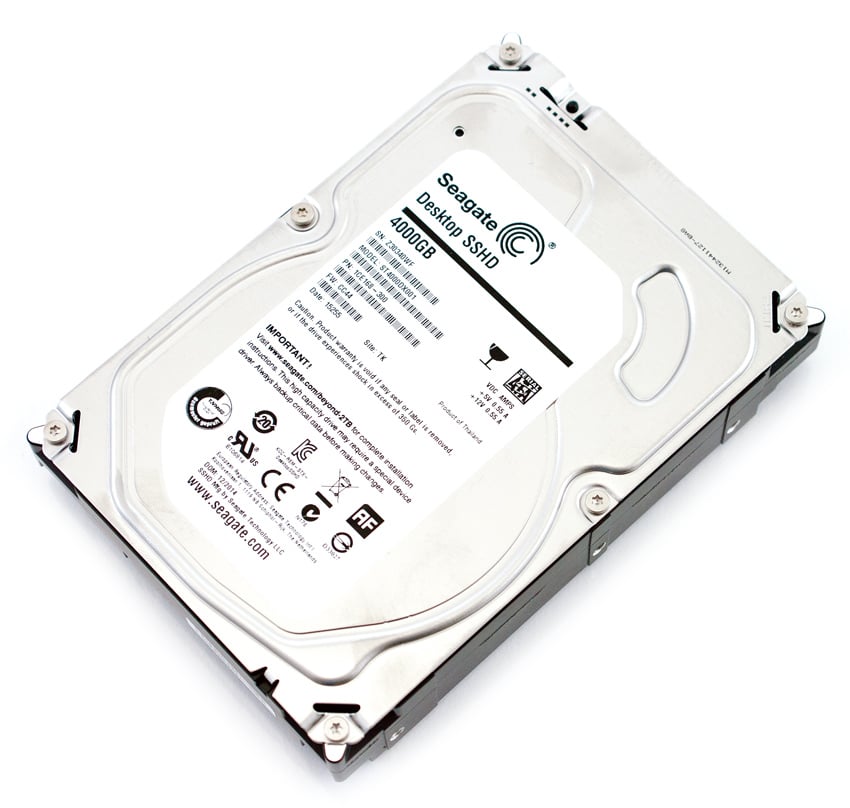
En ce qui concerne son matériel, le disque hybride Seagate est composé d'un facteur de forme de 3.5 pouces et est équipé de la technologie SATA 6 Gb/s Native Command Queuing (NCQ), permettant aux disques durs d'optimiser en interne la façon dont les commandes de lecture et d'écriture sont reçues. réalisé. De plus, Seagate cite un débit de données en lecture moyen de 146 Mo/s avec un débit de données soutenu maximum de 180 Mo/s, ce qui est nettement meilleur que les disques durs traditionnels.
Le Seagate Desktop SSHD est disponible en capacités de 1 To, 2 To et 4 To, au prix d'environ 75 $, 95 $ et 150 $, respectivement ; tous les disques sont couverts par une garantie limitée de 3 ans. Nous examinerons l'unité de 4 To pour cet examen.
Spécifications du Seagate Desktop SSHD 4 To
- Numéro de modèle : ST4000DX001
- Capacités : 1 To, 2 To et 4TB
- Interface : SATA 6 Go/s NCQ
- Type/taille NAND : MLC/8 Go
- Cache DRAM (Mo): 64
- Taux de transfert SATA pris en charge (Gb/s) : 6.0/3.0/1.5
- Recherche moyenne, lecture (ms): <12
- Recherche moyenne, écriture (ms): <12
- Débit de données moyen, lecture, moyenne de toutes les zones (Mo/s) : 146
- Débit de données moyen à partir des supports NAND (Mo/s) : 190
- Débit de données maximal soutenu, lecture OD (Mo/s) : 180
- Têtes/Disques : 8/4
- Octets par secteur : 4096
- Fiabilité / intégrité des données
- Cycles de chargement/déchargement : 300,000 XNUMX
- Erreurs de lecture non récupérables par bits lus, Max : par 10E14
- Taux d'échec annualisé (AFR) prévu : < 1 %
- Puissance (W)
- En fonctionnement, typique : 7.5
- Inactif, typique : 6.2
- Mode veille : 0.75
- Mode veille : 0.75
- Environnemental
- Température (° C)
- En fonctionnement : 0 à 60
- Hors fonctionnement : −40 à 70
- Température (° C)
- Physique
- Hauteur (po/mm) : 1.028/26.11
- Largeur (po/mm) : 4.0/101.6
- Profondeur (po/mm) : 5.787/146.99
- Poids (lb/g) : 1.345/610
- Garantie : limitée de 3 ans
Conception et construction
Comme tous les SSHD, le disque hybride Seagate Desktop ressemble pratiquement à un disque dur traditionnel ; la seule différence étant à l'intérieur, qui est équipé de 8 Go de MLC NAND. Tous les modèles, y compris la capacité de 4 To, sont du facteur de forme 3.5″, limitant ses applications aux ordinateurs de bureau.
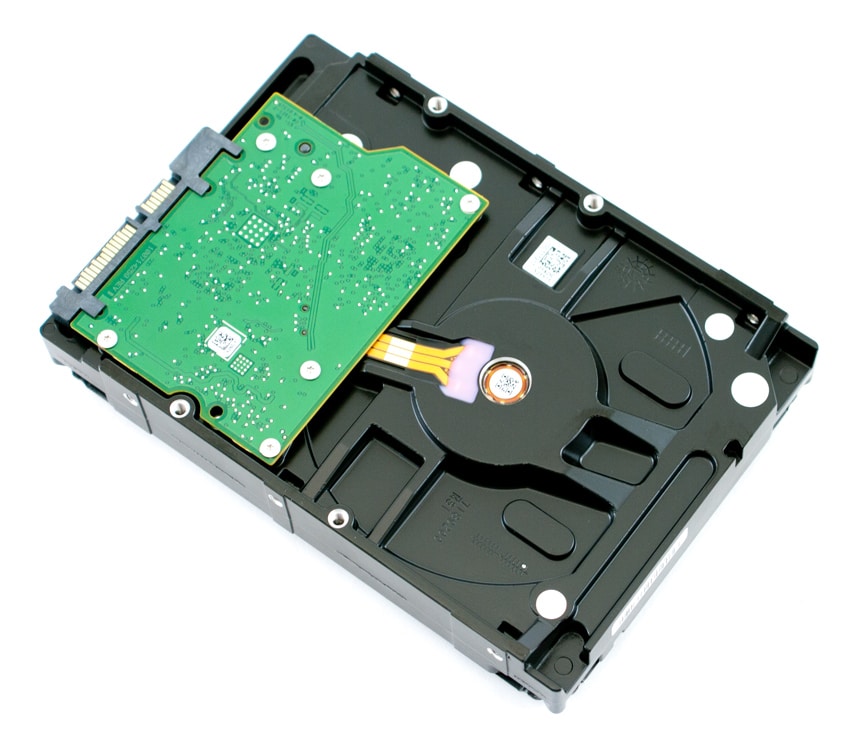
La conception du Seagate Desktop SSHD est cohérente avec les autres disques commercialisés par la société, affichant une étiquette blanche d'informations sur le disque. L'avant du disque montre les connecteurs SATA et d'alimentation standard, tandis que les côtés sont équipés des trous de vis habituels pour un montage facile. Lorsque vous retournez le disque, vous verrez le circuit imprimé du disque Seagate.
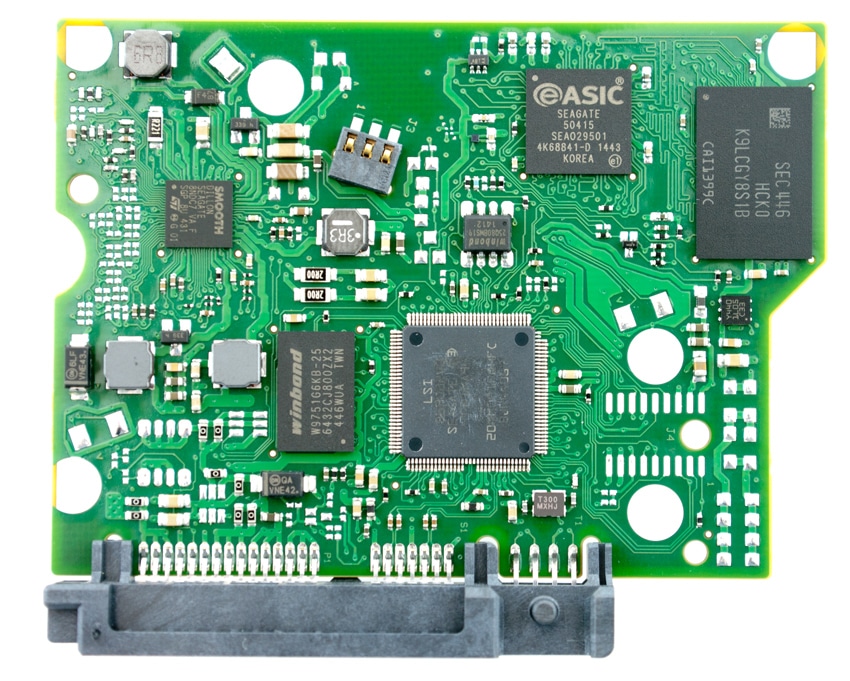
Le retrait de la carte PCB montre le contrôleur LSI avec ses 8 Go de NAND.
Benchmarks synthétiques grand public
Tous les tests de SSD grand public sont réalisés avec la station de travail HP Z620 de StorageReview . Nous avons comparé le Seagate Desktop SSHD aux modèles comparables suivants :
Tous les chiffres IOMeter sont représentés sous forme de chiffres binaires pour les vitesses en Mo/s.
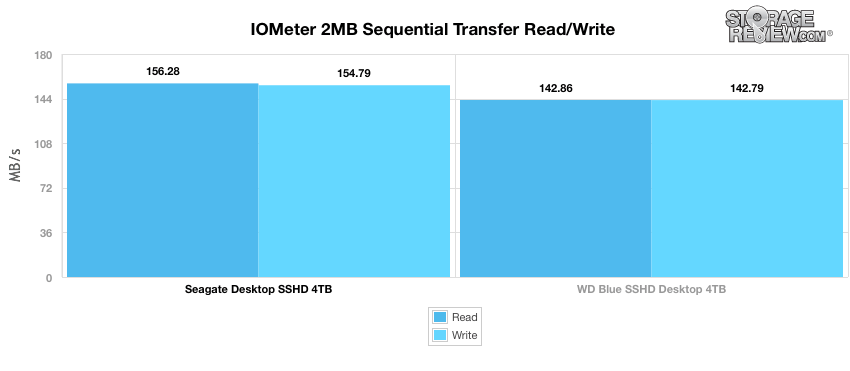
Lors de notre premier test, qui mesure des performances séquentielles de 2 Mo, le disque Seagate a enregistré des résultats légèrement meilleurs avec 156.28 Mo/s en lecture et 154.28 Mo/s en écriture, tandis que le WD Blue SSHD 4 To affichait 142.86 Mo/s en lecture et 142.786477 en écriture.
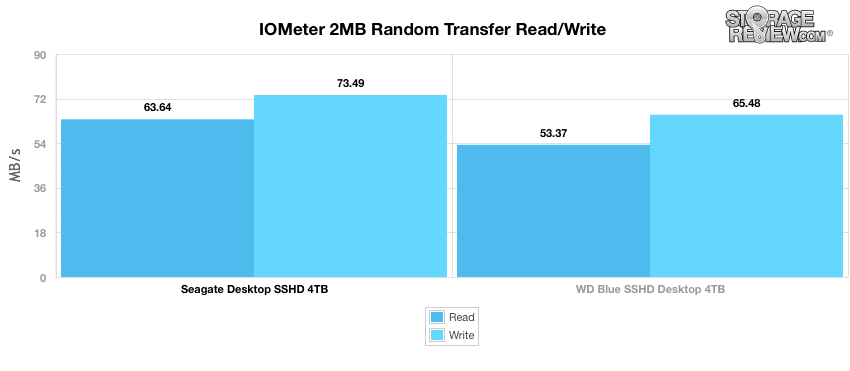
Notre prochain test porte sur les performances de transfert aléatoire de 2 Mo. Dans ce scénario, nous avons mesuré le Seagate avec 63.64 Mo/s en lecture et 73.49 Mo/s en écriture tandis que le WD Blue SSHD 4 To traînait à nouveau, affichant des lectures et des écritures de 53.37 Mo/s et 64.48 Mo/s, respectivement.
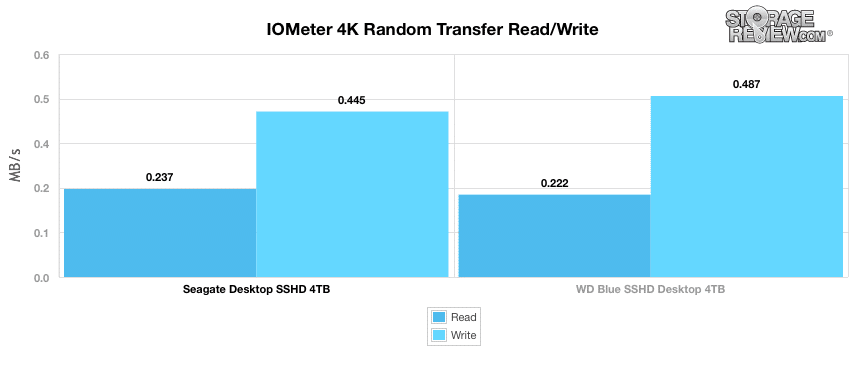
Le passage à des transferts aléatoires 4K plus petits a montré une meilleure parité entre les deux lignes de disques SSHD. Dans ce benchmark, le Seagate 4 To a enregistré 0.237 Mo/s en activité de lecture et 0.445 Mo/s en écriture, tandis que le WD Blue SSHD 4 To a mesuré 0.222 Mo/s en activité de lecture et 0.487 Mo/s en activité d'écriture.
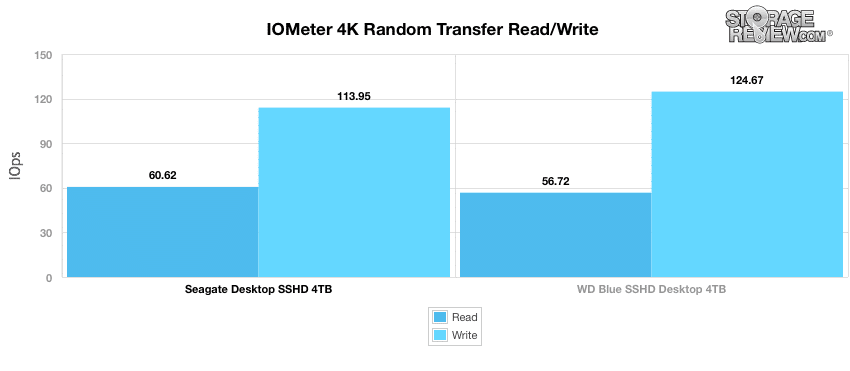
En ce qui concerne les IOPS, le Seagate SSHD 4 To a devancé le WD Blue en lectures une fois de plus, marquant 60.62 IOPS; cependant, il a enregistré des écritures plus lentes (113.95 IOPS) par rapport au modèle WD Blue 4 To, qui affichait 124.67 IOPS.
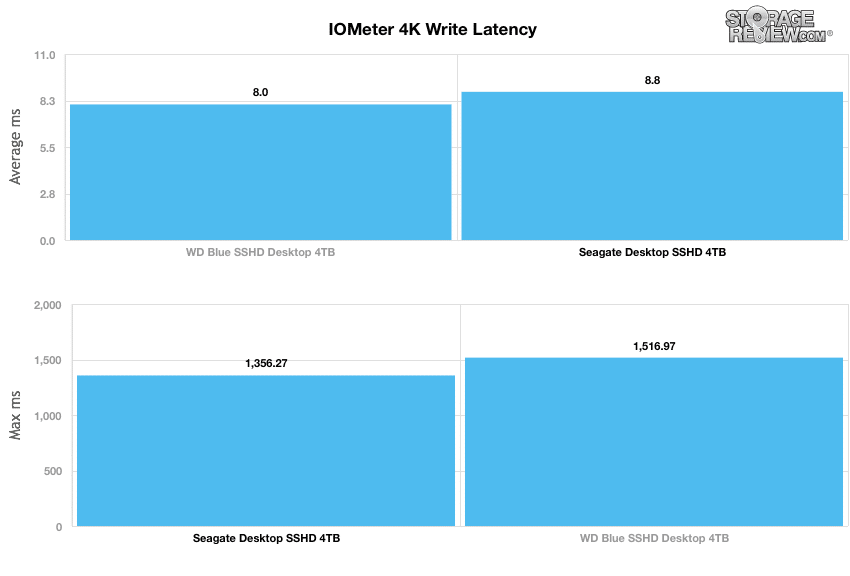
En passant à notre référence de latence d'écriture 4K, qui examine à la fois les lectures moyennes et maximales, le Seagate a enregistré des résultats de latence maximale légèrement meilleurs avec 1,356 4 ms (maximum). Le WD Blue SSHD 8.02 To a montré une latence moyenne de 1,516.97 ms avec une latence maximale de XNUMX XNUMX ms.
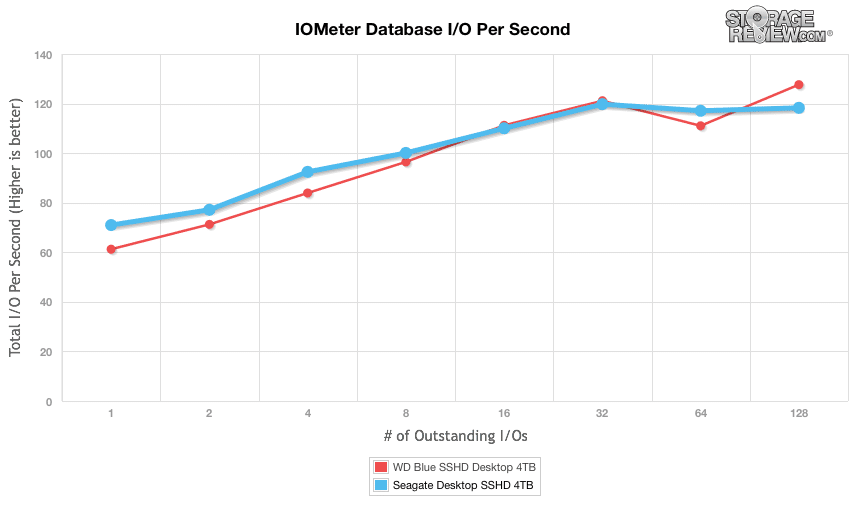
Notre dernière série de benchmarks synthétiques compare les disques durs dans une série de charges de travail mixtes de serveurs avec une profondeur de file d'attente allant de 1 à 128. Chacun de nos tests de profil de serveur a une forte préférence pour l'activité de lecture, allant de 67 % de lecture avec notre profil de base de données à lire à 100 % dans notre profil de serveur Web.
Le premier est notre profil de base de données ; avec une combinaison de charge de travail de 67 % en lecture et 33 % en écriture principalement centrée sur des tailles de transfert de 8K. Dans ce scénario, bien que le Seagate ait enregistré la vitesse de rafale supérieure, il s'est retrouvé avec seulement 118.28 IOPS dans le terminal. Le WD Blue 4 To a affiché un IOPS initial de 61.25 IOPS tandis que la profondeur de la file d'attente du terminal mesurait 127.63 IOPS.
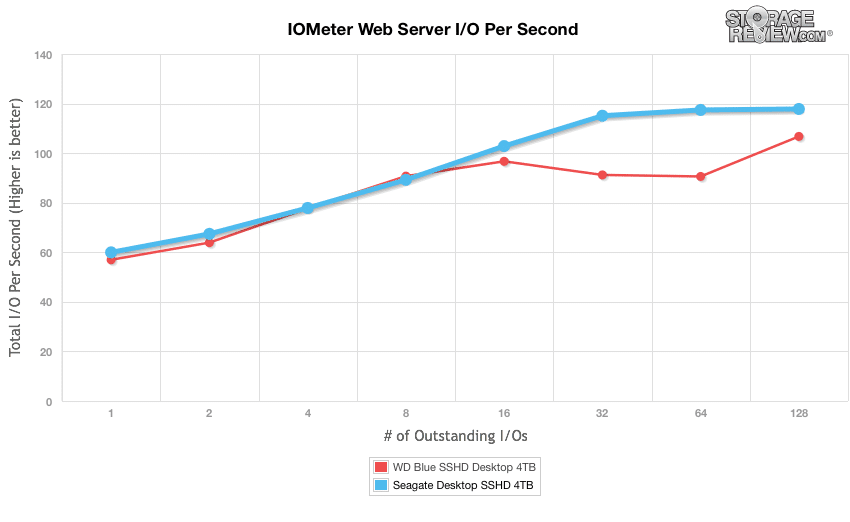
Notre profil de serveur Web est en lecture seule avec une répartition des tailles de transfert de 512 octets à 512 Ko. Ici, le Seagate a enregistré une plage de 59.97 IOPS à 117.83 IOPS, tandis que le disque WD Blue 4 To mesurait 56.97 IOPS à 106.74 IOPS.
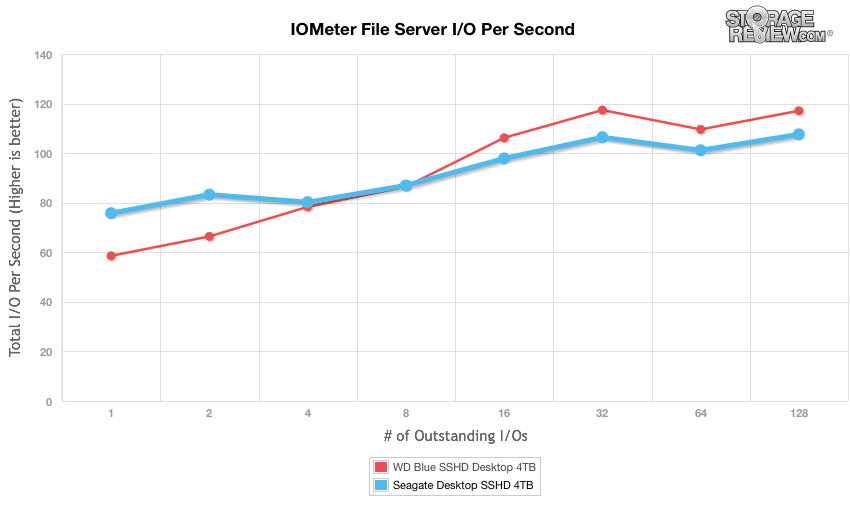
Le profil suivant examine un serveur de fichiers, avec une charge de travail de 80 % en lecture et 20 % en écriture répartie sur plusieurs tailles de transfert allant de 512 octets à 64 Ko. Dans ce scénario, le Seagate 4 To SSHD variait de 75.78 IOPS à 107.57 IOPS, tandis que le WD Blue 4 To offrait une plage de 58.57 IOPS à 117.10 IOPS.
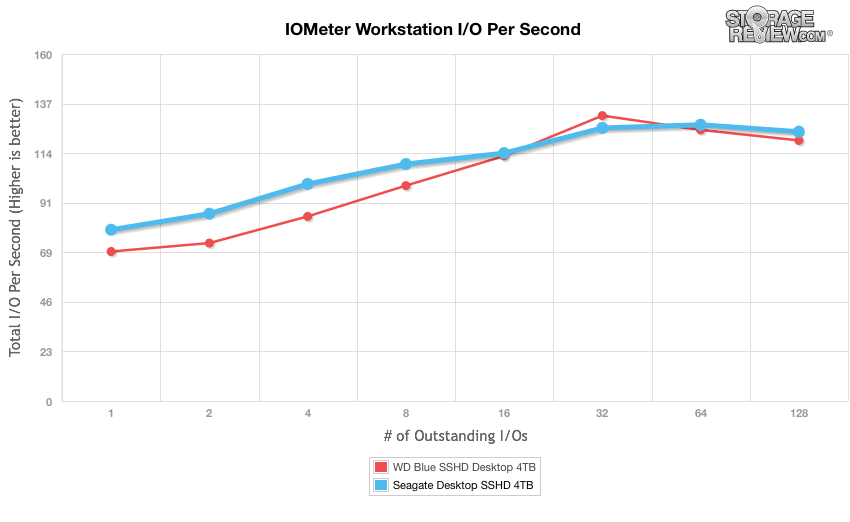
Notre dernier profil examine l'activité des postes de travail, qui comprend un mélange de 20 % d'écriture et de 80 % de lecture à l'aide de transferts 8K. Dans ce benchmark, le disque Seagate a affiché des résultats légèrement meilleurs que le WD, avec une plage de 78.97 IOPS à 124.17 IOPS. Le disque SSHD WD Blue 4 To a commencé à 68.93 IOPS mais s'est retrouvé à 120.15 IOPS à QD128.
Benchmarks du monde réel des consommateurs
Pour le consommateur moyen, essayer de traduire des vitesses d'écriture 4K aléatoires dans une situation quotidienne est assez difficile. Cela aide à comparer les lecteurs dans tous les paramètres possibles, mais cela ne se traduit pas exactement par une utilisation quotidienne plus rapide ou de meilleurs temps de chargement de jeu. Pour cette raison, nous nous sommes tournés vers nos traces StorageMark 2010, qui incluent les traces HTPC et Gaming pour aider les lecteurs à savoir comment un disque pourrait se classer dans ces conditions.
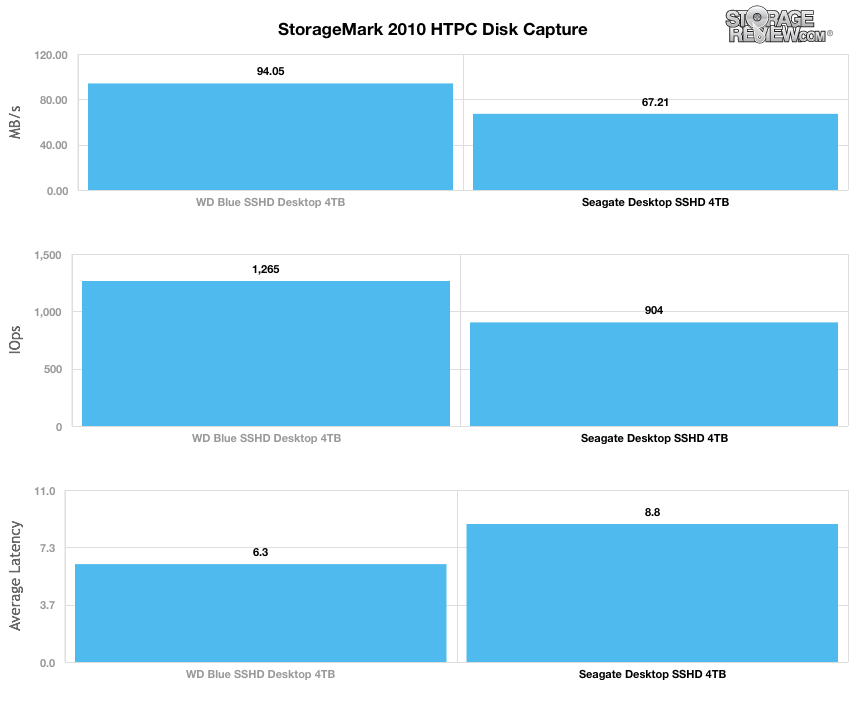
Le premier test réel est notre scénario HTPC. Dans ce test, nous incluons : la lecture d'un film HD 720P dans Media Player Classic, un film SD 480P dans VLC, trois films téléchargés simultanément via iTunes et un flux HDTV 1080i enregistré via Windows Media Center sur une période de 15 minutes. Des débits IOPS et Mo/s plus élevés avec des temps de latence plus faibles sont préférables. Dans cette trace, nous avons enregistré 2,986 1,924 Mo en cours d'écriture sur le lecteur et XNUMX XNUMX Mo en cours de lecture.
Dans notre profil HTPC, le Seagate SSHD a affiché des résultats sensiblement plus lents que le WD Blue avec seulement 67.21 Mo/s, 904 IOPS et 8.8 ms de latence moyenne. Le WD Blue SSHD 4 To affichait 94.05 Mo/s et 1,265 6.3 IOPS tandis que la latence moyenne était mesurée à XNUMX ms.
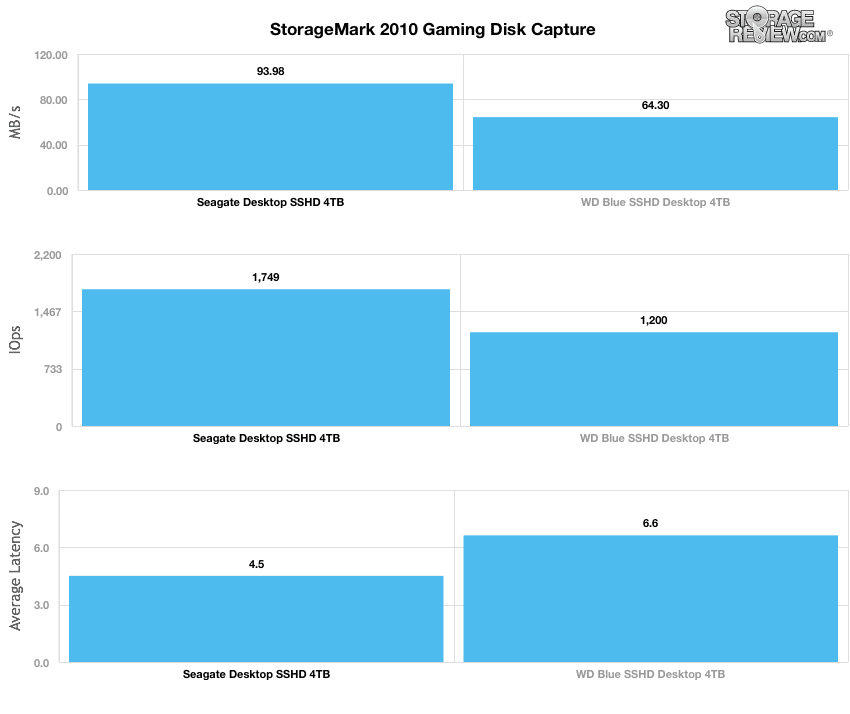
Notre deuxième test en situation réelle couvre l'activité du disque dans un environnement de jeu. Contrairement à la trace HTPC ou Productivity, celle-ci repose fortement sur les performances de lecture d'un lecteur. Pour donner une ventilation simple des pourcentages de lecture/écriture, le test HTPC est de 64 % en écriture, 36 % en lecture, le test de productivité est de 59 % en écriture et 41 % en lecture, tandis que la trace de jeu est de 6 % en écriture et 94 % en lecture. Le test consiste en un système Windows 7 Ultimate 64 bits préconfiguré avec Steam, avec Grand Theft Auto 4, Left 4 Dead 2 et Mass Effect 2 déjà téléchargés et installés. La trace capture l'activité de lecture intensive de chaque chargement de jeu depuis le début, ainsi que les textures au fur et à mesure que le jeu progresse. Dans cette trace, nous avons enregistré 426 Mo en cours d'écriture sur le lecteur et 7,235 XNUMX Mo en cours de lecture.
Notre test de jeu intensif en lecture a révélé une situation différente : les disques Seagate ont affiché des résultats bien meilleurs cette fois-ci. Le Seagate SSHD a atteint 93.98 Mo/s, 1 749 IOPS et une latence moyenne de 4.5 ms, tandis que le WD Blue a enregistré 64.30 Mo/s, 1 200 IOPS et 6.6 ms.
Consommation d'énergie
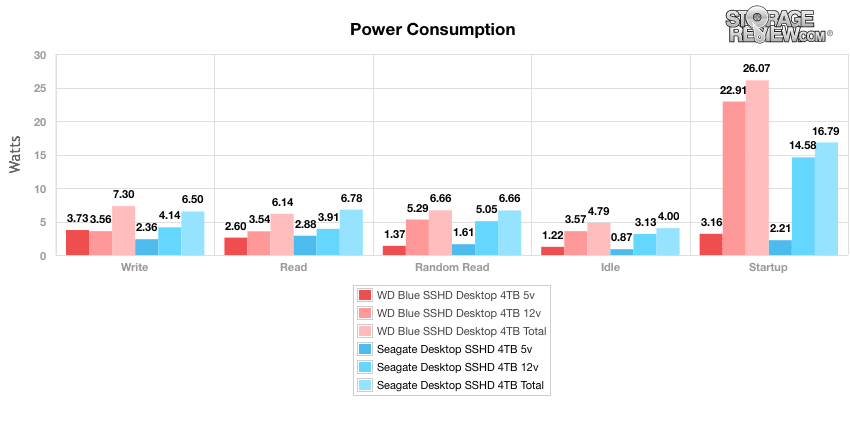
Lors de nos tests d'efficacité énergétique, nous avons mesuré les SSHD WD et Seagate en utilisant à la fois 5 et 12 tensions (spin-ups). Dans cette référence, le Seagate a affiché des lectures au ralenti de 0.87 W (5v) et 3.13 (12v) pour un total de 4.00W tandis que la consommation au ralenti du WD Blue SSHD mesurait 1.22W (5v) et 3.57W (12v) pour un total de 4.79W. La consommation la plus élevée du disque Seagate était de 14.58 W (12 V). L'enregistrement le plus élevé de WD Blue SSHD 4 To a également eu lieu lors du démarrage, qui a mesuré 22.91 W (12 V) beaucoup plus élevés en utilisant la même tension.
Conclusion
Le Seagate Desktop SSHD est un disque hybride de 3.5 pouces qui combine la capacité du disque dur avec les performances du SSD. Conçu pour les ordinateurs de bureau, les postes de travail et les appareils DAS hautes performances, le disque Seagate est équipé de 8 Go de mémoire flash NAND, ce qui permet de conserver les données chaudes sur le stockage flash tandis que les données moins actives sont stockées sur le disque dur. En conséquence, les consommateurs bénéficieront de démarrages rapides du système, de temps de chargement plus rapides et d'une réactivité accrue par rapport aux disques durs traditionnels. Bien que cela n'ait rien d'unique pour un SSHD, le Seagate Desktop SSHD est relativement moins cher que son comparable WD Blue, coûtant environ 50 dollars de moins (150 dollars contre 200 dollars pour la capacité de 4 To).
En plongeant dans ses performances, les deux disques hybrides que nous avons comparés ont affiché des résultats très similaires, bien que le Seagate ait offert de meilleures vitesses de transfert globales pendant les charges de travail mixtes. Dans notre référence de transfert séquentiel de 2 Mo, le Seagate Desktop SSHD mesurait 156.28 Mo/s en lecture et 154.28 Mo/s en écriture tandis que les vitesses aléatoires de la même taille de fichier atteignaient 63.64 Mo/s en lecture et 73.49 Mo/s en écriture. Dans nos benchmarks du monde réel, cependant, le disque Seagate a été facilement battu par le WD Blue dans le scénario HTPC. Ici, le Seagate SSHD n'affiche que 67.21 Mo/s, 904 IOPS et 8.8 ms de latence moyenne pour ce dernier par rapport aux 94.05 Mo/s, 1,265 6.3 IOPS et 93.98 ms du WD Blue. Les joueurs devraient certainement prendre note de notre référence de profil de jeu, car les résultats ont montré une augmentation massive à 1,749 Mo/s, 4.5 64.30 IOPS et une latence moyenne de 1,200 ms par rapport aux 6.6 Mo/s, XNUMX XNUMX IOPS et XNUMX ms enregistrés par WD Blues. .
Avantages
- Meilleures performances que les disques durs traditionnels
- Fichiers chauds stockés dans une mémoire flash NAND de 8 Go
- Bonnes performances lors des charges de travail mixtes
Inconvénients
- Bien performé sous le WD Blue lors des benchmarks du monde réel HTPC
Conclusion
Le Seagate Desktop SSHD est un disque hybride performant qui offre aux consommateurs 8 Go de mémoire flash NAND pour des performances globales accrues du système ainsi qu'un point de capacité élevée.
Seagate 4 To SSHD sur Amazon


 Amazon