---
description: The Seagate FireCuda Gaming Dock is a high-end, multi-functional hub with the connectivity of a docking station and external storage.
title: Seagate FireCuda Gaming Dock Review
image: https://www.storagereview.com/wp-content/uploads/2020/03/StorageReview-Seagate-FireCuda-Gaming-Dock-scaled.jpg
---

[![Storage Review]()](https://storagereview.com/)

---

[Facebook](https://www.facebook.com/@storagereview) [X (Twitter)](https://twitter.twitter.com/storagereview) [Instagram](https://www.instagram.com/storagereview/) [LinkedIn](https://www.linkedin.com/company/storagereview-com) [YouTube](https://www.youtube.com/user/storagereview?sub_confirmation=1) [Email](mailto:info@storagereview.com) [Spotify](https://open.spotify.com/show/1y6VnznABhHeOSMOmbDTz0) [Reddit](https://www.reddit.com/r/StorageReview/) [Discord](https://discord.gg/TwMHb4azdC) [RSS Feed](https://www.storagereview.com/rss.xml) [TikTok](https://www.tiktok.com/@storagereview)

[Facebook](https://www.facebook.com/@storagereview) [X (Twitter)](https://twitter.com/storagereview) [Instagram](https://www.instagram.com/storagereview/) [LinkedIn](https://www.linkedin.com/company/storagereview-com) [YouTube](https://www.youtube.com/user/storagereview?sub_confirmation=1) [Email](mailto:info@storagereview.com) [Spotify](https://open.spotify.com/show/1y6VnznABhHeOSMOmbDTz0) [Reddit](https://www.reddit.com/r/StorageReview/) [Discord](https://discord.gg/TwMHb4azdC) [RSS Feed](https://www.storagereview.com/rss.xml) [TikTok](https://www.tiktok.com/@storagereview)

[![StorageReview.com]()](https://www.storagereview.com)

≡ Menu

- [Home](https://www.storagereview.com/)
- [Storage Reviews](https://www.storagereview.com/review)
  - [Consumer Reviews](https://www.storagereview.com/consumer)
  - [Enterprise Reviews](https://www.storagereview.com/enterprise)
  - [Ubiquiti Reviews](https://www.storagereview.com/best/ubiquiti-reviews)
- [SR Merch](https://store.storagereview.com)
- [Leaderboards](https://www.storagereview.com/best)
  - [Best Storage Arrays](https://www.storagereview.com/best/storage-arrays)
  - [Best Enterprise SSDs](https://www.storagereview.com/best/enterprise-ssds)
  - [Best Servers](https://www.storagereview.com/best/servers)
  - [Best Desktops for Local AI](https://www.storagereview.com/best/desktops-local-ai)
  - [Best Laptops for Local AI](https://www.storagereview.com/best/laptops-local-ai)
  - [Best Local LLM Tools](https://www.storagereview.com/best/local-llm-tools)
  - [Agentic AI Hardware](https://www.storagereview.com/best/agentic-ai-hardware)
  - [Best SSDs & Hard Drives](https://www.storagereview.com/best_drives)
  - [Best Portable SSDs](https://www.storagereview.com/best/portable-ssds)
  - [Best Business Laptops](https://www.storagereview.com/best/business-laptops)
  - [Best Mobile Workstations](https://www.storagereview.com/best/mobile-workstations)
  - [Best Desktop Workstations](https://www.storagereview.com/best/desktop-workstations)
  - [Best Laptop Battery Life](https://www.storagereview.com/best/laptop-battery-life)
- [Storage Reference Guide](https://www.storagereview.com/storage-reference-guide)
- [About SR](https://www.storagereview.com/about-storagereview)
  - [StorageReview.com Sweepstakes Rules and Regulations](https://www.storagereview.com/storagereview-com-sweepstakes-rules-and-regulations)

Search

[Home](https://www.storagereview.com/) » [Review](https://www.storagereview.com/review) » Seagate FireCuda Gaming Dock Review

# Seagate FireCuda Gaming Dock Review

by Lyle Smith on March 10, 2020

[Client Accessories](https://www.storagereview.com/consumer/client-accessories)  ◇  [Consumer](https://www.storagereview.com/consumer)

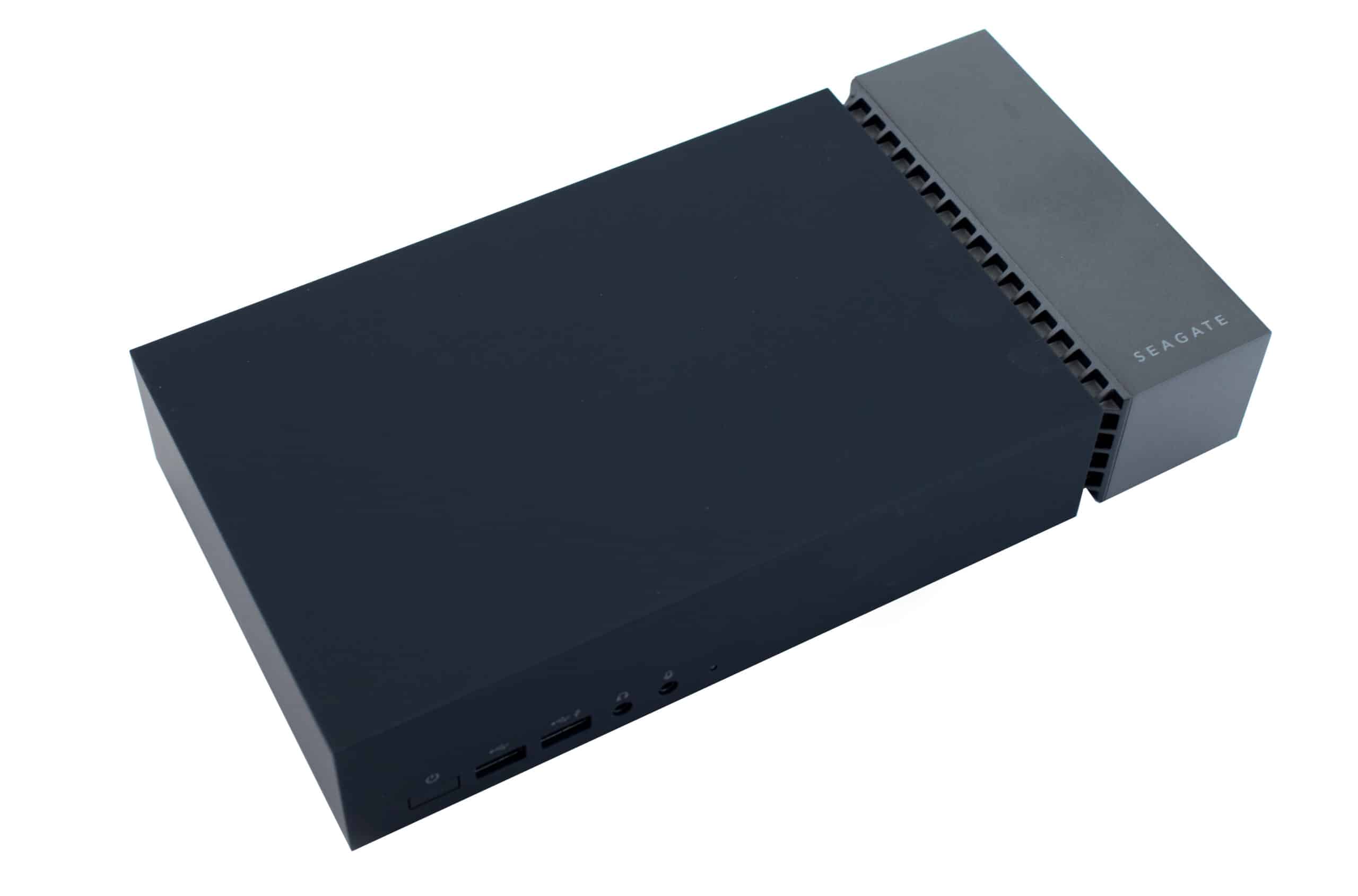
Seagate has planted itself in the mobile gaming storage market with the FireCuda Gaming Dock, a high-end, multi-functional hub that combines the features and connectivity of docking station with external storage. Though it is clearly marketed for laptop gamers who want a more versatile gaming experience without having to transition to a desktop PC, there are a range of advantages for creative professionals who want to optimization their workflows.

![Seagate Firecuda Gaming Dock]()

At the center of the [FireCuda Gaming Dock](https://www.storagereview.com/news/seagate-announces-new-gaming-drives-at-ces-2020) is a 4TB hard drive, which is a generous amount of mobile storage for those who have a lot of larger projects to store. For gamers, that would fit roughly 8 to 10 larger games (by current standards). Unfortunately, it is a hard-disk drive and not an SSD. While smaller, less-intensive games will have no issue running on spinning storage disks, it isn’t ideal for graphics-intensive games with a long loading times. This would also make transfers large files to and from the device a bit tedious. Fortunately, the dock does feature an M.2 NVMe slot for expansion, which will add a ton of speed and flexibility. You do need to purchase it separately, however, and these higher-capacity SSDs go for roughly $200 for a decent 1TB drive, which adds to the already heft price-tag of $350 for the dock.

## **Seagate FireCuda Gaming Dock Specifications**


| Storage | <ul><li>Built-in 4TB HDD</li><li>Expandable M.2 NVMe SSD slot</li></ul> |
| --- | --- |
| LEDs | Customizable RGB LED lighting and pattern control |
| Ports | <ul><li>Thunderbolt 3 port (for laptop connection)</li><li>Thunderbolt 3 port (for accessory device)</li><li>DisplayPort 1.4</li><li>4 USB 3.1 Gen2 ports</li><li>USB 3.1 Gen2 battery-charge port</li><li>RJ45 ethernet network port</li><li>3.5mm audio-in/mic port</li><li>3.5mm audio-out port</li></ul> |
| Dimensions | <ul><li>Length: 2.008 inches</li><li>Width: 10.63 inches</li><li>Depth: 5.31 inches</li></ul> |
| Weight | 5.886lb |
| System requirements | Windows 7 or higher |
| What’s Included   | <ul><li>FireCuda® Gaming Dock</li><li>Power cord</li><li>Power adaptor</li><li>Thunderbolt 3 cable</li></ul> |

## **Design and build**

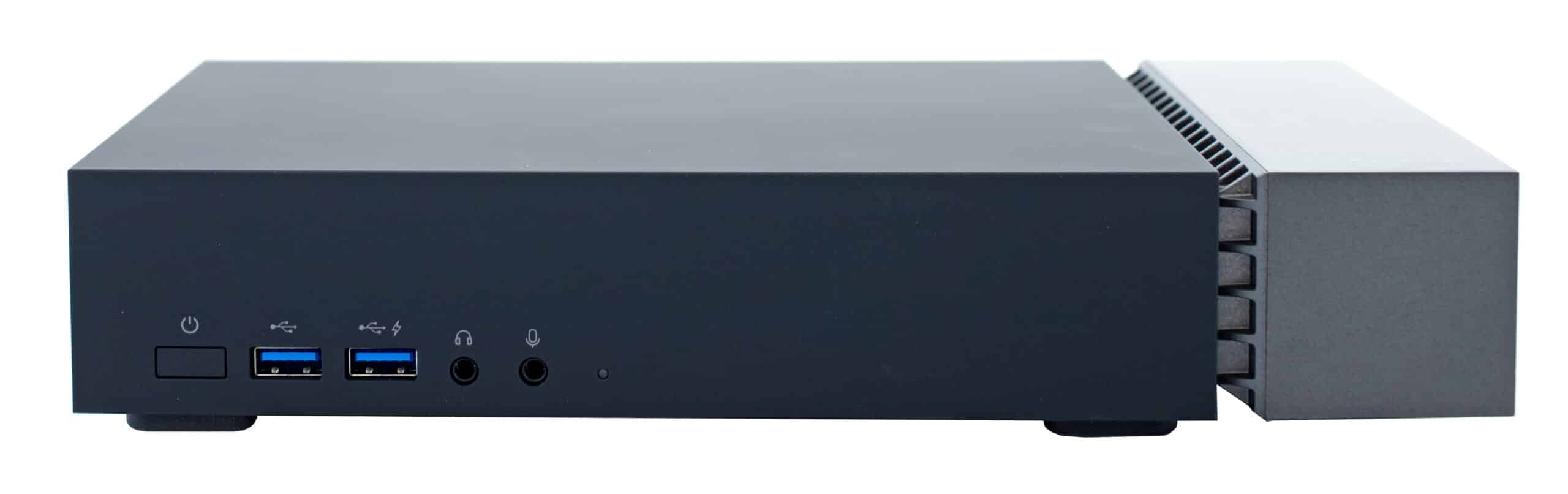
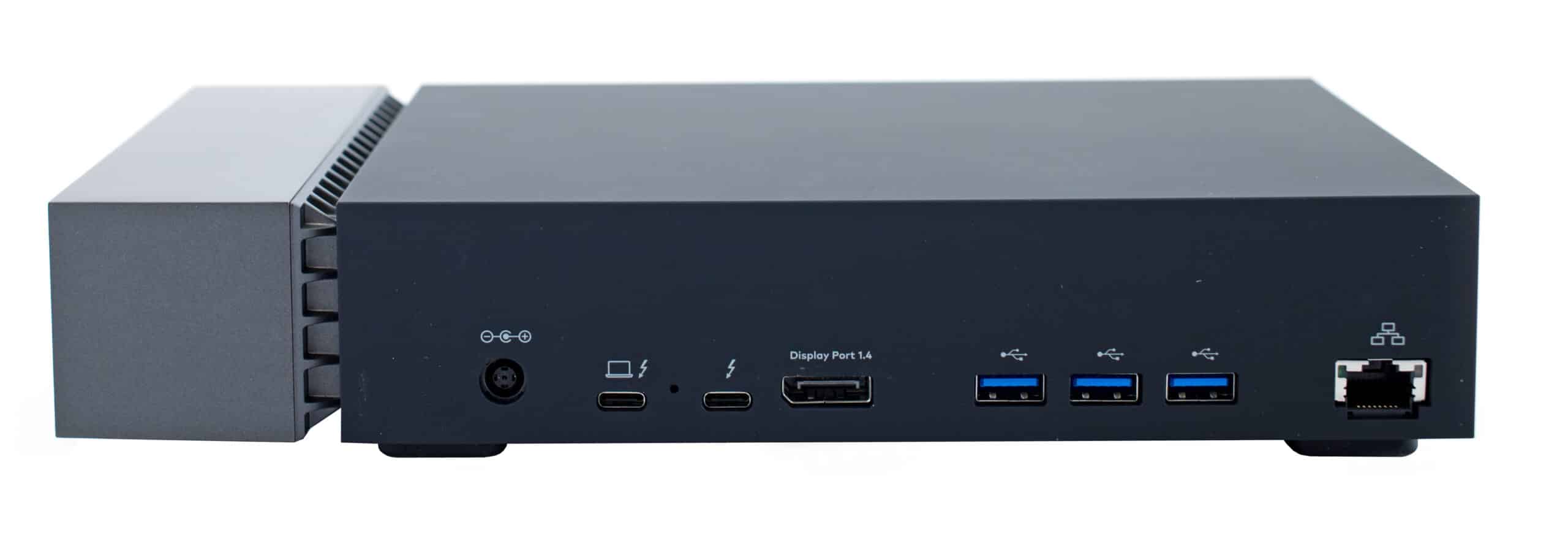
The Seagate gaming hub is equipped with range of ports. Once you connect a single Thunderbolt 3 cord to the hub from your laptop, you will have access to a Thunderbolt 3 port, a DisplayPort, four USB 3.1 Gen2 ports (as well as one USB 3.1 Gen2 battery-charge port), an RJ45 Ethernet network port and 3.5mm audio-in/mic and audio-out ports. All USB, Ethernet and audio ports are plug and play and will work and so no extra drivers are necessary.

![Seagate Firecuda Gaming Dock Front]()

This is a solid, hefty device. At approximately 10 and a half inches wide and 5 inches in depth, the FireCuda Gaming Dock weighs in a just under 6 pounds, which is roughly the same as a laptop. This will double your carry weight, so it’s not the most mobile hub. However, it will certainly sit by your workstation without having to worry much about it moving around; especially with the four rubber paddings underneath.

![Seagate Firecuda Gaming Dock Rear]()

The build itself is really slick looking, sporting a “minimalist industrial” design and customizable LEDs with various colors and light patterns. This is perfect gamers who like to show off their rigs (the fancier the better).

Installing an NVMe drive was fairly seamless. To access the expansion slot, pull on the end cap to remove it then remove the two screws fastening the protective plate (which protects the SSD from dust while dissipating heat) as well as the mounting screw. Then we simply added the M.2 drive in the usual manner and replaced all the screws.

## **Management**

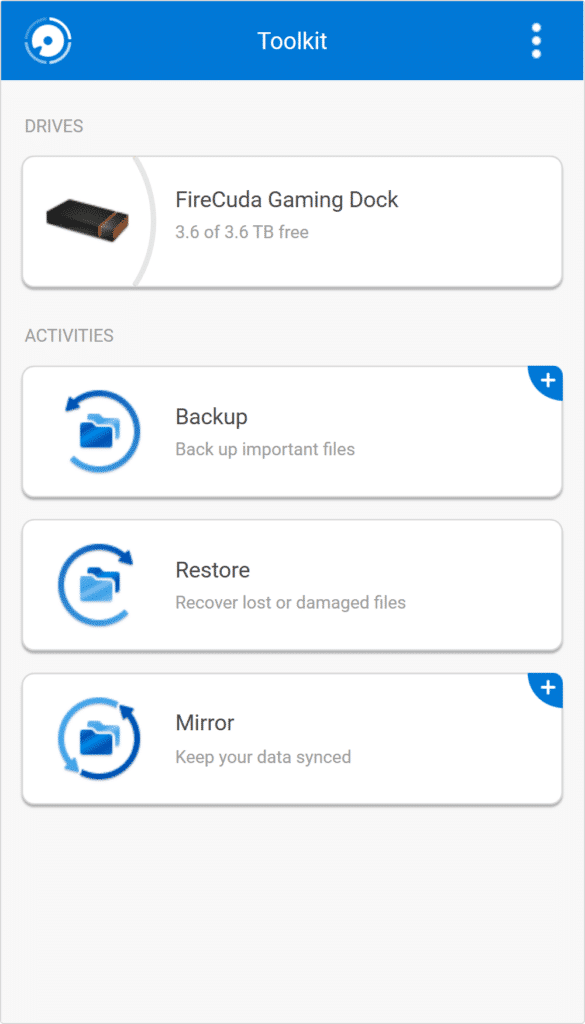
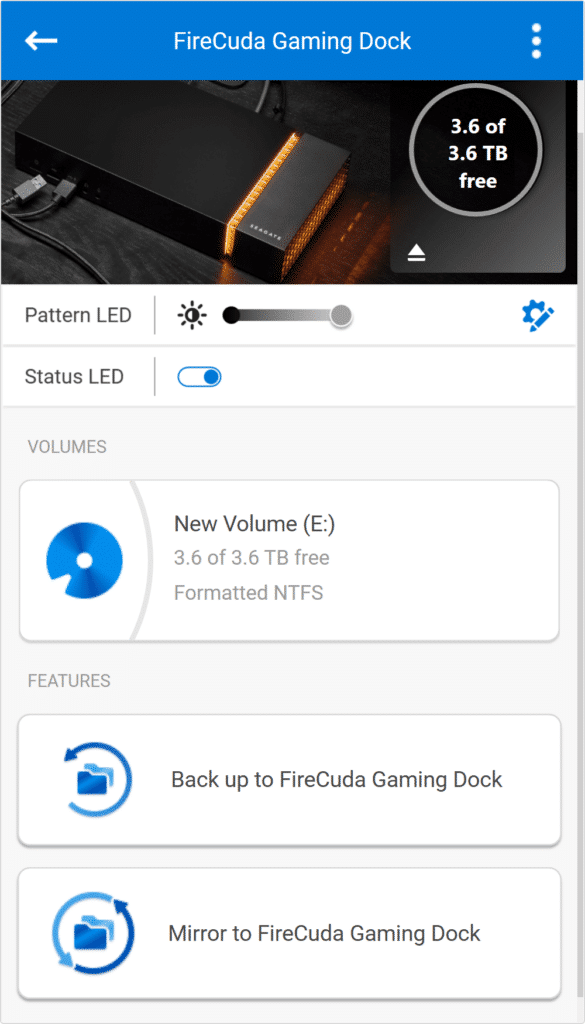
Configuring the Gaming Dock is done through Seagate\`s Toolkit, which is downloadable on their website. This software allows users to manage LED settings and to create and manage backup plans.

![]()

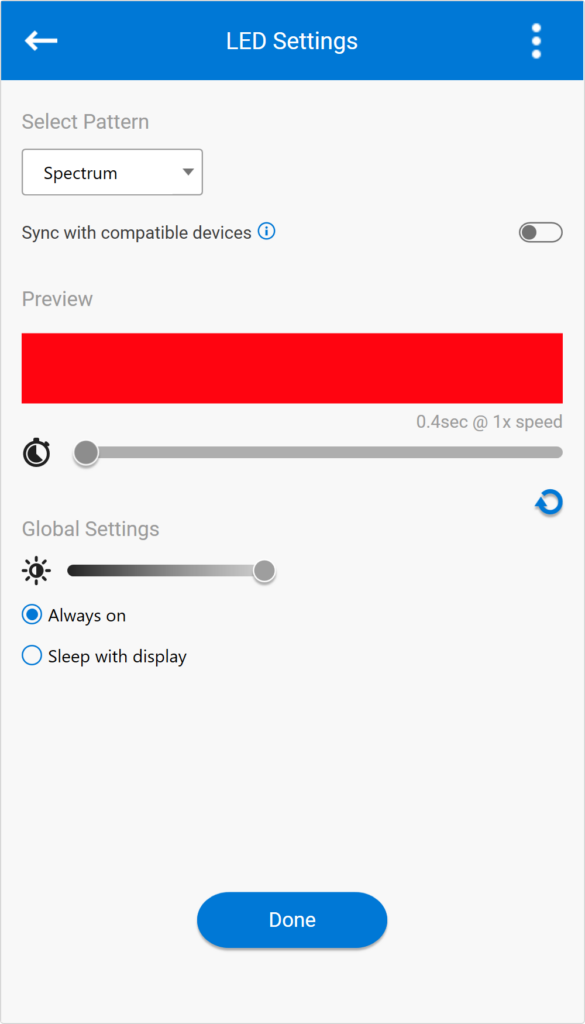
Seagate makes customizing these LEDs very simple using this software. You can access these setting from the “edit” cog icon located on the right of the main dashboard. After selecting a pattern, choose a color from a comprehensive palette, and how fast you want the animation to display. You can also set the brightness via a slider and whether or not you want the LEDs to be always on or turn of once your display goes into sleep mode.

![]()

This device will certainly stand out next to your work space. With the brightness on full, you can still see the LEDs doing there thing in a well lit room. In the dark, the brightness is very high, so you will likely find yourself turning it down a few notches so it won’t be distracting.

![]()

You can also create a “Mirror folder” on your PC that is synced to the dock. This means that whenever you add, modify or delete a file in this folder, the Toolkit software will automatically update the other folder with your changes. This is accessed by clicking the “Mirror” option under Activities in the main Toolkit dashboard.

## **Performance**

To test the Seagate Gaming Dock, we connected it to the  [HP ZBook Studio x360 G5](https://www.storagereview.com/review/hp-zbook-studio-x360-g5-review-update) via a USB-C port and analyzed at its performance during a large file 2MB transfer benchmarking test (in both sequential and random scenarios). We did three separate tests with the following drives:

- Seagate FireCuda Dock 235C internal 4TB HDD (stock)
- Seagate FireCuda 510 NVMe 1TB SSD using the M.2 expansion slot (both 1 thread and 16 thread workloads)

Looking at sequential 2MB performance, the FireCuda Gaming Dock was able to reach 2,012.6MB/s read and 1,046.7MB/s write and 2,772.1MB/s read and 1,293.1MB/s write (1 thread and 16 threads, respectively) using the NVMe M.2 SSD. For the internal HDD, the dock posted near identical reads and writes of 249.1MB/s and 249.2MB/s, respectively.

In random 2MB performance, the FireCuda Gaming Dock hit 1,990.0MB/s read and 1,105.1MB/s write (1 thread) and 2,855.7MB/s read and 1,388.5MB/s write (16 threads) using the FireCuda SSD. For the internal HDD, the dock posted near identical reads and writes of 141.3MB/s and 205MB/s, for reads and writes respectively.

## Conclusion

The FireCuda Gaming Dock is designed for hardcore gamers and creative professionals looking to add more ports, storage and a bit of light to their laptops. Though it doesn’t add extra GPU power, the new Seagate dock gives users a range of high-end connectivity options, a generous 4TB HDD and the ability to add ultra-fast NVMe SSD performance via its M.2 expansion slot. The latter option is very important, as installing games on spinning disk drives isn’t as viable as it use to be due to the massive amount of loading times for graphics-intensive games. It also allows for speedy transfers for large files–over 10x faster than HDD speeds. As far as connectivity goes, the FireCuda Gaming Dock includes a Thunderbolt 3 port, a DisplayPort, five USB 3.1 Gen2 ports, an Ethernet network port and audio ports.

SSD performance showed some impressive results, reaching 2,012.6MB/s read and 1,046.7MB/s write and 2,772.1MB/s read and 1,293.1MB/s write (1 thread and 16 threads, respectively) during our 2MB sequential tests. For random performance, the gaming dock recorded 1,990.0MB/s read and 1,105.1MB/s write (1 thread) and 2,855.7MB/s read and 1,388.5MB/s write (16 threads). HDD performance showed 249.1MB/s read and 249.2MB/s write, and 141.3MB/s and 205MB/s for sequential and random transfer tests, respectively.

The Seagate FireCuda Gaming Dock is a nice USB-C dock to add to any gamer or creative professional’s desk that needs a bit of extra storage. It comes with plenty of connectivity, including NVMe storage and a 4TB hard drive for capacity of backup purposes.

[Seagate FireCuda Gaming Dock on Amazon](https://amzn.to/2VYgD3N)

**Engage with StorageReview**

[Newsletter](https://www.storagereview.com/storage_newsletter) |  [YouTube](https://www.youtube.com/user/StorageReview "Opens in a new window") | Podcast  [iTunes](https://podcasts.apple.com/gb/podcast/storagereview-com-storage-reviews/id1060681115 "Opens in a new window")/ [Spotify](https://open.spotify.com/show/1y6VnznABhHeOSMOmbDTz0 "Opens in a new window") |  [Instagram](https://www.instagram.com/storagereview/ "Opens in a new window") |  [Twitter](https://twitter.com/storagereview "Opens in a new window") |  [TikTok](https://www.tiktok.com/@storagereview? "Opens in a new window") |  [RSS Feed](https://www.storagereview.com/rss.xml)

![]()

### Lyle Smith

Lyle is a writer for StorageReview, covering a broad set of end user and enterprise IT topics.

Previous post: [Dell Precision 7920 Tower Workstation Review](https://www.storagereview.com/review/dell-precision-7920-tower-workstation-review)

Next post: [HPE ProLiant MicroServer Gen10 Plus Review](https://www.storagereview.com/review/hpe-proliant-microserver-gen10-plus-review)

Trusted Vendors

Products and solutions from our affiliate partners:

- [  
  ![Ubiquiti Logo]()  
   Ubiquiti](https://store.ui.com/us/en?a_aid=StorageReview "Opens in a new window")
- [  
  ![Newegg Logo]()  
   Newegg](https://click.linksynergy.com/fs-bin/click?id=g5terNMDhz0&offerid=1207190.18&subid=0&type=4 "Opens in a new window")
- [  
  ![Amazon Logo]() Amazon](https://amzn.to/4fLJUEW "Opens in a new window")

Newsletter

Subscribe to the StorageReview newsletter to stay up to date on the latest news and reviews. We promise no spam!

1  

Leave this field empty if you’re human:

## Advertisement

Content Categories

[Facebook](https://www.facebook.com/@storagereview) [X](https://twitter.com/storagereview) [Instagram](https://www.instagram.com/storagereview/) [LinkedIn](https://www.linkedin.com/company/storagereview-com) [YouTube](https://www.youtube.com/user/storagereview?sub_confirmation=1) [Email](mailto:info@storagereview.com) [Spotify](https://open.spotify.com/show/1y6VnznABhHeOSMOmbDTz0) [Reddit](https://www.reddit.com/r/StorageReview/) [Discord](https://discord.gg/TwMHb4azdC) [RSS](https://www.storagereview.com/rss.xml) [TikTok](https://www.tiktok.com/@storagereview)

Copyright © 1998-2025 Flying Pig Ventures, LLC Cincinnati, Ohio. All rights reserved.

Manage your privacy

To provide the best experiences, we and our partners use technologies like cookies to store and/or access device information. Consenting to these technologies will allow us and our partners to process personal data such as browsing behavior or unique IDs on this site and show (non-) personalized ads. Not consenting or withdrawing consent, may adversely affect certain features and functions.

Click below to consent to the above or make granular choices. Your choices will be applied to this site only. You can change your settings at any time, including withdrawing your consent, by using the toggles on the Cookie Policy, or by clicking on the manage consent button at the bottom of the screen.

Functional Functional Always active

The technical storage or access is strictly necessary for the legitimate purpose of enabling the use of a specific service explicitly requested by the subscriber or user, or for the sole purpose of carrying out the transmission of a communication over an electronic communications network.

Preferences Preferences

The technical storage or access is necessary for the legitimate purpose of storing preferences that are not requested by the subscriber or user.

Statistics Statistics

The technical storage or access that is used exclusively for statistical purposes. The technical storage or access that is used exclusively for anonymous statistical purposes. Without a subpoena, voluntary compliance on the part of your Internet Service Provider, or additional records from a third party, information stored or retrieved for this purpose alone cannot usually be used to identify you.

Marketing Marketing

The technical storage or access is required to create user profiles to send advertising, or to track the user on a website or across several websites for similar marketing purposes.

Statistics

Marketing

Features

Always active

Always active

- Manage options
- Manage services
- Manage {vendor\_count} vendors
- [Read more about these purposes](https://cookiedatabase.org/tcf/purposes/)

Accept Deny Manage options Save preferences Manage options

- {title}
- {title}
- {title}

Manage your privacy

To provide the best experiences, we use technologies like cookies to store and/or access device information. Consenting to these technologies will allow us to process data such as browsing behavior or unique IDs on this site. Not consenting or withdrawing consent, may adversely affect certain features and functions.

Functional Functional Always active

The technical storage or access is strictly necessary for the legitimate purpose of enabling the use of a specific service explicitly requested by the subscriber or user, or for the sole purpose of carrying out the transmission of a communication over an electronic communications network.

Preferences Preferences

The technical storage or access is necessary for the legitimate purpose of storing preferences that are not requested by the subscriber or user.

Statistics Statistics

The technical storage or access that is used exclusively for statistical purposes. The technical storage or access that is used exclusively for anonymous statistical purposes. Without a subpoena, voluntary compliance on the part of your Internet Service Provider, or additional records from a third party, information stored or retrieved for this purpose alone cannot usually be used to identify you.

Marketing Marketing

The technical storage or access is required to create user profiles to send advertising, or to track the user on a website or across several websites for similar marketing purposes.

Statistics

Marketing

Features

Always active

Always active

- Manage options
- Manage services
- Manage {vendor\_count} vendors
- [Read more about these purposes](https://cookiedatabase.org/tcf/purposes/)

Accept Deny Manage options Save preferences Manage options

- {title}
- {title}
- {title}

Manage consent Manage consent

```json
{"@context":"https:\/\/schema.org","@graph":[{"@type":"WebPage","@id":"https:\/\/www.storagereview.com\/review\/seagate-firecuda-gaming-dock-review","url":"https:\/\/www.storagereview.com\/review\/seagate-firecuda-gaming-dock-review","name":"Seagate FireCuda Gaming Dock Review - StorageReview.com","isPartOf":{"@id":"https:\/\/www.storagereview.com\/#website"},"primaryImageOfPage":{"@id":"https:\/\/www.storagereview.com\/review\/seagate-firecuda-gaming-dock-review#primaryimage"},"image":{"@id":"https:\/\/www.storagereview.com\/review\/seagate-firecuda-gaming-dock-review#primaryimage"},"thumbnailUrl":"https:\/\/www.storagereview.com\/wp-content\/uploads\/2020\/03\/StorageReview-Seagate-FireCuda-Gaming-Dock-scaled.jpg","datePublished":"2020-03-10T15:01:40+00:00","dateModified":"2020-03-20T16:46:24+00:00","description":"The Seagate FireCuda Gaming Dock is a high-end, multi-functional hub with the connectivity of a docking station and external storage.","breadcrumb":{"@id":"https:\/\/www.storagereview.com\/review\/seagate-firecuda-gaming-dock-review#breadcrumb"},"inLanguage":"en-US","potentialAction":[{"@type":"ReadAction","target":["https:\/\/www.storagereview.com\/review\/seagate-firecuda-gaming-dock-review"]}]},{"@type":"ImageObject","inLanguage":"en-US","@id":"https:\/\/www.storagereview.com\/review\/seagate-firecuda-gaming-dock-review#primaryimage","url":"https:\/\/www.storagereview.com\/wp-content\/uploads\/2020\/03\/StorageReview-Seagate-FireCuda-Gaming-Dock-scaled.jpg","contentUrl":"https:\/\/www.storagereview.com\/wp-content\/uploads\/2020\/03\/StorageReview-Seagate-FireCuda-Gaming-Dock-scaled.jpg","width":2560,"height":1690,"caption":"Seagate Firecuda Gaming Dock"},{"@type":"BreadcrumbList","@id":"https:\/\/www.storagereview.com\/review\/seagate-firecuda-gaming-dock-review#breadcrumb","itemListElement":[{"@type":"ListItem","position":1,"name":"Home","item":"https:\/\/www.storagereview.com\/"},{"@type":"ListItem","position":2,"name":"Review","item":"https:\/\/www.storagereview.com\/review"},{"@type":"ListItem","position":3,"name":"Seagate FireCuda Gaming Dock Review"}]},{"@type":"WebSite","@id":"https:\/\/www.storagereview.com\/#website","url":"https:\/\/www.storagereview.com\/","name":"StorageReview.com","description":"StorageReview.com is a leading provider of news and reviews throughout the entire IT stack - from the datacenter to the edge, and all points in between.","publisher":{"@id":"https:\/\/www.storagereview.com\/#organization"},"potentialAction":[{"@type":"SearchAction","target":{"@type":"EntryPoint","urlTemplate":"https:\/\/www.storagereview.com\/?s={search_term_string}"},"query-input":{"@type":"PropertyValueSpecification","valueRequired":true,"valueName":"search_term_string"}}],"inLanguage":"en-US"},{"@type":"Organization","@id":"https:\/\/www.storagereview.com\/#organization","name":"StorageReview.com","url":"https:\/\/www.storagereview.com\/","logo":{"@type":"ImageObject","inLanguage":"en-US","@id":"https:\/\/www.storagereview.com\/#\/schema\/logo\/image\/","url":"https:\/\/www.storagereview.com\/wp-content\/uploads\/2020\/02\/Storage-Reviews-2-2.png","contentUrl":"https:\/\/www.storagereview.com\/wp-content\/uploads\/2020\/02\/Storage-Reviews-2-2.png","width":344,"height":61,"caption":"StorageReview.com"},"image":{"@id":"https:\/\/www.storagereview.com\/#\/schema\/logo\/image\/"},"sameAs":["https:\/\/x.com\/storagereview","http:\/\/youtube.com\/user\/storagereview"]}]}
```