---
description: The Orico Multi-Port Hub is a useful 10-port USB hub that brings a ton of storage flexibility to any workspace, combined with HDD enclousures.
title: Orico Multi-Port Hub &amp; HDD Enclosure Expand Desktop Storage
image: https://www.storagereview.com/wp-content/uploads/2021/07/StorageReview-orico-sata-lifestyle3.jpg
---

[![Storage Review]()](https://storagereview.com/)

---

[Facebook](https://www.facebook.com/@storagereview) [X (Twitter)](https://twitter.twitter.com/storagereview) [Instagram](https://www.instagram.com/storagereview/) [LinkedIn](https://www.linkedin.com/company/storagereview-com) [YouTube](https://www.youtube.com/user/storagereview?sub_confirmation=1) [Email](mailto:info@storagereview.com) [Spotify](https://open.spotify.com/show/1y6VnznABhHeOSMOmbDTz0) [Reddit](https://www.reddit.com/r/StorageReview/) [Discord](https://discord.gg/TwMHb4azdC) [RSS Feed](https://www.storagereview.com/rss.xml) [TikTok](https://www.tiktok.com/@storagereview)

[Facebook](https://www.facebook.com/@storagereview) [X (Twitter)](https://twitter.com/storagereview) [Instagram](https://www.instagram.com/storagereview/) [LinkedIn](https://www.linkedin.com/company/storagereview-com) [YouTube](https://www.youtube.com/user/storagereview?sub_confirmation=1) [Email](mailto:info@storagereview.com) [Spotify](https://open.spotify.com/show/1y6VnznABhHeOSMOmbDTz0) [Reddit](https://www.reddit.com/r/StorageReview/) [Discord](https://discord.gg/TwMHb4azdC) [RSS Feed](https://www.storagereview.com/rss.xml) [TikTok](https://www.tiktok.com/@storagereview)

[![StorageReview.com](https://www.storagereview.com/wp-content/uploads/2026/07/Storage-Review-2x.png)](https://www.storagereview.com)

≡ Menu

- [Home](https://www.storagereview.com/)
- [Storage Reviews](https://www.storagereview.com/review)
  - [Consumer Reviews](https://www.storagereview.com/consumer)
  - [Enterprise Reviews](https://www.storagereview.com/enterprise)
  - [Ubiquiti Reviews](https://www.storagereview.com/best/ubiquiti-reviews)
- [SR Merch](https://store.storagereview.com)
- [Leaderboards](https://www.storagereview.com/best)
  - [Best Storage Arrays](https://www.storagereview.com/best/storage-arrays)
  - [Best Enterprise SSDs](https://www.storagereview.com/best/enterprise-ssds)
  - [Best Servers](https://www.storagereview.com/best/servers)
  - [Best Desktops for Local AI](https://www.storagereview.com/best/desktops-local-ai)
  - [Best Laptops for Local AI](https://www.storagereview.com/best/laptops-local-ai)
  - [Best Local LLM Tools](https://www.storagereview.com/best/local-llm-tools)
  - [Agentic AI Hardware](https://www.storagereview.com/best/agentic-ai-hardware)
  - [Best SSDs & Hard Drives](https://www.storagereview.com/best_drives)
  - [Best Portable SSDs](https://www.storagereview.com/best/portable-ssds)
  - [Best Business Laptops](https://www.storagereview.com/best/business-laptops)
  - [Best Mobile Workstations](https://www.storagereview.com/best/mobile-workstations)
  - [Best Desktop Workstations](https://www.storagereview.com/best/desktop-workstations)
  - [Best Laptop Battery Life](https://www.storagereview.com/best/laptop-battery-life)
- [Storage Reference Guide](https://www.storagereview.com/storage-reference-guide)
- [About SR](https://www.storagereview.com/about-storagereview)
  - [StorageReview.com Sweepstakes Rules and Regulations](https://www.storagereview.com/storagereview-com-sweepstakes-rules-and-regulations)

Search

[Home](https://www.storagereview.com/) » [Review](https://www.storagereview.com/review) » Orico Multi-Port Hub & HDD Enclosure Expand Desktop Storage

# Orico Multi-Port Hub & HDD Enclosure Expand Desktop Storage

by Adam Armstrong on July 2, 2021

[Client Accessories](https://www.storagereview.com/consumer/client-accessories)  ◇  [Consumer](https://www.storagereview.com/consumer)

There are times when users may end up with several HDDs with data on them that needs to be gone through. HDDs are still fairly cheap and can pack massive amounts of capacity. This is great for creative professionals or others that may deal with a rotation of bare drives, portable drives, or larger desktop enclosures. If you need a quick and cost-effective method for going over what is on your excess drives, Orico has a couple of solutions that are just perfect for this: the Orico BT2U3-10AB multi-port USB hub and the Orico 3588US3-V1 HDD Enclosure.

![Orico Multi-Port Hub](https://www.storagereview.com/wp-content/uploads/2021/07/StorageReview-orico-sata-lifestyle2.jpg)

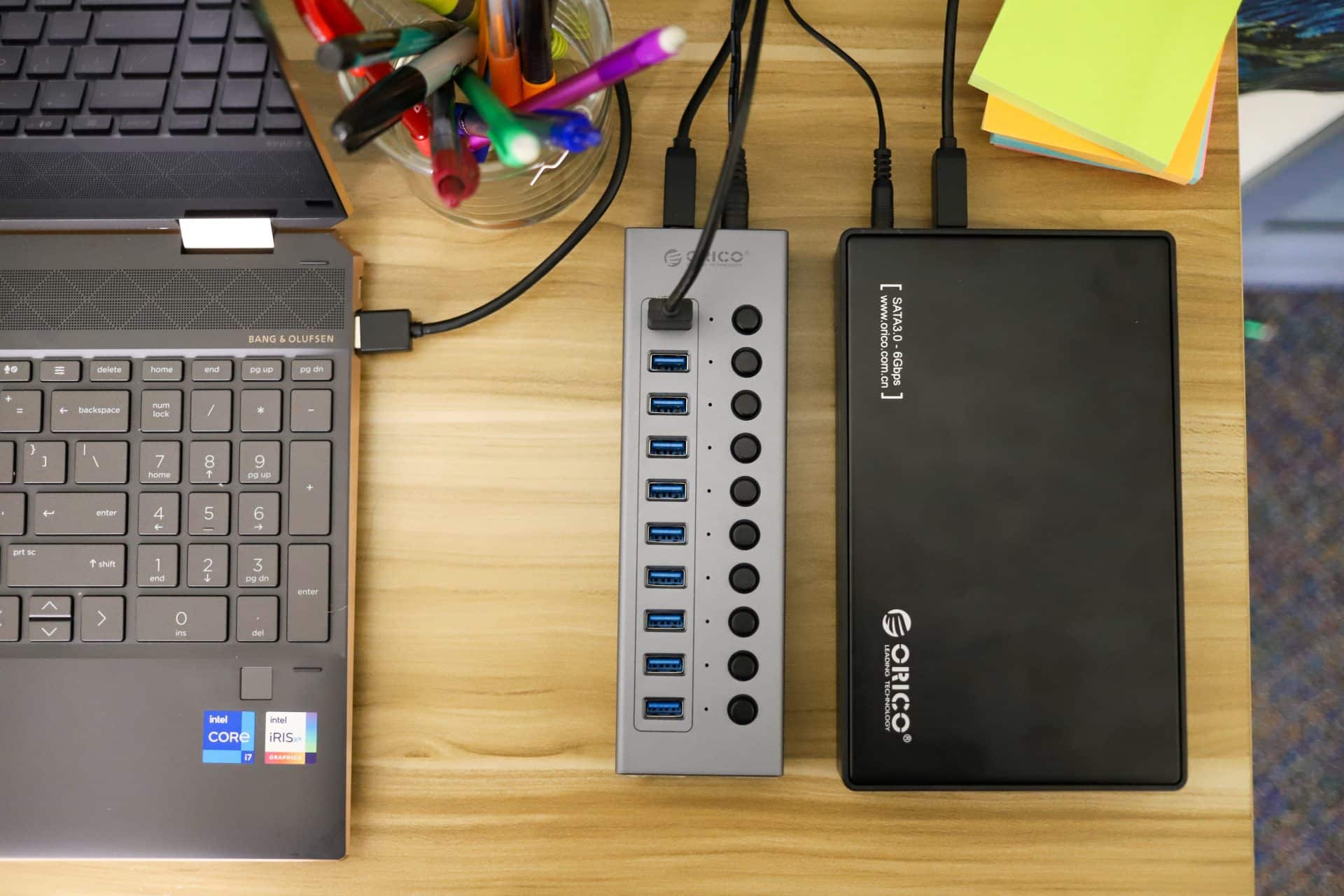
While there are several ways to hook HDDs up to a computer they can be expensive or take up a lot of room. Look at our [Sabrent DS-SC5B review](https://www.storagereview.com/review/sabrent-ds-sc5b-5-bay-docking-station-review). While not terribly expensive, this unit was heavy and was more of a permanent fixture, which is a good option if you want something long-term. If you are limited on space and budget or deal with a lot of media that rotates through your workflow, the combination of the two Orico devices makes for a fast and temporary setup that can be brought out when needed.

![]()

There are other use cases as well. Proof of space cryptocurrencies for instance. Those that host a lot of bulk storage like Chia farmers, typically do so on HDDs. Hard drives are still a bit scarce though. Farmers are often cobbling together an array of portable drives, a mish-mash of loose HDDs, and even some single drive external enclosures, depending on what’s available. With the Orico Multi-port hub, you gain a ton of flexibility for this type of use case.

The USB hub goes for [$70 on Amazon,](https://amzn.to/3ykiO1k) the 3.5″ HDD enclosure is [about $18](https://amzn.to/2UWbASR).

## **Orico Multi-Port Hub BT2U3-10AB Specifications**

| Material | Aluminum Alloy+ABS |
| --- | --- |
| Color | Gray+Black |
| Input Interface | USB-A 3.0\*1，DC 12V |
| Output Interface | USB-A 3.0\*10 |
| Dimension | 190\*58\*26mm |
| Power Supply | 12V 4A(48W) |
| Data Cable | Separate Type-A to Type-B Cable (1m length) |
| Indicator | Blue LED Indicator |
| Control Scheme | VL817 |

## **ORICO 3588US3-V1 Specifications**

| Compatible HDD Type | 3.5 inch HDD / SSD |
| --- | --- |
| Output Interface | SuperSpeed USB3.0 |
| Color | Black |
| Material | Steel+ABS |
| Power Supply | 12V2A Power Adapter |
| HDD Interface | SATA I, II, III |
| Data Cable | 1M USB3.0 Cord |
| Driver | Driver Not Required |
| Supported System | Windows 10 / 8 / 7 / Vista / XP or Mac OS 9.1 and above |
| Max Capacity / Slot | 10TB |
| UASP Protocol | Supported |

## **Design & Build**

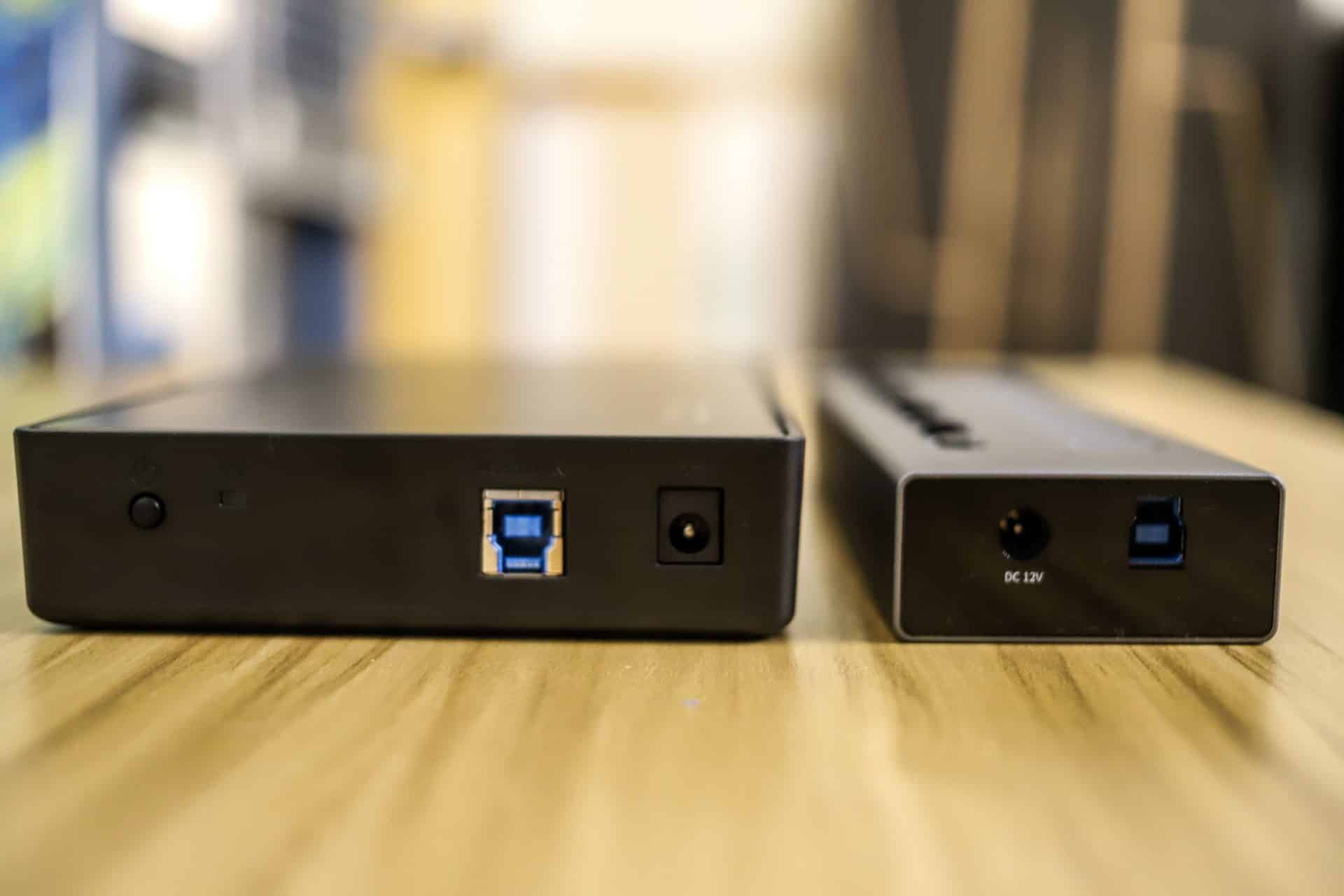
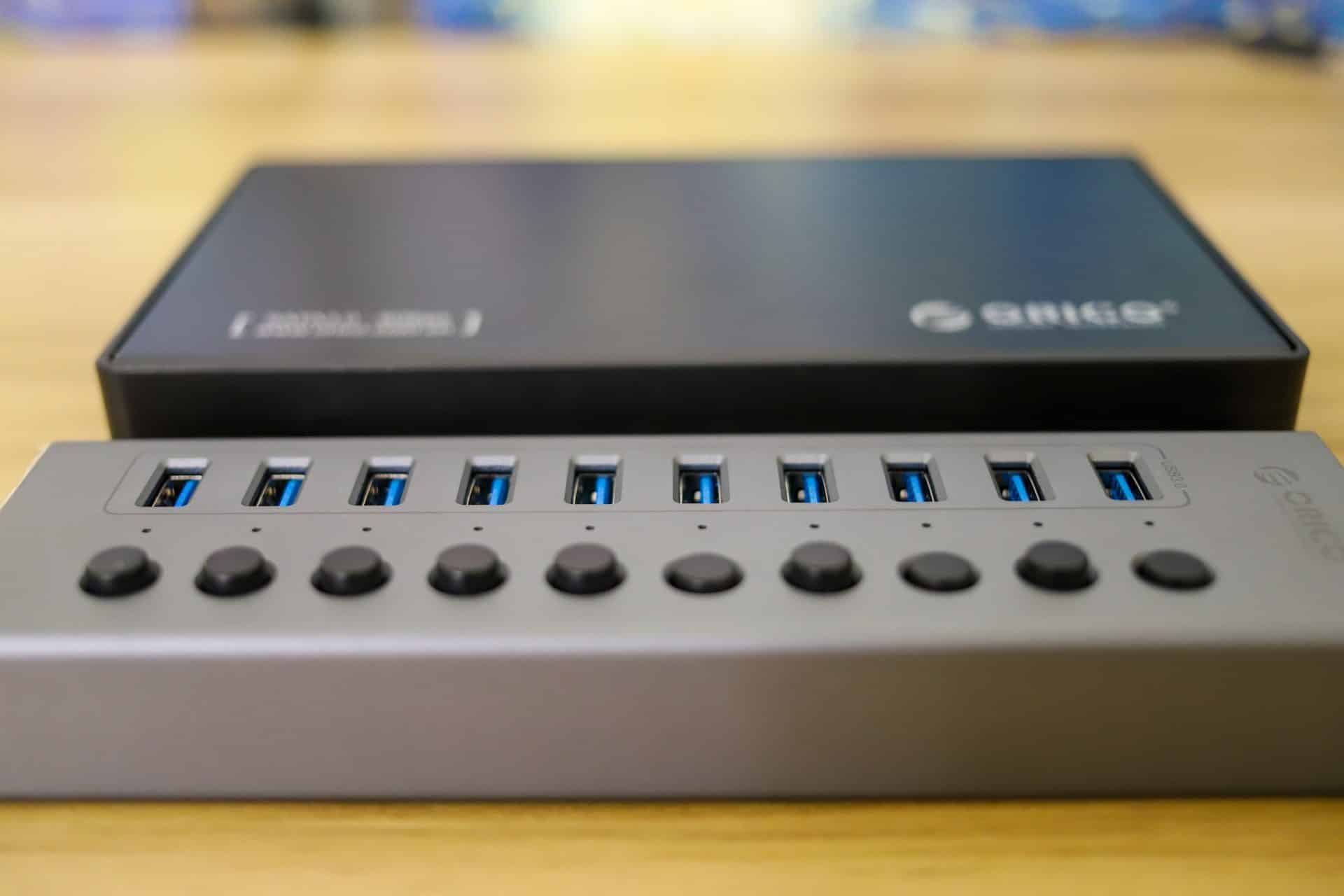
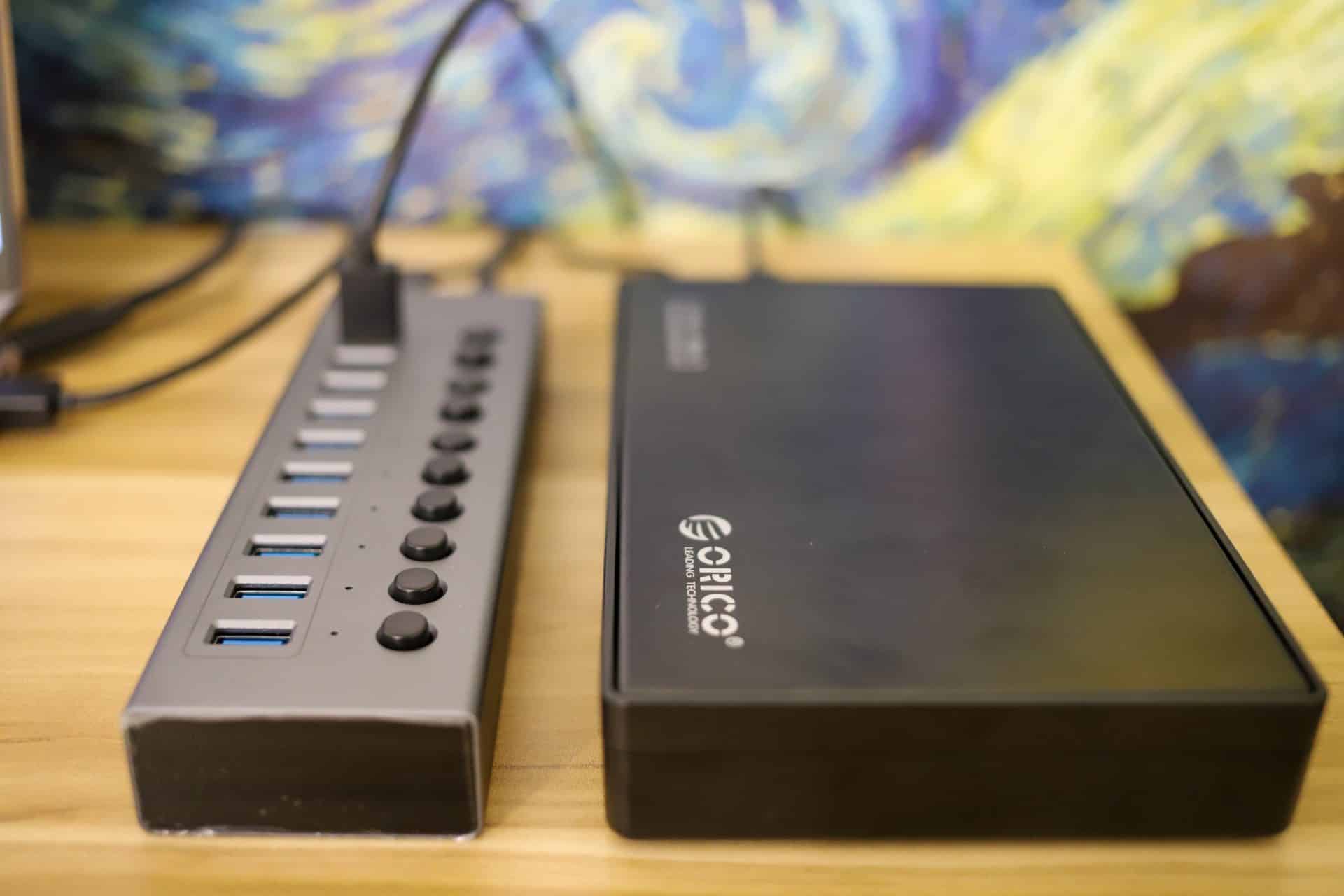
The Orico BT2U3-10AB is a multi-port hub with 10 USB-A ports running across the top. Each bay has a bottom that can be pressed to turn that port on. On one end is the power and USB connection to a computer. The other sides are blank.

![]()

From an aesthetics point of view, the thing is neither neat nor bad looking. It is an off-gray similar to what one would see in a Dell or HP mobile workstation. Though this is definitely a function over form type of device. If you can get the cords and cables laid out in a pleasing manner, it doesn’t take up too much space or look too strange on a desk.

![]()

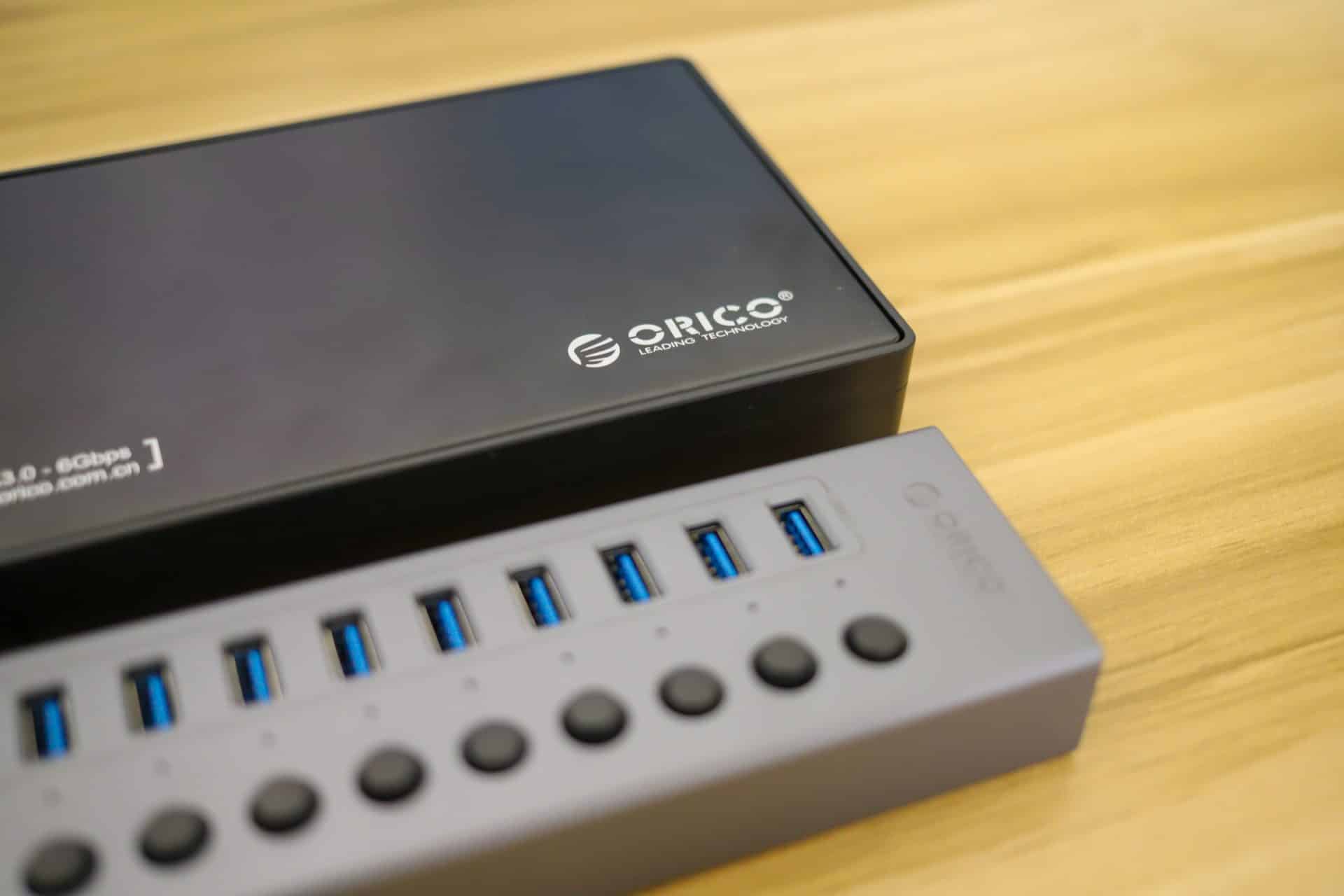
The ORICO 3588US3-V1 is a big, black hunk of plastic. There is a power connection and USB connection on one side along with the power button and indicator light. One side has the Orico branding and notes the interface.

![Orico Multi-Port Hub power buttons]()

On the other side is a cover that slides off and allows users to add SATA-based drives. All in all, pretty simple layout. This is not the most pleasing thing to the eye, however. But if you can tame the cords and cables it doesn’t take up too much room. If you plan on deploying several of these, a little shelf on the desk is probably a good investment to stay organized and looking good.

## **Deployment**

It took less than five minutes from opening the packages to have HDDs connected to a laptop. I never bothered with the instructions because looking at it, it was very simple to see how it all went together. Each 3.5″ component needs its own power source so that is something to contend with and ensure you have enough power to get everything started. That said, 2.5″ HDDs and portable SSDs will work just fine with the power supplied from the USB strip, so there are options to reduce cable clutter.

![]()

Once the hub is connected, one can start plugging in the drive bays. Once everything has power, you can connect the hub to a computer and you are ready to move files. This makes a quick and easy way to go through old HDDs or transferring media onto your current workstation.

## **Orico Multi-Port Hub Performance**

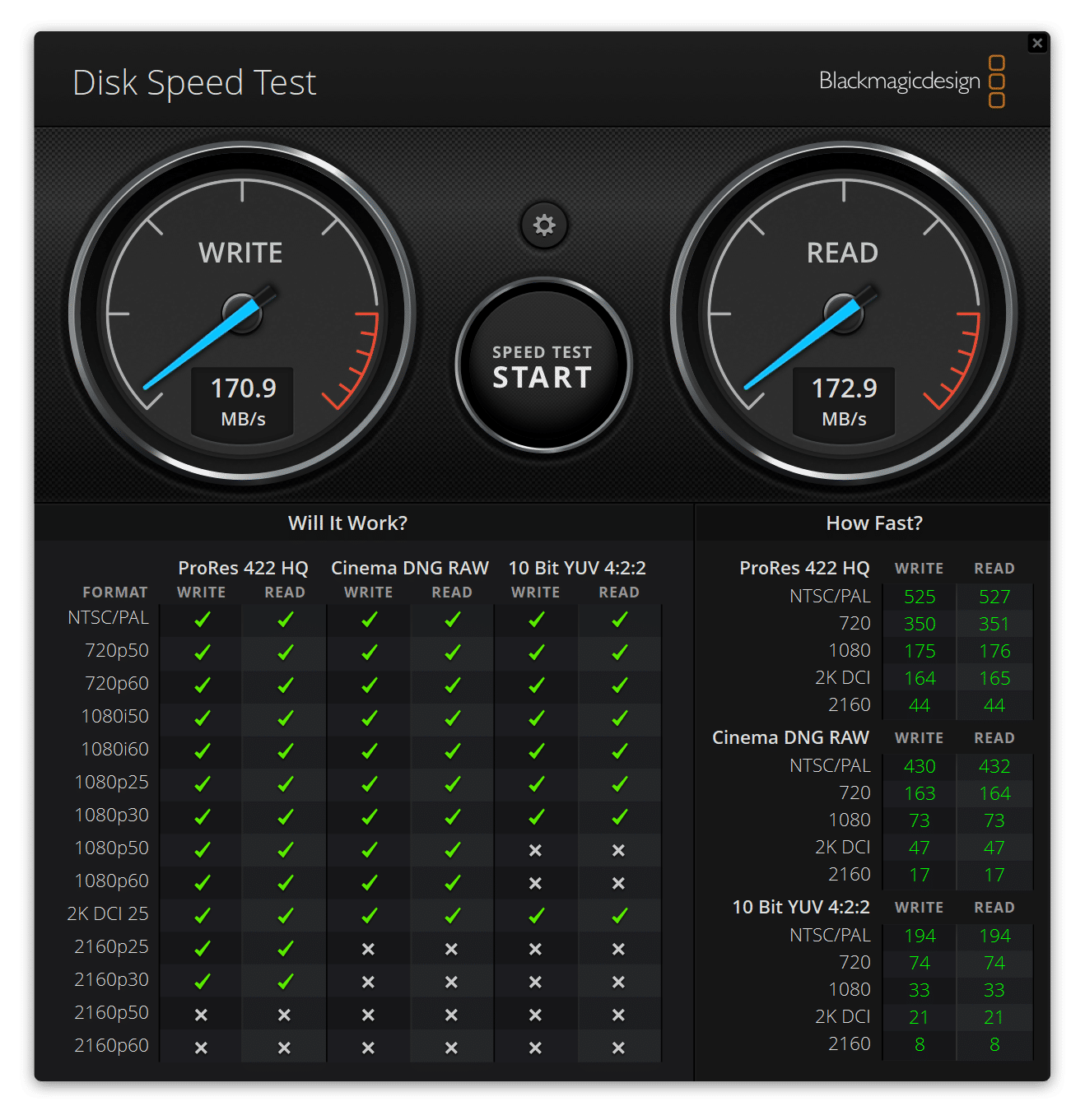
Performance is wholly dependent on the type of drive leveraged. Just to give readers an idea we ran Blackmagic on our [Lenovo P1 Gen 3](https://www.storagereview.com/review/lenovo-thinkpad-p1-gen-3-review). We used a legacy WD Black Se 1TB HDD. The drive several years old, but one of the use cases for these devices is going through older drives to see what is on them or using whatever you can find for temporary storage.

Blackmagic gave us 172.9MB/s read and 170.9MB/s write. Which is about in line for that drive. That’s what we’d expect to see from devices like these, but with lesser accessories, we do at times see oddball performance issues.

![Orico Multi-Port Hub Blackmagic]()

## **Conclusion**

Whether you have several old drives you need to go through or you are a creative professional with large media files on several drives, Orico has a couple of devices for you. The Orico BT2U3-10AB multi-port USB hub adds up to 10 USB ports to your computer. Combine that with the Orico 3588US3-V1 HDD Enclosure and you can quickly and cost-effectively add 10 external HDDs to your system. Of course, this works with portable drives and flash drives as well, should you have these smaller devices.

The setup was super simple. Get power, plug the hub into power and to a computer, and then hook up your USB devices. There are dedicated power buttons to press for each port on the hub. The only downside is that each 3.5″ HDD enclosure will need its own power source (this isn’t specific to this device, they are all like that). While you can use SATA SSDs or 2..5″ HDDs in the enclosure as well, there are better options for that task that Orico also provides.

To validate performance, we tested an old WD Black Se HDD on a Lenovo P1. We saw read and write about 170MB/s, which is what we expected for that particular drive.

Orico makes lots of neat add-on devices and accessories and these two are no different. Combining the Orico BT2U3-10AB multi-port USB hub and Orico 3588US3-V1 HDD Enclosures makes for a cost-effective way to access storage that may not be a permanent fixture in your workspace.

[Orico BT2U3-10AB multi-port USB hub on Amazon](https://amzn.to/3ykiO1k)

[Orico 3588US3-V1 HDD on Amazon](https://amzn.to/2UWbASR)

**Engage with StorageReview**

[Newsletter](https://www.storagereview.com/storage_newsletter) |  [YouTube](https://www.youtube.com/user/StorageReview "Opens in a new window") | Podcast  [iTunes](https://podcasts.apple.com/gb/podcast/storagereview-com-storage-reviews/id1060681115 "Opens in a new window")/ [Spotify](https://open.spotify.com/show/1y6VnznABhHeOSMOmbDTz0 "Opens in a new window") |  [Instagram](https://www.instagram.com/storagereview/ "Opens in a new window") |  [Twitter](https://twitter.com/storagereview "Opens in a new window") |  [TikTok](https://www.tiktok.com/@storagereview? "Opens in a new window") |  [RSS Feed](https://www.storagereview.com/rss.xml)

![]()

### Adam Armstrong

Adam is the chief news editor for StorageReview.com, managing our internal and freelance content teams.

Previous post: [Docker Swarm Install on a Thin Client](https://www.storagereview.com/review/docker-swarm-install-on-a-thin-client)

Next post: [Kingston DC1500M U.2 NVMe SSD Review](https://www.storagereview.com/review/kingston-dc1500m-u-2-nvme-ssd-review)

Trusted Vendors

Products and solutions from our affiliate partners:

- [  
  ![Ubiquiti Logo](https://www.storagereview.com/wp-content/uploads/2024/11/2-1.webp)  
   Ubiquiti](https://store.ui.com/us/en?a_aid=StorageReview "Opens in a new window")
- [  
  ![Newegg Logo](https://www.storagereview.com/wp-content/uploads/2025/11/newegg.webp)  
   Newegg](https://click.linksynergy.com/fs-bin/click?id=g5terNMDhz0&offerid=1207190.18&subid=0&type=4 "Opens in a new window")
- [  
  ![Amazon Logo](https://www.storagereview.com/wp-content/uploads/2025/11/amazon.webp) Amazon](https://amzn.to/4fLJUEW "Opens in a new window")

Newsletter

Subscribe to the StorageReview newsletter to stay up to date on the latest news and reviews. We promise no spam!

1  

Leave this field empty if you’re human:

## Advertisement

Content Categories

[Facebook](https://www.facebook.com/@storagereview) [X](https://twitter.com/storagereview) [Instagram](https://www.instagram.com/storagereview/) [LinkedIn](https://www.linkedin.com/company/storagereview-com) [YouTube](https://www.youtube.com/user/storagereview?sub_confirmation=1) [Email](mailto:info@storagereview.com) [Spotify](https://open.spotify.com/show/1y6VnznABhHeOSMOmbDTz0) [Reddit](https://www.reddit.com/r/StorageReview/) [Discord](https://discord.gg/TwMHb4azdC) [RSS](https://www.storagereview.com/rss.xml) [TikTok](https://www.tiktok.com/@storagereview)

Copyright © 1998-2025 Flying Pig Ventures, LLC Cincinnati, Ohio. All rights reserved.

Manage your privacy

To provide the best experiences, we and our partners use technologies like cookies to store and/or access device information. Consenting to these technologies will allow us and our partners to process personal data such as browsing behavior or unique IDs on this site and show (non-) personalized ads. Not consenting or withdrawing consent, may adversely affect certain features and functions.

Click below to consent to the above or make granular choices. Your choices will be applied to this site only. You can change your settings at any time, including withdrawing your consent, by using the toggles on the Cookie Policy, or by clicking on the manage consent button at the bottom of the screen.

Functional Functional Always active

The technical storage or access is strictly necessary for the legitimate purpose of enabling the use of a specific service explicitly requested by the subscriber or user, or for the sole purpose of carrying out the transmission of a communication over an electronic communications network.

Preferences Preferences

The technical storage or access is necessary for the legitimate purpose of storing preferences that are not requested by the subscriber or user.

Statistics Statistics

The technical storage or access that is used exclusively for statistical purposes. The technical storage or access that is used exclusively for anonymous statistical purposes. Without a subpoena, voluntary compliance on the part of your Internet Service Provider, or additional records from a third party, information stored or retrieved for this purpose alone cannot usually be used to identify you.

Marketing Marketing

The technical storage or access is required to create user profiles to send advertising, or to track the user on a website or across several websites for similar marketing purposes.

Statistics

Marketing

Features

Always active

Always active

- Manage options
- Manage services
- Manage {vendor\_count} vendors
- [Read more about these purposes](https://cookiedatabase.org/tcf/purposes/)

Accept Deny Manage options Save preferences Manage options

- {title}
- {title}
- {title}

Manage your privacy

To provide the best experiences, we use technologies like cookies to store and/or access device information. Consenting to these technologies will allow us to process data such as browsing behavior or unique IDs on this site. Not consenting or withdrawing consent, may adversely affect certain features and functions.

Functional Functional Always active

The technical storage or access is strictly necessary for the legitimate purpose of enabling the use of a specific service explicitly requested by the subscriber or user, or for the sole purpose of carrying out the transmission of a communication over an electronic communications network.

Preferences Preferences

The technical storage or access is necessary for the legitimate purpose of storing preferences that are not requested by the subscriber or user.

Statistics Statistics

The technical storage or access that is used exclusively for statistical purposes. The technical storage or access that is used exclusively for anonymous statistical purposes. Without a subpoena, voluntary compliance on the part of your Internet Service Provider, or additional records from a third party, information stored or retrieved for this purpose alone cannot usually be used to identify you.

Marketing Marketing

The technical storage or access is required to create user profiles to send advertising, or to track the user on a website or across several websites for similar marketing purposes.

Statistics

Marketing

Features

Always active

Always active

- Manage options
- Manage services
- Manage {vendor\_count} vendors
- [Read more about these purposes](https://cookiedatabase.org/tcf/purposes/)

Accept Deny Manage options Save preferences Manage options

- {title}
- {title}
- {title}

Manage consent Manage consent

```json
{"@context":"https:\/\/schema.org","@graph":[{"@type":"WebPage","@id":"https:\/\/www.storagereview.com\/review\/orico-multi-port-hub-hdd-enclosure-expand-desktop-storage","url":"https:\/\/www.storagereview.com\/review\/orico-multi-port-hub-hdd-enclosure-expand-desktop-storage","name":"Orico Multi-Port Hub & HDD Enclosure Expand Desktop Storage - StorageReview.com","isPartOf":{"@id":"https:\/\/www.storagereview.com\/#website"},"primaryImageOfPage":{"@id":"https:\/\/www.storagereview.com\/review\/orico-multi-port-hub-hdd-enclosure-expand-desktop-storage#primaryimage"},"image":{"@id":"https:\/\/www.storagereview.com\/review\/orico-multi-port-hub-hdd-enclosure-expand-desktop-storage#primaryimage"},"thumbnailUrl":"https:\/\/www.storagereview.com\/wp-content\/uploads\/2021\/07\/StorageReview-orico-sata-lifestyle3.jpg","datePublished":"2021-07-02T15:46:54+00:00","description":"The Orico Multi-Port Hub is a useful 10-port USB hub that brings a ton of storage flexibility to any workspace, combined with HDD enclousures.","breadcrumb":{"@id":"https:\/\/www.storagereview.com\/review\/orico-multi-port-hub-hdd-enclosure-expand-desktop-storage#breadcrumb"},"inLanguage":"en-US","potentialAction":[{"@type":"ReadAction","target":["https:\/\/www.storagereview.com\/review\/orico-multi-port-hub-hdd-enclosure-expand-desktop-storage"]}]},{"@type":"ImageObject","inLanguage":"en-US","@id":"https:\/\/www.storagereview.com\/review\/orico-multi-port-hub-hdd-enclosure-expand-desktop-storage#primaryimage","url":"https:\/\/www.storagereview.com\/wp-content\/uploads\/2021\/07\/StorageReview-orico-sata-lifestyle3.jpg","contentUrl":"https:\/\/www.storagereview.com\/wp-content\/uploads\/2021\/07\/StorageReview-orico-sata-lifestyle3.jpg","width":1920,"height":1280},{"@type":"BreadcrumbList","@id":"https:\/\/www.storagereview.com\/review\/orico-multi-port-hub-hdd-enclosure-expand-desktop-storage#breadcrumb","itemListElement":[{"@type":"ListItem","position":1,"name":"Home","item":"https:\/\/www.storagereview.com\/"},{"@type":"ListItem","position":2,"name":"Review","item":"https:\/\/www.storagereview.com\/review"},{"@type":"ListItem","position":3,"name":"Orico Multi-Port Hub &#038; HDD Enclosure Expand Desktop Storage"}]},{"@type":"WebSite","@id":"https:\/\/www.storagereview.com\/#website","url":"https:\/\/www.storagereview.com\/","name":"StorageReview.com","description":"StorageReview.com is a leading provider of news and reviews throughout the entire IT stack - from the datacenter to the edge, and all points in between.","publisher":{"@id":"https:\/\/www.storagereview.com\/#organization"},"potentialAction":[{"@type":"SearchAction","target":{"@type":"EntryPoint","urlTemplate":"https:\/\/www.storagereview.com\/?s={search_term_string}"},"query-input":{"@type":"PropertyValueSpecification","valueRequired":true,"valueName":"search_term_string"}}],"inLanguage":"en-US"},{"@type":"Organization","@id":"https:\/\/www.storagereview.com\/#organization","name":"StorageReview.com","url":"https:\/\/www.storagereview.com\/","logo":{"@type":"ImageObject","inLanguage":"en-US","@id":"https:\/\/www.storagereview.com\/#\/schema\/logo\/image\/","url":"https:\/\/www.storagereview.com\/wp-content\/uploads\/2020\/02\/Storage-Reviews-2-2.png","contentUrl":"https:\/\/www.storagereview.com\/wp-content\/uploads\/2020\/02\/Storage-Reviews-2-2.png","width":344,"height":61,"caption":"StorageReview.com"},"image":{"@id":"https:\/\/www.storagereview.com\/#\/schema\/logo\/image\/"},"sameAs":["https:\/\/x.com\/storagereview","http:\/\/youtube.com\/user\/storagereview"]}]}
```