

High availability has moved from a data center luxury to a line item in ordinary resiliency planning. Small businesses and edge sites now run point-of-sale, surveillance, and shared storage that cost money every minute they are down, yet the classic answer, a dual-controller enterprise array, is sized and priced for the data center rather than a branch closet or a wall-mount rack. That mismatch has left smaller IT shops with backups and snapshots for data protection but nothing for continuity: a single-controller NAS, however well-built, remains a single point of failure.
High availability is not new territory for QNAP, which has offered dual-controller hardware and replication-based recovery paths. What changes with QuTS hero h6.0 is efficiency. The new High Availability Manager builds clustering into the operating system on ordinary hardware, letting two identical NAS units form an active-passive cluster behind a single IP address, so that when one box goes down, the other takes over and clients barely notice. For an organization trying to right-size its IT investment, that is HA at the cost of a second NAS rather than a second class of infrastructure.
That is the pitch: to see how it holds up in practice, we built an HA cluster in the lab from two QNAP TS-h765eU systems loaded with Seagate IronWolf Pro hard drives and QNAP E1.S SSDs for cache, then set out to break it in the same way failures occur in edge locations. We pulled the power on the active node mid-transfer. We yanked its network connection while leaving the heartbeat intact. In both cases, the question was the same: does the file transfer survive, and what does recovery look like when the failed node comes back?
QNAP TS-h765eU Overview
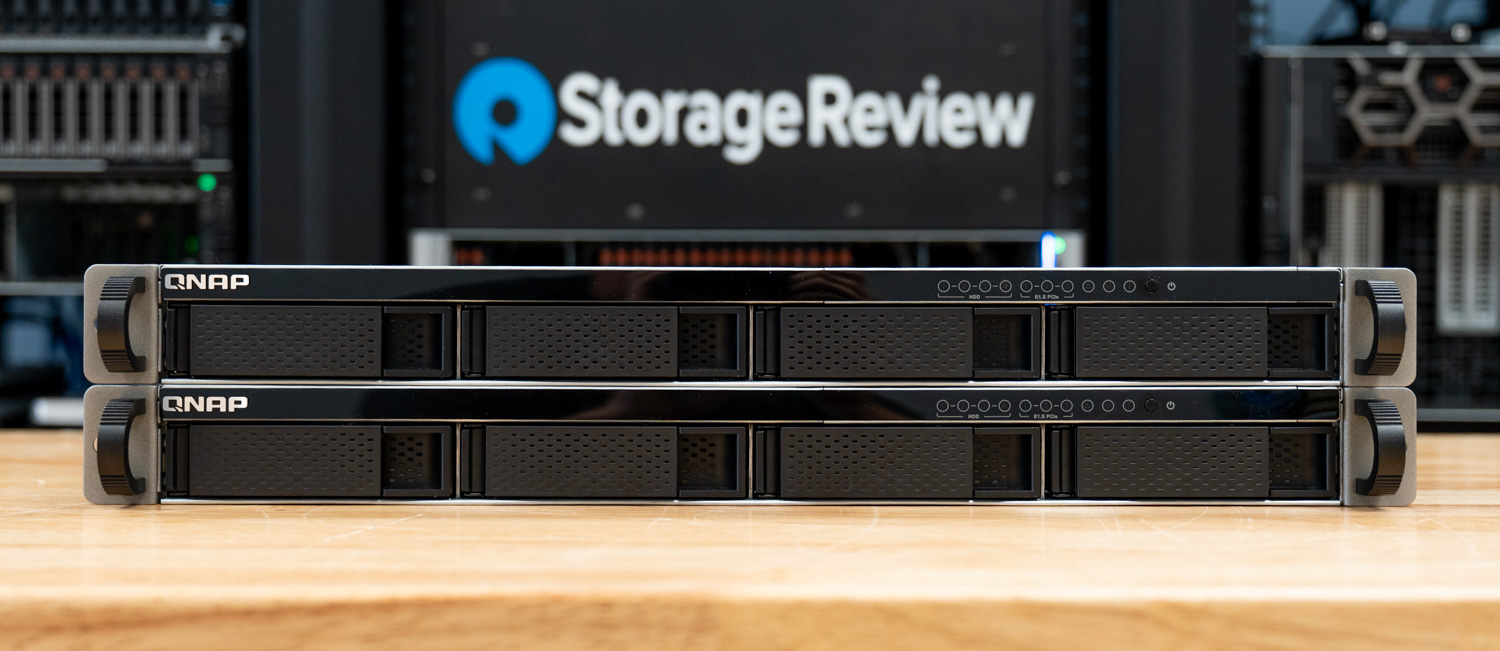
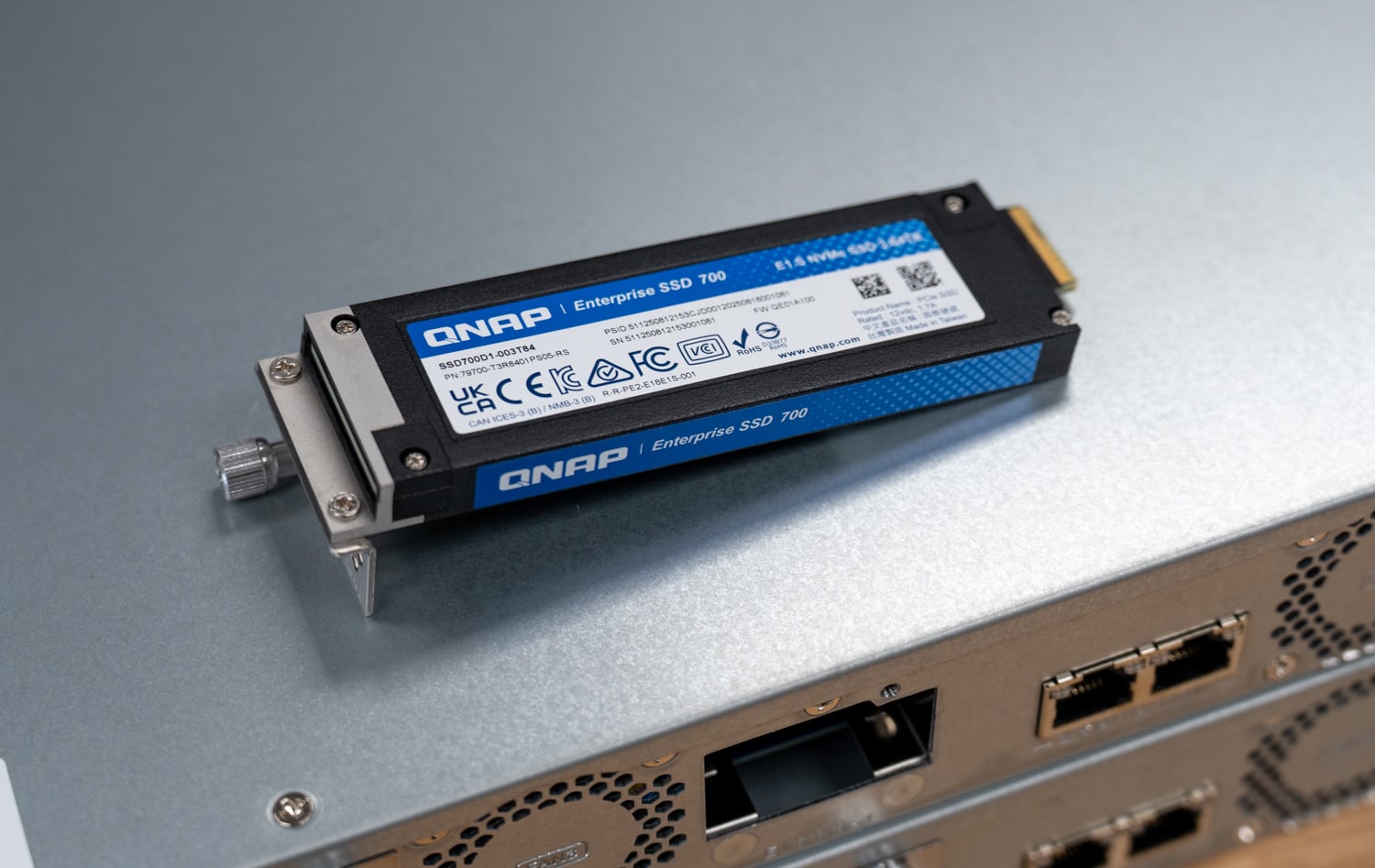
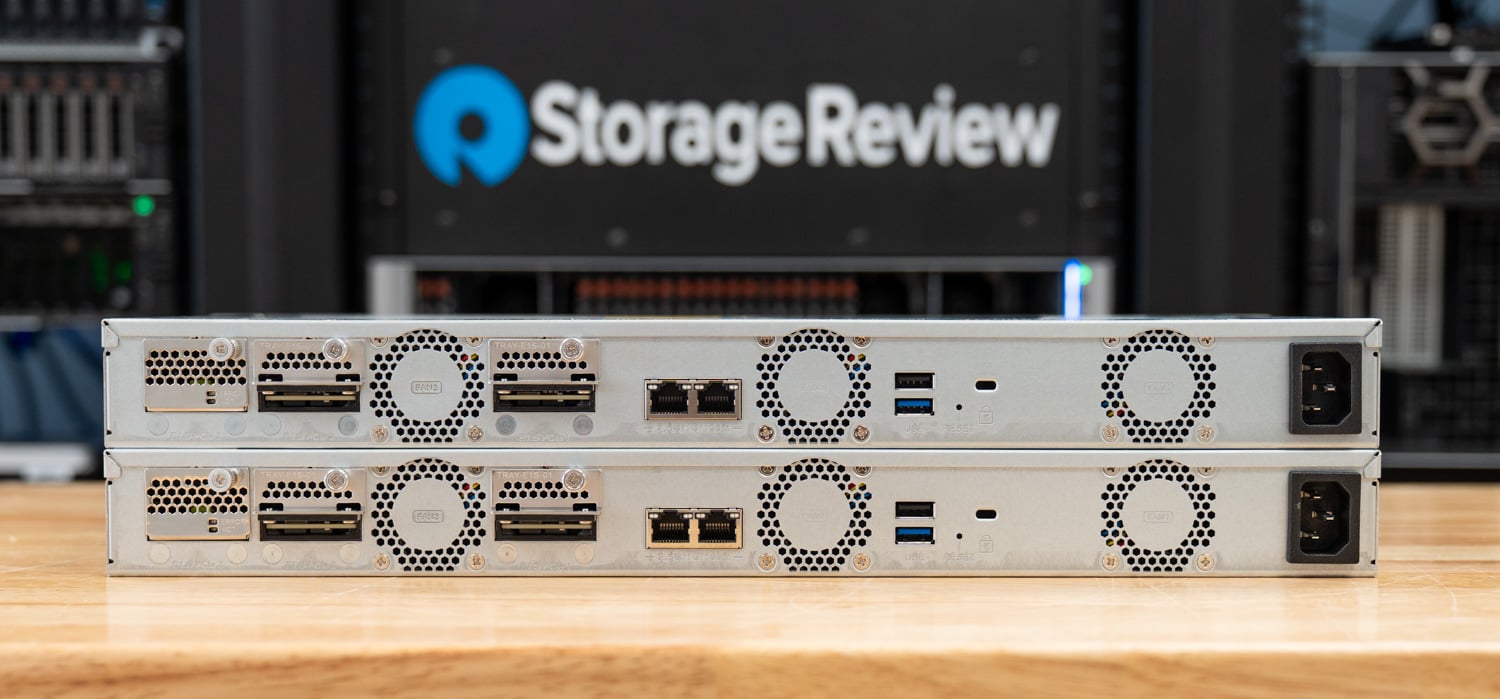
The TS-h765eU is an interesting choice as an HA building block precisely because it’s relatively simple hardware. The enclosure is a 1U short-depth rackmount NAS, just 292.1mm (12 inches) deep, designed for small media cabinets, wall-mounted network racks, and edge deployments where a full-depth chassis will not fit. Each unit offers four 3.5-inch SATA drive bays up front, plus three E1.S/M.2 PCIe NVMe slots on the rear, giving it a hybrid storage personality: spinning disk for capacity, flash for caching or fast tiers.

QNAP has also designated it as a long-term supply model with availability guaranteed through 2031, which matters for organizations standardizing on a platform across sites.
Inside, the TS-h765eU runs Intel’s Atom x7405C, a quad-core chip that offers up to 3.4GHz, paired with 8GB of DDR5 memory, upgradable to 16GB, with In-Band ECC. Networking starts with dual 2.5GbE ports, with 10GbE available by swapping an E1.S bay for QNAP’s QXG-ES10G1T module.
| Specification | QNAP TS-h765eU |
|---|---|
| CPU | Intel Atom x7405C quad-core, up to 3.4GHz |
| Memory | 8GB DDR5, upgradable to 16GB (In-Band ECC) |
| Drive Bays | 4 x 3.5-inch SATA |
| Flash Slots | 3 x E1.S / M.2 PCIe NVMe |
| Networking | 2 x 2.5GbE, 10GbE via optional QXG-ES10G1T E1.S module |
| Form Factor | 1U short-depth rackmount, 292.1mm (12 in) deep |
| Operating System | QuTS hero h6.0 (ZFS-based) |
| Availability | Long-term supply model through 2031 |
For this evaluation, each node was populated with four Seagate IronWolf Pro 30TB hard drives (ST30000NT011) in a RAID 5 storage pool, plus two 3.84TB QNAP SSD700 E1.S drives (SSD700D1-003T84) in RAID 0 as cache. Both systems ran QuTS hero h6.0.0.3500 with High Availability Manager 2.0.421.
QuTS hero h6.0 and the HA Manager Architecture
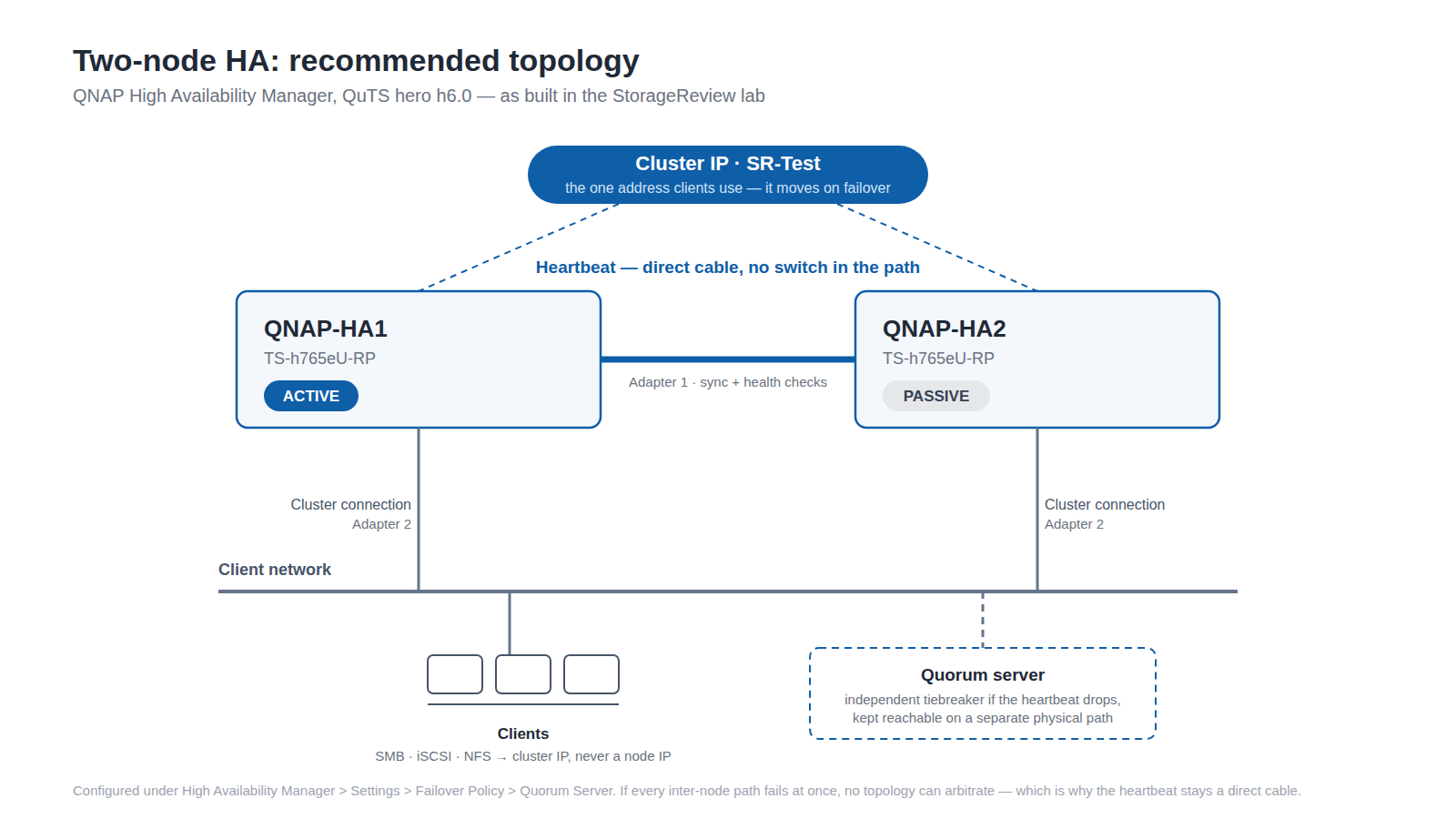
High Availability Manager is the headline feature of QuTS hero h6.0, implementing a classic active-passive design. One NAS, the active node, serves all data and services. The second NAS, the passive node, continuously synchronizes with the active node over a dedicated heartbeat connection and stands ready to take over. Clients never talk to either node directly; instead, the cluster presents a single IP address and hostname, and whichever node is currently active responds to it. When a failover occurs, the cluster IP redirects traffic on the backend, so mapped drives, iSCSI initiators, and backup jobs do not need to be repointed.
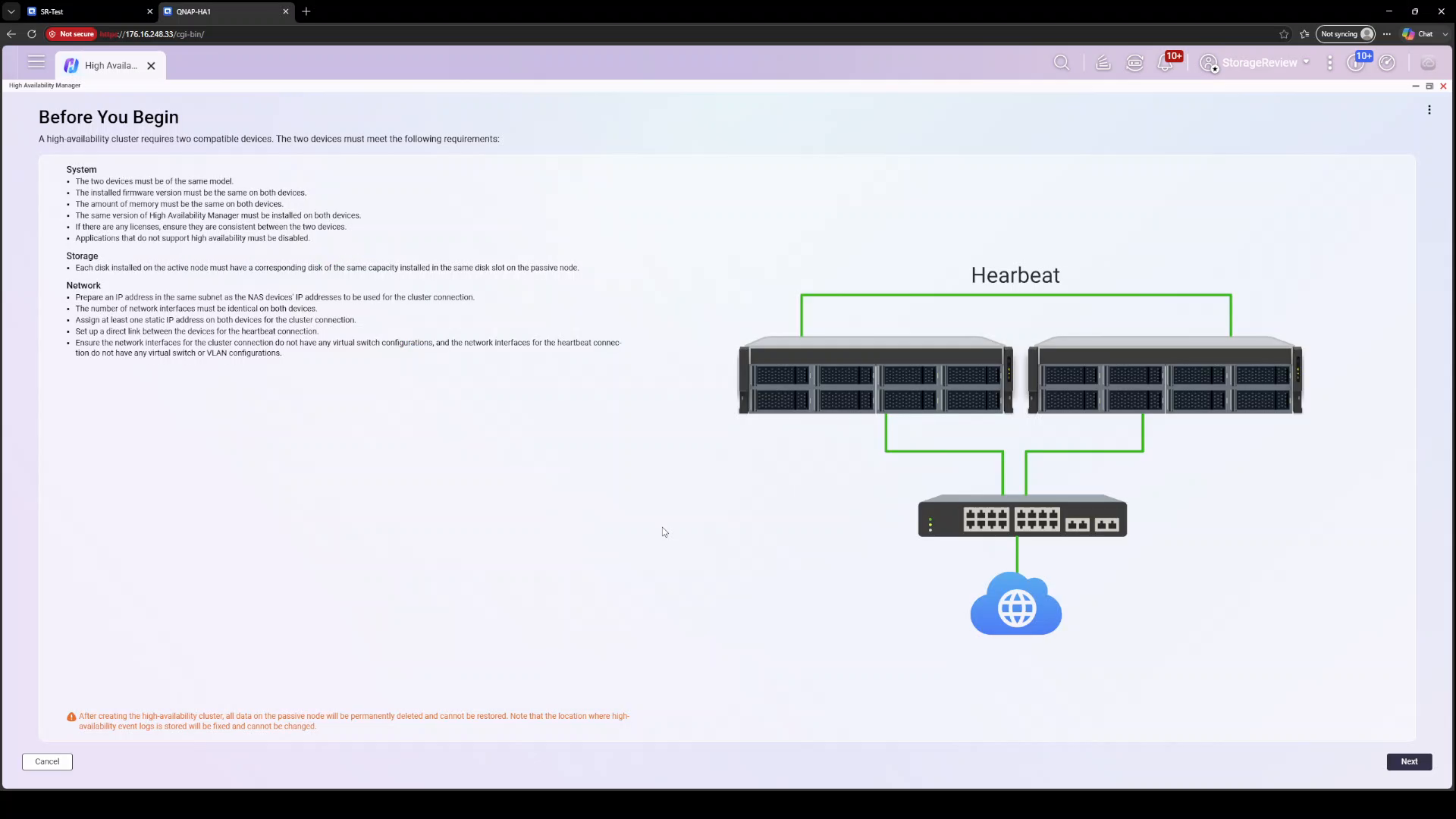
The heartbeat link is the backbone of the design. QNAP requires a direct connection between the two units, with no switches in the path, and it carries both health-check traffic and block-level data synchronization between nodes. A separate cluster connection handles client-facing traffic through the normal network. Rounding out the split-brain protection is a quorum server, a third witness on the network that helps a node determine whether it should promote itself when the heartbeat goes quiet. We cover split-brain and the deployment topology that prevents it in detail later in this review.
QNAP says over 90 percent of NAS services are HA-ready in h6.0, and the cluster can extend capacity with JBOD expansion enclosures. There are caveats. Immutable snapshots, another marquee h6.0 feature, are not currently supported inside an HA cluster, so administrators will have to choose between the two protections for now. HA also requires two identical systems, matching model and firmware, which the pairing wizard enforces before allowing you to proceed.
Building the QNAP HA Cluster
Cluster creation starts from two independently configured TS-h765eU units with identical hardware. From the designated active node, the High Availability Manager wizard walks through a short pairing process. The wizard discovers the passive node over the heartbeat link, then asks you to assign roles to your network interfaces: a cluster connection that serves as the communication channel for access to the cluster, and the heartbeat connection, which QNAP notes is dedicated to syncing data and must be a direct link between the devices. In our build, the wizard assigned the heartbeat to Adapter 1 and the cluster connection to Adapter 2.
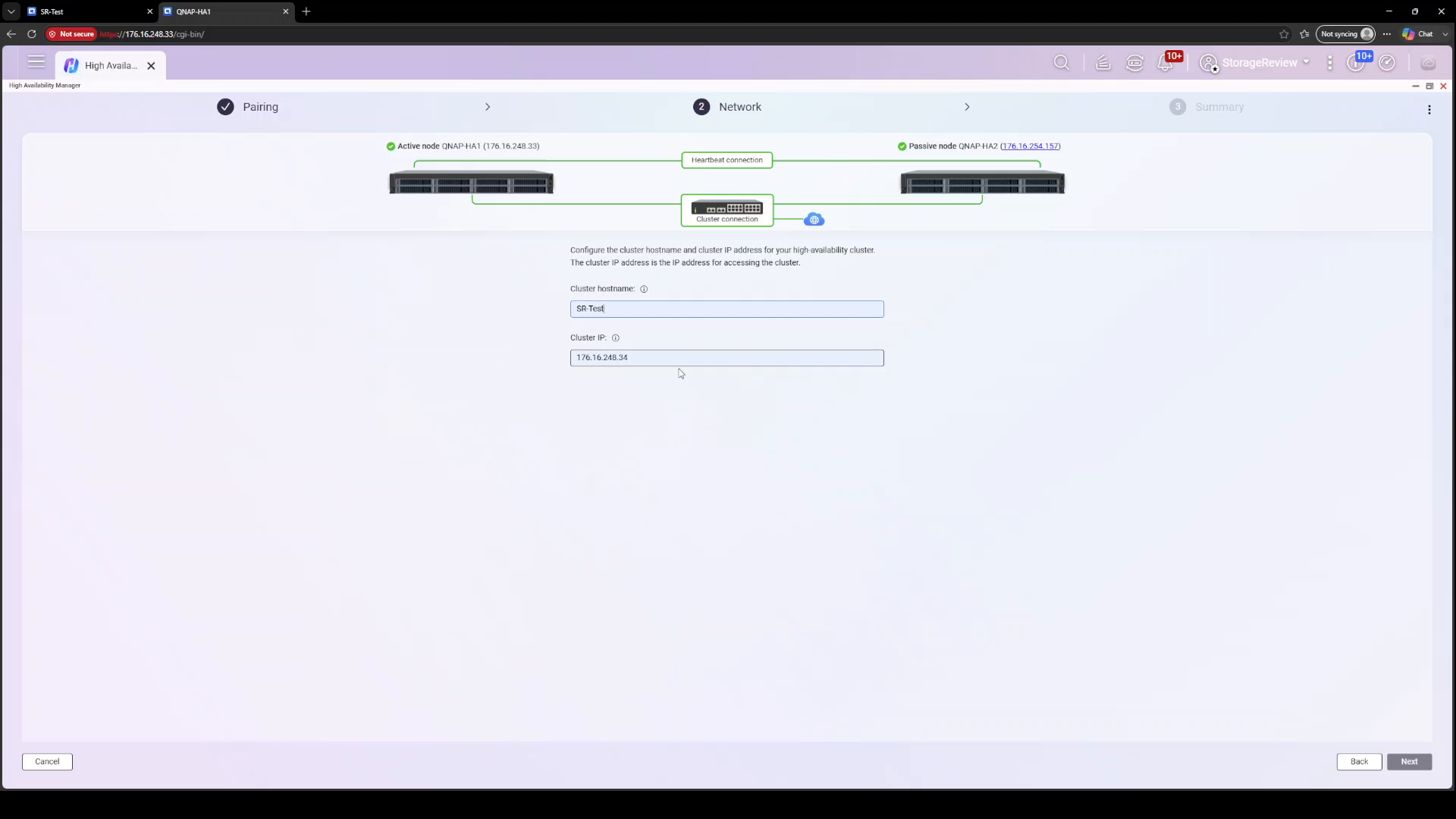
Next comes cluster identity. You assign a cluster hostname and a cluster IP address, which become the single address clients use from that point forward. Our cluster was named SR-Test at 176.16.248.34, sitting in front of nodes QNAP-HA1 (176.16.248.33) and QNAP-HA2 (176.16.254.157), the two nodes sitting in different /24 subnets on the lab network; the wizard paired them without complaint.
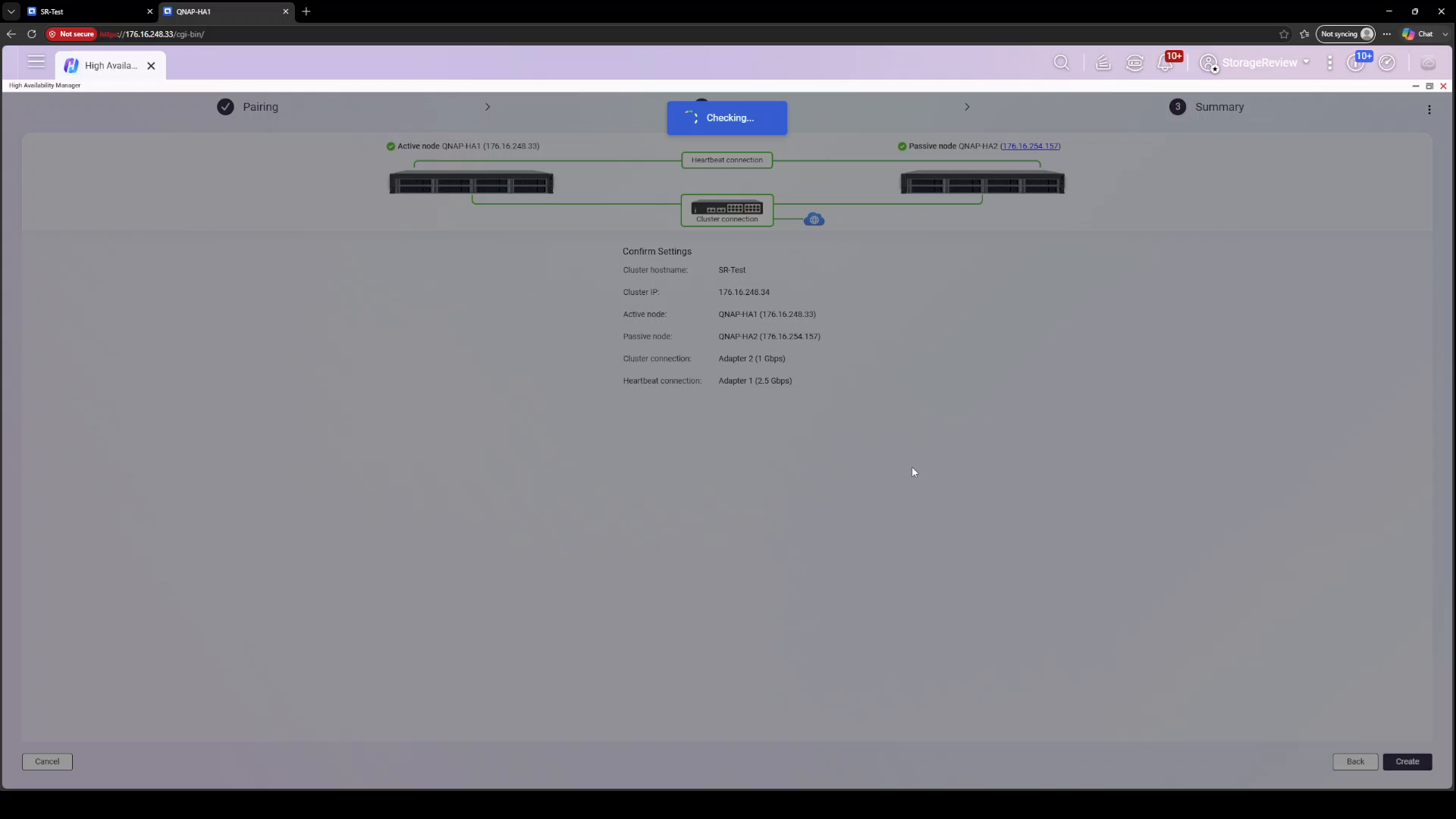
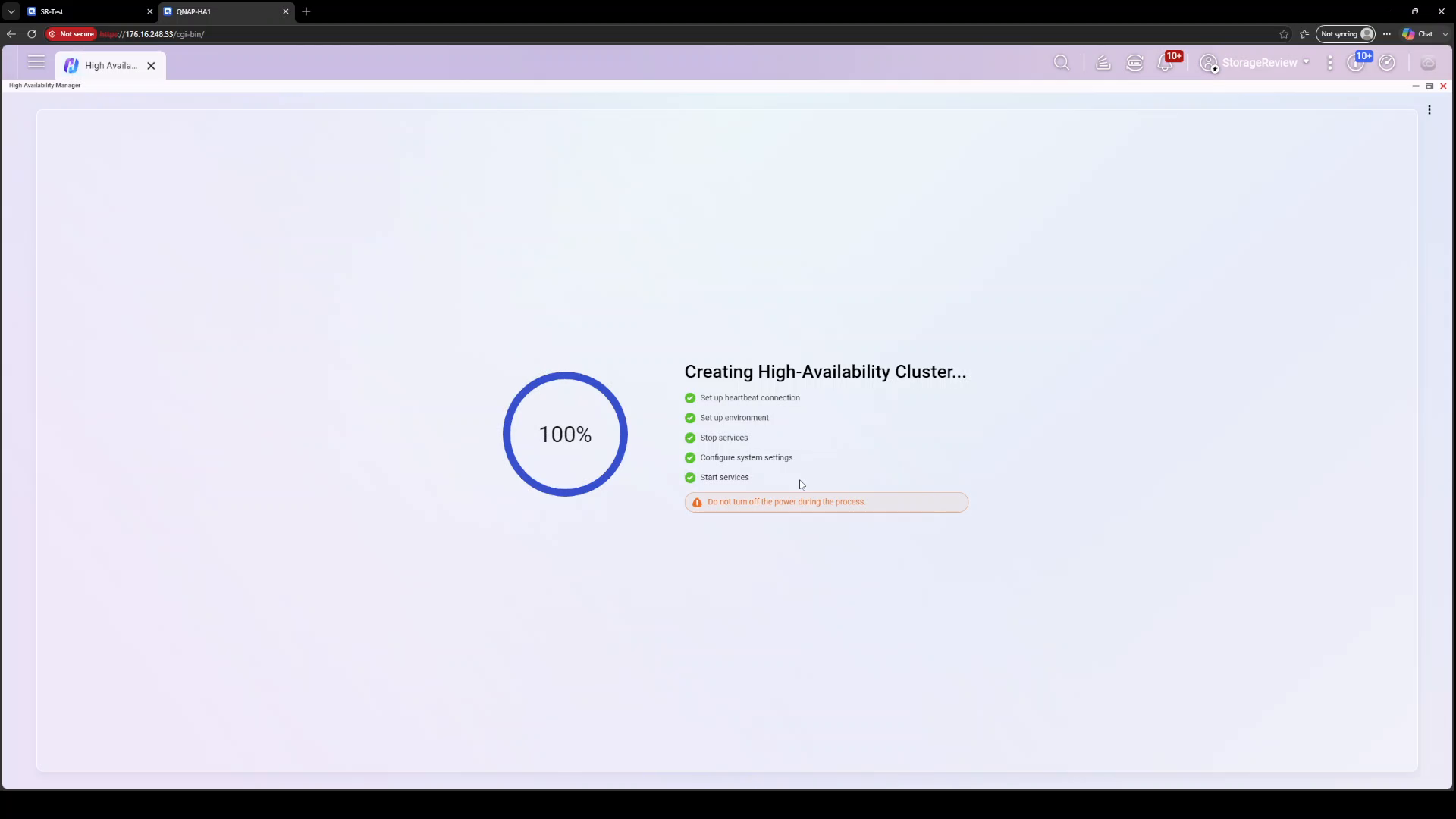
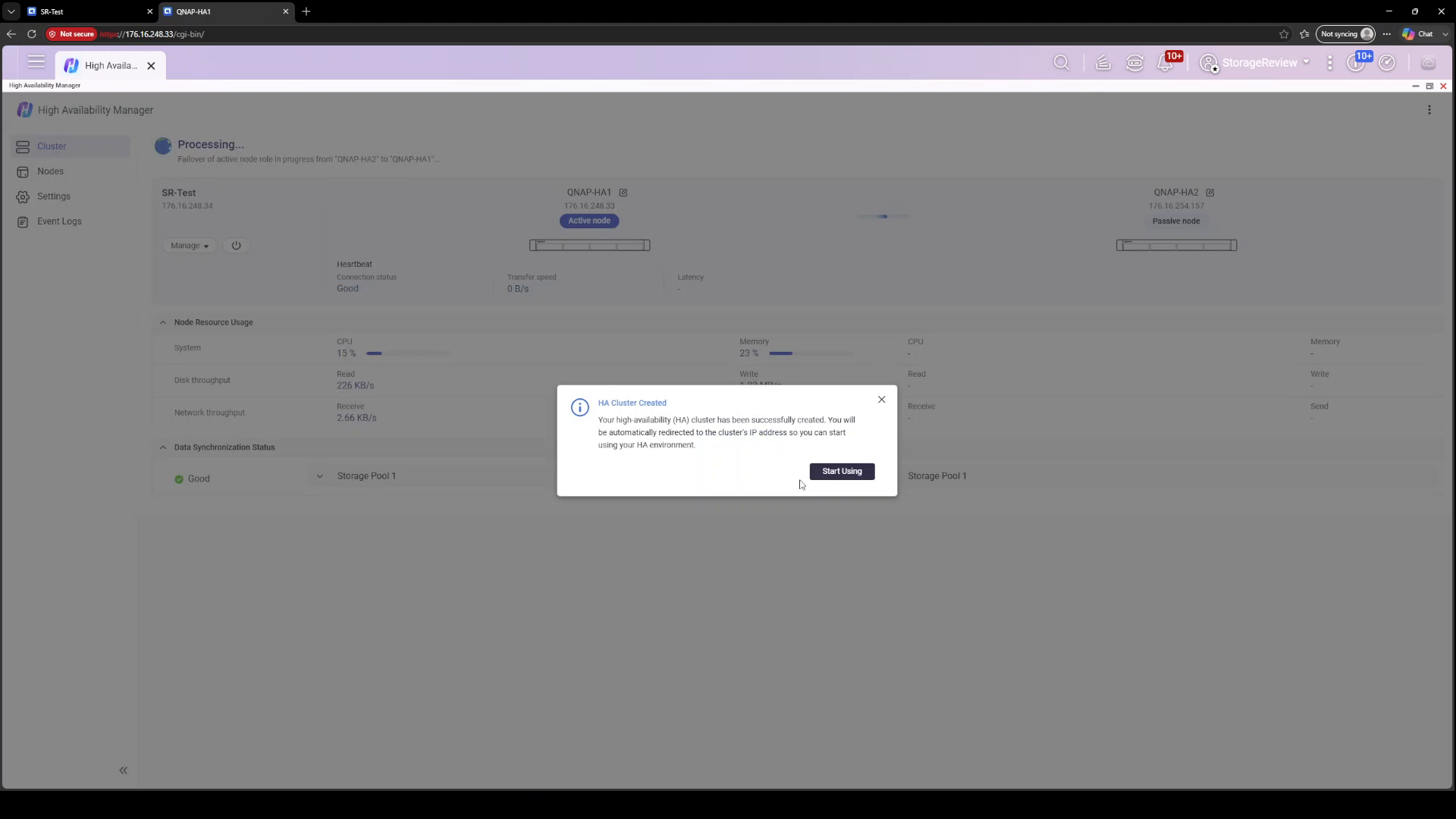
With settings confirmed, the wizard executes a five-step build: set up the heartbeat connection, set up the environment, stop services, configure system settings, and start services. The UI emphasizes that you should not power anything off during this window. On our systems, the build itself completed in about five and a half minutes, after which HA Manager reported the cluster created and redirected us to the cluster IP. Start to finish, going from two standalone NAS units to a serving cluster took under ten minutes of wizard time.
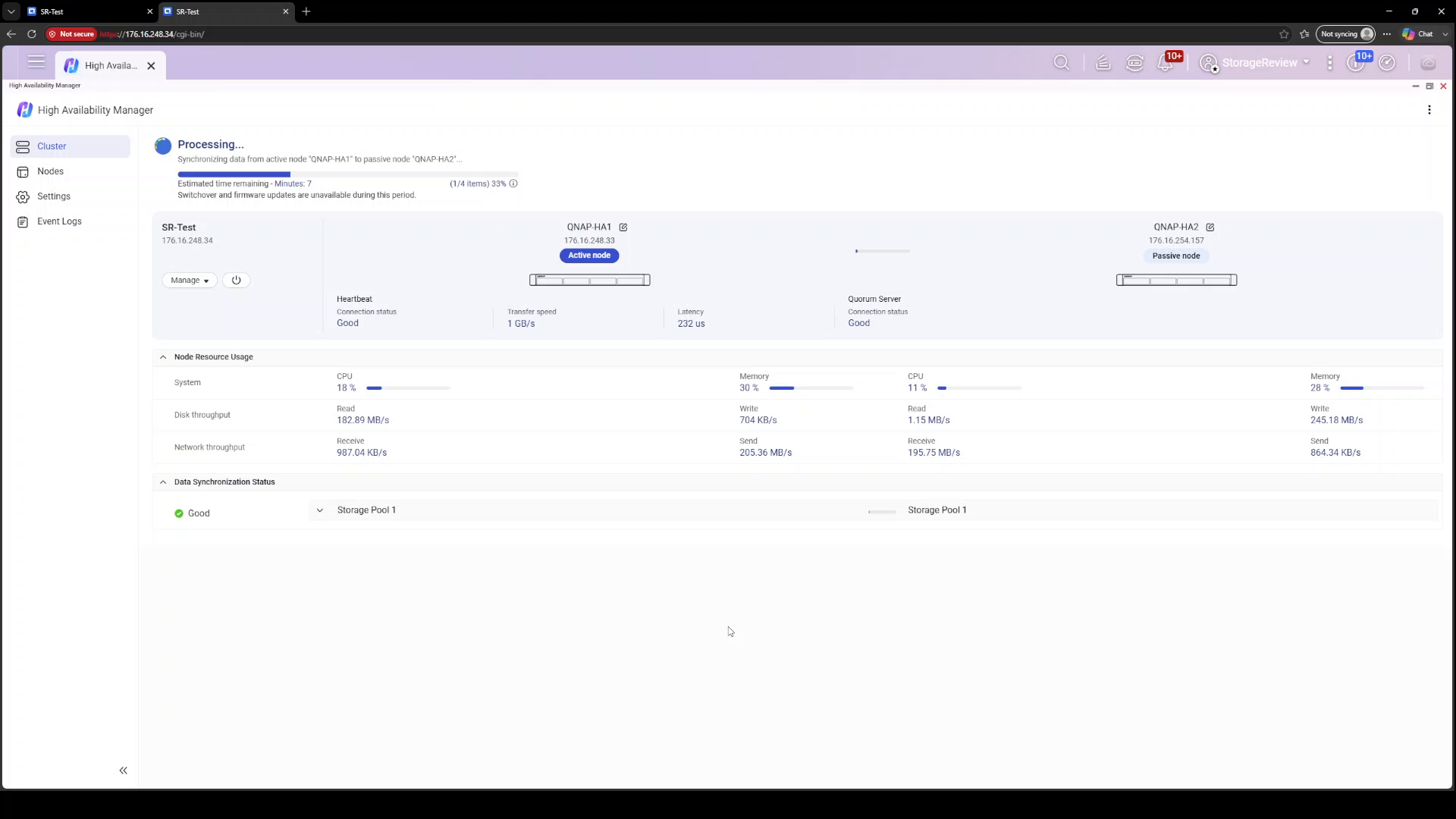
The heavier lift is the initial synchronization, in which the active node replicates its storage pool to the passive node, block by block. HA Manager surfaces this clearly with a progress bar, item count, and time estimate at the top of the dashboard, along with a warning that switchover and firmware updates are unavailable until sync completes. Watching the heartbeat statistics during this phase was one of the more impressive parts of the process: transfer speeds ranged from roughly 900 MB/s to 1.2 GB/s, with latency in the hundreds of microseconds, including one representative reading of 1 GB/s at 232 microseconds. Our initial sync completed in roughly ten minutes, right in line with the dashboard’s opening estimate of nine.
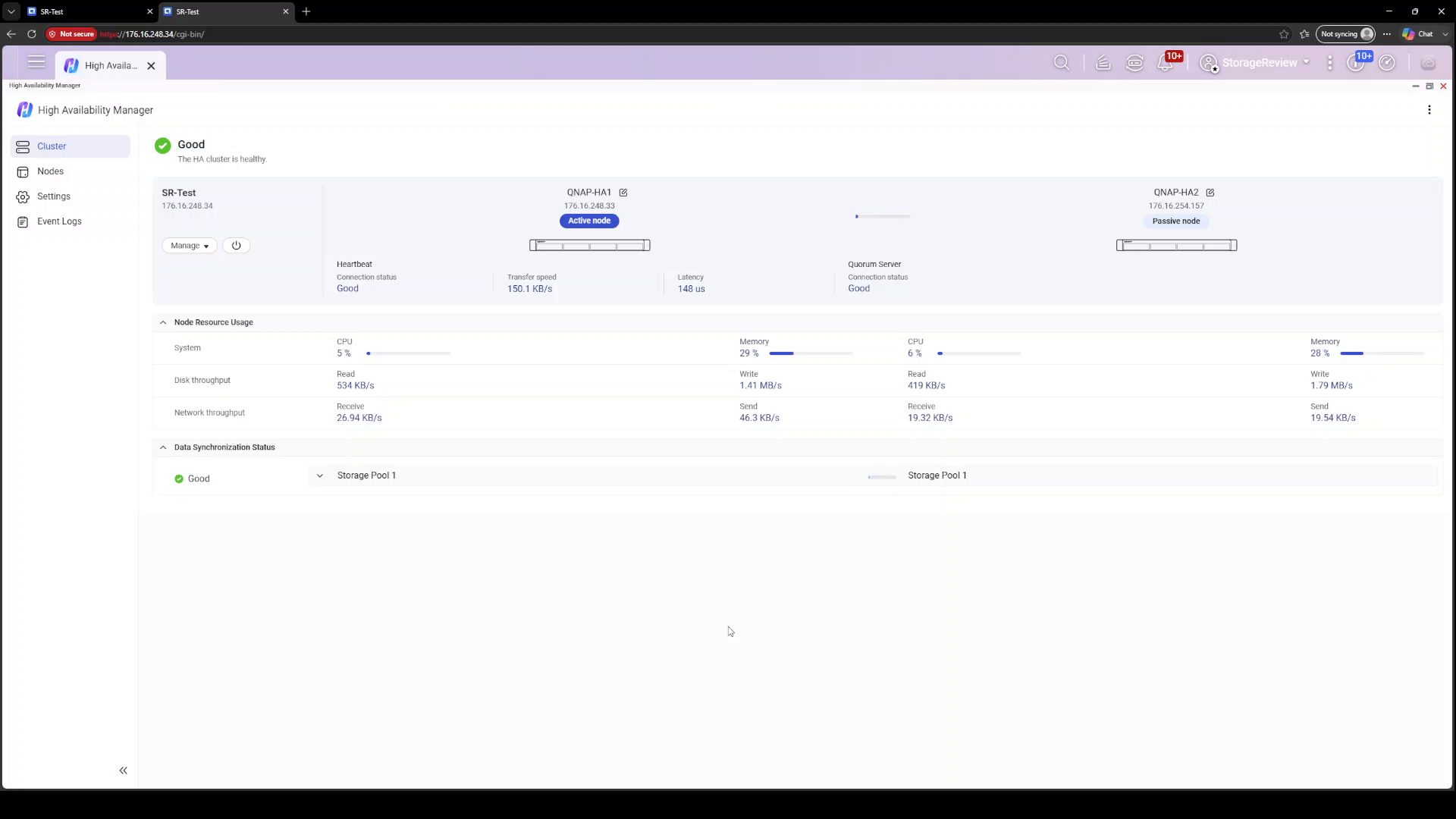
Once synchronization finishes, the dashboard settles into a Good status: cluster healthy, heartbeat connected, both nodes visible with live CPU, memory, disk throughput, and network statistics side by side, and per-pool synchronization status down below. It is a clean, information-dense view that answers the two questions an admin actually has: Is the cluster healthy, and is my data in sync?
Failover Test 1: Power Loss on the Active Node
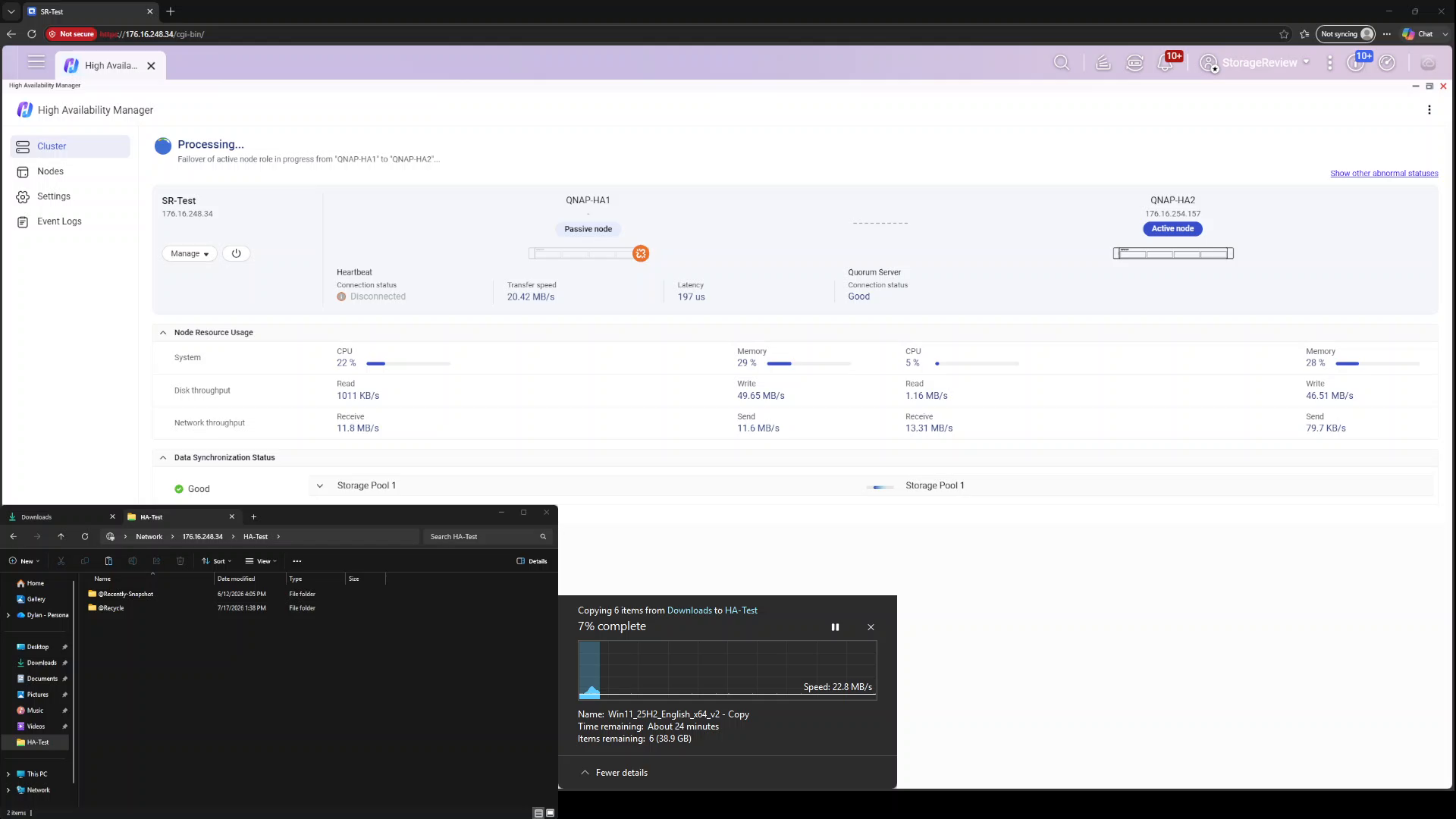
Our first failure scenario is the blunt one: total power loss on the active node. We started a Windows file copy from a client to an SMB share on the cluster IP, a 41.1GB batch of six files including Windows 11 and Rocky Linux ISOs and a pair of Kali Linux VM archives, then pulled the power on QNAP-HA1 mid-transfer.
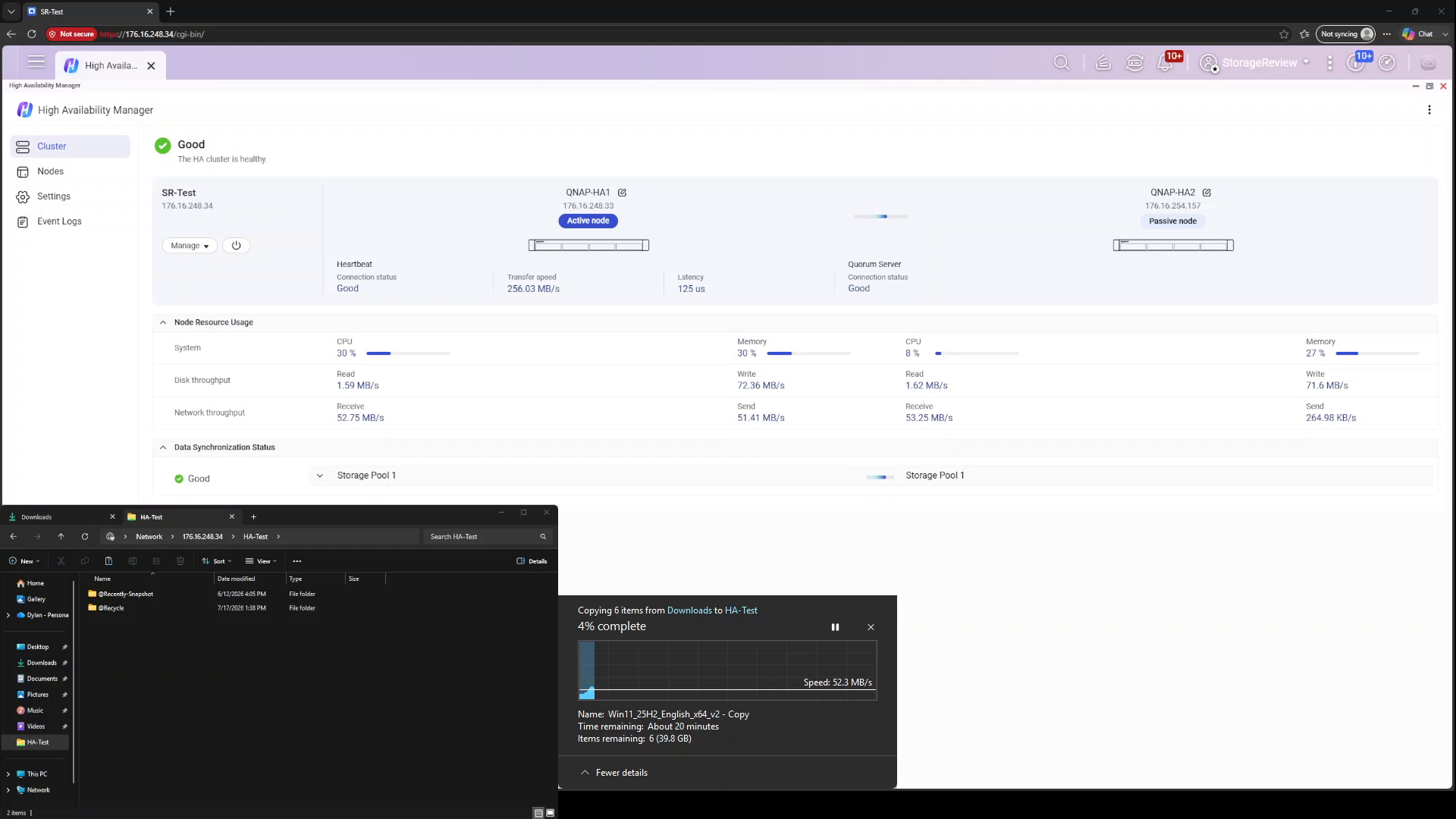
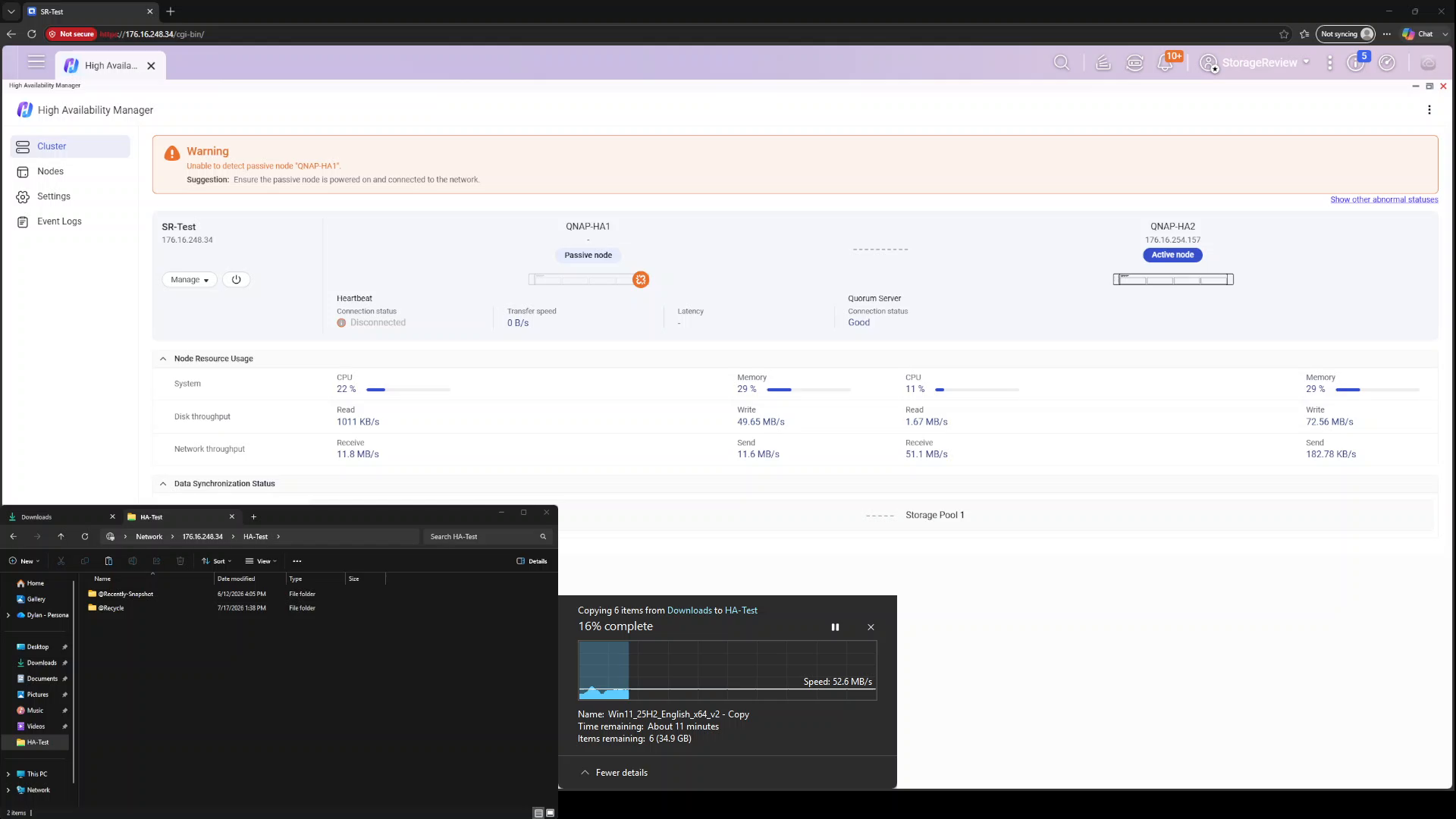
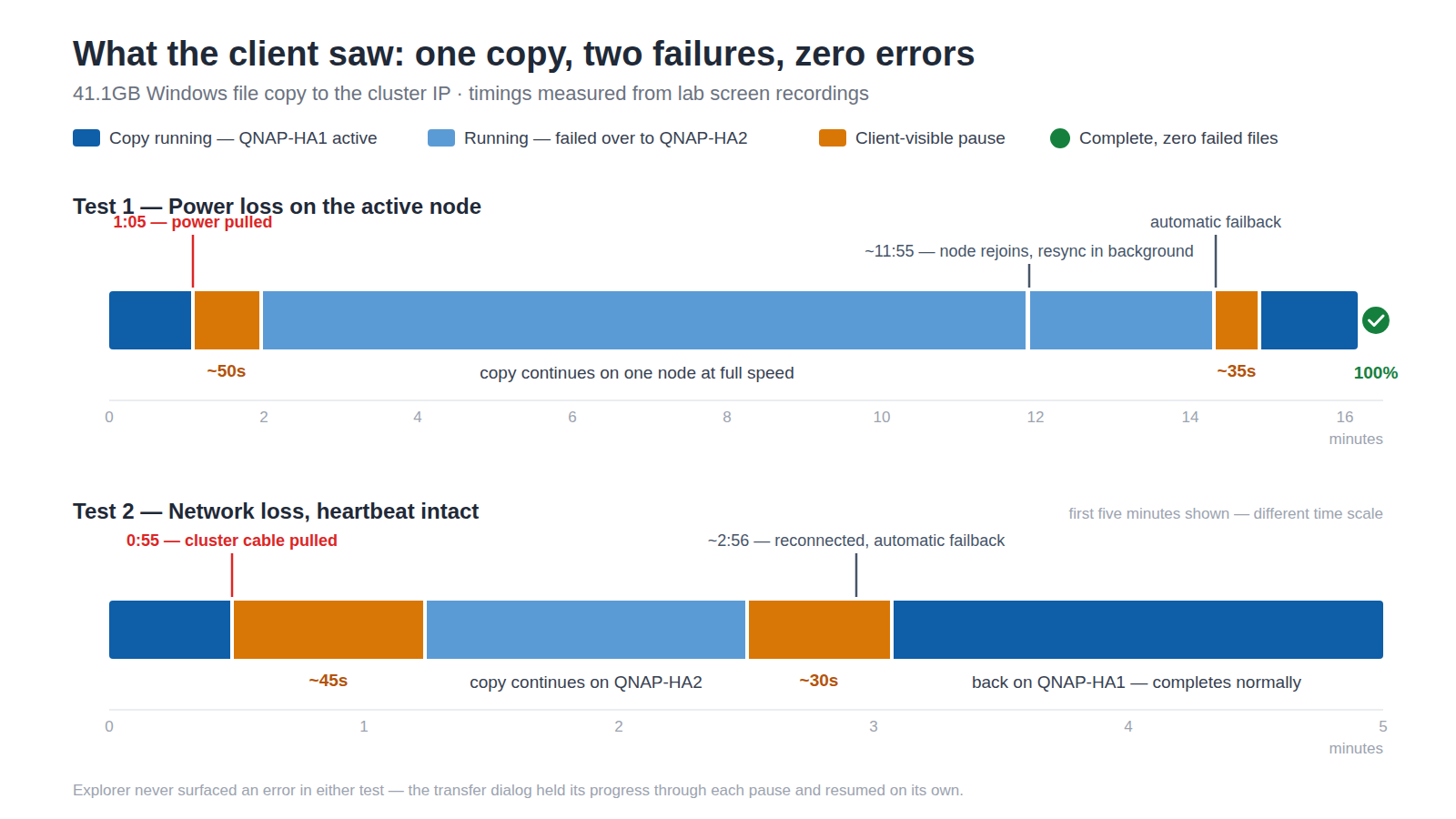
From the client’s perspective, the copy stalled for just under a minute, roughly 50 seconds, from the power pull to data moving again, and Explorer never surfaced an error; the transfer dialog held its progress, then picked back up as QNAP-HA2 promoted itself to active. HA Manager briefly reported the failover of the active node role in progress, then raised a warning banner: unable to detect passive node QNAP-HA1, with the suggestion to ensure the node is powered on and connected to the network. The transfer continued against the same cluster IP at full speed while the cluster ran on one node, which is exactly the degraded-but-operational state HA promises.
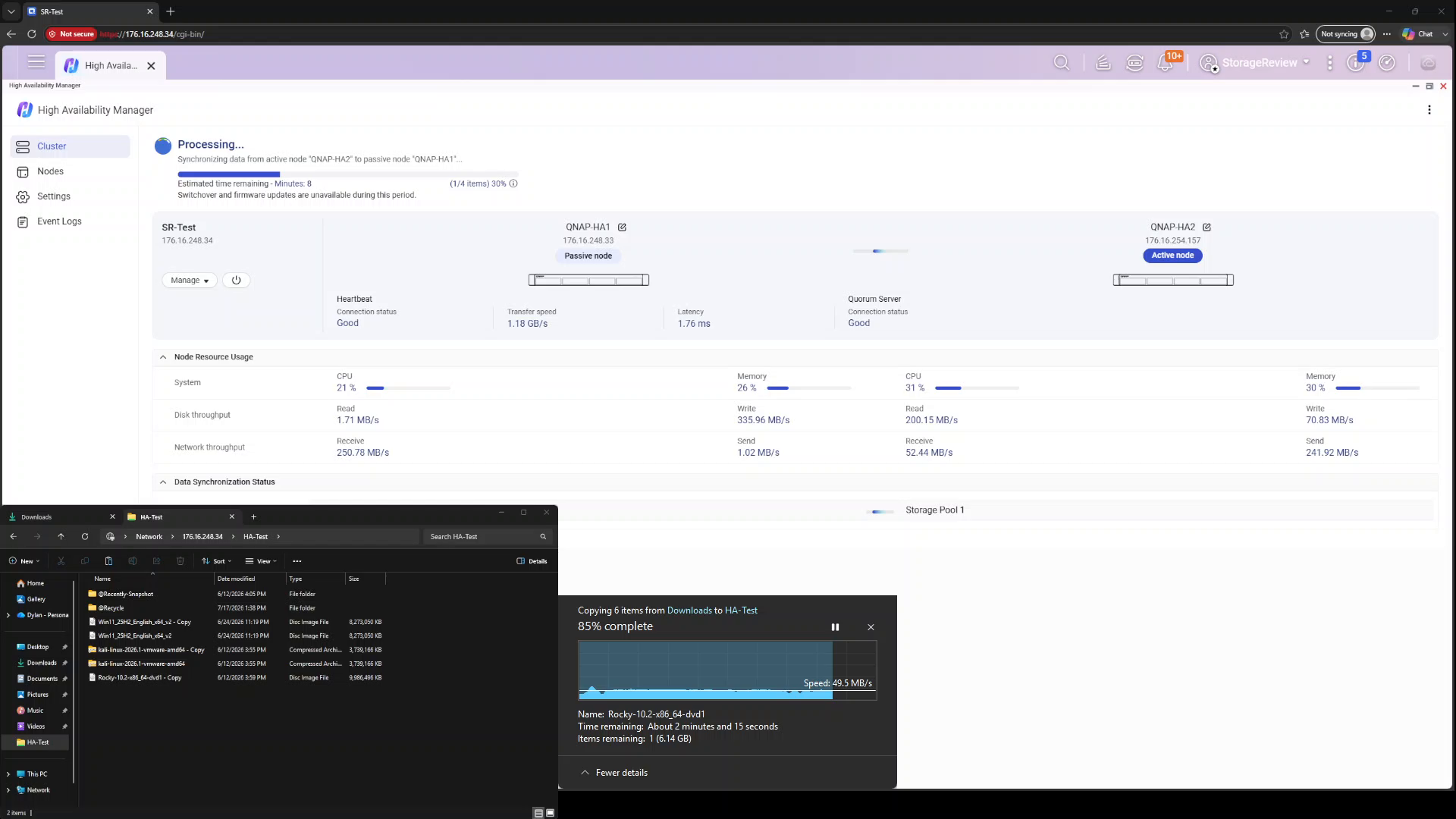
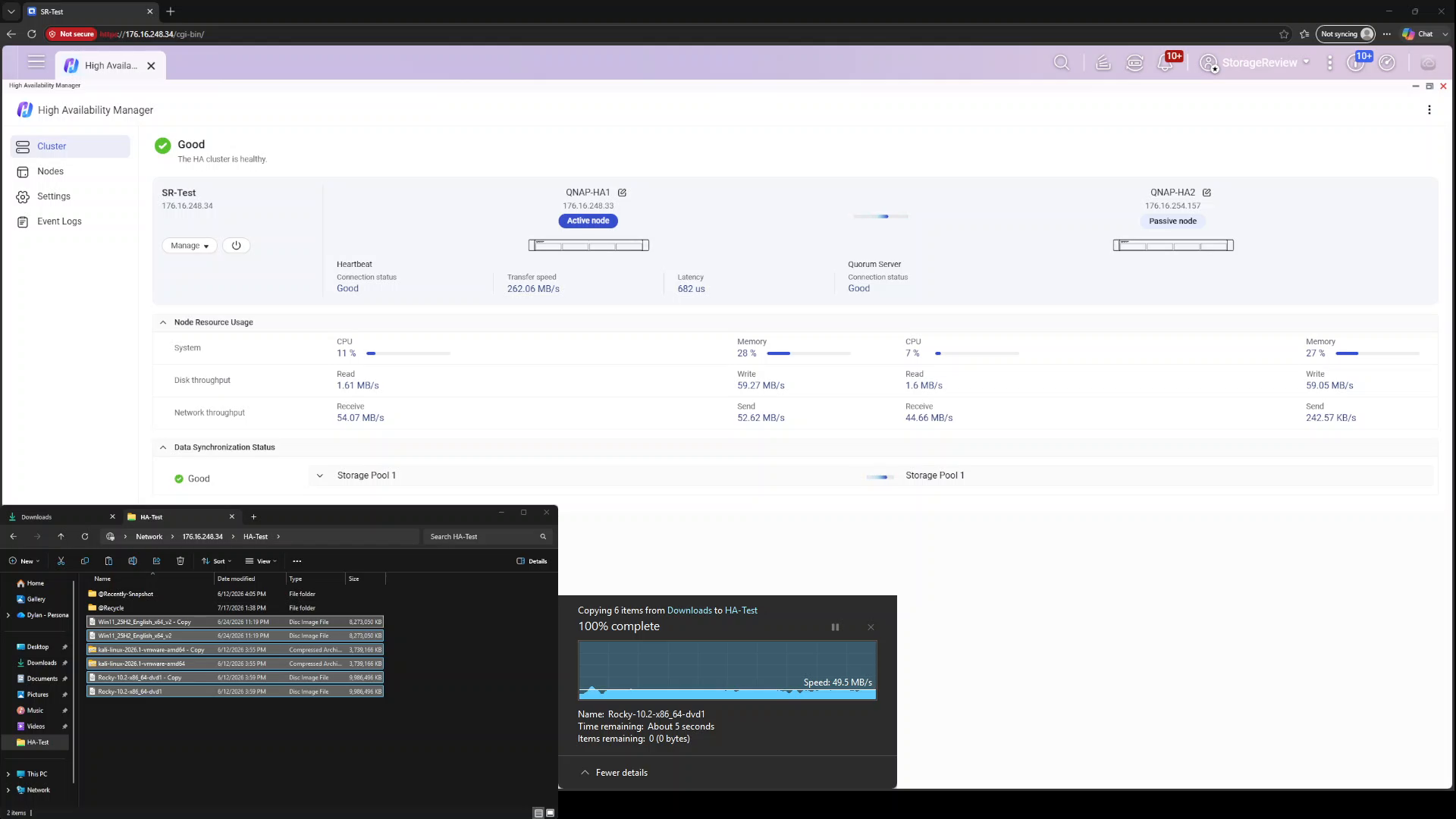
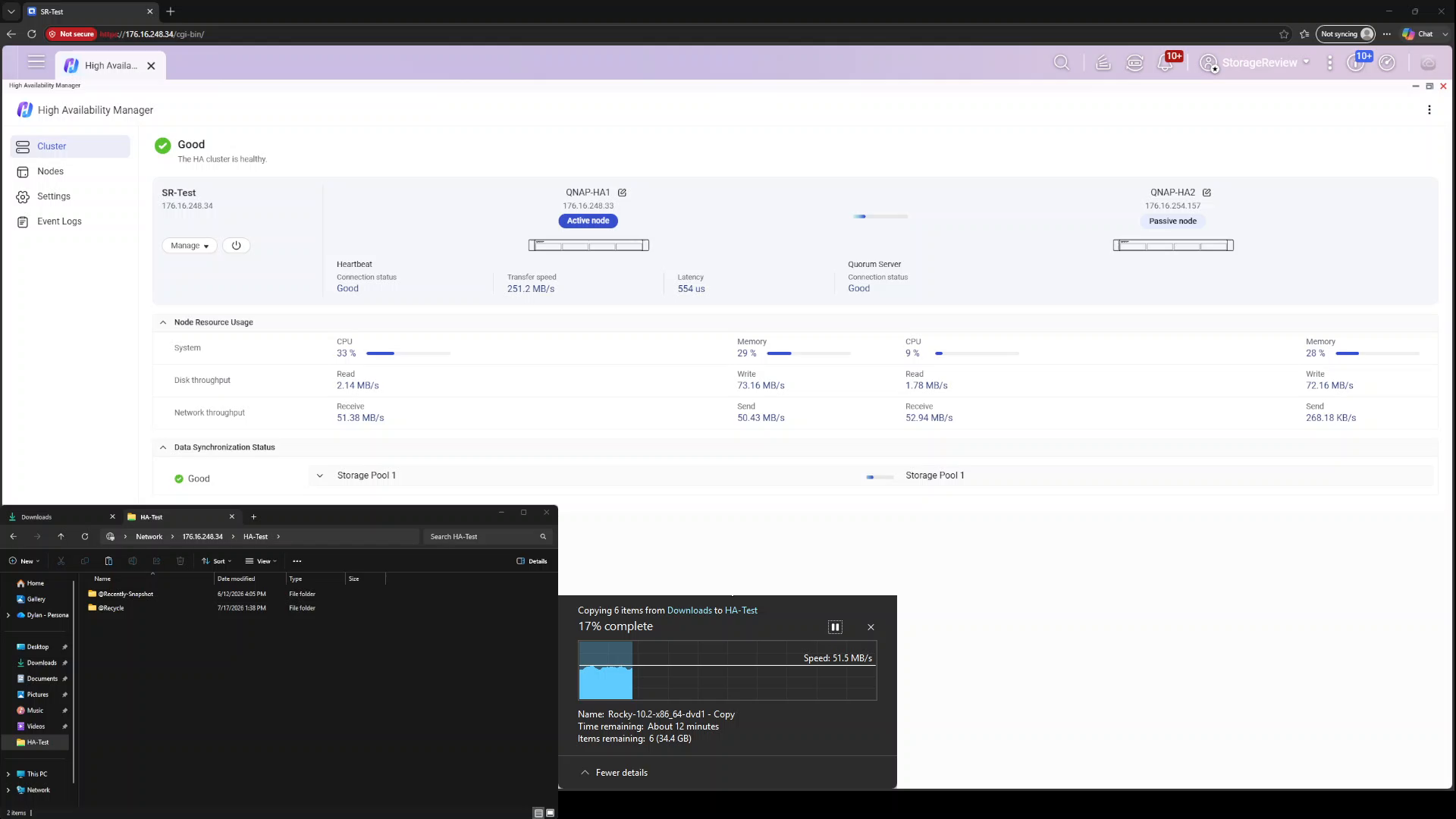
Restoring power to the QNAP-HA1 automatically triggered the reverse process. The node booted and rejoined as the passive member roughly ten minutes after losing power, and HA Manager began synchronizing data from the active node QNAP-HA2 back to QNAP-HA1, again with progress and time estimates visible on the dashboard, while our file copy continued undisturbed. Failback required no intervention: once the resync wrapped, the cluster paused the transfer for about 35 seconds while it returned the active role to QNAP-HA1, then let the copy run to completion. By the end of the run, the cluster was back to Good status with the transfer at 100 percent, having survived a hard power failure, a single-node period, a node restoration, and a failback within a single-copy job.
Failover Test 2: Network Loss with Heartbeat Intact
The second scenario is subtler and arguably more common in the real world: the active node loses its client-facing network connection (a failed switch port, a pulled cable, or a bad transceiver) while the node itself keeps running and the heartbeat link stays up. This is the case where split-brain protection is critical because both nodes are alive and can see each other, and the cluster must decide which node should own the cluster IP.
We repeated the same Windows file copy against the cluster IP and disconnected the cluster network interface on the active node. The transfer paused for about 45 seconds while the cluster moved services to the other node, then resumed without failing. HA Manager flagged the fault precisely, warning that cluster network interface Adapter 2 on the node was disconnected and suggesting a check of the switch connection, and then went a step further, noting that the disconnected node could no longer reach the quorum server through that interface. That specificity, naming the exact interface, node, and consequence, is more diagnostic than the generic degraded flag that some HA implementations settle for.
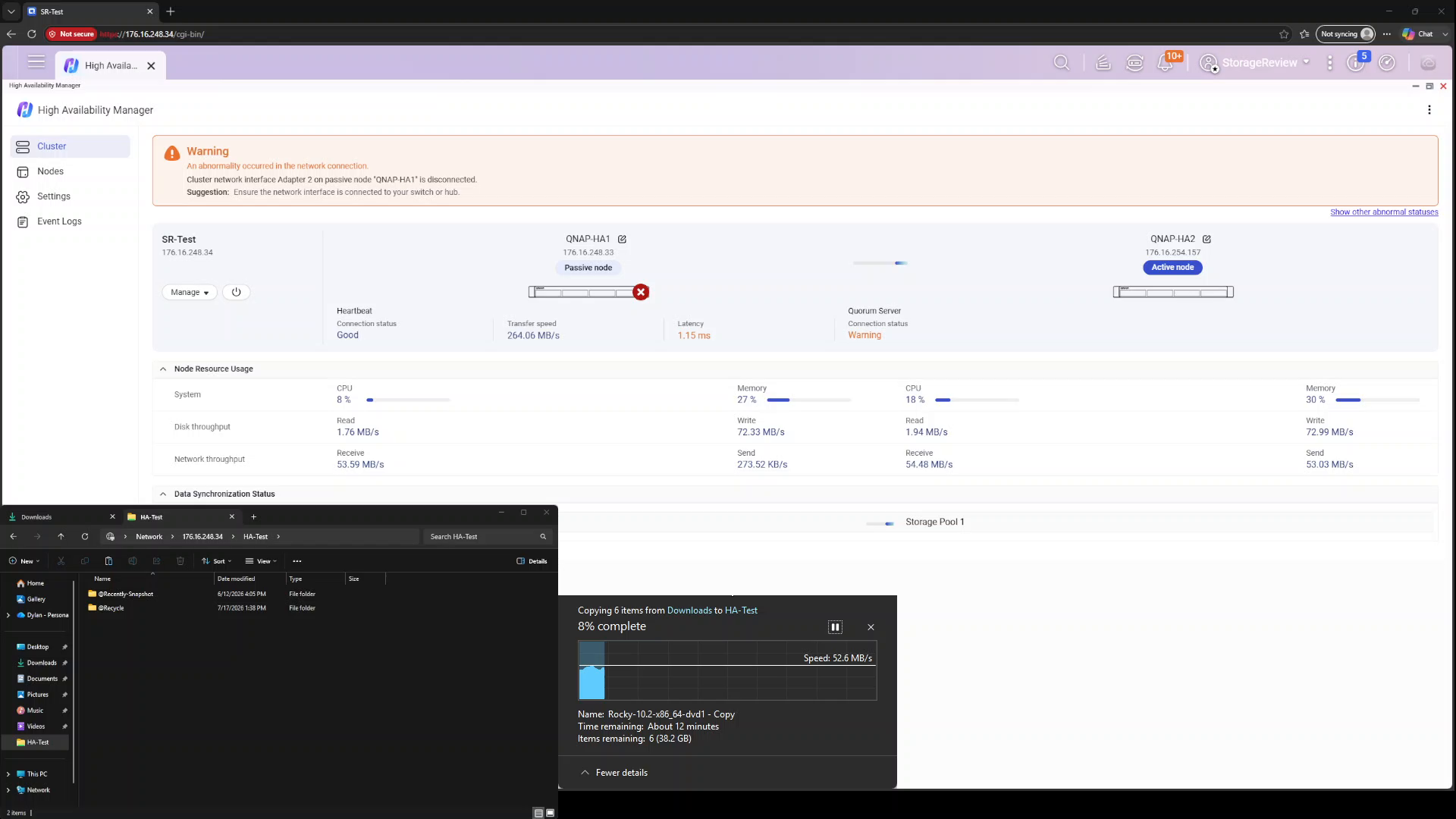
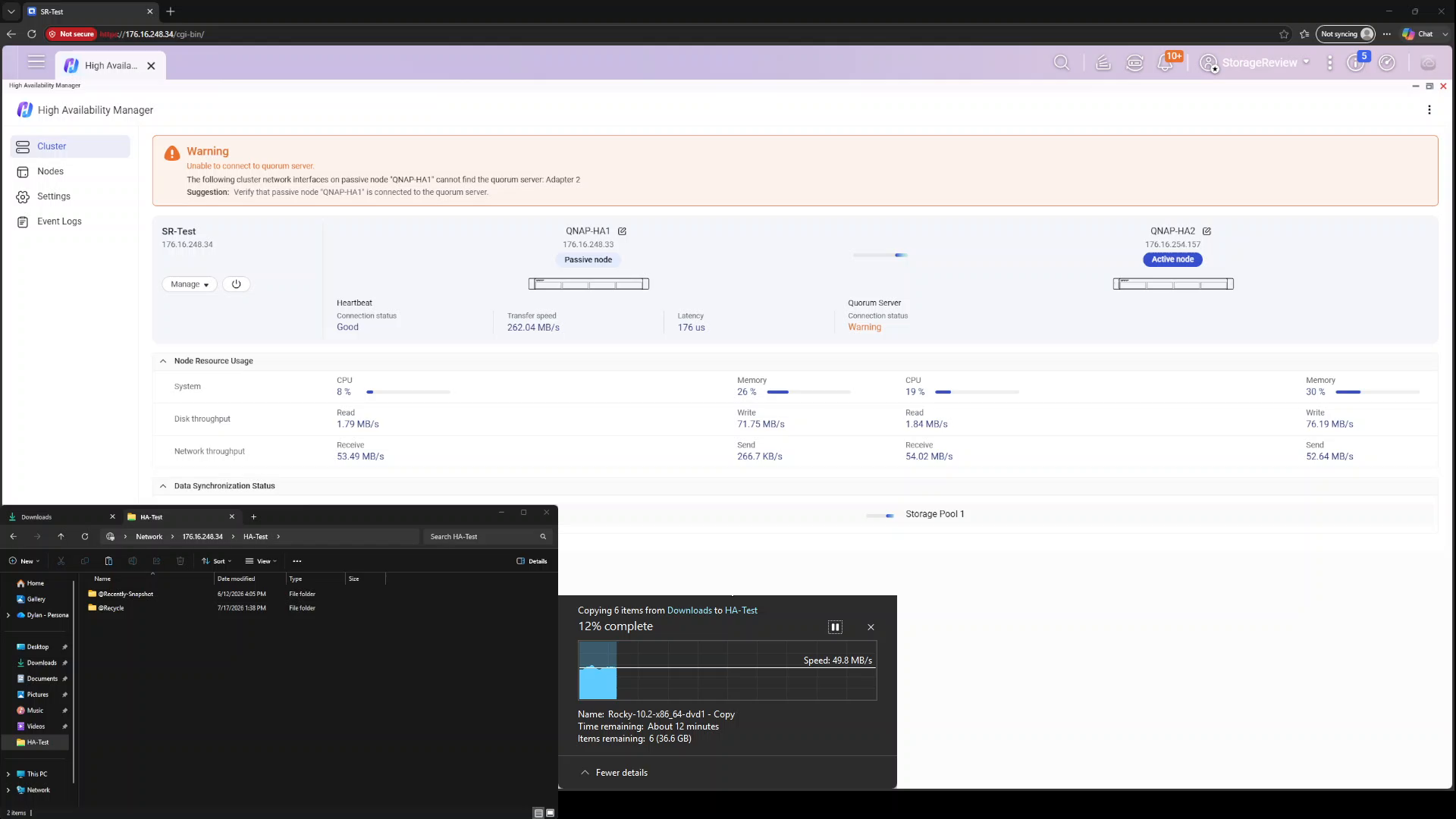
Reconnecting the network brought the node back into the cluster, and the failback came on its own within a minute: a second pause of roughly 30 seconds while the active role returned to QNAP-HA1 was the only client-visible evidence that anything had happened. The same copy job survived two switchovers in a row without a single failed file. For anyone who has watched an SMB session die from far less, that is the headline result of this entire exercise.
Deploying HA the Right Way: Split-Brain and Network Topology
Failover testing like ours proves the cluster works, but how well an HA pair holds up in production depends as much on the surrounding network as on the NAS units themselves. The scenarios HA Manager is designed for (a failed node, a dead switch port, a pulled uplink) all share one assumption: at least one communication path between the two nodes survives the failure. Protecting that assumption is the single most important decision in an HA deployment, because the alternative is the one condition every high-availability architecture is built to avoid: split-brain.
QNAP documents the scenario. Split-brain occurs when both nodes lose communication with each other but remain operational independently, each assuming the active role. Two nodes, each believing it owns the cluster, each willing to accept writes, are a recipe for data inconsistency or corrupted storage, since each may attempt to control shared resources simultaneously. The documented causes are exactly what you would expect: network disconnections between nodes, heartbeat failures, and unstable network paths. Note what these have in common. Split-brain is not triggered by a single node failure; it is triggered when all paths between two healthy nodes fail simultaneously. That is a topology problem, and it has a topology solution.
The deployment rules fall out as expected:
Run the heartbeat as a direct cable between the two nodes. QNAP requires a direct link for the heartbeat, and this is why. With no switch, no transceiver, and no shared infrastructure in the path, the only thing that can take the heartbeat down is a node itself, which is precisely the event failover is designed for. In a same-rack deployment, where these short-depth TS-h765eU units are likely to live side by side, there is no reason to do anything else.
If the nodes are separated, keep heartbeat and client traffic on physically independent paths. Where a direct cable is impractical, route the heartbeat through switches other than those used for the cluster connection. The moment both connections traverse the same switch, that switch becomes a single point of failure capable of severing all paths between the nodes simultaneously, turning an ordinary switch failure into a potential split-brain event. The whole point of buying two NAS units is defeated if one piece of shared infrastructure can isolate them from each other. This is the logic behind our network failover test methodology: pulling the client-facing lead while the heartbeat stays connected simulates the switch or cabling failure that a properly separated topology would actually experience, with the heartbeat alive to arbitrate the takeover cleanly.
Enable the quorum server. QNAP’s third safeguard is a witness on the network, configured under High Availability Manager > Settings > Failover Policy > Quorum Server. If the nodes lose their direct link but can still reach the network, the quorum server continues to monitor both and relays their status, giving each node an independent tiebreaker before it promotes itself. The quorum server’s connection status is displayed persistently on the HA Manager dashboard alongside the heartbeat, so its health is visible at a glance.
Should the worst happen anyway, QuTS hero handles split-brain defensively. Once connectivity is restored and the nodes can talk again, they exchange status information, recognize that both held the active role, and deliberately stop most services, including SMB and iSCSI, to avoid merging two diverged datasets. HA Manager then presents a Recover from Split-Brain wizard with two paths. Option one preserves data on a single node you select; the other node is wiped, reset as the passive member, and resynchronized, the fast route when you know which side has the correct data. Option two preserves data on both nodes by resuming services on one node while removing the other from the cluster entirely, allowing you to verify and reconcile the data before manually rejoining it. It is a sane recovery model, but recovery still means downtime and a full resync. Split-brain is a condition you prevent through deployment design, not one you plan to recover from, and the three rules above cost nothing beyond a cable and five minutes in a settings panel.
Monitoring and Management
Day-two operations live in the HA Manager app, which consolidates cluster status, per-node resource usage, event logs, and node management, including manual switchover, into a single pane. The dashboard’s warning banners proved specific enough to be diagnostic during our testing, naming the exact interface and node at fault rather than a generic degraded flag.
QNAP has also pushed HA awareness into the hardware itself. In an HA cluster, the LCD panel on each NAS can display the cluster name, the node’s current role, and the cluster IP, and the status LED indicates the HA state at a glance: solid green for the active node, blinking green for the passive node, and solid red for an HA error. In a rack full of identical short-depth units, being able to identify the active node without opening a browser is a small touch that techs will appreciate. For fleet deployments, AMIZcloud adds centralized cloud monitoring of HA groups, surfacing cluster health, latency, and alerts across sites.
Final Thoughts
High Availability Manager delivered on its core promise in both failure modes we threw at it. A hard power loss on the active node cost our Windows file copy roughly 50 seconds of stalled progress and zero failed files; a severed client network connection cost about 45 seconds. In each case, the same copy job then rode through node restoration and an automatic failback with nothing worse than a second sub-minute pause. Clients never had to repoint anything. Applications, file shares, and user workflows continued to operate through a single IP and hostname before, during, and after failover. Setup is approachable too; two standalone units became a serving cluster in under ten minutes of wizard time plus a ten-minute initial sync, and the dashboard told us exactly which interface, node, and connection to worry about every time we broke something.
The full HA stack: two TS-h765eU units and the IronWolf Pro drives that filled them.
The costs of HA shouldn’t be ignored, though. You are buying two of everything, and the passive node is idle capacity until the day it is not. Immutable snapshots, h6.0’s other marquee protection, are off the table inside an HA cluster today, so administrators must pick between the two. And the identical-hardware requirement means upgrades happen in pairs, which may constrain budgets.
Where this ends up is a question of right-sizing, and it is the small business and edge deployment that HA Manager serves best. Against dual-controller enterprise arrays, a pair of short-depth TS-h765eU units plays a different financial game entirely while covering the failure scenario, controller loss, that drives most dual-controller purchases in the SMB tier. Against DIY replication schemes, snapshot shipping, rsync jobs, and backup-and-restore, the difference is recovery time: those schemes protect data but leave you rebuilding client connections for hours, whereas HA Manager’s worst client-visible event in our testing was a minute-long pause. Just as important, the failure it cannot absorb, every inter-node path dying at once, is preventable with a direct heartbeat cable, separated network paths, and an enabled quorum server: a topology bill that totals one cable and five minutes in a settings panel.
One last point specific to a two-node design: the cluster’s most vulnerable window is a resync, when one node holds the only good copy of your data and the drives underneath are working their hardest. That is an argument for taking drive selection seriously in an HA pair, and it is why NAS-rated disks like the Seagate IronWolf Pro 30TB units in our build matter more here than in a standalone box: their job is to keep that window uneventful.
The QNAP TS-h765eU and QuTS hero h6.0 are available now. For more information, visit the QNAP TS-h765eU product page.
This report is sponsored by QNAP. All views and opinions expressed in this report are based on our unbiased view of the product(s) under consideration.


 Amazon