

The ASUS ExpertCenter PN55 is the AMD side of ASUS’s commercial mini PC line, a 130 x 130 x 34mm box that puts a Ryzen AI 400 Series processor, two DDR5 SO-DIMM slots, two M.2 2280 slots, and dual 2.5GbE behind a fingerprint reader and a Copilot key. Our review unit runs the Ryzen AI 7 450 with Radeon 860M graphics, 64GB of DDR5-5600, and a 1TB Micron 2500 Gen4 SSD, in 0.57 liters with a 120W brick.
The 450 is the Gorgon Point refresh of the Ryzen AI 7 350 we tested in the HP EliteDesk 8 Mini G1a last December: the same eight cores split between Zen 5 and Zen 5c, the same Radeon 860M, the same 50 TOPS XDNA 2 NPU, with the boost clock moved from 5.0GHz to 5.1GHz and the GPU from 3.0GHz to 3.1GHz. The closest family comparison is the ASUS NUC 16 Pro, which arrived in the lab the same week on Intel’s Core Ultra X7 358H at a 65W cTDP, so this review acts as a two-way test of ASUS’s own small commercial desktops.
ASUS ExpertCenter PN55 Specifications
| Specification | ASUS ExpertCenter PN55 (as tested) |
|---|---|
| Platform Overview | |
| Processor | AMD Ryzen AI 7 450 (Ryzen AI 400 Series) 8 cores (4 Zen 5, 4 Zen 5c), 16 threads 2.0GHz base, up to 5.1GHz boost 8MB L2, 16MB L3 28W default TDP, configurable 15W to 54W (AMD); ASUS lists a 45W cTDP on its spec page and 40W in its launch release |
| Graphics | AMD Radeon 860M (integrated, RDNA 3.5) 8 compute units, up to 3.1GHz |
| NPU | AMD XDNA 2, up to 50 TOPS Copilot+ PC |
| Memory | 64GB DDR5-5600 (2 x 32GB), dual channel (as tested); 16GB assigned to the GPU through AMD Adrenalin for testing Two SO-DIMM slots; ASUS lists 8GB, 16GB, and 32GB modules and a 64GB maximum |
| Storage | 1TB M.2 2280 PCIe Gen4 x4 NVMe SSD (Micron 2500, MTFDKBA1T0QGN, as tested) Two M.2 2280 PCIe 4.0 x4 slots, 256GB to 2TB each (ASUS); second slot empty on our unit |
| Operating System | Windows 11 Pro (Copilot+ PC) |
| Connectivity | |
| Front Ports | 1x USB-C 10Gbps (USB 3.2 Gen 2) 2x USB-A 10Gbps (USB 3.2 Gen 2) Combo audio jack Power button, Copilot button Fingerprint reader (top), Kensington lock slot (side) |
| Rear Ports | 1x USB4 40Gbps (USB-C) with DisplayPort 2.1 and 100W power input 2x DisplayPort 1.4 1x HDMI 2.1 (FRL) 1x USB-A 10Gbps (USB 3.2 Gen 2) 1x USB-A 2.0 2x 2.5GbE (RJ-45) DC-in |
| Display Support | Up to four 4K displays (ASUS) |
| Networking | Dual Realtek RTL8125BG 2.5GbE controllers |
| Wireless | MediaTek MT7925 Wi-Fi 7 (Gig+) Bluetooth 5.4 |
| Audio | Realtek codec, internal 1W mono speaker, internal digital microphone |
| Design and Power | |
| Dimensions (W x D x H) | 130 x 130 x 34mm (5.12 x 5.12 x 1.34 inches) |
| Volume | 0.57 liters |
| Weight | 0.62kg (1.37 lb) per the ASUS spec page; 0.6kg in the launch release |
| Power Supply | 120W external adapter (19V, 6.32A) |
| Security | fTPM 2.0 (discrete TPM on select models) Fingerprint reader Kensington lock slot MIL-STD-810H tested (ASUS) |
| In the Box | AC adapter and power cord, VESA bracket and screws |
| Warranty | 1 year limited (ASUS eShop listing) |
| Price | $1,349 (ASUS eShop, PN55-SYS731PETL0 with 32GB DDR5-5600 and a 1TB Gen4 SSD, Windows 11 Pro); the 64GB configuration we tested is not listed at US retailers at the time of writing |
Build and Design
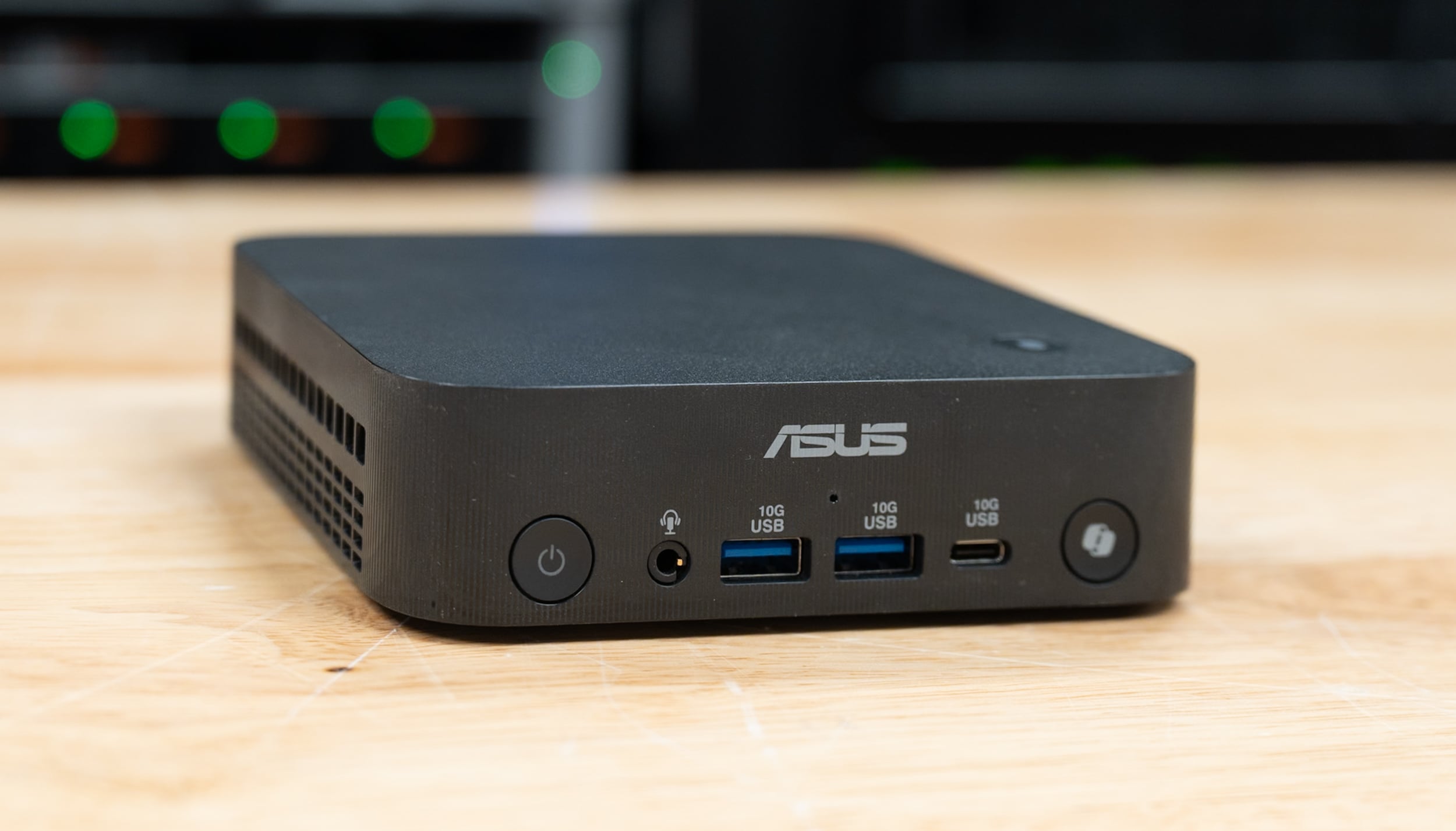
The PN55 is a 5.12-inch square, 34mm tall, in black aluminum with a fine horizontal texture, the ASUS logo on the front edge, and ventilation slots cut into both sides and across the back above the ports. At 0.62 kg, it is lighter than the 0.75kg NUC 16 Pro and smaller too, 0.57 liters against 0.71, and the footprint is the 4×4 class the NUC Pro line moved away from this year. ASUS rates the chassis to MIL-STD-810H and sells it with a VESA bracket for the back of a monitor.

The front carries the power button, a combo audio jack, two USB-A ports at 10Gbps, a USB-C port at 10Gbps, and a round Copilot key at the right end; the fingerprint reader sits on the top panel behind it, which is the Copilot+ sign-in path. The audio jack and the fingerprint reader are two things the NUC 16 Pro does not have, and for a desk that gets shared or a headset that gets plugged in daily, both matter more than they sound.
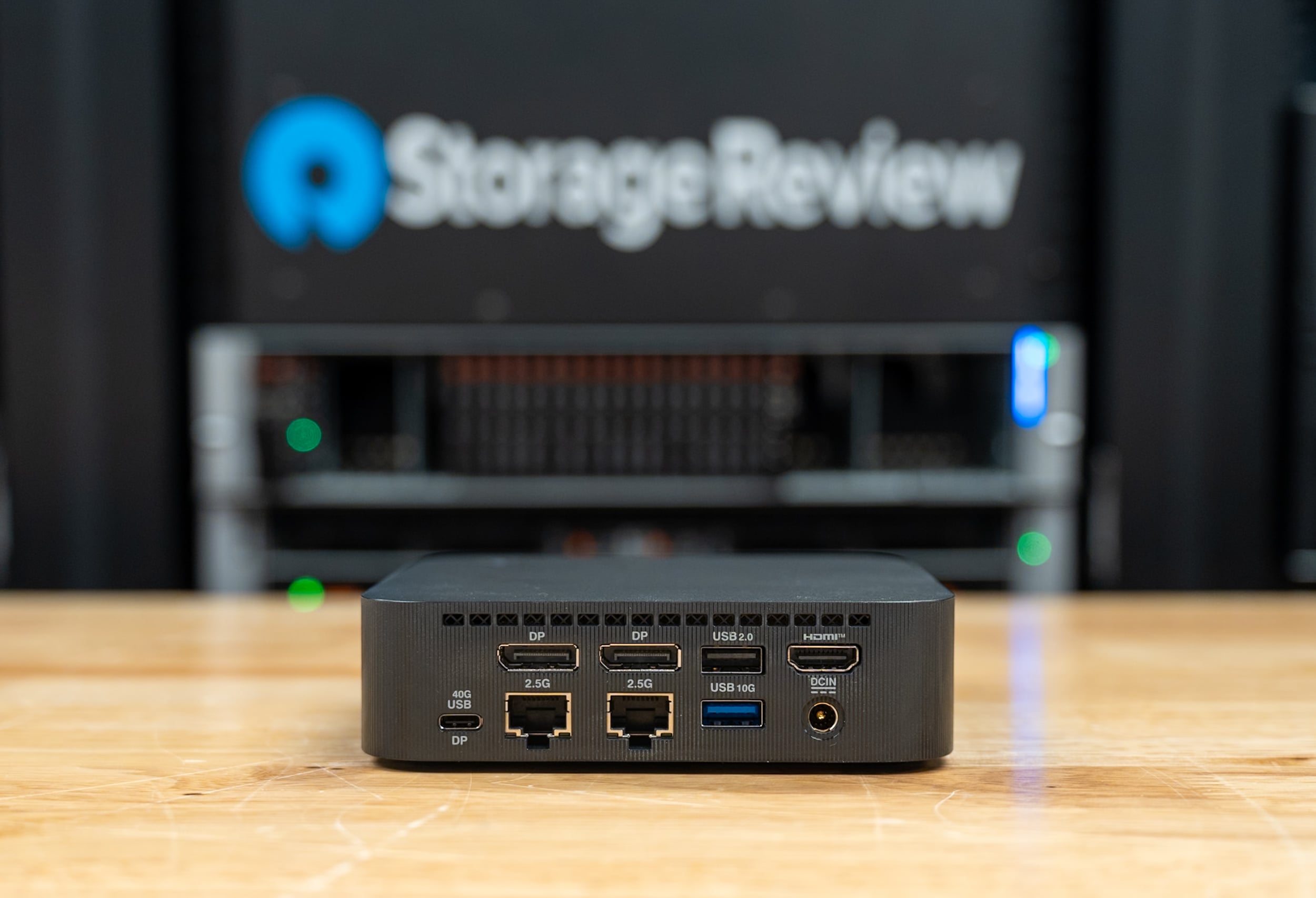
Around the back, left to right, are a USB4 port at 40Gbps that carries DisplayPort 2.1 and accepts 100W of power input, two full-size DisplayPort 1.4 outputs, two 2.5GbE jacks, a USB 2.0 Type-A, a USB-A at 10Gbps, HDMI 2.1, and the DC input. ASUS rates the system for four 4K displays across the two DisplayPorts, the HDMI, and the USB4 port. The two LAN ports run on Realtek RTL8125BG controllers, whereas the NUC 16 Pro uses Intel I226-V silicon, and both ASUS boxes pitch the second port as isolating a management network from a production one.
Wireless is a MediaTek MT7925 Wi-Fi 7 card with Bluetooth 5.4, visible in the M.2 2230 slot in our teardown. Power comes from a 120W external adapter at 19V, and ASUS says the USB4 port accepts 100W of power input, so a USB-C display or dock with enough output can run the system without the brick, which the NUC 16 Pro’s Thunderbolt ports do not offer. We did not measure acoustics for this review; the fan is audible under sustained load and otherwise unremarkable for a box this size.
Serviceability and Upgradability

The bottom panel lifts off after a tool-less release latch, though the engineering isn’t quite as good as the NUC 16 Pro, and it carries a thermal pad on its inside face that sits on the SSD. Inside are two stacked DDR5 SO-DIMM slots at the top of the board under a black shroud, two M.2 2280 slots, and the Wi-Fi card in a 2230 slot beside them. Our unit carries two 32GB DDR5-5600 modules and the 1TB Micron 2500 in the upper M.2 slot, and the second 2280 slot below it is empty, with a tool-free latch at the end where a screw would normally hold the drive.
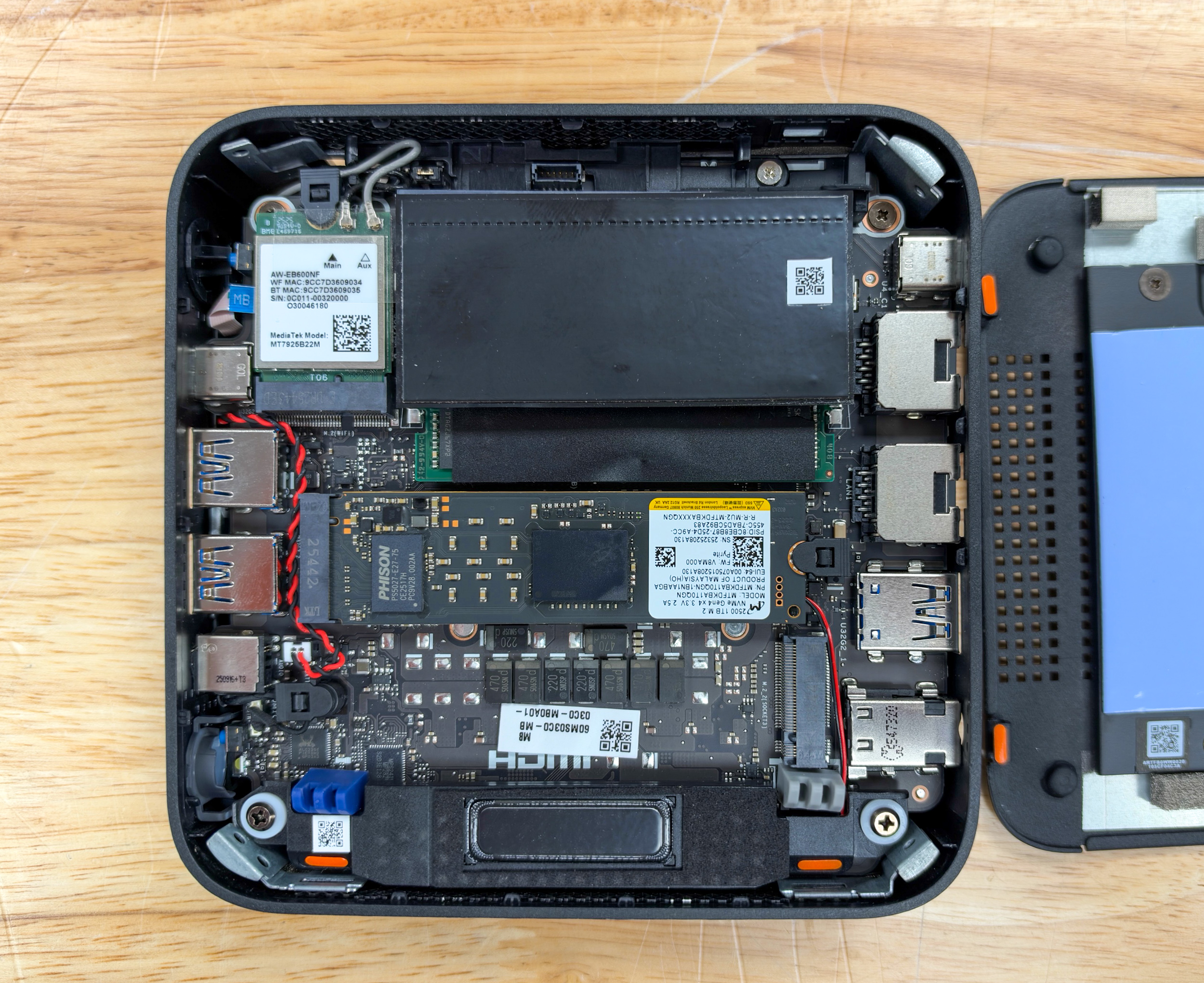
The SSD slots are a key difference between the two ASUS boxes: both have two slots, but the PN55’s slots are both PCIe 4.0 x4, whereas the NUC 16 Pro has one Gen5 and one Gen4. Memory is the other distinction between the two systems. The PN55 takes SO-DIMMs, so the 64GB in our unit is a field upgrade, whereas the NUC 16 Pro we tested carries 64GB of LPDDR5X soldered to the board.
For testing, we assigned 16GB of the 64GB to the Radeon 860M as a dedicated frame buffer through AMD’s Adrenalin software, the setting we use on our other AMD integrated systems, which is why the benchmark reports list 48GB of system memory. It is the setting a buyer who wants to run local models on the GPU will care about, since it sets the largest model the DirectML and ROCm paths can load without spilling.
ASUS ExpertCenter PN55 Performance
Our ASUS ExpertCenter PN55 review unit runs the AMD Ryzen AI 7 450 with Radeon 860M integrated graphics, 64GB of DDR5-5600 with 16GB assigned to the GPU, a 1TB Micron 2500 PCIe Gen4 SSD, and Windows 11 Pro on AMD graphics driver 32.0.22042.25001. All benchmarks were run on the Best Performance power plan.
Our comparison set is the ASUS NUC 16 Pro (Core Ultra X7 358H, Arc B390, 64GB LPDDR5X-8533) tested the same week, the Lenovo Yoga Mini on the same Intel chip with 32GB, the HP EliteDesk 8 Mini G1a on the previous-generation Ryzen AI 7 PRO 350 with 32GB of DDR5-5600, and the ASUS Ascent QN10 on the 18-core Snapdragon X2 Elite. The HP and the QN10 appear only in the tests they ran at the same versions and settings, so some tables carry three systems and some five.
PCMark 10
PCMark 10 is UL Solutions’ general-purpose productivity benchmark. It measures app start times, web browsing, and video conferencing in the Essentials group; spreadsheets and document editing in Productivity; and photo editing, rendering and visualization, and video editing in Digital Content Creation, and rolls the three into an overall score.
| PCMark 10 (higher is better) | ASUS ExpertCenter PN55 | ASUS NUC 16 Pro | Lenovo Yoga Mini |
|---|---|---|---|
| Overall Score | 8,385 | 9,513 | 10,369 |
| Essentials | 11,036 | 11,318 | 11,965 |
| Productivity | 14,669 | 14,781 | 20,073 |
| Digital Content Creation | 9,882 | 13,963 | 12,597 |
The PN55 scores 8,385 overall, 12% behind the NUC 16 Pro at 9,513 and 19% behind the Yoga Mini at 10,369. The groups tell the story: Essentials at 11,036 is within 3% of the NUC, Productivity at 14,669 is within 1%, and the whole gap is in Digital Content Creation, 9,882 against 13,963, where the photo editing and rendering workloads run on the GPU and the Radeon 860M gives up 29% to the Arc B390. The Yoga Mini’s 20,073 Productivity score is the outlier among the three; the two ASUS systems agree with each other.
Geekbench 7
Geekbench 7 runs short workloads modeled on real applications, including file compression, HTML5 and PDF rendering, photo filtering, ray tracing, and machine learning inference, and produces single-core and multi-core CPU scores. The GPU compute tests run image processing, particle physics, and machine learning kernels through OpenCL and Vulkan. Geekbench runs natively on Arm and x86, so the Snapdragon-based QN10 compares directly here.
| Geekbench 7 (higher is better) | ASUS ExpertCenter PN55 (Radeon 860M) | ASUS NUC 16 Pro (Arc B390) | Lenovo Yoga Mini (Arc B390) | ASUS Ascent QN10 (Adreno) |
|---|---|---|---|---|
| CPU Single-Core | 2,657 | 2,618 | 2,583 | 3,272 |
| CPU Multi-Core | 15,311 | 18,388 | 16,811 | 24,049 |
| GPU OpenCL | 25,199 | 55,273 | 51,571 | 30,982 |
| GPU Vulkan | 13,022 | 46,894 | 44,450 | 40,042 |
Single-core is the PN55’s best Geekbench line: 2,657 is 1% ahead of the NUC 16 Pro and 3% ahead of the Yoga Mini, with only the QN10’s 3,272 clear of the group. Multi-core at 15,311 is 17% behind the NUC and 9% behind the Yoga Mini, which is roughly the gap between eight cores, with four of them Zen 5c and a 16-core Intel part, and the QN10 leads by 57%.
The GPU compute rows are where the Radeon 860M falls away. OpenCL at 25,199 is 46% of the NUC’s 55,273 and 81% of the QN10’s Adreno, and Vulkan at 13,022 is 28% of the NUC’s 46,894 and a third of the QN10’s. The Vulkan gap is the largest in this review, and it sets the pattern for every GPU test that follows.
Cinebench 2026
Cinebench 2026 is built on Maxon’s Redshift engine and renders a complex scene on the CPU. The single-thread test isolates per-core throughput, the multi-thread test loads every core for the length of the run, and the MP ratio divides one by the other to show how well a system scales. The PN55 also reported a single-core score of 661 with SMT active; we use the single-thread figure so the row compares like with like against the Intel systems, which have no SMT.
| Cinebench 2026 (higher is better) | ASUS ExpertCenter PN55 | ASUS NUC 16 Pro | Lenovo Yoga Mini | ASUS Ascent QN10 |
|---|---|---|---|---|
| CPU Single Thread | 489 | 508 | 509 | 639 |
| CPU Multiple Threads | 3,861 | 4,741 | 4,473 | 6,476 |
| MP Ratio | 7.89x | 9.34x | 8.79x | 10.13x |
Single-thread lands at 489, 4% behind the two 358H systems at 508 and 509, and 23% behind the QN10. Multi-thread at 3,861 is 19% behind the NUC 16 Pro’s 4,741 and 14% behind the Yoga Mini, and the 7.89x scaling ratio is the lowest in the group against 9.34x for the NUC and 10.13x for the QN10. Four of the PN55’s eight cores are the smaller Zen 5c design with a 3.6GHz ceiling, and this is the test that shows it.
3DMark CPU Profile
The 3DMark CPU Profile benchmark runs the same physics and simulation workload at six thread counts, from one thread to the maximum the processor supports. Reading across shows how a processor scales as cores are engaged and where it stops gaining from additional threads, which predicts behavior in applications that fall between purely single-threaded and fully parallel.
| 3DMark CPU Profile (higher is better) | ASUS ExpertCenter PN55 | ASUS NUC 16 Pro | Lenovo Yoga Mini | ASUS Ascent QN10 |
|---|---|---|---|---|
| Max Threads | 8,093 | 10,380 | 9,004 | 9,544 |
| 16 Threads | 8,094 | 10,388 | 8,929 | 9,118 |
| 8 Threads | 6,842 | 6,642 | 6,185 | 5,327 |
| 4 Threads | 4,496 | 4,357 | 4,184 | 3,209 |
| 2 Threads | 2,315 | 2,304 | 2,244 | 1,702 |
| 1 Thread | 1,178 | 1,176 | 1,159 | 857 |
From one thread to eight, the PN55 leads every system in the table. Its 1,178 at one thread and 2,315 at two match the NUC 16 Pro within a point, and at four and eight threads it is 3% ahead of the NUC, 7% to 11% ahead of the Yoga Mini, and 28% to 40% ahead of the QN10, whose Oryon cores scale wide but start slow. The crossover comes at 16 threads, where the PN55’s 8,094 is 22% behind the NUC and 9% behind the Yoga Mini, and the max-threads row repeats it because the 450 tops out at 16 threads.
For a business desktop that runs a browser, a document suite, and a few background services, the one-to-eight-thread rows are the ones that matter, and the PN55 is the strongest of the four there. The 16-thread row is the price of a 28W-class chip against a 65W one.
7-Zip Compression
The 7-Zip benchmark uses the built-in test in the open-source archiver to measure compression and decompression throughput in GIPS. Compression is sensitive to memory latency and cache behavior, while decompression scales more directly with core count and clock speed. The HP EliteDesk 8 Mini G1a joins the table here, since the test is version-independent.
| 7-Zip (GIPS, higher is better) | ASUS ExpertCenter PN55 | ASUS NUC 16 Pro | Lenovo Yoga Mini | HP EliteDesk 8 Mini G1a | ASUS Ascent QN10 |
|---|---|---|---|---|---|
| Compressing | 88.176 | 95.224 | 93.603 | 86.365 | 96.729 |
| Decompressing | 94.485 | 91.939 | 81.927 | 94.100 | 120.205 |
| Total Rating | 91.331 | 93.581 | 87.765 | 90.233 | 108.467 |
The PN55 posts 88.176 GIPS compressing and 94.485 decompressing for a 91.331 total, 2% behind the NUC 16 Pro, 4% ahead of the Yoga Mini, and 1% ahead of the HP. The two AMD systems are near twins on this test: the HP decompresses at 94.100 and compresses at 86.365, so the 450’s extra 100MHz buys about 2% on compression and nothing on decompression. The PN55’s decompression rate is the best of the x86 group; the QN10’s 120.205 carries it to a 108.467 total.
y-cruncher
y-cruncher is a multithreaded program that computes the digits of Pi and other constants. It is a demanding test of CPU throughput and memory bandwidth, since the larger digit counts stream large working sets through the memory subsystem. We run the standard Pi computation at 1 billion, 2.5 billion, and 5 billion digits, along with the BBP digit-extraction formula at 1, 10, and 100 billion, and report elapsed seconds, so lower is better. The HP review ran the Pi computations only, and the 5 billion-digit run needs more memory than the 32GB Yoga Mini and the QN10 had.
| y-cruncher (seconds, lower is better) | ASUS ExpertCenter PN55 | ASUS NUC 16 Pro | Lenovo Yoga Mini | HP EliteDesk 8 Mini G1a | ASUS Ascent QN10 |
|---|---|---|---|---|---|
| Pi 1B | 26.037 | 27.823 | 28.755 | 29.418 | 71.531 |
| Pi 2.5B | 73.749 | 77.812 | 80.831 | 109.052 | 218.332 |
| Pi 5B | 166.959 | 174.318 | N/A | 204.316 | N/A |
| Pi BBP 1B | 1.849 | 1.665 | 1.799 | N/A | 5.844 |
| Pi BBP 10B | 16.350 | 18.173 | 19.580 | N/A | 67.701 |
| Pi BBP 100B | 183.800 | 213.223 | 223.731 | N/A | 778.722 |
This is the PN55’s best test of the suite. It computes 1 billion digits of Pi in 26.037 seconds, 6% faster than the NUC 16 Pro, 9% faster than the Yoga Mini, and 11% faster than the HP, and at 5 billion digits its 166.959 seconds is 4% ahead of the NUC and 18% ahead of the HP’s 204.316. On BBP, the advantage grows with the digit count, from 10% at 10 billion to 14% at 100 billion, 183.800 seconds against 213.223 on the NUC.
The HP trails further as the runs lengthen: 11% at 1 billion digits and 32% at 2.5 billion, a gap larger than the clock difference between the 350 and the 450, and one we did not isolate. Against the Intel systems with faster LPDDR5X-8533, the AMD part’s win points at the memory controller and cache more than at raw bandwidth. The BBP 1B row is the one line the NUC takes by 10%.
Blender 5.2
Blender’s benchmark renders three standard scenes, Monster, Junkshop, and Classroom, with the Cycles engine. We run it on the CPU and on the GPU and report samples per minute, so higher is better. The PN55 renders on the GPU through AMD’s HIP backend and the Intel systems through oneAPI; the QN10 has no Blender GPU path. The HP review ran Blender 4.3, so it is not in this table.
| Blender 5.2 (samples/min, higher is better) | ASUS ExpertCenter PN55 (Radeon 860M, HIP) | ASUS NUC 16 Pro (Arc B390, oneAPI) | Lenovo Yoga Mini (Arc B390, oneAPI) | ASUS Ascent QN10 |
|---|---|---|---|---|
| GPU | ||||
| Monster | 96.50 | 559.84 | 544.64 | N/A |
| Junkshop | 85.91 | 468.21 | 372.30 | N/A |
| Classroom | 68.76 | 418.02 | 393.19 | N/A |
| CPU | ||||
| Monster | 110.15 | 131.83 | 122.87 | 188.04 |
| Junkshop | 84.30 | 97.69 | 89.19 | 133.21 |
| Classroom | 61.65 | 68.94 | 63.34 | 93.93 |
On the GPU, the Radeon 860M renders Monster at 96.50 samples per minute, Junkshop at 85.91, and Classroom at 68.76, which puts the Arc B390 in the NUC 16 Pro at 5.5x to 6.1x the PN55’s rate and the Yoga Mini at 4.3x to 5.7x. The PN55’s GPU renders Monster slower than its own CPU does, so on this system, Cycles should be left on the CPU.
On the CPU, the PN55 holds up: 110.15, 84.30, and 61.65 samples per minute are 11% to 16% behind the NUC and 3% to 10% behind the Yoga Mini, in line with the Cinebench spread, and the QN10 is 52% to 71% ahead on its 18 cores.
LuxMark
LuxMark is an OpenCL benchmark built on the LuxCoreRender physically based engine. It renders the Food and Hall scenes on the GPU and reports a score based on samples per second, and because it uses OpenCL and no vendor-specific API, it is a fair measure of how an integrated GPU handles compute-heavy rendering outside a game engine.
| LuxMark v4 (higher is better) | ASUS ExpertCenter PN55 | ASUS NUC 16 Pro | Lenovo Yoga Mini | HP EliteDesk 8 Mini G1a |
|---|---|---|---|---|
| Hall | 1,917 | 3,518 | 3,430 | 1,461 |
| Food | 869 | 1,704 | 1,663 | 706 |
The PN55 scores 1,917 on Hall and 869 on Food, 54% and 51% of the NUC 16 Pro’s 3,518 and 1,704, and within 3% of the same ratio against the Yoga Mini. Against the HP’s Radeon 860M the PN55 is 31% ahead on Hall and 23% on Food, a wider margin than the 100MHz GPU clock bump explains on its own; the newer driver, the larger frame buffer, and the 64GB of memory behind it are the candidates, and the Procyon results below point the same way.
V-Ray
The V-Ray benchmark from Chaos measures rendering throughput in the V-Ray engine; the CPU test reports vsamples. It is a short, intense render that favors sustained clocks. We ran the CPU test on the three systems in the table; the GPU test was not run on the two ASUS units.
| V-Ray (higher is better) | ASUS ExpertCenter PN55 | ASUS NUC 16 Pro | Lenovo Yoga Mini |
|---|---|---|---|
| CPU (vsamples) | 18,550 | 21,073 | 19,450 |
At 18,550 vsamples, the PN55 is 12% behind the NUC 16 Pro’s 21,073 and 5% behind the Yoga Mini’s 19,450, a narrower gap than Cinebench showed and closer to the Blender CPU spread.
Blackmagic RAW Speed Test
The Blackmagic RAW Speed Test decodes 8K Blackmagic RAW footage at a 12:1 compression ratio and reports frames per second on the CPU and on the GPU. It is a direct look at how a system handles the camera footage video editors work with, and one of the tests where integrated graphics can take real work off the CPU.
| Blackmagic RAW Speed Test (fps, higher is better) | ASUS ExpertCenter PN55 | ASUS NUC 16 Pro | Lenovo Yoga Mini | HP EliteDesk 8 Mini G1a |
|---|---|---|---|---|
| 8K 12:1 CPU | 65 | 76 | 67 | 58 |
| 8K 12:1 GPU | 43 | 83 | 81 | 34 |
The PN55 decodes 65 frames per second on the CPU, 3% behind the Yoga Mini and 14% behind the NUC 16 Pro, and 43 on the GPU, about half the Intel systems’ 81 to 83. It is 12% ahead of the HP on the CPU and 26% ahead on the GPU, and like the HP, it is a system where the OpenCL path is slower than the CPU path, so Resolve on this box should leave BRAW decode on the processor.
Topaz Video AI
Topaz Video AI is a widely used application for AI-based video upscaling, denoising, and frame interpolation. We run its built-in benchmark at 1080p input, which times each Topaz model at 1X, 2X, and 4X scaling along with the Apollo and Aion slow-motion models, and reports frames per second. The models rely on the GPU and, where supported, the NPU, and the test reflects a commercial application people pay for.
| Topaz Video AI (fps, higher is better) | ASUS ExpertCenter PN55 | ASUS NUC 16 Pro | Lenovo Yoga Mini |
|---|---|---|---|
| Artemis 1X / 2X / 4X | 2.64 / 1.72 / 0.58 | 6.15 / 5.13 / 1.87 | 5.89 / 5.19 / 1.87 |
| Iris 1X / 2X / 4X | 3.32 / 1.92 / 0.60 | 5.14 / 3.11 / 0.95 | 4.84 / 2.97 / 0.90 |
| Proteus 1X / 2X / 4X | 2.87 / 2.01 / 0.78 | 6.46 / 6.09 / 2.48 | 6.04 / 5.94 / 2.42 |
| Gaia 1X / 2X / 4X | 1.09 / 0.72 / 0.53 | 3.34 / 2.26 / 1.49 | 3.18 / 2.15 / 1.45 |
| Nyx 1X / 2X | 1.28 / 1.08 | 1.58 / 1.53 | 1.50 / 1.46 |
| Hyperion HDR 1X | 10.35 | 3.16 | 3.06 |
| 4X Slowmo Apollo / APFast | 3.77 / 13.46 | 8.82 / 25.48 | 8.08 / 22.91 |
| 16X Slowmo Aion | 8.80 | N/A | N/A |
On the upscaling models, the PN55 runs at 33% to 65% of the NUC 16 Pro’s rate: 2.64 frames per second on Artemis 1X against 6.15, 2.87 on Proteus 1X against 6.46, 3.32 on Iris 1X against 5.14, and 1.09 on Gaia against 3.34. The 4X passes drop to 0.5 to 0.8 frames per second, so this is a 1X box for Topaz work, and Apollo slow motion at 3.77 is 43% of the NUC’s rate.
Two rows in the table go the PN55’s way. It is the only system of the three with a result on the 16X Aion slow-motion model, at 8.80 frames per second, and on Hyperion HDR it posted 10.35 frames per second against 3.16 on the NUC and 3.06 on the Yoga Mini. That is the one Topaz model where the AMD execution path is the faster one by a wide margin.
Procyon AI Image Generation
The Procyon AI Image Generation benchmark from UL Solutions runs Stable Diffusion 1.5 and Stable Diffusion XL inference through the inference engine best suited to the hardware and reports a score based on how quickly images are generated. Scores are comparable only when the same engine, device, and precision are used, so each result carries its engine and device.
The PN55 and the HP run through ONNX Runtime with DirectML on the Radeon 860M, the Intel systems through OpenVINO on their Arc GPUs, and the QN10 runs the INT8 profile on its Hexagon NPU through QNN. On the INT8 profile, the AMD path substitutes an FP16 model because there is no INT8 Stable Diffusion path on that platform, so the PN55’s 1,906 in that row is an FP16 result at the INT8 test settings. The HP review ran the SD 1.5 FP16 test only.
| Procyon AI Image Generation (higher is better) | ASUS ExpertCenter PN55 | HP EliteDesk 8 Mini G1a (Radeon 860M) | ASUS NUC 16 Pro | Lenovo Yoga Mini | ASUS Ascent QN10 |
|---|---|---|---|---|---|
| SD 1.5 FP16 | 201 (ONNX DirectML, GPU) | 169 (ONNX DirectML, GPU) | 634 (OpenVINO, GPU) | 613 (OpenVINO, GPU) | N/A |
| SD 1.5 INT8 profile | 1,906 (ONNX DirectML, GPU, FP16 model) | N/A | 7,725 (OpenVINO, GPU) | 7,119 (OpenVINO, GPU) | 5,457 (QNN, NPU) |
| SD 1.5 INT8 (NPU) | N/A | N/A | N/A | 2,936 (OpenVINO, NPU) | N/A |
| SDXL FP16 | 117 (ONNX DirectML, GPU) | N/A | 750 (OpenVINO, GPU) | 727 (OpenVINO, GPU) | N/A |
On SD 1.5 FP16, the PN55 scores 201 at 31.0 seconds per image, 19% ahead of the HP’s 169 at 36.9 seconds, and a third of the NUC 16 Pro’s 634 at 9.8 seconds. The INT8 profile reaches 1,906 at 16.4 seconds per image against 7,725 and 4.0 seconds on the NUC, and SDXL at 117 took 318 seconds per image against 50. The HP comparison says the 450 and its current driver are a real step over the 350 on this path; the Intel comparison says the path itself is the ceiling, and the Arc B390 delivers 3x to 6x the throughput.
Procyon AI Computer Vision
The Procyon AI Computer Vision benchmark runs MobileNet V3, ResNet 50, Inception V4, DeepLab V3, YOLO V3, and Real-ESRGAN and reports a score that reflects inference throughput across all six. It can target the CPU, GPU, or NPU through several engines, and results are comparable across systems only when the same engine, device, and precision are used. We ran the PN55 through Windows ML on the CPU and GPU, which matches the Intel systems, and through AMD’s Ryzen AI engine on the NPU at integer precision, which does not compare with the Intel NPU’s float16 OpenVINO result and sits in its own row.
| Procyon AI Computer Vision (higher is better) | ASUS ExpertCenter PN55 | ASUS NUC 16 Pro | Lenovo Yoga Mini |
|---|---|---|---|
| WinML (float32) | |||
| CPU | 113 | 156 | 139 |
| GPU | 184 | 413 | 373 |
| OpenVINO | |||
| CPU (float32) | N/A | 130 | 118 |
| GPU (float32) | N/A | 591 | 550 |
| NPU (float16) | N/A | 1,259 | 1,205 |
| AMD Ryzen AI | |||
| NPU (integer) | 2,031 | N/A | N/A |
Through Windows ML, the PN55 scores 113 on the CPU and 184 on the GPU, 72% and 45% of the NUC 16 Pro, and 81% and 49% of the Yoga Mini. The NPU is the headline: 2,031 through the Ryzen AI engine is 11x the PN55’s own GPU and 61% higher than the Intel NPU’s 1,259, with the precision caveat that the AMD run is quantized to integers and the Intel run is float16. Both NPUs are the fastest device in their own box for this class of model, and the XDNA 2 path scores higher when the workload is quantized for it.
Procyon AI Text Generation
The Procyon AI Text Generation benchmark runs four local language models, Phi, Mistral, Llama 3, and Llama 2, through the inference engine suited to the hardware and reports an overall score for each along with time to first token and output tokens per second. UL’s score reflects both, so a device that starts answering quickly and streams at a steady rate scores well even if its raw token rate is modest.
On the PN55, we run ONNX Runtime with DirectML on the GPU, the path that covers all four models on AMD integrated graphics. We include the HP’s GPU results from its review on the same path and the NUC 16 Pro’s GPU and NPU results through OpenVINO. The Yoga Mini was not run on this test.
| Procyon AI Text Generation | ASUS ExpertCenter PN55 GPU (ONNX DirectML) | HP EliteDesk 8 Mini G1a GPU (ONNX DirectML) | ASUS NUC 16 Pro GPU (OpenVINO) | ASUS NUC 16 Pro NPU (OpenVINO) |
|---|---|---|---|---|
| Phi | ||||
| Score | 332 | 301 | 1,970 | 852 |
| Time to first token (s) | 6.152 | 7.692 | 0.305 | 1.097 |
| Output tokens/s | 26.54 | 27.22 | 46.24 | 31.04 |
| Mistral | ||||
| Score | 289 | 242 | 1,884 | 590 |
| Time to first token (s) | 8.930 | 13.678 | 0.350 | 2.627 |
| Output tokens/s | 16.32 | 17.53 | 27.27 | 20.05 |
| Llama 3 | ||||
| Score | 259 | 206 | 1,819 | 622 |
| Time to first token (s) | 8.384 | 12.731 | 0.322 | 1.889 |
| Output tokens/s | 13.87 | 13.31 | 26.18 | 17.99 |
| Llama 2 | ||||
| Score | 296 | 234 | 1,821 | 541 |
| Time to first token (s) | 13.670 | 21.500 | 0.618 | 4.532 |
| Output tokens/s | 8.88 | 8.73 | 15.14 | 9.82 |
The PN55’s output rates are competitive for the class: 26.54 tokens per second on Phi is 57% of the NUC 16 Pro’s GPU rate, 16.32 on Mistral is 60%, and 8.88 on Llama 2 is 59%, which tracks the bandwidth gap between DDR5-5600 and LPDDR5X-8533, and every rate is within 7% of the HP on the same silicon. The scores collapse because of time to first token: 6.2 seconds on Phi and 13.7 on Llama 2 against 0.3 and 0.6 on the NUC’s GPU, a 20x to 22x wait before the first word.
The HP posted 7.7 seconds on Phi and 21.5 on Llama 2 last December, so the PN55 trims the wait by 20% to 36%, and the behavior is consistent across two AMD systems on this path: prompt processing on the Radeon 860M through DirectML is the cost, and the token stream once it starts is fine. For an interactive assistant, that first-token wait is the number a user feels, and it is the clearest reason to pick the Intel box for local LLM work.
3DMark Gaming Benchmarks
3DMark’s gaming tests put the Radeon 860M through rendering workloads at different resolutions and feature levels. Wild Life is built for integrated and mobile-class GPUs; Fire Strike is a DirectX 11 test at 1080p; Time Spy moves to DirectX 12 at 1440p; Solar Bay adds ray tracing on a lighter workload; and Steel Nomad, Port Royal, and Speed Way are the heavy DirectX 12 and ray-tracing tests built for discrete cards. The PN55 was not run on Night Raid, so that row is omitted.
| 3DMark (higher is better) | ASUS ExpertCenter PN55 | ASUS NUC 16 Pro | Lenovo Yoga Mini | ASUS Ascent QN10 |
|---|---|---|---|---|
| Wild Life | 17,671 | 44,129 | 42,152 | 19,996 |
| Fire Strike | 6,714 | 14,980 | 14,076 | 9,949 |
| Fire Strike Graphics / Physics | 7,398 / 29,522 | 17,715 / 30,934 | 16,841 / 26,944 | 10,615 / 25,253 |
| Time Spy | 3,135 | 7,697 | 7,308 | 4,014 |
| Time Spy Graphics / CPU | 2,784 / 11,046 | 7,085 / 15,082 | 6,774 / 13,225 | 3,590 / 12,141 |
| Solar Bay | 12,456 | 26,979 | 27,236 | 21,561 |
| Steel Nomad | 573 | 1,628 | 1,595 | 1,042 |
| Port Royal | 1,409 | 4,213 | 4,091 | 1,520 |
| Speed Way | 419 | 925 | 975 | 324 |
The Radeon 860M lands at 7,398 on Fire Strike graphics, 2,784 on Time Spy graphics, and 17,671 on Wild Life, which is 39% to 42% of the Arc B390 in the NUC 16 Pro on each and 70% to 88% of the QN10’s Adreno. Port Royal at 1,409 is within 7% of the QN10, and Speed Way at 419 is 29% ahead of it, so on the ray-tracing tests the AMD part closes on the Snapdragon GPU while trailing the Intel one by 2.2x to 3x.
The CPU subscores in the same tests tell a different story. Fire Strike Physics at 29,522 is within 5% of the NUC and 10% ahead of the Yoga Mini, and Time Spy CPU at 11,046 is 27% behind the NUC’s 15,082, the same multi-thread gap Cinebench showed. Steel Nomad at 573 and Speed Way at 419 are discrete-card tests this GPU is not built for; Wild Life and Fire Strike say older and lighter titles run at 1080p with settings turned down.
SPECviewperf 15
SPECviewperf 15 is the industry standard for measuring professional graphics performance. It replays workloads captured from 3ds Max, Blender, CATIA, Creo, Maya, Siemens NX, SolidWorks, Unreal Engine, and Enscape, along with energy and medical visualization viewsets, and reports frames per second for each. Results compare only against runs at the same resolution. We ran both ASUS systems at 4K, a heavier load than the 1080p we used for the Yoga Mini, so the Yoga Mini is not in this table. There is no PN55 result for the enscape-01 viewset.
| SPECviewperf 15 (4K, higher is better) | ASUS ExpertCenter PN55 | ASUS NUC 16 Pro |
|---|---|---|
| 3dsmax-08 | 10.25 | 11.87 |
| blender-01 | 6.91 | 12.33 |
| catia-07 | 9.07 | 8.25 |
| creo-04 | 25.68 | 24.55 |
| energy-04 | 9.06 | 6.30 |
| enscape-01 | N/A | 4.03 |
| maya-07 | 18.29 | 33.90 |
| medical-04 | 16.40 | 9.72 |
| snx-05 | 36.84 | 42.68 |
| solidworks-08 | 15.95 | 19.69 |
| unreal_engine-01 | 15.95 | 30.62 |
The PN55 takes four of the ten scored viewsets at 4K. medical-04 at 16.40 frames per second is 69% ahead of the NUC 16 Pro’s 9.72, and energy-04 at 9.06 is 44% ahead; the two volumetric workloads where the AMD part also led in y-cruncher, and it edges catia-07 by 10% and creo-04 by 5%. The Arc B390 takes the DCC and game-engine viewsets by the widest margins: maya-07 at 33.90 against 18.29, unreal_engine-01 at 30.62 against 15.95, and blender-01 at 12.33 against 6.91. At 4K, none of these rates describe a comfortable CAD workstation.
SPECworkstation 4
SPECworkstation 4 is the broadest test in our suite. It runs more than 50 workloads drawn from professional applications and organizes them into hardware subsystem scores for CPU, graphics, accelerator, and storage, and industry vertical scores for AI and machine learning, energy, financial services, life sciences, media and entertainment, product design, and productivity and development. Each score is a ratio against a reference workstation. The PN55 and the NUC 16 Pro have scores on every line; the Yoga Mini’s CPU and Productivity and Development scores were not computed in its review, and the HP review reported the six vertical scores shown.
| SPECworkstation 4 (SPEC ratio, higher is better) | ASUS ExpertCenter PN55 | ASUS NUC 16 Pro | Lenovo Yoga Mini | HP EliteDesk 8 Mini G1a |
|---|---|---|---|---|
| Hardware Subsystems | ||||
| CPU | 1.08 | 1.42 | N/A | N/A |
| Graphics | 2.04 | 1.80 | 1.60 | N/A |
| Accelerator | 1.96 | 2.37 | 2.25 | N/A |
| Storage | 1.06 | 1.97 | 1.11 | N/A |
| Industry Verticals | ||||
| AI & Machine Learning | 1.29 | 1.52 | 1.44 | N/A |
| Energy | 1.17 | 1.52 | 1.34 | 1.01 |
| Financial Services | 1.03 | 1.12 | 1.01 | 1.02 |
| Life Sciences | 1.29 | 1.71 | 1.42 | 1.02 |
| Media & Entertainment | 1.30 | 1.67 | 1.40 | 1.06 |
| Product Design | 1.32 | 1.81 | 1.52 | 0.98 |
| Productivity & Development | 1.00 | 1.25 | N/A | 0.64 |
The PN55’s one win over the NUC 16 Pro is Graphics, 2.04 against 1.80, on the strength of the Viewport Graphics workload, and it matches the NUC within a point in Financial Services. Elsewhere, the Intel box is 9% to 37% ahead: CPU at 1.42 against 1.08, Accelerator at 2.37 against 1.96, and the sustained multi-core verticals, Life Sciences, Media and Entertainment, and Product Design, by 28% to 37%. Storage at 1.06 against 1.97 is the Gen5 drive in the NUC and nothing else.
Against the HP on the same GPU and the previous chip, the PN55 is 16% ahead in Energy, 26% in Life Sciences, 23% in Media and Entertainment, 35% in Product Design, and 56% in Productivity and Development, which is a larger step than the clock bump explains and, as with LuxMark, likely owes some of it to the 64GB of memory and a year of driver work. The OpenFOAM workload returned a 4.93 ratio on the PN55 and 7.93 on the NUC, far above every other workload on both systems; we read that as a characteristic of the workload against the SPEC reference system and would not weight it.
Storage Performance
We measure storage two ways, starting with the 3DMark Storage benchmark, which replays traces of game loading, installing, saving, and recording and produces a single score for the mixed, bursty access of everyday use. The Blackmagic Disk Speed Test is a simple sequential test that reports peak read and write throughput in megabytes per second. The PN55 ships with a 1TB Micron 2500, a Gen4 x4 drive on a Phison controller.
| Storage | ASUS ExpertCenter PN55 | ASUS NUC 16 Pro | Lenovo Yoga Mini | HP EliteDesk 8 Mini G1a | ASUS Ascent QN10 |
|---|---|---|---|---|---|
| 3DMark Storage | 2,471 | 3,391 | 2,540 | N/A | 2,393 |
| Blackmagic Write (MB/s) | 4,518.4 | 9,863.2 | 5,151.1 | 4,410.3 | N/A |
| Blackmagic Read (MB/s) | 4,903.6 | 9,505.2 | 5,276.6 | 4,889.6 | N/A |
The Micron 2500 scores 2,471 in 3DMark Storage, within 3% of the Yoga Mini’s KIOXIA Gen4 drive and the QN10, and 27% behind the NUC 16 Pro’s Gen5 Samsung PM9E1. Sequential throughput is 4,518MB/s write and 4,904MB/s read, a match for the HP’s 4,410 and 4,890, and about half the PM9E1’s 9,863 and 9,505. The trace average of 425MB/s at 73 microseconds against the NUC’s 570MB/s at 52 microseconds is the everyday version of the same gap; the second M.2 slot is the place to put a faster Gen4 drive if it matters.
Conclusion
The ASUS ExpertCenter PN55 is the smaller, cheaper, and more serviceable of the two ASUS commercial mini PCs we tested this month, and on the work most business desktops do, it keeps pace with the 65W Intel box. It leads the NUC 16 Pro on single-core Geekbench, on every CPU Profile row from one to eight threads, on 7-Zip decompression, on every y-cruncher Pi computation, and on the volumetric SPECviewperf viewsets, and its NPU posts the highest Procyon computer vision score in the group at integer precision.

Where the Ryzen AI 7 450 gives ground is the second eight threads and the GPU. Cinebench multi-thread trails the NUC by 19% and CPU Profile at 16 threads by 22%, which is the Zen 5c half of the chip against 16 Intel cores at a higher power limit. The Radeon 860M lands at 39% to 54% of the Arc B390 on OpenCL, LuxMark, Blackmagic RAW GPU decode, and 3DMark graphics, 17% of it on Blender Cycles, and a local LLM waits six to fourteen seconds for a first token, while the Intel GPU takes a third of a second.
Against the HP EliteDesk 8 Mini G1a on the previous-generation 350, the 450 and its current driver stack are a significant step up: 11% to 32% faster in y-cruncher, 23% to 31% in LuxMark, 16% to 56% across the SPECworkstation verticals, 19% in Stable Diffusion 1.5, and a 20% to 36% shorter first-token wait. Between the two Ryzen AI 7 boxes, take the 450. Between the PN55 and a 358H system, the question is how much GPU work the user does, since that’s the whole difference, and the desktops on our local AI leaderboard are the next step up for anyone with heavier workloads than these minis can handle.
At $1,349 for the 32GB and 1TB Windows 11 Pro configuration at the ASUS eShop, with two SO-DIMM slots, two Gen4 M.2 slots, dual 2.5GbE, a USB4 port that can power the system from a dock, a fingerprint reader, and a headphone jack, the PN55 is the better-equipped box for a managed office desk, and about half the price of the NUC 16 Pro as listed. For a creator or a developer running models on the GPU, the NUC 16 Pro earns its premium in this class of PC.
Leaderboard: The ASUS ExpertCenter PN55 holds Best Business Mini PC on our Best Mini PCs leaderboard.



 Amazon