

The Dell XPS 16 Creator Edition is the first XPS built on NVIDIA’s RTX Spark N1X, and Dell has put the chip in what it calls the thinnest high-performance XPS it has made: a 17.8mm CNC aluminum chassis with a 3.2K Tandem OLED touch panel, a 99Wh battery, three USB4 ports, HDMI 2.1b, and a full-size SD reader. Our review unit is the $4,799.99 build with the 20-core N1X, 64GB of LPDDR5X-9400 split evenly between CPU and GPU, and a 1TB Gen4 SSD.
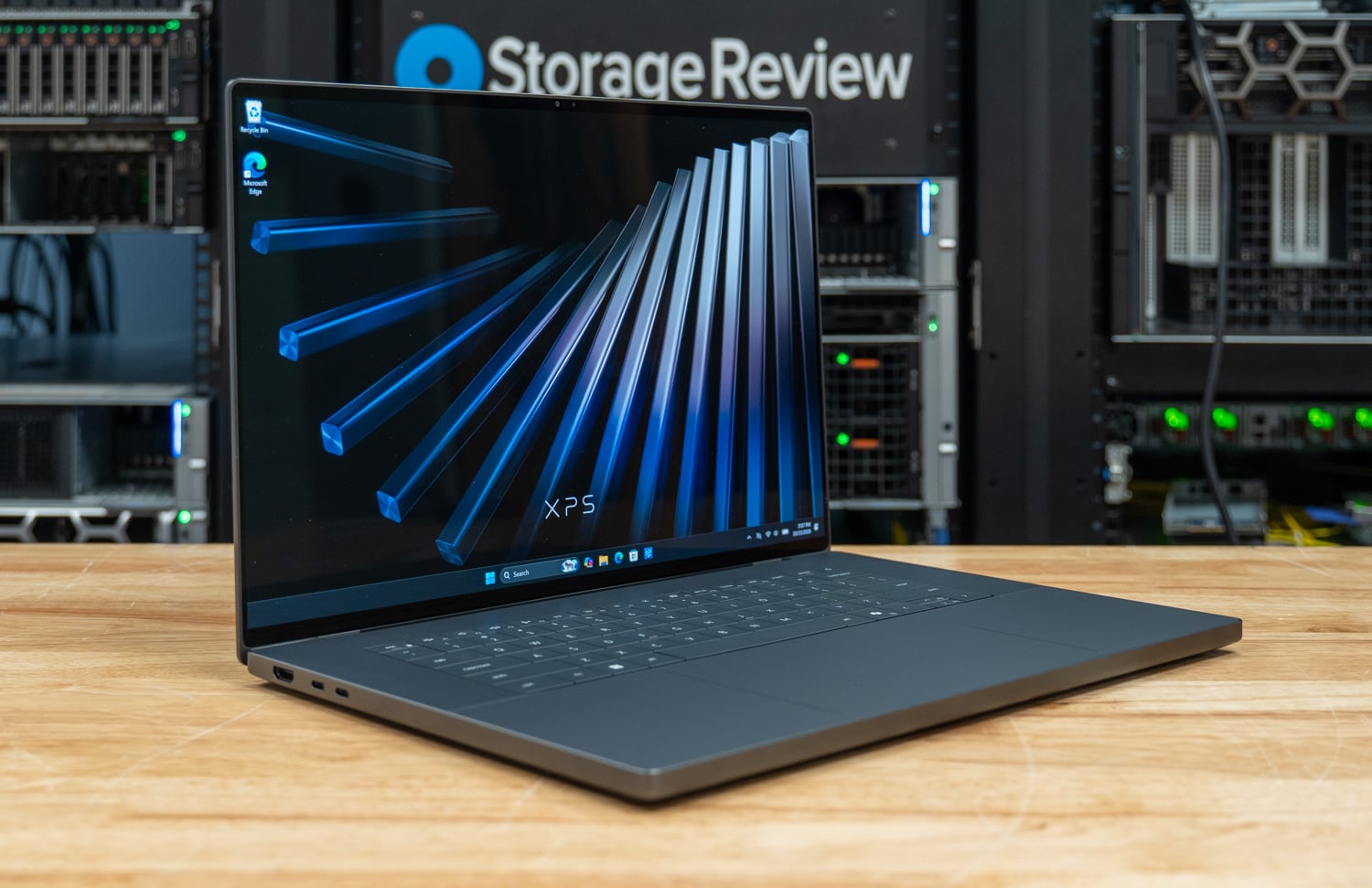
It is the fifth RTX Spark notebook through the lab after the Microsoft Surface Laptop Ultra, the HP OmniBook Ultra 16, the Lenovo Yoga 9n 2-in-1 16, and the Lenovo Pro 9n 15. The N1X inside it is the same 20-core, 6,144-core-GPU part HP ships in the OmniBook, and Dell’s chassis is a uniform 17.8mm slab where HP’s tapers from 15.7mm to 11.6mm, so the comparison between the two is a comparison of cooling designs and build decisions around the same silicon.
The result is about 5 percent less multi-threaded CPU performance than the OmniBook and no throttling at all: the cooling lets the N1X run at its full rated clocks and stay there for as long as the work lasts. The XPS scored 6,631 in Cinebench 2026 multi-core against 7,001 on the OmniBook, then held 6,550 through a 30-minute loop. Its single-core score of 564.5 is the highest we have recorded on an RTX Spark notebook, and its STREAM Triad bandwidth of 122,872MB/s leads this comparison.
On the GPU, the XPS runs within 2 to 8 percent of the OmniBook on every local AI test that fits in its memory and level with it on MLPerf and the small-model serving runs, generates FLUX.2 klein Q4_0 images faster than any other N1X notebook in this comparison at 11.17 per minute, and posts the best SuperTuxKart steady frame rate of the group at 148 fps. The 64GB configuration is a tier S machine by our memory rules, which means gpt-oss:20b and the 27B serving tier run and the 35B coding-agent tier does not, the same line the 64GB Yoga sits on.
Key Takeaways
- Same silicon, thinner shell, small performance drift: 6,631 in Cinebench 2026 multi-core is 5 percent behind the 128GB HP OmniBook Ultra 16 with the same 20-core N1X, 147.0 GIPS in 7-Zip against 150.6, and an LLVM build of 232.4 seconds against 218.1; Blender runs 6 to 7 percent behind across three scenes.
- Best single-thread and memory numbers of the RTX Spark group: Cinebench single-core 564.5, STREAM Triad 122,872MB/s and Copy 130,689MB/s, memory latency 140.5 ns, and Speedometer 36.5, each the top result among the five N1X notebooks in this comparison.
- Local AI runs within 2 to 8 percent of the OmniBook up to its memory line: MLPerf Client generates Llama 3.1 8B at 55.7 tokens per second and Phi-4-mini at 96.2, the Codex coding agent runs gpt-oss:20b at 58.5 tokens per second, llama-server pushes Qwen3.8 27B to 31.9 aggregate tokens per second at eight concurrent users, and FLUX.2 klein renders at 11.17 images per minute; the 30.5GB GPU-usable budget keeps the 35B agent tier out.
- Full performance for as long as the job runs: ten Cinebench multi-core passes over 30 minutes stayed between 6,519 and 6,562 with the last pass the highest, at a 3,083MHz mean clock, and no sustained test in the suite showed a throttling step; the chip runs at the same 98C target the OmniBook uses, and HP’s 3,239MHz at that temperature is where the 5 percent goes.
- The Gen4 SSD is the one spec that holds it back: the 1TB SK hynix PVC10 reads 6,502MB/s and writes 5,670MB/s sequentially with 300.1K IOPS on 4K random reads, against 13,598MB/s and 449.0K IOPS from the OmniBook’s Gen5 drive; cold model loads from disk take 7.73 seconds against 6.70. Dell’s configurator puts a Gen5 drive only in the $6,999.99 128GB build.
Where the Creator Edition Sits
Dell showed the XPS 16 Creator Edition at Computex in June and opened orders on Dell.com in October, with Best Buy, Micro Center, and B&H carrying it as well. It sits beside the Intel XPS 16 (DA16260), which starts at $2,399.99 with Core Ultra Series 3 processors and Arc graphics in a 14.6mm chassis, and Dell positions the Creator Edition as the XPS for buyers who have been asking for discrete-class GPU performance without leaving the family.
Dell lists four fixed configurations, all with the 3.2K OLED touch panel and Windows 11 Home. The $3,799.99 base pairs the 18-core N1X with the 5,120-core GPU, 32GB, and a 512GB SSD; $3,999.99 moves to the 20-core, 6,144-core part with 1TB; our $4,799.99 unit adds 64GB; and $6,999.99 brings 128GB and a 2TB Gen5 self-encrypting drive, the only Gen5 SSD in the lineup; the three lower configurations ship Gen4 drives. Dell says a 4TB option is planned. Our unit happened to arrive with Windows 11 Pro.
The memory configuration is the decision that matters on an RTX Spark system, because the N1X splits its unified LPDDR5X between CPU and GPU by a firmware setting, and the GPU share decides which local models fit. Our 64GB review unit is configured with 32GB for the GPU and reports 30.5GB usable, which runs gpt-oss:20b, the 27B serving tier, and 20B image models, and does not qualify for the 35B coding-agent tier that the 128GB OmniBook and Surface Laptop Ultra run. The 32GB configurations present 12GB to the GPU and run none of our model-load or agent tiers.
Against the other N1X notebooks, the Creator Edition’s distinguishing hardware is the display and the ports: a 3200×2000 Tandem OLED with a variable 20 to 120Hz refresh, and a full-size SD reader beside HDMI 2.1b and three USB4 ports. At 17.8mm and 4.45 pounds, it’s thicker than the OmniBook, which tapers to 11.6mm at the front but weighs 4.89 pounds, and both thicker and heavier than the 4.28-pound Yoga 9n, and the 1TB configuration ships a Gen4 SSD where the OmniBook’s drive we tested is Gen5.
Build and Design
The Creator Edition is a CNC-machined aluminum clamshell at 352.58 x 237.97 x 17.81mm and a listed 2.02kg (4.45 lb) minimum, in a single Graphite finish. Dell calls it the thinnest high-performance XPS it has built, and the thinness is an engineering accomplishment: Dell fitted what it describes as its largest and thinnest fans to date and an 8mm heat pipe, wider than its previous XPS designs, to carry the N1X in a chassis that is 0.7 inches at its thickest point.

In hand, the system has the density and rigidity of a MacBook Pro, with a glass touchpad set into the palm rest and a backlit keyboard with a Copilot key. One detail stood out in the lab: the palm rest is not a single piece of metal. The flat keyboard deck and the front edge piece meet with a visible seam and a slight lip, and with hands resting on the deck the lower palm finds it. It is a small thing on a machine this well finished, and it is the only build complaint we have.

The display is a 16-inch 3200×2000 Tandem OLED touch panel at 142 PPI with a 20 to 120Hz variable refresh rate, VESA DisplayHDR True Black 600 certification, 400 nits typical and up to 1,000 nits peak, 100 percent DCI-P3 coverage, and factory calibration to Delta E under 2 with Pantone validation. It is the same class of panel Dell uses on the Intel XPS 16, and at this resolution Windows defaults to 200 percent scaling. Dell quotes a 1,000,000:1 contrast ratio for it.

Ports run along both sides and largely cover what a creator needs without a dock. There are three USB4 Type-C ports at 40Gbps with DisplayPort 2.1 and Power Delivery, an HDMI 2.1b port, a full-size SDXC v7.1 card reader, and a headset jack. Dell’s patented lock slot lets a Kensington lock secure the machine through any of the Type-C ports. Wireless is a MediaTek Wi-Fi 7 module with Bluetooth 6.0, and the battery is a 99Wh pack, the largest the airlines allow.


Service access and repairability are the best we’ve seen in this class. The Creator Edition opens from the top: four screws release the top cover, and the keyboard and touchpad are screwed to that cover, so either comes out without touching the battery or the motherboard. The I/O sits on two daughterboards separate from the motherboard, and each USB-C port is a separate module held by two screws, so a worn port is a two-screw part that’s simple to swap. The HDMI port and the rest of the I/O are fixed to their daughterboards, which still keeps a port failure off the mainboard.

With the cover off, the layout is visible: the two fans Dell calls its largest and thinnest sit at the rear corners with the heat pipe running between them over the N1X, and the 99Wh battery fills the front half of the chassis under the palm rest. The unified memory is part of the N1X package, so there is nothing to upgrade on the memory side; the SSD is the one component a buyer can change later.

Dell XPS 16 Creator Edition Specifications
| Specification | Dell XPS 16 Creator Edition (DX16263 as tested) |
|---|---|
| Platform | |
| Processor | NVIDIA RTX Spark N1X, 20-core NVIDIA Grace CPU (Arm), 20 threads, 24MB L3 Base configuration: 18-core N1X |
| Graphics | NVIDIA Blackwell RTX GPU, 6,144 CUDA cores, integrated in the N1X, unified memory Base configuration: 5,120-core GPU |
| Memory | 64GB LPDDR5X-9400 unified, soldered; shipped at 32GB GPU / 32GB system, 30.5GB GPU-usable as measured Options: 32GB, 64GB, 128GB |
| Storage | 1TB SK hynix PVC10, M.2 PCIe 4.0 x4 TLC Options: 512GB and 1TB on PCIe 4.0 x4; 2TB on PCIe 5.0 x4 with DRAM, self-encrypting, in the 128GB configuration only; 4TB planned |
| Display | |
| Panel | 16-inch 3.2K (3200×2000) Tandem OLED touch, 142 PPI, 20 to 120Hz VRR, 400 nits typical / 1,000 nits peak, VESA DisplayHDR True Black 600, 100% DCI-P3, Delta E under 2, Pantone Validated, 1,000,000:1 contrast |
| Connectivity | |
| Ports | 3 x USB4 Type-C, 40Gbps, DisplayPort 2.1, Power Delivery, Kensington lock support 1 x HDMI 2.1b 1 x full-size SDXC v7.1 card reader 1 x headset jack |
| Wireless | MediaTek Wi-Fi 7 (802.11be) with Bluetooth 6.0 |
| Physical | |
| Battery | 99Wh |
| Dimensions | 352.58 x 237.97 x 17.81mm (13.88 x 9.37 x 0.70 in) |
| Weight | From 2.02kg (4.45 lb) |
| Chassis | CNC-machined aluminum, Graphite; glass touchpad; backlit keyboard |
| Operating system | Windows 11 Home as sold (Copilot+ PC); Windows 11 Pro on our review unit |
| Price | $4,799.99 as tested on Dell.com; $3,799.99 (18-core, 32GB, 512GB), $3,999.99 (20-core, 32GB, 1TB), $6,999.99 (20-core, 128GB, 2TB) |
Test Setup and Methodology
Our review unit runs the 20-core RTX Spark N1X with 64GB of LPDDR5X-9400 at a 32/32 split and the 1TB Gen4 SSD on Windows 11 Pro 26H1, with benchmarks tested on the Best performance power mode in Dell’s default shipped thermal mode, plugged in. Battery life will follow in a later update.
Results come from sr-client 1.11, our scripted Windows client benchmark suite, on its full run and Peak profile, on each system’s factory Windows image with the OEM’s drivers and utilities. The suite applies the same settings: Windows power mode at Best performance, display at 50 percent brightness, all sleep and display timers off, Windows Firewall and UAC prompts off, and VBS and Memory Integrity left on as shipped. Each result is the median of repeated passes, and the suite reruns a test whose spread exceeds 2 percent before accepting it.
The comparison set is several RTX Spark notebooks we have run on this suite version plus two x86 references. The HP OmniBook Ultra 16 appears twice, as the 128GB unit with 64GB for the GPU and as the 32GB unit with 12GB, and the Lenovo Yoga 9n 2-in-1 16 is the direct match for our configuration at 64GB with a 32GB GPU share. The Lenovo Pro 9n 15 carries the 18-core, 5,120-core-GPU bin that Dell uses in its $3,799.99 base configuration.
The Dell Pro Precision 5 16S with the Core Ultra X9 388H and Arc Pro B390 and the Dell Pro 7 14 with the Ryzen AI 9 HX PRO 470 are Dell’s 64GB x86 machines, and both can hand their integrated GPUs more than 47GB.
| Configuration | CPU | Memory | GPU | Boot drive | OS and power mode |
|---|---|---|---|---|---|
| Dell XPS 16 Creator Edition (DX16263) | NVIDIA RTX Spark N1X, 20C / 20T (Arm), 6,144-core GPU | 64GB LPDDR5X-9400, 32GB GPU / 32GB system split, 30.5GB GPU-usable | Integrated Blackwell RTX, 6,144 cores | SK hynix PVC10 1TB, Gen4 x4 | Windows 11 Pro 26H1 (Arm64), Best performance, Dell default shipped mode |
| HP OmniBook Ultra 16 (16-bk0xxx), 128GB | NVIDIA RTX Spark N1X, 20C / 20T (Arm), 6,144-core GPU | 128GB LPDDR5X-9400, 64GB / 64GB split, 62.5GB GPU-usable | Integrated Blackwell RTX, 6,144 cores | Sandisk PC SN8050S 2TB, Gen5 x4 | Windows 11 Pro 26H1 (Arm64), Best performance |
| Lenovo Yoga 9n 2-in-1 16 (83N7) | NVIDIA RTX Spark N1X, 20C / 20T (Arm), 6,144-core GPU | 64GB LPDDR5X-9400, 32GB / 32GB split, 32GB GPU-usable | Integrated Blackwell RTX, 6,144 cores | Sandisk PC SN5100S 1TB, Gen4 x4 | Windows 11 Home 26H1 (Arm64), Best performance |
| HP OmniBook Ultra 16 (16-bk0xxx), 32GB | NVIDIA RTX Spark N1X, 20C / 20T (Arm), 6,144-core GPU | 32GB LPDDR5X-9400, 12GB GPU / 20GB system, 12GB GPU-usable | Integrated Blackwell RTX, 6,144 cores | KIOXIA KBG80ZNV 1TB, Gen5 x4 | Windows 11 Home 26H1 (Arm64), HP Performance |
| Lenovo Pro 9n 15 (83SS) | NVIDIA RTX Spark N1X, 18C / 18T (Arm), 5,120-core GPU | 32GB LPDDR5X-9400, 12GB GPU / 20GB system, 12GB GPU-usable | Integrated Blackwell RTX, 5,120 cores | Samsung MZAL81T0 1TB, Gen4 x4 | Windows 11 Pro 26H1 (Arm64), Lenovo Performance |
| Dell Pro Precision 5 16S (PW516260) | Intel Core Ultra X9 388H, 16C / 16T (4P + 8E + 4LPE) | 64GB LPDDR5X-8533 LPCAMM2, 47.6GB GPU-usable | Intel Arc Pro B390 (integrated, 12 Xe cores) | SK hynix PCB01 1TB, Gen5 x4 | Windows 11 Pro 26H2 (x64), Dell Performance |
| Dell Pro 7 14 (P714265) | AMD Ryzen AI 9 HX PRO 470, 12C / 24T | 64GB LPDDR5X-8000, 32GB VGM, 47.8GB GPU-usable | AMD Radeon 890M (integrated) | Samsung BM9C1a 1TB, Gen4 x4 | Windows 11 Pro 25H2 (x64), Dell Performance |
Three labels recur in the tables. N/A means a test does not apply to the hardware. Not run means the suite declined to start a test because the hardware does not qualify: our model-load, coding-agent, 27B serving, and 20B image tiers need at least 16GB of GPU-usable memory, and the two 12GB systems clear none of them. Partial marks a result the suite accepted with a note. The Dell Pro Precision 5 16S did not expose CPU temperatures to the suite, so it is absent from the thermal table.
Two tests are new to this suite version and appear here for the first time against the full RTX Spark group: llama-server throughput at one to eight concurrent users on three models, and image generation through stable-diffusion.cpp on FLUX.2 klein 4B, Z-Image Turbo 6B, and Qwen-Image 20B. The HP 32GB and Lenovo Pro 9n results in this review are fresh runs on 1.11, so their numbers differ slightly from the October 16 reviews.
Local AI Performance
The frame around this section is the 30.5GB the GPU can address. Within it, the XPS runs within 2 to 8 percent of the 128GB OmniBook on every test and level with it on MLPerf and the small-model serving runs, because the GPU, the memory bus, and the drivers are the same. Above it, the 128GB systems run a 35B coding-agent tier the XPS cannot start. For a buyer deciding between the $4,799.99 and $6,999.99 configurations, that line, and the Gen5 SSD that comes with the 2TB drive, is what the extra $2,200 buys.
MLPerf Client v2.0
MLPerf Client runs Llama 3.1 8B and Phi-4-mini through five prompt categories and reports time to first token and the token rate after it as a geometric mean across the categories, with agentic scenarios that run Llama 3.1 8B as a data analyst agent and a software engineering agent calling tools over multiple turns. The engine is llama.cpp on CUDA on the N1X systems, Intel’s native OpenVINO path on the Arc Pro B390, and WindowsML on the Radeon 890M, so the two x86 columns are different runtimes on different silicon.


| MLPerf Client v2.0 | Dell XPS 16 Creator Edition (N1X 20C, 64GB) | HP OmniBook Ultra 16 (N1X 20C, 128GB) | Lenovo Yoga 9n 2-in-1 16 (N1X 20C, 64GB) | HP OmniBook Ultra 16 (N1X 20C, 32GB) | Lenovo Pro 9n 15 (N1X 18C, 32GB) | Dell Pro Precision 5 16S (X9 388H, B390) | Dell Pro 7 14 (Ryzen AI 9 HX PRO 470) |
|---|---|---|---|---|---|---|---|
| Llama 3.1 8B, time to first token, geomean (s, lower is better) | 0.313 | 0.275 | 0.348 | 0.277 | 0.303 | 0.214 | 3.146 |
| Llama 3.1 8B, token rate, geomean (tok/s) | 55.7 | 56.5 | 54.4 | 56.1 | 55.0 | 26.9 | 18.0 |
| Phi-4-mini, time to first token, geomean (s, lower is better) | 0.139 | 0.129 | 0.155 | 0.122 | 0.134 | 0.180 | 1.901 |
| Phi-4-mini, token rate, geomean (tok/s) | 96.2 | 97.0 | 91.8 | 95.0 | 94.9 | 41.5 | 29.5 |
| Data Analyst Agent, end-to-end (s, lower is better) | 54.7 | 53.3 | 60.0 | 53.4 | 57.0 | 84.7 | N/A |
| Data Analyst Agent, token rate (tok/s) | 48.6 | 48.6 | 45.5 | 48.6 | 46.9 | 25.7 | N/A |
| SWE Agent, end-to-end (s, lower is better) | 46.7 | 45.5 | 51.7 | 46.6 | 49.2 | 65.9 | N/A |
| SWE Agent, token rate (tok/s) | 46.3 | 46.8 | 43.4 | 46.0 | 44.9 | 25.1 | N/A |
The XPS generated Llama 3.1 8B at 55.7 tokens per second and Phi-4-mini at 96.2, against 56.5 and 97.0 on the OmniBook and 54.4 and 91.8 on the Yoga. The five N1X systems land within 4 percent of each other on Llama decode and 6 percent on Phi-4-mini, which is the memory bus talking: all five run LPDDR5X-9400 and the small models are bandwidth-bound. Time to first token favors the OmniBooks slightly, at 0.275 seconds on Llama against 0.313 on the XPS.
Dell’s x86 machines are a different class here. The Arc Pro B390 generated Llama at 26.9 tokens per second through OpenVINO and the Radeon 890M at 18.0 through WindowsML, with the Dell Pro 7 14 taking 3.146 seconds to first token, where every N1X system is under a third of a second. The agentic runs track the same order: 54.7 and 46.7 seconds end to end on the XPS against 84.7 and 65.9 on the Precision 5 16S.
Model Loading and the Coding Agent
Our model-load test times Ollama from launch to first token on gpt-oss:20b, a 12.8GB download, cold from the SSD and warm from the page cache, and the coding-agent test runs Codex CLI against the same model with a 64K context through a fixed set of tasks. Both start at 16GB of GPU-usable memory, so the 12GB HP and Lenovo Pro 9n do not run them; the 35B tier that needs about 40GB is out of reach for every 64GB system in the table, and we covered it in the OmniBook and Surface Laptop Ultra reviews.


| Model load and coding agent, gpt-oss:20b | Dell XPS 16 Creator Edition (N1X 20C, 64GB) | HP OmniBook Ultra 16 (N1X 20C, 128GB) | Lenovo Yoga 9n 2-in-1 16 (N1X 20C, 64GB) | HP OmniBook Ultra 16 (N1X 20C, 32GB) | Lenovo Pro 9n 15 (N1X 18C, 32GB) | Dell Pro Precision 5 16S (X9 388H, B390) | Dell Pro 7 14 (Ryzen AI 9 HX PRO 470) |
|---|---|---|---|---|---|---|---|
| Model load to first token (s, lower is better) | |||||||
| Cold load from SSD | 7.73 | 6.70 | 7.55 | Not run | Not run | 6.29 | 10.94 |
| Warm load from page cache | 3.69 | 3.68 | 3.70 | Not run | Not run | 4.21 | 5.14 |
| Read throughput during cold load (MB/s) | 2,372 | 3,211 | 2,486 | Not run | Not run | 3,263 | 1,731 |
| Drive sequential read ceiling (MB/s) | 5,778 | 13,681 | 6,239 | Not run | Not run | 12,425 | 2,096 |
| Codex CLI coding agent, 64K context | |||||||
| Generation rate (tok/s) | 58.5 | 57.1 | 56.0 | Not run | Not run | 17.0 | 20.2 |
| Tasks passing (of 4) | 3 | 2 | 2 | Not run | Not run | 4 | 2 |
| Tool calls | 35 | 22 | 34 | Not run | Not run | 40 | 28 |
| Wall time (s, lower is better) | 360.1 | 215.9 | 310.8 | Not run | Not run | 1,079.7 | 1,327.6 |
| Agent beside a user (Speedometer in the foreground) | |||||||
| Agent generation rate (tok/s) | 52.7 | 54.1 | 52.8 | Not run | Not run | 18.0 | 18.9 |
| Speedometer score with agent running | 13.1 | 14.8 | 14.7 | Not run | Not run | 27.2 | 19.4 |
| Speedometer slowdown (x, lower is better) | 2.79 | 2.35 | 2.35 | Not run | Not run | 1.57 | 1.91 |
Warm loads are identical across the N1X systems at about 3.7 seconds, which is the GPU and driver doing the same work. Cold loads separate on the SSD: the XPS took 7.73 seconds reading at 2,372MB/s from its Gen4 drive, against 6.70 seconds at 3,211MB/s on the OmniBook’s Gen5 drive. A second of difference per model load is not a workflow problem, and it is the first place the 1TB drive’s ceiling shows.
The coding agent generated at 58.5 tokens per second on the XPS, the best of the N1X group by a hair, and passed three of the four tasks against two on the OmniBook and the Yoga; its longer wall time, 360 seconds against 216, comes from making 35 tool calls where the OmniBook made 22. Agent runs are not deterministic, so we read the generation rate as the comparable number and the pass count as a sanity check. The Precision 5 16S passed all four tasks at 17.0 tokens per second and needed 1,080 seconds to do it.
With the agent running in the background and Speedometer in the foreground, the XPS slowed the browser by 2.79x against 2.35x on the OmniBook and 1.57x on the Precision, while the agent itself lost about 10 percent. The N1X systems take a larger foreground hit than the x86 machines in this test because the agent is saturating the same memory bus the browser needs.
RAG and LLM Serving
The RAG test ingests a passage corpus through an embedding model, retrieves against it, and answers questions with Ollama, reporting throughput and accuracy at each stage. The serving test runs llama-server on Ministral 3 3B and 8B at 4,096-token prompts and Qwen3.8 27B at 8,192-token prompts, finds the concurrency that fits in GPU memory, and reports aggregate output throughput as users are added.


| RAG (Ollama) and llama-server | Dell XPS 16 Creator Edition (N1X 20C, 64GB) | HP OmniBook Ultra 16 (N1X 20C, 128GB) | Lenovo Yoga 9n 2-in-1 16 (N1X 20C, 64GB) | HP OmniBook Ultra 16 (N1X 20C, 32GB) | Lenovo Pro 9n 15 (N1X 18C, 32GB) | Dell Pro Precision 5 16S (X9 388H, B390) | Dell Pro 7 14 (Ryzen AI 9 HX PRO 470) |
|---|---|---|---|---|---|---|---|
| RAG | |||||||
| Ingest (passages/s) | 104.4 | 111.5 | 114.5 | 110.7 | 113.5 | 81.4 | 52.3 |
| Embedding rate (tokens/s) | 16,901 | 18,049 | 18,538 | 17,927 | 18,380 | 13,188 | 8,465 |
| Retrieval recall@5 (%) | 82.8 | 82.8 | 82.8 | 82.8 | 82.7 | 82.7 | 82.7 |
| Answer prompt processing (tokens/s) | 6,251 | 7,103 | 5,835 | 7,136 | 6,179 | 2,154 | 970 |
| Answer generation (tokens/s) | 95.0 | 103.4 | 91.1 | 101.5 | 94.9 | 48.4 | 42.2 |
| Question to answer, p50 (s, lower is better) | 0.25 | 0.23 | 0.27 | 0.23 | 0.25 | 0.99 | 1.58 |
| Ministral 3 3B Reasoning Q8_0, 4,096 in / 1,024 out | |||||||
| 1 concurrent, output (tok/s) | 57.8 | 57.5 | 56.8 | 57.4 | 54.8 | 22.4 | 18.3 |
| 2 concurrent, output (tok/s) | 95.8 | 93.7 | 92.8 | 94.2 | 93.2 | 36.2 | 29.9 |
| 4 concurrent, output (tok/s) | 146.4 | 148.8 | 143.2 | 147.6 | 146.0 | 38.2 | 45.3 |
| 4 concurrent, TTFT median (ms, lower is better) | 1,505 | 1,382 | 1,647 | 1,447 | 1,548 | 8,706 | 8,546 |
| Ministral 3 8B Reasoning, 4,096 in / 1,024 out | |||||||
| 1 concurrent, output (tok/s) | 40.6 | 41.5 | 39.7 | 40.9 | 40.1 | 15.5 | 13.4 |
| 4 concurrent, output (tok/s) | 96.3 | 104.1 | 96.9 | 104.7 | 103.3 | 24.5 | 29.0 |
| Qwen3.8 27B, 8,192 in / 1,024 out | |||||||
| Concurrency that fits | 8 | 8 | 8 | Not run | Not run | 8 | 8 |
| 1 concurrent, output (tok/s) | 12.4 | 12.6 | 12.5 | Not run | Not run | 4.9 | 3.6 |
| 4 concurrent, output (tok/s) | 27.5 | 28.1 | 27.4 | Not run | Not run | 10.9 | 6.9 |
| 8 concurrent, output (tok/s) | 31.9 | 33.8 | 31.4 | Not run | Not run | 12.1 | 7.5 |
| 8 concurrent, TTFT median (s, lower is better) | 24.3 | 24.3 | 24.4 | Not run | Not run | 77.8 | 128.0 |
RAG answer generation ran at 95.0 tokens per second on the XPS against 103.4 on the OmniBook and 91.1 on the Yoga, with ingest at 104.4 passages per second, the low end of a group that spans 104.4 to 114.5. Retrieval quality is a property of the models and matched everywhere at 82.8 percent recall at five. Questions came back in a quarter second; the Precision 5 16S needed a second, and the Pro 7 14 a second and a half.
Serving is where the 64GB configuration shows what it can hold. Ministral 3 3B scaled from 57.8 tokens per second for one user to 146.4 aggregate at four, within 2 percent of the OmniBook at every step, and Qwen3.8 27B fit eight concurrent users in the XPS’s 30.5GB and delivered 31.9 aggregate tokens per second against 33.8 on the 128GB machine. The 12GB systems could not load the 27B model. The Precision 5 16S also fit eight users on the same model and produced 12.1 tokens per second, with a median time to first token of 78 seconds on the 8K prompts against 24 on the XPS.
Image Generation
The image test runs stable-diffusion.cpp at 1024×1024 on three models, FLUX.2 klein 4B at four steps, Z-Image Turbo 6B at eight, and Qwen-Image 20B at twenty, and reports images per minute after a warm-up image. The N1X and Arc systems run the Vulkan backend, the Radeon 890M runs ROCm 10.1, and the 20B model needs the 16GB tier.

| stable-diffusion.cpp, 1024×1024 (images per minute, higher is better) | Dell XPS 16 Creator Edition (N1X 20C, 64GB) | HP OmniBook Ultra 16 (N1X 20C, 128GB) | Lenovo Yoga 9n 2-in-1 16 (N1X 20C, 64GB) | HP OmniBook Ultra 16 (N1X 20C, 32GB) | Lenovo Pro 9n 15 (N1X 18C, 32GB) | Dell Pro Precision 5 16S (X9 388H, B390) | Dell Pro 7 14 (Ryzen AI 9 HX PRO 470) |
|---|---|---|---|---|---|---|---|
| FLUX.2 klein 4B, Q4_0, 4 steps | 11.17 | 11.01 | 9.89 | 11.16 | 10.40 | 0.20 | 1.79 |
| FLUX.2 klein 4B, BF16, 4 steps | 10.36 | 11.09 | 9.80 | Not run | Not run | 0.32 | 1.77 |
| FLUX.2 klein 4B, Q4_0, seconds per image (lower is better) | 5.4 | 5.5 | 6.1 | 5.4 | 5.8 | 299.9 | 33.5 |
| Z-Image Turbo 6B, Q4_0, 8 steps | 3.83 | 4.03 | 3.71 | Not run | Not run | 0.26 | 0.67 |
| Z-Image Turbo 6B, BF16, 8 steps | 3.89 | 4.19 | 3.86 | Not run | Not run | 0.19 | 0.19 |
| Qwen-Image 20B, Q4_0, 20 steps | 0.49 | 0.50 | 0.48 | Not run | Not run | Not run | 0.10 |
| Qwen-Image 20B, Q4_0, seconds per image (lower is better) | 122 | 119 | 124 | Not run | Not run | Not run | 612 |
The XPS produced FLUX.2 klein images at 11.17 per minute, 5.4 seconds each, the best result among the N1X notebooks by a small margin over the OmniBook at 11.01, and Qwen-Image 20B at 0.49 per minute, about two minutes per image, which the 64GB memory budget makes possible and the 12GB systems cannot attempt. The x86 integrated GPUs are not competitive on this workload through these backends: the Arc Pro B390 needed 300 seconds per FLUX image on Vulkan and the Radeon 890M 34 on ROCm.
CPU Performance
The 20 Grace cores in the XPS run the same instruction set and the same clocks as the OmniBook’s, so the CPU section measures the chassis. On single-threaded work, the XPS is the best N1X system we have tested; on all-core work it gives up 2 to 9 percent to the HP depending on the test, 2 percent in 7-Zip and about 9 in Stockfish and primesieve, and the thermal section below shows why.
Against Dell’s x86 machines, the N1X leads on multi-threaded throughput and memory bandwidth and trails on single-threaded Python and the vector-heavy GROMACS and OpenBLAS runs, where the Panther Lake and Zen 5 cores have wider SIMD units.

| Cinebench 2026 (points, higher is better) | Dell XPS 16 Creator Edition (N1X 20C, 64GB) | HP OmniBook Ultra 16 (N1X 20C, 128GB) | Lenovo Yoga 9n 2-in-1 16 (N1X 20C, 64GB) | HP OmniBook Ultra 16 (N1X 20C, 32GB) | Lenovo Pro 9n 15 (N1X 18C, 32GB) | Dell Pro Precision 5 16S (X9 388H, B390) | Dell Pro 7 14 (Ryzen AI 9 HX PRO 470) |
|---|---|---|---|---|---|---|---|
| Single core | 564.5 | 561.4 | 551.7 | 560.9 | 519.5 | 534.6 | 464.8 |
| Multi core | 6,631 | 7,001 | 6,303 | 6,976 | 6,369 | 4,754 | 4,045 |
| Sustained loop, first pass | 6,539 | 7,014 | 6,269 | 6,940 | 6,171 | 4,634 | 4,029 |
| Sustained loop, steady state | 6,550 | 6,970 | 6,296 | 6,957 | 6,243 | 4,413 | 4,057 |
| Steady / first | 1.002 | 0.994 | 1.004 | 1.002 | 1.012 | 0.952 | 1.007 |
| Mean CPU clock, steady state (MHz) | 3,083 | 3,239 | 3,043 | 3,270 | 3,305 | 3,283 | 2,902 |
The XPS scored 564.5 single-core and 6,631 multi-core. The single-core result edges the OmniBook’s 561.4 and the Yoga’s 551.7, and it beats the Core Ultra X9 388H in the Precision 5 16S at 534.6, the fastest x86 single-core result in this comparison. Multi-core is 5 percent behind the 128GB OmniBook and 5 percent behind the 32GB one, and 5 percent ahead of the Yoga, which runs the same chip cooler and slower.
The 30-minute loop runs ten multi-core passes about three minutes apart, and the XPS scored between 6,519 and 6,562 on all ten, a spread of 43 points with the last pass the highest, at a 3,083MHz mean clock. There is no throttling curve to report: the XPS reaches its operating temperature in the first minutes, holds the same clock from there, and the score does not move. The OmniBook ran the same loop from 7,014 down to a 6,970 steady state, and it holds 3,239MHz at the same 98C, which is the whole of the multi-core gap.

| 7-Zip (GIPS, higher is better) | Dell XPS 16 Creator Edition (N1X 20C, 64GB) | HP OmniBook Ultra 16 (N1X 20C, 128GB) | Lenovo Yoga 9n 2-in-1 16 (N1X 20C, 64GB) | HP OmniBook Ultra 16 (N1X 20C, 32GB) | Lenovo Pro 9n 15 (N1X 18C, 32GB) | Dell Pro Precision 5 16S (X9 388H, B390) | Dell Pro 7 14 (Ryzen AI 9 HX PRO 470) |
|---|---|---|---|---|---|---|---|
| Compress, all threads | 154.4 | 157.6 | 151.5 | 160.3 | 147.0 | 116.3 | 96.4 |
| Decompress, all threads | 139.6 | 143.7 | 139.8 | 145.1 | 129.5 | 100.6 | 114.1 |
| Total, all threads | 147.0 | 150.6 | 145.6 | 152.7 | 138.3 | 108.3 | 105.2 |
| Total, one thread | 9.13 | 9.10 | 9.12 | 9.12 | 8.92 | 9.86 | 8.99 |
| Total, all threads, x64 build under Prism | 122.0 | 126.4 | 124.7 | 128.6 | 115.6 | N/A | N/A |
| Total, one thread, x64 build under Prism | 8.40 | 8.34 | 8.28 | 8.35 | 7.86 | N/A | N/A |
7-Zip’s native Arm build totaled 147.0 GIPS on the XPS against 150.6 on the OmniBook and 108.3 on the Precision 5 16S. The x64 build of the same benchmark under Windows’ Prism emulation ran at 122.0 GIPS, a 17 percent penalty across all threads and 8 percent on one, which is the cost of an application that has not been ported; even emulated, the N1X stays ahead of both x86 Dells running native code.


| Rendering and encoding | Dell XPS 16 Creator Edition (N1X 20C, 64GB) | HP OmniBook Ultra 16 (N1X 20C, 128GB) | Lenovo Yoga 9n 2-in-1 16 (N1X 20C, 64GB) | HP OmniBook Ultra 16 (N1X 20C, 32GB) | Lenovo Pro 9n 15 (N1X 18C, 32GB) | Dell Pro Precision 5 16S (X9 388H, B390) | Dell Pro 7 14 (Ryzen AI 9 HX PRO 470) |
|---|---|---|---|---|---|---|---|
| Blender 4.5 CPU (samples per minute, higher is better) | |||||||
| Monster | 198.9 | 211.4 | 201.8 | 211.8 | 189.8 | 129.1 | 112.9 |
| Junkshop | 119.1 | 127.7 | 121.2 | 127.0 | 111.8 | 88.9 | 79.5 |
| Classroom | 86.7 | 92.8 | 89.2 | 93.4 | 84.3 | 62.8 | 59.8 |
| HandBrake 4K60 (frames per second, higher is better) | |||||||
| x265, medium, q22, software | 38.8 | 40.6 | 38.7 | 42.8 | 38.1 | 29.6 | 26.8 |
| SVT-AV1, preset 8, q30, software | 14.0 | 15.4 | 15.1 | 15.9 | 15.3 | 81.7 | 68.5 |
| HEVC, NVENC hardware encoder | 138 | 136 | 138 | 138 | 140 | N/A | N/A |
| HEVC, Media Foundation hardware encoder | 61 | 53 | 54 | 56 | 58 | N/A | 112 |
| HEVC, Quick Sync hardware encoder | N/A | N/A | N/A | N/A | N/A | 128 | N/A |
Blender’s three CPU scenes ran 6 to 7 percent behind the OmniBook and 34 to 54 percent ahead of the Precision 5 16S. HandBrake’s software x265 encode at 38.8 fps sits with the group, and the SVT-AV1 result at 14.0 fps repeats what we saw on every N1X notebook: the Arm build of SVT-AV1 runs at a fifth to a sixth of the x86 systems’ rate, 68.5 fps on the Pro 7 14 and 81.7 on the Precision, and the fix is upstream of Dell. NVENC handles HEVC at 138 fps on every N1X system.


| Developer, scientific, and memory tests | Dell XPS 16 Creator Edition (N1X 20C, 64GB) | HP OmniBook Ultra 16 (N1X 20C, 128GB) | Lenovo Yoga 9n 2-in-1 16 (N1X 20C, 64GB) | HP OmniBook Ultra 16 (N1X 20C, 32GB) | Lenovo Pro 9n 15 (N1X 18C, 32GB) | Dell Pro Precision 5 16S (X9 388H, B390) | Dell Pro 7 14 (Ryzen AI 9 HX PRO 470) |
|---|---|---|---|---|---|---|---|
| LLVM 21.1.4 full build (s, lower is better) | 232.4 | 218.1 | 230.1 | 224.1 | 247.9 | 348.6 | 437.2 |
| Stockfish, one thread (Mnps) | 1.74 | 1.73 | 1.73 | 1.74 | 1.69 | 1.86 | 1.96 |
| Stockfish, all threads (Mnps) | 13.87 | 15.19 | 12.98 | 15.02 | 14.38 | 15.02 | 14.74 |
| primesieve 1e11, one thread (s, lower is better) | 12.03 | 12.02 | 12.02 | 12.01 | 12.34 | 9.55 | 6.67 |
| primesieve 1e12, all threads (s, lower is better) | 10.39 | 9.53 | 10.71 | 9.45 | 10.45 | 11.34 | 14.95 |
| pyperformance go (ms, lower is better) | 111.6 | 111.2 | 110.6 | 110.6 | 114.1 | 69.6 | 76.5 |
| pyperformance nbody (ms, lower is better) | 80.8 | 80.4 | 80.3 | 80.5 | 82.6 | 52.4 | 61.8 |
| pyperformance regex_compile (ms, lower is better) | 84.9 | 84.4 | 84.4 | 84.5 | 86.7 | 65.2 | 70.6 |
| Speedometer 3.1 | 36.5 | 34.8 | 34.5 | 35.2 | 34.0 | 42.9 | 36.9 |
| GROMACS benchMEM (ns/day) | 17.41 | 17.48 | 17.35 | 16.95 | 16.86 | 23.28 | 21.72 |
| OpenBLAS LU solve N=20000, all cores (GFLOPS) | 315 | 322 | 292 | 328 | 304 | 503 | 378 |
| OpenBLAS DGEMM M=8000, all cores (GFLOPS) | 355 | 374 | 305 | 380 | 361 | 527 | 390 |
| STREAM Copy (MB/s) | 130,689 | 127,283 | 119,804 | 128,365 | 125,011 | 73,809 | 42,001 |
| STREAM Triad (MB/s) | 122,872 | 120,783 | 112,952 | 121,515 | 117,986 | 83,038 | 45,108 |
| Memory latency, 4K pages (ns, lower is better) | 140.5 | 143.6 | 141.2 | 141.9 | 141.6 | 115.2 | 148.3 |
| Core-to-core latency, mean (ns, lower is better) | 159.9 | 162.3 | 161.4 | 159.7 | 164.8 | 89.0 | 50.9 |
The LLVM build finished in 232.4 seconds, 7 percent longer than the OmniBook’s 218.1 and a third faster than the Precision 5 16S at 348.6. Speedometer at 36.5 is the best N1X result and short of the X9 388H’s 42.9, and the single-threaded Python benchmarks show the same shape as the Surface and HP reviews: the Grace cores take 30 to 60 percent longer than Panther Lake on go, nbody, and regex_compile.
Memory is the N1X’s clearest hardware advantage over the x86 machines, and the XPS has the best of it: 122,872MB/s on STREAM Triad and 130,689MB/s on Copy, against 83,038 and 73,809 on the Precision 5 16S and under 50,000 on the Pro 7 14. Latency runs the other way at 140.5 ns against 115.2 on Panther Lake, and the 160 ns core-to-core mean reflects the two 10-core clusters inside the N1X. GROMACS and OpenBLAS favor the x86 parts, 23.28 against 17.41 ns per day and 527 against 355 GFLOPS, where the x86 cores’ wider vector units count, plus AVX-512 on the Ryzen.
Gaming and GPU Encoding
SuperTuxKart 1.5 is the one game the suite runs on every platform, at 1080p Ultra with vsync off, and reports average and steady frame rates. It is a light workload for a 6,144-core Blackwell GPU, so the test is a check on drivers and sustained GPU clocks more than a measure of gaming capability.

| SuperTuxKart 1.5, 1080p Ultra (frames per second, higher is better) | Dell XPS 16 Creator Edition (N1X 20C, 64GB) | HP OmniBook Ultra 16 (N1X 20C, 128GB) | Lenovo Yoga 9n 2-in-1 16 (N1X 20C, 64GB) | HP OmniBook Ultra 16 (N1X 20C, 32GB) | Lenovo Pro 9n 15 (N1X 18C, 32GB) | Dell Pro Precision 5 16S (X9 388H, B390) | Dell Pro 7 14 (Ryzen AI 9 HX PRO 470) |
|---|---|---|---|---|---|---|---|
| Average FPS | 230.6 | 219.5 | 208.0 | 231.6 | 212.9 | 168.0 | 84.9 |
| Steady FPS | 148 | 143 | 115 | 144 | 135 | 88 | 61 |
The XPS averaged 230.6 fps with a 148 fps steady figure, the best steady frame rate in the group and within 1 fps of the 32GB OmniBook’s top average of 231.6, and 11 percent ahead of the Yoga on the same GPU with the same memory split. Dell’s thermal design holds GPU clocks at least as well as it holds CPU clocks, and the Precision’s Arc Pro B390 at 168.0 fps and the Pro 7 14’s Radeon 890M at 84.9 show the distance between the N1X and Dell’s x86 integrated graphics on a 3D load.
The hardware HEVC path through Media Foundation ran at 61 fps on the XPS, the best of the N1X systems, and NVENC at 138.
Thermals and Clocks Under Load
The suite logs CPU temperature and clock during every test, and the XPS’s log is the flattest we have recorded: a 98C peak in every sustained CPU test, a 97.3C mean through the 30-minute loop, and 96 to 98C through MLPerf, serving, image generation, RAG, and the game. That is the target Dell’s firmware sets for the N1X, the same one HP uses, and the two rear fans and the heat pipe hold the chip there with the clock floating in a narrow band, so all ten passes of the 30-minute loop land within 0.7 percent of each other.
HP’s firmware does the same thing in its wedge chassis and lands up to about 300MHz higher on most tests, 29MHz in 7-Zip and 307MHz in RAG, while the XPS clocks higher in image generation and SuperTuxKart; Lenovo’s Yoga keeps the chip in the 70s and low 80s and gives up 5 percent in Cinebench multi-core and 3 to 11 percent on the GPU tests to do it.
| Peak CPU temperature / mean CPU clock during the test (MHz) | Dell XPS 16 Creator Edition (N1X 20C, 64GB) | HP OmniBook Ultra 16 (N1X 20C, 128GB) | Lenovo Yoga 9n 2-in-1 16 (N1X 20C, 64GB) | HP OmniBook Ultra 16 (N1X 20C, 32GB) | Lenovo Pro 9n 15 (N1X 18C, 32GB) | Dell Pro Precision 5 16S (X9 388H, B390) | Dell Pro 7 14 (Ryzen AI 9 HX PRO 470) |
|---|---|---|---|---|---|---|---|
| Cinebench 2026 | 98C / 2,910 | 98C / 2,971 | 71C / 2,807 | 98C / 2,948 | 90C / 2,946 | N/A / 3,797 | 81C / 3,888 |
| Sustained loop (30 min) | 98C / 3,080 | 98C / 3,227 | 71C / 3,024 | 98C / 3,252 | 90C / 3,294 | N/A / 3,405 | 73C / 2,921 |
| 7-Zip | 98C / 2,849 | 98C / 2,878 | 75C / 2,742 | 98C / 2,843 | 80C / 2,863 | N/A / 3,938 | 73C / 3,744 |
| Blender | 98C / 3,033 | 98C / 3,237 | 79C / 3,048 | 98C / 3,168 | 88C / 3,220 | N/A / 3,648 | 76C / 3,095 |
| HandBrake | 98C / 2,700 | 98C / 2,856 | 86C / 2,750 | 98C / 2,781 | 91C / 2,974 | N/A / 3,725 | 80C / 3,278 |
| LLVM build | 98C / 3,030 | 98C / 3,161 | 80C / 3,079 | 98C / 3,186 | 84C / 3,038 | N/A / 3,653 | 73C / 3,056 |
| GROMACS | 98C / 3,132 | 98C / 3,296 | 83C / 3,218 | 98C / 3,320 | 88C / 3,364 | N/A / 3,359 | 70C / 2,990 |
| MLPerf Client | 96C / 2,219 | 93C / 2,269 | 70C / 1,994 | 93C / 2,170 | 76C / 2,052 | N/A / 2,628 | 68C / 3,152 |
| LLM serving | 98C / 1,646 | 93C / 1,798 | 77C / 1,550 | 90C / 2,028 | 77C / 1,998 | N/A / 3,637 | 70C / 2,052 |
| Image generation | 97C / 1,662 | 94C / 1,630 | 80C / 1,710 | 84C / 2,117 | 71C / 2,550 | N/A / 2,725 | 85C / 2,125 |
| RAG | 97C / 2,467 | 93C / 2,774 | 84C / 2,708 | 94C / 2,781 | 76C / 2,779 | N/A / 3,866 | 77C / 2,631 |
| SuperTuxKart | 96C / 1,997 | 95C / 1,952 | 66C / 1,961 | 92C / 2,006 | 72C / 2,107 | N/A / 3,663 | 68C / 2,230 |
The practical reading for buyers is that the XPS holds its performance indefinitely: a 30-minute render or a long agent session runs at the same speed as the first minute, with the chip inside its operating spec the whole time, as it is in the OmniBook at the same 98C.
The fans never fell behind the load in any test we ran, and the tables show it in the best single-core, memory bandwidth, FLUX.2 klein Q4_0, and SuperTuxKart steady-rate results in the group. The OmniBook holds up to about 300MHz more from the same chip at the same temperature on most tests, and that margin in HP’s cooling design accounts for the 5 percent.
Storage Performance
The 1TB drive in our unit is an SK hynix PVC10 on PCIe 4.0 x4, and Dell’s configurator lists Gen4x4 TLC drives for the 512GB build and both 1TB builds. The only Gen5 drive in the line is the 2TB self-encrypting drive with DRAM in the $6,999.99 configuration, and Dell does not offer it with 64GB. The fio tests use a 25GiB footprint on the boot volume with 128K sequential at QD32 and 4K random at QD32 across 4, 8, and 16 jobs, through the file system and against the raw device.


| fio, 25GiB footprint | Dell XPS 16 Creator Edition (N1X 20C, 64GB) | HP OmniBook Ultra 16 (N1X 20C, 128GB) | Lenovo Yoga 9n 2-in-1 16 (N1X 20C, 64GB) | HP OmniBook Ultra 16 (N1X 20C, 32GB) | Lenovo Pro 9n 15 (N1X 18C, 32GB) | Dell Pro Precision 5 16S (X9 388H, B390) | Dell Pro 7 14 (Ryzen AI 9 HX PRO 470) |
|---|---|---|---|---|---|---|---|
| 128K sequential, QD32 | |||||||
| Sequential read, file system (MB/s) | 6,502 | 13,598 | 6,884 | 10,620 | 7,004 | 9,456 | 6,564 |
| Sequential read, raw device (MB/s) | 6,507 | 12,490 | 6,958 | 10,002 | 7,193 | 9,012 | 6,588 |
| Sequential write (MB/s) | 5,670 | 11,899 | 5,860 | 9,531 | 4,520 | 9,257 | 5,050 |
| 4K random, QD32 | |||||||
| Random read, file system, peak (IOPS) | 300,063 | 449,043 | 410,338 | 293,120 | 300,437 | 778,094 | 627,962 |
| Random read, raw device, peak (IOPS) | 873,625 | 1,898,651 | 722,368 | 1,403,656 | 920,303 | 1,285,510 | 660,209 |
| Random write, file system, peak (IOPS) | 256,856 | 234,888 | 64,948 | 225,114 | 183,675 | 649,544 | 42,149 |
| Random read, 16 jobs, p99 latency (us, lower is better) | 545 | 1,286 | 774 | 1,188 | 782 | 971 | 1,794 |
| Random write, 16 jobs, p99 latency (us, lower is better) | 2,769 | 2,146 | 40,108 | 2,769 | 9,634 | 1,057 | 58,982 |
| Drive temperature, peak (C) | 58 | 52 | 65 | 64 | 77 | N/A | 76 |
The PVC10 read 6,502MB/s and wrote 5,670MB/s sequentially, with 300.1K IOPS on 4K random reads through the file system, 873.6K against the raw device, and 256.9K on random writes. Those are solid Gen4 numbers, with the best p99 read latency in the table at 545 microseconds, and the drive stayed at 58C. They are also half the OmniBook’s Gen5 SN8050S on sequential work, 13,598MB/s and 11,899MB/s, and well behind the Precision 5 16S’s Gen5 PCB01 on random reads at 778.1K IOPS.
For a creator loading 8K footage from the SD slot or an AI developer pulling a 20GB model off disk, the Gen4 drive is the component most below the rest of the machine. Dell has a Gen5 drive in the line, so shipping Gen4 at $4,799.99 is a product decision, and a 1TB Gen5 option on the 64GB build would fix it.
Conclusion
The XPS 16 Creator Edition carries the full 20-core RTX Spark N1X in a 17.8mm aluminum chassis, gives up about 5 percent of multi-threaded CPU performance to HP’s OmniBook Ultra 16, and runs within 2 to 8 percent of it on the GPU, level on MLPerf and the small-model serving runs and ahead on FLUX.2 klein Q4_0 and the SuperTuxKart steady frame rate. It posts the best single-core and memory bandwidth results in the comparison and the best browser score of the N1X notebooks, and it holds all of it for as long as the work lasts.

At $4,799.99, the 64GB Creator Edition gets you the best display and the best port set of the N1X notebooks, a chassis that feels the part, and a memory budget that covers 20B and 27B models well. Its two soft spots are the 1TB Gen4 SSD, which is a step behind the rest of the hardware and the price, and the seam on the palm rest, which is the one place the fit and finish slip just a little. The 128GB, 2TB configuration at $6,999.99 fixes both the memory line and the drive, and for AI developers that is the Creator Edition to buy.

The last word goes to the service design. Dell built the Creator Edition to open from the top with four screws, put the keyboard and touchpad on the cover, and moved the I/O onto daughterboards with each USB-C port on a separate two-screw module. That makes it the most repairable RTX Spark notebook we have seen, and on a $4,799.99 machine that will be carried and plugged in every day, a port that takes just two screws to replace is worth a great deal to limit downtime.
Leaderboard: The Dell XPS 16 Creator Edition appears under Also Tested in the RTX Spark section of our Best Laptops for Local AI leaderboard.



 Amazon