

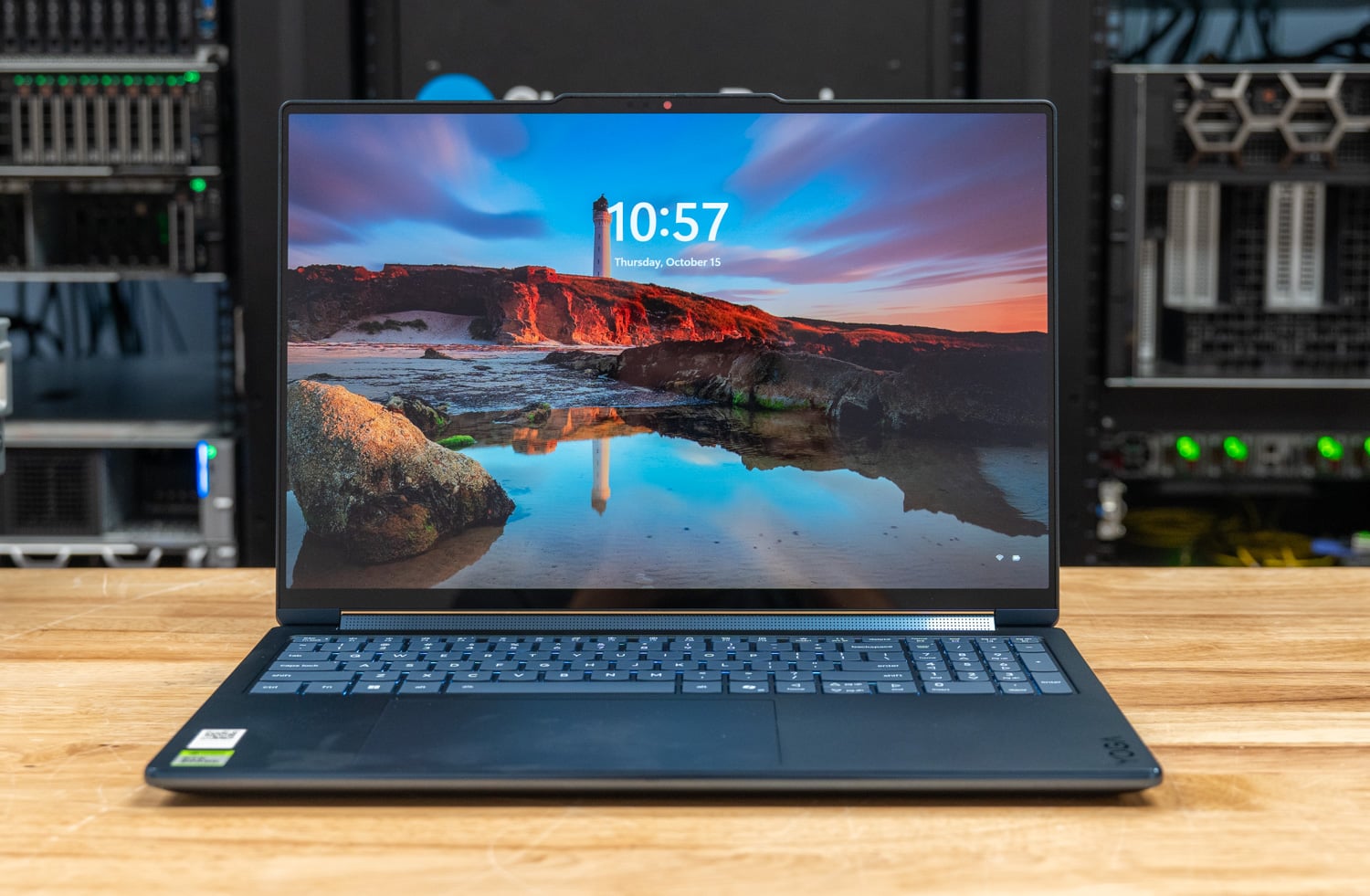
The Lenovo Yoga 9n 2-in-1 16 puts the NVIDIA RTX Spark N1X into a convertible: a 16-inch OLED touchscreen on a hinge that folds into tablet and tent modes, a pen-enabled haptic touchpad, and a 0.69-inch aluminum chassis. Our unit carries the full 20-core N1X with its 6,144-core Blackwell GPU, 64GB of LPDDR5X, and a 1TB Gen4 SSD, the configuration Best Buy lists at $3,749.99. An 18-core, 32GB, 1TB model sells for $3,099.99.
Three comparison systems help frame the Yoga’s results. The HP OmniBook Ultra 16 with 128GB carries the same 20-core N1X in a 16-inch clamshell and is the fastest RTX Spark notebook we have tested, so it is the yardstick for what the Yoga’s cooler tuning trades. The Lenovo Pro 9n 15 is the Yoga’s sibling on the 18-core bin, and the Razer Blade 16 stands in for the x64 field after its RTX 5090 led that group in our Surface Laptop Ultra review. From there, the review covers build and design, local AI, CPU, memory, gaming, thermals, and storage; battery results follow once the new test harness is complete.
Temperature is the result that defines the Yoga: under the all-core loads that hold the OmniBook at 98 C, the Yoga’s CPU peaked between 71 and 86 C and ran the 30-minute sustained loop at 72 C without losing a step. Lenovo credits a redesigned thermal system with enlarged vents and a raised thermal bump, and the convertible hinge leaves extra room behind the vents for air to move. The trade-off is a lower all-core clock, which leaves the Yoga 4 to 10 percent behind the OmniBook in most multi-threaded tests while it matches on a single thread.
Key Takeaways
- 32GB of GPU memory runs our tier S models at full speed: the coding agent generated gpt-oss:20b at 58.0 tokens per second, the same rate as the 128GB OmniBook, and MLPerf ran within 5 percent of it. Tier M’s Qwen3.6-35B-A3B needs about 40GB of GPU memory, so the Yoga sits it out.
- The coolest RTX Spark notebook we have tested: 72 C at peak in Cinebench and 72 C through the sustained loop, against 98 C on the OmniBook, with a steady state at 100 percent of the first pass.
- A few percent of CPU throughput for 25 degrees: 6,292 in Cinebench 2026 multi-core, 10 percent behind the OmniBook and 22 percent ahead of the Razer Blade 16, with a single-core score of 557.0 that matches the HP.
- A convertible built for creators: a 2.8K OLED rated at 1,100 nits peak, a haptic touchpad that works with the included Yoga Pen Gen 2, tweeters on a rotating soundbar, and a 99.9Wh battery in a 4.28-pound chassis.
- QLC storage is the weak spot: the Gen4 QLC SSD read 6,874MB/s sequentially but managed only 68.9K IOPS of 4K random writes, the lowest in the group, and it slowed cold model loads by about 2 seconds.
Build and Design
The Yoga 9n 2-in-1 uses Lenovo’s convertible layout, with a hinge that lets the display fold back into tablet, tent, and stand modes. The chassis is aluminum on the top and bottom, finished in Cosmic Blue, and measures 14.17 x 9.57 x 0.69 inches at its thinnest, with a starting weight of 4.28 pounds. Lenovo says the design passed MIL-STD-810H testing, and the bottom cover uses 50 percent recycled aluminum.

In the hand, the Yoga shares its rounded edges and port layout with the Pro 9n, and the lid holds closed on a magnet. The keyboard is a full-size layout with a number pad and a solid feel, and the glass Force Pad is large enough to work with both hands at once if you like. The Yoga is a little wider than the Pro 9n, and its hinge folds the display all the way back for tablet use, leaving more space between the heatsink vents and the hinge than the Pro 9n’s clamshell design allows.
Cooling is where the Yoga sets itself apart from the other RTX Spark notebooks we have tested. Lenovo redesigned the thermal system with enlarged vents and a raised thermal bump on the underside, and the convertible hinge leaves more room at the rear of the chassis for air to move. The result is a CPU that ran 71 C in Stockfish, while the OmniBook ran 98 C; the thermals section breaks down the lower clocks that come with it.

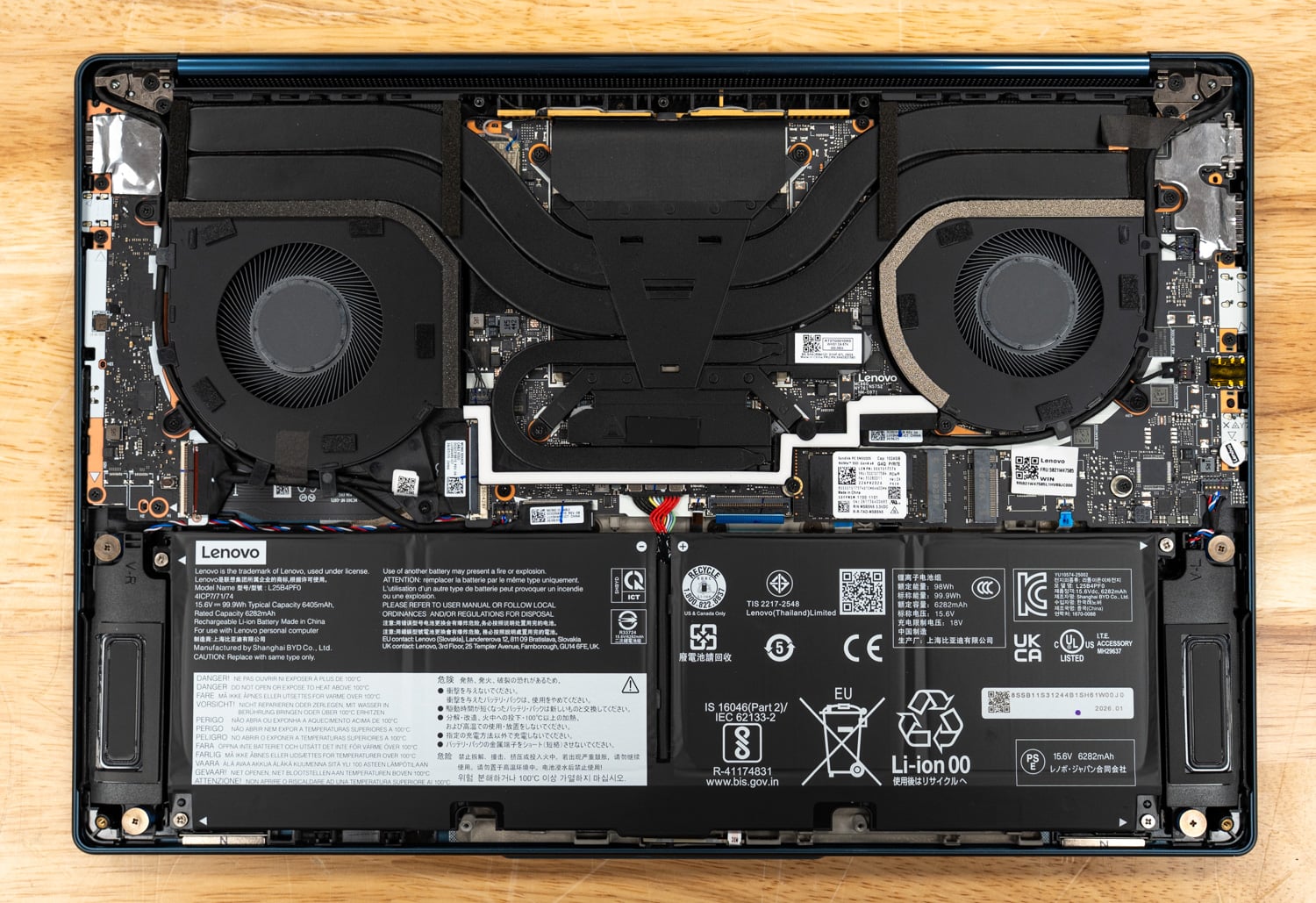
Underneath, a perforated intake grille covers most of the rear half of the bottom cover, with the exhaust running along the rear edge below the hinge. With the cover off, two fans sit at the rear corners, and a wide heatsink assembly with its heat pipes spans the center of the board between them.
At first glance, it looks like the same cooler and fan assembly the Pro 9n uses, but the Yoga 9n has an un-ducted fan. The Pro 9n has small half-moon covers that partially block the fan intake on both fans. M.2 2242 SSD sits below the heatsink at the center of the board, with the second M.2 slot Lenovo offers beside it, and the 99.9Wh battery fills the front half of the chassis, flanked by the woofer enclosures, which fire out through slits near the front of each side.
One design decision that sets the Lenovos apart from other NVIDIA mobile platforms so far is the pair of 2242 M.2 bays, while others use a single 2280. That gives the Yoga a second drive option, but 2242 SSDs come in smaller capacities and typically underperform 2280 SSDs, which shows up in the storage section.
The 16-inch PureSight Pro OLED touchscreen runs at 2880 x 1800 with variable refresh from 30 to 120Hz. Lenovo rates it at 1,100 nits peak in HDR, with 100% sRGB and P3 coverage, Delta E under 1, Dolby Vision, and VESA DisplayHDR True Black 1000 certification. The audio system pairs four 2W woofers with two 2W tweeters on a rotating soundbar hinge, so the tweeters face the user in every mode.

The keyboard has 1.5mm of travel, a backlight, and a Copilot key. Below it, the haptic Force Pad doubles as a drawing surface for the Yoga Pen Gen 2, which supports AES 3.0 with 8,192 pressure levels and tilt, charges over USB-C, and stores in a magnetic case that snaps to the back of the lid. The 9.2MP IR camera has an electronic shutter, and three microphones handle voice.
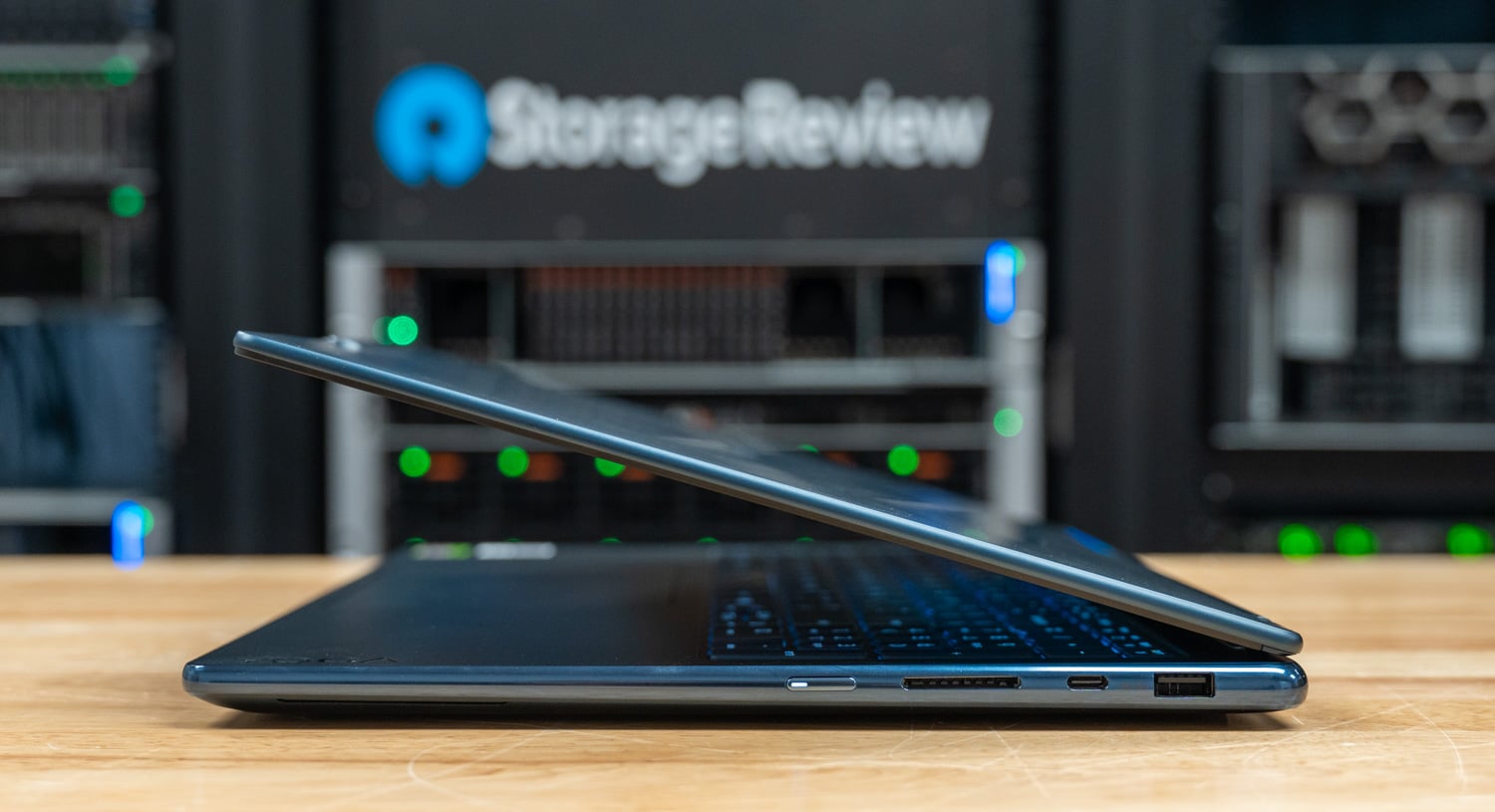
The left side carries HDMI 2.1, a USB-A port at 10Gbps, a USB4 port at 40Gbps with Power Delivery and DisplayPort 2.1, and a headphone jack; the right side has the power button, a UHS-I SD reader, a second USB4 port, and a second USB-A port, one of the two USB-A ports being always on. Wireless is Wi-Fi 7 with Bluetooth 5.4, and the 99.9Wh battery supports Rapid Charge Express, which Lenovo says yields 3 hours of use from a 15-minute charge.

The RTX Spark N1X Platform
RTX Spark is the Windows PC family built on the N1X superchip, the laptop sibling of the GB10 in DGX Spark, and our Surface Laptop Ultra review covers the platform. The Yoga carries the top silicon, which pairs a 20-core Grace CPU (10 faster cores and 10 efficiency cores, with no SMT) with a 6,144-core Blackwell RTX GPU.
NVIDIA gives laptop N1X designs a 45 to 80W power range, and how an OEM cools its notebook within that range influences the results as much as the silicon does. Lenovo rates the Yoga at 70W, HP rates the OmniBook at up to 70W, and Lenovo rates the Pro 9n at up to 80W, yet the three run at different clocks and temperatures under the same loads.
The N1X’s LPDDR5X is shared between the CPU and GPU, with a setting in the NVIDIA app, not the BIOS, deciding how much Windows hands the GPU, so the split can be changed from the desktop.
Our 64GB Yoga ran a 32GB GPU/32GB CPU split. That qualifies it for our tier S local AI models, but not for tier M, which needs about 40GB, and as with every RTX Spark system, memory is the constraint that should inform the sizing decision when buying.
The fixed split is a Windows limitation, not an NVIDIA one. Windows does not yet support unified memory across the CPU and GPU the way the Linux stack on DGX Spark does, which is why the allocation has to be set in advance; we understand that NVIDIA and Microsoft are working on support.
Windows 11 26H1 runs on Arm64; x64 applications go through Prism emulation, and our suite uses native Arm64 builds of every open-source workload, so the CPU rows compare silicon.
Lenovo Yoga 9n 2-in-1 16 Specifications
| Specification | Lenovo Yoga 9n 2-in-1 16 (83N7000UUS) |
|---|---|
| Platform Overview | |
| Processor | NVIDIA RTX Spark N1X, 20-core CPU with 6,144-core Blackwell RTX GPU (as tested) NVIDIA RTX Spark N1X, 18-core CPU with 5,120-core Blackwell RTX GPU |
| Memory | 64GB soldered LPDDR5X-9400, 256-bit (as tested); up to 64GB 32GB GPU / 32GB system split (as tested) |
| Storage | 1TB PCIe Gen4 QLC M.2 2242 SSD Sandisk PC SN5100S 1TB (as tested) |
| Operating System | Windows 11 (Arm64); Windows 11 Home as tested |
| Display and I/O | |
| Display | 16-inch 2.8K (2880 x 1800) PureSight Pro OLED touchscreen, 30-120Hz VRR, 16:10 1,100 nits peak (HDR), 100% sRGB and P3, Delta E <1, Dolby Vision VESA DisplayHDR True Black 1000, glass |
| Ports | 2x USB4 40Gbps (USB PD 3.0, DisplayPort 2.1) 2x USB-A 10Gbps (one always on) 1x HDMI 2.1 (up to 8K/60Hz) 1x SD card reader (UHS-I) 1x headphone/microphone combo jack |
| Wireless | Wi-Fi 7 (802.11be 2×2), Bluetooth 5.4 |
| Camera | 9.2MP + IR with electronic shutter |
| Audio | Six speakers: 4x 2W woofers, 2x 2W tweeters on a rotating soundbar; Dolby Atmos 3x microphones |
| Input | Backlit keyboard, 1.5mm travel, Copilot key Haptic Force Pad with pen support Yoga Pen Gen 2 (AES 3.0, 8,192 pressure levels, included) |
| Power and Physical | |
| Battery | 99.9Wh, Rapid Charge Express |
| Thermal design | Enlarged vents and thermal bump; 70W TDP (Lenovo rating) |
| Dimensions | 14.17 x 9.57 x 0.69 in (360 x 243.1 x 17.5mm) |
| Weight | Starting at 4.28 lb (1.94 kg) |
| Color and material | Cosmic Blue, aluminum top and bottom; MIL-STD-810H tested |
| Pricing | |
| Price (Best Buy) | $3,099.99 (18-core, 32GB, 1TB); $3,749.99 (20-core, 64GB, 1TB, as tested) |
Test Setup and Methodology
Our Yoga 9n 2-in-1 review system runs the RTX Spark N1X with its 6,144-core Blackwell GPU, 64GB of LPDDR5X-9400 split 32/32 between GPU and system, and a 1TB Sandisk SN5100S Gen4 SSD on Windows 11 Home 26H1 (Arm64). Benchmarks ran in Lenovo’s Performance mode.
Every system in this comparison ran sr-client 1.2, our scripted Windows client benchmark suite, on its full run and Peak profile, using its factory Windows image with the OEM’s drivers and utilities. The suite applies the same lab settings everywhere: Windows power mode at Best performance, plugged in, display at 50 percent brightness, all sleep and display-off timers disabled, and Windows Firewall and UAC prompts off. Each result is the median of repeated passes, and the suite reruns a test whose spread exceeds 2 percent before accepting it.
| System | CPU | Memory | GPU used for GPU and AI tests | SSD | OS and performance mode |
|---|---|---|---|---|---|
| Lenovo Yoga 9n 2-in-1 16 | NVIDIA RTX Spark N1X, 20C / 20T | 64GB LPDDR5X-9400 (32GB GPU / 32GB system split) | 6,144-core Blackwell RTX (integrated, 32GB usable) | Sandisk PC SN5100S 1TB, Gen4 x4 | Windows 11 Home 26H1 (Arm64), Lenovo Performance mode |
| HP OmniBook Ultra 16 (128GB) | NVIDIA RTX Spark N1X, 20C / 20T | 128GB LPDDR5X-9400 (64GB GPU / 64GB system split) | 6,144-core Blackwell RTX (integrated, 62.5GB usable) | Sandisk PC SN8050S 2TB, Gen5 x4 | Windows 11 Pro 26H1 (Arm64), HP Performance |
| Lenovo Pro 9n 15 | NVIDIA RTX Spark N1X, 18C / 18T | 32GB LPDDR5X-9400 (12GB GPU / 20GB system split) | 5,120-core Blackwell RTX (integrated, 12GB usable) | Samsung MZAL81T0HFLB 1TB, Gen4 x4 | Windows 11 Pro 26H1 (Arm64), Lenovo Performance mode |
| Razer Blade 16 | AMD Ryzen AI 9 HX 370, 12C / 24T | 32GB LPDDR5X-8000 | NVIDIA GeForce RTX 5090 Laptop GPU, 24GB | Samsung MZVL22T0 2TB, Gen4 x4 | Windows 11 Home 25H2 (x64), Razer Synapse Performance |
Two labels recur in the tables below; “not run” means the suite declined to start a test because the hardware does not qualify, most often because a model exceeds the available GPU memory: the Yoga’s 32GB and the Blade 16’s 24GB keep them below tier M, and the Pro 9n’s 12GB keeps it below both tiers. The same label marks the OpenBLAS size the 12GB Pro 9n skips for memory.
N/A means a test does not apply to that hardware, such as SMT single-core on a chip without SMT, or an emulation row on an x64 system that runs its native build. Where an RTX Spark system ran x64 software through Prism, the data is labeled as such.
Local AI Performance
Local AI comes down to how fast the GPU runs a model and whether the model fits. The Yoga’s 32GB of GPU-usable memory runs our tier S model, gpt-oss:20b, at the same generation rate as the 128GB OmniBook, but it stops short of tier M, where the OmniBook’s 62.5GB pays off.
MLPerf Client v2.0
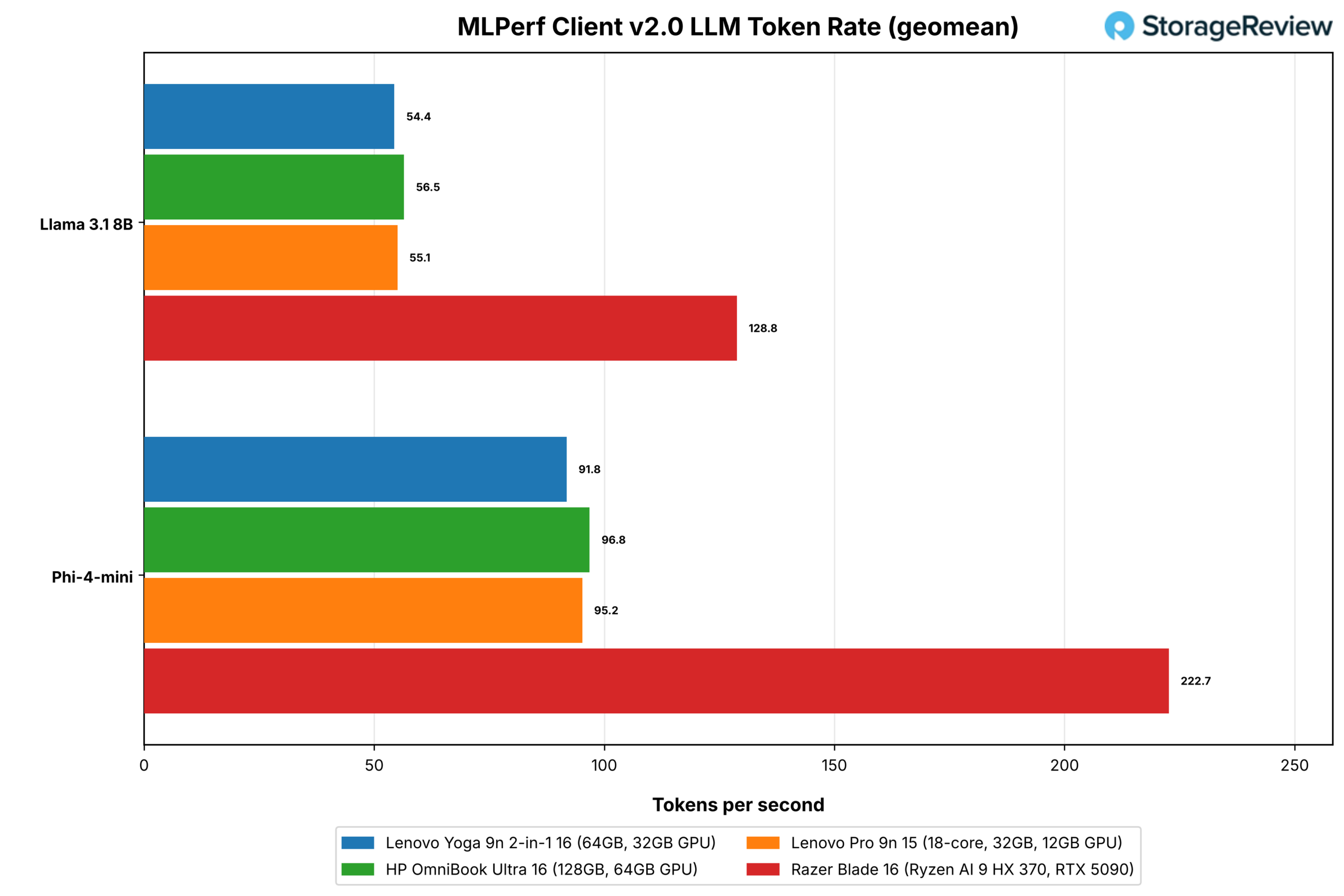
MLPerf Client runs Llama 3.1 8B and Phi-4-mini through five prompt categories and reports time to first token and the token rate after it, as a geometric mean. Every system here uses llama.cpp with CUDA, so the engine is the same, and the rows compare hardware. The agentic scenarios run Llama 3.1 8B as a software engineering agent and a data analyst agent that call tools over multiple turns.
| MLPerf Client v2.0 | Yoga 9n 2-in-1 16 | OmniBook Ultra 16 (128GB) | Pro 9n 15 | Razer Blade 16 |
|---|---|---|---|---|
| Llama 3.1 8B, time to first token, geomean (s, lower is better) | 0.353 | 0.274 | 0.303 | 0.149 |
| Llama 3.1 8B, token rate, geomean (tok/s) | 54.4 | 56.5 | 55.1 | 128.8 |
| Phi-4-mini, time to first token, geomean (s, lower is better) | 0.158 | 0.130 | 0.135 | 0.074 |
| Phi-4-mini, token rate, geomean (tok/s) | 91.8 | 96.8 | 95.2 | 222.7 |
| Data Analyst Agent, end-to-end (s, lower is better) | 59.7 | 53.0 | 56.2 | 27.8 |
| Data Analyst Agent, token rate (tok/s) | 45.3 | 48.5 | 46.9 | 108.3 |
| SWE Agent, end-to-end (s, lower is better) | 51.6 | 45.3 | 48.0 | 24.6 |
| SWE Agent, token rate (tok/s) | 43.0 | 46.6 | 44.5 | 102.5 |
The Yoga generated Llama 3.1 8B at 54.4 tokens per second and Phi-4-mini at 91.8, 4 and 5 percent behind the OmniBook. The gap widens on the first token, which leans on compute more than memory bandwidth: the Yoga took 0.353 seconds on Llama 3.1 against 0.274 on the HP, and it trailed the 18-core Pro 9n there as well. That pattern suggests Lenovo’s cooler tuning reaches both the GPU and the CPU, since the Yoga also ran MLPerf at the lowest CPU clock of the three N1X systems.
In the agentic scenarios, the Yoga took 59.7 seconds for the data analyst and 51.6 seconds for the software engineering agent, 13 to 14 percent longer than the OmniBook, while the Blade 16 finished both in under half the Yoga’s time.
Model Loading
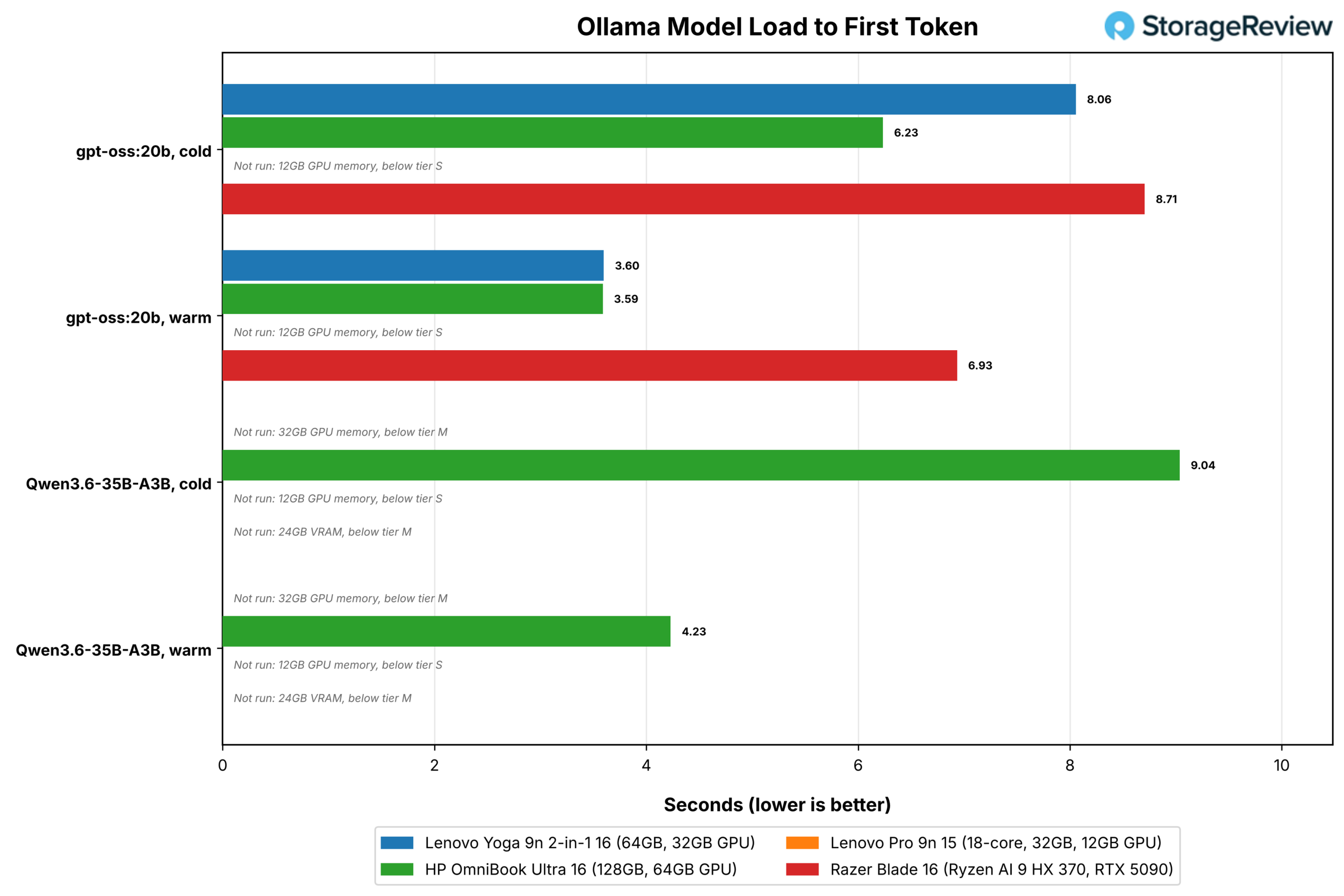
This test times a local model in Ollama from SSD to its first generated token, cold (file cache flushed) and warm (file already in memory), and reports how fast the SSD was read during the cold load. Tier S uses gpt-oss:20b (12.8GB) on systems with at least 16GB of GPU-usable memory; tier M adds Qwen3.6-35B-A3B (21.1GB) on systems with about 40GB or more.
| Model loading (memory mapping on) | Yoga 9n 2-in-1 16 | OmniBook Ultra 16 (128GB) | Pro 9n 15 | Razer Blade 16 |
|---|---|---|---|---|
| gpt-oss:20b, cold load to first token (s, lower is better) | 8.06 | 6.23 | Not run (12GB GPU memory) | 8.71 |
| gpt-oss:20b, warm load to first token (s, lower is better) | 3.60 | 3.59 | Not run (12GB GPU memory) | 6.93 |
| gpt-oss:20b, read throughput during cold load (MB/s) | 2,480 | 3,044 | Not run (12GB GPU memory) | 3,874 |
| Qwen3.6-35B-A3B, cold load to first token (s, lower is better) | Not run (32GB GPU memory, below tier M) | 9.04 | Not run (12GB GPU memory) | Not run (24GB VRAM, below tier M) |
| Qwen3.6-35B-A3B, warm load to first token (s, lower is better) | Not run (32GB GPU memory, below tier M) | 4.23 | Not run (12GB GPU memory) | Not run (24GB VRAM, below tier M) |
Warm, the Yoga brought gpt-oss:20b to its first token in 3.60 seconds, matching the OmniBook’s 3.59. Cold, it took 8.06 seconds vs. 6.23, because its QLC drive read the model at 2,480MB/s during load, while the OmniBook’s Gen5 drive read at 3,044MB/s. The Blade 16 was slowest, cold and warm, at 8.71 and 6.93 seconds, because its weights have to cross PCIe into VRAM after they are read.
Coding Agent
Codex CLI drives a local model served by Ollama through a fixed coding task in a pinned repository; a run succeeds when the repository’s 11 tests pass. We report the median wall time across three runs, the number that succeeded, and the generation rate. The agent-beside-user test runs the agent and Speedometer together and reports how much each slows down compared to running alone.

| Codex CLI coding agent | Yoga 9n 2-in-1 16 | OmniBook Ultra 16 (128GB) | Pro 9n 15 | Razer Blade 16 |
|---|---|---|---|---|
| Tier S, gpt-oss:20b 64K: wall time (s, lower is better) | 132.5 | 115.3 | Not run (12GB GPU memory) | 64.4 |
| Tier S: successes (of 3) | 2 | 3 | Not run (12GB GPU memory) | 2 |
| Tier S: generation rate (tok/s) | 58.0 | 58.0 | Not run (12GB GPU memory) | 137.9 |
| Tier M, gpt-oss:20b 128K: wall time (s, lower is better) | Not run (32GB GPU memory, below tier M) | 152.1 | Not run (12GB GPU memory) | Not run (24GB VRAM, below tier M) |
| Tier M, gpt-oss:20b 128K: successes (of 3) | Not run (32GB GPU memory, below tier M) | 3 | Not run (12GB GPU memory) | Not run (24GB VRAM, below tier M) |
| Tier M, Qwen3.6-35B-A3B 64K: wall time (s, lower is better) | Not run (32GB GPU memory, below tier M) | 72.0 | Not run (12GB GPU memory) | Not run (24GB VRAM, below tier M) |
| Tier M, Qwen3.6-35B-A3B 64K: successes (of 3) | Not run (32GB GPU memory, below tier M) | 3 | Not run (12GB GPU memory) | Not run (24GB VRAM, below tier M) |
| Tier M, Qwen3.6-35B-A3B 64K: generation rate (tok/s) | Not run (32GB GPU memory, below tier M) | 89.5 | Not run (12GB GPU memory) | Not run (24GB VRAM, below tier M) |
| Speedometer beside the agent (score) | 14.1 | 21.2 | Not run (12GB GPU memory) | 36.3 |
| Speedometer slowdown beside the agent (x, lower is better) | 2.44 | 1.73 | Not run (12GB GPU memory) | 1.06 |
| Agent slowdown beside Speedometer (x, lower is better) | 1.03 | 1.04 | Not run (12GB GPU memory) | 1.05 |
On the tier S task, Yoga generated at 58.0 tokens per second, identical to the OmniBook, and finished in 132.5 seconds, slower than the HP’s 115.3. It passed two of three runs, the same as the Blade 16; gpt-oss:20b fails this task about one run in three on several systems we have tested, so the success count says more about the model than the hardware. The Blade 16 finished in 64.4 seconds at 137.9 tokens per second.
The concurrency test was hardest on the Yoga. With the agent running, its Speedometer score fell from 36.1 to 14.1, a 2.44x slowdown, compared with 1.73x on the OmniBook and 1.06x on the Blade 16, where the model runs on the discrete GPU and leaves the CPU alone. The agent itself slowed by only 3 percent, so the Yoga favors the background job over the browser when both compete for its power budget and shared memory.
Retrieval-Augmented Generation
Our RAG test embeds 20,963 SQuAD v1.1 passages with nomic-embed-text, retrieves the top five passages for each of 2,000 questions, and answers 400 of them with Phi-4-mini, scoring exact match and F1 against the reference answers. The models run on every system, so this is a speed comparison.

| RAG | Yoga 9n 2-in-1 16 | OmniBook Ultra 16 (128GB) | Pro 9n 15 | Razer Blade 16 |
|---|---|---|---|---|
| Ingest wall time, 20,963 passages (s, lower is better) | 188.8 | 187.0 | 191.8 | 131.0 |
| Retrieval query time, p50 (ms, lower is better) | 22.6 | 23.3 | 24.2 | 20.9 |
| Answer, Phi-4-mini time to first token, p50 (s, lower is better) | 0.181 | 0.155 | 0.171 | 0.109 |
| Answer, prompt processing (tok/s) | 5,837 | 7,142 | 6,268 | 11,560 |
| Answer, generation rate (tok/s) | 91.1 | 104.4 | 96.6 | 209.2 |
| Question to answer, p50 (s, lower is better) | 0.262 | 0.227 | 0.252 | 0.159 |
| Answer F1 (%) | 73.97 | 73.97 | 74.27 | 74.47 |
The Yoga matched the OmniBook on ingest (188.8 seconds vs. 187.0) and on retrieval, but trailed it when answering: Phi-4-mini processed prompts at 5,837 tokens per second vs. 7,142 and generated at 91.1 vs. 104.4. A typical question took 0.262 seconds from query to answer, against 0.227 on the HP and 0.159 on the Blade 16. Accuracy was identical on the Yoga and the OmniBook.
CPU Performance
The Yoga’s CPU results follow one rule: it matches the OmniBook on a single thread and trails it on all cores. Single-threaded rows land within about 2 percent of the HP, and the Yoga posted the best 7-Zip single-thread, PyPerformance go, and regex_compile results of any RTX Spark system here. Multi-threaded rows land 2 to 28 percent behind, most of them in the 4 to 10 percent range, with the largest gaps in Stockfish and OpenBLAS. Against the Razer Blade 16, the Yoga still wins rendering, compression, and compiles.
Cinebench 2026 and Sustained Load
Cinebench 2026 renders a scene with Maxon’s Redshift engine on the CPU and scores single-core, SMT single-core (two threads on one physical core), and multi-core throughput. We follow it with a sustained loop that repeats the multi-core run for about 30 minutes and compares the steady state to the first pass.

| Cinebench 2026 (points, higher is better) | Yoga 9n 2-in-1 16 | OmniBook Ultra 16 (128GB) | Pro 9n 15 | Razer Blade 16 |
|---|---|---|---|---|
| Single core | 557.0 | 558.6 | 518.2 | 480.0 |
| SMT single core | N/A | N/A | N/A | 661.3 |
| Multi core | 6,292 | 7,004 | 6,394 | 5,179 |
| Sustained loop, first pass | 6,248 | 6,954 | 6,346 | 5,162 |
| Sustained loop, steady state | 6,256 | 6,942 | 6,416 | 5,206 |
| Steady state / first pass | 1.001 | 0.998 | 1.011 | 1.009 |
The Yoga scored 6,292 multi-core, 10 percent behind the OmniBook’s 7,004, 2 percent behind the 18-core Pro 9n, and 22 percent ahead of the Blade 16, with a single-core score of 557.0 that matches the HP. Its sustained loop is the flattest here: the steady state of 6,256 sat at 100.1 percent of the first pass, with the CPU at 72 C and 3,015MHz the whole time.
7-Zip, Blender, HandBrake, and LLVM
7-Zip’s built-in benchmark reports LZMA compression and decompression throughput on every thread and on one core. Blender 4.5 renders the Monster, Junkshop, and Classroom scenes with Cycles on the CPU. HandBrake encodes 60 seconds of a 4K60 clip in software with x265 and SVT-AV1, and the LLVM test compiles the full LLVM 21.1.4 tree with Clang and Ninja.

| 7-Zip, one thread (GIPS, higher is better) | Yoga 9n 2-in-1 16 | OmniBook Ultra 16 (128GB) | Pro 9n 15 | Razer Blade 16 |
|---|---|---|---|---|
| Total | 9.12 | 9.09 | 8.93 | 9.24 |
| Compress | 7.35 | 7.31 | 7.26 | 7.28 |
| Decompress | 10.88 | 10.87 | 10.59 | 11.20 |


In 7-Zip, the Yoga reached 145.3 GIPS on all threads, 4 percent behind the OmniBook and 15 percent ahead of the Blade 16, and its one-thread total of 9.12 GIPS was the best of the RTX Spark systems. Blender put it 5 percent behind the HP in Monster and 5 percent behind in Classroom, and the LLVM build took 217.2 seconds against 206.6, still 34 percent less time than the Blade 16.
HandBrake’s x265 encode ran at 38.6 fps, 6 percent behind the OmniBook. SVT-AV1 managed about 15 fps on every RTX Spark system, compared with 77.3 on the Blade 16, suggesting SVT-AV1’s Arm64 code path is the bottleneck.
Stockfish, primesieve, Python, and the Browser
Stockfish reports chess search speed in millions of nodes per second. primesieve counts the primes below 10^12 on all threads and below 10^11 on one thread. PyPerformance runs three CPython benchmarks pinned to one fast core, and Speedometer 3.1 measures web application responsiveness in Microsoft Edge. The last two rows run the x64 build of 7-Zip under Prism emulation.
| Test | Yoga 9n 2-in-1 16 | OmniBook Ultra 16 (128GB) | Pro 9n 15 | Razer Blade 16 |
|---|---|---|---|---|
| Stockfish bench, all threads (Mnps, higher is better) | 13.42 | 16.28 | 15.20 | 17.96 |
| Stockfish bench, one thread (Mnps, higher is better) | 1.72 | 1.73 | 1.70 | 2.04 |
| primesieve 1e12, all threads (s, lower is better) | 10.77 | 9.57 | 10.56 | 10.60 |
| primesieve 1e11, one thread (s, lower is better) | 12.01 | 12.03 | 12.34 | 6.67 |
| PyPerformance go (ms, lower is better) | 110.6 | 111.2 | 114.1 | 75.2 |
| PyPerformance nbody (ms, lower is better) | 80.5 | 80.4 | 82.5 | 60.8 |
| PyPerformance regex_compile (ms, lower is better) | 84.3 | 84.6 | 86.7 | 69.7 |
| Speedometer 3.1, Edge (score, higher is better) | 36.1 | 36.7 | 33.9 | 38.4 |
| x64 7-Zip under emulation, all threads (GIPS) | 124.3 | 127.0 | 117.6 | N/A (native x64) |
| x64 7-Zip under emulation, one thread (GIPS) | 8.25 | 8.26 | 7.94 | N/A (native x64) |
Stockfish shows the clock gap most clearly: on all threads, the Yoga searched 13.42 Mnps, 18 percent behind the OmniBook and the 18-core Pro 9n’s 15.20, while on one thread it matched both at about 1.7 Mnps. Stockfish ran the Yoga at 3,057MHz and 71 C, against 3,269MHz and 98 C on the HP, so the Yoga gives up about 6 percent of its clock and runs about 27 C cooler.
The single-threaded rows favor the Yoga among the RTX Spark systems, with the fastest PyPerformance go time at 110.6 ms, and a Speedometer score of 36.1, but the Blade 16 led the Python, primesieve, Stockfish, and browser rows, finishing single-threaded primesieve in 6.67 seconds against 12.01. The x64 build of 7-Zip ran at 124.3 GIPS under emulation, 86 percent of the native result.
GROMACS, OpenBLAS, and Memory
GROMACS runs the benchMEM molecular dynamics case on 16 cores and reports nanoseconds of simulated time per day for the best layout. Our OpenBLAS test runs an HPL-style double-precision LU solve at three problem sizes and a DGEMM matrix multiply, on all cores and on the top core class alone, and it is the heaviest sustained floating-point load in the suite. STREAM measures sustained memory bandwidth, and the latency rows measure single-access memory latency and inter-core latency.
| Test (higher is better) | Yoga 9n 2-in-1 16 | OmniBook Ultra 16 (128GB) | Pro 9n 15 | Razer Blade 16 |
|---|---|---|---|---|
| GROMACS benchMEM, best layout (ns/day) | 17.15 | 17.47 | 16.88 | 26.41 |
| OpenBLAS LU N=10000, all cores (GFLOPS) | 281.3 | 324.0 | 303.4 | 400.9 |
| OpenBLAS LU N=20000, all cores (GFLOPS) | 298.6 | 329.6 | 318.1 | 454.4 |
| OpenBLAS LU N=40000, all cores (GFLOPS) | 282.5 | 348.8 | Not run (needs 11.9GB) | 498.5 |
| OpenBLAS LU N=20000, top core class (GFLOPS) | 273.2 | 380.5 | 403.8 | 240.4 |
| OpenBLAS DGEMM M=8000, all cores (GFLOPS) | 312.7 | 398.5 | 357.6 | 455.4 |
| OpenBLAS DGEMM M=8000, top core class (GFLOPS) | 346.7 | 488.7 | 448.3 | 252.4 |
GROMACS barely separated the RTX Spark systems, with the Yoga at 17.15 ns/day, but OpenBLAS showed the widest gaps in the review. The Yoga’s all-core LU solve at N=20000 reached 298.6 GFLOPS, 9 percent behind the OmniBook, and its DGEMM trailed by 22 percent. Running on the top core class alone, where the OmniBook gains, the Yoga fell further behind, at 273.2 GFLOPS against 380.5. The Yoga completed every size, including N=40000, which the 64GB configuration has the memory to run, at temperatures that never passed 85 C.

| Test | Yoga 9n 2-in-1 16 | OmniBook Ultra 16 (128GB) | Pro 9n 15 | Razer Blade 16 |
|---|---|---|---|---|
| STREAM Copy (MB/s, higher is better) | 118,738 | 130,790 | 127,682 | 43,731 |
| STREAM Triad (MB/s, higher is better) | 112,067 | 122,260 | 120,272 | 48,298 |
| Memory latency, 1GiB buffer, 4KiB pages (ns, lower is better) | 141.8 | 143.1 | 143.4 | 129.6 |
| Core-to-core latency, mean of all pairs (ns, lower is better) | 162.8 | 156.8 | 160.6 | 57.0 |
STREAM Triad reached 112,067MB/s on the Yoga, 8 percent below the OmniBook and 2.3x the Blade 16, so the Yoga’s lower clocks reach the memory subsystem too. Memory latency of 141.8 ns was the lowest of the RTX Spark systems here, and core-to-core latency of 162.8 ns is in line with the platform.
Gaming and GPU Encoding
SuperTuxKart 1.5 runs its built-in benchmark at 1080p fullscreen on the highest preset with vsync off, once with the game’s native Arm64 build and once with the x64 build under emulation. FFmpeg encodes the same 4K60 clip with NVENC HEVC at 8Mbps and, where available, with the Media Foundation HEVC encoder.

| Test (higher is better) | Yoga 9n 2-in-1 16 | OmniBook Ultra 16 (128GB) | Pro 9n 15 | Razer Blade 16 |
|---|---|---|---|---|
| SuperTuxKart 1080p Ultra, native, average (fps) | 216.4 | 225.9 | 218.4 | 200.0 |
| SuperTuxKart 1080p Ultra, native, steady (fps) | 131 | 143 | 140 | 115 |
| SuperTuxKart 1080p Ultra, x64 under emulation, average (fps) | 186.8 | 266.5 | 248.6 | N/A (native x64) |
| SuperTuxKart 1080p Ultra, x64 under emulation, steady (fps) | 93 | 141 | 94 | N/A (native x64) |
| FFmpeg NVENC HEVC, 4K60 at 8Mbps (fps) | 139 | 138 | 139 | 132 |
| FFmpeg Media Foundation HEVC (fps) | 65 | 66 | 55 | N/A |
The Yoga averaged 216.4 fps with the native build, 4 percent behind the OmniBook and within 1 percent of the Pro 9n, and ahead of the Blade 16’s 200.0, since at 1080p the CPU sets the frame rate on every system here. One result stands out: the Yoga’s x64 build under emulation averaged 186.8 fps, slower than its native build, while the OmniBook and Pro 9n ran the emulated build faster, so we will rerun this test to confirm. Hardware encoding was level across the field, with NVENC HEVC at 139 fps on the Yoga.
Thermals
The Yoga ran cooler than any RTX Spark notebook we have tested. Across the CPU tests, its peak temperature ranged from 71 C in Stockfish to 86 C in HandBrake, compared with 98 C in every one of the same tests on the OmniBook, and its mean in the 30-minute sustained loop was 70 C versus the HP’s 98. RTX Spark systems report CPU temperature only through the Windows thermal zones, and the Yoga’s zone may not be the same sensor the HP reports, but its clocks and power behavior indicate that most of the gap is valid.
| CPU temperature, max / mean (C) | Yoga 9n 2-in-1 16 | OmniBook Ultra 16 (128GB) | Pro 9n 15 | Razer Blade 16 |
|---|---|---|---|---|
| Cinebench 2026 | 72 / 65 | 98 / 83 | 92 / 70 | 96 / 78 |
| 7-Zip | 76 / 62 | 98 / 78 | 83 / 63 | 99 / 84 |
| Stockfish | 71 / 69 | 98 / 97 | 88 / 83 | 92 / 90 |
| Blender | 80 / 75 | 98 / 96 | 91 / 80 | 95 / 87 |
| HandBrake | 86 / 71 | 98 / 86 | 93 / 74 | 92 / 86 |
| LLVM build | 81 / 75 | 98 / 92 | 87 / 79 | 98 / 93 |
| GROMACS | 84 / 81 | 98 / 96 | 89 / 85 | 97 / 94 |
| OpenBLAS | 85 / 74 | 98 / 95 | 92 / 83 | 91 / 87 |
| STREAM | 64 / 59 | 98 / 96 | 78 / 66 | 75 / 71 |
| SuperTuxKart | 68 / 62 | 95 / 82 | 74 / 68 | 89 / 82 |
| MLPerf Client | 72 / 60 | 93 / 84 | 76 / 66 | 97 / 76 |
| Coding agent | 71 / 67 | 90 / 79 | Not run | 91 / 84 |
| RAG | 84 / 75 | 94 / 90 | 76 / 71 | 88 / 83 |
| Sustained loop | 72 / 70 | 98 / 98 | 92 / 87 | 94 / 90 |
The cooler operation comes with lower all-core clocks. In the sustained loop, the Yoga held 3,015MHz against 3,239MHz on the OmniBook and 3,288MHz on the Pro 9n, and that clock gap accounts for most of the Yoga’s multi-threaded deficit. Lenovo rates the Yoga at 70W, the same figure HP gives the OmniBook, so the gap looks like a tuning choice about temperature and noise more than a smaller power budget.
The Yoga does not throttle: like every RTX Spark system we have tested, it holds its clock flat for as long as the load lasts, and it does so while running 12 to 27 C below the 98 C the OmniBook reaches in the same tests.
| Mean CPU clock (MHz) | Yoga 9n 2-in-1 16 | OmniBook Ultra 16 (128GB) | Pro 9n 15 | Razer Blade 16 |
|---|---|---|---|---|
| Cinebench 2026 | 2,799 | 2,962 | 2,951 | 4,158 |
| 7-Zip | 2,722 | 2,838 | 2,849 | 4,014 |
| Stockfish | 3,057 | 3,269 | 3,292 | 3,645 |
| Blender | 3,111 | 3,123 | 3,216 | 3,729 |
| HandBrake | 2,687 | 2,756 | 2,834 | 3,814 |
| LLVM build | 3,083 | 3,151 | 3,197 | 3,697 |
| GROMACS | 3,226 | 3,308 | 3,367 | 3,874 |
| OpenBLAS | 2,890 | 3,024 | 3,192 | 4,274 |
| STREAM | 3,077 | 3,258 | 3,101 | 3,684 |
| SuperTuxKart | 2,002 | 1,957 | 2,017 | 4,349 |
| MLPerf Client | 1,935 | 2,114 | 2,027 | 3,593 |
| Coding agent | 1,945 | 2,078 | Not run | 3,789 |
| RAG | 2,707 | 2,749 | 2,760 | 3,764 |
| Sustained loop | 3,015 | 3,239 | 3,288 | 3,726 |
For a laptop that will often be held as a tablet or rest on a lap, that trade makes sense. A 16-inch convertible running at 72 C through a half-hour render is a different machine to live with than one pinned at 98 C, and the cost is a few percent in rendering and compiles. The Yoga’s SSD peaked at 67 C during the storage test.
Storage Performance
Our storage test runs fio’s four corners against the boot drive at 5GB and 25GB footprints, through the file system and against the raw device, and reports the 25GB results here. The raw-device rows bypass NTFS and BitLocker, so the gap between the two shows how much of a drive’s ability survives the Windows I/O path. BitLocker protection was off on the Yoga and the Pro 9n and on for the OmniBook.


| fio, 25GB footprint, QD32 | Yoga 9n 2-in-1 16 | OmniBook Ultra 16 (128GB) | Pro 9n 15 | Razer Blade 16 |
|---|---|---|---|---|
| Sequential read 128K, file system (MB/s) | 6,874 | 13,833 | 7,024 | 7,125 |
| Sequential read 128K, raw device (MB/s) | 6,975 | 12,479 | 7,165 | 7,134 |
| Sequential write 128K (MB/s) | 5,905 | 11,719 | 5,699 | 5,250 |
| Random read 4K, file system, peak (IOPS) | 394,468 | 437,833 | 338,936 | 694,597 |
| Random read 4K, raw device, peak (IOPS) | 765,766 | 1,888,501 | 973,106 | 993,050 |
| Random write 4K, peak (IOPS) | 68,923 | 228,354 | 192,000 | 648,446 |
| Raw / file system random read | 1.94x | 4.31x | 2.87x | 1.43x |
| Random read 4K, 4 jobs, p99 latency (us, lower is better) | 522 | 643 | 578 | 444 |
| Random write 4K, 4 jobs, p99 latency (us, lower is better) | 12,255 | 586 | 758 | 371 |
| Drive temperature, maximum (C) | 67 | 52 | 78 | 60 |
Lenovo put in a PCIe Gen4 QLC M.2 2242 drive for this Yoga build, and our unit carries a 1TB Sandisk SN5100S. It read 6,874MB/s and wrote 5,905MB/s sequentially, in line with the Gen4 drives in the Pro 9n and Blade 16 and about half the OmniBook’s Gen5 drive. With BitLocker protection off, its file system random reads of 394.5K IOPS kept 52 percent of the raw device’s 765.8K, a much smaller loss than the OmniBook’s.
Random writes are the drive’s weakness, and the SN5100S topped out at 68.9K IOPS of 4K random writes at the 25GB footprint, about a third of the Pro 9n’s 192.0K and a tenth of the Blade 16’s, and its p99 write latency at four jobs was 12.3 ms against under 1 ms on the other systems. At the 5GB footprint, the same test swung widely between passes and is marked partial, so we are rerunning it. The QLC drive is enough for everyday use and for loading models, but it is the component we would change first in this configuration.
Conclusion
The Lenovo Yoga 9n 2-in-1 16 is the coolest-running RTX Spark notebook we have tested, and the only convertible. Lenovo’s thermal design, with enlarged vents, a raised thermal bump, and a hinge that leaves room for airflow, kept the N1X at 71 to 86 C under all-core loads, while the HP OmniBook Ultra 16 hit 98 C, and the Yoga held its clock flat for 30 minutes without loss. Its 2.8K OLED, pen-enabled Force Pad, rotating soundbar, and 99.9Wh battery make it the most complete creative laptop in this new RTX Spark group.

The cost of that comfort is just a few percent less performance than the max potential. The Yoga’s all-core clocks sit up to about 220MHz below the OmniBook’s, and its multi-threaded results land 4 to 10 percent behind in most tests, with larger gaps in Stockfish and OpenBLAS. On a single thread, it matches the HP, and on GPU work it trails by about 4 to 18 percent. Its 32GB GPU split runs our tier S models at full speed, but not tier M, and its QLC SSD posted the weakest random writes in the group.
The platform caveats apply here as with all other Sparks: the Windows on Arm I/O path, Arm64 ports such as SVT-AV1 that trail their x64 builds, and a shared memory bus that slowed the browser by 2.44x while the coding agent ran. As always, we expect the software ecosystem to advance quickly now that these units are shipping.
For creators who want a pen, a tablet mode, and an OLED alongside local AI and a 20-core CPU, the Yoga 9n 2-in-1 gives up very little of the RTX Spark platform’s performance and runs far cooler. Buyers whose priority is the last 10 percent of all-core throughput or tier M models should look at a 128GB version instead.

Leaderboard: The Lenovo Yoga 9n 2-in-1 16 holds the Coolest-Running RTX Spark Laptop spot on our Best Laptops for Local AI leaderboard.



 Amazon