

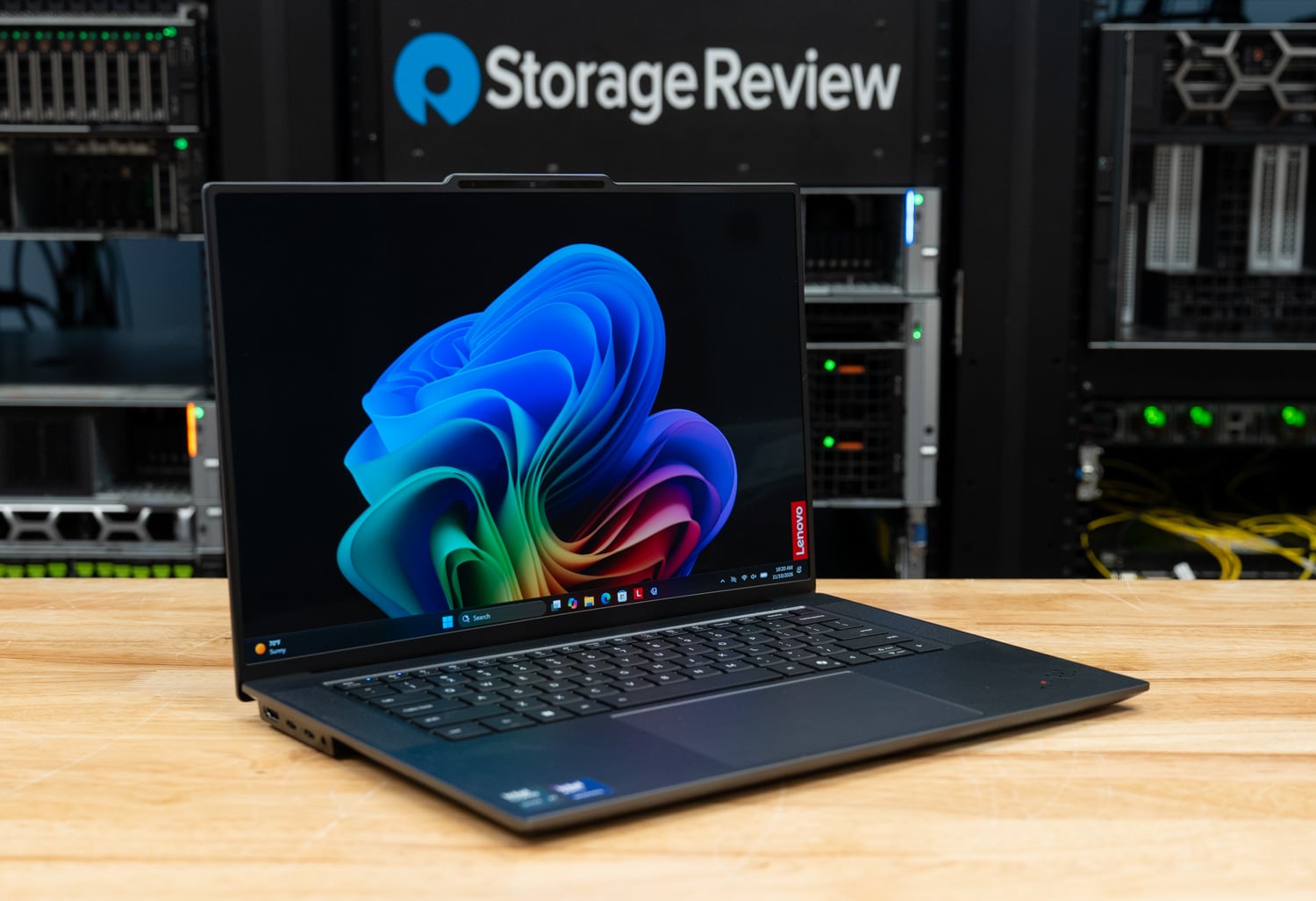
The Lenovo ThinkPad X9-15p Gen 1 Aura Edition puts Intel’s H-series Core Ultra Series 3 processors and Arc B390 graphics in a 15.3-inch aluminum notebook that starts at 1.5kg (3.31lb). It belongs to the X9 branch of the ThinkPad line, which drops the TrackPoint for a large haptic touchpad. Lenovo targets the X9-15p at creators, analysts, and STEM professionals who want workstation-class processors without a discrete GPU. Our review unit runs the Core Ultra X7 358H with 32GB of LPDDR5X-9600 memory, a 1TB SSD, and the 2.8K OLED touch panel.
Key Takeaways
- A 16-core H-series processor in a 3.3-pound, 15-inch ThinkPad. The X9-15p pairs the Core Ultra X7 358H and 12-Xe-core Arc B390 graphics with a 2880×1800 OLED panel and an 88Wh battery in a chassis that measures 7.25mm at the front edge and 17.9mm at its thickest point.
- The chassis holds 99.6 percent of its opening score over 30 minutes. Cinebench 2026 multi core reached 4,594, which is 8 percent behind a mini PC with the same processor and 3 percent behind the Core Ultra X9 388H in a 16-inch workstation, and the steady-state loop score settled at 4,595.
- Shared memory lets integrated graphics load a 20B model. With 18.1GB of GPU-usable memory, the X9-15p completed our coding agent test on gpt-oss:20b in all three runs with 11 of 11 tests passing. A notebook with a 12GB GeForce RTX 5070 could not start that test.
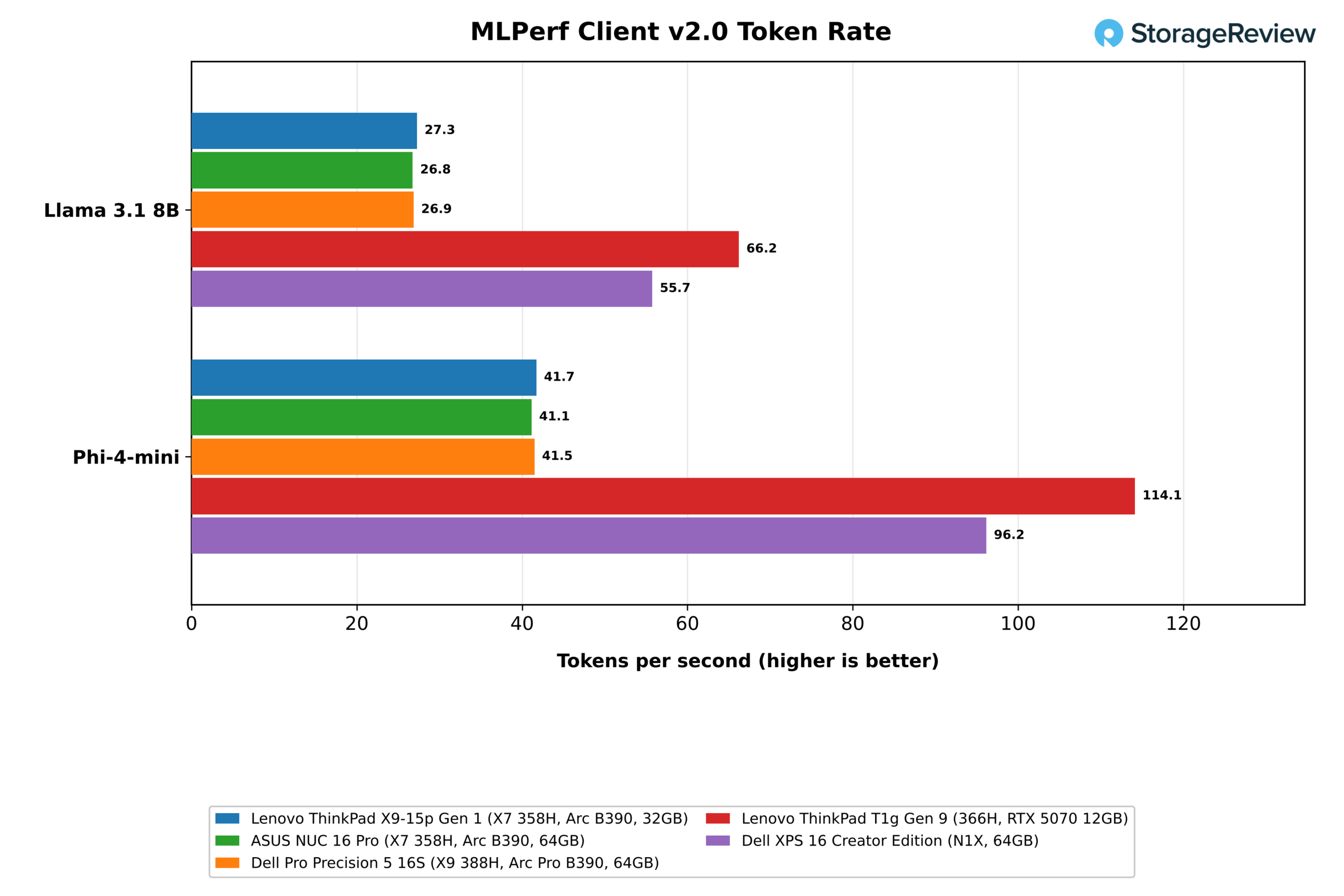
- Token rates trail the NVIDIA systems by 2x or more in MLPerf Client. MLPerf Client measured 27.3 tokens per second on Llama 3.1 8B, level with the other Arc B390 systems, against 66.2 on the RTX 5070 and 55.7 on the RTX Spark N1X.
- Long floating-point jobs open a wider gap to the desktop. GROMACS finished 21 percent behind the mini PC with the same chip and all-thread Stockfish 16 percent behind, where 7-Zip, Blender Monster, and x265 stayed within 3 to 5 percent.
- Memory is soldered and our SSD is a Gen4 drive in a Gen5 slot. The 1TB UMIS drive read at 7,067MB/s and wrote at 6,362MB/s, about half the read rate of the Gen5 drives in the NUC 16 Pro and the T1g. Buyers who want the 27B and 35B local model tiers need to order the 64GB option up front.
Where the X9-15p Sits
Lenovo describes the X9 family as a modern take on the ThinkPad, and the 15p is the model built on Intel’s H-series processors. Lenovo says an improved thermal design enables up to 30W TDP performance in this chassis. Processor choices include the 12-core Core Ultra 5 338H with Arc B370 graphics and the 16-core Core Ultra X7 358H and X7 368H, both with Arc B390.
There is no discrete GPU option anywhere in the range, which sets the X9-15p apart from the ThinkPad P1 and T1g and puts its graphics and local AI performance entirely on the Arc B390 and shared system memory. Lenovo’s pitch for the model leans on on-device AI and multi-day battery life, and it quotes up to 23.2 hours in MobileMark 30 for a touch configuration with our processor and 64GB of memory.
Buyers who manage fleets should note that Intel vPro is tied to the processor choice. Lenovo lists the Core Ultra 5 338H and Core Ultra X7 368H as supporting Intel vPro, but the Core Ultra X7 358H in our review unit does not. The security hardware is otherwise standard ThinkPad, with a discrete TPM 2.0 certified to FIPS 140-3, a match-on-chip fingerprint reader in the power button, and a self-healing BIOS.
Lenovo.com lists our configuration, model 21VV002AUS, at $2,629 and in stock at the time of writing, with the Core Ultra X7 358H, 32GB of memory, a 1TB SSD, and the OLED touch panel. The range starts at $1,985.76 for a build-to-order model with the Core Ultra 5 338H, 32GB, and 1TB. Memory tops out at 64GB and storage at a single 2TB drive, so the upgrade decisions that matter are made at purchase.
Build and Design
The X9-15p uses aluminum for the top and bottom covers, 50 percent of it recycled, in a finish Lenovo calls Thunder Grey. It measures 339.5 x 228.5mm and is 7.25mm thick at the front edge and 7.65mm at the rear, with a 17.9mm maximum where a raised bar crosses the bottom cover. Lenovo calls that bar the Engine Hub and uses it to house components, ports, and ventilation, which leaves the rest of the chassis under 8mm thick.
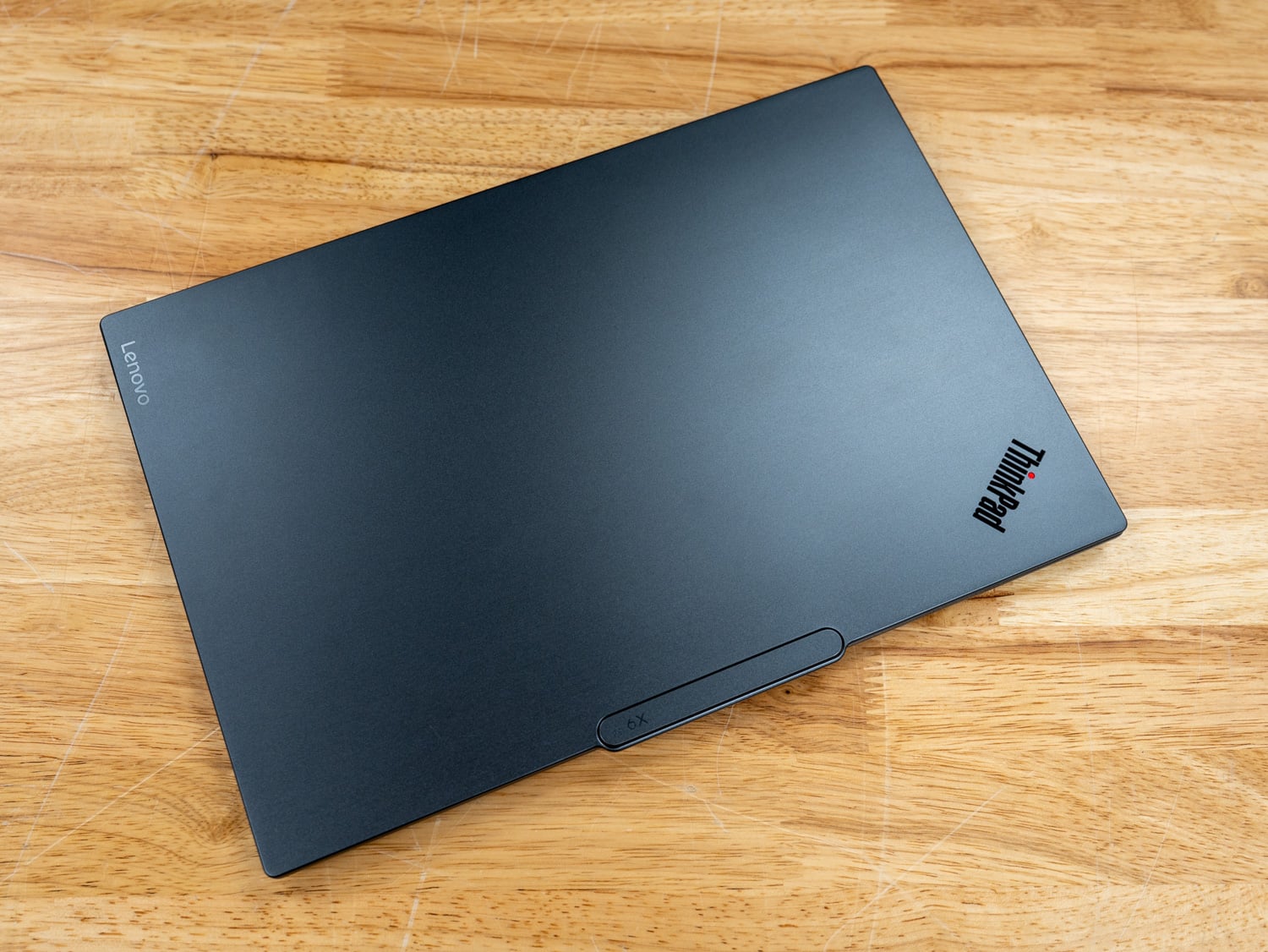
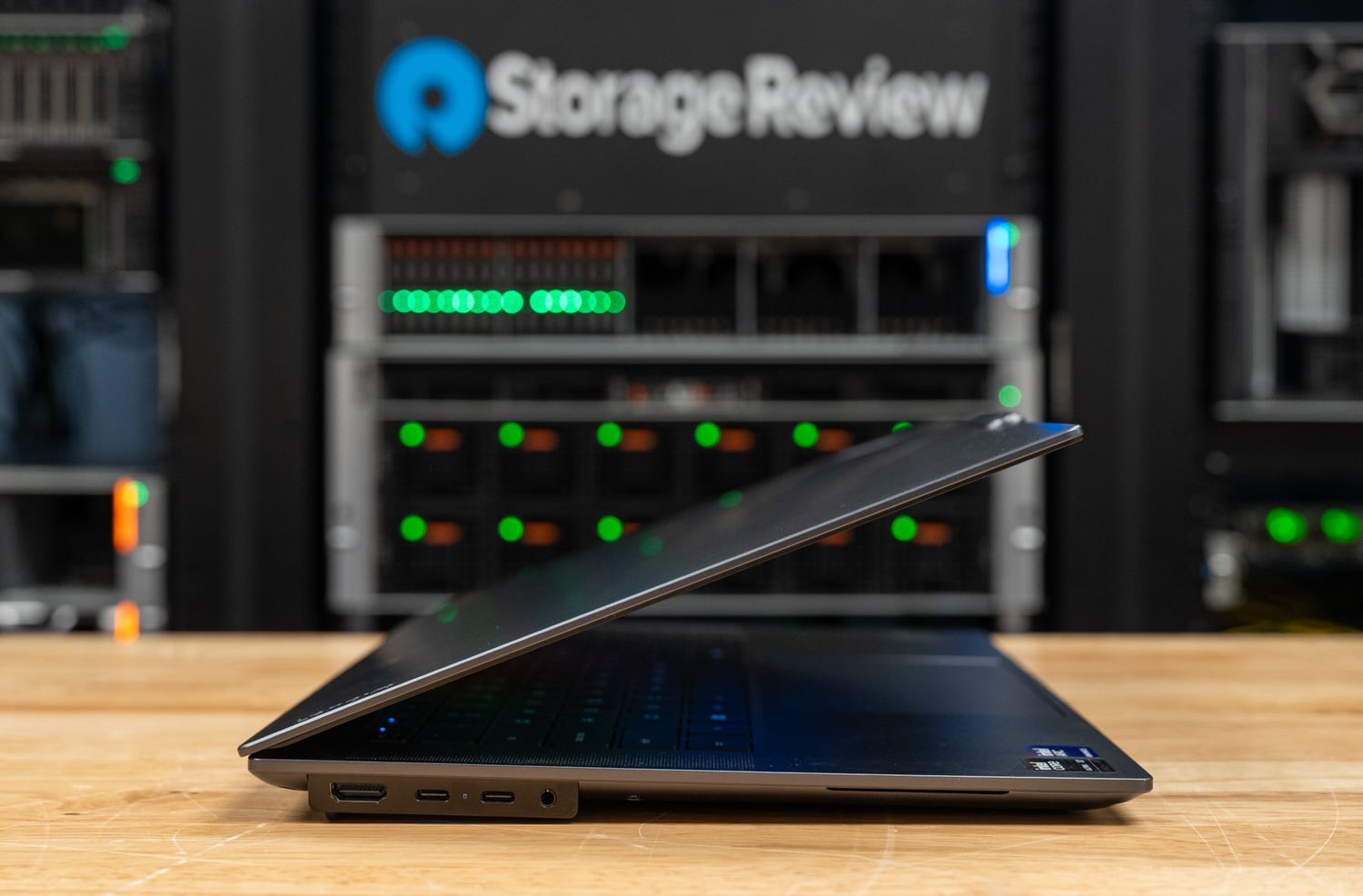
In hand, the X9-15p sits toward the prosumer end of the ThinkPad range. The metallic finish replaces the rubberized black coating of traditional ThinkPads, and the chassis edge stays very thin from the front until it reaches the ports, where it steps out to the depth that HDMI and USB-C connectors need on both sides. That step keeps the notebook looking slim, and it will divide opinion: we would take a consistent edge over the bump-out.
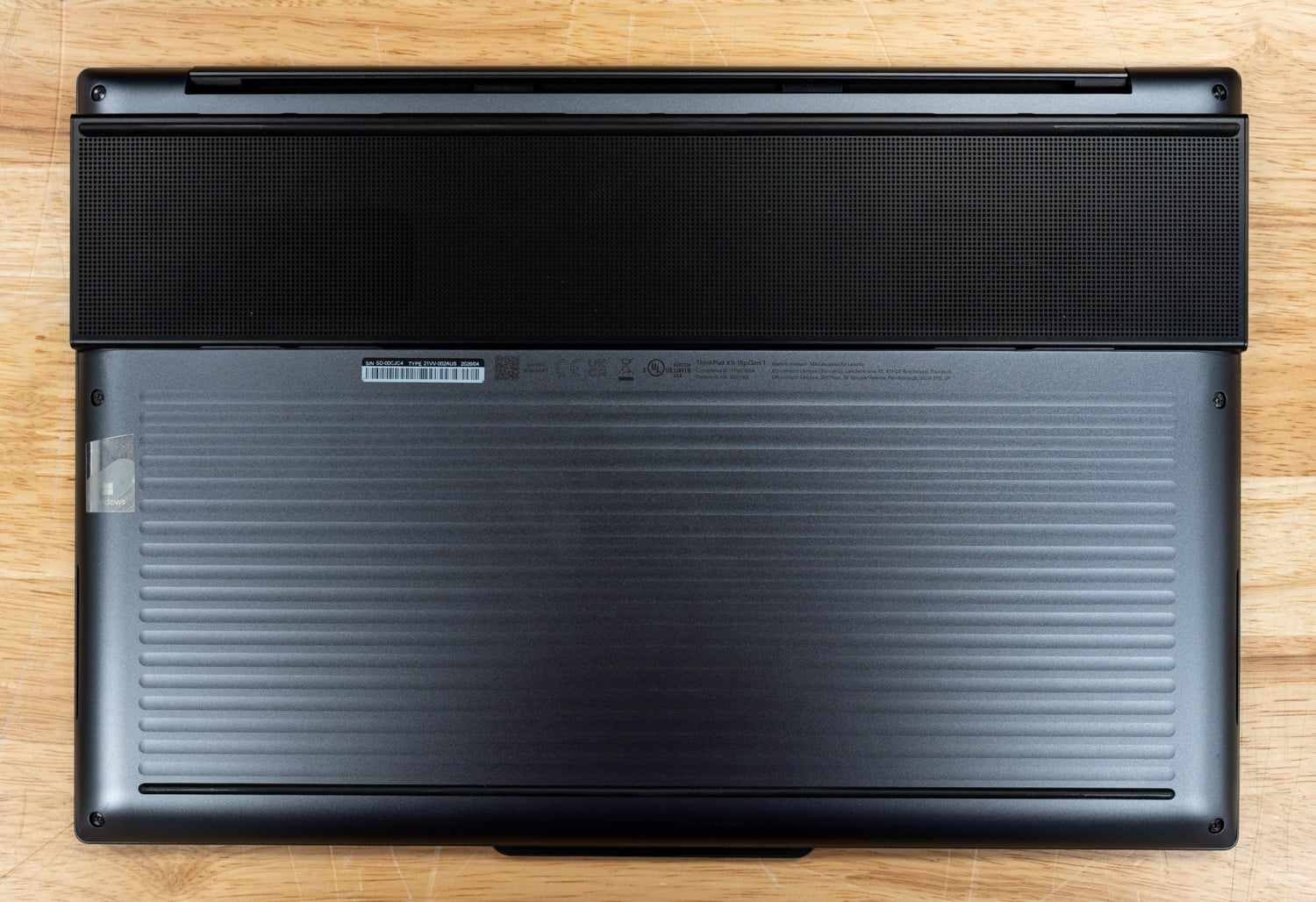
Lenovo tests the chassis against 12 MIL-STD-810H methods and more than 26 procedures. The recycled content extends past the covers to the keyboard frame, 85 percent post-consumer plastic in the keycaps, 90 percent in the speaker and battery enclosures, and 100 percent recycled cobalt in the battery cells. Starting weight is 1.5kg (3.31lb) with the 88Wh battery installed, and the 100W adapter and its enclosure also use 90 percent post-consumer plastic.
The left side carries HDMI 2.1 at up to 4K and 60Hz, two Thunderbolt 4 ports, and a 3.5mm combo jack, and the right side has an SD card reader, a third Thunderbolt 4 port, and one USB-A at 10Gbps with always-on charging. Each Thunderbolt port supports DisplayPort 2.1 and USB Power Delivery from 15 to 100W. The system drives up to four displays, including the internal panel. Wireless is Intel Wi-Fi 7 BE211 with Bluetooth 5.4, and there is no Ethernet port, WWAN option, or pen support.
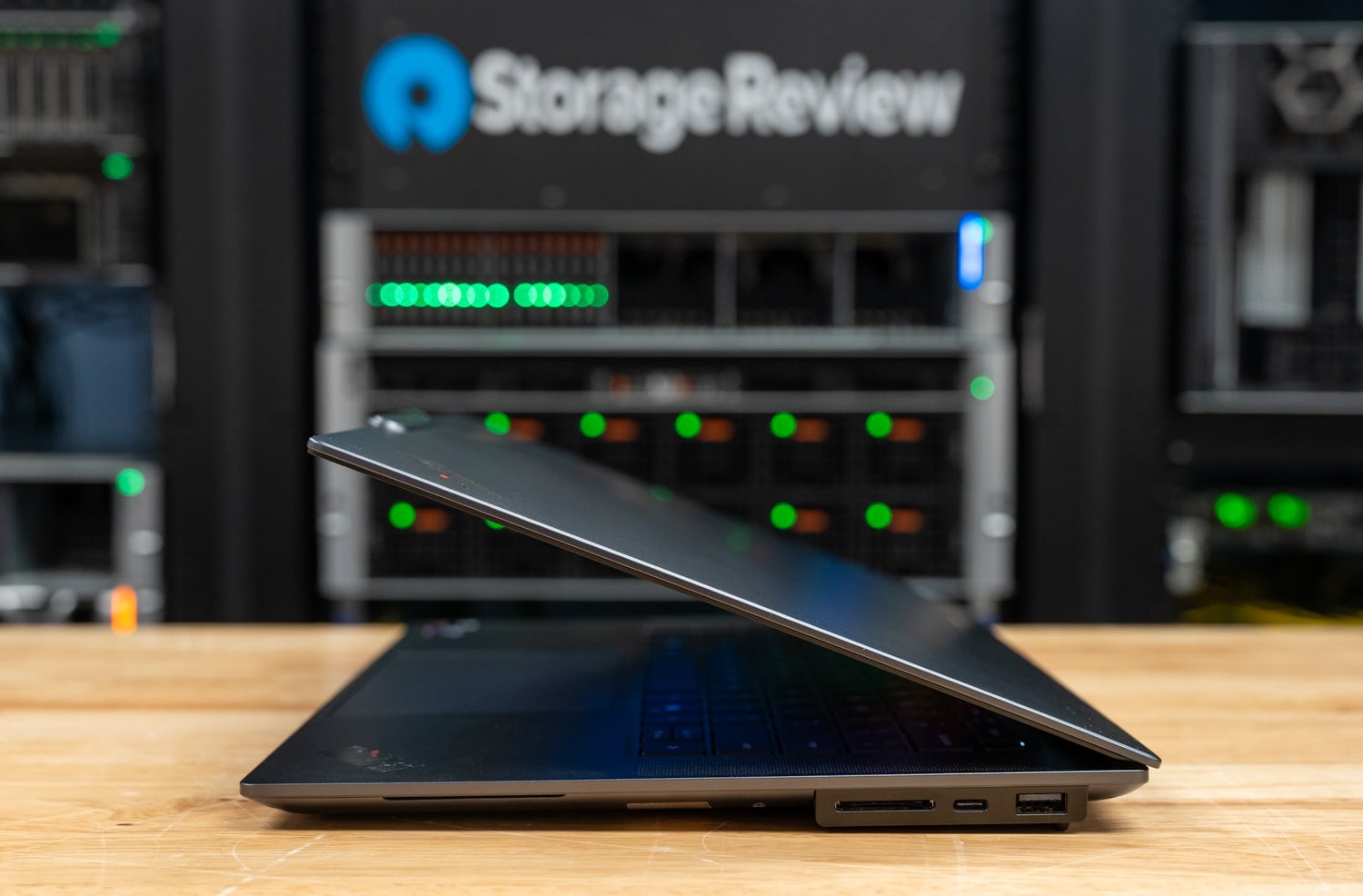
The keyboard is a six-row, spill-resistant layout with 1.35mm of key travel, an LED backlight, and a Copilot key, and it has no TrackPoint or dedicated buttons. Pointing is handled by a buttonless glass haptic touchpad that measures 85 x 135mm. In use, the keyboard is comfortable, and the touchpad is generously sized. Longtime ThinkPad users will need to decide whether they can live without the red pointing stick, because no X9 configuration offers one.

Above the display sits a 10MP camera with an IR sensor for Windows Hello and an electronic shutter on the F9 key. A time-of-flight sensor adds presence features: the notebook can wake as the user approaches, lock when the user leaves, and dim the panel when the user looks away. Audio comes from six speakers: four 2W woofers and two 2W tweeters with Dolby Atmos tuning, plus a dual-microphone array.
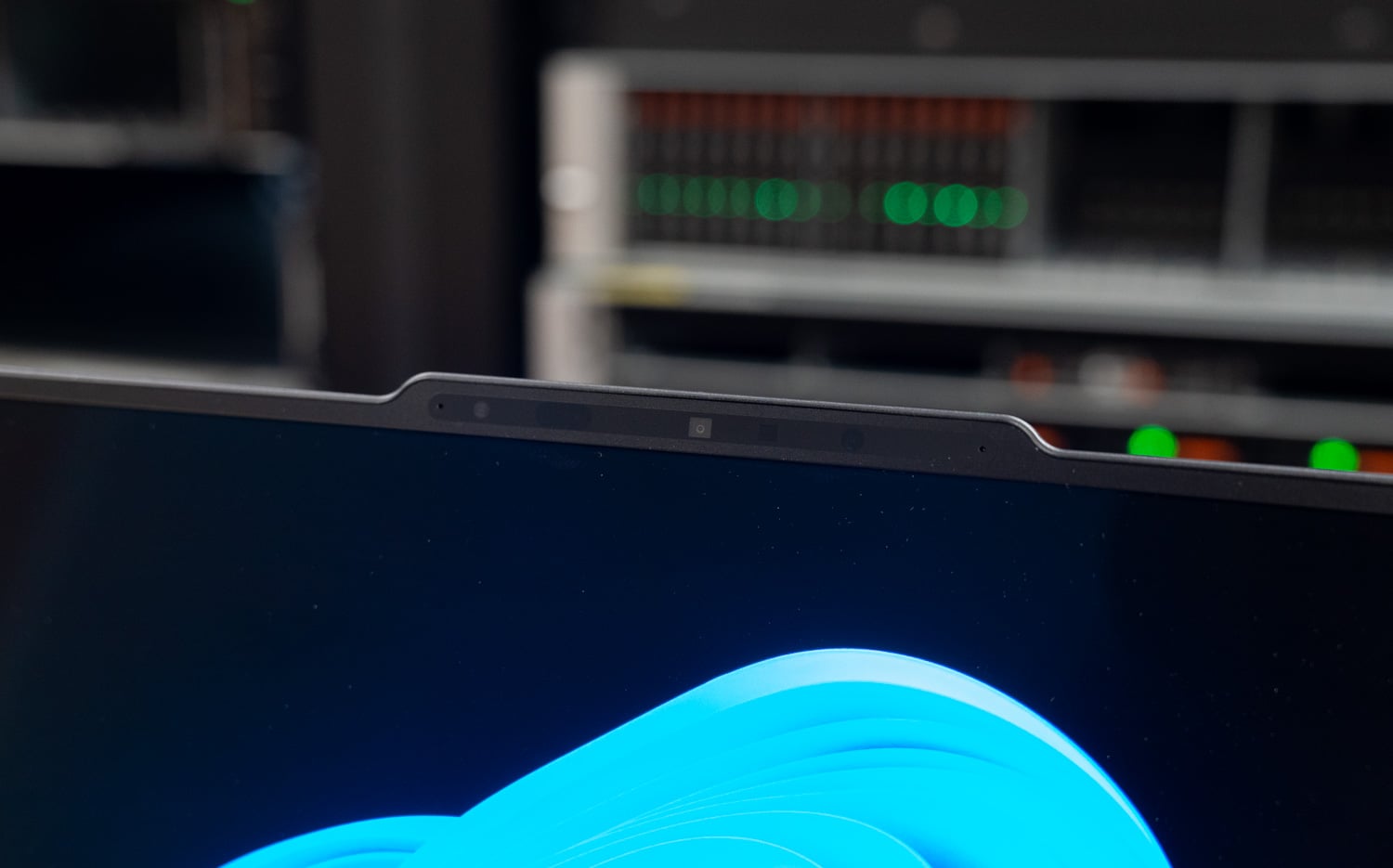
Every X9-15p ships with the same panel: a 15.3-inch, 16:10 OLED at 2880×1800, offered with or without touch, and our unit has the touch version. Lenovo rates it at 500 nits in SDR and 1,100 nits at HDR peak, with 100 percent DCI-P3 coverage, a 30 to 120Hz variable refresh rate, DisplayHDR True Black 1000, Dolby Vision, and X-Rite factory color calibration. We have not measured panel output or battery life yet.
Memory is LPDDR5X soldered to the board at 32GB or 64GB, and storage is a single M.2 2280 slot wired for PCIe Gen5 x4 with drives up to 2TB. The bottom cover is held by six captive Phillips screws, and Lenovo lists the SSD, speakers, and base cover as parts an owner can replace, with the battery as an optional service part. The 88Wh battery charges over USB-C from a 100W GaN adapter, with Rapid Charge to 80 percent in one hour while the system is off or asleep.
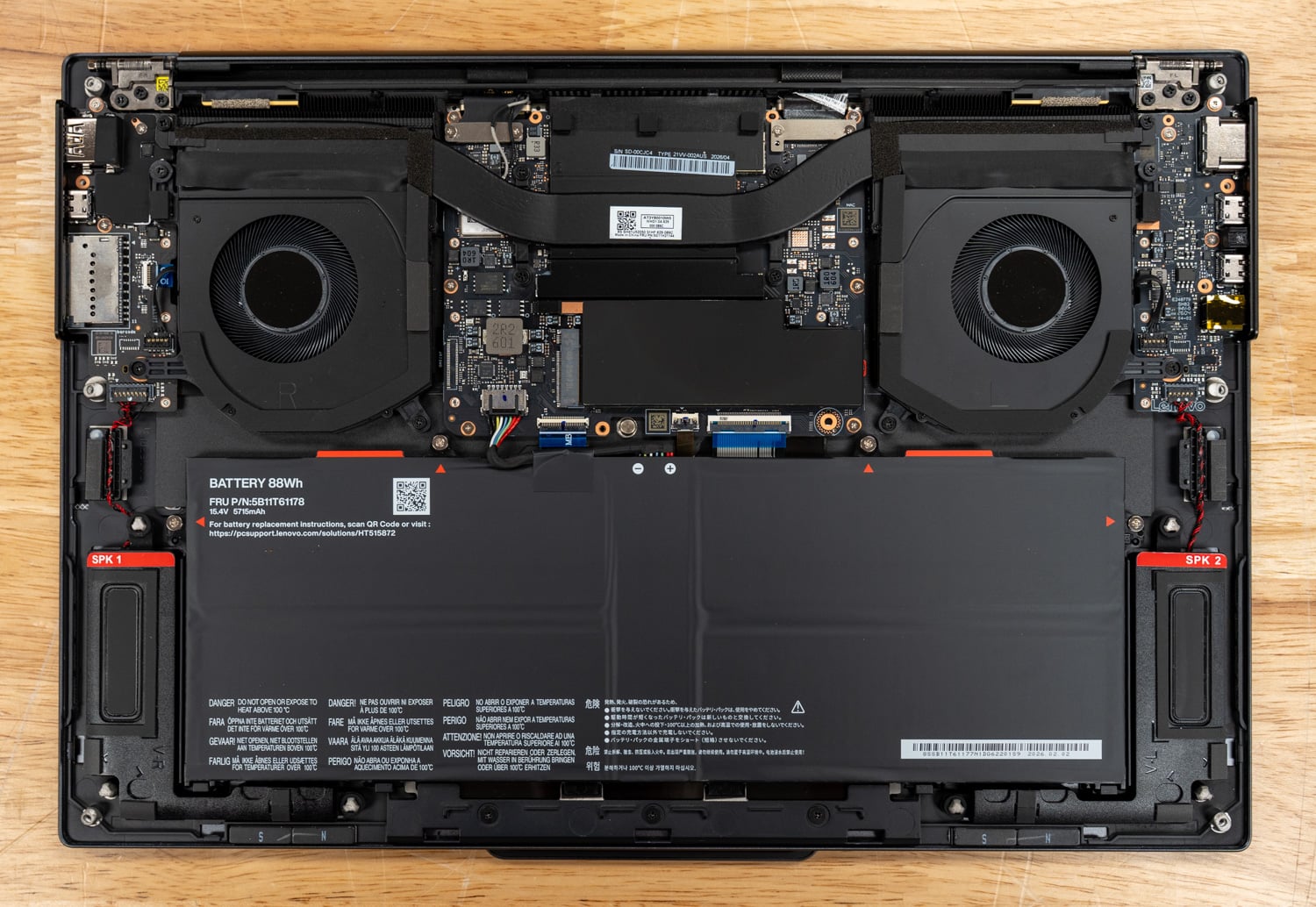
With the cover off, two fans sit at either side of the system board and share a heat pipe that crosses the processor and feeds fin stacks along the rear edge, under the Engine Hub. The 88Wh battery fills the front half of the chassis, the SSD sits under a shield between the fans, and speaker modules occupy the front corners.
The Aura Edition name refers to a set of Lenovo software features. Smart Modes switches system settings across six profiles for working, gaming, creating, entertainment, meetings, and learning, from a widget or inside Lenovo Vantage, and the function row has a dedicated mode key at F8. Smart Share covers Tap to Launch for moving photos between a phone and the notebook and Tap to Pair for Bluetooth accessories, and Smart Care connects users to Lenovo support technicians by chat or phone. None of these features change the benchmark configuration described below.
Lenovo ThinkPad X9-15p Gen 1 Aura Edition Specifications
| Specification | Lenovo ThinkPad X9-15p Gen 1 Aura Edition (as tested) |
|---|---|
| Platform | |
| Model | 21VV002AUS |
| Processor | Intel Core Ultra X7 358H, 16 cores (4 P-cores, 8 E-cores, 4 LP E-cores), P-cores up to 4.8GHz |
| NPU | Up to 50 TOPS |
| Graphics | Intel Arc B390 (integrated, 12 Xe-cores) |
| Memory | 32GB LPDDR5X-9600, soldered 64GB available |
| Storage | 1TB M.2 2280 PCIe Gen4 Opal SSD (UMIS) 1x M.2 2280 PCIe Gen5 x4 slot, up to 2TB |
| Operating System | Windows 11 Pro |
| Display | |
| Panel | 15.3-inch 16:10 2.8K (2880×1800) OLED, touch |
| Brightness | 500 nits SDR 1,100 nits HDR peak |
| Color and Refresh | 100% DCI-P3 30 to 120Hz VRR DisplayHDR True Black 1000, Dolby Vision X-Rite factory calibration |
| Connectivity | |
| Ports | 3x Thunderbolt 4 (USB PD 15 to 100W, DisplayPort 2.1) 1x USB-A 10Gbps, always on 1x HDMI 2.1, up to 4K at 60Hz 1x 3.5mm combo jack 1x SD card reader |
| Wireless | Intel Wi-Fi 7 BE211 2×2 Bluetooth 5.4 |
| Input and Audio | |
| Camera | 10MP with IR, electronic shutter, time-of-flight presence sensor |
| Keyboard and Pointing | Six-row backlit, spill-resistant keyboard, 1.35mm travel 85 x 135mm glass haptic touchpad No TrackPoint |
| Audio | 6 speakers (4x 2W woofers, 2x 2W tweeters), Dolby Atmos Dual-microphone array |
| Security and Durability | |
| Security | Discrete TPM 2.0, FIPS 140-3 Match-on-chip fingerprint reader in the power button Self-healing BIOS |
| Durability | MIL-STD-810H |
| Power and Physical | |
| Battery | 88Wh, Rapid Charge to 80% in 1 hour |
| Charging | USB-C, 100W GaN adapter |
| Dimensions | 339.5 x 228.5 x 7.25 to 7.65mm, 17.9mm maximum (13.37 x 9.0 x 0.29 to 0.30in, 0.70in maximum) |
| Weight | Starting at 1.5kg (3.31lb) |
| Materials | Aluminum top and bottom covers, 50% recycled |
| Warranty | 1 year onsite |
| Price as Tested | $2,629 (Lenovo.com) |
Test Setup and Methodology
Our review unit runs the Core Ultra X7 358H with Arc B390 graphics, 32GB of LPDDR5X-9600, and a 1TB Gen4 SSD on Windows 11 Pro, with benchmarks run in Best Performance power mode. We ran the suite while plugged in, on BIOS 1.17 and Intel graphics driver 32.0.101.8509. Battery life will follow in a later update.
Results come from full, Peak-profile runs of sr-client, our scripted client benchmark suite. The X9-15p, the NUC 16 Pro, and the ThinkPad T1g ran version 1.13, and the two Dell systems ran version 1.11; the benchmark applications match across those releases, including Cinebench 2026, 7-Zip 24.09, Blender 4.5, Stockfish 19, GROMACS 2025.3, and MLPerf Client v2.0.
The suite applies the same settings everywhere: Windows power mode at Best performance, display at 50 percent brightness, all sleep and display timers off, Windows Firewall and UAC prompts off, and VBS and Memory Integrity left as shipped. Each result is the median of repeated passes, and the suite reruns a test if its spread exceeds 2 percent before accepting it.
The comparison set starts with the ASUS NUC 16 Pro, a mini PC with the same Core Ultra X7 358H, 64GB of memory, and no battery or thin chassis to manage, so it shows what the processor does with desktop cooling. ASUS rates the 358H at a 65W configurable TDP in that chassis, a little more than twice the 30W Lenovo cites for the X9-15p. The Dell Pro Precision 5 16S carries the Core Ultra X9 388H with Arc Pro B390 graphics in a 16-inch mobile workstation, which makes it the closest notebook to the X9-15p on silicon.
The Lenovo ThinkPad T1g Gen 9 pairs a 12GB GeForce RTX 5070 Laptop GPU with a Core Ultra 7 366H and shows what a discrete card can do in Lenovo’s lineup. The Dell XPS 16 Creator Edition runs NVIDIA’s 20-core RTX Spark N1X with 64GB of unified memory and represents the Arm alternative at a similar screen size.
| Configuration | CPU | Memory | GPU | Boot Drive | sr-client |
|---|---|---|---|---|---|
| Lenovo ThinkPad X9-15p Gen 1 (21VV002AUS) | Core Ultra X7 358H, 16 cores | 32GB LPDDR5X-9600 | Arc B390 (integrated), 18.1GB usable | 1TB UMIS, PCIe Gen4 | 1.13 |
| ASUS NUC 16 Pro (NUC16GDKX76) | Core Ultra X7 358H, 16 cores | 64GB LPDDR5X-8533 | Arc B390 (integrated), 47.5GB usable | 1TB Samsung, PCIe Gen5 | 1.13 |
| Dell Pro Precision 5 16S (PW516260) | Core Ultra X9 388H, 16 cores | 64GB LPDDR5X-8533 | Arc Pro B390 (integrated), 47.6GB usable | 1TB SK hynix, PCIe Gen5 | 1.11 |
| Lenovo ThinkPad T1g Gen 9 (21UG000BUS) | Core Ultra 7 366H, 16 cores | 64GB LPDDR5X-8533 | GeForce RTX 5070 Laptop, 11.7GB usable | 2TB Micron, PCIe Gen5 | 1.13 |
| Dell XPS 16 Creator Edition (DX16263) | RTX Spark N1X, 20 cores | 64GB LPDDR5X-9400 | N1X integrated RTX, 30.5GB usable | 1TB SK hynix, PCIe Gen4 | 1.11 |
Local AI Performance
The Arc B390 has no dedicated memory and draws from system RAM; on our 32GB unit, the suite measured 18.1GB of GPU-usable memory. That clears the 16GB floor for our tiered local AI tests, so model loading and the coding agent both ran on the X9-15p, where the T1g’s 12GB RTX 5070 measured 11.7GB and could not start them. The cost is speed, because the Arc B390 generates tokens at roughly half the rate of the NVIDIA hardware in this group or less.
MLPerf Client v2.0
| MLPerf Client v2.0 | Lenovo ThinkPad X9-15p Gen 1 (X7 358H, Arc B390, 32GB) | ASUS NUC 16 Pro (X7 358H, Arc B390, 64GB) | Dell Pro Precision 5 16S (X9 388H, Arc Pro B390, 64GB) | Lenovo ThinkPad T1g Gen 9 (366H, RTX 5070 12GB) | Dell XPS 16 Creator Edition (N1X, 64GB) |
|---|---|---|---|---|---|
| Llama 3.1 8B, time to first token (s, lower is better) | 0.20 | 0.21 | 0.21 | 0.31 | 0.31 |
| Llama 3.1 8B, token rate (tokens/s) | 27.3 | 26.8 | 26.9 | 66.2 | 55.7 |
| Phi-4-mini, time to first token (s, lower is better) | 0.18 | 0.18 | 0.18 | 0.14 | 0.14 |
| Phi-4-mini, token rate (tokens/s) | 41.7 | 41.1 | 41.5 | 114.1 | 96.2 |
MLPerf Client runs through OpenVINO on the three Arc systems and through llama.cpp with CUDA on the two NVIDIA systems, so the columns compare engines as well as hardware. The X9-15p generated 27.3 tokens per second on Llama 3.1 8B and 41.7 on Phi-4-mini, within 2 percent of the NUC 16 Pro and the Precision. The RTX 5070 in the T1g is 2.4 times faster on Llama at 66.2 tokens per second, and the N1X is 2.0 times faster at 55.7 tokens per second. The Arc systems post the quickest first token on Llama at 0.20 to 0.21 seconds.
Model Loading and the Coding Agent
| gpt-oss:20b (Ollama 0.40.3) | Lenovo ThinkPad X9-15p Gen 1 (X7 358H, Arc B390, 32GB) | ASUS NUC 16 Pro (X7 358H, Arc B390, 64GB) | Dell Pro Precision 5 16S (X9 388H, Arc Pro B390, 64GB) | Lenovo ThinkPad T1g Gen 9 (366H, RTX 5070 12GB) | Dell XPS 16 Creator Edition (N1X, 64GB) |
|---|---|---|---|---|---|
| gpt-oss:20b cold load to first token (s, lower is better) | 8.63 | 5.80 | 6.29 | Did not fit | 7.73 |
| gpt-oss:20b warm load to first token (s, lower is better) | 8.01 | 4.42 | 4.21 | Did not fit | 3.69 |
| Coding agent, successful runs (of 3) | 3 | 2 | 1 | Did not fit | 3 |
| Coding agent, tests passing (of 11) | 11 | 11 | 8 | Did not fit | 11 |
| Coding agent, wall time (s, lower is better) | 374 | 243 | 919 | Did not fit | 360 |
| Coding agent, generation rate (tokens/s) | 18.3 | 20.1 | 17.0 | Did not fit | 58.5 |
| Speedometer slowdown beside the agent (x, lower is better) | 1.26 | 1.41 | 1.57 | Did not fit | 2.79 |
The model-load test times Ollama from launch to first token on gpt-oss:20b, a 12.8GB model, cold from the SSD and warm from the page cache. The X9-15p took 8.63 seconds cold and 8.01 seconds warm, and it is the only system here where the warm load saved less than a second. The 64GB Intel systems dropped to 4.2 to 4.4 seconds warm, suggesting the 32GB configuration has little page cache to spare once the model is resident in shared memory.
The coding agent test runs Crush against gpt-oss:20b with a 64K context through a fixed programming task, three times, with up to three rounds each. The X9-15p succeeded on all three runs with 11 of 11 tests passing, at a median of 374 seconds and 18.3 tokens per second. Individual runs ranged from 229 to 410 seconds, and the NUC 16 Pro and the Precision each had runs that failed the task, so wall time here reflects the path the model took as much as the hardware.
Running Speedometer beside the agent, the browser score fell from 40.8 to 32.4, a 1.26x slowdown. That was the smallest in the group, and the agent’s generation rate dropped from 18.3 to 15.2 tokens per second. The next tier up needs more memory than this unit has: the 35B agent model requires about 40GB and the 27B serving model 30GB of GPU-usable memory, and both ran on the 64GB NUC 16 Pro. With soldered memory, that makes the 64GB option the one to order for larger local models.
RAG and LLM Serving
| RAG (Ollama 0.40.3) | Lenovo ThinkPad X9-15p Gen 1 (X7 358H, Arc B390, 32GB) | ASUS NUC 16 Pro (X7 358H, Arc B390, 64GB) | Dell Pro Precision 5 16S (X9 388H, Arc Pro B390, 64GB) | Lenovo ThinkPad T1g Gen 9 (366H, RTX 5070 12GB) | Dell XPS 16 Creator Edition (N1X, 64GB) |
|---|---|---|---|---|---|
| Ingest, passages per second | 83.6 | 81.0 | 81.4 | 159.8 | 104.4 |
| Ingest, embedding rate (tokens/s) | 13,543 | 13,112 | 13,188 | 25,883 | 16,901 |
| Answer, generation rate (tokens/s) | 48.7 | 48.2 | 48.4 | 110.0 | 95.0 |
| Answer, time to first token p50 (s, lower is better) | 0.84 | 0.86 | 0.86 | 0.18 | 0.17 |
| Question-to-answer p50 (s, lower is better) | 0.98 | 1.00 | 0.99 | 0.25 | 0.25 |
The RAG test embeds 20,963 SQuAD passages, retrieves the top five for each question, and answers with Phi-4-mini through Ollama. The X9-15p ingested 83.6 passages per second and generated answers at 48.7 tokens per second, with a median of 0.98 seconds from question to answer. All three Arc systems land within about 3 percent of each other; the T1g’s RTX 5070 is 1.9 times faster on ingest at 159.8, and both NVIDIA systems answer in a median of 0.25 seconds.
| llama.cpp server, Ministral 3 | Lenovo ThinkPad X9-15p Gen 1 (X7 358H, Arc B390, 32GB) | ASUS NUC 16 Pro (X7 358H, Arc B390, 64GB) | Dell Pro Precision 5 16S (X9 388H, Arc Pro B390, 64GB) | Lenovo ThinkPad T1g Gen 9 (366H, RTX 5070 12GB) | Dell XPS 16 Creator Edition (N1X, 64GB) |
|---|---|---|---|---|---|
| Ministral 3 3B, 1 request, output (tokens/s) | 22.8 | 22.5 | 22.4 | 69.0 | 57.8 |
| Ministral 3 3B, 4 requests, output (tokens/s) | 39.1 | 38.4 | 38.2 | 176.4 | 146.4 |
| Ministral 3 3B, 1 request, time to first token (ms, lower is better) | 4,349 | 4,040 | 4,437 | 726 | 669 |
| Ministral 3 8B, 1 request, output (tokens/s) | 16.5 | 16.4 | 15.5 | 49.9 | 40.6 |
| Ministral 3 8B, 4 requests, output (tokens/s) | 25.6 | 27.0 | 24.5 | 107.8 | 96.3 |
| Ministral 3 8B, 1 request, time to first token (ms, lower is better) | 7,168 | 6,546 | 10,342 | 1,698 | 1,794 |
LLM serving runs the llama.cpp server with Ministral 3 models at 4,096 prompt tokens and 1,024 output tokens per request. The X9-15p delivered 22.8 tokens per second to one user on the 3B model and 39.1 across four concurrent requests, then 16.5 and 25.6 on the 8B model. Prompt processing is the weak point for the Arc B390, with a median of 4.3 seconds to first token on the 3B model and 7.2 seconds on the 8B model, against 0.7 and 1.7 seconds on the RTX 5070.
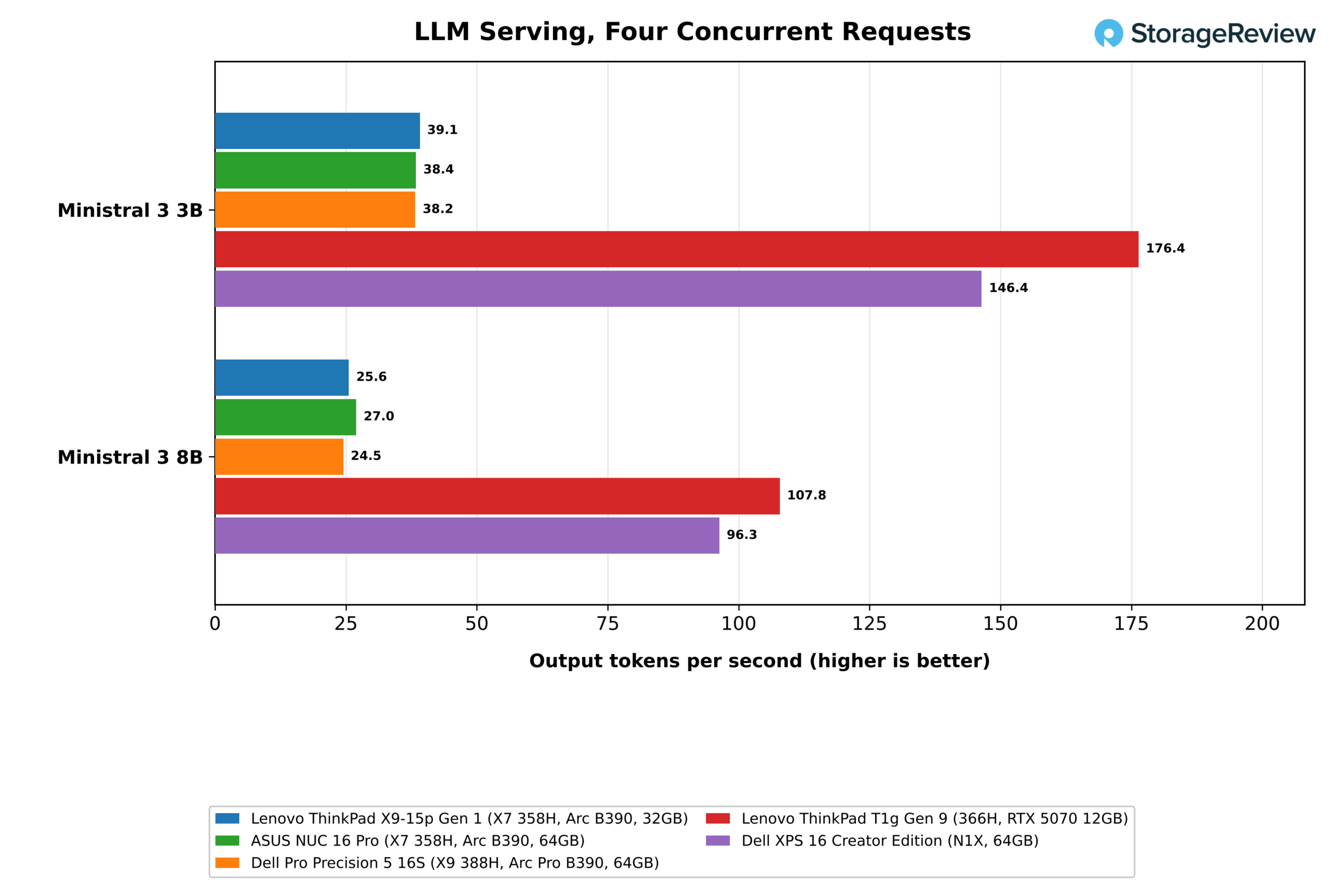
Image Generation
| stable-diffusion.cpp, 1024×1024 | Lenovo ThinkPad X9-15p Gen 1 (X7 358H, Arc B390, 32GB) | ASUS NUC 16 Pro (X7 358H, Arc B390, 64GB) | Dell Pro Precision 5 16S (X9 388H, Arc Pro B390, 64GB) | Lenovo ThinkPad T1g Gen 9 (366H, RTX 5070 12GB) | Dell XPS 16 Creator Edition (N1X, 64GB) |
|---|---|---|---|---|---|
| FLUX.2 klein 4B Q4_0, images per minute | 0.20 | 0.19 | 0.38 | 9.36 | 11.17 |
| FLUX.2 klein 4B Q4_0, time per image (s, lower is better) | 302.39 | 309.40 | 159.85 | 6.41 | 5.37 |
Image generation with stable-diffusion.cpp is the one AI workload in our suite that does not suit the integrated Arc systems. The X9-15p completed FLUX.2 klein 4B at Q4_0 in 302 seconds per image (0.20 images per minute), and the larger configurations did not finish within the suite’s time limits. The NUC 16 Pro with the same processor posted 0.19 images per minute. The T1g’s RTX 5070 produced 9.36 images per minute, and the XPS 16 produced 11.17 images per minute on the same model.
CPU Performance
Cinebench 2026 and Sustained Load
| Cinebench 2026 (points, higher is better) | Lenovo ThinkPad X9-15p Gen 1 (X7 358H, Arc B390, 32GB) | ASUS NUC 16 Pro (X7 358H, Arc B390, 64GB) | Dell Pro Precision 5 16S (X9 388H, Arc Pro B390, 64GB) | Lenovo ThinkPad T1g Gen 9 (366H, RTX 5070 12GB) | Dell XPS 16 Creator Edition (N1X, 64GB) |
|---|---|---|---|---|---|
| Single core | 511 | 512 | 535 | 510 | 565 |
| Multi core | 4,594 | 4,980 | 4,754 | 4,928 | 6,631 |
| 30-minute loop, first pass | 4,614 | 4,993 | 4,634 | 4,924 | 6,539 |
| 30-minute loop, steady state | 4,595 | 5,002 | 4,413 | 4,901 | 6,550 |
| Steady state / first pass | 0.996 | 1.002 | 0.952 | 0.995 | 1.002 |
The Core Ultra X7 358H scored 4,594 in Cinebench 2026 multi-core and 511 in single-core in the X9-15p. The same processor in the NUC 16 Pro, running at more than twice the rated power, reached 4,980 and 512, so the thin chassis costs 8 percent in multi-core work and nothing in single-core work. The X9-15p finishes 3 percent behind the Precision’s Core Ultra X9 388H and 7 percent behind the T1g’s Core Ultra 7 366H on multi-core. The N1X in the XPS 16 leads the group at 6,631, a 44 percent margin.
Over the 30-minute loop, the X9-15p opened at 4,614 and settled at 4,595, holding 99.6 percent of its first pass with the CPU at a mean of 88.4 °C and a mean clock of 3,255MHz. The Precision, a 16-inch workstation, held 95.2 percent in the same test and ended at 4,413, so the X9-15p passes it once both chassis are warm. Lenovo’s power limits appear to be set at a level the cooling system held for the full 30-minute loop.

7-Zip, Blender, HandBrake, and LLVM
| Test | Lenovo ThinkPad X9-15p Gen 1 (X7 358H, Arc B390, 32GB) | ASUS NUC 16 Pro (X7 358H, Arc B390, 64GB) | Dell Pro Precision 5 16S (X9 388H, Arc Pro B390, 64GB) | Lenovo ThinkPad T1g Gen 9 (366H, RTX 5070 12GB) | Dell XPS 16 Creator Edition (N1X, 64GB) |
|---|---|---|---|---|---|
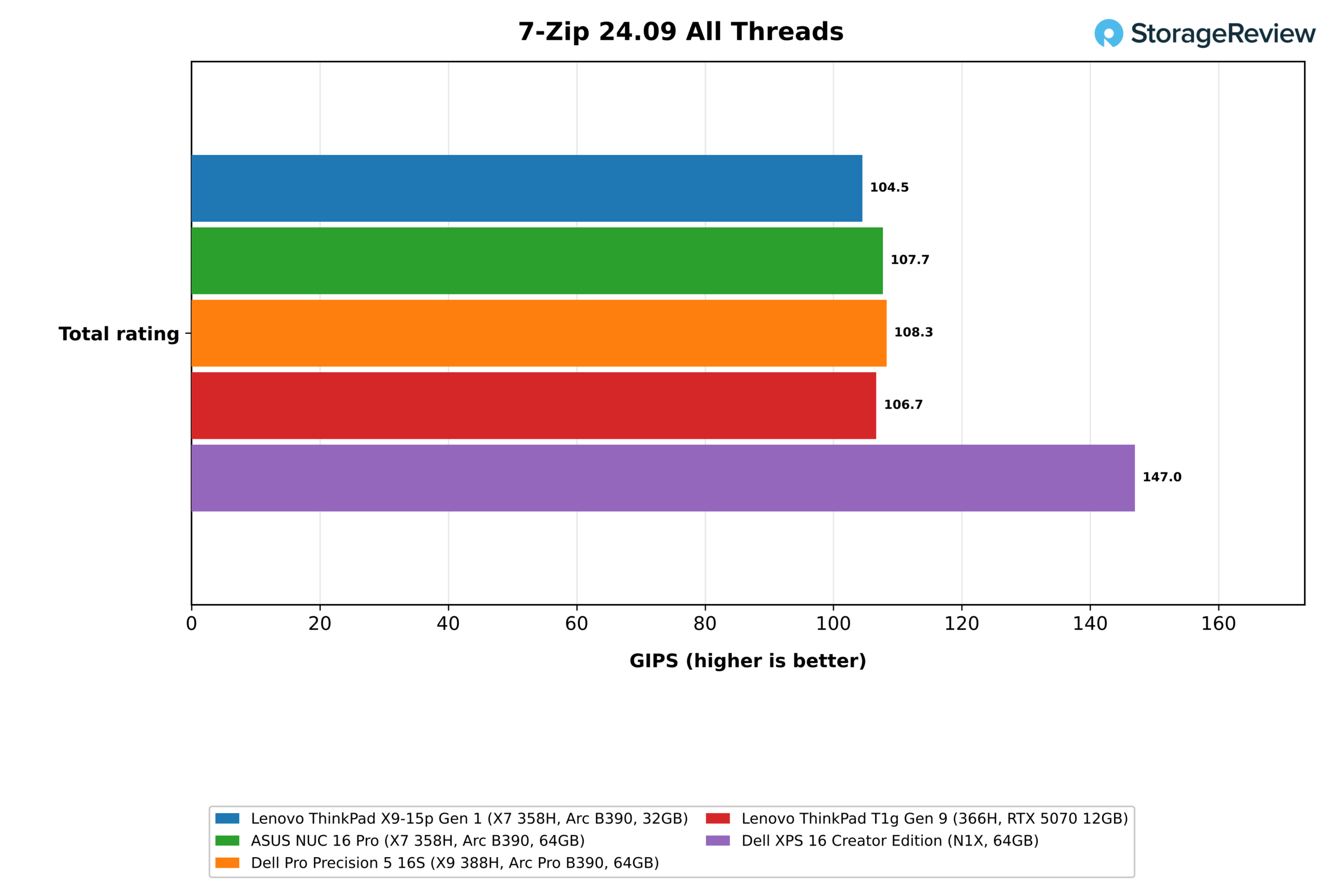
| 7-Zip, all threads, total (GIPS) | 104.5 | 107.7 | 108.3 | 106.7 | 147.0 |
| 7-Zip, one thread, total (GIPS) | 9.44 | 9.41 | 9.86 | 9.35 | 9.13 |
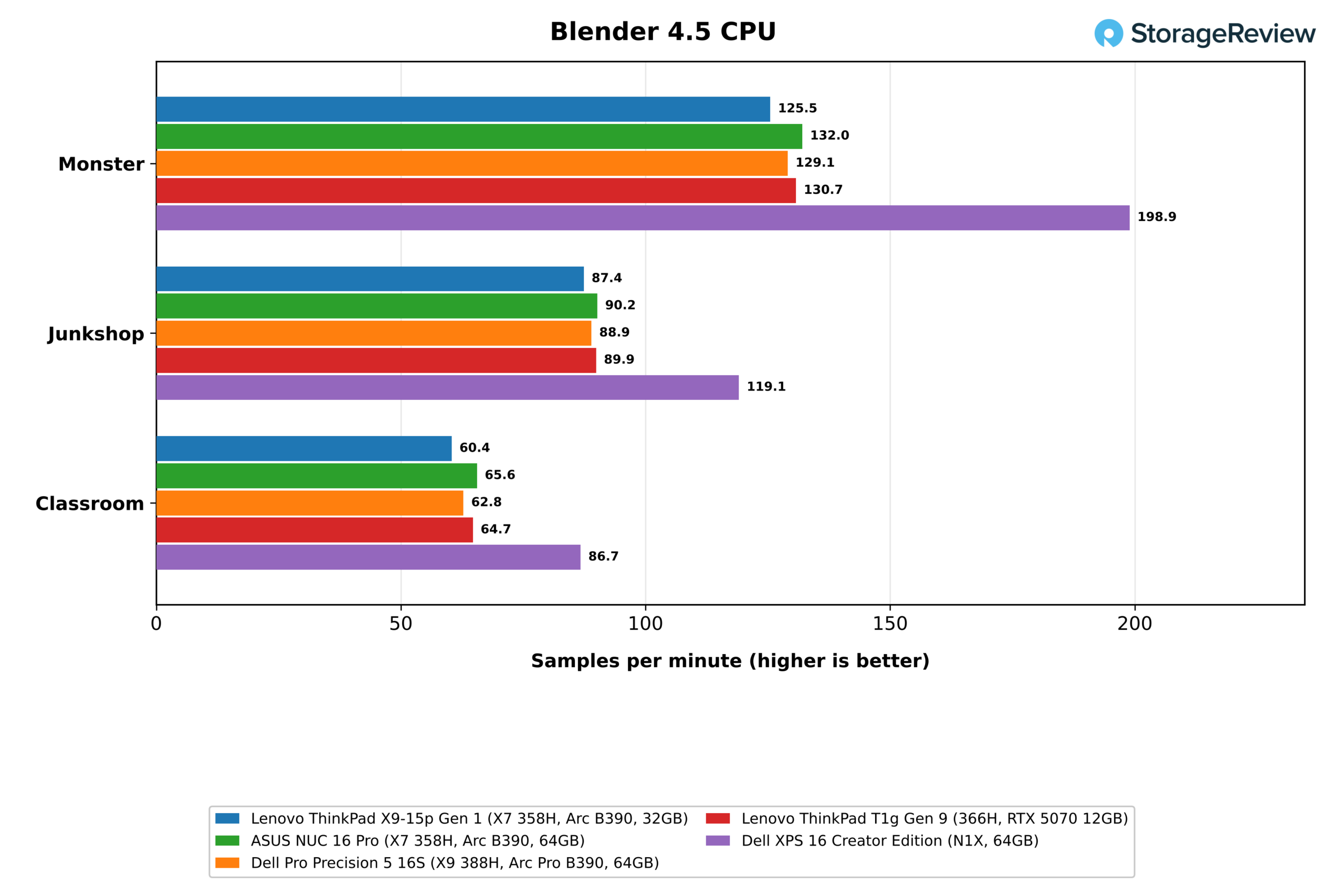
| Blender 4.5 Monster (samples/min) | 125.5 | 132.0 | 129.1 | 130.7 | 198.9 |
| Blender 4.5 Junkshop (samples/min) | 87.4 | 90.2 | 88.9 | 89.9 | 119.1 |
| Blender 4.5 Classroom (samples/min) | 60.4 | 65.6 | 62.8 | 64.7 | 86.7 |
| HandBrake x265 (fps) | 28.6 | 30.1 | 29.6 | 28.8 | 38.8 |
| HandBrake SVT-AV1 (fps) | 80.1 | 82.5 | 81.7 | 81.6 | 14.0 |
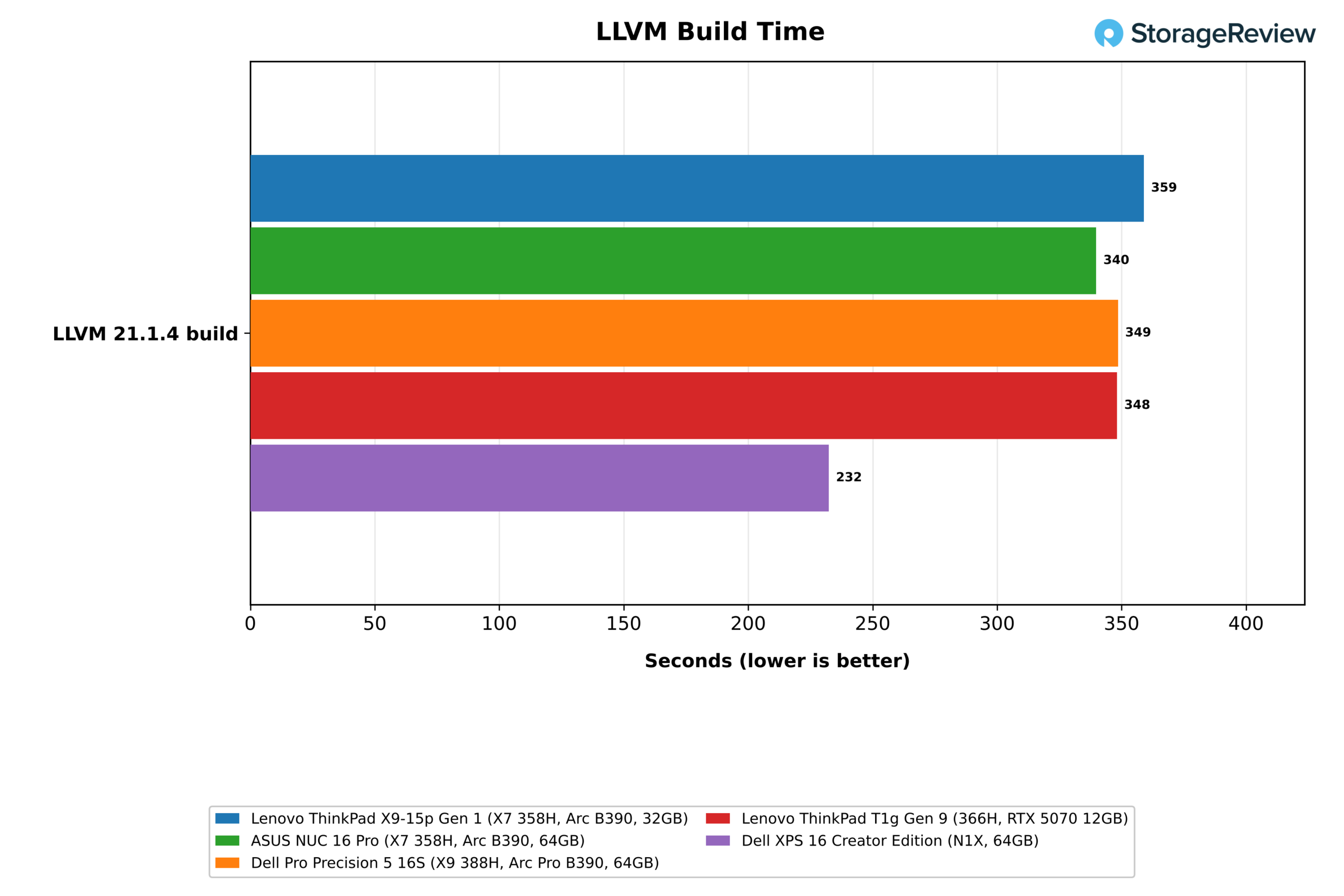
| LLVM build (s, lower is better) | 359 | 340 | 349 | 348 | 232 |
Across the content creation tests, the X9-15p trails the NUC 16 Pro by 3 to 8 percent: 104.5 against 107.7 GIPS in 7-Zip, 125.5 against 132.0 samples per minute in Blender Monster, and 28.6 against 30.1 fps in x265, with Blender Classroom showing the widest gap at 60.4 against 65.6. The LLVM build took 359 seconds, 6 percent longer than the NUC and 3 percent longer than the Precision and the T1g. The X9-15p is the slowest of the four Intel systems in most rows, by margins that stay in single digits.
The N1X leads the multi-threaded rows by wide margins, including 41 percent in 7-Zip, 58 percent in Blender Monster, and a 232-second LLVM build that finishes about two minutes sooner. SVT-AV1 is the exception, where the X9-15p encoded at 80.1 fps against 14.0 fps on the Arm laptop, and x265 narrows the N1X lead to 36 percent at 38.8 fps.
Stockfish, primesieve, Python, and the Browser
| Test | Lenovo ThinkPad X9-15p Gen 1 (X7 358H, Arc B390, 32GB) | ASUS NUC 16 Pro (X7 358H, Arc B390, 64GB) | Dell Pro Precision 5 16S (X9 388H, Arc Pro B390, 64GB) | Lenovo ThinkPad T1g Gen 9 (366H, RTX 5070 12GB) | Dell XPS 16 Creator Edition (N1X, 64GB) |
|---|---|---|---|---|---|
| Stockfish, one thread (Mnps) | 1.74 | 1.79 | 1.86 | 1.73 | 1.74 |
| Stockfish, all threads (Mnps) | 13.84 | 16.39 | 15.02 | 14.96 | 13.87 |
| primesieve to 10^12, all threads (s, lower is better) | 12.04 | 11.19 | 11.34 | 11.98 | 10.39 |
| primesieve to 10^11, one thread (s, lower is better) | 10.15 | 10.17 | 9.55 | 10.39 | 12.03 |
| PyPerformance go (ms, lower is better) | 73.2 | 72.1 | 69.6 | 75.7 | 111.6 |
| PyPerformance nbody (ms, lower is better) | 55.3 | 55.3 | 52.4 | 57.6 | 80.8 |
| Speedometer 3.1 (score) | 40.8 | 42.1 | 42.9 | 40.9 | 36.5 |
Single-threaded results are level across the Intel systems, with the X9-15p at 1.74 Mnps in one-thread Stockfish, 73.2ms in PyPerformance go, and 40.8 in Speedometer 3.1, each within about 3 percent of the NUC 16 Pro. The X9-15p leads the XPS 16 in the browser, 40.8 against 36.5, and in the Python tests, where the Arm system takes 46 to 52 percent longer. All-thread Stockfish is the weak row at 13.84 Mnps, 16 percent behind the NUC and 8 percent behind the Precision.
GROMACS, OpenBLAS, and Memory
| Test | Lenovo ThinkPad X9-15p Gen 1 (X7 358H, Arc B390, 32GB) | ASUS NUC 16 Pro (X7 358H, Arc B390, 64GB) | Dell Pro Precision 5 16S (X9 388H, Arc Pro B390, 64GB) | Lenovo ThinkPad T1g Gen 9 (366H, RTX 5070 12GB) | Dell XPS 16 Creator Edition (N1X, 64GB) |
|---|---|---|---|---|---|
| GROMACS benchMEM (ns/day) | 21.24 | 26.84 | 23.28 | 24.98 | 17.41 |
| OpenBLAS DGEMM, all cores (GFLOPS) | 469.2 | 527.4 | 527.5 | 506.1 | 354.6 |
| OpenBLAS LU solve N=20000, all cores (GFLOPS) | 444.1 | 489.6 | 503.5 | 441.0 | 314.9 |
| STREAM Triad (MB/s) | 91,270 | 81,907 | 83,038 | 81,548 | 122,872 |
| Memory latency, 4KiB pages (ns, lower is better) | 109.9 | 118.6 | 115.2 | 117.2 | 140.5 |
Long floating-point workloads show the largest gap to the desktop. GROMACS benchMEM ran at 21.24 ns/day on the X9-15p against 26.84 on the NUC 16 Pro, a 21 percent deficit, and OpenBLAS DGEMM reached 469.2 GFLOPS against 527.4. The X9-15p averaged 3,249MHz through the 32-minute GROMACS run, its lowest mean clock in any CPU test apart from Stockfish. It still finishes 22 percent ahead of the XPS 16 in GROMACS and 32 percent ahead in DGEMM.
The X9-15p leads the Intel group on memory bandwidth, with its LPDDR5X-9600 delivering 91.3GB/s in STREAM Triad versus 81.5 to 83.0GB/s for the three systems on LPDDR5X-8533, a 10 to 12 percent advantage. Memory latency at 4KiB pages was also the lowest of the five systems at 109.9ns. The N1X’s LPDDR5X-9400 remains well ahead on bandwidth at 122.9GB/s, the one memory result where the Arm system leads this group.

Graphics and GPU Encoding
| SuperTuxKart 1.5 and FFmpeg (higher is better) | Lenovo ThinkPad X9-15p Gen 1 (X7 358H, Arc B390, 32GB) | ASUS NUC 16 Pro (X7 358H, Arc B390, 64GB) | Dell Pro Precision 5 16S (X9 388H, Arc Pro B390, 64GB) | Lenovo ThinkPad T1g Gen 9 (366H, RTX 5070 12GB) | Dell XPS 16 Creator Edition (N1X, 64GB) |
|---|---|---|---|---|---|
| SuperTuxKart 1080p, average FPS | 163.9 | 165.3 | 168.0 | 206.8 | 248.6 |
| SuperTuxKart 1080p, typical FPS | 161 | 164 | 167 | 206 | 250 |
| SuperTuxKart 1080p, mostly stable FPS | 132 | 135 | 137 | 173 | 214 |
| SuperTuxKart 1080p, steady FPS | 77 | 74 | 88 | 45 | 131 |
| FFmpeg HEVC Quick Sync (fps) | 128 | 128 | 128 | Not run | Not run |
SuperTuxKart at 1080p with the highest preset is the suite’s one game test, and the X9-15p averaged 163.9 fps, within 3 percent of the other two Arc B390 systems. The T1g’s RTX 5070 is 26 percent faster at 206.8 fps, and the XPS 16 is 52 percent faster at 248.6. The game’s steady FPS figure, which tracks the low end of frame delivery, came in at 77 fps on the X9-15p. The panel tops out at 2880×1800, so the suite’s 4K pass did not run.
For GPU encoding, FFmpeg with HEVC Quick Sync ran at 128 fps on the suite’s Big Buck Bunny clip, identical across all three Arc systems. The Arc B390 gives the X9-15p enough graphics performance for light gaming and hardware-accelerated video work, and buyers who need more will find that no configuration of this notebook adds a discrete card.

Thermals and Clocks Under Load
| Lenovo ThinkPad X9-15p Gen 1 | CPU Max (C) | CPU Mean (C) | Mean CPU Clock (MHz) |
|---|---|---|---|
| Cinebench 2026 | 96.1 | 84.5 | 3,568 |
| 7-Zip | 96.1 | 82.5 | 3,705 |
| Blender | 96.1 | 89.2 | 3,387 |
| GROMACS | 97.1 | 87.0 | 3,249 |
| 30-minute Cinebench loop | 97.1 | 88.4 | 3,255 |
| MLPerf Client | 82.1 | 60.4 | 2,467 |
| LLM serving | 71.1 | 62.6 | 3,477 |
| SuperTuxKart | 78.1 | 71.0 | 3,115 |
| Storage | 93.1 | 70.6 | 3,028 |
The 358H reached 96C to 97C in every sustained CPU test and held there, with mean clocks between 3,249 and 3,705MHz under those loads and no decline across the 30-minute loop. GPU-led work ran much cooler on the processor side, at a 60C mean during MLPerf Client and 63C during LLM serving. The SSD peaked at 66C during the 82-minute storage run with a 55C mean, and stayed at or below 56C in the other tests. Fan noise during the benchmark runs was in line with the other notebooks we have tested recently.
Storage Performance
| fio, 25GiB footprint (higher is better) | Lenovo ThinkPad X9-15p Gen 1 (X7 358H, Arc B390, 32GB) | ASUS NUC 16 Pro (X7 358H, Arc B390, 64GB) | Dell Pro Precision 5 16S (X9 388H, Arc Pro B390, 64GB) | Lenovo ThinkPad T1g Gen 9 (366H, RTX 5070 12GB) | Dell XPS 16 Creator Edition (N1X, 64GB) |
|---|---|---|---|---|---|
| Sequential read 128K (MB/s) | 7,067 | 14,236 | 9,456 | 13,525 | 6,502 |
| Sequential write 128K (MB/s) | 6,362 | 2,684* | 9,257* | 9,238 | 5,670 |
| Random read 4K, peak (IOPS) | 699,680 | 972,854 | 778,094 | 728,827 | 300,063 |
| Random write 4K, peak (IOPS) | 392,939* | 524,069 | 649,544 | 605,858 | 256,856 |
| Random read 4K, QD32 x 4 jobs (IOPS) | 364,397 | 522,083 | 528,105 | 384,475 | 300,063 |
| Random write 4K, QD32 x 4 jobs (IOPS) | 222,188* | 396,978 | 432,635 | 307,270 | 256,856 |
*Flagged by the suite for run-to-run variance after a rerun.
The 1TB drive in our unit is a UMIS PCIe Gen4 SSD, installed in a slot that supports Gen5. It read at 7,067MB/s and wrote at 6,362MB/s on the 25GiB footprint, with the read figure near what a Gen4 x4 link allows, and both are 9 to 12 percent ahead of the Gen4 SK hynix drive in the XPS 16. The Gen5 drives in the NUC 16 Pro and the T1g read at roughly twice that rate, at 14,236 and 13,525MB/s.
Peak 4K random read reached 700K IOPS, within 4 percent of the T1g’s Gen5 Micron drive, and random write is the softer side. The UMIS drive peaked at 393K write IOPS and managed 222K at QD32 across four jobs, the lowest of the four Intel systems, and the suite flagged both write figures for variance between passes. Lenovo lists Gen5 Performance SSDs at 1TB and 2TB as options for this model, and other drives may ship under the same 1TB Gen4 option, so these figures describe our unit.


Conclusion
The ThinkPad X9-15p Gen 1 Aura Edition delivers most of what the Core Ultra X7 358H can do in a chassis that weighs 1.5kg. It finished within 8 percent of a mini PC with the same processor in Cinebench and within 3 to 5 percent in 7-Zip, Blender Monster, and x265, and it held 99.6 percent of its opening score through a 30-minute loop. At $2,629 as tested, it costs about half as much as the $5,349 T1g configuration. Its Arc B390, with 18.1GB of usable memory, also completed every run of the 20B coding test, while the T1g’s 12GB GPU could not load the model.

The limits follow from the same design choices. Token rates on the Arc B390 are roughly half those of the RTX 5070 and the N1X or lower; image generation is impractical, and long floating-point jobs such as GROMACS ran 21 percent behind the desktop. Memory is soldered; our 32GB unit can’t handle the 27B and 35B model tiers, and the Gen4 SSD leaves the Gen5 slot’s speed unused. The 358H also ships without vPro.
That makes the X9-15p a good fit for analysts, developers, and creators who want a light 15-inch notebook with sustained 16-core performance, a color-calibrated OLED panel, and enough shared memory for mid-size local models, and who can work without a TrackPoint. Buyers who need a discrete GPU should look at the ThinkPad T1g or P1, and buyers who put multi-threaded throughput or AI token rates first will be better served by the N1X systems.


 Amazon