

The Enterprise NAS (ENAS) is Ubiquiti’s first run at more enterprise-lite business storage. The 3U chassis holds 16 hot-swap drive bays, an eight-core Arm Neoverse N2 processor, 64GB of ECC memory, dual 25GbE SFP28 ports, and redundant hot-swap 550W power supplies, all for $3,999 MSRP. One pricing note: Ubiquiti’s store currently applies a memory surcharge at checkout, its response to the memory price environment, so out-the-door pricing runs above list until component costs settle. The filesystem underneath is ZFS, the drive bays accept whatever disks you want to put in them, and every software feature ships with the box. There are no licenses, no feature unlocks, and no mandatory support contracts.
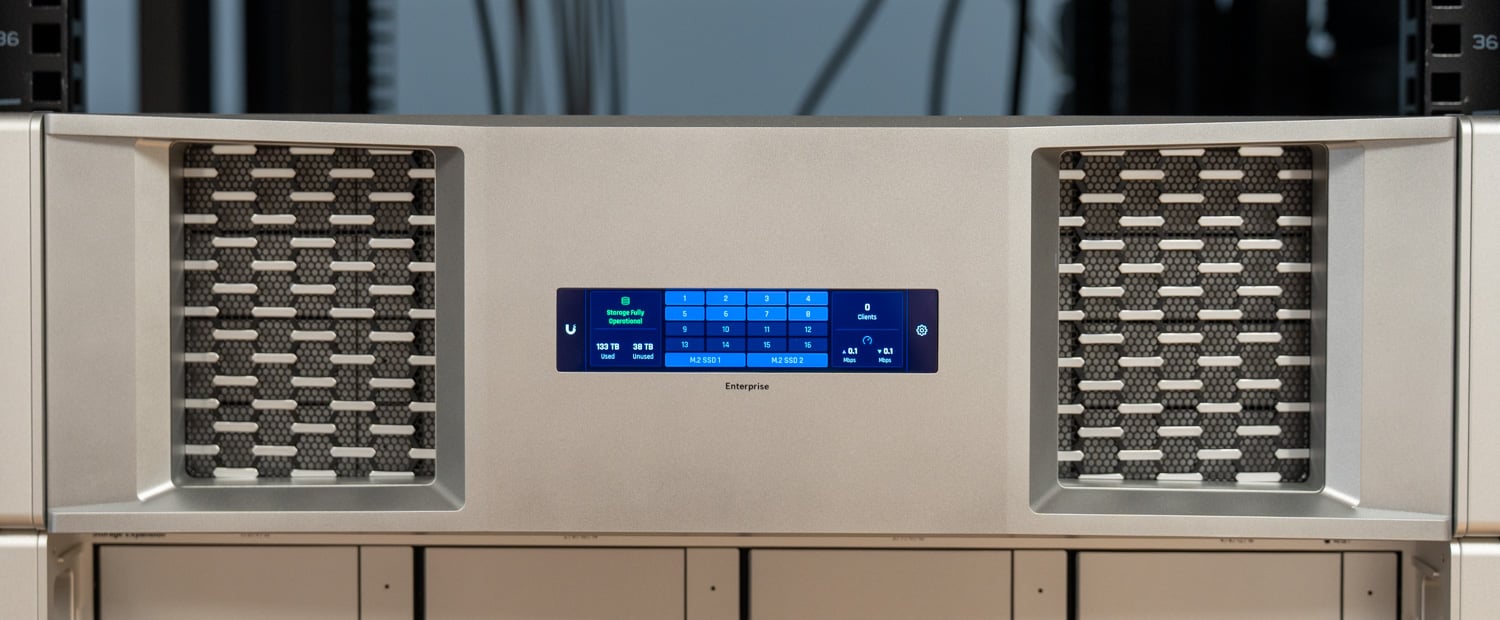
The price for a bare unit might look daunting at first, but there is a lot of value to be found. Dual 25GbE as standard equipment is the piece competitors do not match: Synology’s 16-bay RS4021xs+ ships with two 10GbE RJ45 ports and puts 25GbE behind a PCIe add-in card, and the story is much the same across rackmounts at this capacity point, where faster-than-10GbE networking is another line on the quote. Pair that with redundant power and ECC memory, and Ubiquiti is checking boxes that have traditionally separated SMB NAS boxes from entry-level enterprise arrays. ENAS is available now directly from Ubiquiti (affiliate link).
ENAS also caps a portfolio expansion that has been running at a remarkable pace. Ubiquiti built its name on access points and gateways, and the networking side keeps rolling; in the past year alone, we have looked at the UniFi E7 and E7 Campus WiFi 7 access points, the Cloud Gateway Fiber, and the Dream Router 7. Storage is newer ground. The line started with the UNAS Pro, a $499 seven-bay 2U unit that made sense mostly for UniFi loyalists, then grew with the compact UNAS 2 and the UNAS Pro 8, which added redundant power and NVMe caching. ENAS is the first of the family with ZFS, ECC memory, native iSCSI, and SAS expansion ports, and it is worth noting that the file systems differ enough that Ubiquiti says UNAS data cannot be restored directly to an ENAS; only users, groups, and settings carry over.
The segment ENAS enters is not empty. Synology and QNAP, along with others, have owned the SMB NAS market for two decades, and their platforms remain far deeper in software: app ecosystems, containers, surveillance suites, and mature backup tooling that UniFi Drive does not attempt to match today. But the incumbents have provided challengers with an opening. Synology spent most of 2025 enforcing a compatibility policy that effectively locked its 2025 Plus-series units to validated, largely Synology-branded drives, before walking the policy back with DSM 7.3 in the fall. Against that backdrop, a 16-bay ZFS system with an explicit open-drive stance and no software licensing is a well-aimed product.
The buyer this makes the most sense for is easy to picture: a small or mid-sized shop, or the MSP that runs it, with a moderate-to-large UniFi estate already in place. For those environments, ENAS drops into the same console as the switches, gateways, access points, and cameras, inherits Site Manager for multi-site visibility, and ties into the same identity model, with UniFi Endpoint handling remote file access. Storage stops being a separate vendor with a separate UI and a separate renewal. For shops that need easy, reliable file and block storage and already understand the UniFi interface, operational continuity is as much the product as the hardware.
One note on our test unit: we have had ENAS in the lab since November 2025, and the production hardware revision moved the rear I/O from 10GbE to the dual 25GbE configuration shipping today. Everything pictured and tested here reflects the current retail hardware, and the software has been moving quickly since our unit arrived, a point we will come back to.
Ubiquiti Enterprise NAS Specifications
| Specification | Ubiquiti Enterprise NAS |
|---|---|
| Overview | |
| Dimensions | 481.4 × 480 × 132 mm (19 × 18.9 × 5.2 in) |
| Storage Capacity | 16 × 2.5/3.5-inch drive bays 2 × M.2 NVMe bays |
| Networking Interface | 2 × 25G SFP28 (25G/10G/1G) 1 × 10GbE RJ45 (10G/5G/2.5G/1G/100M) |
| Expansion Port | 2 × SFF-8644 (24G) |
| Power Redundancy | Supported |
| Form Factor | 3U rackmount |
| Hardware | |
| Drive Support | 16 × 2.5/3.5-inch HDD/SSD 2 × M.2 NVMe SSD 2 × Expansion ports |
| Max Power Budget for Drives | 450W |
| Max Power Consumption | 550W |
| Power Method | Dual AC input, hot-swappable power modules |
| Power Supply | 2 × Hot-swappable AC/DC 550W power modules |
| Processor | Eight-Core ARM N2 at 2.4GHz |
| Memory | 64GB |
| Management | Ethernet |
| RF Interface | Bluetooth 4.1 |
| Weight | 16.1 kg (35.5 lb) |
| Enclosure Material | SGCC steel |
| Mount Material | SGCC steel |
| Supported Rack Depth | Rails support 600 mm (23.6 in) four-post racks with square holes (9.5 × 9.5 mm) Post depths from 600–1066 mm (23.6–42 in) |
| Faceplate | 3U Bezel (4.7-inch touchscreen, RGBW LEDs) 3U Bezel Lite (blank) Both optional |
| LEDs | |
| Status LEDs | Ethernet, SFP28, HDD, System, Expansion Port, CRPS |
| Environmental & Compliance | |
| Operating Temperature | -5°C to 40°C (23°F to 104°F) |
| Operating Humidity | 5% to 95% noncondensing |
| NDAA Compliant | Yes |
| Certifications | FCC, CE, IC |
| Software | |
| Supported File Protocols | NFS, SMB |
| Supported Block Protocols | iSCSI |
| RAID Types | Mirror, RAID-Z1, RAID-Z2, RAID-Z3 |
| RAID Groups | Multiple |
| Hot Spare Support | Supported |
| Personal & Shared Drives | Supported |
| SSD Cache | Supported |
| Max NVMe SSD Capacity | 8 TiB |
| File Encryption | Supported |
| Backup Support | Remote UNAS, CIFS/SMB server, cloud services |
| Cloud Backup Services | Google Drive, OneDrive, Dropbox, Amazon S3, Backblaze B2, Wasabi |
| Snapshots | Supported |
| Share Links | Supported |
| Time Machine Backup | Supported |
| Client App Support | Supported |
| User Groups | Supported |
Build And Design
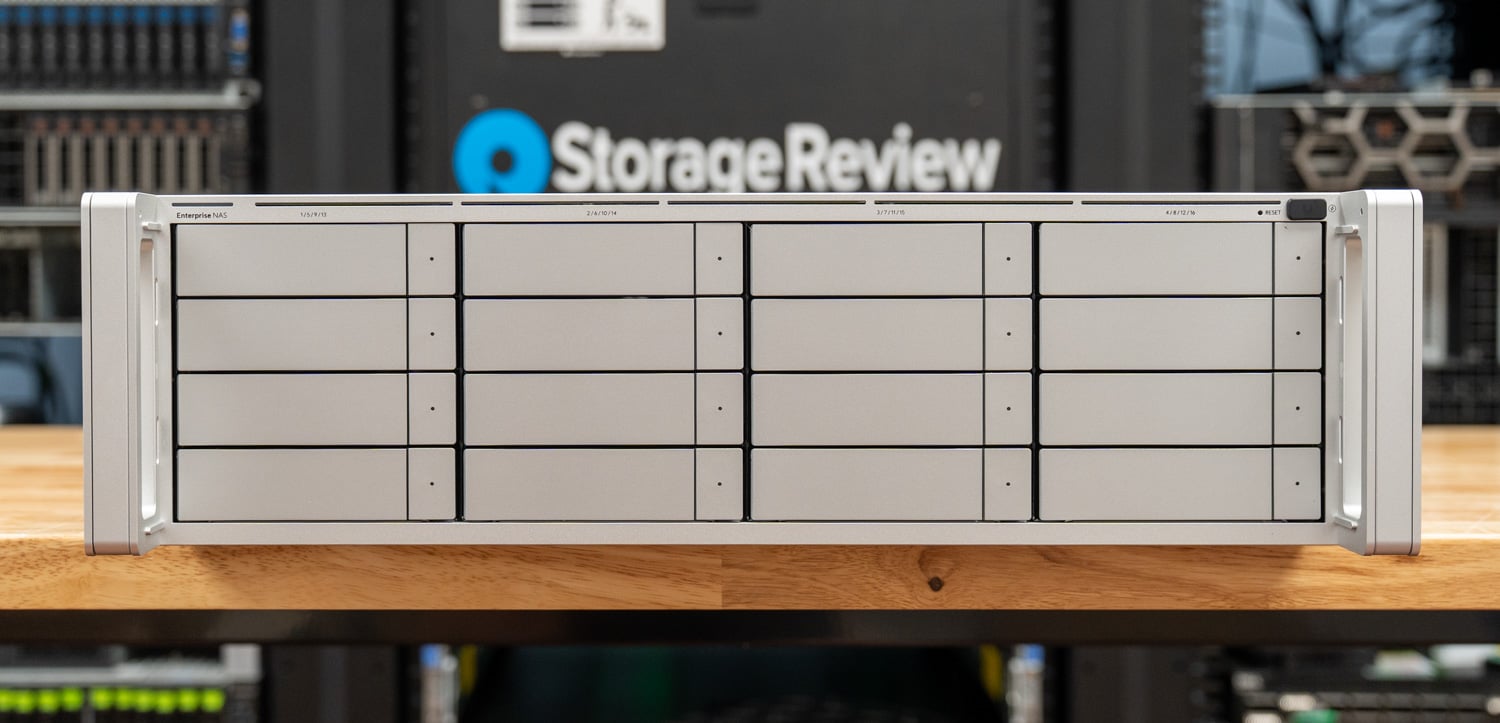
The ENAS is built to a different standard than the rest of the UniFi storage line, closer to the rackmount servers that pass through the lab than to the UNAS Pro it descends from. The differences start at the drive bays. ENAS caddies use a proper release button with the activity LED set into its center, replacing the push-to-release caddies on the UNAS Pro. It is a small change that makes hot-swaps less fiddly when the rack is dark and a drive needs pulling. A plug at the top right of the front panel covers a connector we will come back to at the end of this section.
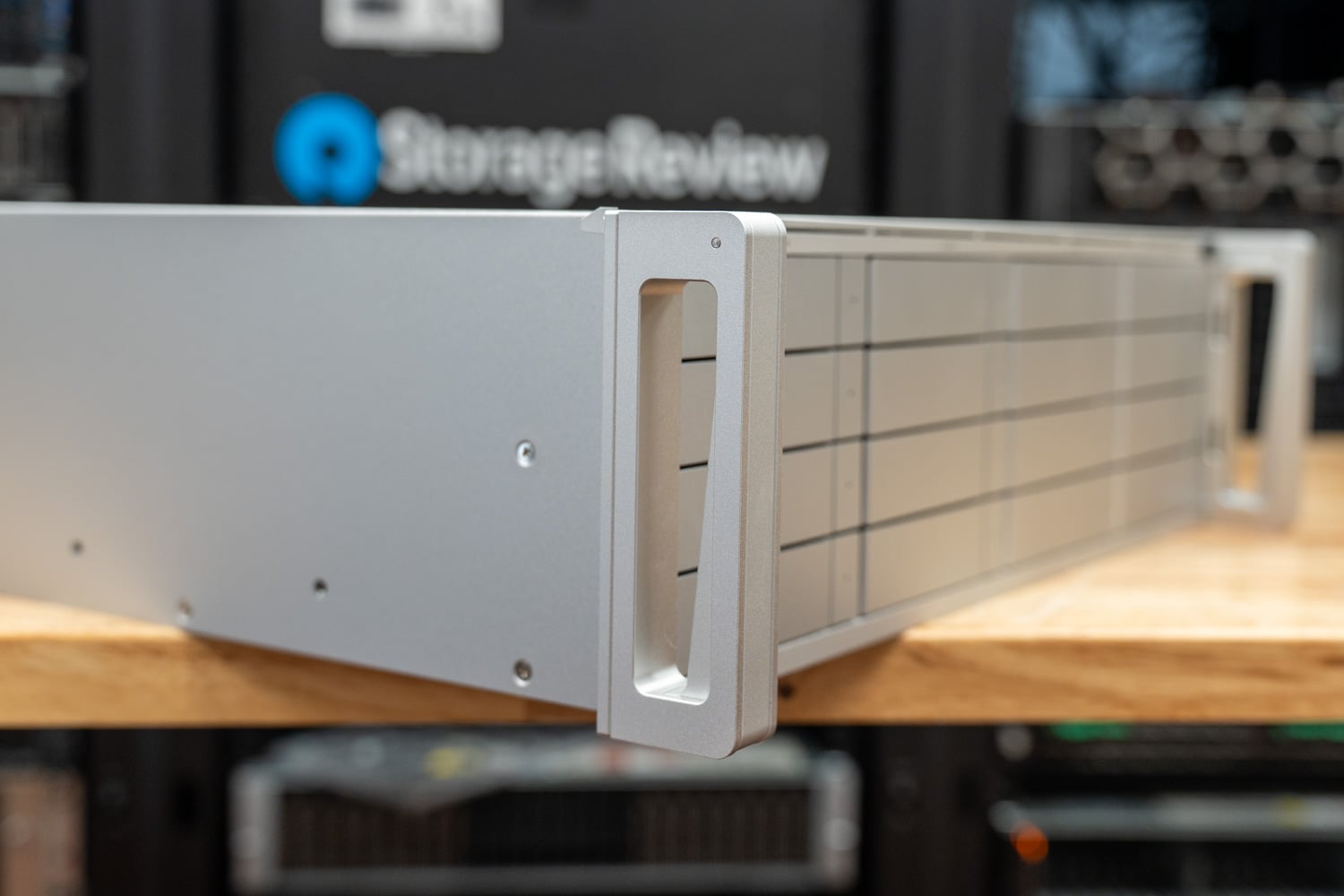
The aluminum handles on the rack ears do two jobs: they release the rackmount latches, and they anchor the optional bezel. Ubiquiti ships the ENAS with King Slide rails, the same family we see on servers from the major OEMs, and mounting them into the rack is tool-less. Getting the inner rail onto the chassis is not easy and takes a screwdriver and the screws along the bottom of the unit. Once that is done, the ENAS slides in and locks with the latches at the top of each handle.
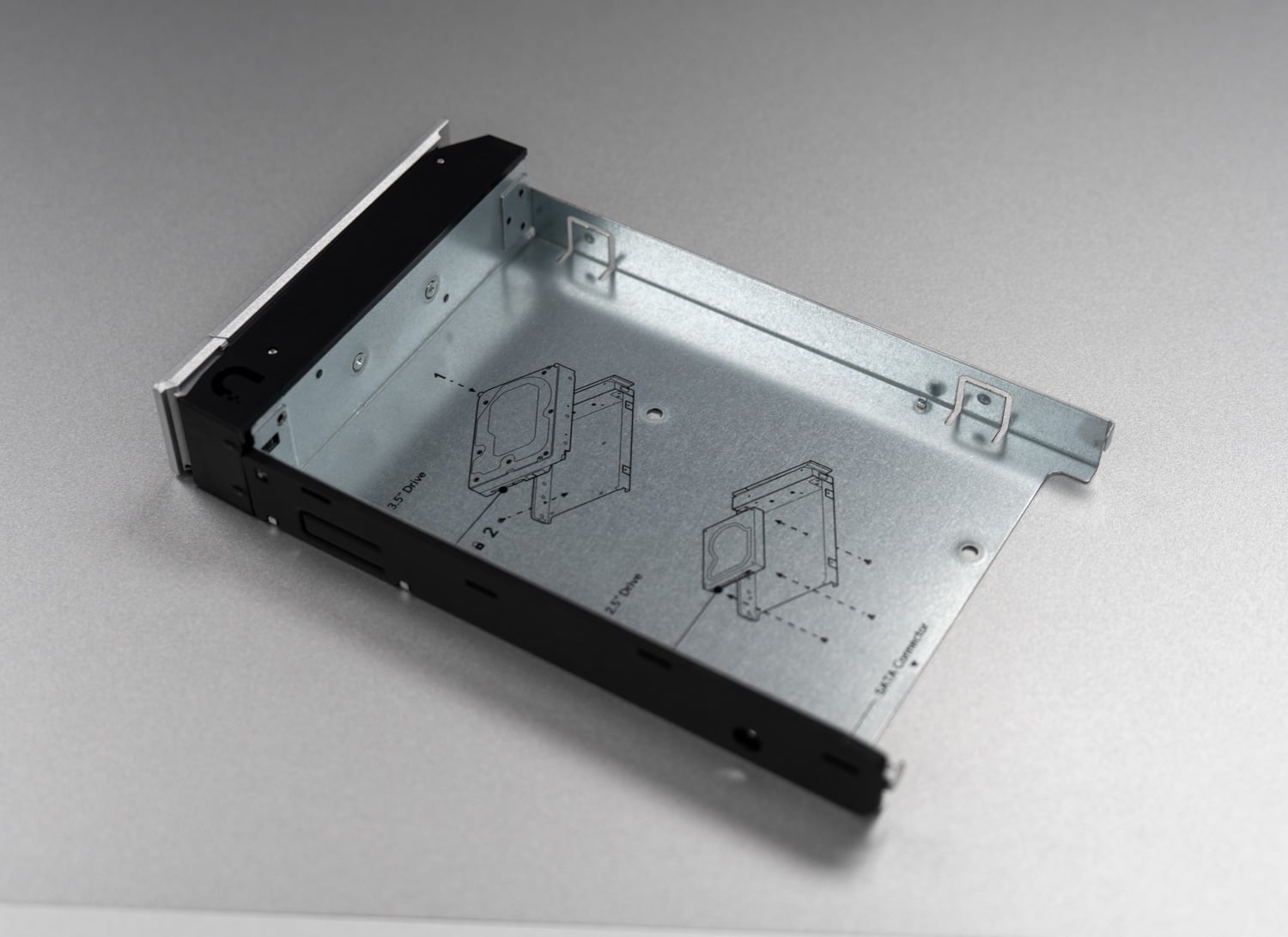
The caddies are also where some cost engineering shows. The release lever is plastic, whereas the UNAS Pro used what feels like aluminum, a downgrade on the one part that gets handled every time a drive moves. Mounting is tool-less for 3.5-inch drives, with an optional locking screw for anyone who wants it, but 2.5-inch drives still take four screws through the bottom of the caddy. Fill all 16 bays with SSDs, and that is 64 screws standing between you and a populated chassis.
The rear panel carries an RJ45 console port, twin 25G SFP28 ports, and twin SFF-8644 connectors, better known as external Mini-SAS HD. Each Mini-SAS port carries 24G to a shelf, supporting up to two of the UACC-ESE-16 Enterprise Storage Expansion, a no-frills 16-bay expansion chassis. Ubiquiti specifies the shelf as a 3U unit with a single SFF-8644 port and the same pair of hot-swap 550W power modules used in the ENAS, and lists it as compatible with the ENVR-Core as well. It appeared on Ubiquiti’s site while we were finishing this review but had not reached the store, so we have not had one in the lab. Two shelves take the system to 48 bays, which is where Ubiquiti’s claim of more than a petabyte of raw capacity comes from.
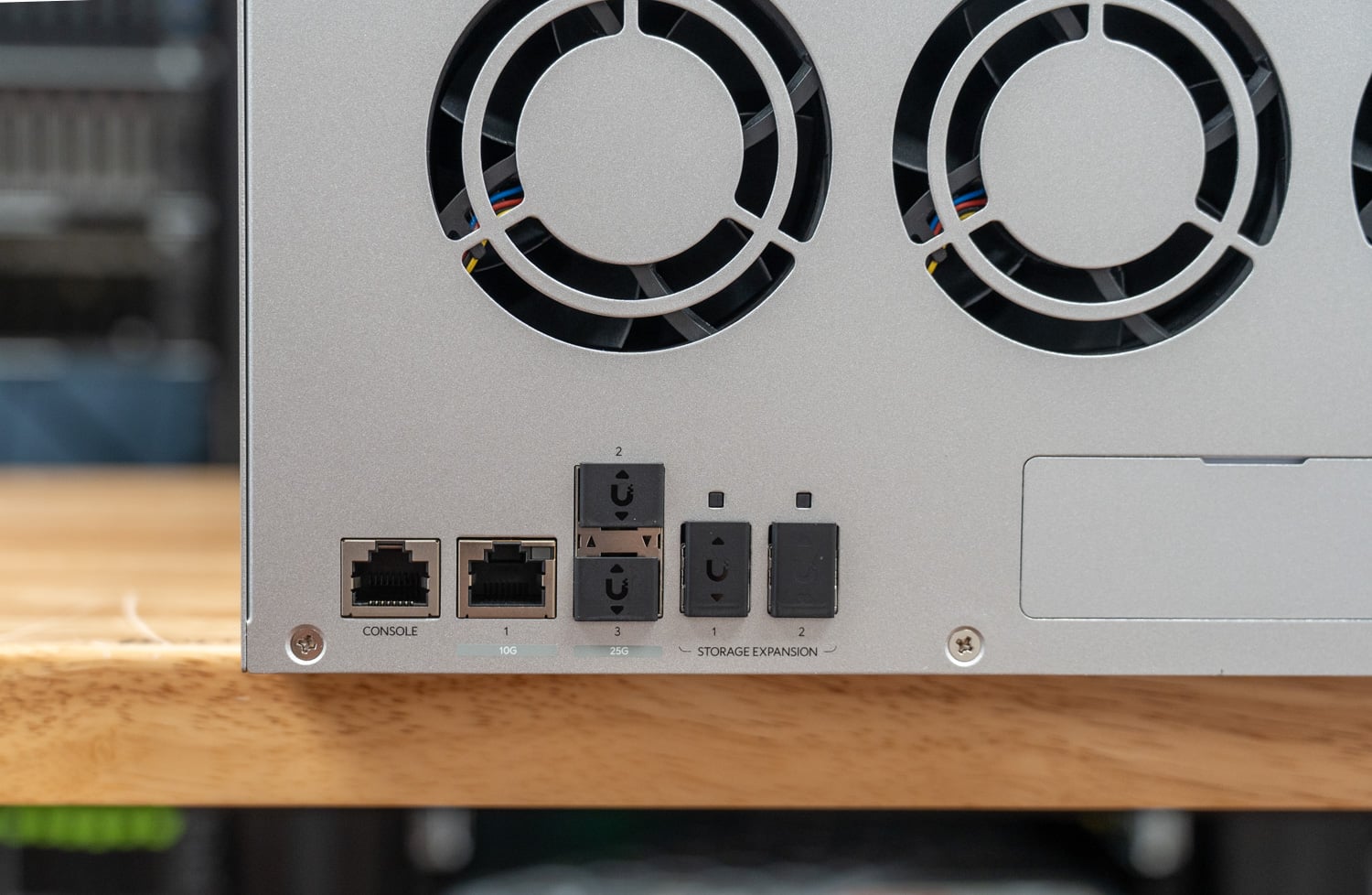
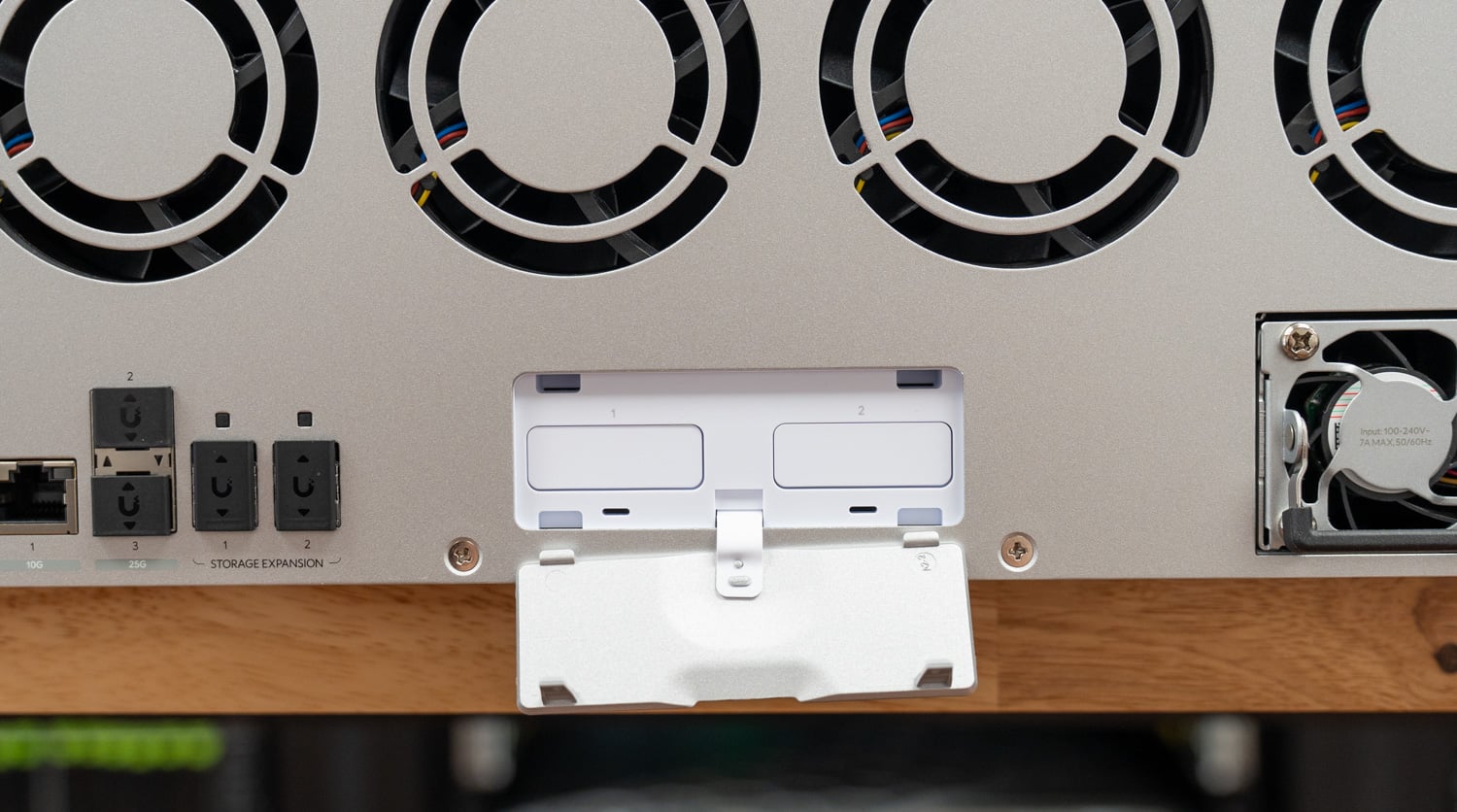
A blank panel to the right of the expansion ports opens onto two M.2 slots. Trays are not included, so populating them means adding Ubiquiti’s UACC-SSD-Tray (Affiliate Link). UniFi Drive uses these as a read-only SSD cache rather than as a general-purpose fast tier. Ubiquiti does offer a read-write cache mode on the UNAS line, but the ZFS-based ENAS does not support it.
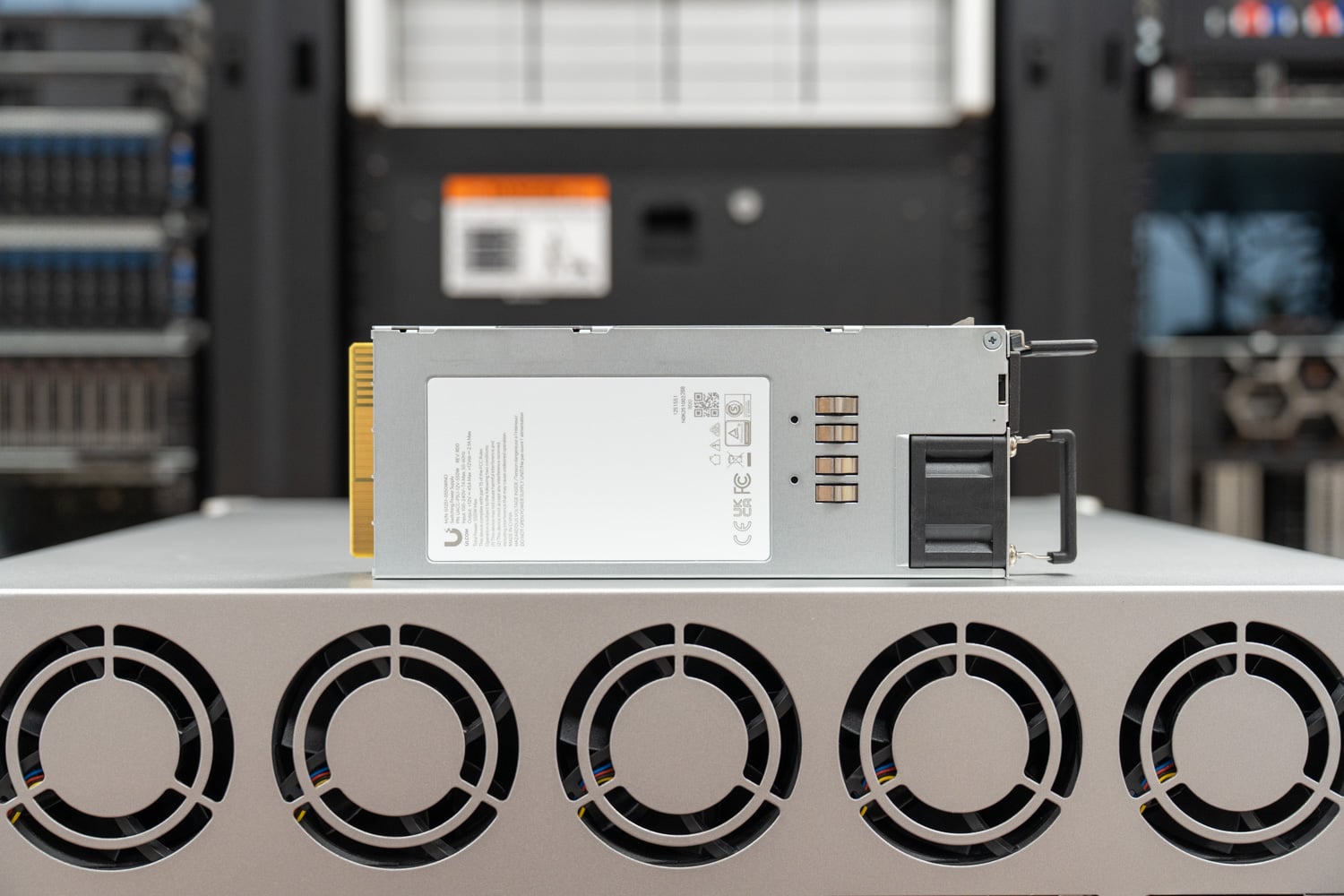
Further to the right sit the redundant hot-swap power supplies, a pair of 550W CRPS modules. Nothing about them is novel to anyone who works on servers, which is rather the point: this is the first UniFi storage box whose parts bin looks like the rest of the rack. Each module releases with a locking tab on the side and pulls out on a foldaway handle.
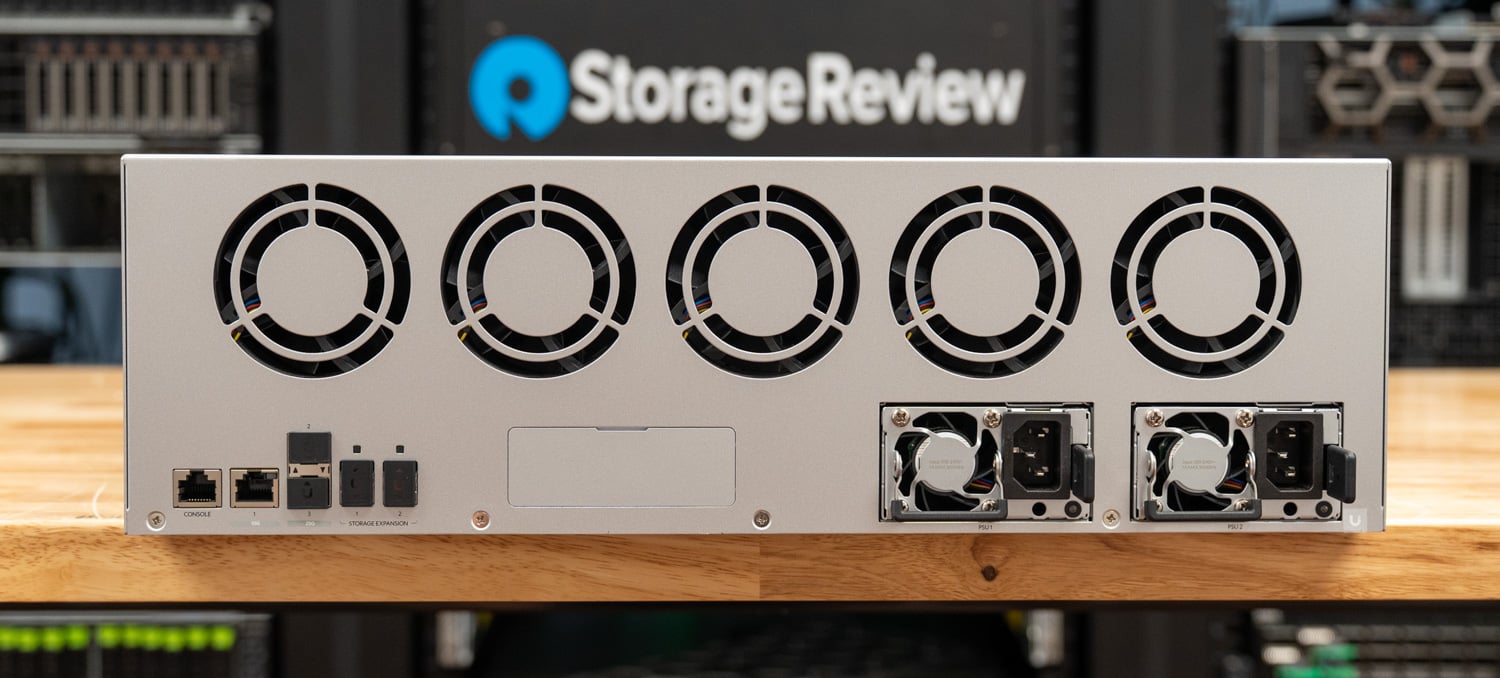
For a $3,999 chassis, the back panel is dense. Console, dual 25G, and SAS expansion on one plate is a spec sheet normally found a tier or two further up, and it is the clearest signal that ENAS is not simply a bigger UNAS.
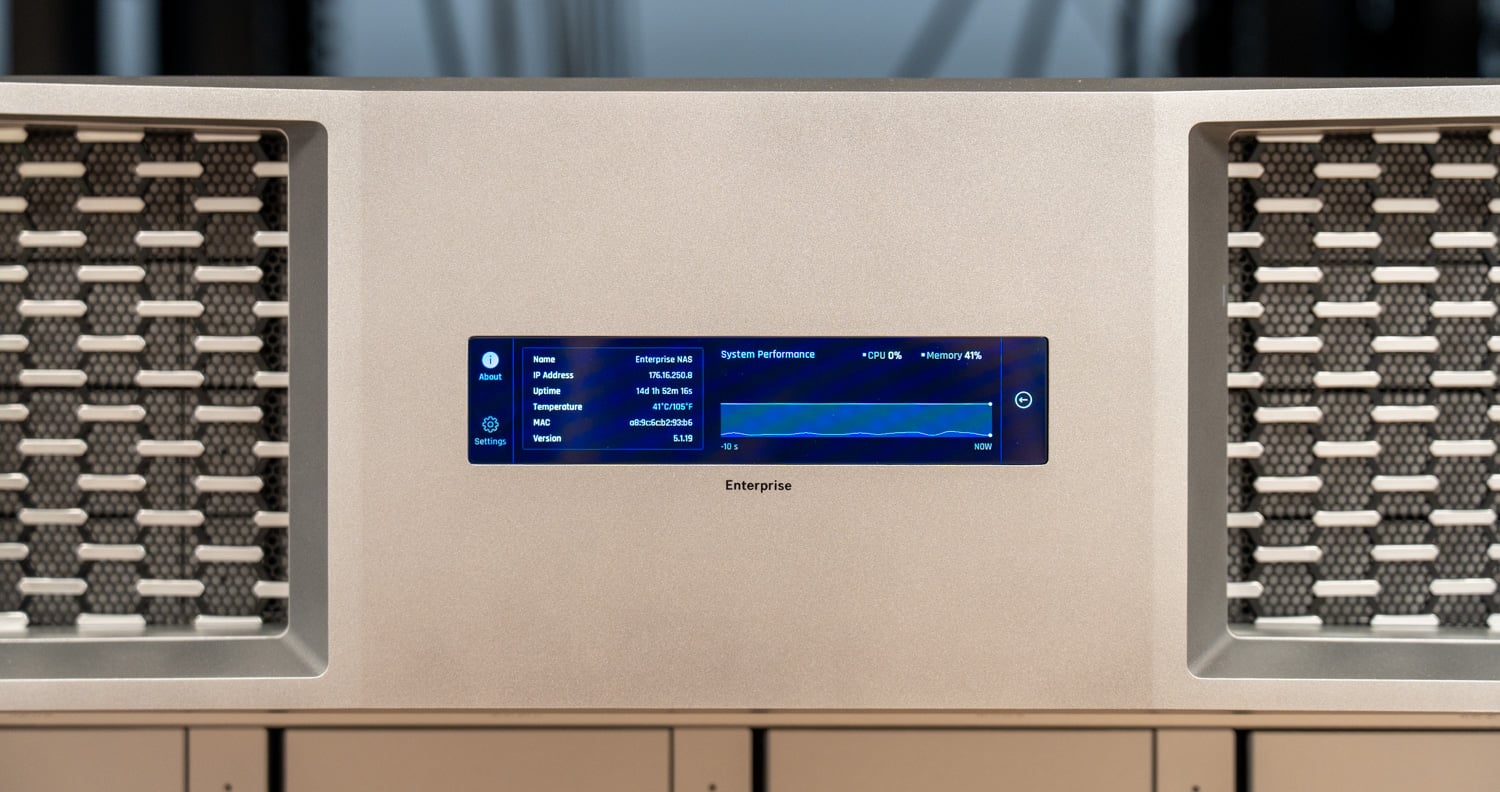
And finally, the small port mentioned on the front of the unit at the beginning of this section is a magnetic USB Type-C connector for the optional UniFi 3U Bezel, which Ubiquiti specs with a 4.7-inch touchscreen and RGBW status lighting drawing under 4W. If screens and lights are not your thing, but you want to cover your drive bays, Ubiquiti offers the blank UACC-3U-Bezel-Lite. Both bezels are listed on Ubiquiti’s site but have not reached the store as of this writing, so we have not had either one in hand.
That bezel is more than decoration, because the ENAS has no power button. Shutting the system down from the interface is easy; getting it back up is not. With no front-panel control, the only way to power the unit on while standing at the rack is to pull both power cords and reseat them. Remotely, there is no power-on control in the UniFi interface either, which leaves Wake-on-LAN as the only option. For a box destined for closets and small racks that may never see a KVM, that is worth knowing before it ships to a site an hour away.
The build lands where Ubiquiti hardware usually does, clean on the outside with most of the practical details right: tool-less rail mounting, tool-less 3.5-inch caddies, redundant power, and 25G on board. The Mini-SAS ports are the part that changes the math later, since they turn a 16-bay box into a 48-bay one without replacing anything already installed. The missing power button is the one real misstep.
ENAS Management
ENAS is managed through UniFi Drive on UniFi OS, which means anyone who has adopted a UniFi device in the past will find nothing surprising in the workflow. The system appears in the same console as the rest of a UniFi deployment, and Site Manager provides fleet-level visibility across sites so that an MSP can watch capacity and health on a client’s ENAS alongside their switches and access points. Local storage administration covers ZFS pool creation in Mirror, RAID-Z1, RAID-Z2, or RAID-Z3 layouts, shared folders over SMB (including Time Machine targets for macOS clients) and NFS, and iSCSI LUNs for block workloads. Scheduled snapshots, replication between UniFi storage devices, and backup jobs to third-party cloud targets, including Amazon S3, Backblaze B2, Wasabi, Google Drive, OneDrive, and Dropbox, round out the data protection story, and AD/LDAP integration handles user import for shops with existing directories. Drive encryption is supported, as are ZFS inline compression and deduplication, though Ubiquiti sensibly cautions that dedup is resource-hungry and best reserved for SSD-backed pools.
The two external M.2 slots serve as an SSD cache rather than a general storage tier. Ubiquiti offers read-only and read-write cache on the UNAS line, although for the ENAS, the SSD cache is read-only with one or two SSDs. The cache deliberately bypasses large sequential files, since streaming them through the SSDs would burn endurance for no real gain, so the payoff lands in concurrent random access, office file sharing, and database-style workloads rather than large media pulls. We tested with and without the cache populated, and the results below bear that behavior out.
The caveat is that the feature set is still thin next to DSM or QTS. There is no application ecosystem, no container or VM hosting, and no equivalent of Synology’s Active Backup suite; ENAS is a storage appliance, not an app platform yet. The counterweight is how fast the platform is moving. Since our unit arrived, Ubiquiti has shipped a steady cadence of UniFi Drive releases, most recently version 4.3.10 on July 30, and the company has publicly committed to immutable snapshots, multi-site backup orchestration, and expansion shelves that Ubiquiti says will take a single system past a petabyte of raw capacity through the two SFF-8644 ports. Buyers should evaluate ENAS on what it does today, but the trajectory is important to consider, and the gap is closing quarter by quarter.
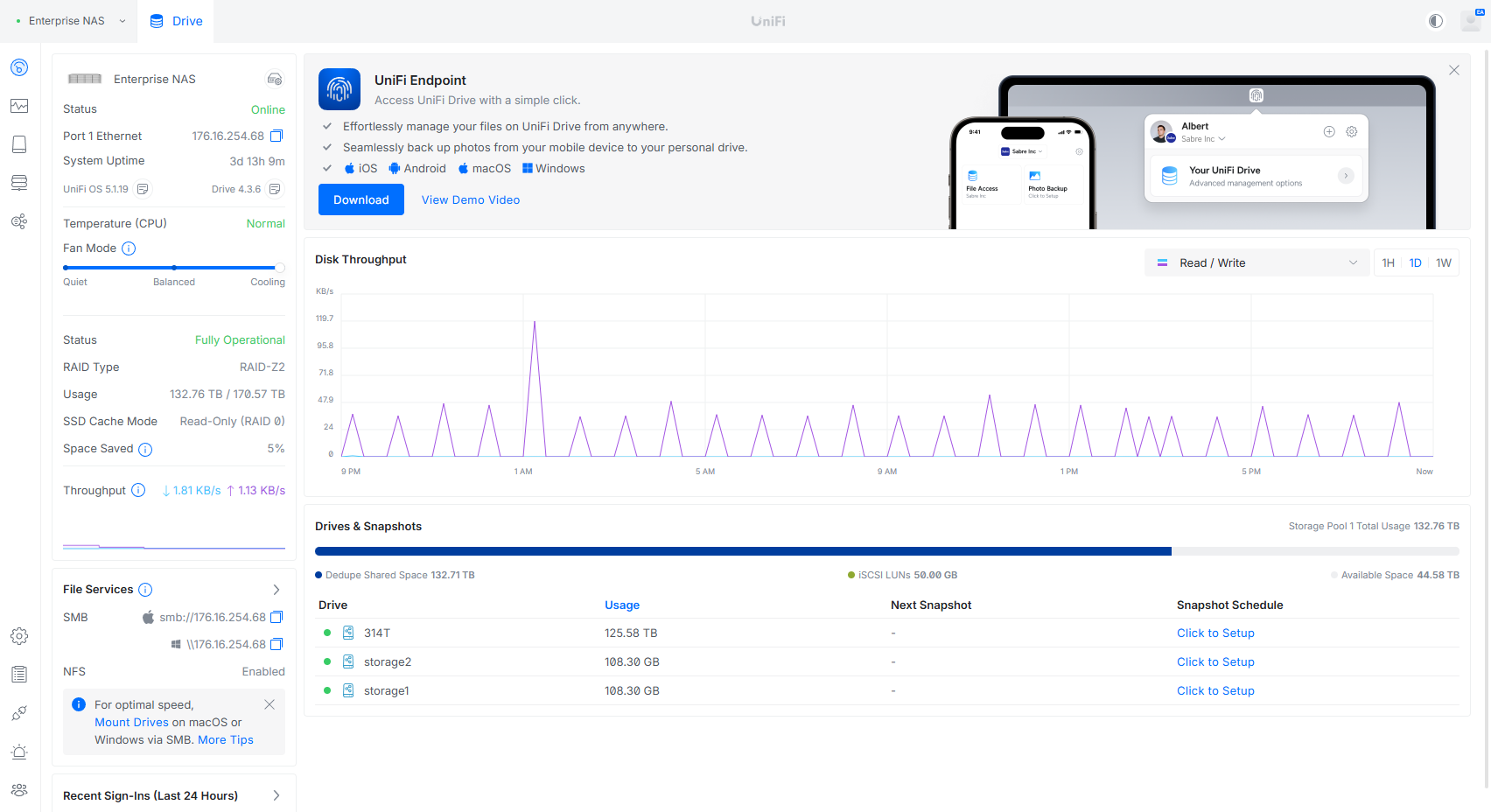
The landing page in UniFi Drive condenses the entire system into a single view. A status rail on the left covers the chassis: network address, uptime, firmware level (UniFi OS 5.1.19 and Drive 4.3.6 during our time with the unit), CPU temperature, and a three-position fan profile slider. The center pane tracks live disk throughput, while the panel below breaks out the pool with per-share usage and a snapshot schedule column, each share a click away from protection. Our RAID-Z2 pool showed 132.76TB in use of 170.57TB usable, with dedupe and iSCSI carve-outs itemized on the capacity bar.
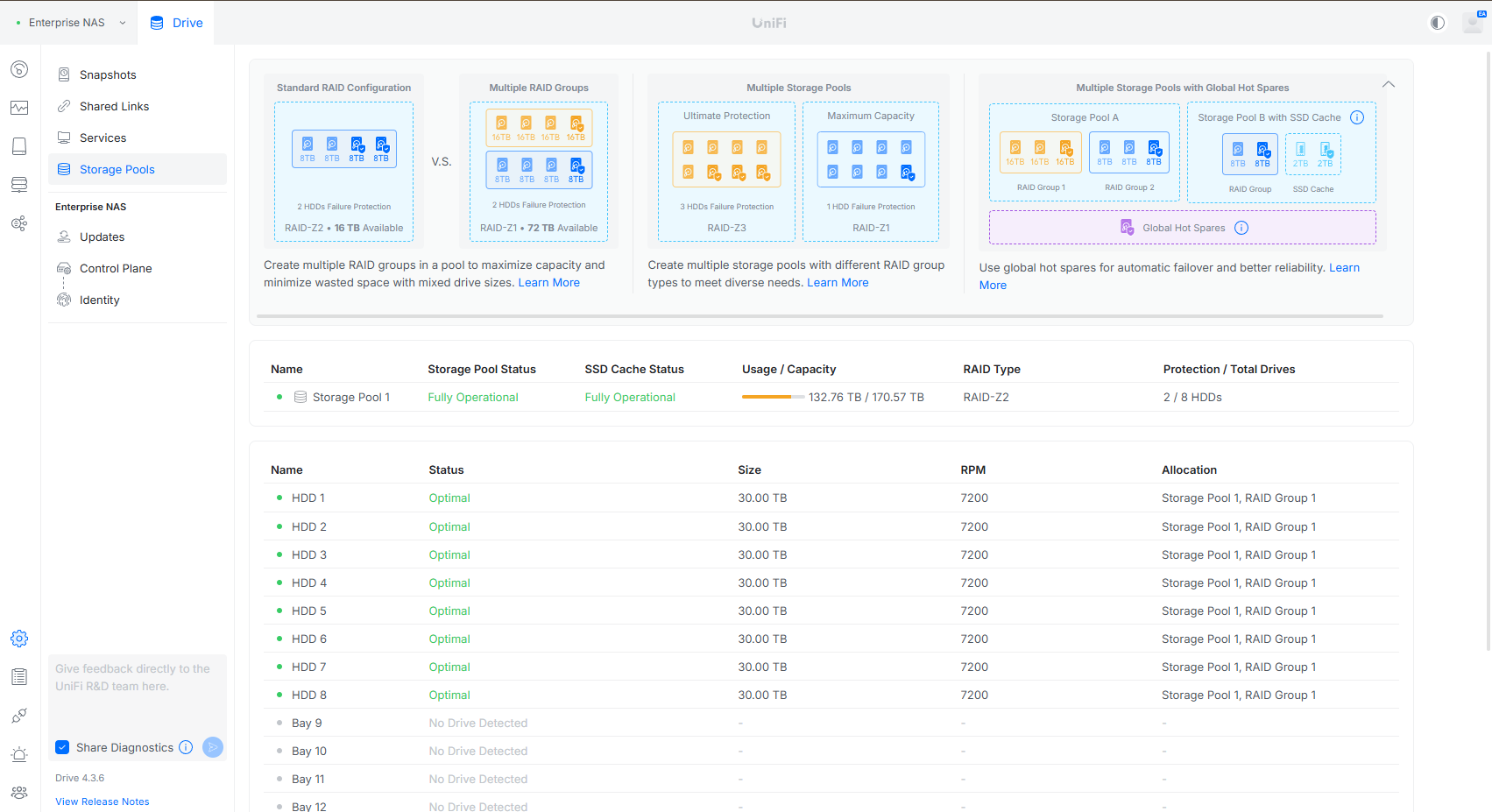
Storage Pools are where the ZFS decisions get made, and Ubiquiti does more hand-holding here than most. Illustrated cards across the top explain the trade-offs between a single RAID group, multiple RAID groups in one pool, multiple pools with different protection levels, and global hot spares, useful guardrails for an admin who has never touched ZFS. Below that sits our test pool: a single RAID-Z2 group of eight 30TB 7,200RPM hard drives, good for two-drive failure protection, with bays 9 through 16 left open.
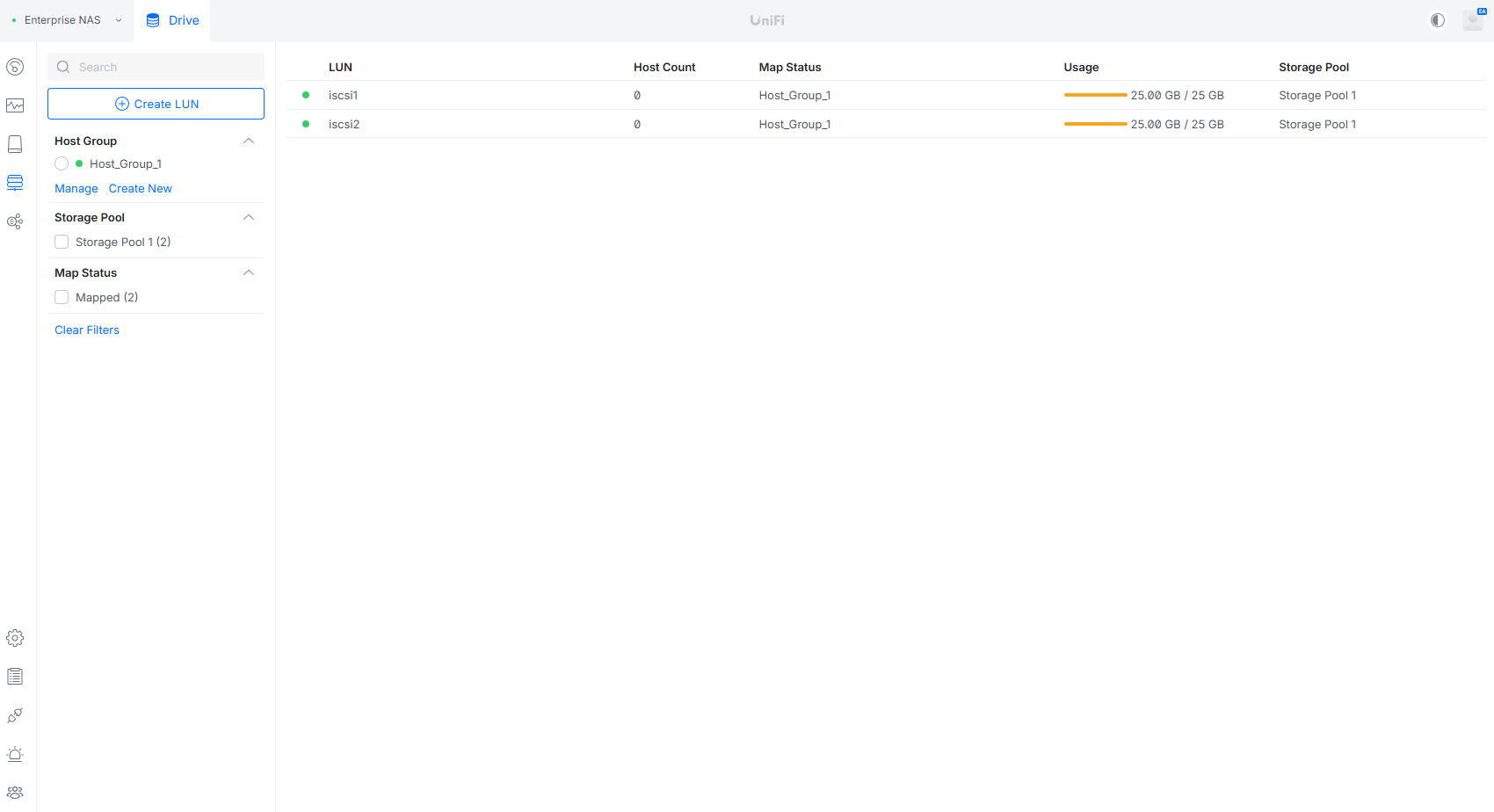
Block storage gets its own view. LUN creation is a short wizard, and the list shows host count, map status, per-LUN usage, and the backing pool at a glance. Initiator access is controlled through host groups rather than per-LUN fiddling; we provisioned a pair of 25GB LUNs mapped through a single host group for our iSCSI testing. It is minimal compared to what a dedicated SAN interface exposes, but it covers the Proxmox/VMware/Hyper-V shared-storage case that ENAS is aimed at.
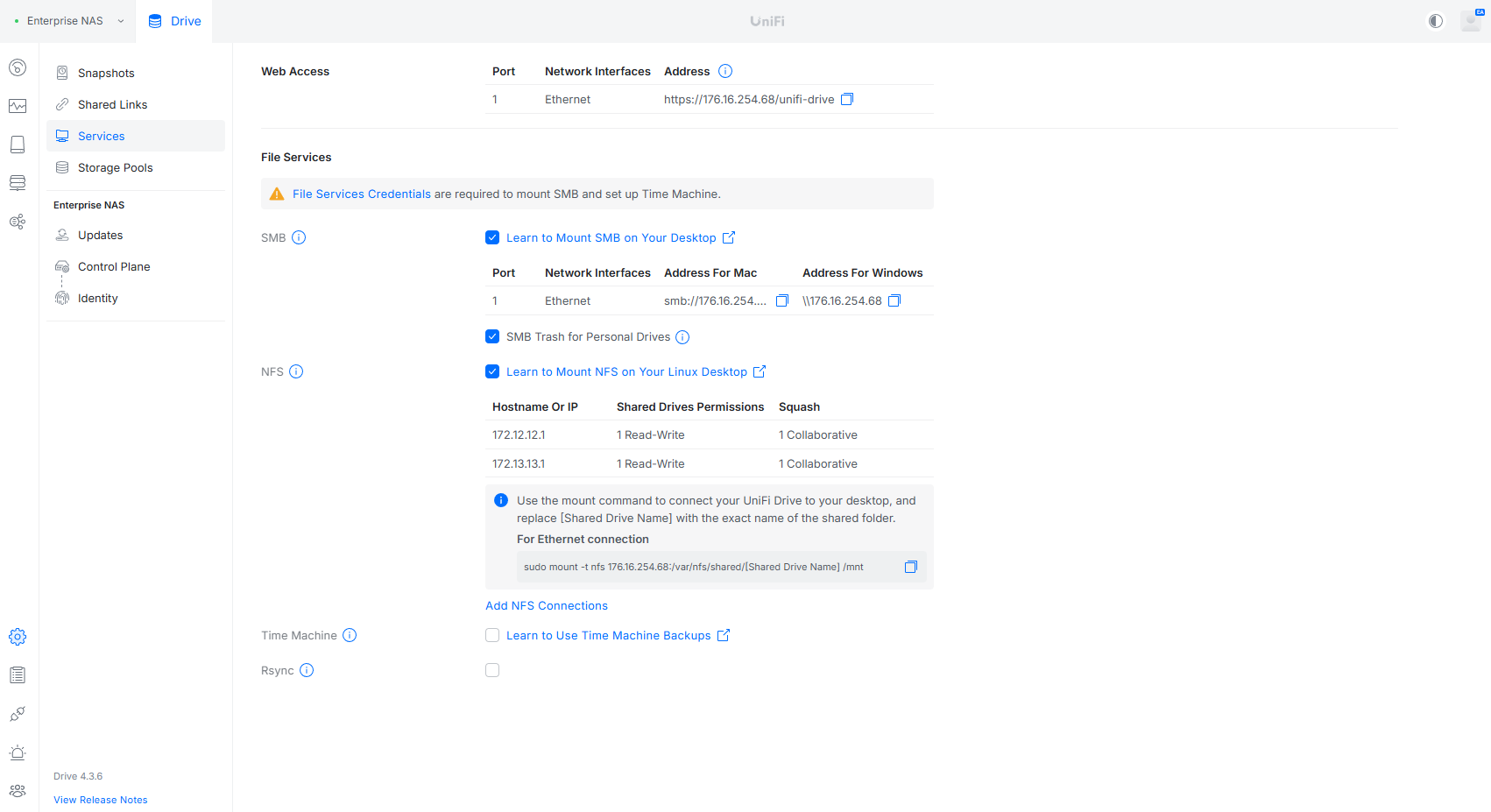
The Services page collects protocol plumbing in one place: the web access endpoint, SMB with copy-ready paths for macOS and Windows, NFS exports with per-host permissions and squash settings alongside a pre-built mount command, plus Time Machine and Rsync toggles. One quirk worth noting is that file services use their own credentials, separate from UniFi accounts; a banner reminds you that they are required before SMB mounts or Time Machine will work.
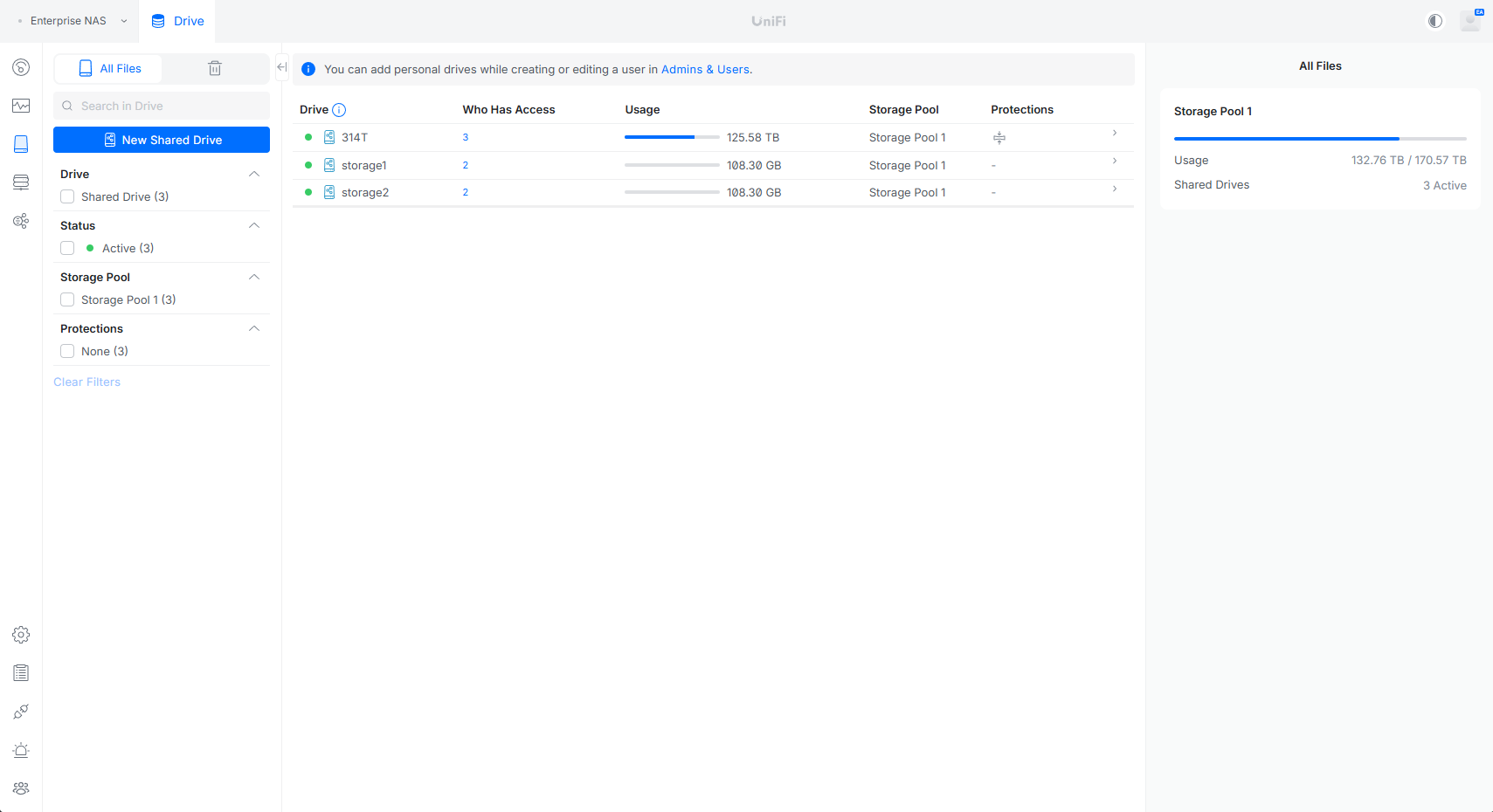
Day-to-day administration happens in the file view, where shared drives are listed with active user counts, usage, pool assignment, and protection status. This is where our 314T share, holding the bulk of the 125TB test data set, lived alongside a pair of smaller shares. Personal drives are provisioned per user through Admins & Users, which keeps end-user storage separate from departmental shares without extra configuration.
Performance Testing
To exercise the ENAS over its shipping 25GbE interfaces, we built a single RAID-Z2 group from eight Seagate IronWolf Pro 30TB CMR drives in bays 1 through 8, leaving the back half of the chassis empty, and generated load from a Dell PowerEdge R740 running Ubuntu Server with a dual-port NVIDIA ConnectX-4 25GbE NIC, directly attached to the ENAS SFP28 ports. Our testing used FIO sweeps of 4K random and 1M sequential transfers, in both read and write, across a matrix of queue depths and job counts to find each protocol’s peak and its saturation behavior.
We ran the sweep against six configurations: NFS with asynchronous mounts, NFS with synchronous mounts, and iSCSI, each with and without the M.2 cache populated. The cache drives are Ubiquiti-supplied 1TB M.2 units that report as Kingston OM8SEP41024Q-A0, a TLC NVMe part from Kingston’s OEM catalog rather than an enterprise SSD. For a read-only cache that is a sensible fit, since the device serves reads and never has to absorb sustained writes. Charts below plot all six against each other; peak figures are called out in the text.
4K Rand Read IOPS
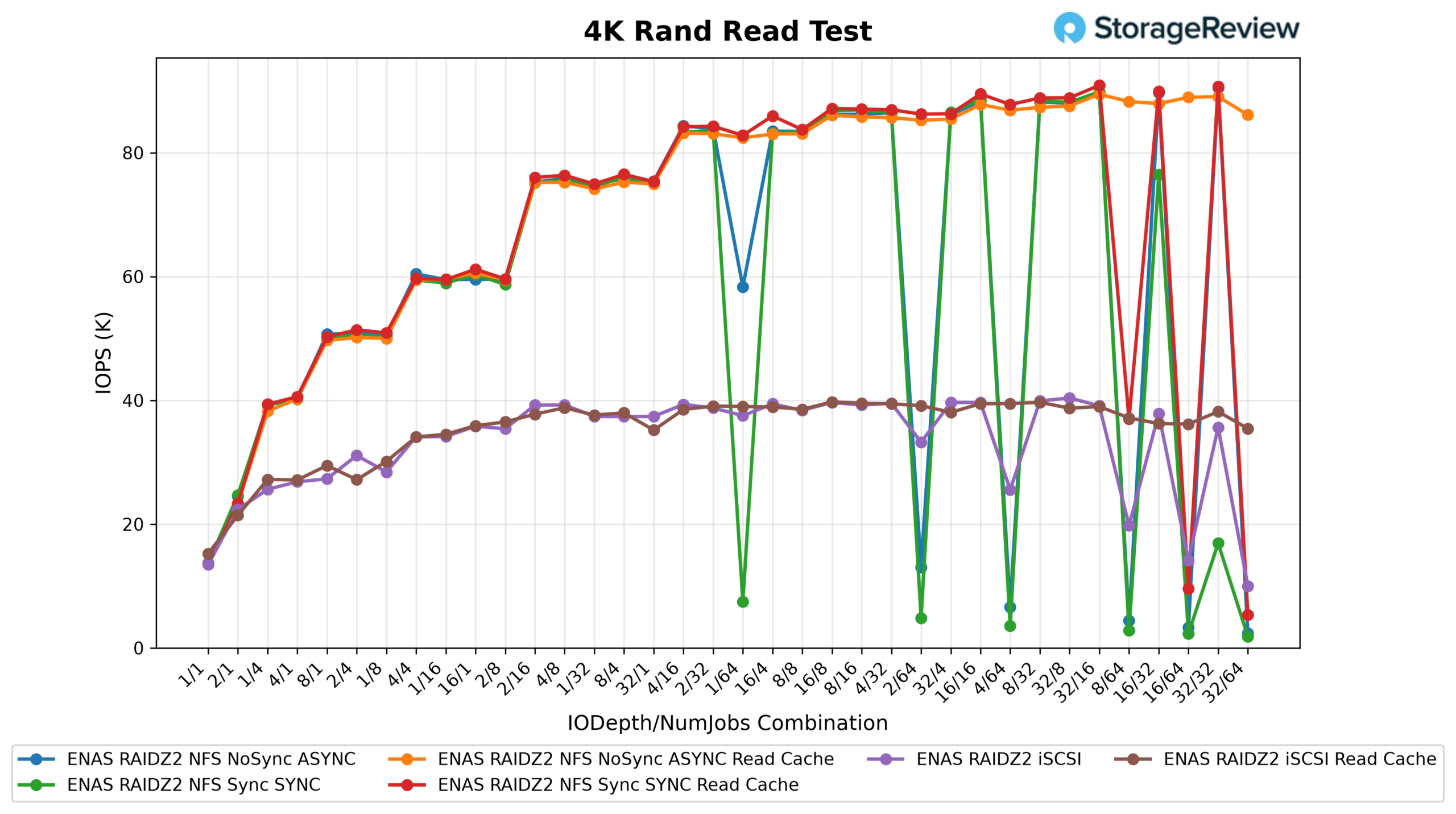
Random 4K reads cluster tightly across every NFS configuration, peaking between 89.5K and 90.9K IOPS regardless of sync mode or cache. With a working set this size against 64GB of ECC memory, ZFS is serving the bulk of these hits from ARC, so the ceiling reflects the network path and protocol stack more than the spinning disks underneath. iSCSI tops out lower, at 40.4K IOPS (39.7K with the cache populated), a little under half the NFS figure.
4K Rand Read Latency
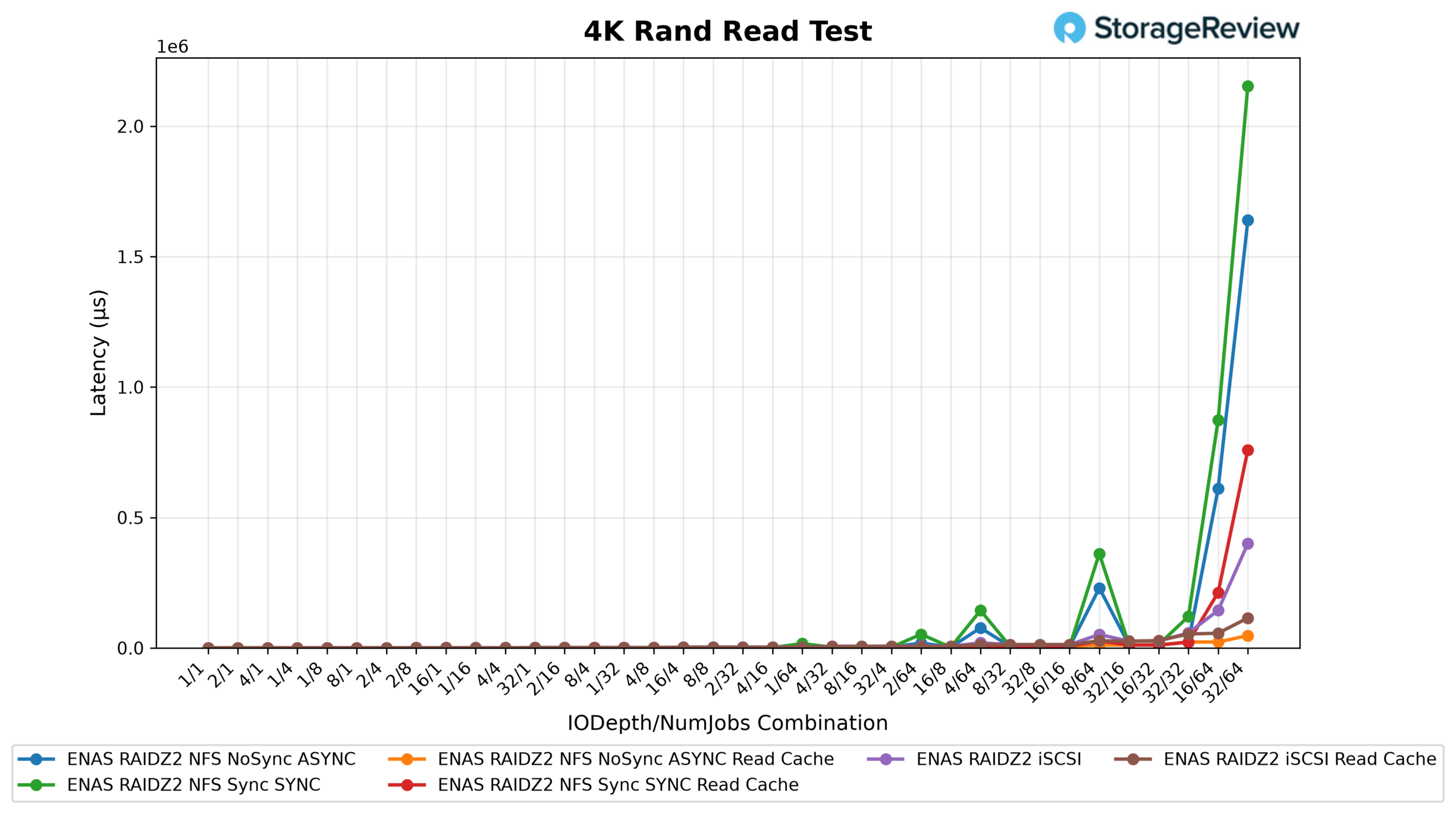
Latency tells the same story from the other side. At low queue depths, every configuration answers 4K reads in 0.13 to 0.15ms, which is memory-and-wire territory, not disk. Response times scale predictably as the sweep deepens, and the NFS configurations stay well-behaved through moderate depths before climbing steeply once the box saturates at the extreme corners of the matrix. The practical read: ENAS has plenty of headroom for the concurrent small-file access an office generates.
4K Rand Write IOPS
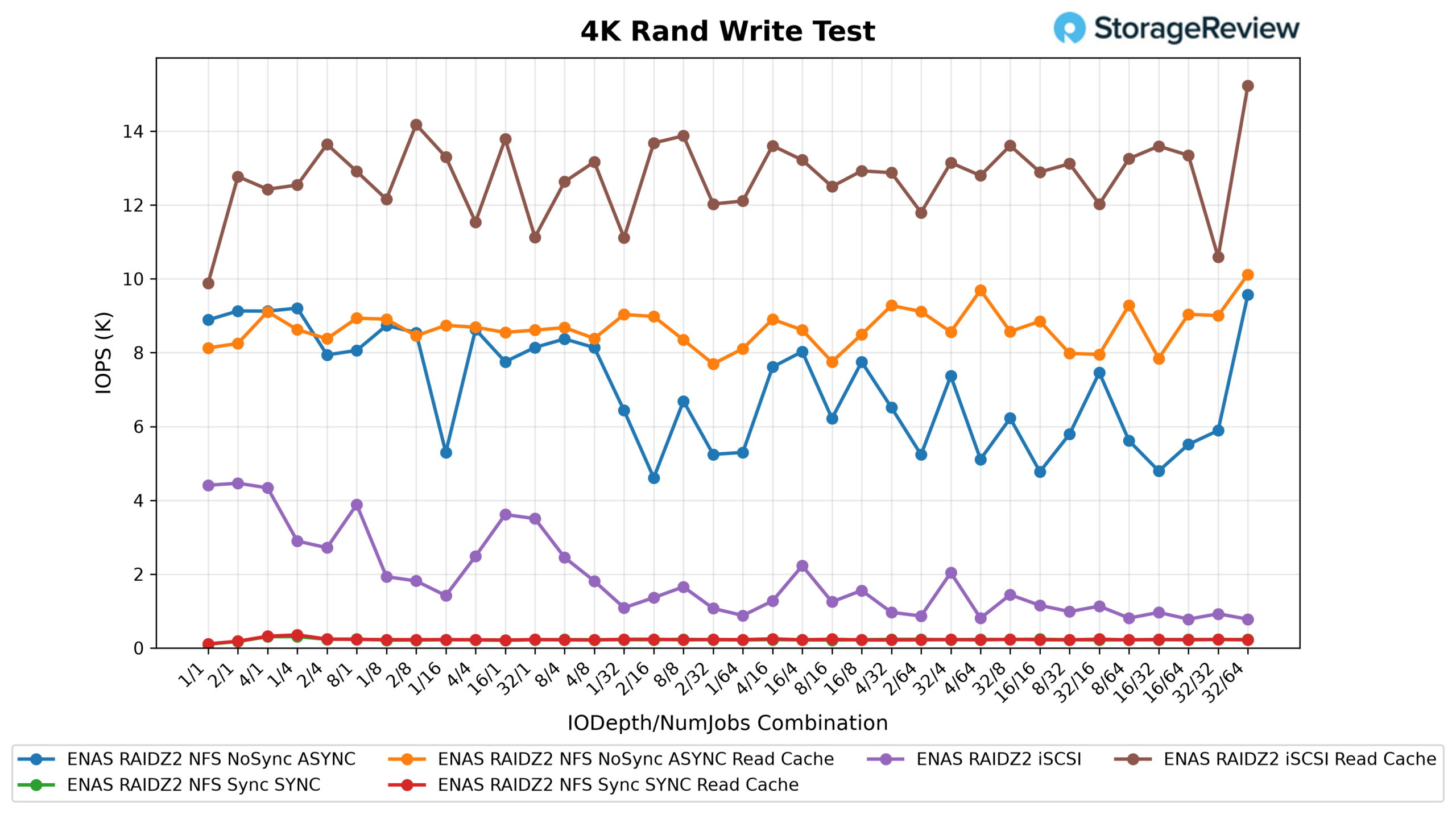
Random 4K writes separate the configurations dramatically. Async NFS peaks at 9.6K IOPS (10.1K with cache), respectable for a RAID-Z2 pool of spinning disks. Force synchronous writes, though, and throughput collapses to a few hundred IOPS, with mean latencies in the tens of milliseconds; every commit is waiting on the pool. UniFi Drive does not expose a dedicated ZFS write-log (SLOG) device, which is the usual fix for exactly this behavior, and the ENAS SSD cache is read-only, so there is nothing in the platform today to absorb synchronous writes. iSCSI landed at 4.5K IOPS in the base configuration and 15.2K with the cache populated, an unexpectedly large spread for a read cache, so treat the delta between those two runs with some caution.
4K Rand Write Latency
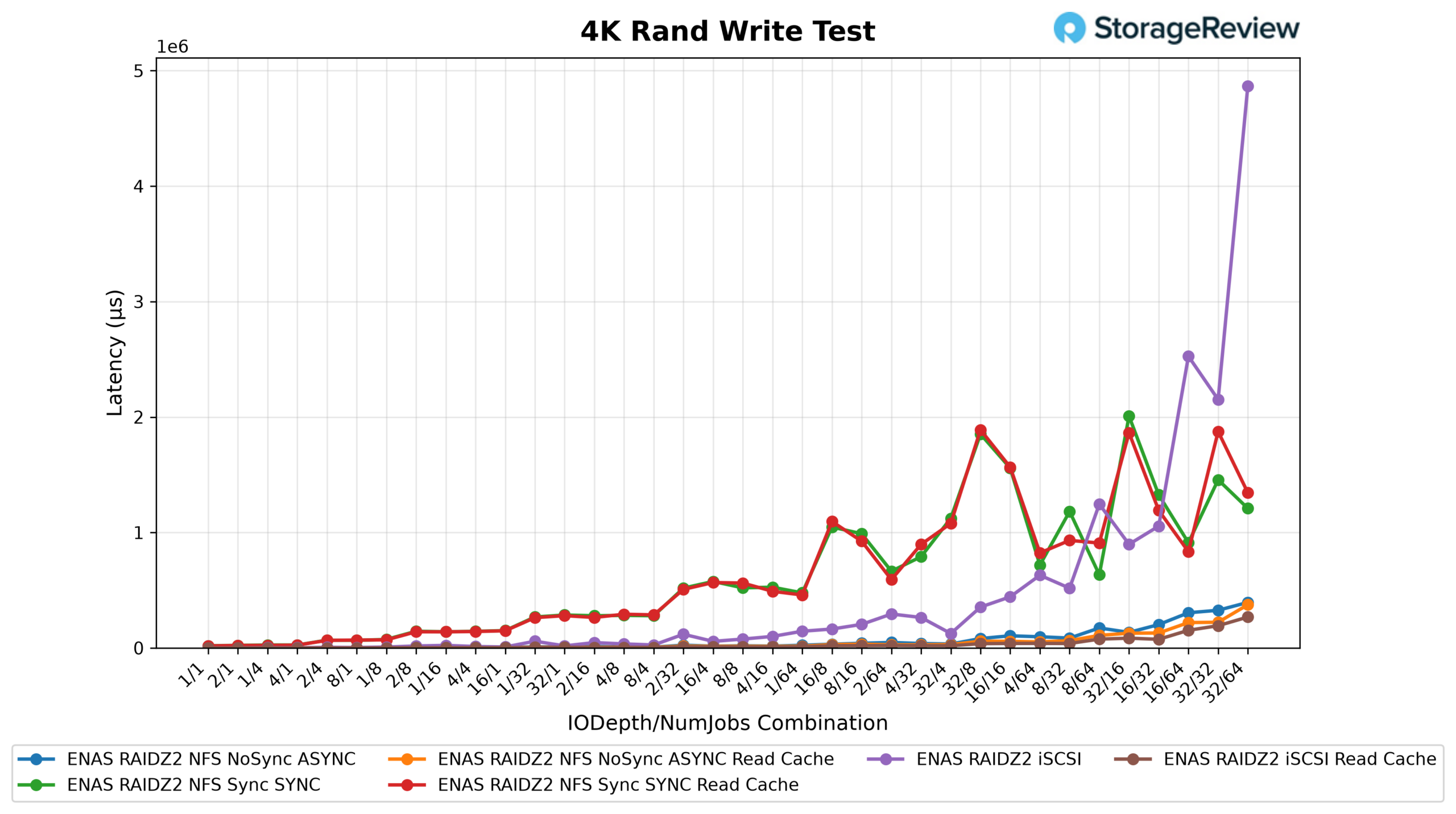
The write-latency chart mirrors the IOPS results: async NFS holds sub-millisecond response at the low end of the sweep and degrades gracefully, while the sync configurations start near 20ms and climb from there. Nothing here is surprising for ZFS on hard drives without a log device. Still, shops planning sync-write-heavy workloads, databases, or NFS datastores with sync enforced should look at the async and iSCSI numbers and plan accordingly.
1M Seq Read GB/s
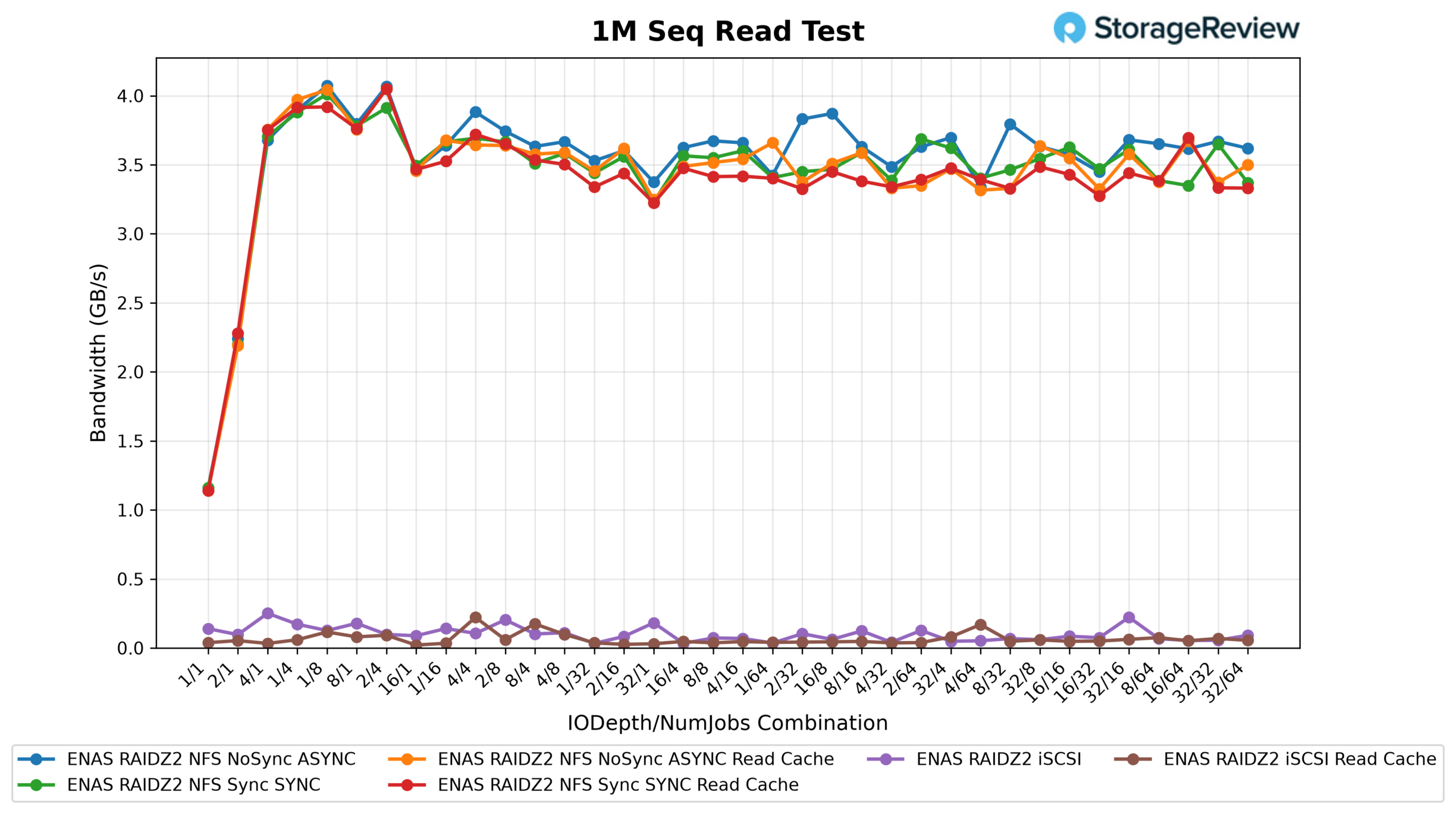
Large sequential reads are the ENAS headline result. Async NFS peaked at 4,170 MB/s, and all four NFS configurations held above 4,100 MB/s, comfortably beyond what a single 25GbE link can carry, confirming the system can drive both SFP28 ports at once. For a $3,999 box full of hard drives, north of 4GB/s of sustained read throughput is a legitimately strong showing that covers backup verification, media pulls, and multi-client streaming with room to spare. iSCSI sequential reads are the sore spot: the target peaked at just 257MB/s (227MB/s with cache) and degraded as load increased, behavior consistent with the target oversaturating rather than throttling cleanly. This looks like the kind of issue a firmware release resolves; until then, iSCSI on ENAS is better suited to random-access workloads than large sequential streams.
1M Seq Read Latency
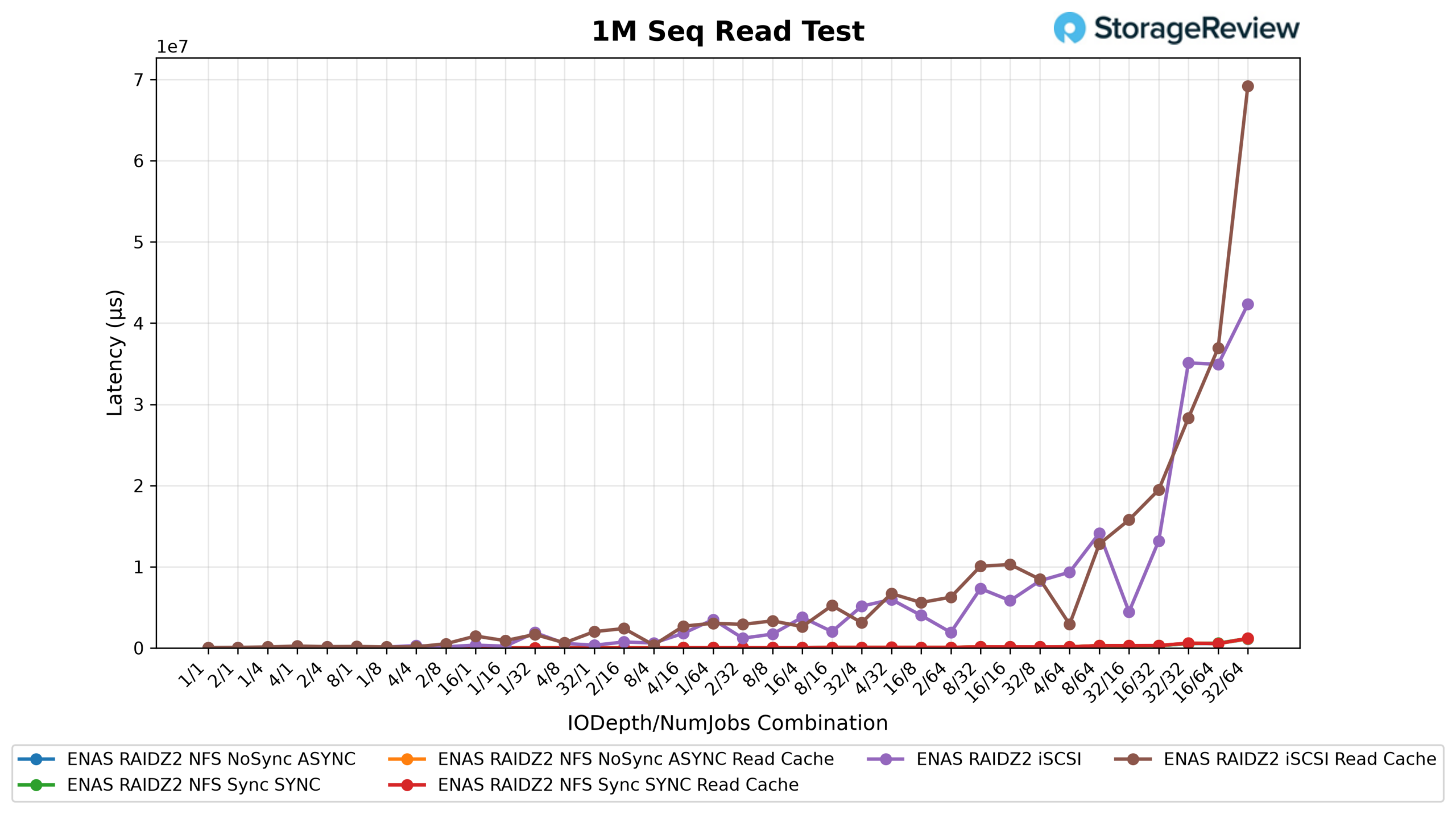
Sequential read latency stays orderly on NFS, opening around 1.7ms and scaling with queue depth as expected. The iSCSI curve is the outlier, with response times an order of magnitude higher at equivalent load, which is the same oversaturation signature seen in the throughput chart.
1M Seq Write GB/s
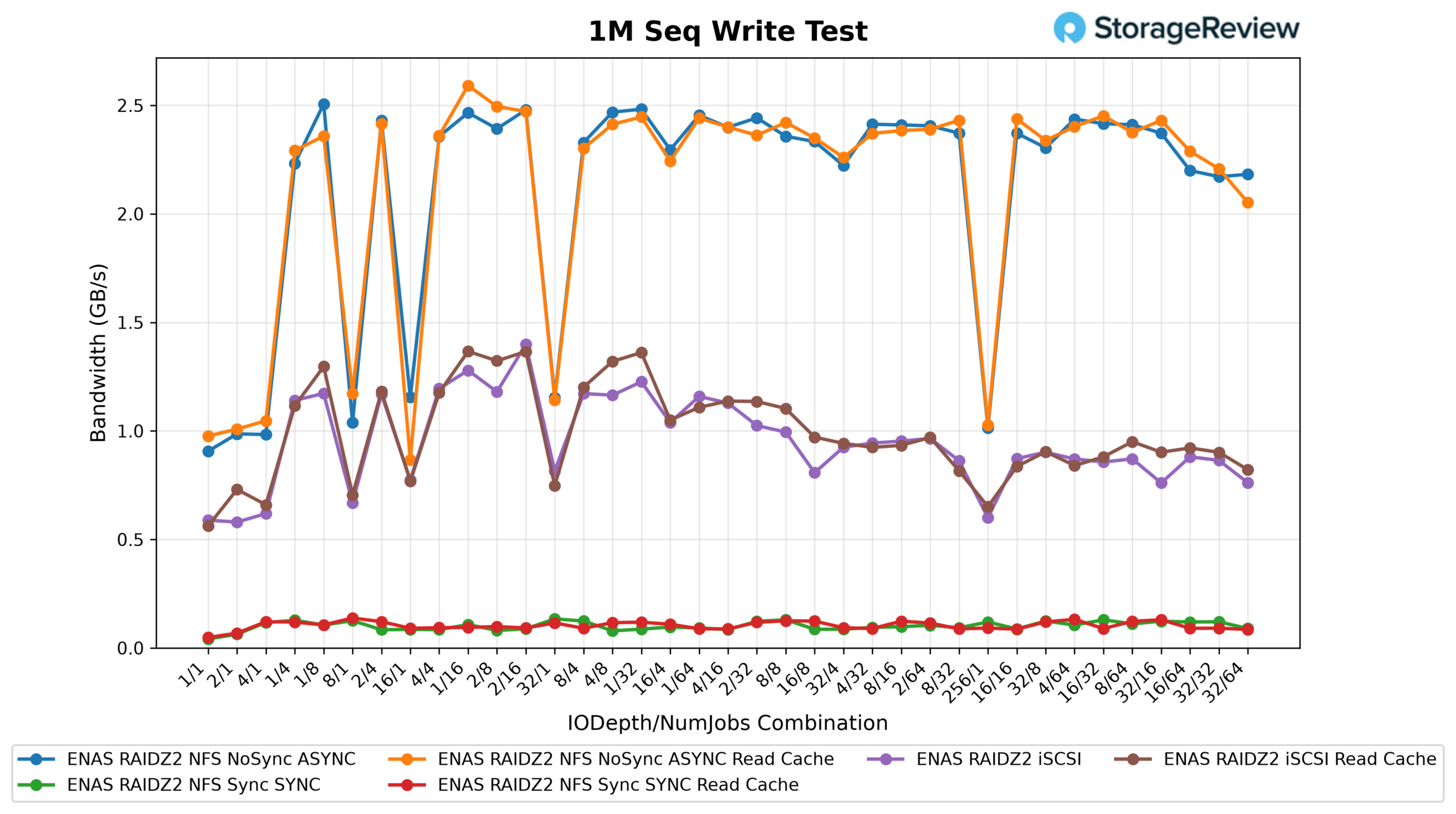
Sequential writes over async NFS reached 2,567MB/s (2,654MB/s with cache), roughly the ceiling we would expect the RAID-Z2 pool itself to sustain. The sync NFS configurations tell the same story as the 4K results, topping out at 137 to 142MB/s. iSCSI writes fared far better than iSCSI reads at 1,432MB/s, further evidence that the read-path anomaly is a software issue rather than a hardware limit.
1M Seq Write Latency
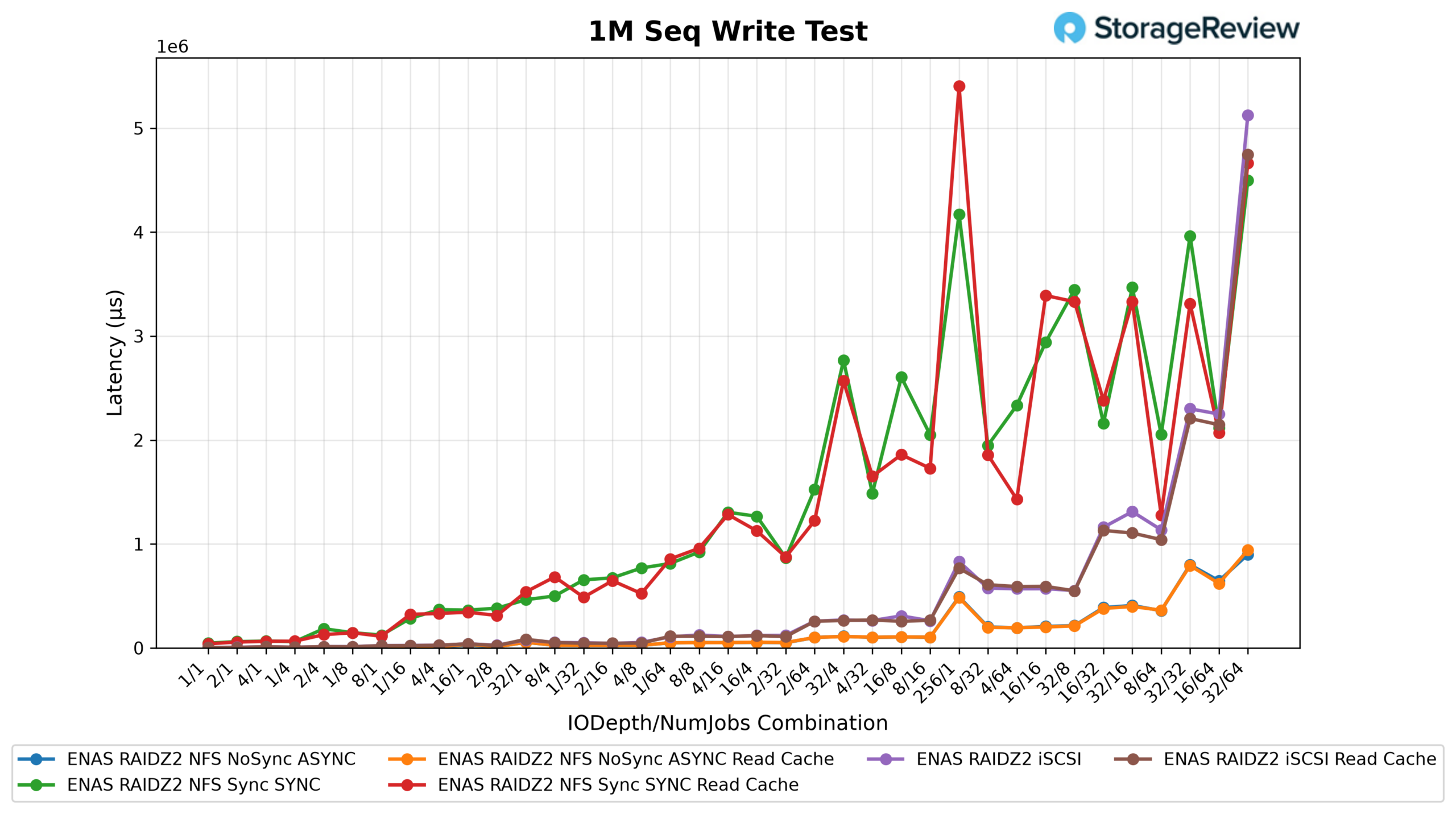
Write latency closes out the sweep with no surprises: async NFS holds low single-digit milliseconds at sane depths, sync NFS lives in the tens of milliseconds, and iSCSI sits in between. Taken together, the data says ENAS is an excellent sequential machine and a capable async random performer, with sync-write workloads being the one area that demands planning.
Conclusion
The hardware value here is real. For $3,999, ENAS delivers 16 open bays, ZFS with ECC memory, dual 25GbE on board, redundant power, and expansion ports that will eventually take it past a petabyte, a combination the incumbents do not match at this price without add-on cards and, in some cases, drive-compatibility strings attached. Our testing backs the core proposition: over 4.1GB/s of sequential NFS read throughput, 2.6GB/s writes, and roughly 90K IOPS of cached 4K random reads is more performance than most small businesses will ever pull through it.
The decision comes down to software. Shops that live in Synology or QNAP’s application ecosystems, containers, surveillance, turnkey backup suites, will find UniFi Drive spartan by comparison, and virtualization builders should weigh the iSCSI sequential-read anomaly and the sync-write penalty before pointing a datastore at it. But that is not really who this box is for. For the SMB with a moderate or large UniFi estate that needs easy, reliable file and block storage, managed from the console it already knows, with snapshots, replication, cloud backup, and directory integration included and no license invoice ever arriving, ENAS is the most credible storage product Ubiquiti has shipped, and the first one the incumbents need to take seriously. Given the pace of UniFi Drive releases since our unit arrived, we expect the software gap to keep narrowing, and we will revisit the platform as immutable snapshots and the expansion shelves land.

Leaderboard: The Ubiquiti Enterprise NAS holds Best UniFi NAS on our Ubiquiti Reviews index.
Product Page – Ubiquiti ENAS
Ubiquiti Enterprise NAS (ENAS) (affiliate link)


 Amazon