

The ASUS ExpertCenter Pro ET900N G3 is the second GB300 DGX Station we’ve tested and the first we’ve had hands-on in the lab; our MSI XpertStation WS300 testing ran remotely. It uses the same NVIDIA silicon we tested in the MSI XpertStation WS300: a Grace Blackwell Ultra Desktop Superchip with 72 Grace cores, a B300 GPU, 252GB of HBM3e, 496GB of LPDDR5X, and a ConnectX-8 SuperNIC with two 400GbE ports. ASUS packages that fixed core platform in a tidy tower built for deskside AI, adding a few touches not found on the WS300: two carry handles on top, a dedicated fan aimed at the ConnectX-8 optics cages, and a 1,600W power supply rated 80 PLUS Titanium.
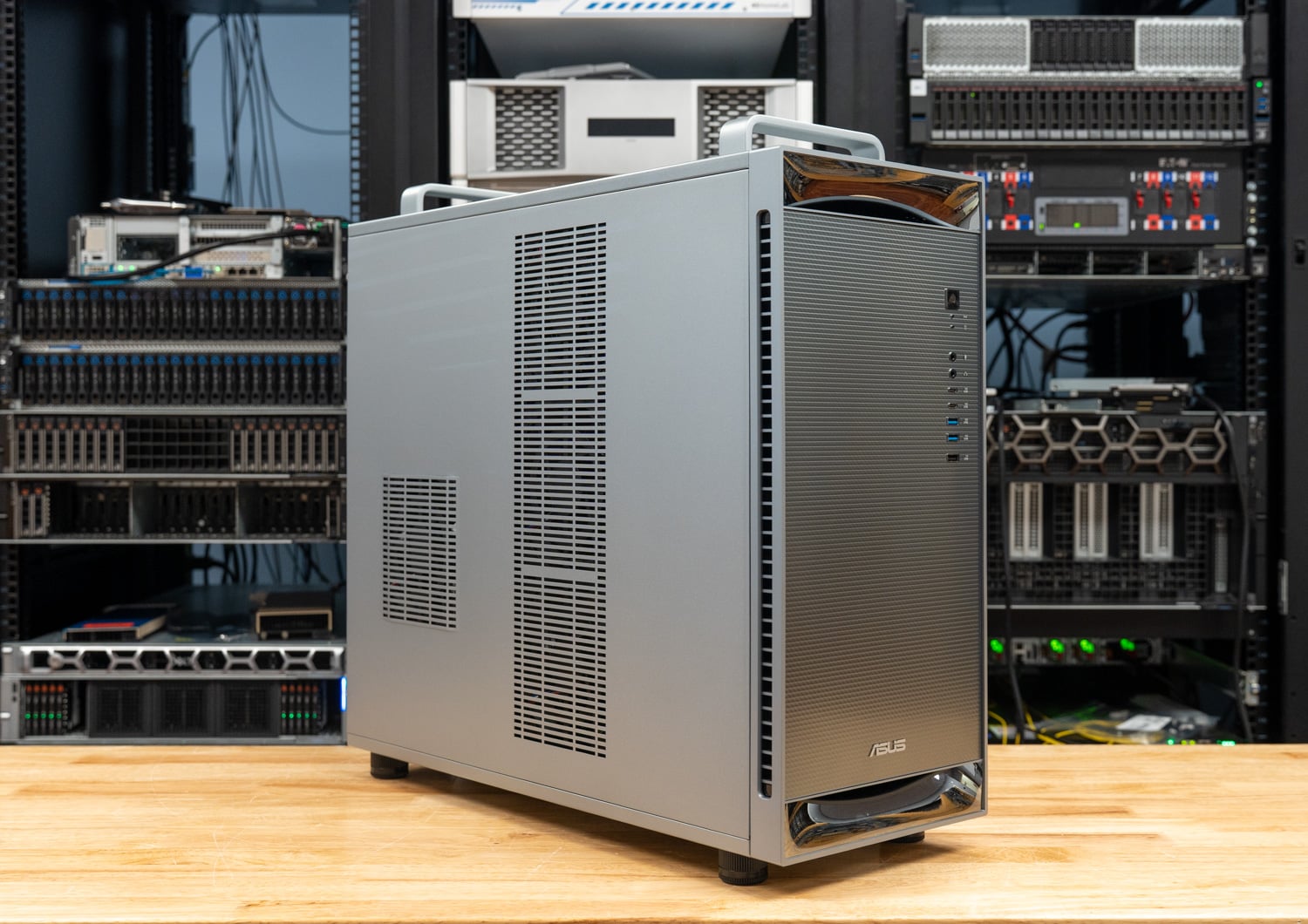
ASUS shipped the ET900N G3 to the lab for about a week of benchmarking, photography, and physical checks, with an RTX PRO 2000 installed. For the platform itself, the B300, Grace, NVLink-C2C, MIG, and what a DGX Station is for, the WS300 review covers that ground. This review is about what ASUS built around the Superchip, and whether the numbers hold up against the first GB300 tower we tested.
ASUS ExpertCenter Pro ET900N G3 Specifications
| Specification | ASUS ExpertCenter Pro ET900N G3 |
|---|---|
| Platform Overview | |
| Superchip | NVIDIA GB300 Grace Blackwell Ultra Desktop Superchip |
| CPU | NVIDIA Grace, 72 Arm Neoverse V2 cores |
| GPU | NVIDIA Blackwell Ultra (B300), up to 20 PFLOPS NVFP4 with sparsity |
| CPU-GPU Interconnect | NVLink-C2C, 900GB/s bidirectional |
| Memory | |
| Coherent Memory | 748GB |
| GPU Memory | 252GB HBM3e, 7.1TB/s |
| CPU Memory | 496GB LPDDR5X, 396GB/s, 4x SOCAMM |
| Storage | |
| Boot Drives | 2x M.2 2280 PCIe 5.0 x4 (Key M), populated with 2x 2TB NVMe in RAID 1 |
| Expansion Drives | 2x M.2 2280 (Key M), PCIe 6.0 x4 per ASUS, open from the factory |
| Networking | |
| SuperNIC | NVIDIA ConnectX-8, 2x QSFP112 400GbE |
| Ethernet | 1x Marvell 10GbE 1x Realtek 1GbE (BMC) |
| Expansion | |
| PCIe Slots | 1x PCIe 5.0 x16 2x PCIe 5.0 x16 (x8 signals) |
| Add-in GPU | Up to one NVIDIA RTX PRO Blackwell card; review unit shipped with an RTX PRO 2000 Blackwell |
| I/O | |
| Front | 2x USB 10Gbps Type-C 2x USB 10Gbps Type-A 1x USB 2.0 Headphone and microphone jacks |
| Rear | 4x USB 10Gbps Type-A 1x Micro-USB COM (BMC serial console) 1x Mini DisplayPort (BMC) 3x audio jacks |
| Management and Security | |
| BMC | ASPEED AST2600 with AMI MegaRAC firmware, IPMI and Redfish |
| Security | Onboard TPM 2.0 |
| Power and Cooling | |
| Power Supply | 1x 1,600W ATX, 80 PLUS Titanium |
| Cooling | Closed-loop AIO liquid cooling (per ASUS) with cold plates on the GB300, SOCAMM, and ConnectX-8; front and top radiators, rear chassis fan, dedicated fan over the QSFP112 cages |
| Operating Temperature | 10C to 35C |
| Software and Form Factor | |
| Operating System | Ubuntu with NVIDIA AI developer tools; ASUS says Windows-based AI development support is planned |
| Dimensions | 584 x 232 x 565mm (23.0 x 9.1 x 22.3 in), as listed by ASUS |
| Weight | 27kg net, 32kg gross |
Design and Build
ASUS dresses the ET900N G3 as a business workstation, with a brushed silver chassis, a dark mesh front, a chrome-trimmed cap and foot, and an ASUS badge low on the front. The proportions are what the platform dictates: 584 x 232 x 565mm by ASUS’s listing, which works out a little taller and a touch narrower than the WS300 at 529mm high, 570mm deep, and 246mm wide. At 27kg, it isn’t a system anyone moves casually, and that’s where the first ASUS-specific decision comes into play. Two metal handles on the top edge, one at the front and one at the rear, let two people lift the tower onto a desk or into a cart without grabbing the panels. They look slightly out of place on an office machine until you’ve had to carry a GB300 tower across a lab.
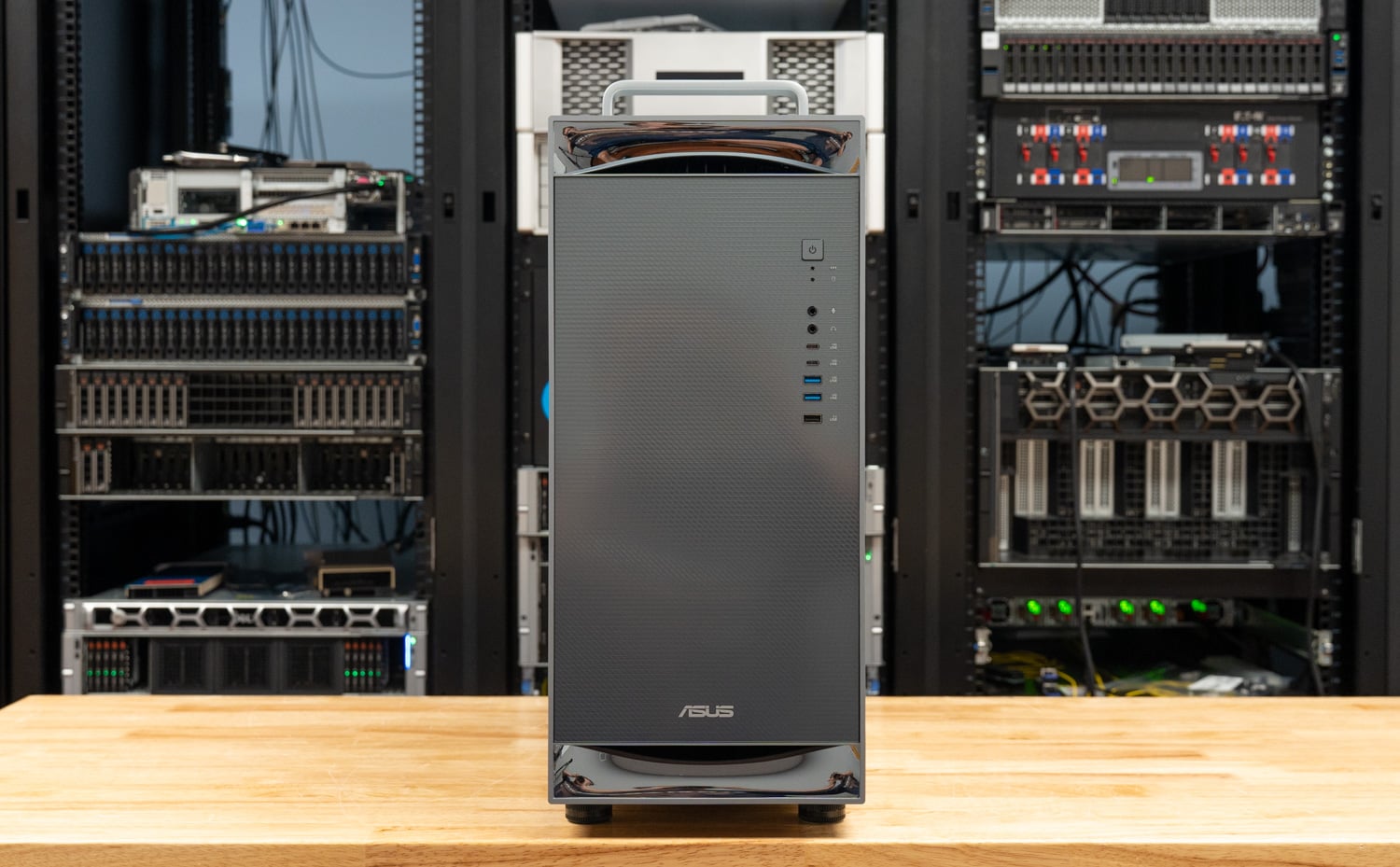
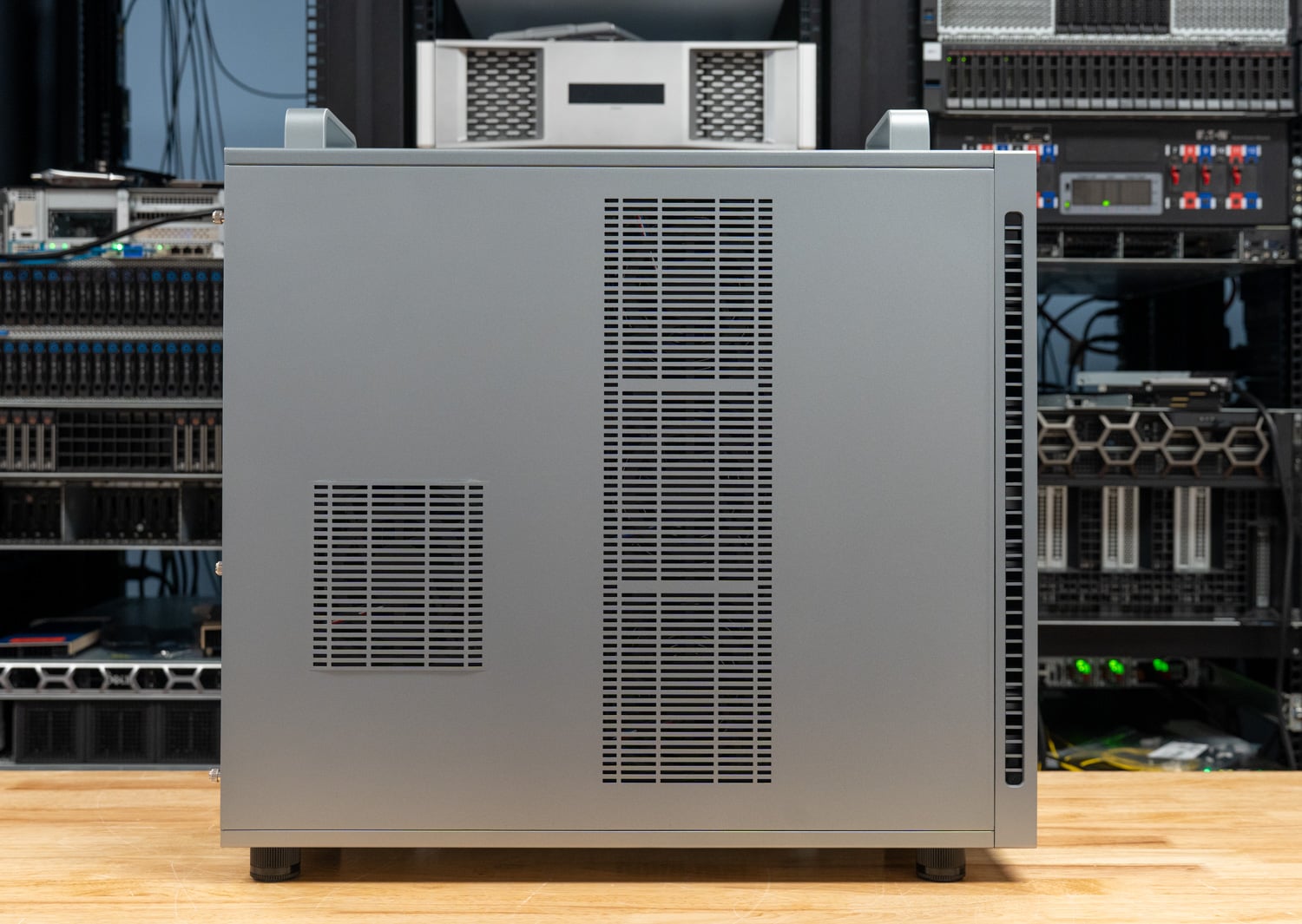
The front panel features the power button, two 10Gbps USB Type-A ports, two 10Gbps USB Type-C ports, a USB 2.0 port, and separate headphone and microphone jacks, all arranged in a vertical strip at the upper right of the mesh. The side panel is a large vented slab, with a long perforated column toward the front for the radiator intake and a smaller square grille toward the rear that lines up with the system fans. There’s no window and no lighting, which suits the target buyer.
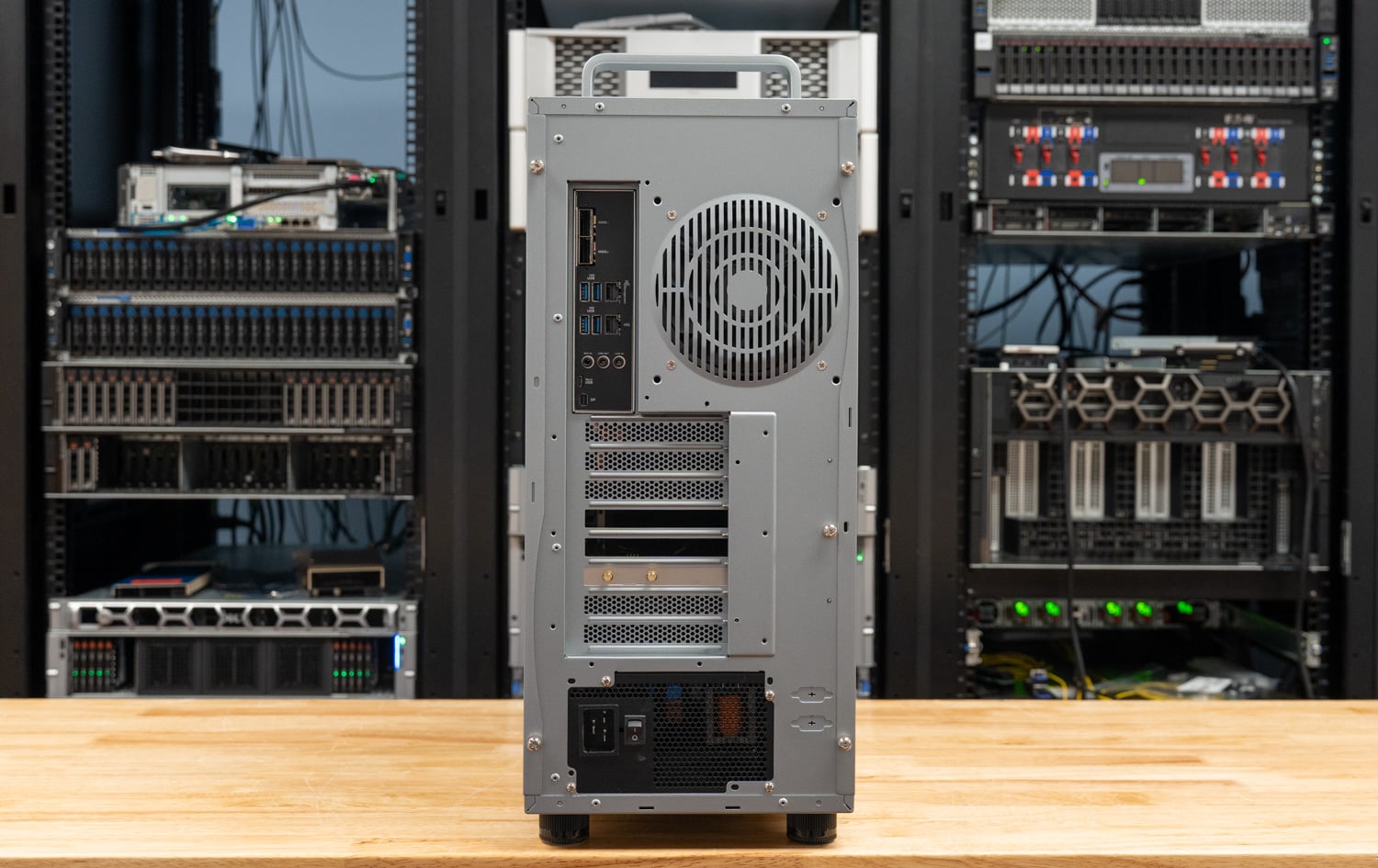
Around back, the layout separates the workstation I/O from the server hardware underneath. The upper cluster holds the four 10Gbps USB Type-A ports, the 10GbE and 1GbE RJ45 jacks, the three audio jacks, the BMC’s Micro-USB console port, and the Mini DisplayPort that the BMC drives for setup. The two QSFP112 cages for the ConnectX-8 sit at the top of the I/O shield; an exhaust fan sits beside them; the three expansion slot covers run down the middle; and the power supply with its C19 inlet is at the bottom. As on the WS300, the Mini DisplayPort is a BMC output for initial setup and troubleshooting; anyone who wants a desktop on this machine needs the RTX PRO card.
Inside the ET900N G3
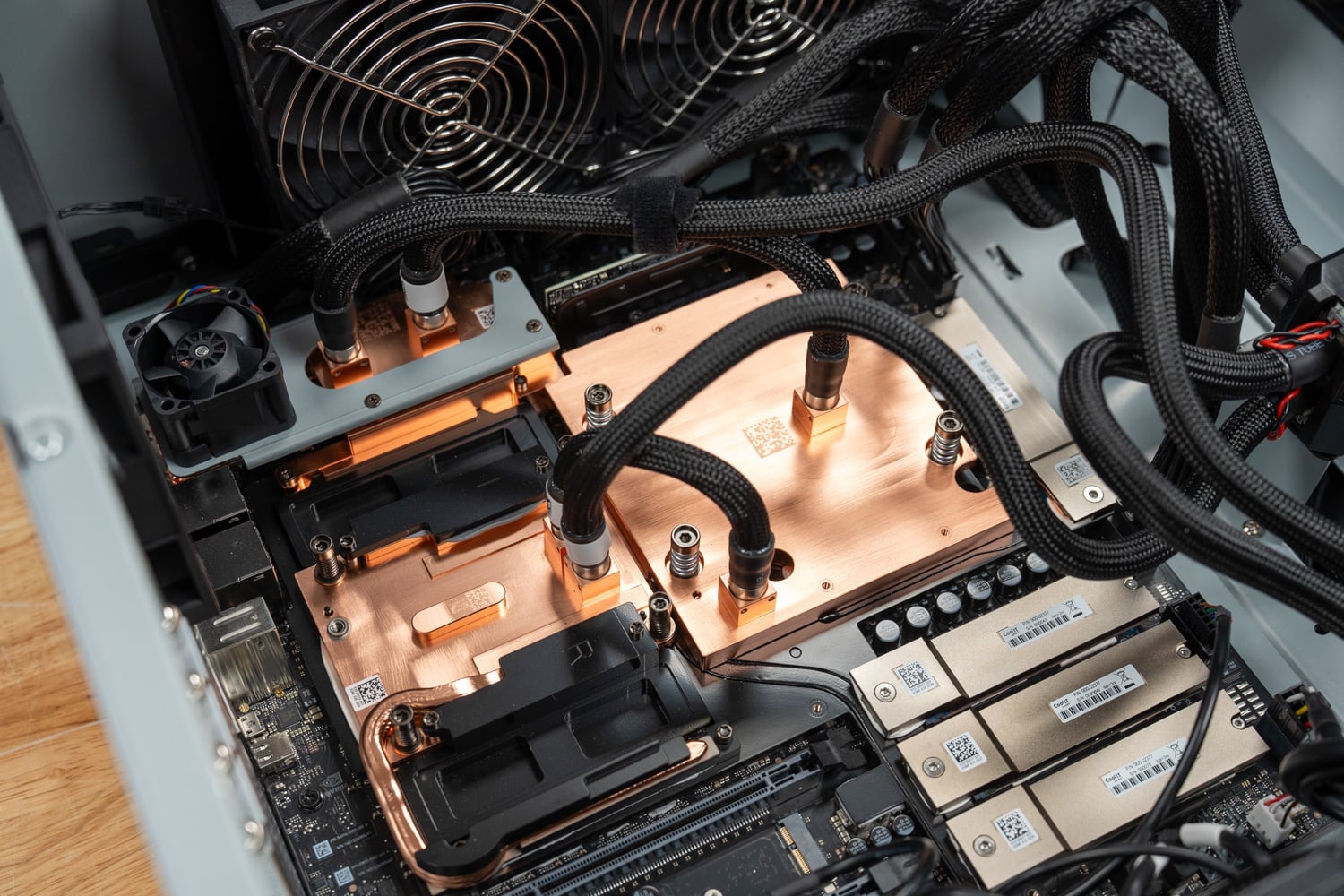
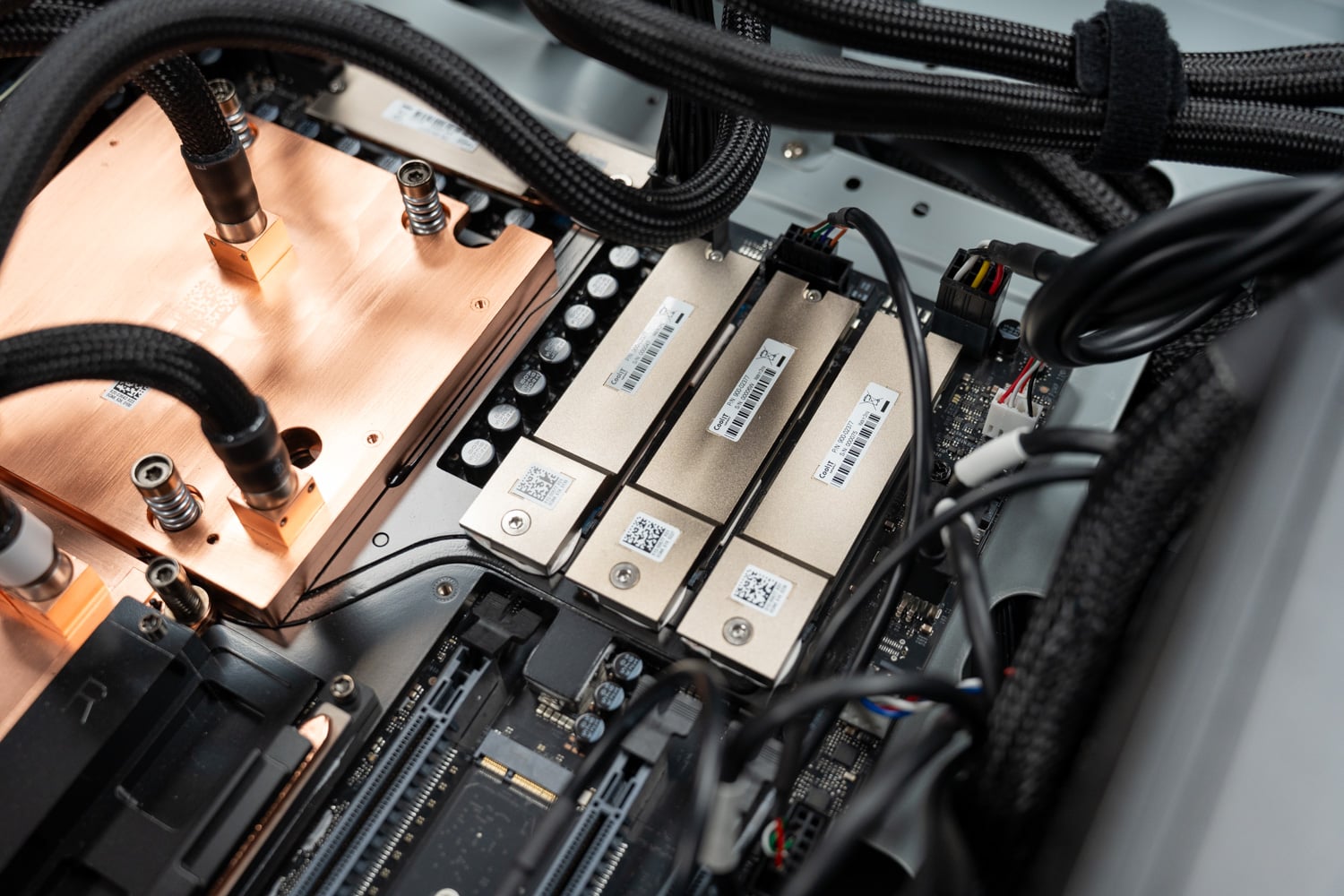
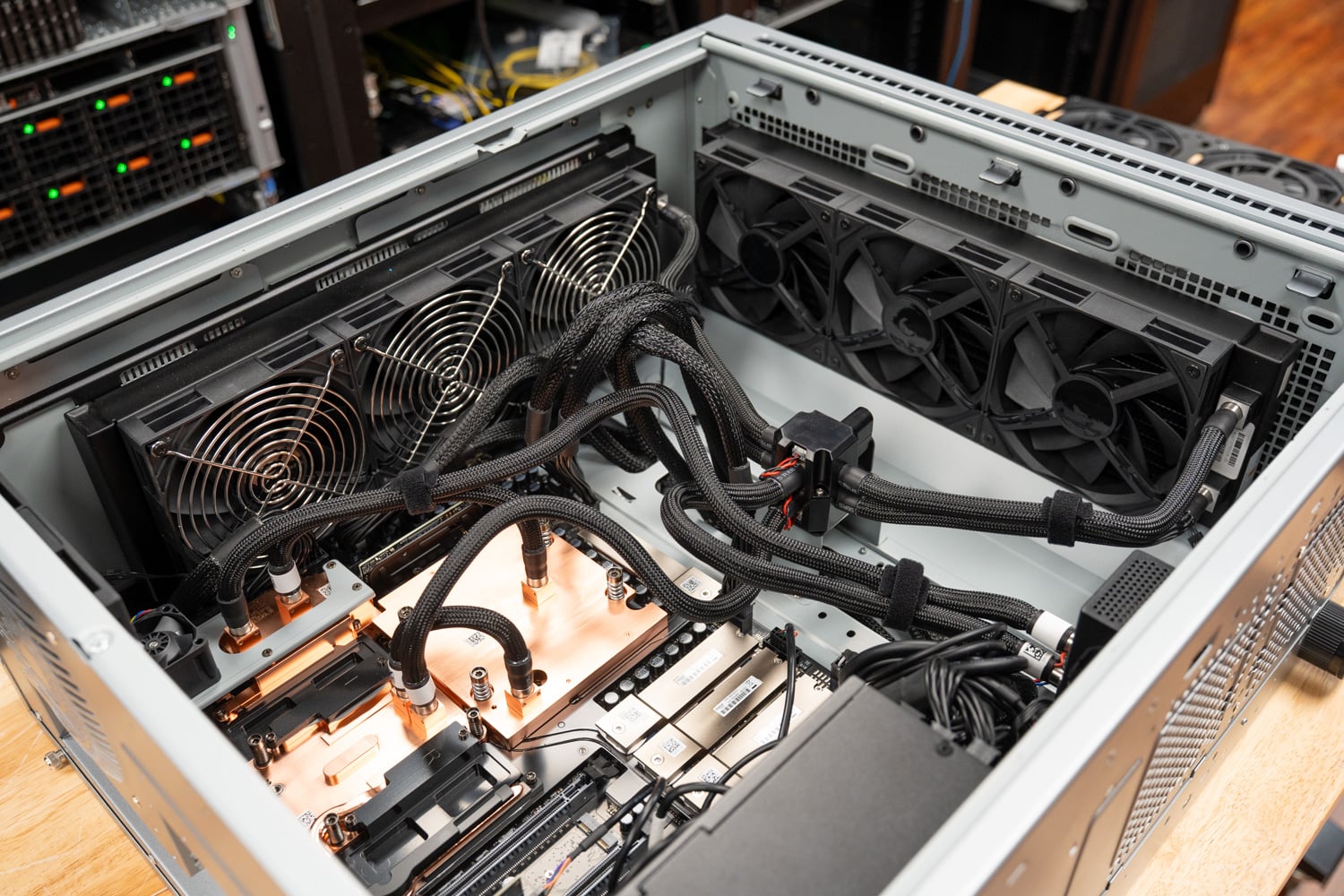
With the side panel off, the ET900N G3 appears to be a close relative of the WS300, which is expected, given that both share the same NVIDIA baseboard. The GB300 Superchip sits under a copper cold plate assembly on the left of the chassis, with the SOCAMM modules under their own copper plates beside it and the ConnectX-8 under a third block near the rear I/O. Braided tubing runs from the blocks to a distribution manifold mounted on the chassis crossmember, and from there to the radiators. The three full-length PCIe slots sit below the Superchip, the power supply occupies the lower front corner, and a metal shroud covers the cable path along the bottom.
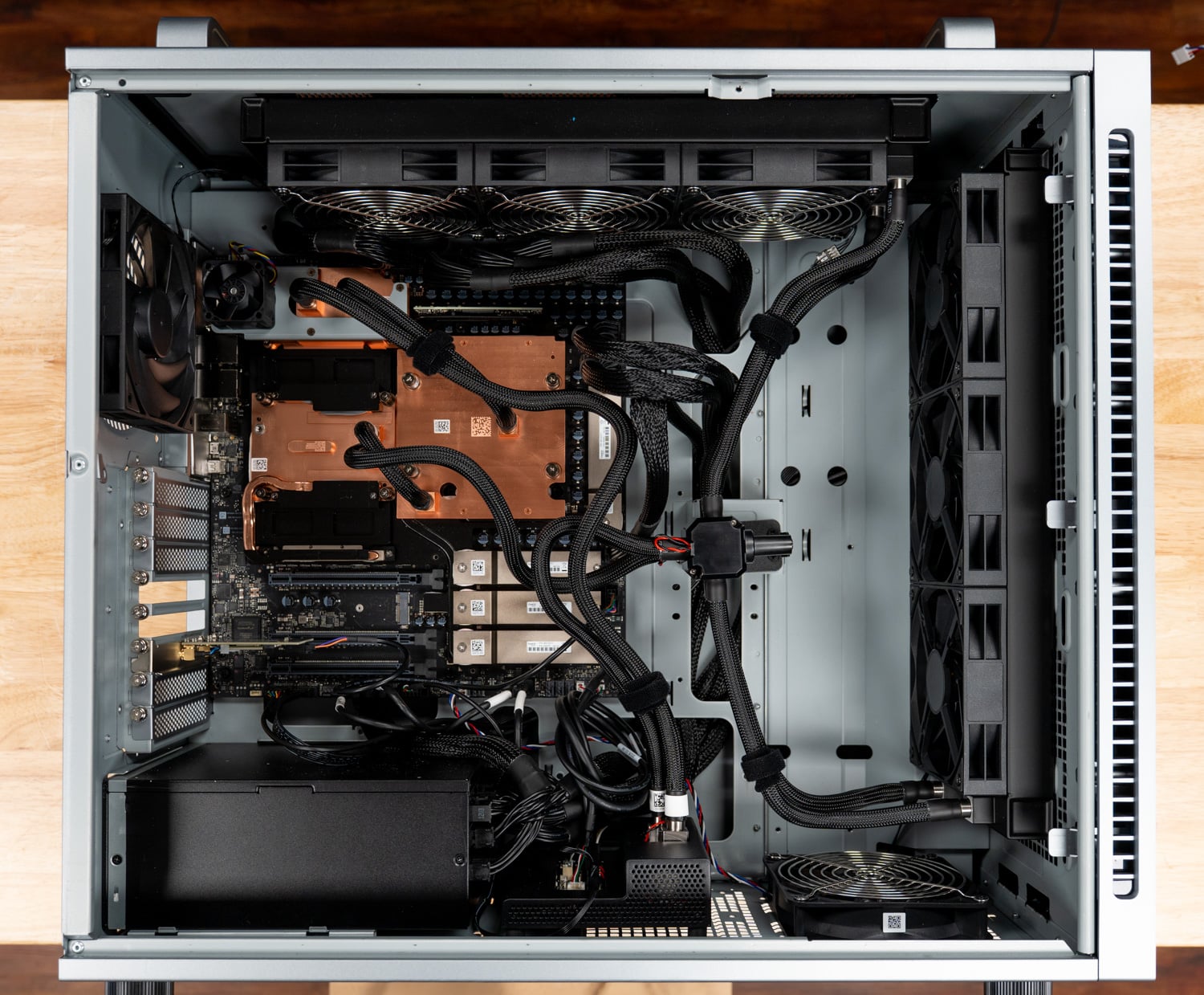
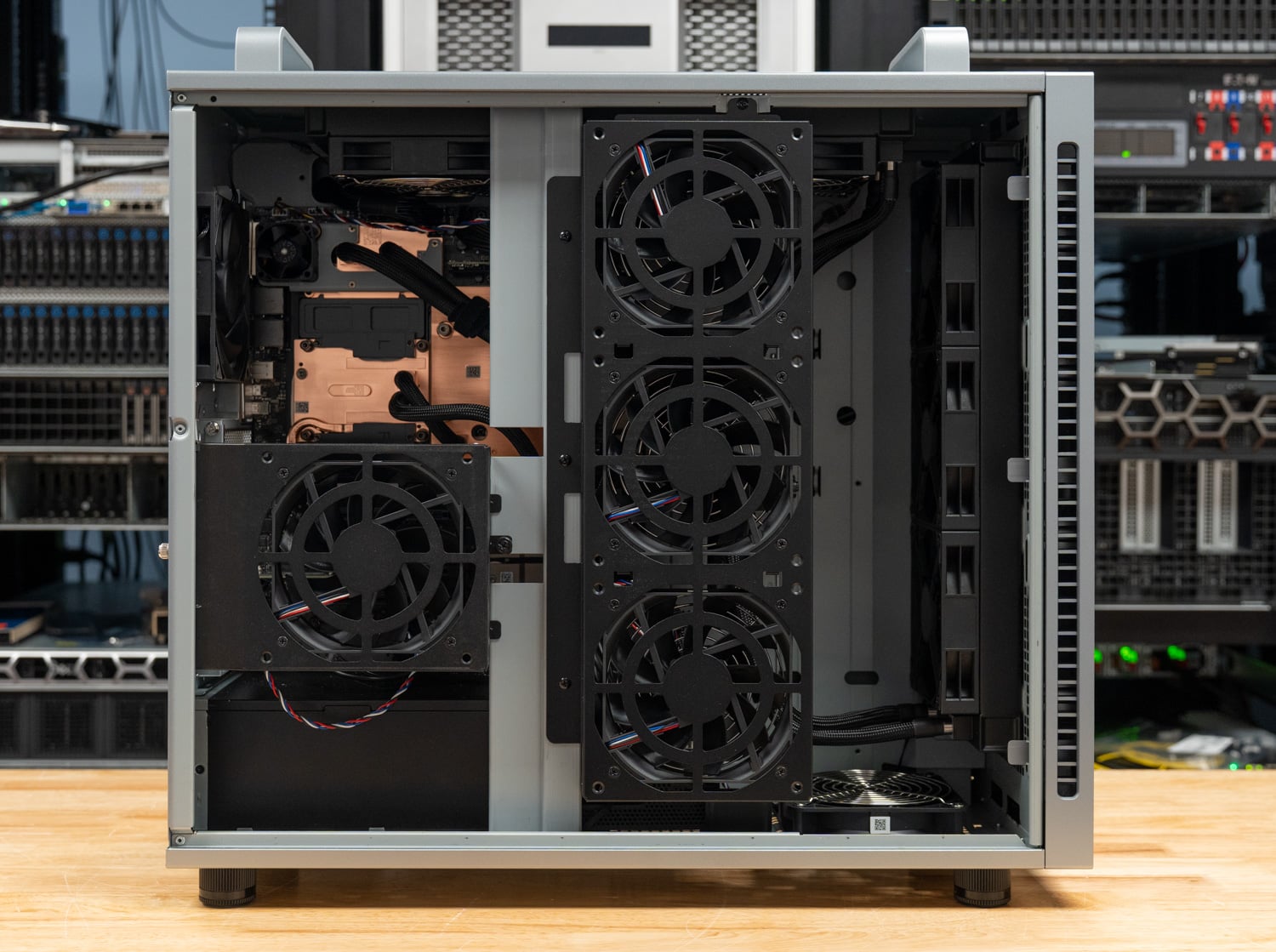
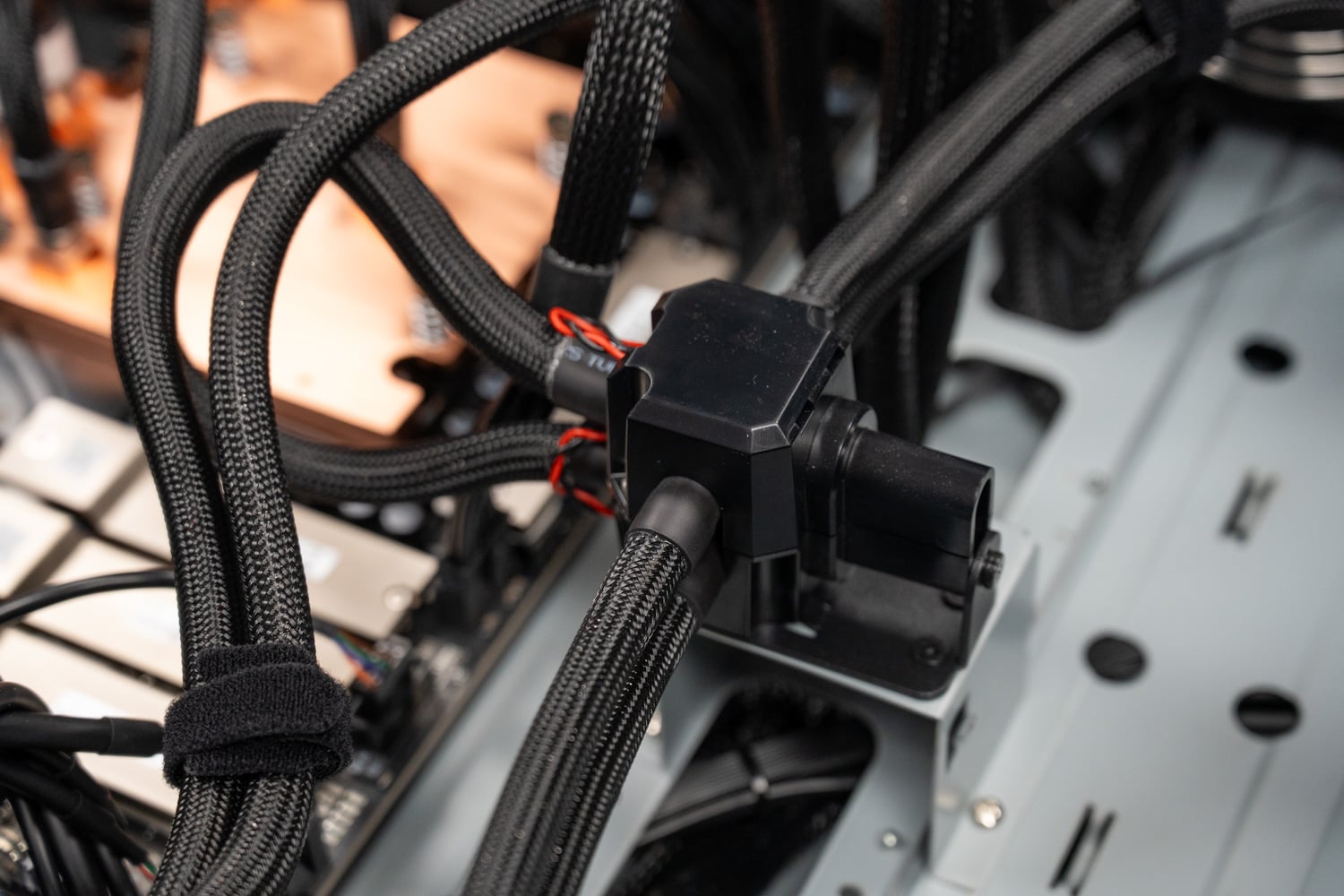
The arrangement inside follows the same pattern as the WS300: one radiator mounted vertically behind the front mesh and a second along the top, each with a row of fans, plus a chassis fan at the rear. The coolant lines are sleeved and secured to the crossmember with hook-and-loop straps, and the manifold consolidates the runs from the four cold plates so that only two lines reach each radiator.
The optics fan
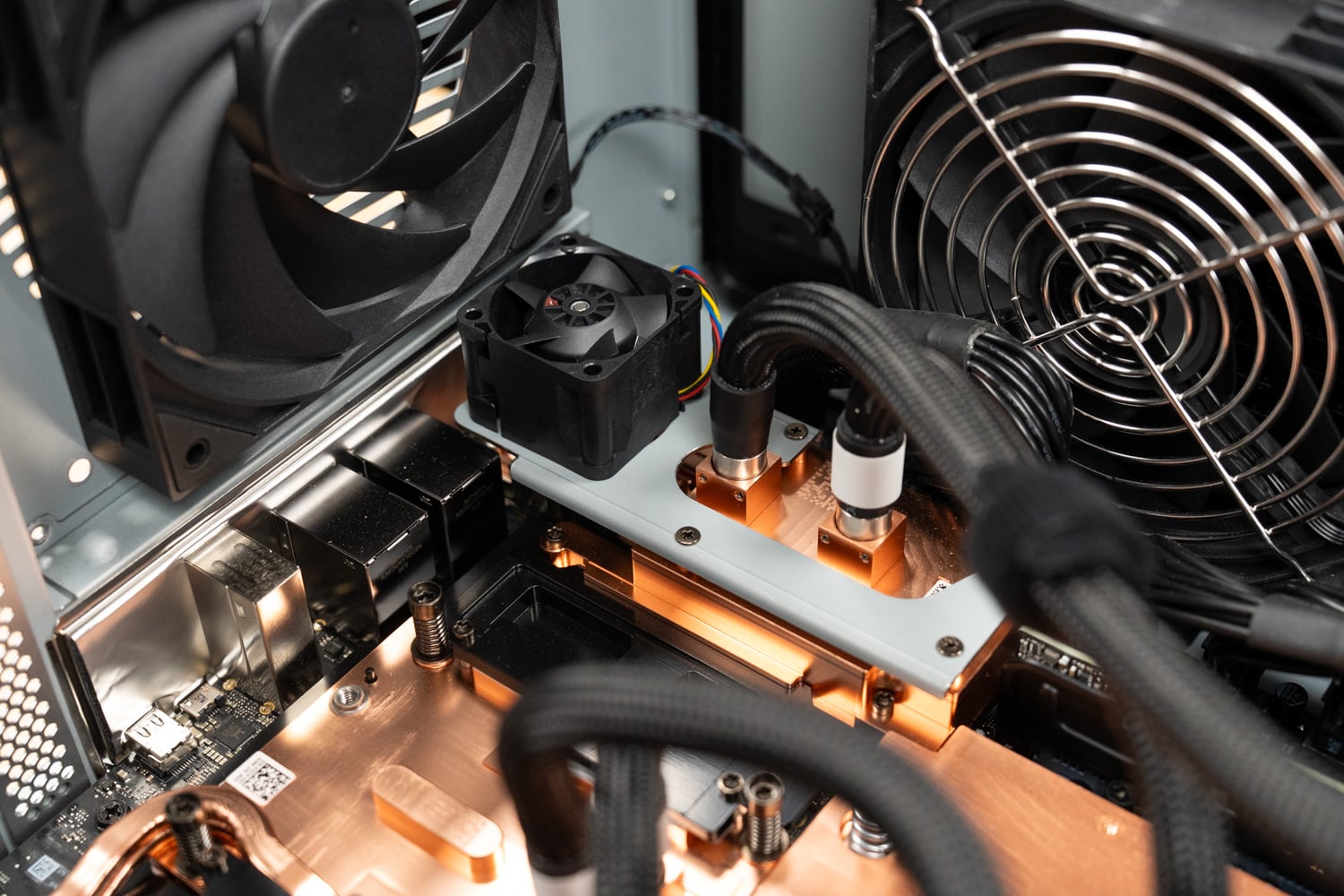
The one cooling element that has no equivalent in the WS300 is a small fan mounted on a bracket above the ConnectX-8 cold plate, aimed at the QSFP112 cages. The liquid loop handles the SuperNIC silicon itself, but 400G optical transceivers generate their own heat and sit in metal cages that the cold plate can only reach by conduction. In other testing, we’ve noted that the ConnectX-8 gets warm under sustained load and that the optics themselves can run hot, so a dedicated airflow path across the cages is a nice design element for anyone planning to run the ET900N G3 on fiber for hours at a time. With DACs, which is how we cabled it to a second GB300 Station for a clustered-inference deep dive that’s still in progress, the fan has less to do.
Storage, expansion, and power
ASUS shipped the ET900N G3 with a single 2TB NVMe drive for the operating system and NVIDIA software stack, in the pair of M.2 2280 slots attached to Grace over PCIe 5.0 x4. The second pair of slots hangs off the ConnectX-8’s integrated PCIe switch and shipped empty.
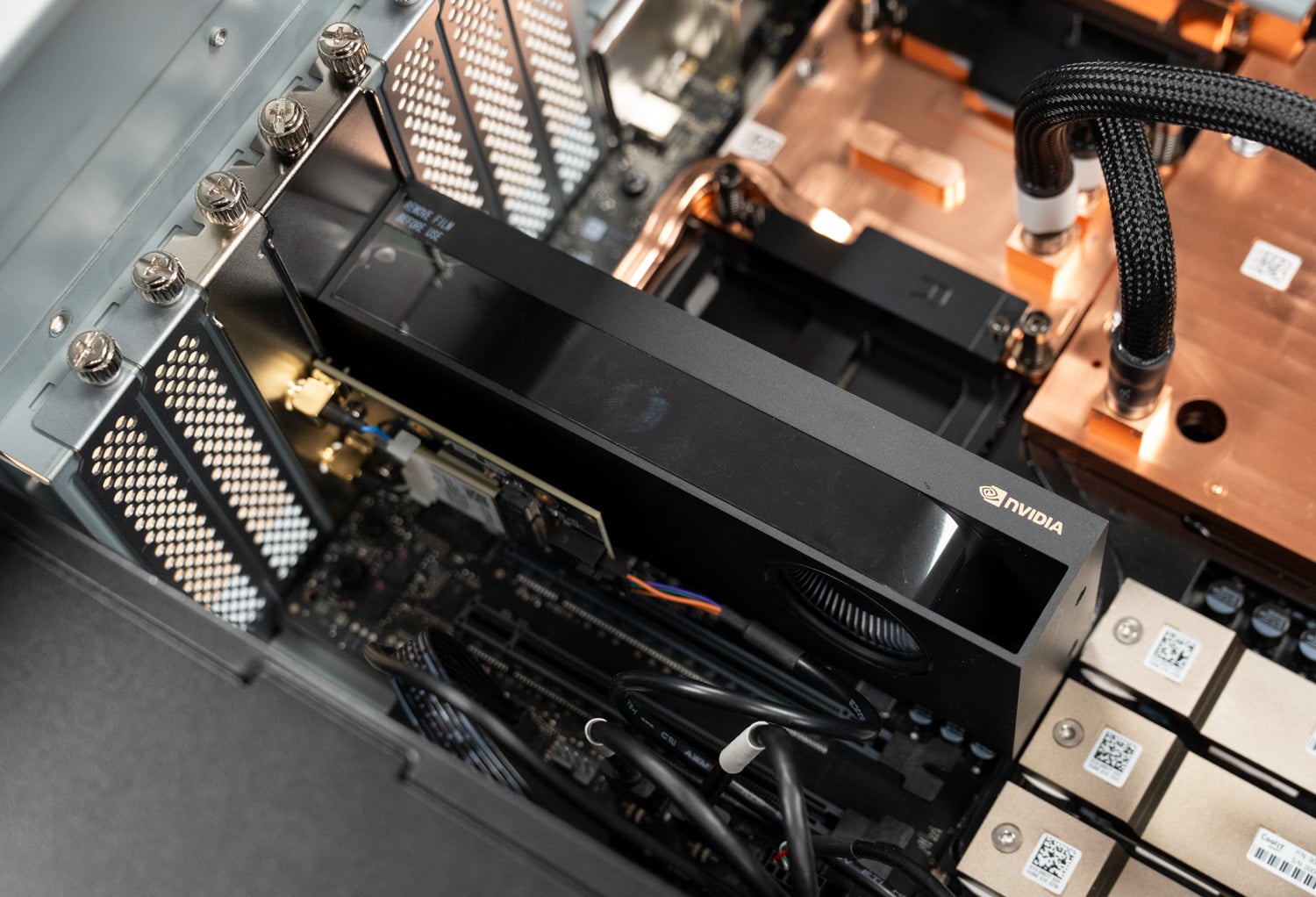
Our review unit arrived with an NVIDIA RTX PRO 2000 Blackwell in the PCIe 5.0 x16 slot, which is one of the configurations ASUS lists. The card provides display output without drawing significantly from the GB300’s power budget, and ASUS says the chassis can accommodate up to one RTX PRO Blackwell card. We pulled the RTX PRO 2000 before benchmarking so the Superchip had the full accelerator budget, the same condition we used for the WS300, and we didn’t test a high-power RTX PRO card in this chassis; that path, and what it does to the shared power budget, is something we’ll cover in a coming GB300 Station review.
The power supply is a 1,600W ATX unit that ASUS rates at 80 PLUS Titanium, a step above the Platinum unit in the WS300. Titanium requires 94% efficiency at 50% load on 115V input compared with 92% for Platinum, and it is the only tier that sets a floor at 10% load, so the ET900N G3 should waste a few tens of watts less at the wall under a full GB300 load. The budget is still shared: Grace, the B300, the pumps, fans, storage, and any RTX PRO card draw from the same 1,600W, and NVIDIA’s vsloshd service shifts headroom between the Superchip and an add-in GPU as their draw changes, with no fixed cap on either. The WS300 review walks through that policy, and it’s unchanged here. A dedicated 20A circuit remains the requirement for North American installs.
Connectivity
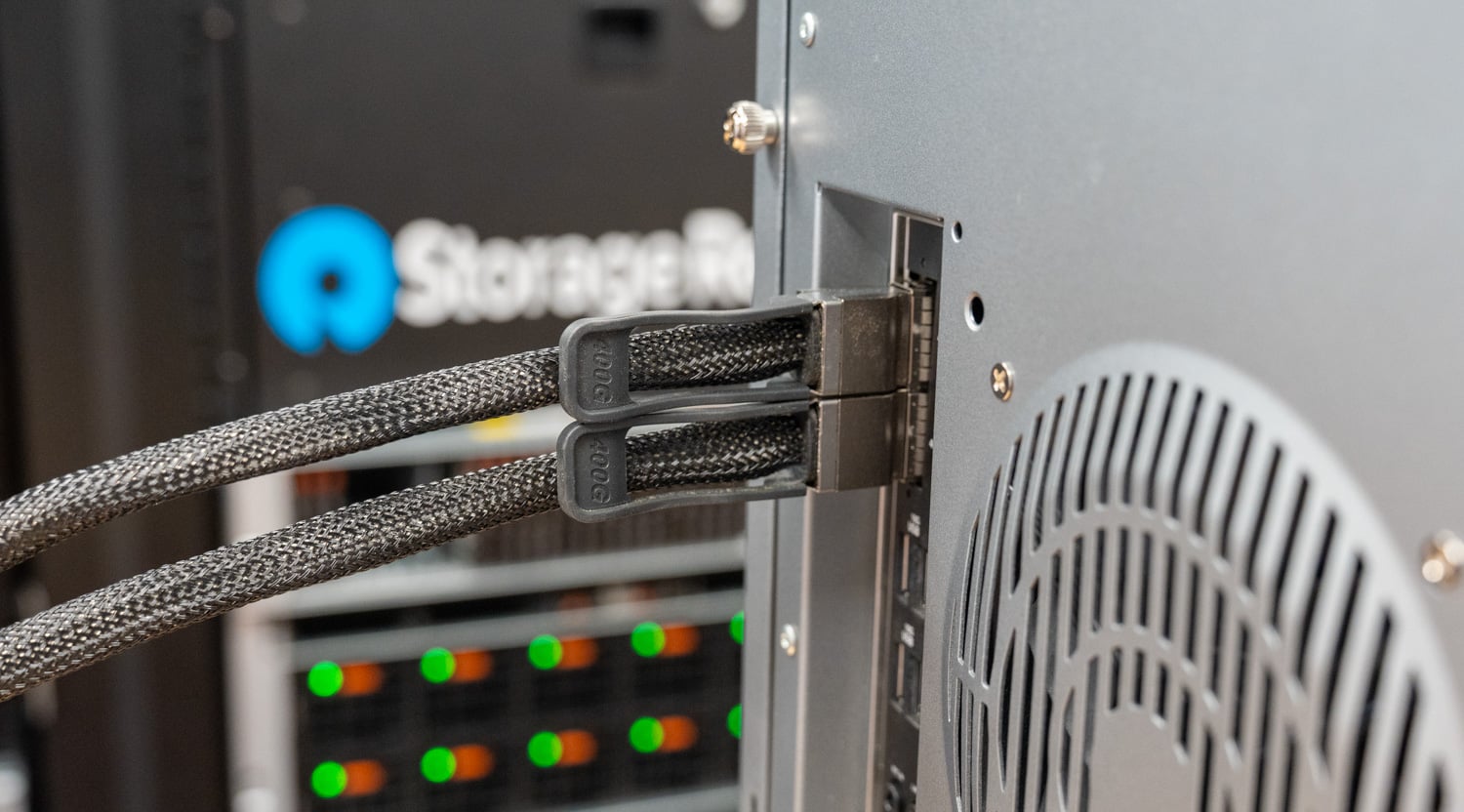
The ConnectX-8’s two QSFP112 ports are the ET900N G3’s link to everything else: storage, a second DGX Station, or a cluster fabric. Those ports are already in use in the lab, with the ET900N G3 cabled to a second GB300 Station over 400G DACs for a clustered-inference deep dive we’ll publish separately. The 10GbE Marvell port handles ordinary host traffic, and the Realtek 1GbE port is dedicated to the BMC.
Testing Notes
Every result in this review comes from the unit ASUS shipped to our lab, in the shipping memory configuration with 252GB of HBM3e and 496GB of LPDDR5X. The system ran without an RTX PRO card installed, so the GB300 Superchip had the full accelerator power budget, matching the conditions of our WS300 testing. The software stack, vLLM configuration, workload profiles, and concurrency sweep are the same as those we used for the WS300, so the two towers can be compared directly. This review is performance only; we didn’t instrument power draw or thermals on this unit.
The workloads are the same two vLLM live-inference profiles we run on every local AI system: an equal workload with 512 input and 512 output tokens, and a prefill-heavy workload with 8,192 input and 1,024 output tokens, swept from one to 128 concurrent streams. For the frontier-scale models, we compare against a Dell PowerEdge XE7740 GPU server fitted with two or four RTX PRO 6000 cards, the nearest single-box alternative for these checkpoints. For the smaller models, we compare against a single RTX PRO 6000 in the same XE7740, a single H200 NVL in a Dell PowerEdge R770, and a GB10 DGX Spark represented by the Acer Veriton GN100, the same Spark we used in the WS300 review. All figures below are exact values from each system’s run logs, and the DGX Spark results carry over from our WS300 testing.
Inference Performance
Frontier models on the coherent memory pool
The GB300’s reason to exist is serving models on either side of the B300’s 252GB HBM3e boundary, so we start with four checkpoints that span it: DeepSeek V4 Flash and MiniMax M2.7 fit in HBM with room to spare, MiniMax M3 barely fits and pushes a slice of its experts to Grace memory, and GLM-5.2 offloads roughly half its weights. On the other side of each chart is the nearest single-box alternative: RTX PRO 6000 cards together in the PowerEdge XE7740, with expert offload to host memory where needed.
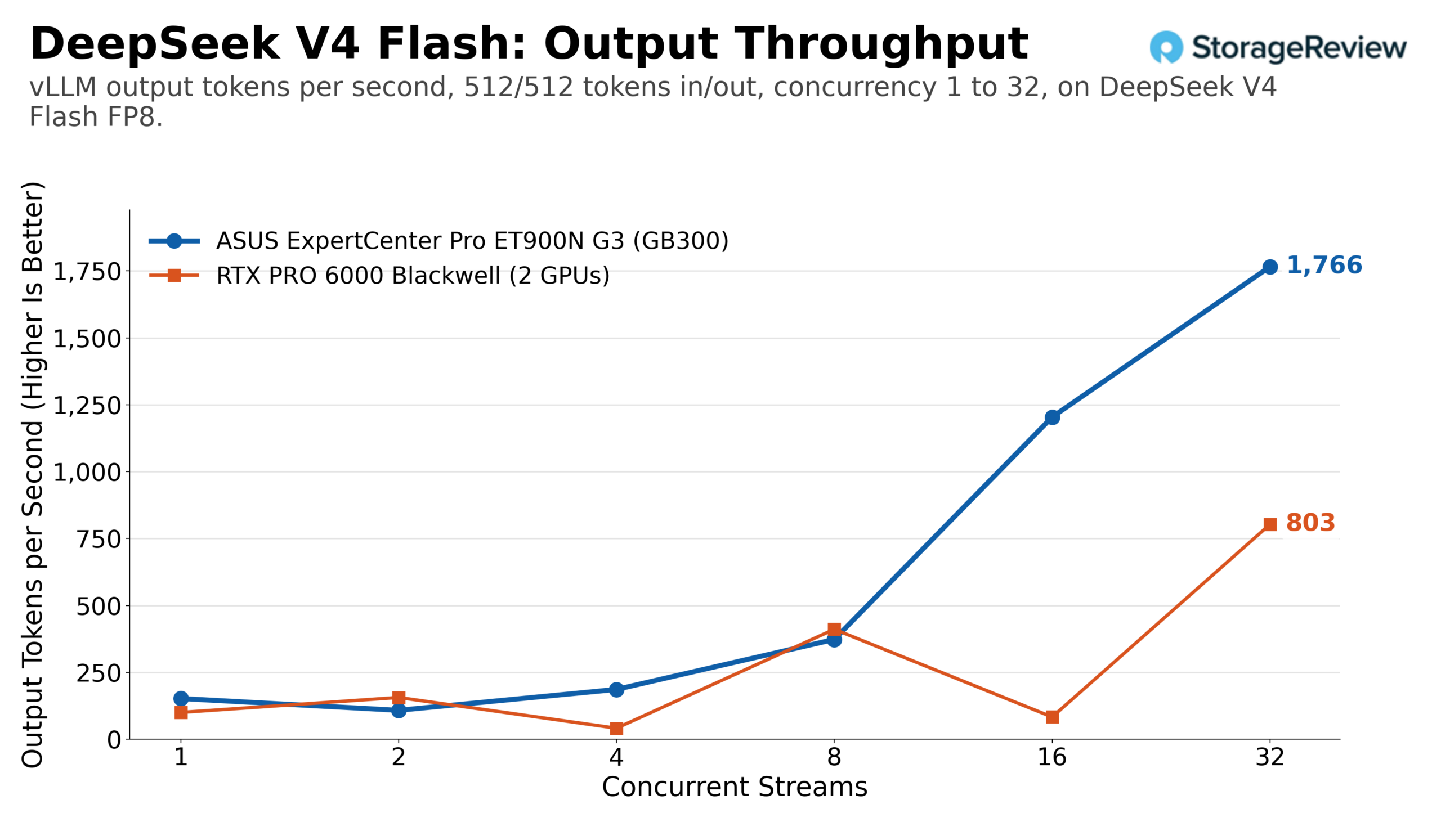
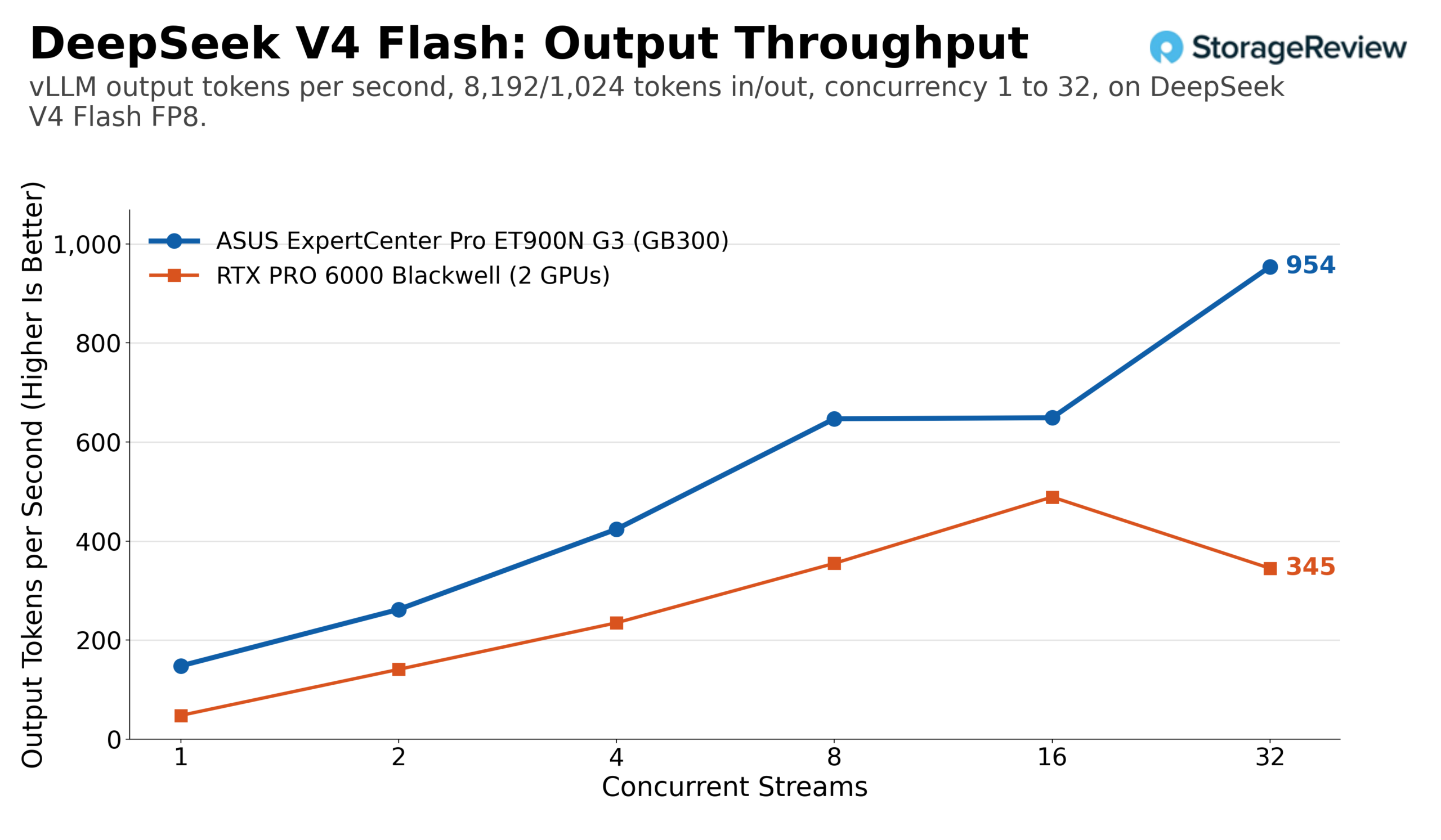
DeepSeek V4 Flash is the easy case: a native FP8 checkpoint of about 20GB that the B300 serves without effort. Output throughput on the same workload climbed from 152 tokens per second with 1 stream to 1,766 with 32 streams, bringing total token throughput to 3,532. On the prefill-heavy profile, the ET900N G3 increased from 148 to 954 output tokens per second, with a total of 8,587 tokens. Across the same 1 to 32 stream range, a pair of RTX PRO 6000 cards reached 803 output tokens per second on the equal workload and 489 on the long prompts, with an uneven curve at low concurrency.
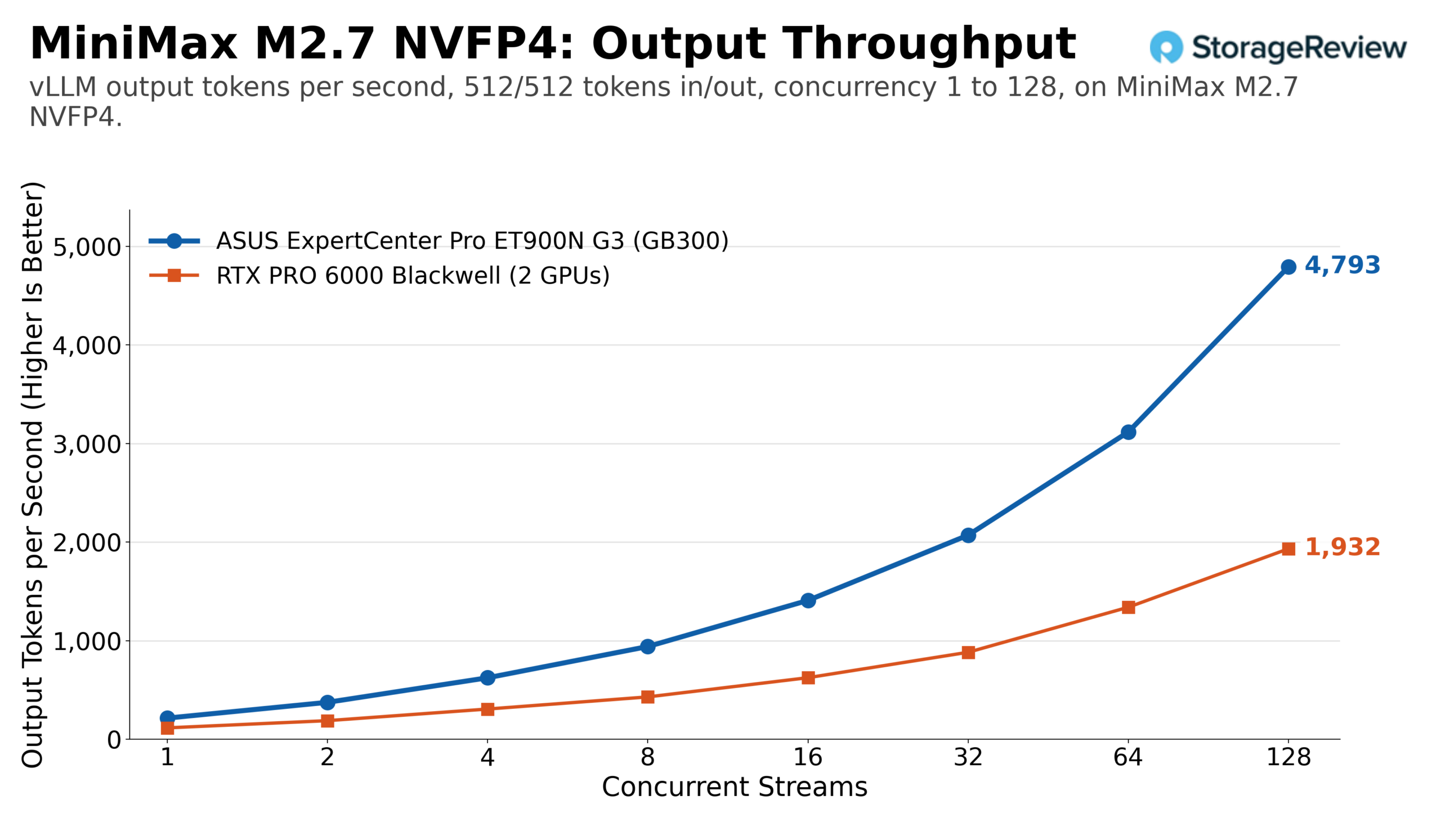
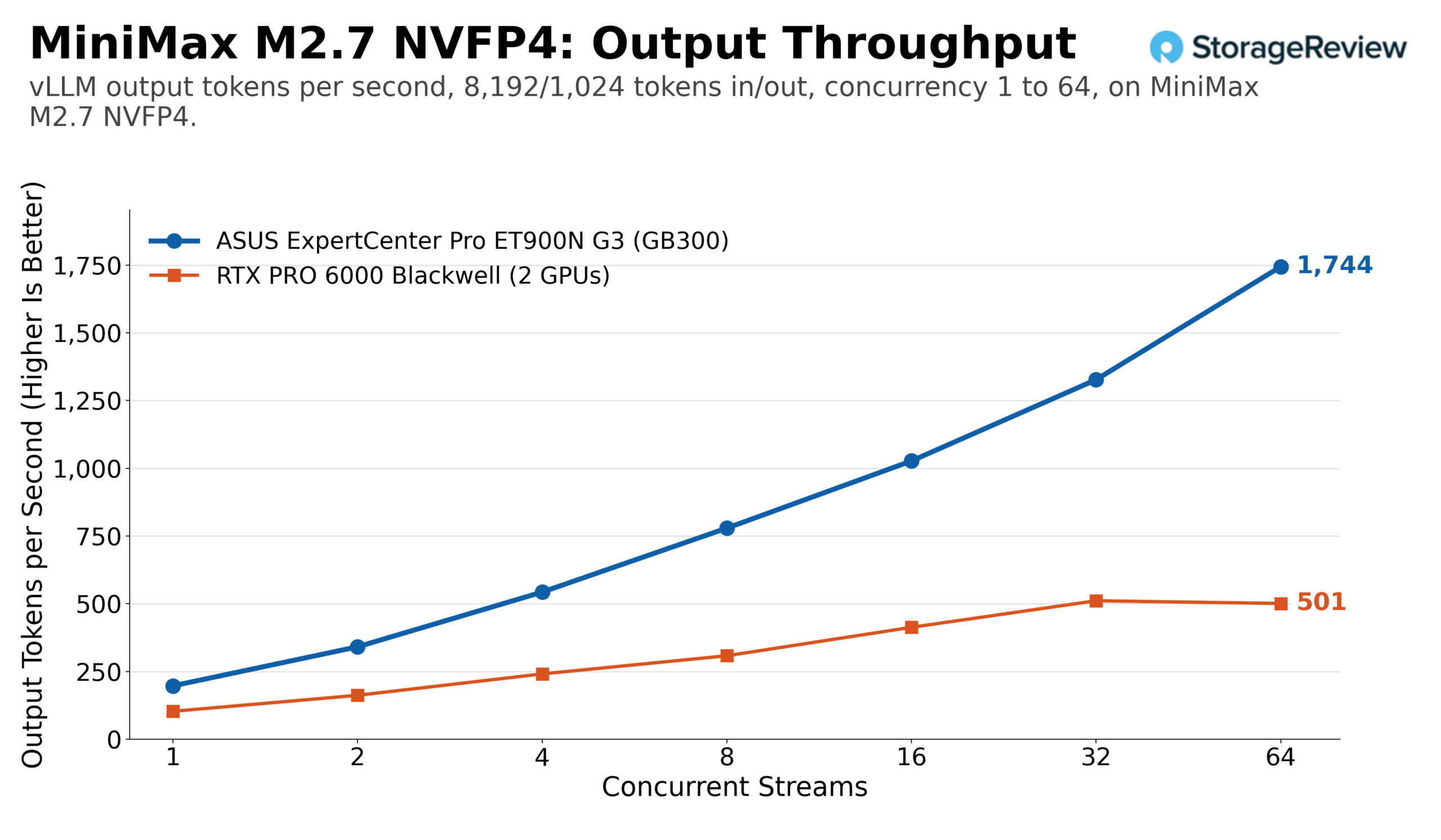
MiniMax M2.7 in NVIDIA’s NVFP4 quantization occupies about 125GB of HBM and scaled the furthest of the four. The equal workload rose from 214 output tokens per second on one stream to 4,793 on 128 streams, and total throughput reached 9,586. The prefill-heavy run scaled to 1,744 output tokens per second and 15,700 total tokens per second at 64 streams. Two RTX PRO 6000 cards followed the same shape at less than half the height, reaching 1,932 output tokens per second at 128 streams on the equal workload and 511 on the long prompts.
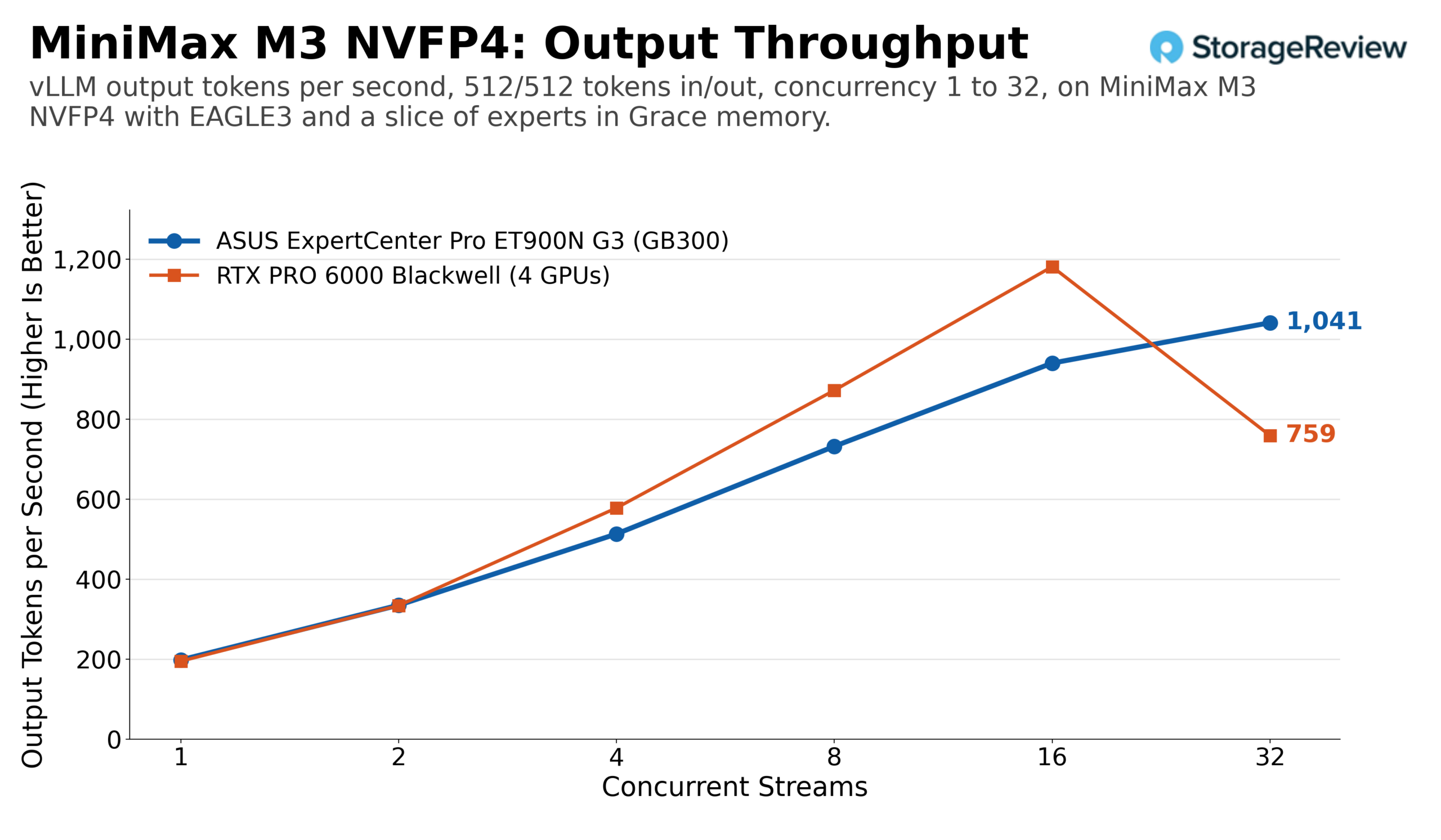
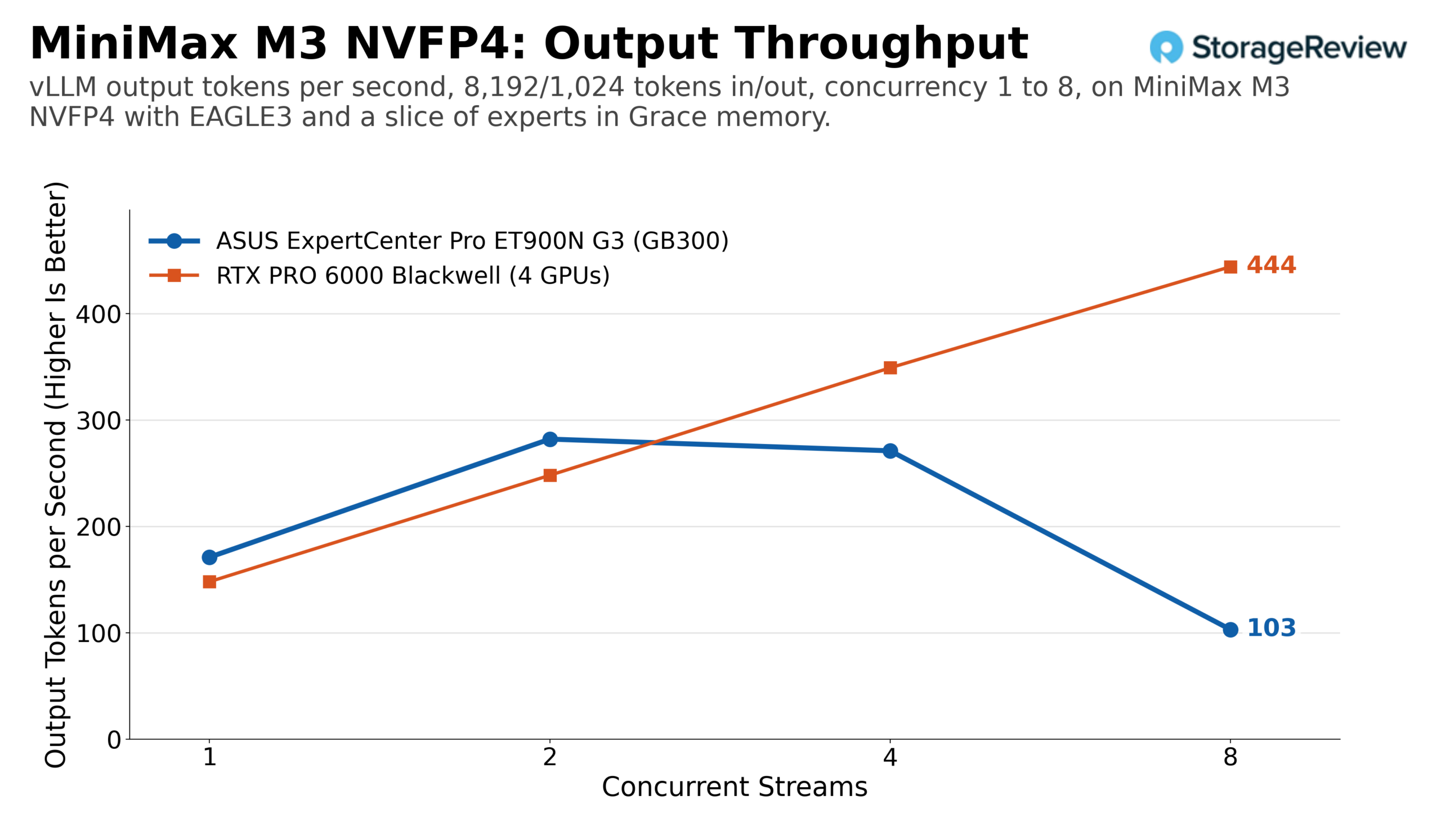
MiniMax M3 shows what it’s like to barely fit into memory. The NVFP4 checkpoint is smaller than 252GB, but the runtime and KV cache also need space, so a portion of the experts resides in Grace memory, and every decode step that touches them crosses NVLink-C2C. With EAGLE3 speculative decoding, the ET900N G3 reached 1,041 output tokens per second at 32 streams on the equal workload, and the prefill-heavy profile peaked at 282 at two streams, held 271 at four, and fell to 103 at eight as the long prompts consumed the remaining cache. Four RTX PRO 6000 cards with the same speculative decoder matched the Station at one and two streams, pulled ahead from four streams to 1,181 output tokens per second at 16, then fell back to 759 at 32 streams. On the prefill-heavy profile, the four-card box held about 349 output tokens per second at four streams to the Station’s 271. A model that sits right at the HBM boundary is the one place in this set where 384GB of VRAM across four cards competes with 252GB of HBM plus offload.
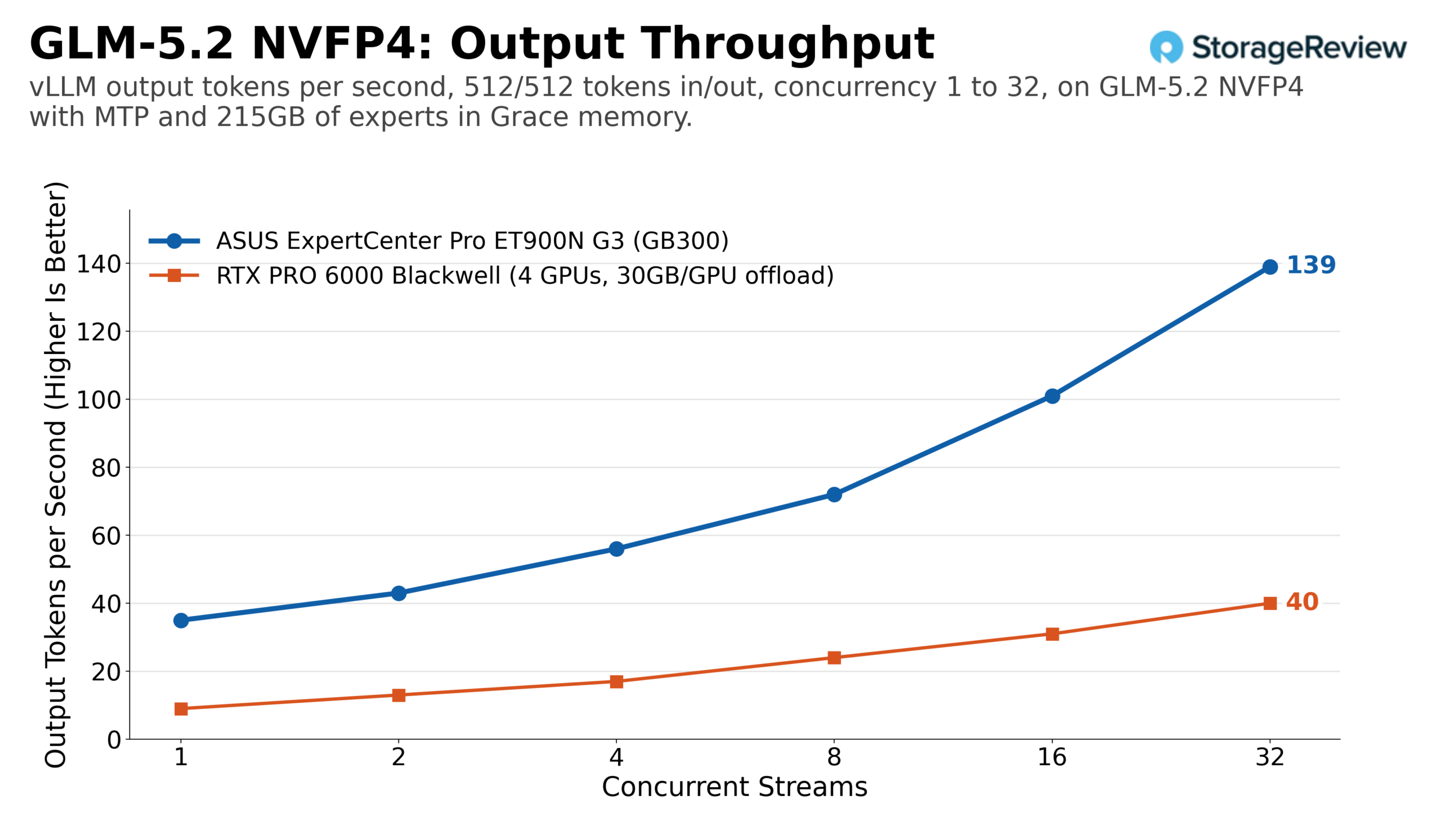
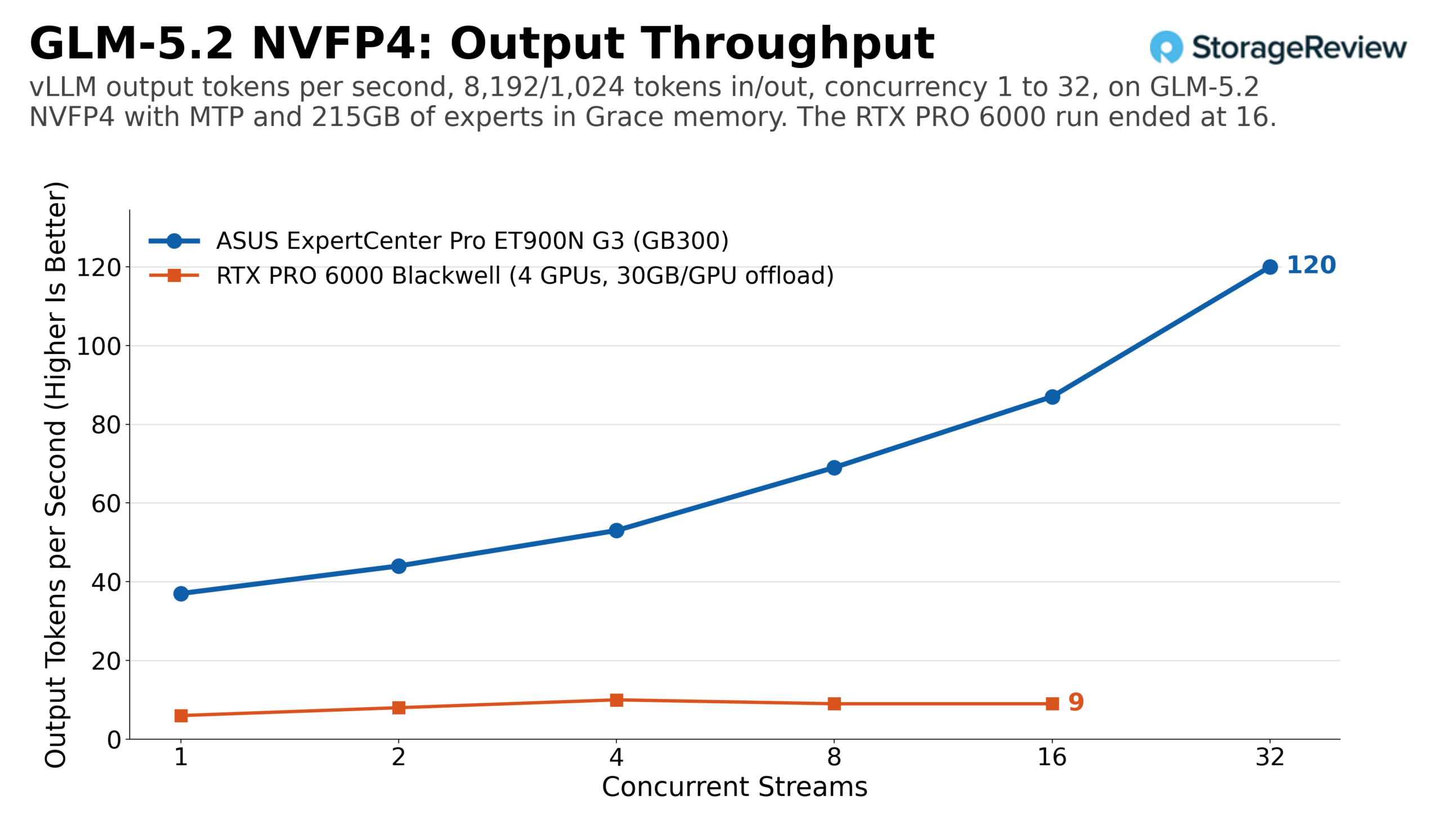
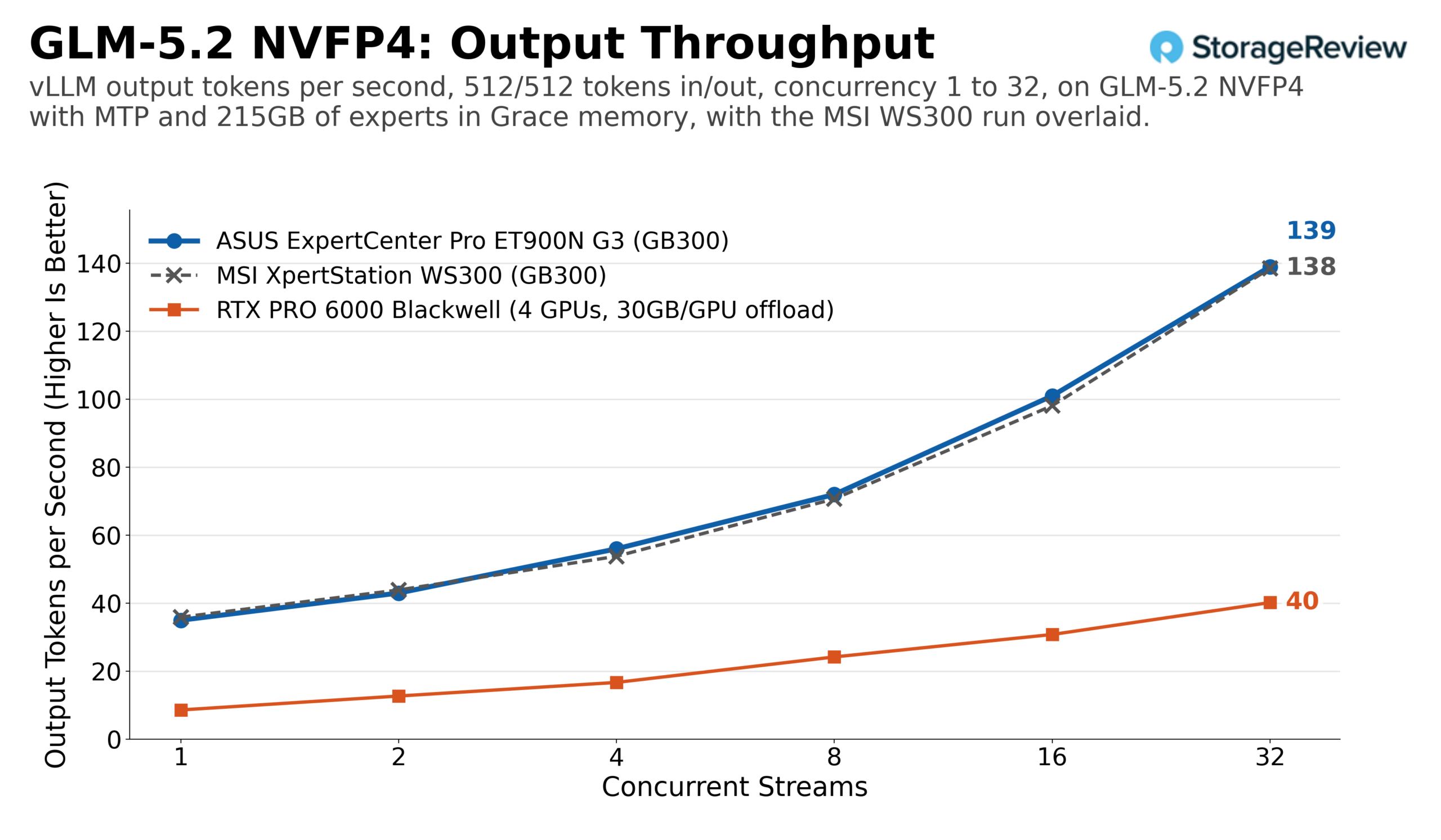
GLM-5.2 is the use case that only the coherent pool makes possible. The NVFP4 checkpoint keeps about 215GB of expert weights in Grace memory with MTP speculative decoding, and the ET900N G3 served it at 35 output tokens per second for one stream and 139 for 32 streams on an equal workload, with total throughput reaching 277. On the prefill-heavy profile, the sweep ran to 32 streams, reaching 120 output tokens per second and 1,079 total tokens. Four RTX PRO 6000 cards, each offloading about 30GB to host memory, managed about 40 output tokens per second at 32 streams, flattening to roughly 9 to 10 on long prompts from four streams onward. Neither system makes a 433GB model feel fast, but the GB300’s 396GB/s LPDDR5X and 900GB/s NVLink-C2C path to offloaded experts keeps scaling where PCIe-attached host memory across four cards stops.
Set against the MSI WS300, the ET900N G3’s frontier-model results land within about 1% at every point we can compare: 1,766 output tokens per second on DeepSeek V4 Flash at 32 streams on both towers, 4,793 versus 4,801 on MiniMax M2.7 at 128, 1,041 on MiniMax M3 at 32 on both, and 139 on GLM-5.2 at 32 on both.
Shared models against the RTX PRO 6000, H200 NVL, and DGX Spark
The second half of benchmarking uses models small enough for every system to serve: GPT-OSS-20B and 120B in native MXFP4; Llama 3.1 8B in BF16 and FP8; Mistral Small 24B in BF16 and FP8; and Qwen3 Coder 30B in BF16 and FP8. New since the WS300 review is a single H200 NVL, NVIDIA’s 141GB Hopper card, which gives the comparison a data center accelerator one generation back.
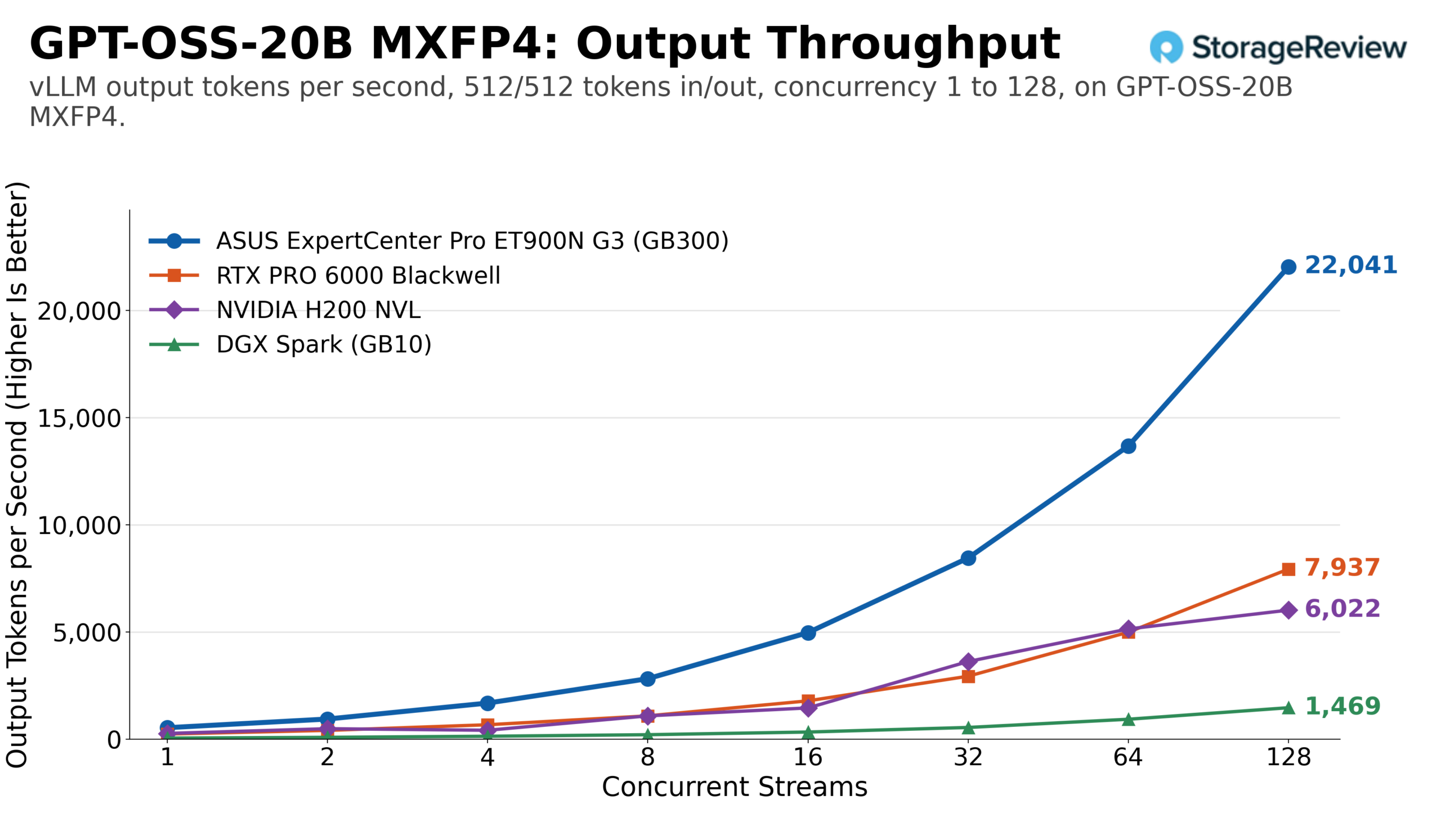
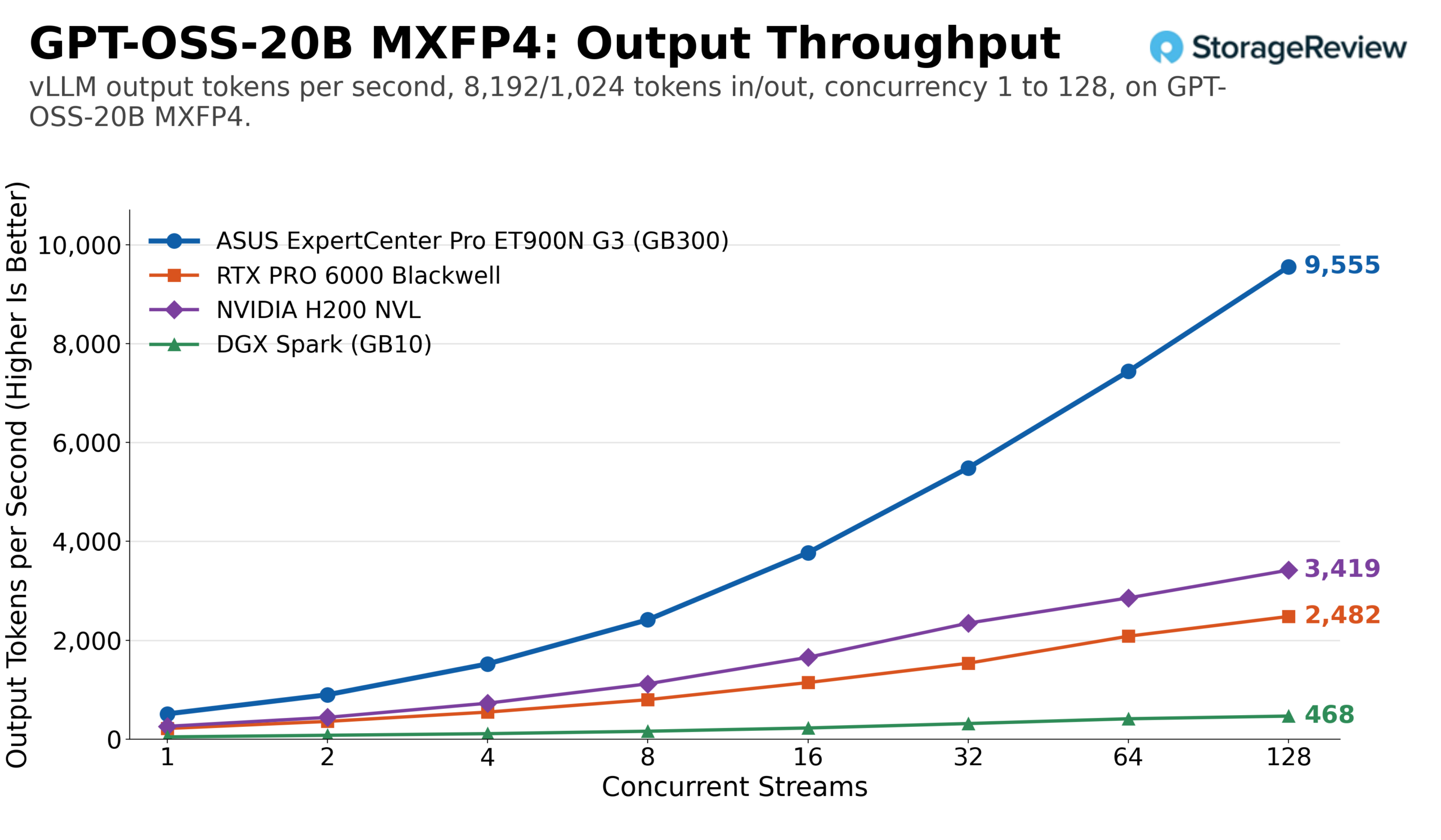
GPT-OSS-20B is the friendliest test of the set, a checkpoint every system holds comfortably, and on the equal workload the ET900N G3 scaled to 22,041 output tokens per second at 128 streams, or 44,082 total, against 7,937 for the RTX PRO 6000, 6,022 for the H200 NVL, and 1,469 for the DGX Spark. In single-stream mode, the Station produced 536 output tokens per second, compared to the card’s 241, the H200’s 270, and the Spark’s 50. The prefill-heavy profile widened the gap: 9,555 output tokens per second and 85,994 total at 128 streams for the Station, with the RTX PRO 6000 at 2,482, the H200 NVL at 3,419, and the Spark at 468.
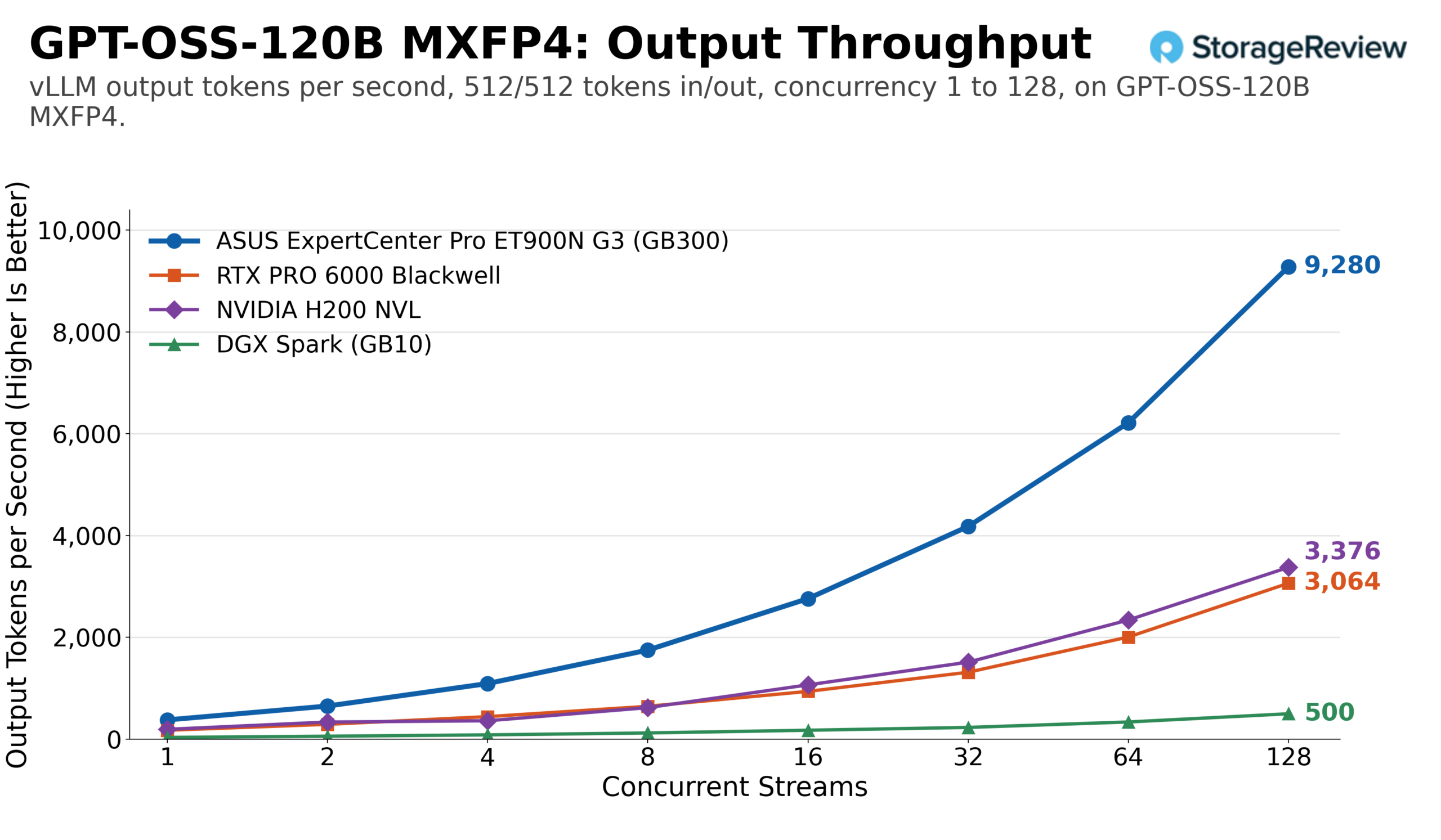
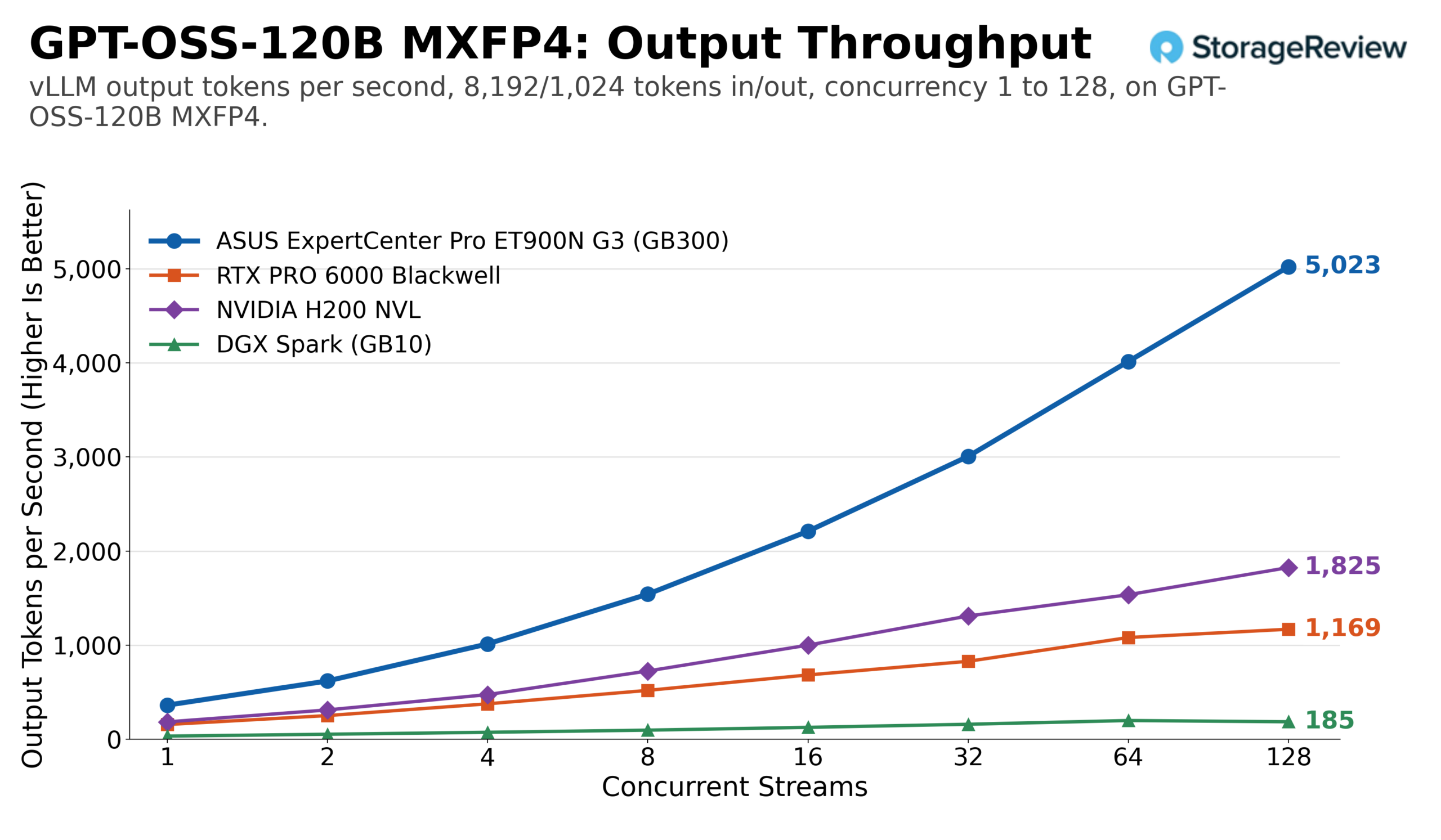
GPT-OSS-120B is where memory starts to sort the field. The ET900N G3 reached 9,280 output tokens per second on the equal workload at 128 streams, roughly three times the RTX PRO 6000 at 3,064, 2.7 times the H200 NVL at 3,376, and more than 18 times the Spark at 500. Under long prompts, the smaller systems finished far below the Station: the RTX PRO 6000 reached 1,169 output tokens per second at 128 streams and the H200 NVL 1,825, while the Station was still climbing at 128 streams and finished at 5,023, with a total throughput of 45,205 tokens per second.
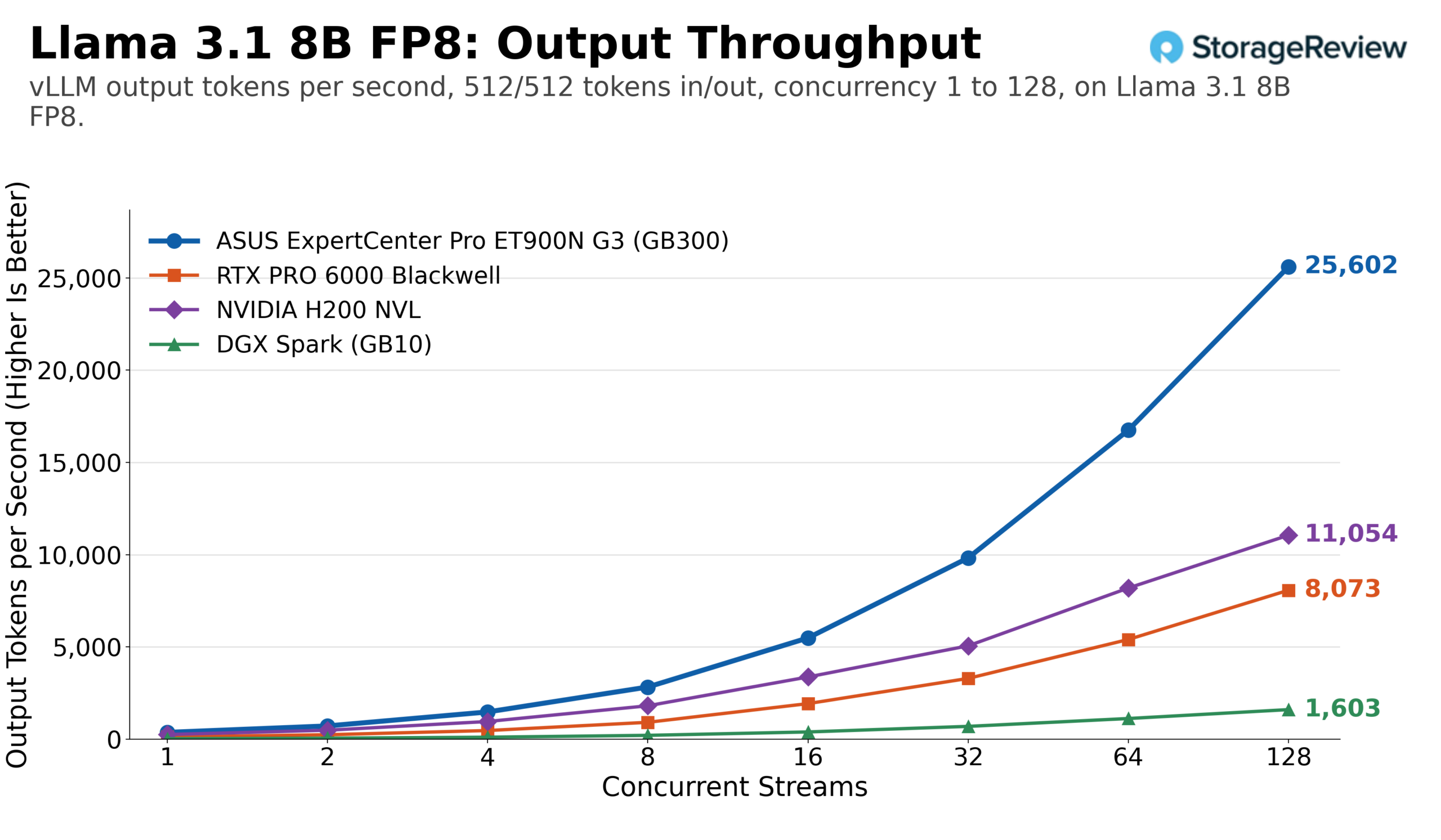
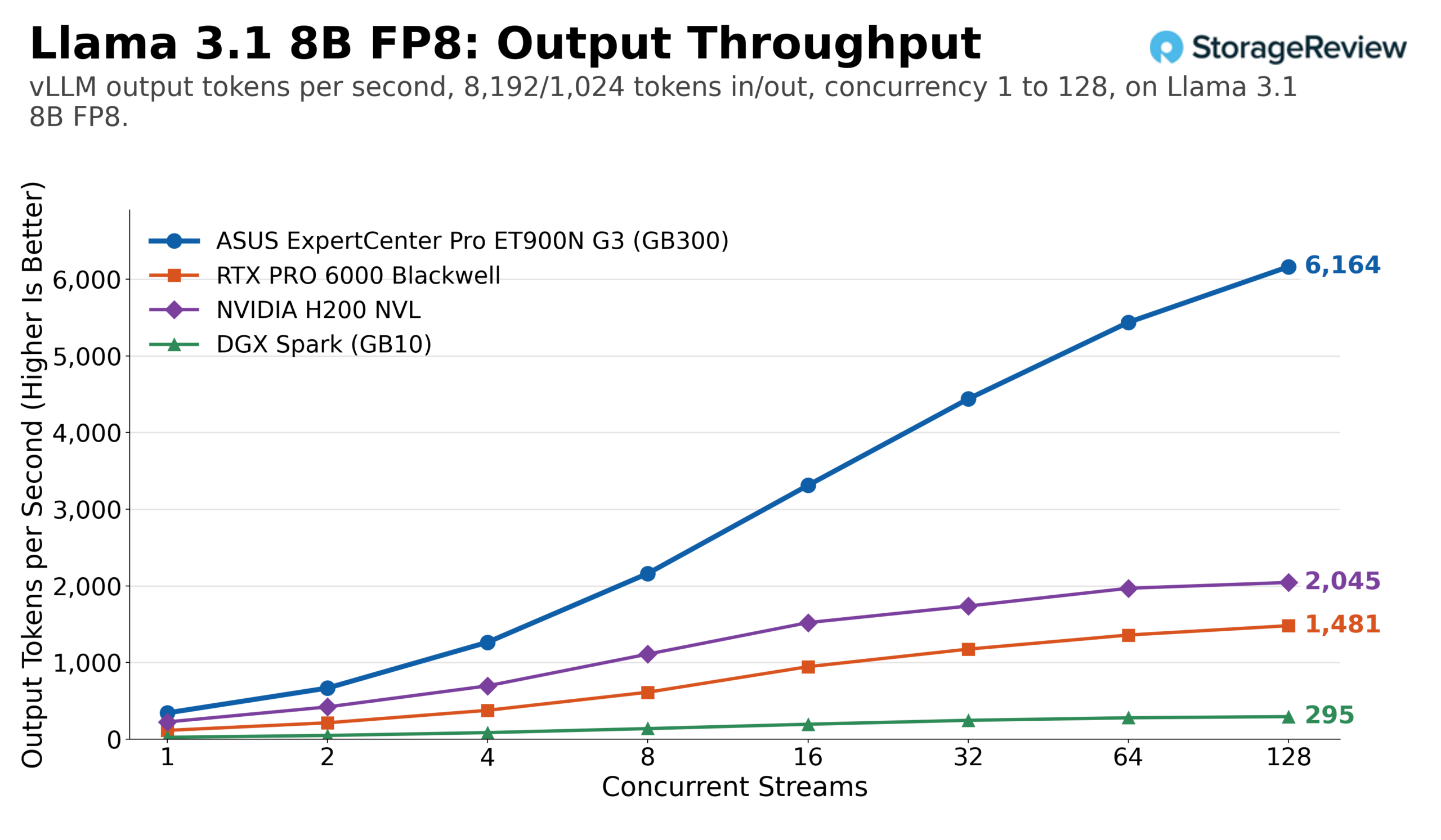
Llama 3.1 8B at FP8 is the highest single number in the set. The ET900N G3 pushed 25,602 output tokens per second across 128 streams on the equal workload, 51,205 total, compared with 8,073 for the RTX PRO 6000 and 11,054 for the H200 NVL. Dropping from BF16 to FP8 lifted the Station by about 50% (from 17,074 to 25,602), while the RTX PRO 6000 gained about 70% and the H200 NVL about 37% from the same change. The prefill-heavy profile compressed everything, with the Station at 6,164 output tokens per second, the card at 1,481, and the H200 at 2,045.
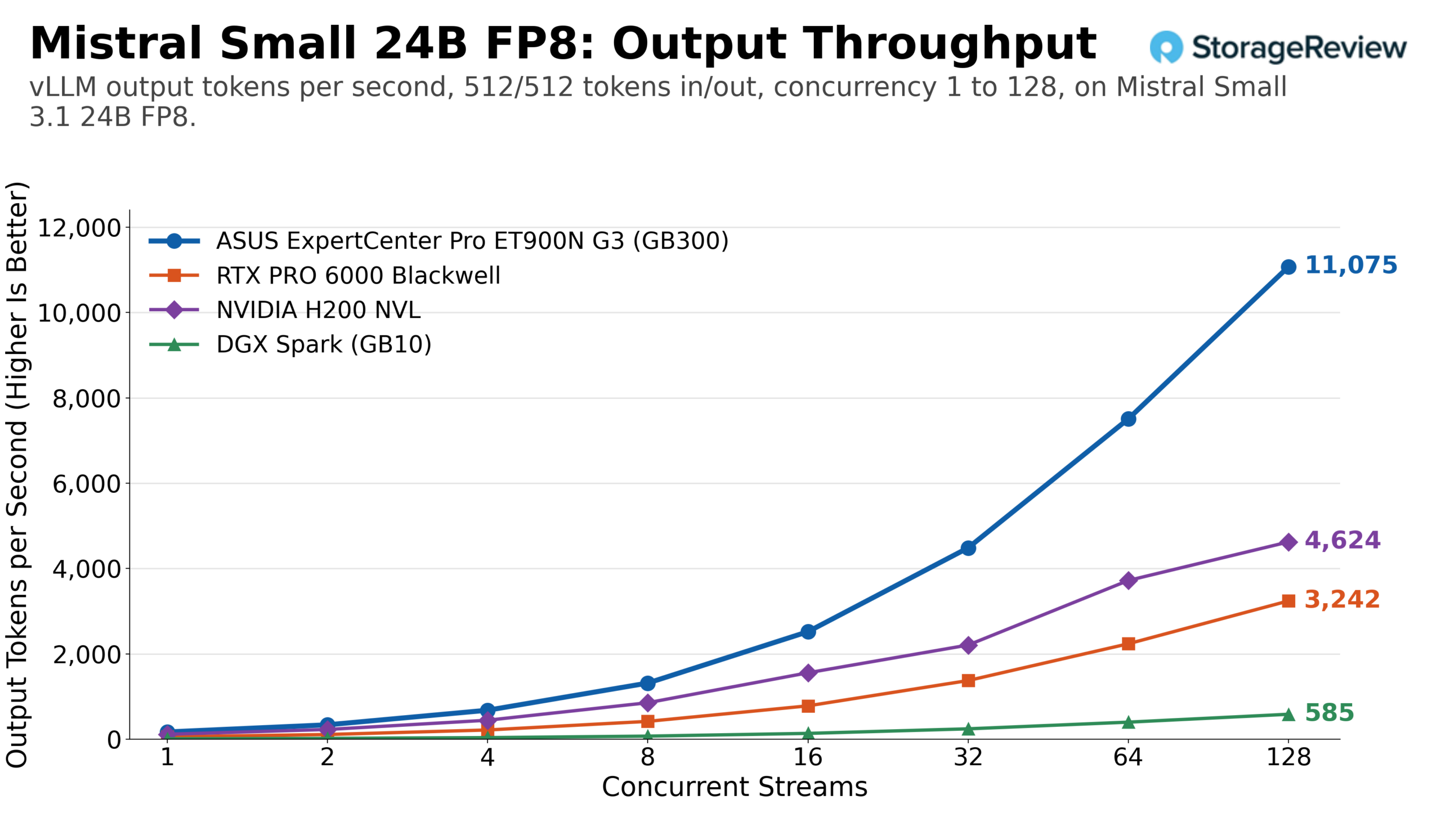
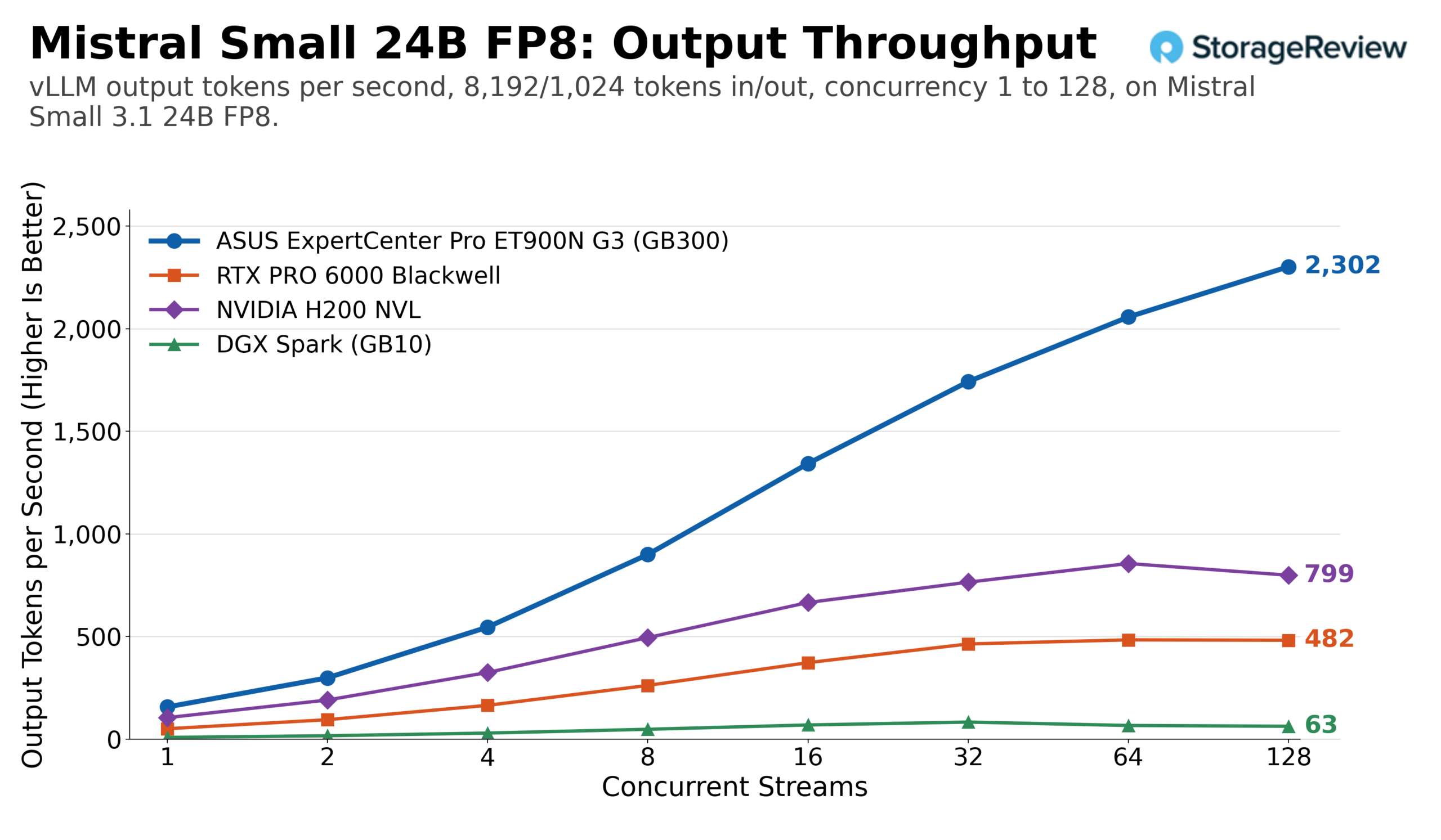
Mistral Small 24B at FP8 produced the widest ratios. The ET900N G3 peaked at 11,075 output tokens per second on the equal workload, 3.4 times the RTX PRO 6000 at 3,242, 2.4 times the H200 NVL at 4,624, and nearly 19 times the Spark at 585. Under long prompts, the RTX PRO 6000 peaked at 484 output tokens per second at 64 streams and held there; the H200 NVL topped out at 856 at 64 streams, and the Station reached 2,302 at 128 streams.
Qwen3 Coder 30B, a mixture-of-experts model with a small active parameter count, is where the single-stream gap narrows. At one stream on an equal workload, the RTX PRO 6000 delivered 169 output tokens per second to the Station’s 319 and the H200 NVL’s 211, the closest the card gets to the Station among the shared models. Batching widens the gap again: at 128 streams, the ET900N G3 reached 12,439 output tokens per second at FP8, 3.1 times the card at 3,995 and 1.7 times the H200 NVL at 7,459. On the prefill-heavy profile, the Station reached 3,837 output tokens per second, while the RTX PRO 6000 peaked at 882 at 64 streams, and the H200 NVL at 1,820.
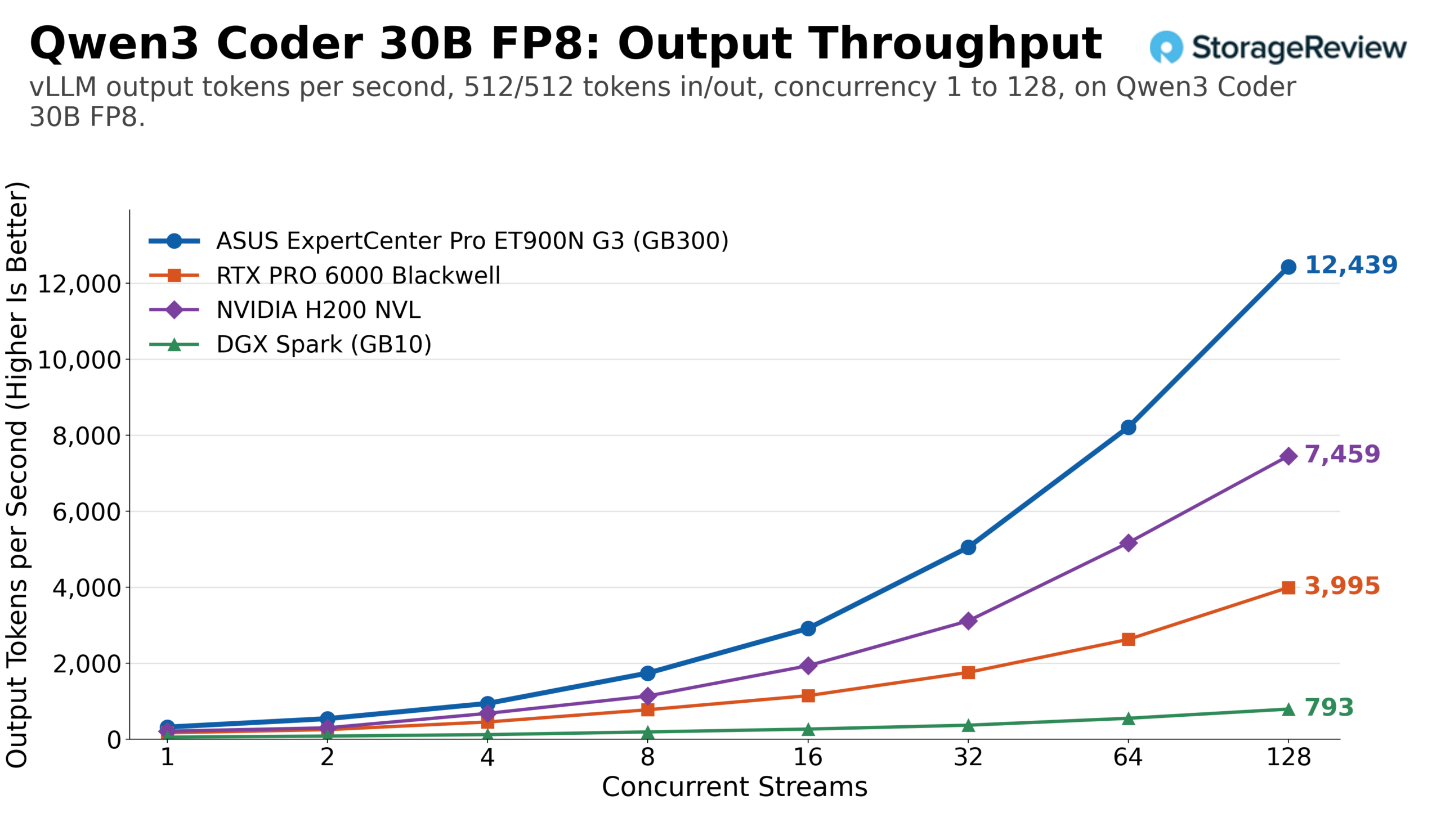
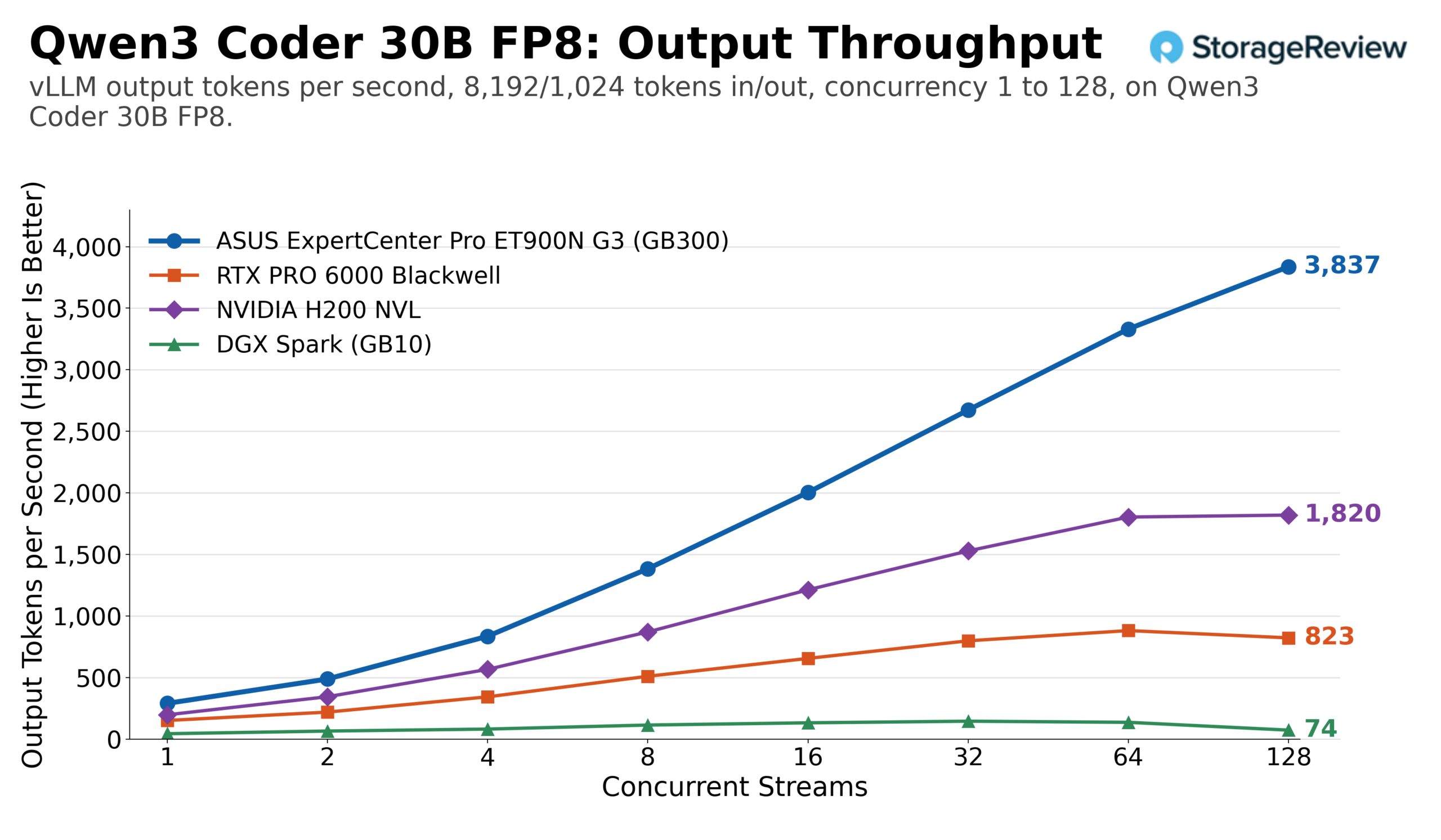
Across the shared models, the ET900N G3 landed at 2.8 to 3.9 times that of a single RTX PRO 6000 and 1.7 to 3.7 times that of an H200 NVL at full concurrency, with the margin over both widening under long prompts as their KV cache headroom ran out. Against the WS300, these four again sit within 1%: 22,041 versus 22,161 on GPT-OSS-20B, 9,280 versus 9,294 on GPT-OSS-120B, 11,075 versus 11,157 on Mistral Small FP8, and 12,439 versus 12,425 on Qwen3 Coder FP8. The full 14-model comparison, including the three models with wider gaps, is in the next section.
Two Towers, One Baseboard: ASUS ET900N G3 vs MSI WS300
The ET900N G3 and the MSI XpertStation WS300 are the same NVIDIA GB300 DGX Station baseboard in two OEM chassis, and both went through the same 14 models, the same two workloads, and the same concurrency sweep on the same vLLM build. The chart below compares the ET900N G3’s peak output throughput across all models with the WS300’s.
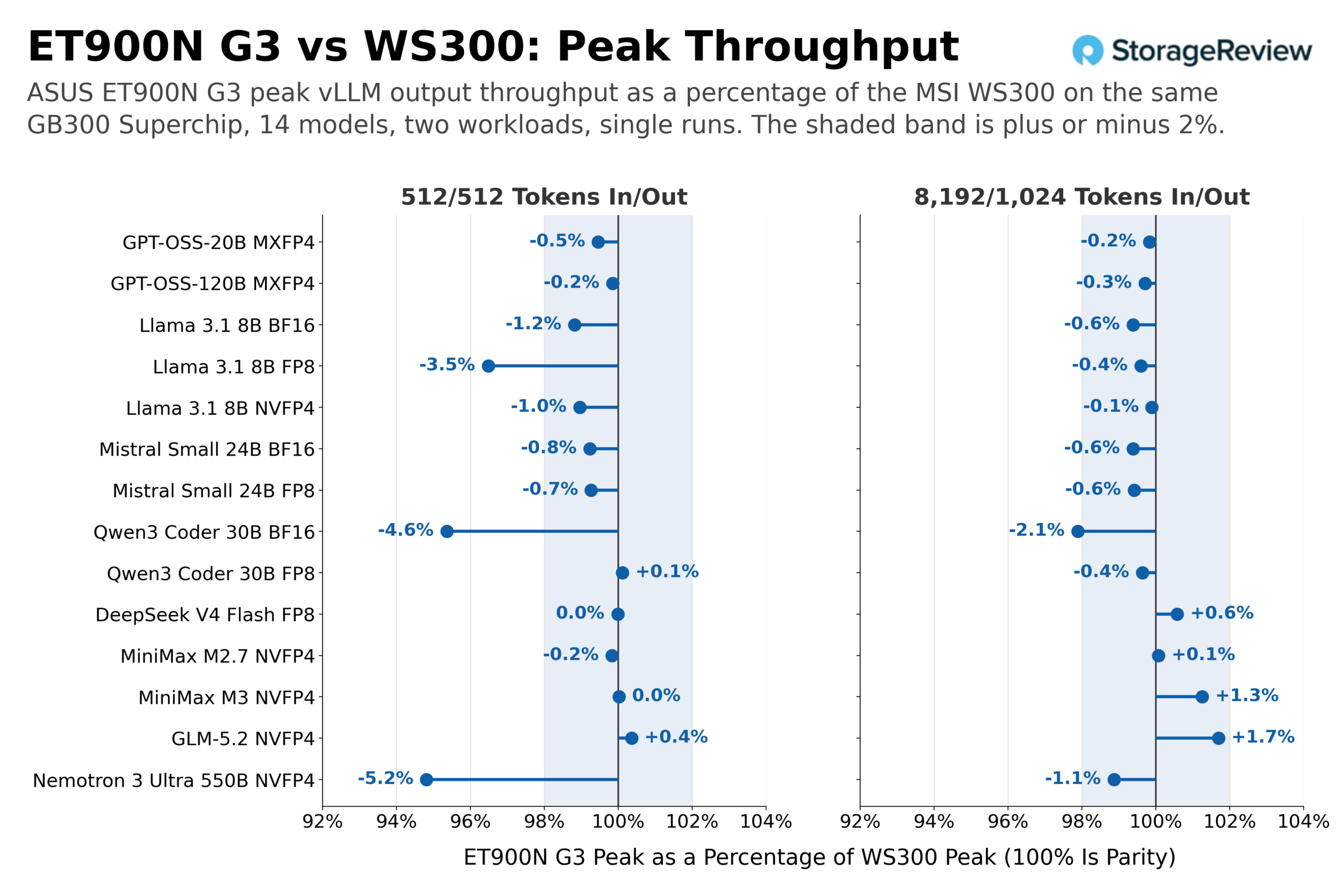
Across the 28 model-workload pairs, 24 fall within 2% of each other, and most of those are a fraction of a percent in the WS300’s favor. Four sit outside that band, three of them on the equal workload: Llama 3.1 8B FP8 at 3.5% under the WS300 (25,602 versus 26,536 output tokens per second), Qwen3 Coder 30B BF16 at 4.6% under (10,000 versus 10,486), and Nemotron 3 Ultra 550B at 5.2% under (159 versus 168), plus Qwen3 Coder 30B BF16 again at 2.1% under on the long prompts. Every figure here is a single run on each tower, so a 2 to 5% gap across three models out of 14 isn’t something we’ll pin on the chassis; we’re just noting the data and the delta between the two. The models that rely on the coherent memory pool, MiniMax M3 and GLM-5.2, land at parity or above on both workloads; that’s the result we think matters most for the platform: the Grace offload path performs the same in ASUS’s chassis as in MSI’s.
| Model | WS300 512/512 | ET900N G3 512/512 | Delta | WS300 8,192/1,024 | ET900N G3 8,192/1,024 | Delta |
|---|---|---|---|---|---|---|
| GPT-OSS-20B MXFP4 | 22,161 | 22,041 | -0.5% | 9,572 | 9,555 | -0.2% |
| GPT-OSS-120B MXFP4 | 9,294 | 9,280 | -0.2% | 5,038 | 5,023 | -0.3% |
| Llama 3.1 8B BF16 | 17,278 | 17,074 | -1.2% | 3,520 | 3,498 | -0.6% |
| Llama 3.1 8B FP8 | 26,536 | 25,602 | -3.5% | 6,189 | 6,164 | -0.4% |
| Llama 3.1 8B NVFP4 | 28,698 | 28,400 | -1.0% | 6,744 | 6,737 | -0.1% |
| Mistral Small 24B BF16 | 7,922 | 7,861 | -0.8% | 1,643 | 1,633 | -0.6% |
| Mistral Small 24B FP8 | 11,157 | 11,075 | -0.7% | 2,316 | 2,302 | -0.6% |
| Qwen3 Coder 30B BF16 | 10,486 | 10,000 | -4.6% | 3,830 | 3,749 | -2.1% |
| Qwen3 Coder 30B FP8 | 12,425 | 12,439 | +0.1% | 3,851 | 3,837 | -0.4% |
| DeepSeek V4 Flash FP8 | 1,766 | 1,766 | 0.0% | 948 | 954 | +0.6% |
| MiniMax M2.7 NVFP4 | 4,801 | 4,793 | -0.2% | 1,743 | 1,744 | +0.1% |
| MiniMax M3 NVFP4 | 1,041 | 1,041 | 0.0% | 278 | 282 | +1.3% |
| GLM-5.2 NVFP4 | 138 | 139 | +0.4% | 118 | 120 | +1.7% |
| Nemotron 3 Ultra 550B NVFP4 | 168 | 159 | -5.2% | 142 | 140 | -1.1% |
GPT-OSS-20B, the highest-throughput dense case in the set, and GLM-5.2, the offload case, show the overlap without a ratio: on both, the WS300’s run traces the ET900N G3’s point for point.
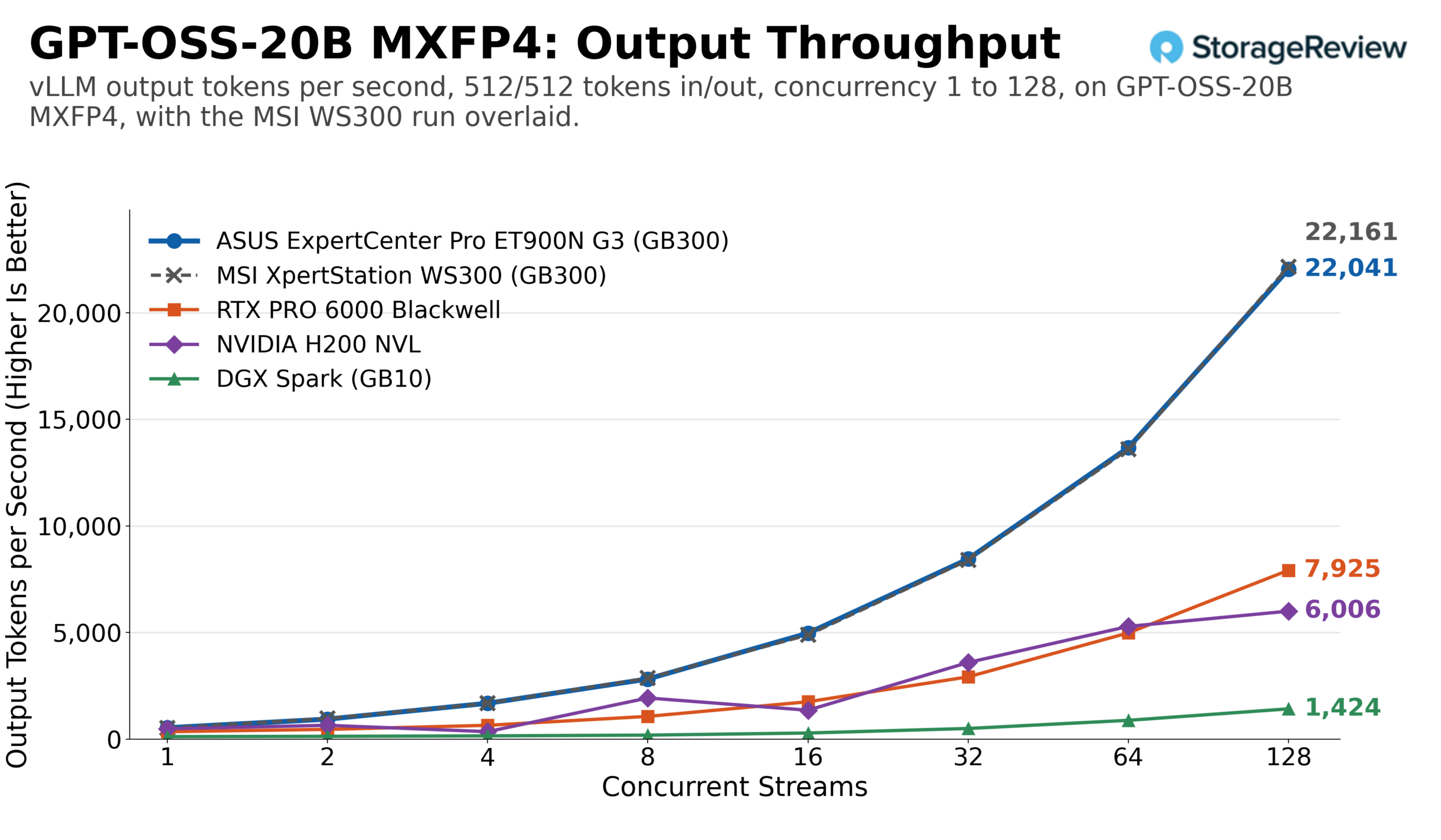
This is the comparison we’ll build on as more GB300 towers come through the lab. HP’s ZGX is next, with more to follow, and each one runs the same sweep, so any differences between OEM implementations will show up here, in one chart per tower, with the model charts holding the raw curves.
Conclusion
The ASUS ExpertCenter Pro ET900N G3 does what a second implementation of a reference platform should: it confirms the first. Across 14 models and two workloads, its peak vLLM throughput landed within 2% of the MSI XpertStation WS300 on 24 of 28 comparisons, from 1,766 output tokens per second on DeepSeek V4 Flash to 22,041 on GPT-OSS-20B, with four single-run outliers between 2 and 5% under, and it served GLM-5.2 with 215GB of experts in Grace memory at rates four RTX PRO 6000 cards couldn’t reach. The GB300 Superchip sets the ceiling, and ASUS did a good job executing.
What ASUS adds is practical: the handles turn a 27kg tower into something two people can move without gripping the panels, the fan over the QSFP112 cages addresses a potential problem for anyone running 400G optics for hours, and the Titanium supply trims a few watts at the wall. The Arm host, the 20A circuit, the BMC-only display output, and the shared 1,600W budget when a large card is installed are platform realities that apply equally to both towers.
The GB300 DGX Station remains the most capable thing we’ve ever put on a desk, and ASUS has made their version a good way to buy it.
On our Best Desktops for Local AI leaderboard, the ET900N G3 now stands alongside the WS300 as a tested alternative in the Best GB300 System slot.
Leaderboard: The H200 NVL results in this review back its Best Overall PCIe AI Accelerator pick on our Best Enterprise GPUs leaderboard, and the XE7740 RTX PRO 6000 configurations appear in its scale-out table.



 Amazon