

The MSI XpertStation WS300 is built on NVIDIA’s newest DGX Station architecture, the most capable generation yet, placing a full GB300 Grace Blackwell Ultra node beside your desk. The headline number is 20 petaFLOPS of FP4 compute, delivered by a single Blackwell Ultra GPU tied to a 72-core Grace CPU over a 900GB/s NVLink-C2C link. Both processors draw from one coherent 748GB memory pool; 252GB of HBM3e paired with 496GB of LPDDR5X, enough to keep a trillion-parameter model resident in local memory.
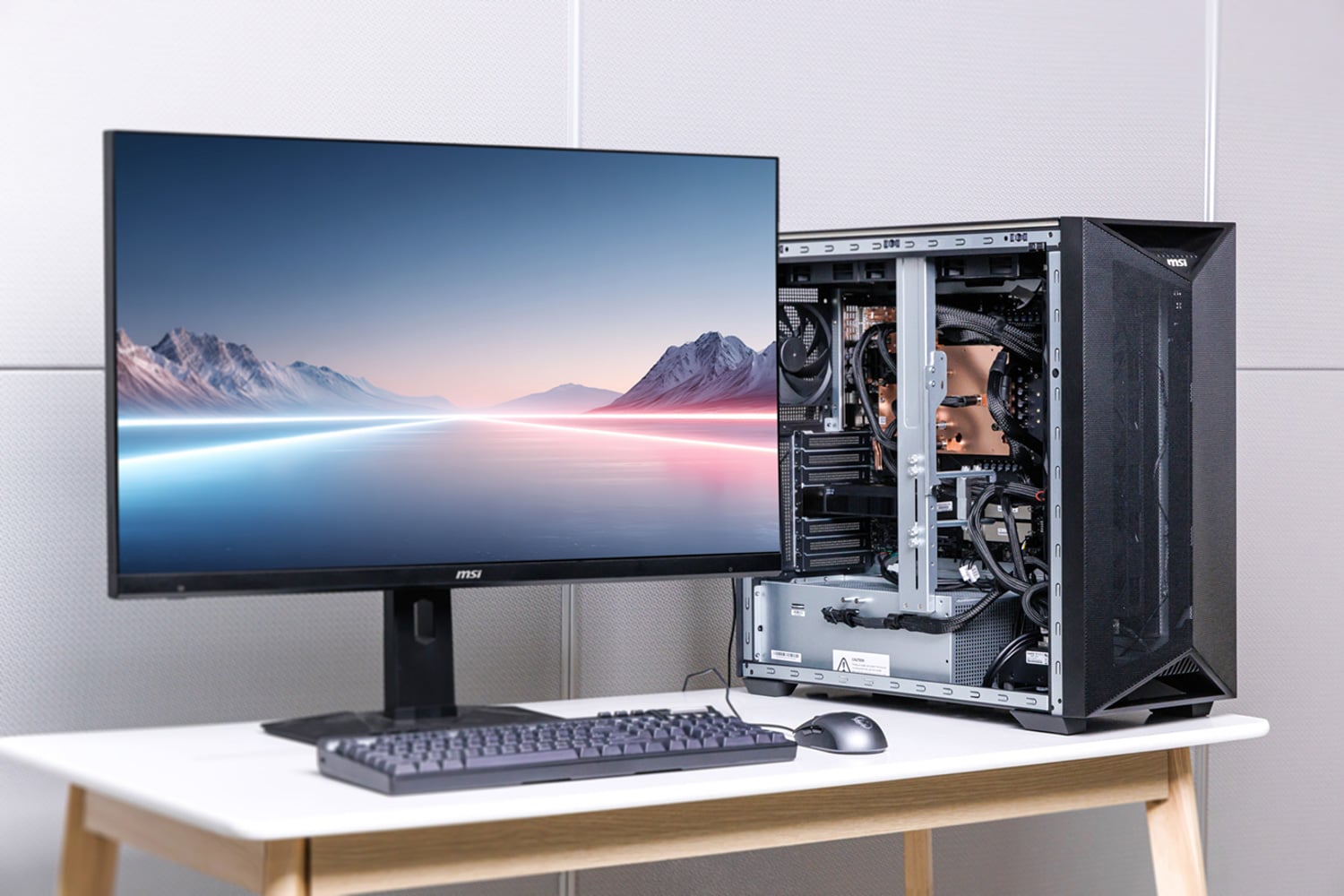
The DGX Station also supports clustering multiple units using its ConnectX-8 SuperNIC, which exposes two 400GbE ports for 800Gb/s of fabric. The result is a datacenter-class machine that can run in a home or office rather than a server hall.
NVIDIA DGX Station Technical Specifications
The XpertStation WS300 is MSI’s implementation of NVIDIA’s GB300 DGX Station platform. NVIDIA supplies the Grace Blackwell Ultra baseboard and software environment, while MSI supplies the chassis, liquid cooling, power delivery, storage layout, external I/O, and service model that turn the platform into a complete deskside system. Because the Grace CPU, Blackwell Ultra GPU, NVLink-C2C interconnect, and ConnectX-8 networking are fixed, the real OEM differentiation is in how effectively the surrounding system sustains, manages, and exposes that hardware. MSI had this system configured with four 2TB Micron 4600 Gen5 M.2 SSDs for testing. Two SSDs were configured in RAID1 for boot storage, while the other two were discrete SSDs for scratch space or other uses.
| Specification | Details |
|---|---|
| Architecture | |
| CPU | NVIDIA Grace, 72-core Arm Neoverse V2 |
| GPU | NVIDIA Blackwell Ultra (B300) |
| Tensor Cores | 5th Generation |
| CPU-GPU Interconnect | NVLink-C2C, 900 GB/s bidirectional |
| Memory | |
| Coherent Memory | Up to 748 GB |
| GPU Memory | Up to 252 GB HBM3e |
| GPU Memory Bandwidth | 7.1 TB/s |
| CPU Memory | Up to 496 GB LPDDR5X (4 x SOCAMM) |
| CPU Memory Bandwidth | 396 GB/s |
| Storage | |
| Boot Drives | 2 x M.2 2280 PCIe 5.0 x4 NVMe (CPU-attached), populated with 2 x 2TB Micron 4600 Gen5 in RAID 1 |
| Expansion Drives | 2 x M.2 2280 PCIe 5.0 x4 NVMe (ConnectX-8-attached), populated for testing with 2 x 2TB Micron 4600 Gen5 |
| Networking | |
| NIC | NVIDIA ConnectX-8 SuperNIC, 2 x 400G QSFP112 (800 Gb/s aggregate) |
| Ethernet | 1 x 10GBase-T RJ45 (Marvell AQC113) |
| Management Port | 1 x 1000Base-T RJ45 (dedicated out-of-band) |
| Wireless | M.2 2230 Key-E slot, PCIe 2.0 x1 (Wi-Fi 6E / Wi-Fi 7, Bluetooth) |
| Expansion | |
| PCIe Slots | 1 x PCIe 5.0 x16 FHFL double-wide; 2 x PCIe 5.0 x16 FHFL single-wide (x8 signals) |
| Supported Add-in GPUs | NVIDIA RTX PRO 2000 Blackwell, RTX PRO 4000 Blackwell SFF, RTX PRO 6000 Blackwell Workstation / Max-Q |
| Front / Top I/O | |
| USB | 2 x USB 3.2 Gen 2 Type-A; 2 x USB 3.2 Gen 2 Type-C (5V/3A) |
| Audio | 2 x jacks (line-out / mic) |
| Rear I/O | |
| USB | 4 x USB 10Gbps Type-A; 1 x Micro-USB COM (serial console) |
| Display | 1 x Mini DisplayPort (BMC video, max 1024 x 768, no DP++) |
| Audio | 3 x jacks (line-in / line-out / mic) |
| Management & Security | |
| BMC | ASPEED AST2600 with AMI MegaRAC firmware, IPMI 2.0 and Redfish, eMMC local storage |
| Security | TPM 2.0, chassis intrusion, Microchip CEC1736 hardware root of trust (ERoT) |
| Cooling | |
| Liquid Cooling | Liquid cooling module rated for 1400W CPU + GPU, with blocks on GPU, CPU, memory, and ConnectX-8 |
| Radiators / Fans | 2 x 360mm radiators; 1 x 12025 system fan |
| Power | |
| Power Supply | 1 x 1600W ATX, 80 PLUS Platinum (150 x 86 x 210 mm) |
| AC Input | 100-114Vac, 15A, 47-63Hz (max 1300W output); 115-240Vac, 15-8A, 47-63Hz (max 1600W output) |
| Form Factor | |
| Dimensions | 245.7 x 529.0 x 570.4 mm (9.67 x 20.83 x 22.46 in), W x H x D |
Design and Build
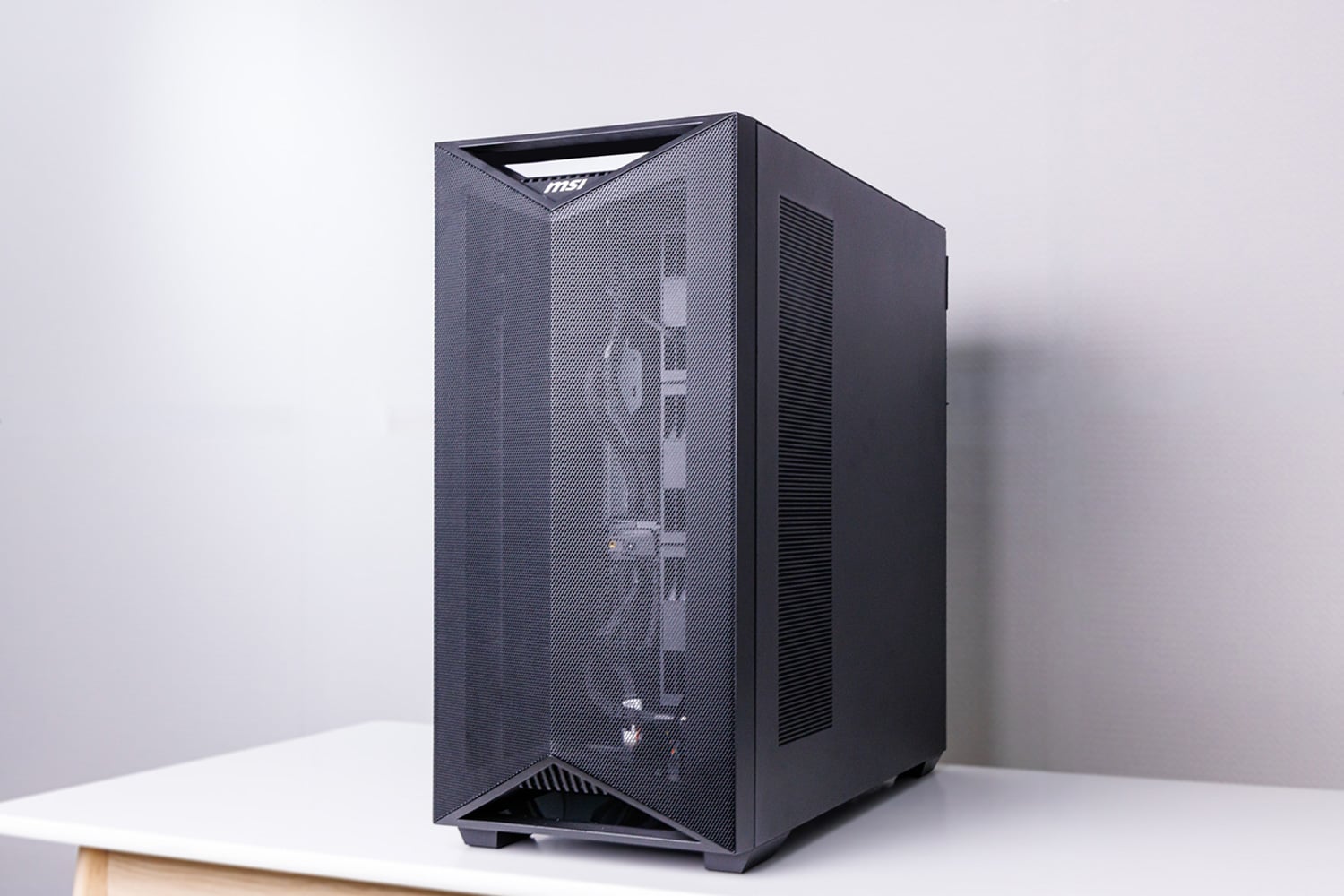
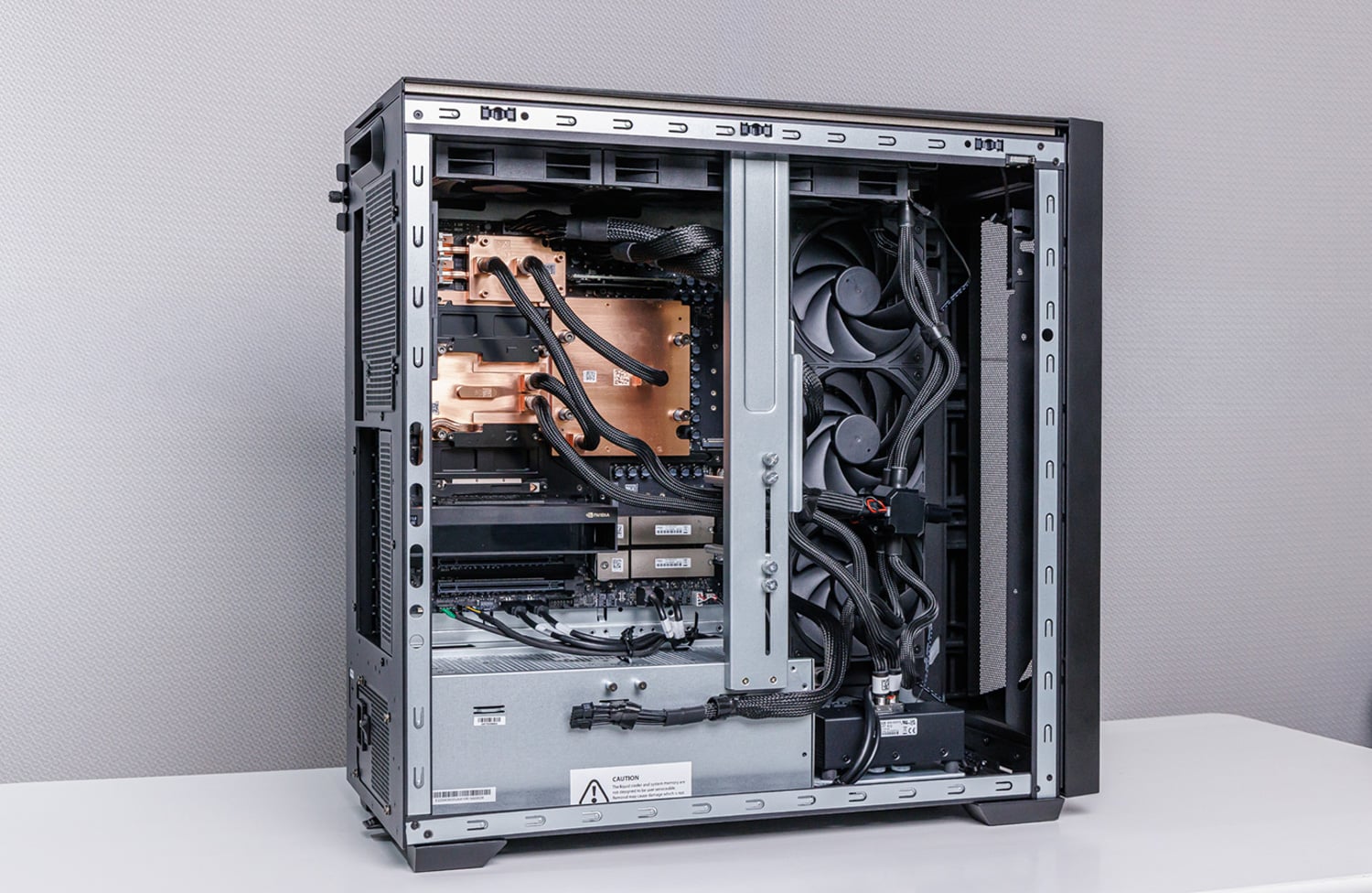
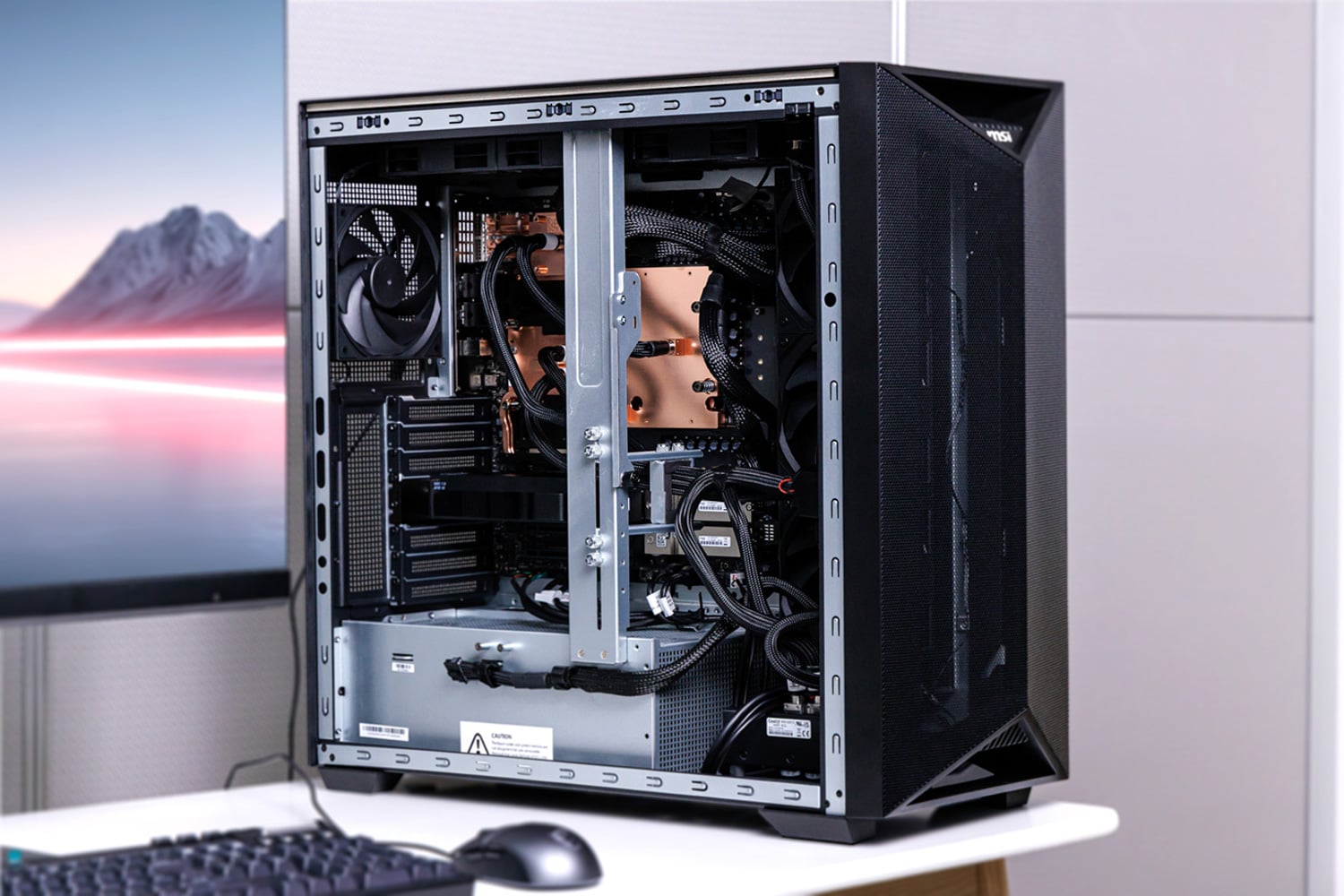
At first glance, the XpertStation looks like a standard modern workstation with a sleek professional design. Take the side panel off, and the resemblance ends there.
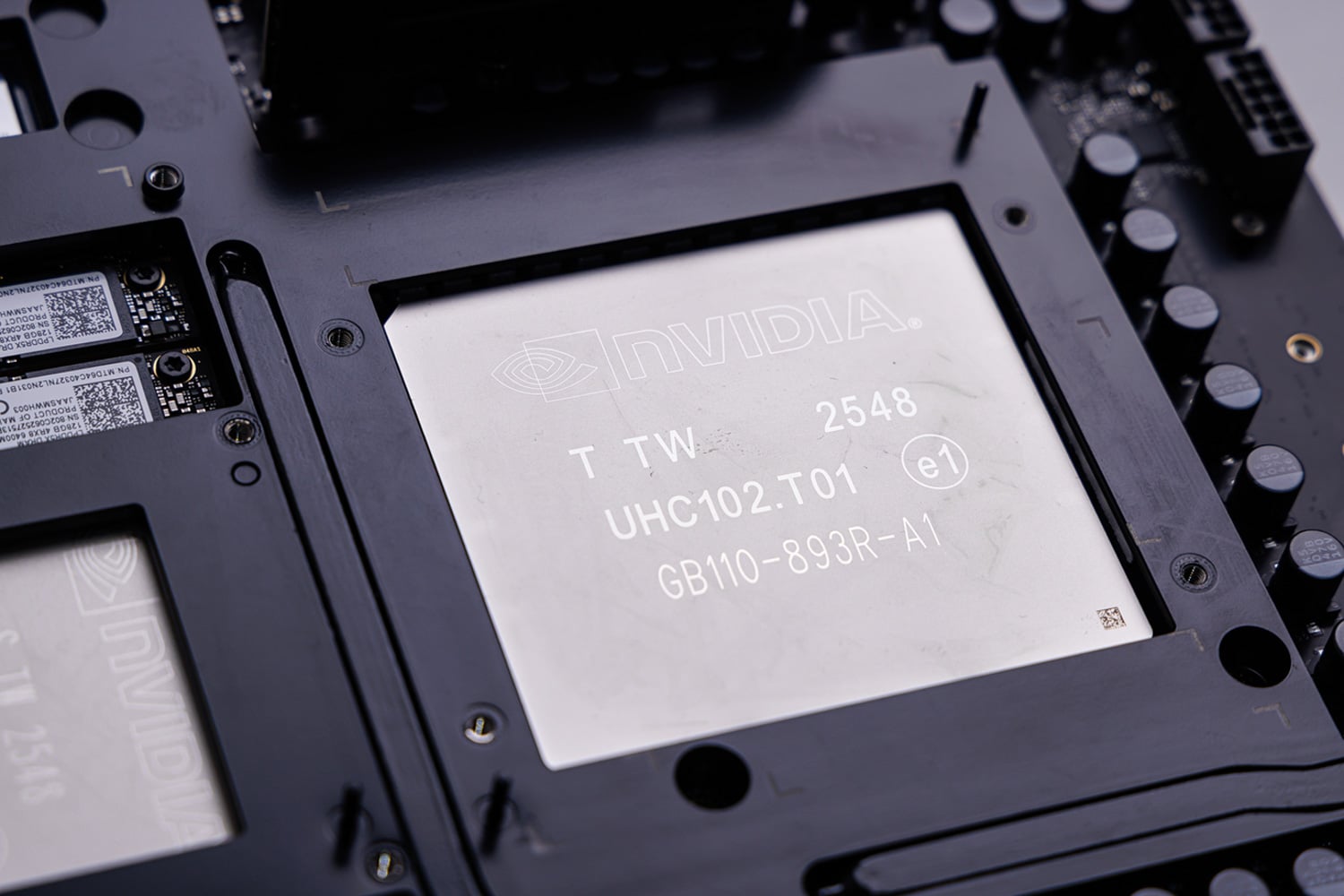
GB300 Grace Blackwell Ultra Desktop Superchip
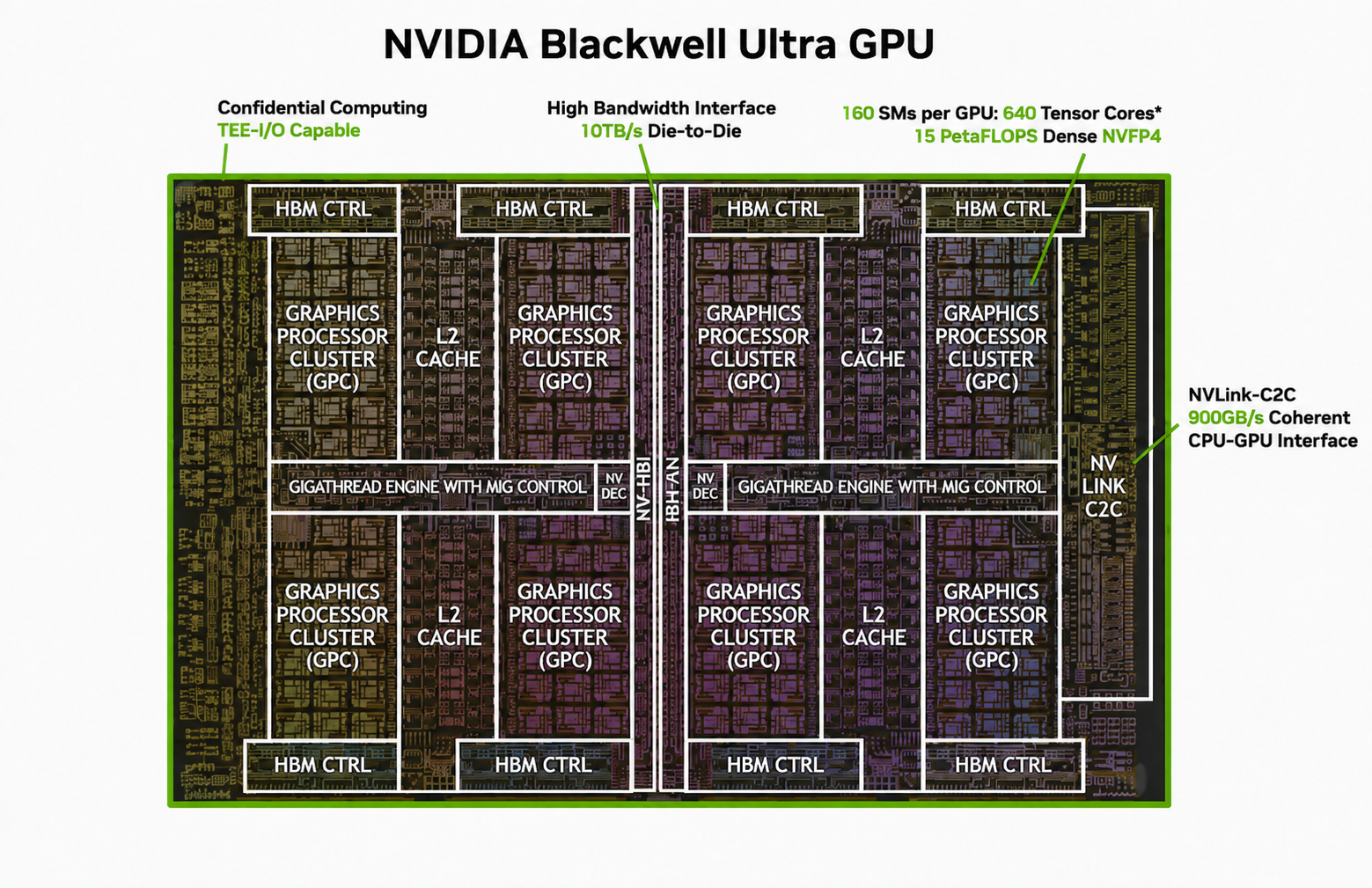
At the center of the WS300 is our star of the show: NVIDIA’s B300 GPU, built on the Blackwell Ultra architecture.
Source: NVIDIA, annotated by StorageReview
The B300 is one of the most advanced GPUs available today, featuring a dual-reticle design built on TSMC’s 4NP process. The two dies are joined by NVIDIA’s 10TB/s NV-HBI die-to-die interface, allowing the GPU to operate as a single CUDA accelerator. The B300 used in DGX Station is based on the 208-billion-transistor Blackwell Ultra design, with up to 160 SMs and 640 fifth-generation Tensor Cores. It also features 252GB of HBM3e with 7.1TB/s of memory bandwidth. As a data center part, the B300 lacks normal display output and NVENC hardware encoders. It does, however, include seven NVDEC engines and seven nvJPEG decoders. The GPU also supports MIG, allowing it to be partitioned into as many as seven isolated instances. Looking at compute, the B300 offers:
| Precision | Peak Performance |
|---|---|
| B300 Compute Performance | |
| NVFP4 Tensor Core | 20 PFLOPS sparse / 15 PFLOPS dense |
| FP8 / FP6 Tensor Core | 10 PFLOPS |
| INT8 Tensor Core | 330 TOPS |
| FP16 / BF16 Tensor Core | 5 PFLOPS |
| TF32 Tensor Core | 2.5 PFLOPS |
| FP32 | 80 TFLOPS |
| FP64 / FP64 Tensor Core | 1.3 TFLOPS |
| Peak rates are based on GPU boost clock. Tensor Core specifications use sparsity unless otherwise noted. | |
Paired with the B300 is Grace, NVIDIA’s first data-center CPU. It uses 72 Arm Neoverse V2 cores, but the surrounding processor is NVIDIA’s own design, including the cache hierarchy, memory controllers, system I/O, Scalable Coherency Fabric, and NVLink-C2C interface. Grace exposes 72 cores and 72 hardware threads, with each core implementing Armv9 with cryptography extensions and four 128-bit SVE2 vector units. The core has a six-way instruction decoder capable of dispatching up to eight instructions per clock, six scalar ALUs, 64KB each of L1 instruction and data cache, and 1MB of private L2. Across the die, the CPU shares 114MB of L3 cache.
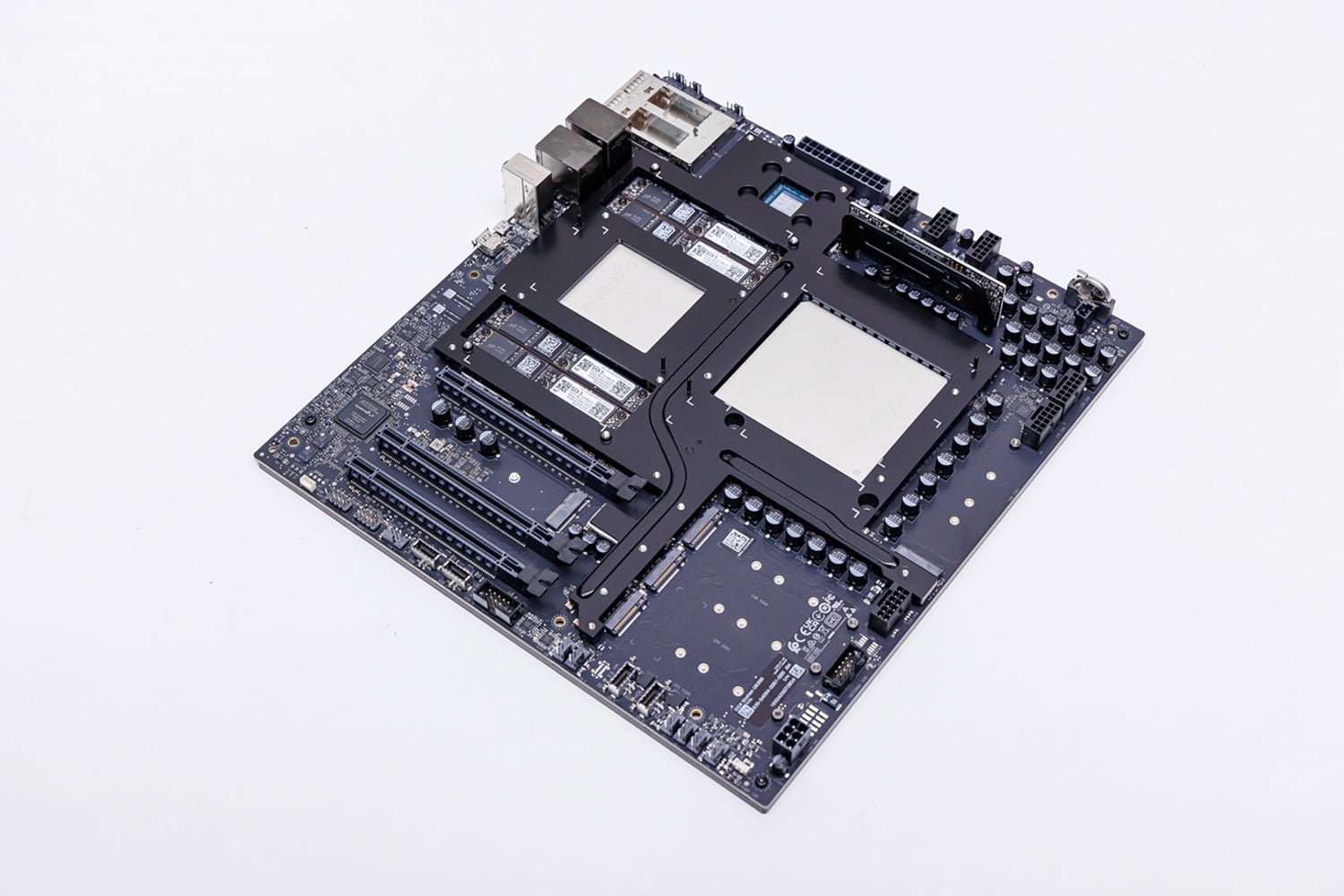
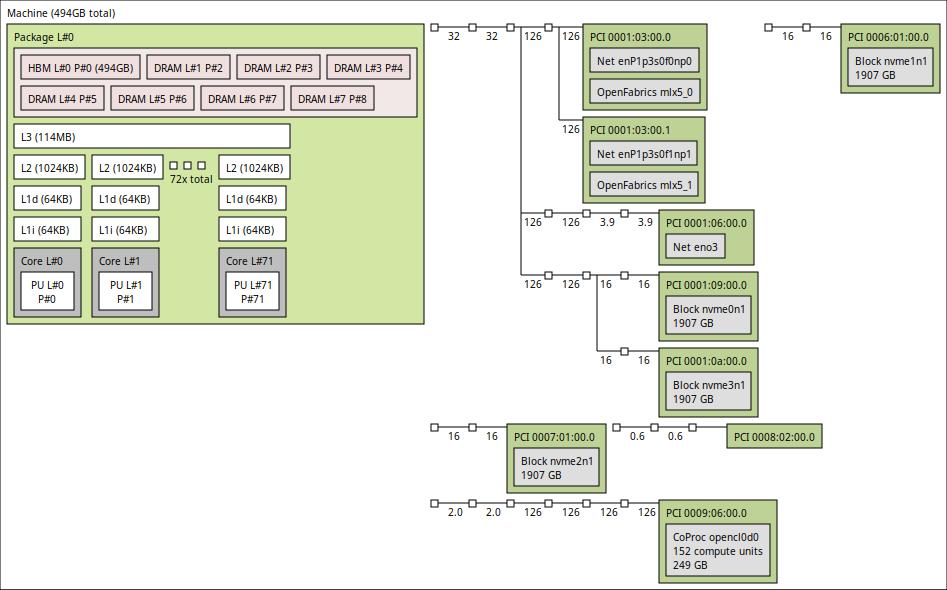
The cores and L3 cache slices are connected through NVIDIA’s Scalable Coherency Fabric, a mesh interconnect with 3.2TB/s of bisection bandwidth. The fabric also connects the CPU cores to memory, system I/O, and the NVLink-C2C interface, giving Grace the data-movement bandwidth needed to keep the B300 fed. In the WS300, Grace handles the CPU-side work surrounding the accelerator: GPU kernel launches, data loading, preprocessing, tokenization, and model orchestration. The topology view below gives a clear look at the single-socket design, with one 72-core Grace CPU and the platform devices connected around it.
Grace is paired with 496GB of LPDDR5X memory, delivering 396GB/s of bandwidth. Rather than soldering the memory directly to the baseboard, DGX Station uses four SOCAMM modules. SOCAMM, or System-on-Chip Advanced Memory Module, packages LPDDR5X in a compact, removable form factor. This allows the platform to retain the bandwidth and power-efficiency benefits of LPDDR5X while making the memory serviceable. A failed module can be replaced without replacing the entire baseboard.
Connecting Grace and the B300 is NVIDIA’s NVLink-C2C interface, a package-level interconnect that delivers 900GB/s of bidirectional bandwidth, roughly seven times that of a PCIe Gen5 x16 connection. The more important difference is memory coherence. In a conventional workstation, the CPU and discrete GPU maintain separate memory spaces, with data copied between them over PCIe. With NVLink-C2C, Grace and B300 share a coherent address space, allowing each processor to directly access memory attached to the other.
The result is a 748GB coherent address space, not a 748GB block of HBM. The B300 has 252GB of HBM3e delivering 7.1TB/s, while Grace contributes 496GB of LPDDR5X at 396GB/s. Data held in Grace memory must still cross the C2C link, so HBM remains the best location for frequently accessed model weights, tensors, and buffers. Grace memory instead acts as a large-capacity tier, allowing workloads that exceed the B300’s 252GB of local memory to remain on one system rather than being split across multiple GPUs. We will measure the performance impact of crossing into that second memory tier later in the testing section.
System topology
Moving out from the GB300 package, MSI’s block diagram shows how the rest of the system connects around Grace. The CPU sits at the center of the I/O topology, with two PCIe 5.0 x4 M.2 slots attached directly to it. MSI populates these with a pair of 2TB Micron 4600 SSDs configured in RAID 1 for the operating system and NVIDIA software stack. The three full-length expansion slots also come directly off Grace, with one PCIe 5.0 x16 link and two PCIe 5.0 x8 links.
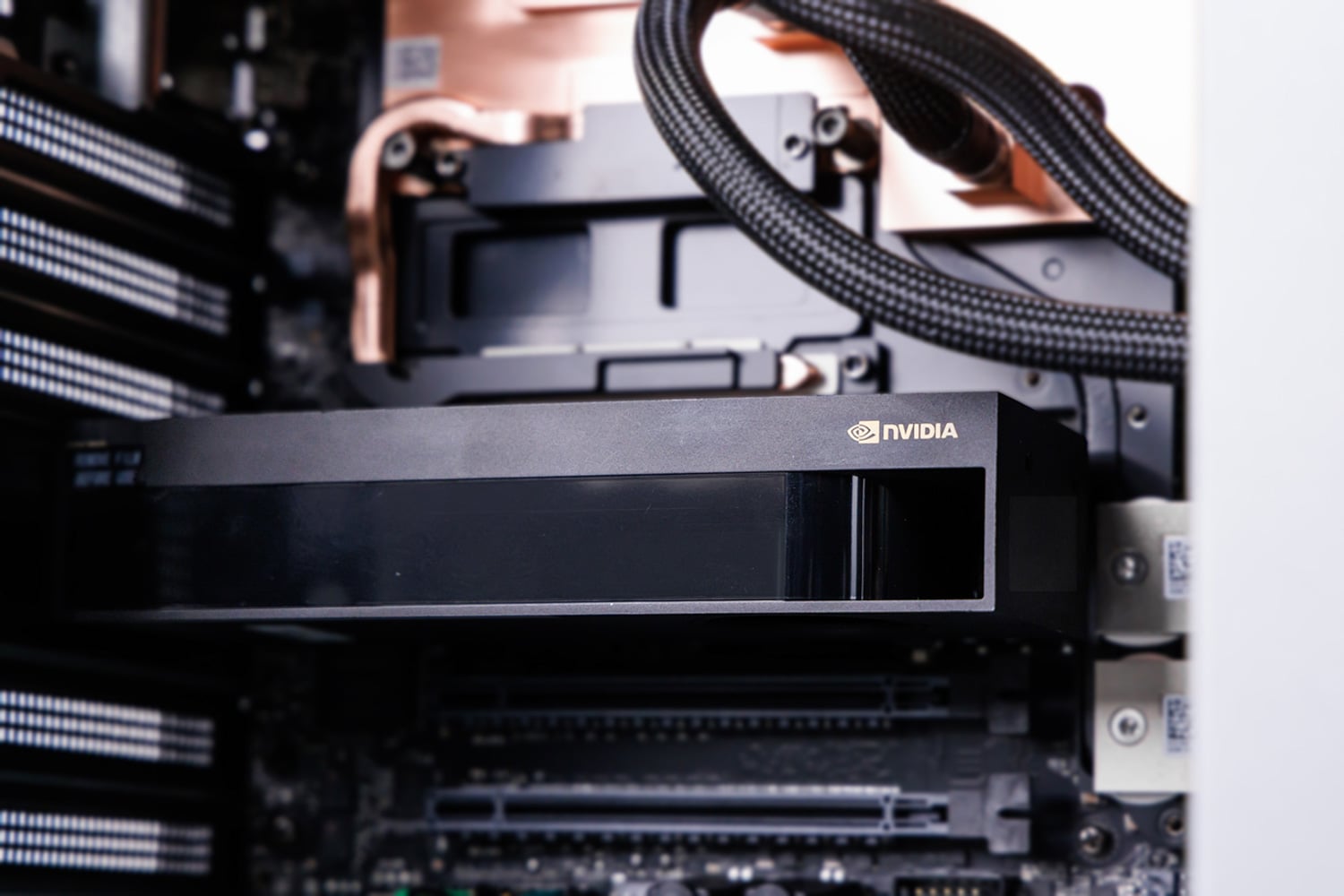
MSI has also prepared the chassis for a large add-in GPU. A pre-wired 12VHPWR power lead is easy to reach at the front of the chassis, avoiding the need to route another cable through the system. The vertical metal brace that stiffens the chassis also incorporates an anti-sag bracket to support long, heavy RTX PRO cards.
A USB controller on the Grace side handles the system’s main front and rear USB ports, along with the audio codec. Grace also connects to the ASPEED AST2600 BMC, which provides a dedicated 1GbE management port, a Mini DisplayPort output limited to 1024 x 768, and a Micro-USB serial console. The Mini DisplayPort is intended for initial setup and troubleshooting, not as the system’s primary display output. Anyone planning to use the WS300 as a conventional desktop will still need one of the optional RTX PRO add-in cards.
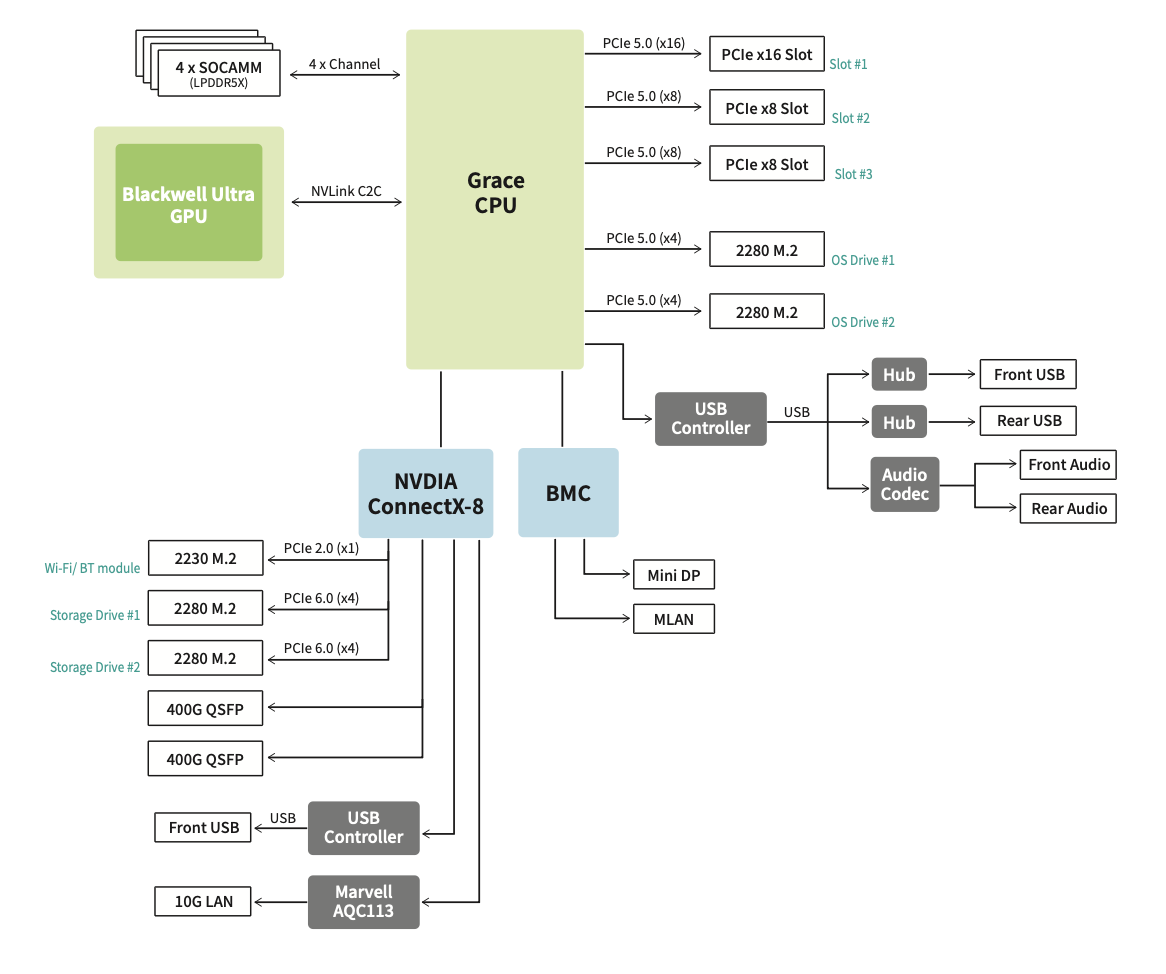
The other major branch is NVIDIA’s ConnectX-8 SuperNIC. Its most visible feature is the pair of 400GbE QSFP112 ports on the rear panel, providing up to 800Gb/s of aggregate network bandwidth. ConnectX-8 also includes an integrated PCIe switch with 48 lanes; its upstream link is PCIe Gen6 capable, but the downstream ports it exposes to devices run at PCIe 5.0, allowing MSI to use it as a secondary I/O hub rather than simply a network adapter.
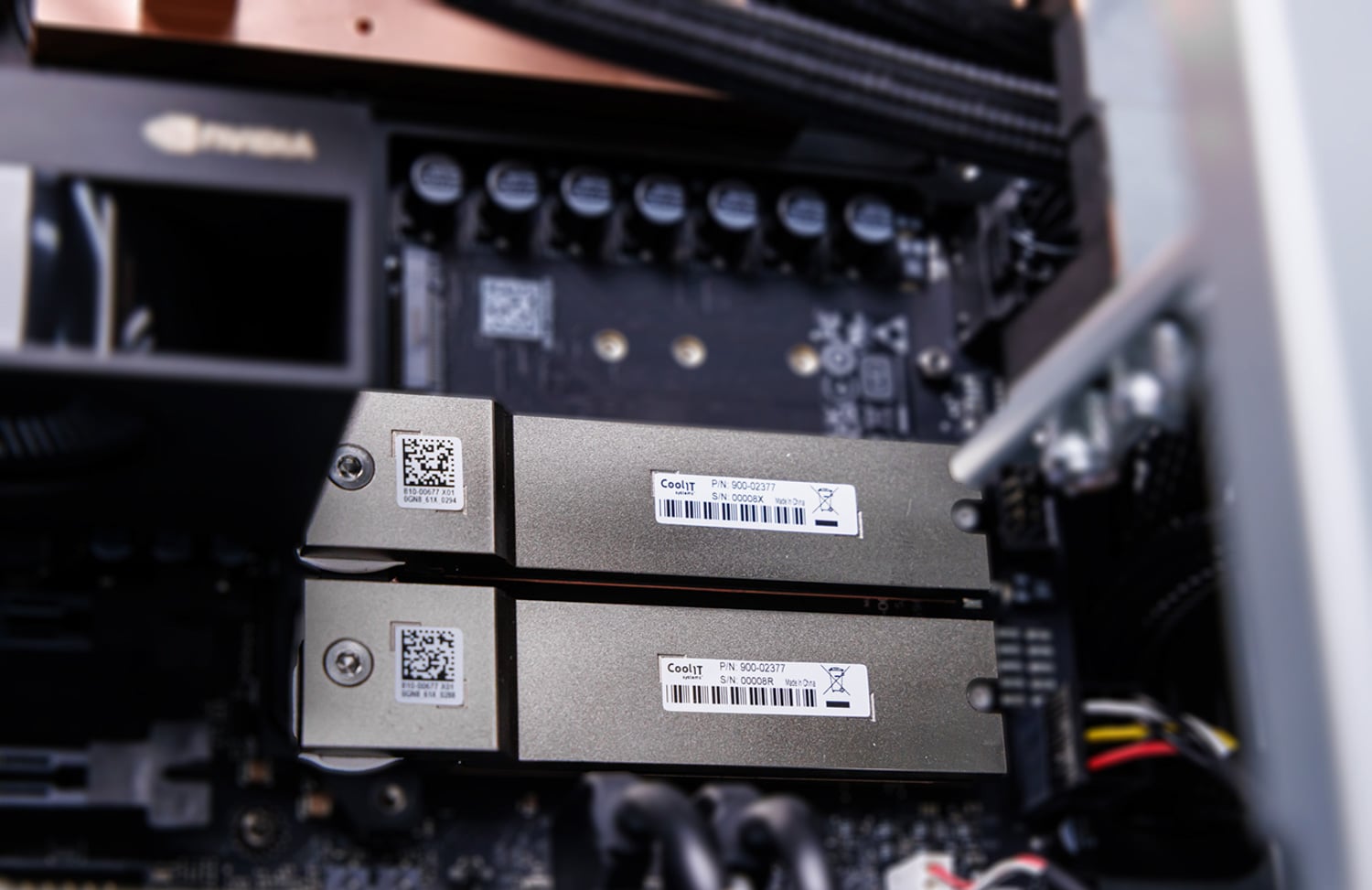
Two PCIe 5.0 x4 links from the ConnectX-8 feed the remaining M.2 2280 slots, which MSI leaves open for expansion. The same branch also connects the M.2 2230 Wi-Fi and Bluetooth slot over PCIe 2.0 x1, the Marvell AQC113 controller for the 10GBase-T port, and a second USB controller serving an additional front-panel USB path.
Power and cooling
Powering the WS300 is a single 1,600W 80 PLUS Platinum ATX power supply with a C19 input. For North American installations, the DGX Station requires a dedicated 20A circuit to provide the system with its full power envelope.
The 1,600W rating is the ceiling for the entire system. Grace, the B300, storage, pumps, fans, and any optional RTX PRO card all draw from the same supply. Adding a high-power graphics card expands the WS300’s capabilities, but it does not pull from a different pool of power. When the B300 and RTX card are both under load, they have to share what is already available, which can reduce the performance of the B300 GPU.
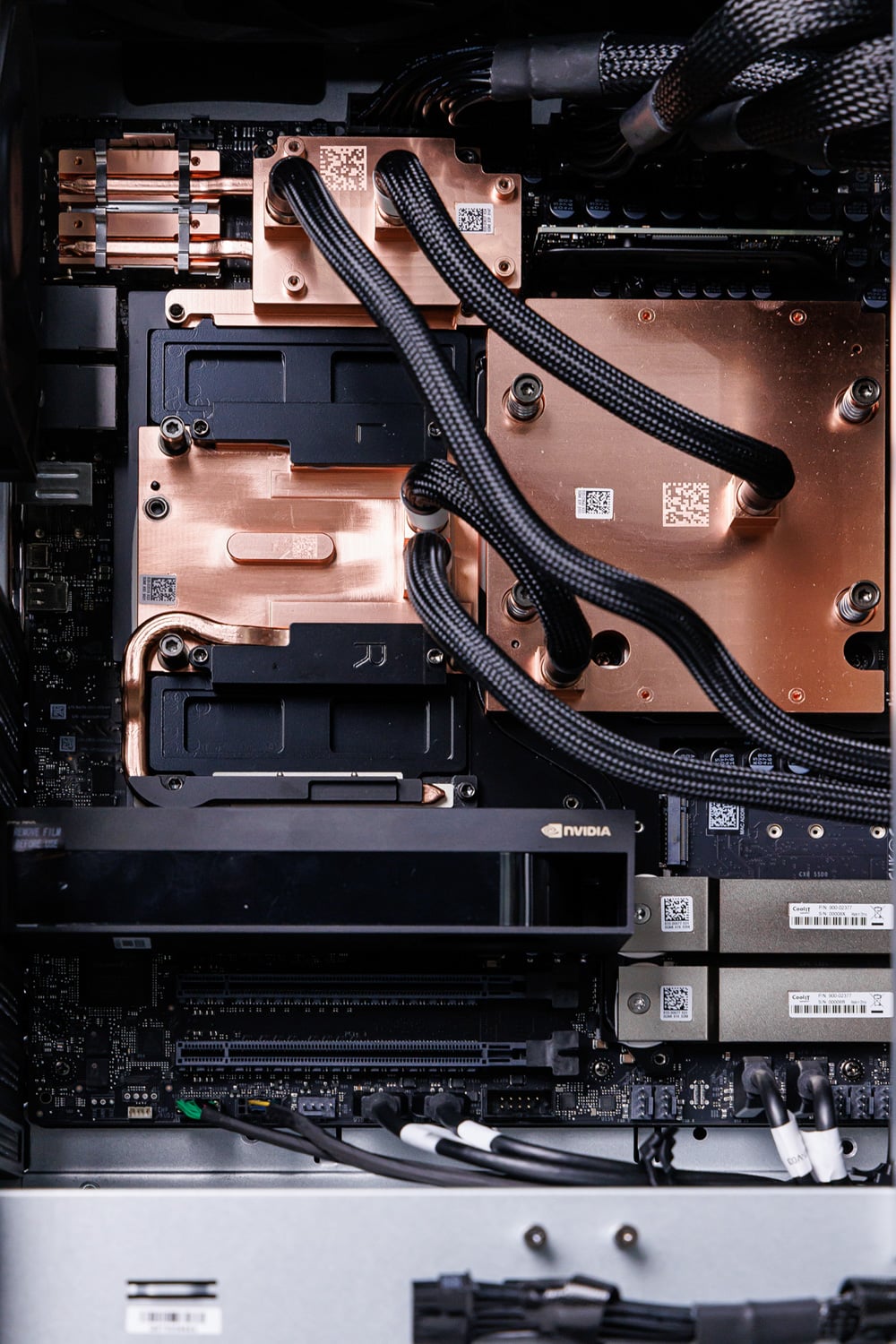
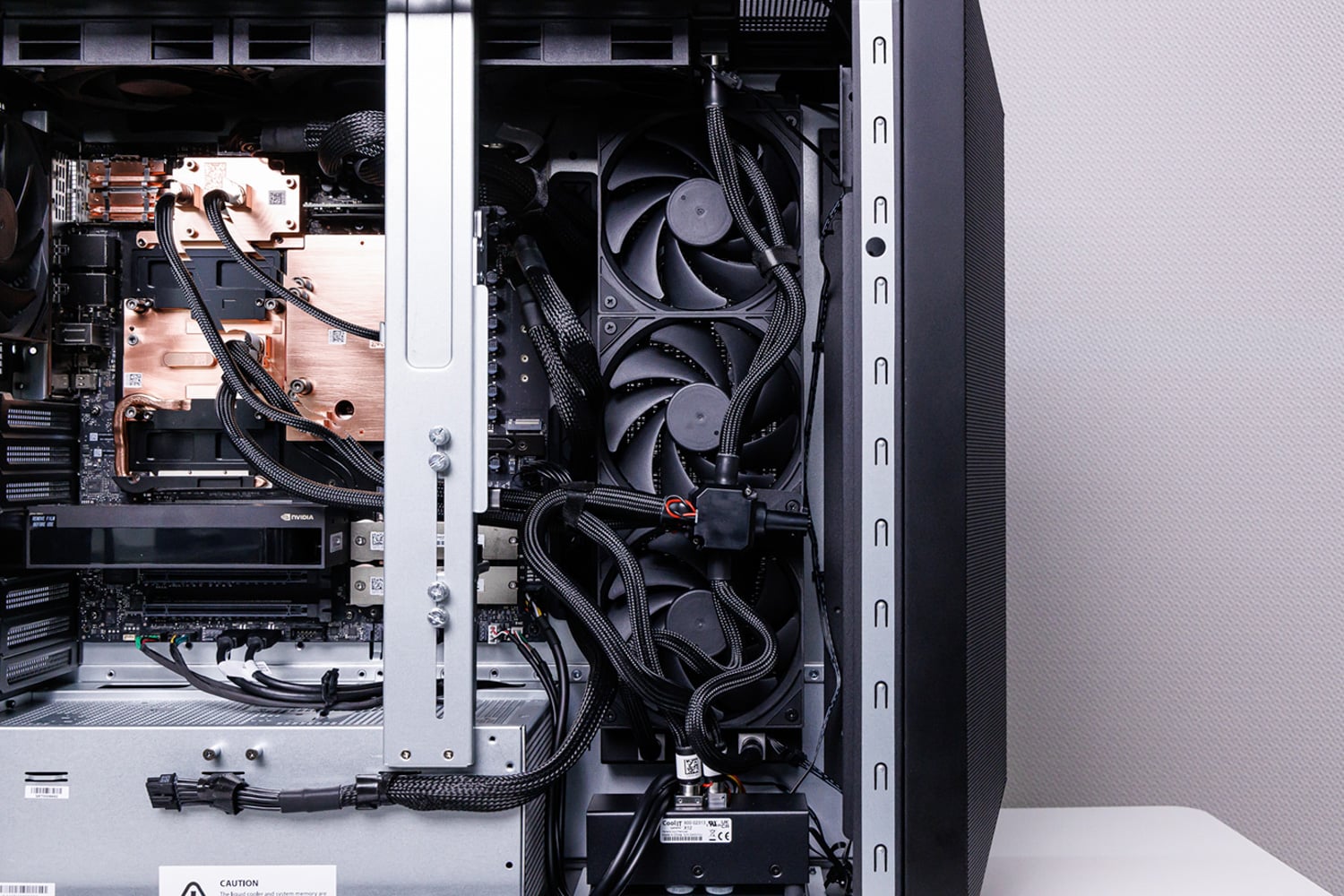
MSI handles the resulting thermal load with a custom liquid loop covering the B300, Grace CPU, SOCAMM memory, and ConnectX-8, including the optical cages. Heat is sent through two 360mm radiators, while a separate 120mm fan moves air through the rest of the chassis. MSI rates the cooling assembly for up to 1,400W across the CPU and GPU. During our testing the B300 temperature peaked at 71C while the CPU never got hotter than 65C at 1292W of power being consumed by the GPU.
Power sloshing
NVIDIA manages that shared budget through the vsloshd service. In its default dynamic mode, the service monitors the real-time power draw of the GB300 module and an optional RTX PRO card, shifting available headroom between them rather than holding each device to a fixed limit. Under the current policy, the RTX card gets priority, so when it needs more power, the system first lowers the GB300 power cap before raising the RTX cap. With no RTX card installed, the full policy budget remains available to the GB300 module.
This means the optional RTX PRO 6000 is not simply additional performance on top of the B300. When both GPUs are busy, power assigned to the RTX card comes directly out of the GB300 budget and can reduce B300 clocks and performance.
The platform also includes a hardware power brake for cases where the system detects degraded power delivery. We saw this during our hands-on work when loose power connectors caused the WS300 to lower its power limit rather than shut down or continue drawing at full power through a compromised connection. The machine remained online in the reduced-power state until the connection issue was addressed.
Connectivity
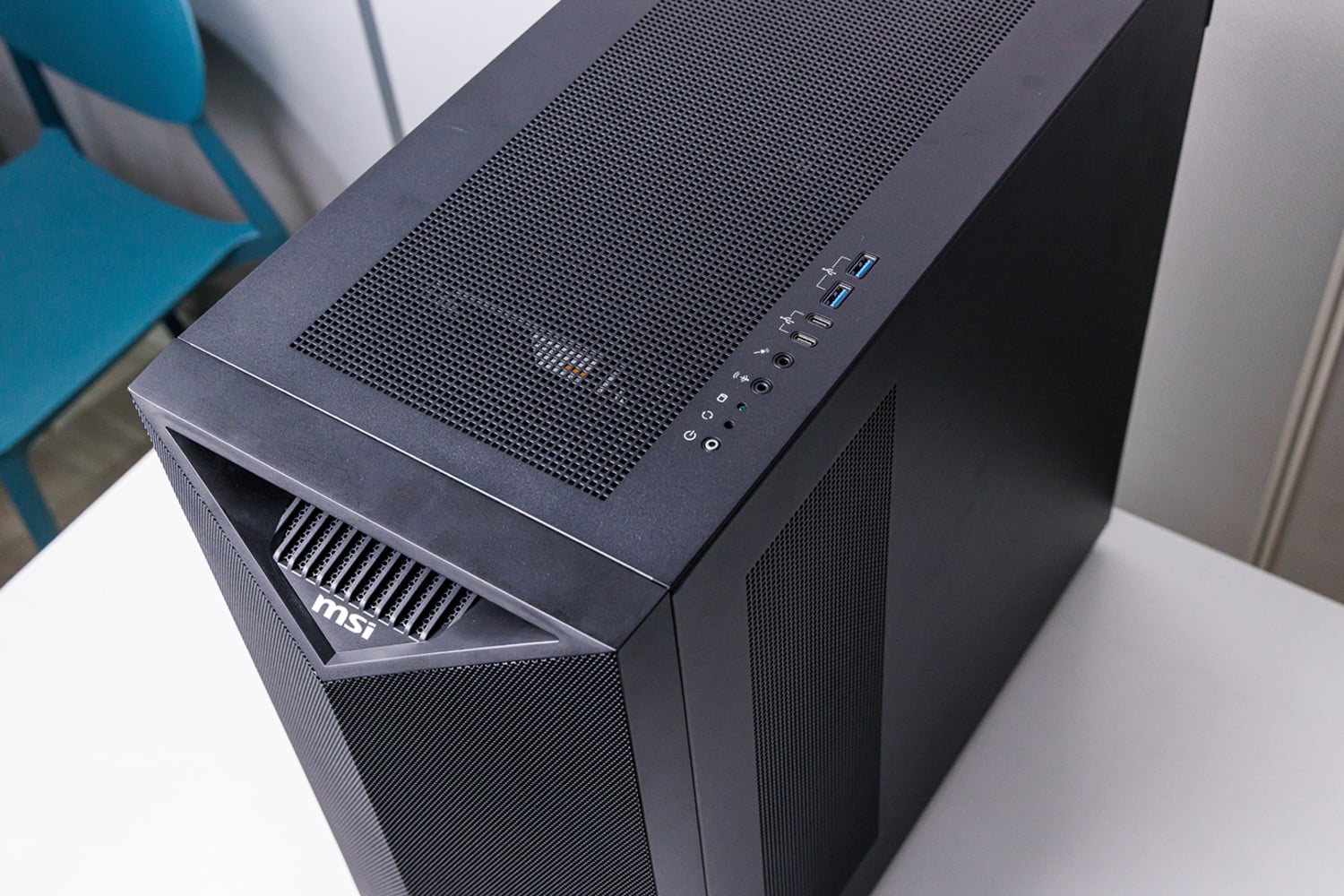
Before moving on from the chassis, the front and rear I/O are worth a quick look. The front IO consists of two USB 3.2 Gen 2 Type-A ports, two USB 3.2 Gen 2 Type-C ports, separate line-out and microphone jacks, and the power and reset controls.
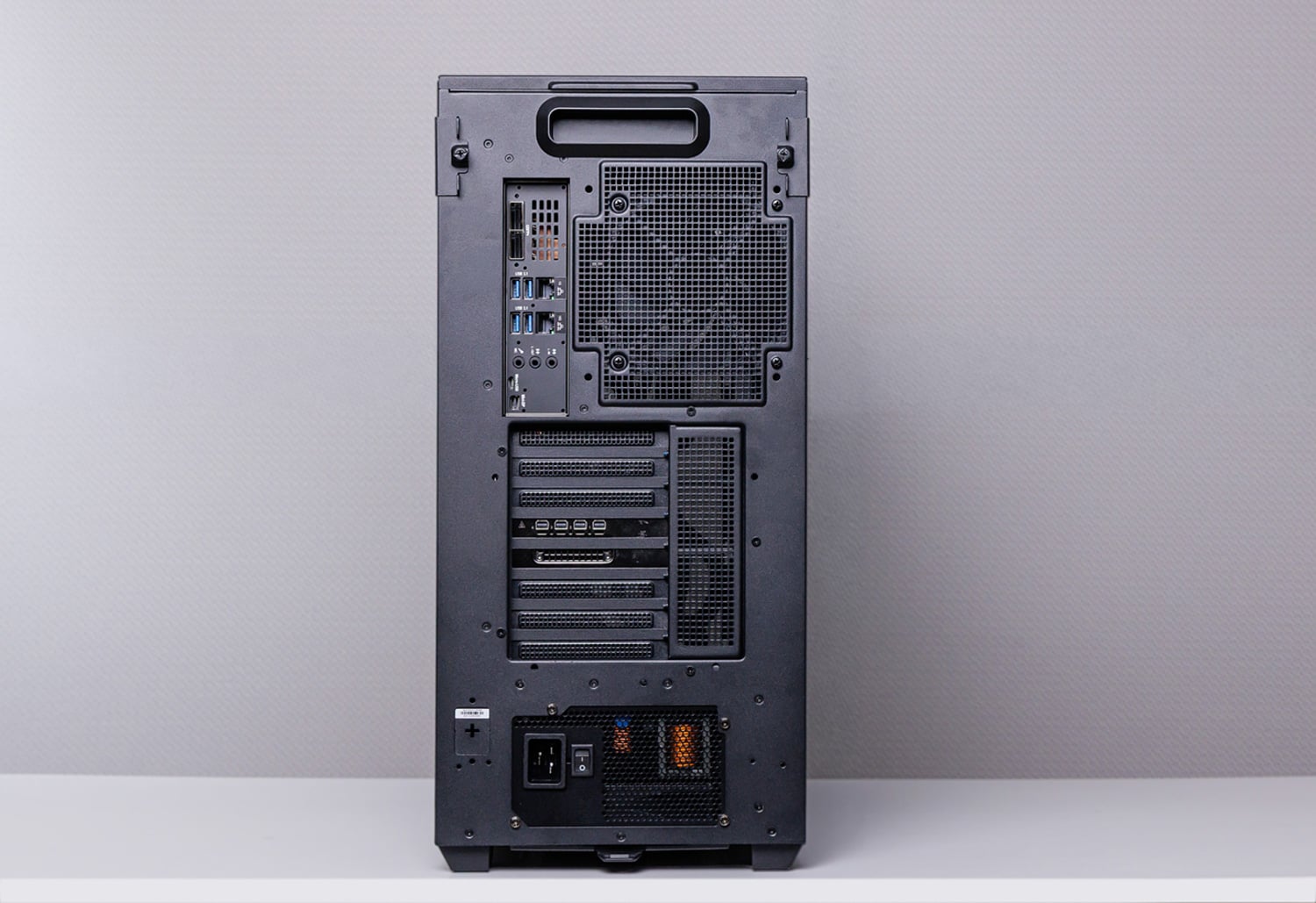
The rear panel is split between workstation connectivity and the server hardware underneath. ConnectX-8 provides two 400GbE QSFP112 ports, while a separate 10GBase-T port handles normal host networking and a dedicated 1GbE port connects to the BMC. Four 10Gbps USB Type-A ports and three audio jacks cover local peripherals. The BMC also exposes a Micro-USB serial console and a Mini DisplayPort. The C19 power inlet sits at the bottom of the chassis, and Wi-Fi 6E or Wi-Fi 7 with Bluetooth can be added through the internal M.2 2230 Key-E slot.
Datacenter Workloads on the Desk
Everything to this point has described what the DGX Station is; the more useful question for buyers is what the XpertStation enables a team to do. The value of the WS300 becomes clearer when you treat it as a development platform rather than simply a high-capacity inference system. Its B300 GPU, Grace CPU, MIG support, optional RTX PRO graphics, and datacenter software stack bring several workflows that would normally depend on shared cluster hardware onto a single local node.
MIG as a development tool
Imagine running several completely separate jobs on one GPU at the same time, each sealed off from the others. That is what Multi-Instance GPU (MIG) does: it spatially segments the B300 in hardware into as many as seven equally sized slices, or instances. Each instance gets its own fixed share of SMs, HBM, cache, and memory bandwidth, carries its own device identity, and appears to CUDA as a separate GPU.
This makes it possible to develop, test, and validate multi-GPU workloads; train scripts; and develop for tools like Dynamo, LLM-D, etc.
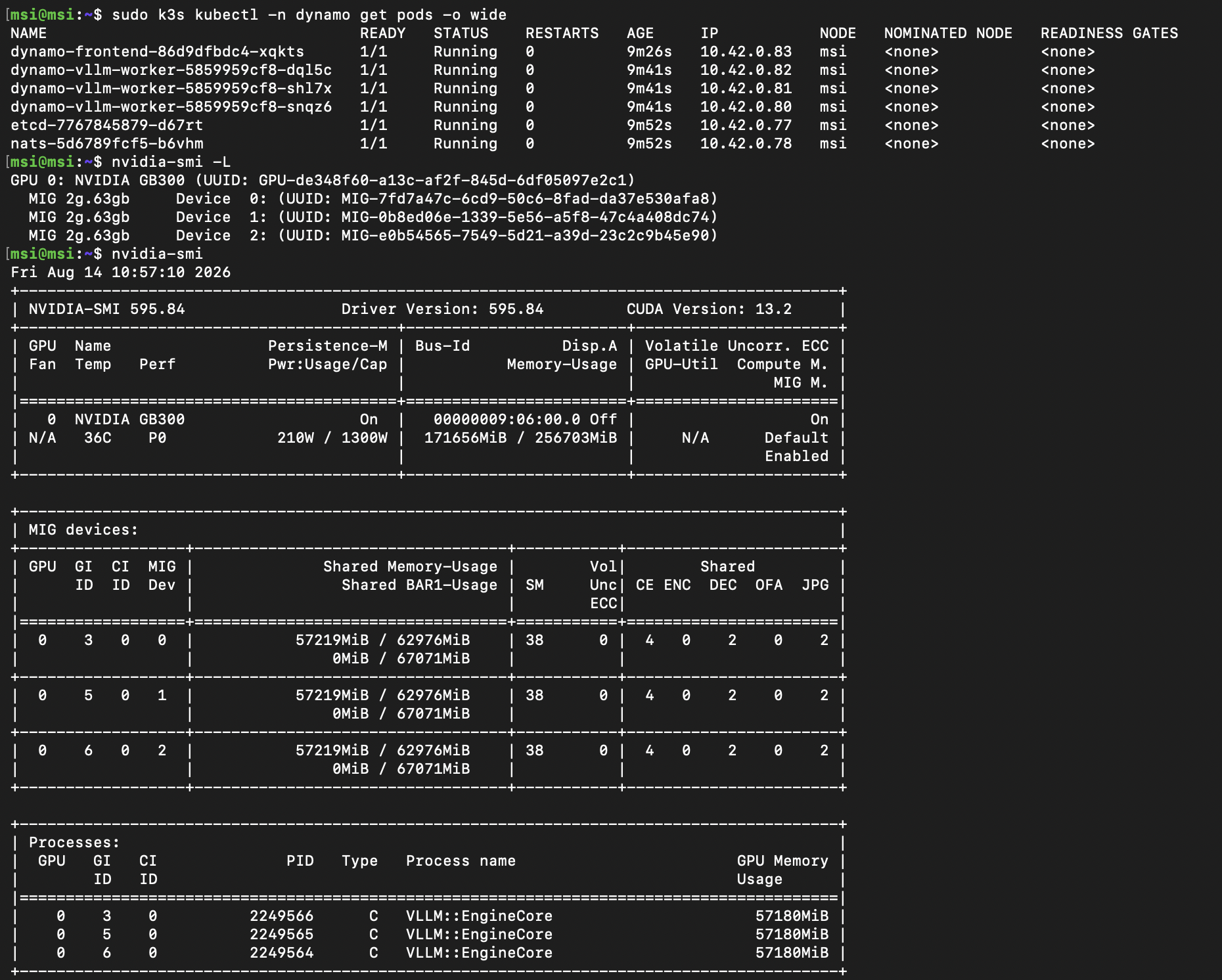
For our testing, we configured the B300 with 3x MIG instances and used them to bring up NVIDIA Dynamo components on separate CUDA-visible devices. This mirrors how much of our own benchmark tooling gets built: validating that it behaves exactly as intended means iterating against real hardware over and over. Having a local B300 we can carve up and reconfigure, without scheduling time on a shared server, and without the power draw, heat, and noise of a rack in the room, removes a surprising amount of overhead from that kind of iterative work.
Isaac GR00T and the physical AI loop
Another workflow that fits the DGX Station particularly well is physical AI.
We have tested this type of workflow before, but it required several systems equipped with different classes of GPUs. The DGX Station brings those previously separate stages together in one desk-side machine.
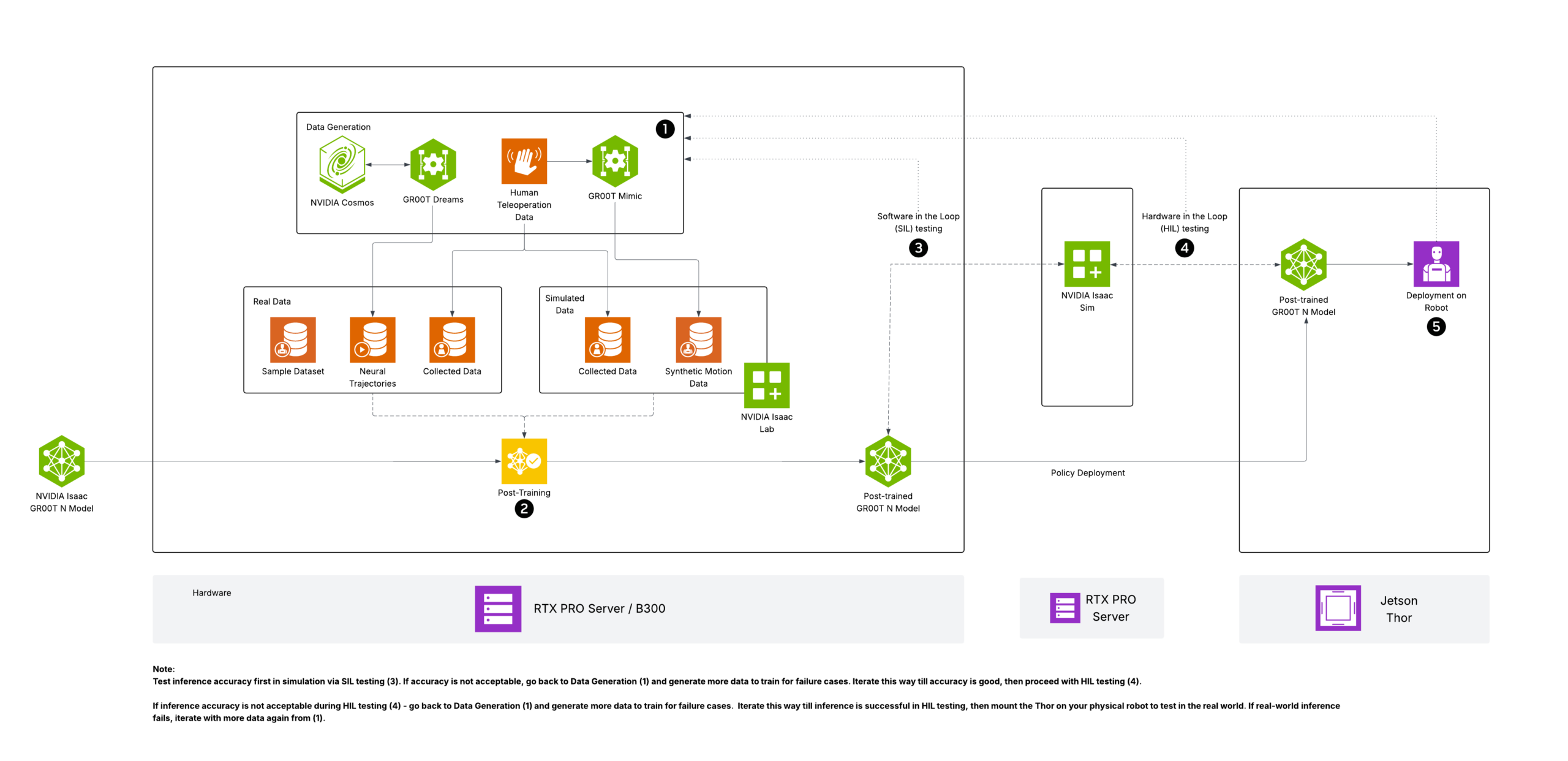
The process begins with teleoperation: an operator guides the robot through a task to capture a small set of real-world demonstrations. Those examples then enter the Isaac GR00T workflow. The optional RTX PRO GPU handles the graphics and ray-tracing demands of Isaac Sim, while Isaac Lab and GR00T-Mimic expand the original demonstrations into a much larger collection of physically plausible synthetic trajectories. Finally, the B300 fine-tunes the GR00T model using the combined real and synthetic dataset.
Source: NVIDIA
After fine-tuning, the resulting policy can be validated in simulation before being deployed to the robot for real-world evaluation. That creates a tight development loop: capture a real demonstration, reproduce and vary it in simulation, retrain the model, and test the updated policy on the hardware. For teams with limited access to robots, operators, or data-collection windows, consolidating simulation, synthetic-data generation, and model training in a single desk-side system can significantly reduce the friction of each iteration.
Blackwell Ultra kernel development
Arguably, however, the best use case for the DGX Station is kernel optimization. When a team is writing CUDA or Triton kernels for Blackwell Ultra, there is no substitute for running on the target architecture. The WS300 puts a B300 and 252GB of HBM3e beside the developer, making it possible to profile real workloads, inspect memory behavior, tune Tensor Core paths, fuse operations, and iterate without booking time on an eight-GPU server or rack-scale system.
Larger systems still matter, but they can be reserved for work that requires them: NVLink scaling, NCCL collectives, communication kernels, multi-GPU inference, and final throughput validation. The WS300 handles the single-GPU kernel work locally, keeping those expensive shared systems available for scaled-up testing. For a team focused on Blackwell Ultra optimization, this is about as direct a development machine as the market offers.
Had the DGX Station shipped alongside the first Blackwell Ultra systems, we suspect the initial supply would have disappeared almost immediately into AI labs, compiler teams, inference-engine developers, and other groups racing to tune software for B300. Even now, direct access to the target GPU may be the clearest reason for an organization to buy one.
Performance
Testing note: Testing was conducted remotely on an MSI-hosted system, with StorageReview controlling the full software environment throughout the evaluation window. The system was tested without an RTX PRO GPU or any other PCIe add-in cards installed. This left the GB300 Superchip with the system’s full available accelerator power budget throughout testing.
Maximum Achievable Matmul FLOPS (MAMF)
First, to put B300’s compute in context, we ran MAMF across three Blackwell-generation systems. MAMF (Maximum Achievable Matmul FLOPS) is a practical performance metric designed to measure the realistic peak floating-point operations per second that can be achieved on machine learning accelerators during matrix multiplication operations, offering a more accurate benchmark than the theoretical peak FLOPS often advertised in hardware specifications.
For this test, we sweep each of the 3 systems in BF16, FP8, and NVFP4, and we report the best sustained (dense) result per precision.
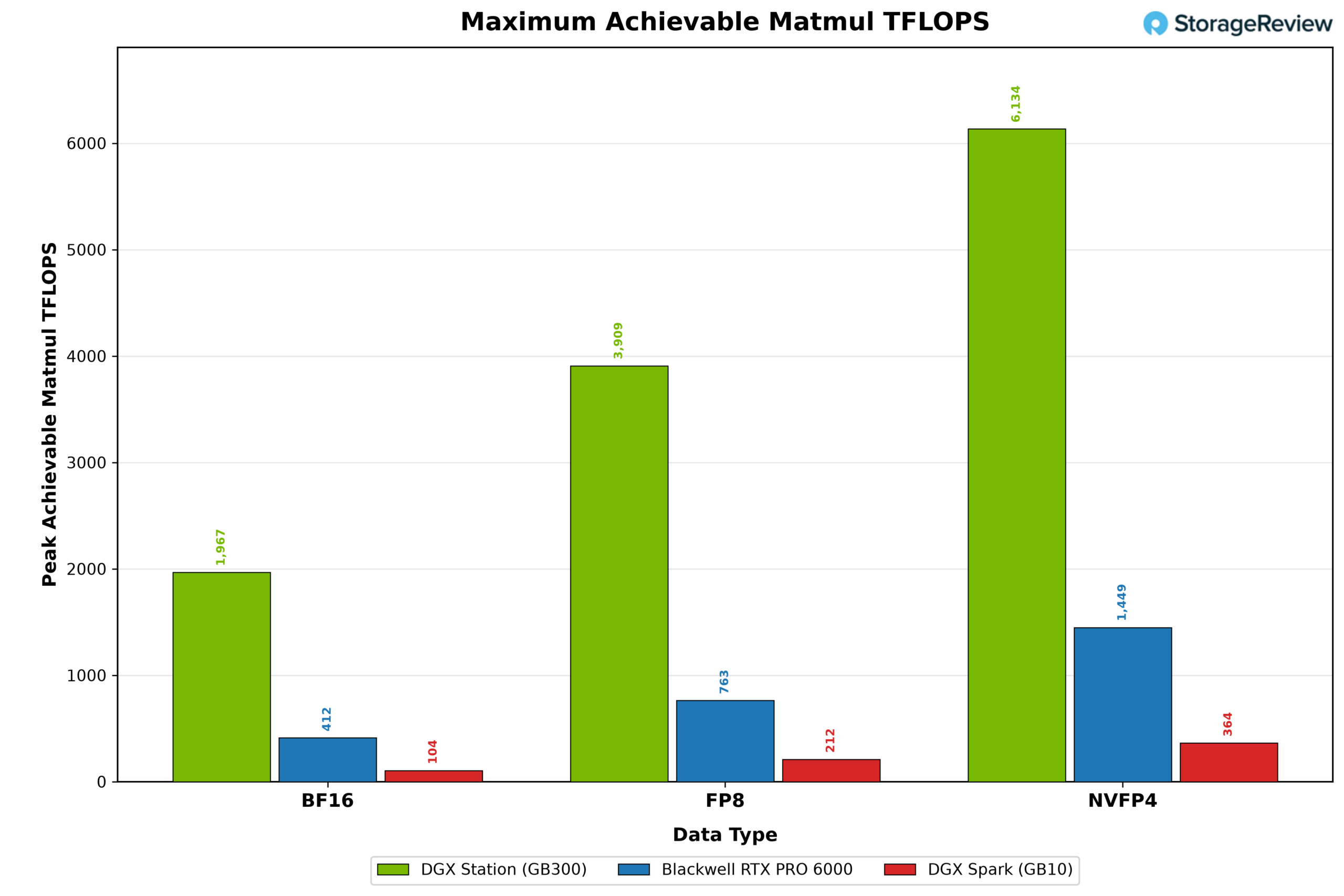
The GB300 leads in every precision. In BF16, it reaches 1,967 TFLOPS against 412 on the RTX PRO 6000 and 104 on the DGX Spark. FP8 follows the same pattern: 3,909, 763, and 211. NVFP4 brings the GB300 to 6,134 TFLOPS, with the RTX PRO 6000 at 1,449 and the Spark at 364. The ratios are remarkably stable across all three precisions: the GB300 holds a 4 to 5x advantage over the RTX PRO 6000 and 17 to 19x over the Spark, while the RTX PRO 6000 maintains roughly 4x over the Spark.
NVBandwidth
Raw compute throughput is only useful if the accelerator can keep its execution units supplied with data. This is especially important for AI inference, where token generation during the decode phase is often limited more by memory bandwidth than by available FLOPS.
On the GB300 Superchip, that hierarchy spans the B300’s local HBM3e, Grace’s LPDDR5X memory, and the NVLink-C2C interconnect connecting them. NVIDIA’s NVBandwidth utility exercises the different copy paths across those components, showing both the bandwidth available inside the GPU and the cost of moving data between the GPU and CPU memory domains.
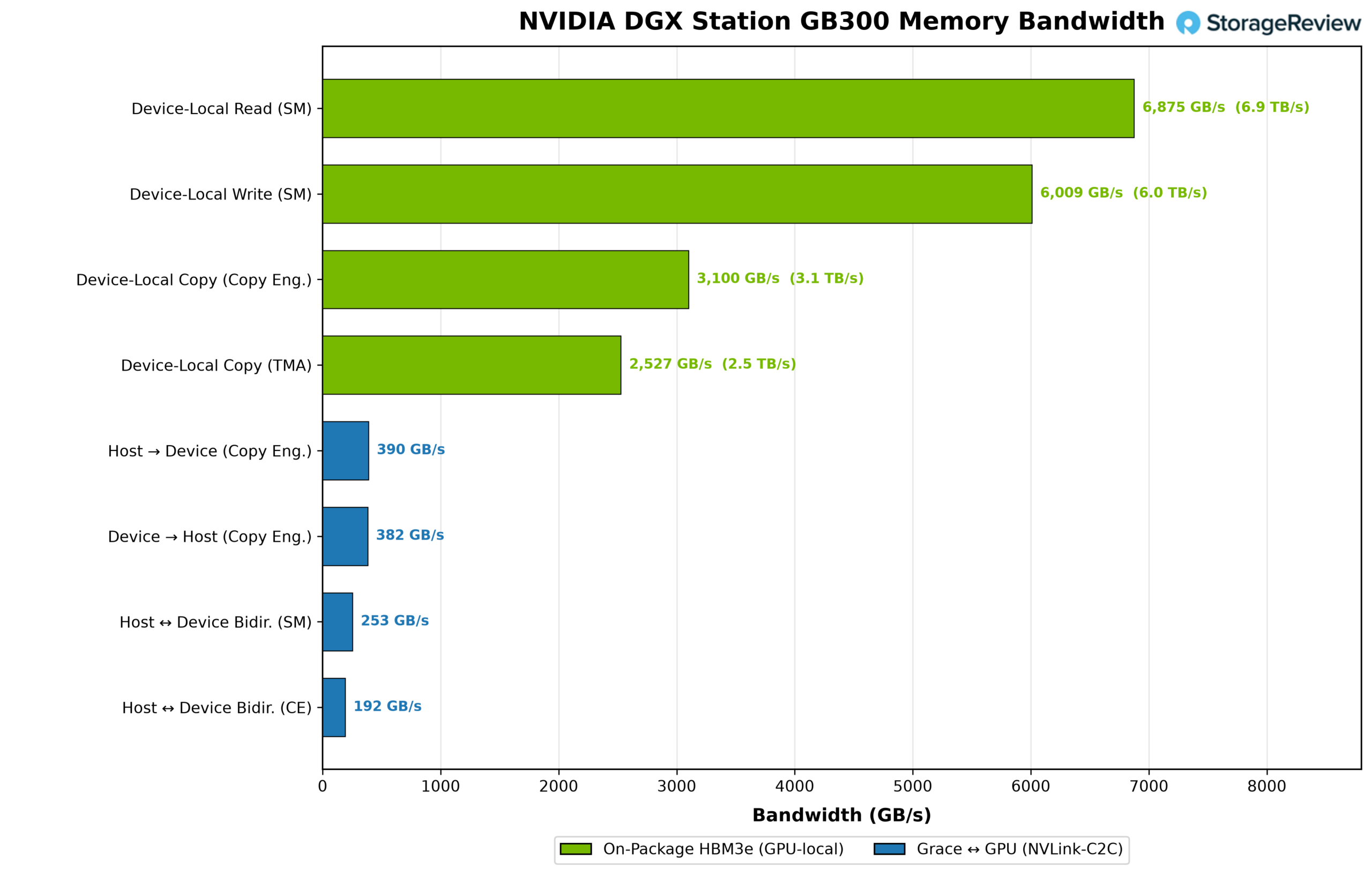
The first four tests measure data movement within the B300’s 252GB of HBM3e. Device-local reads reach 6,875 GB/s, or approximately 6.9 TB/s, placing the result within a few percent of the GPU’s rated 7.1 TB/s memory bandwidth. Device-local writes reach 6,009 GB/s.
HBM-to-HBM copy operations are lower because every copy consumes bandwidth twice: once to read the source and again to write the destination. The dedicated copy engines reach 3,100 GB/s, while the Tensor Memory Accelerator records 2,527 GB/s.
The remaining tests cross NVLink-C2C and access Grace’s 496GB of LPDDR5X memory. Transfers from Grace memory into B300 HBM reach 390 GB/s, while transfers in the opposite direction reach 382 GB/s. Although NVLink-C2C provides up to 900 GB/s of coherent bandwidth between the CPU and GPU, the measured transfers are limited by Grace’s 396 GB/s LPDDR5X memory bandwidth. Bidirectional transfers further expose that constraint. Simultaneous traffic reaches 253 GB/s using SM-based copies and 192 GB/s through the copy engines.
Inference
With the low-level tests covered, we move to LLM inference. Here, the focus shifts from peak numbers to tokens per second, time to first token, and latency under load, giving us a better view of how the WS300 behaves as a serving system.
Let’s begin with the GB300 Superchip’s defining capability: serving models on either side of the B300’s 252GB HBM3e capacity limit. This is where its 748GB coherent memory pool matters most. The five checkpoints progress from two models that fit comfortably in HBM, to one that nominally fits but leaves too little headroom for the runtime and KV cache, and finally to two that must offload substantial portions of their weights to Grace memory.
Note: Where mentioned, models were run with speculative decoding for higher decode throughput, with the forced acceptance token amount set to the speculative decode token amount. The results therefore show best-case performance; in real-world serving, throughput is dynamic and depends on the quality of speculative-decode tokens.
Models that fit completely in HBM
DeepSeek v4 Flash (0731)
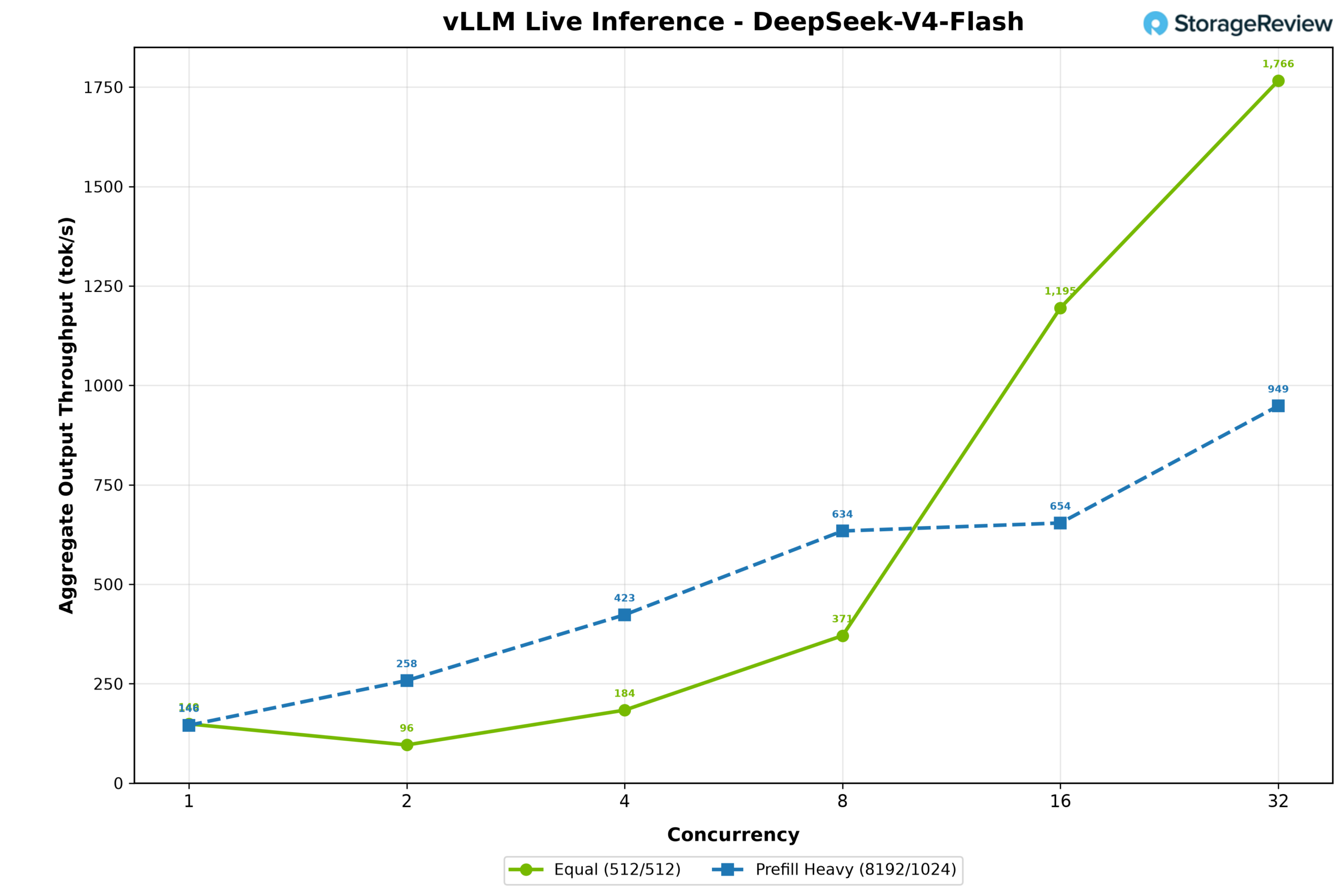
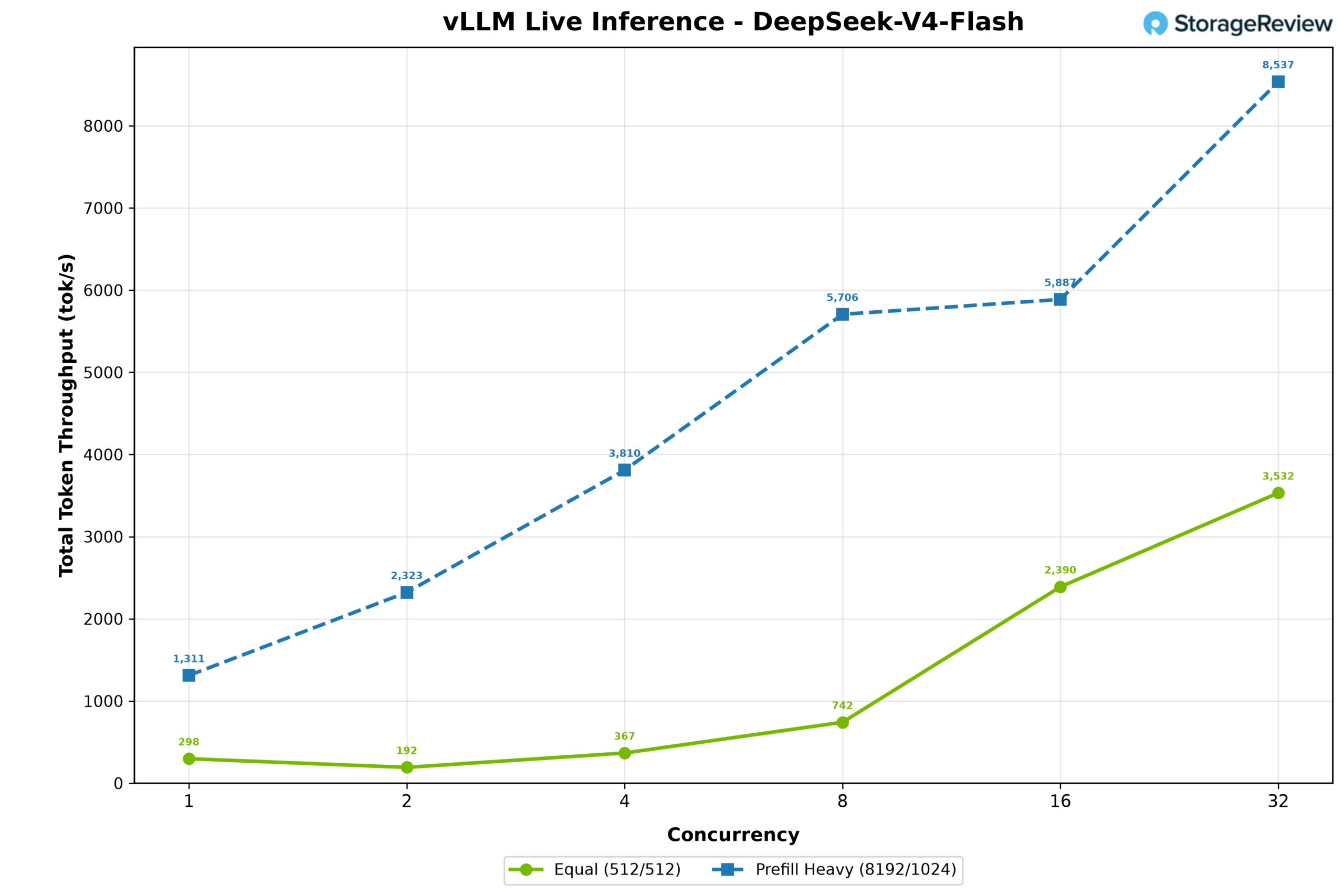
First up was the wildly popular DeepSeek v4 Flash (0731), which consumes 14+6GB of memory as a native FP8 checkpoint. This model is known to be very efficient and easy to run, which is what we experienced on the DGX Station. In the 512/512 workload, output throughput started at 149 tokens per second at concurrency 1, climbing rapidly to 1,766 at concurrency 32. The prefill-heavy workload scaled from 146 to 949 tokens per second.
Total token throughput scaled in lockstep, with the 512/512 workload climbing from 298 to 3,532 tokens per second and the prefill-heavy workload rising from 1,311 to 8,537
MiniMax M2.7 (NVFP4)
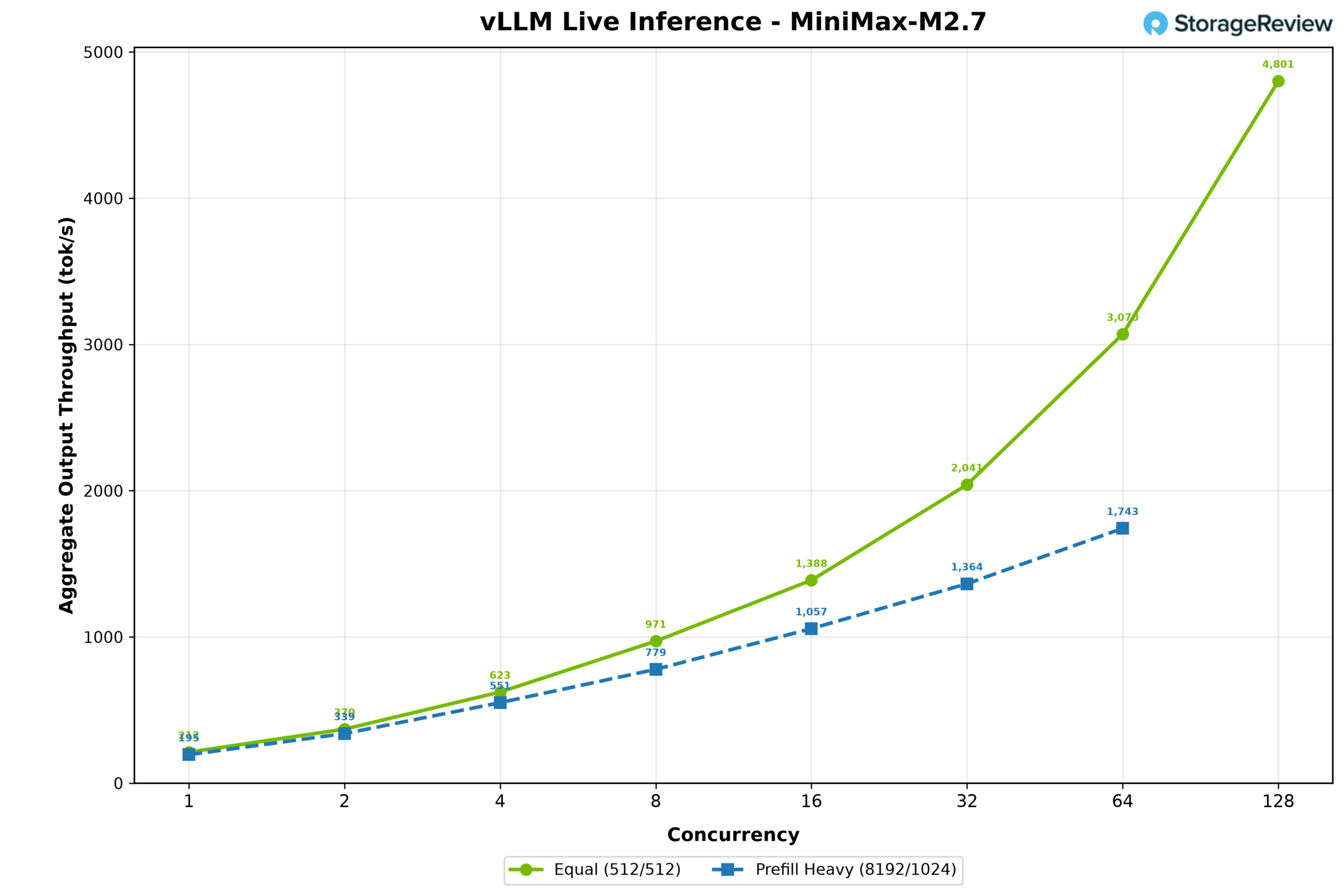
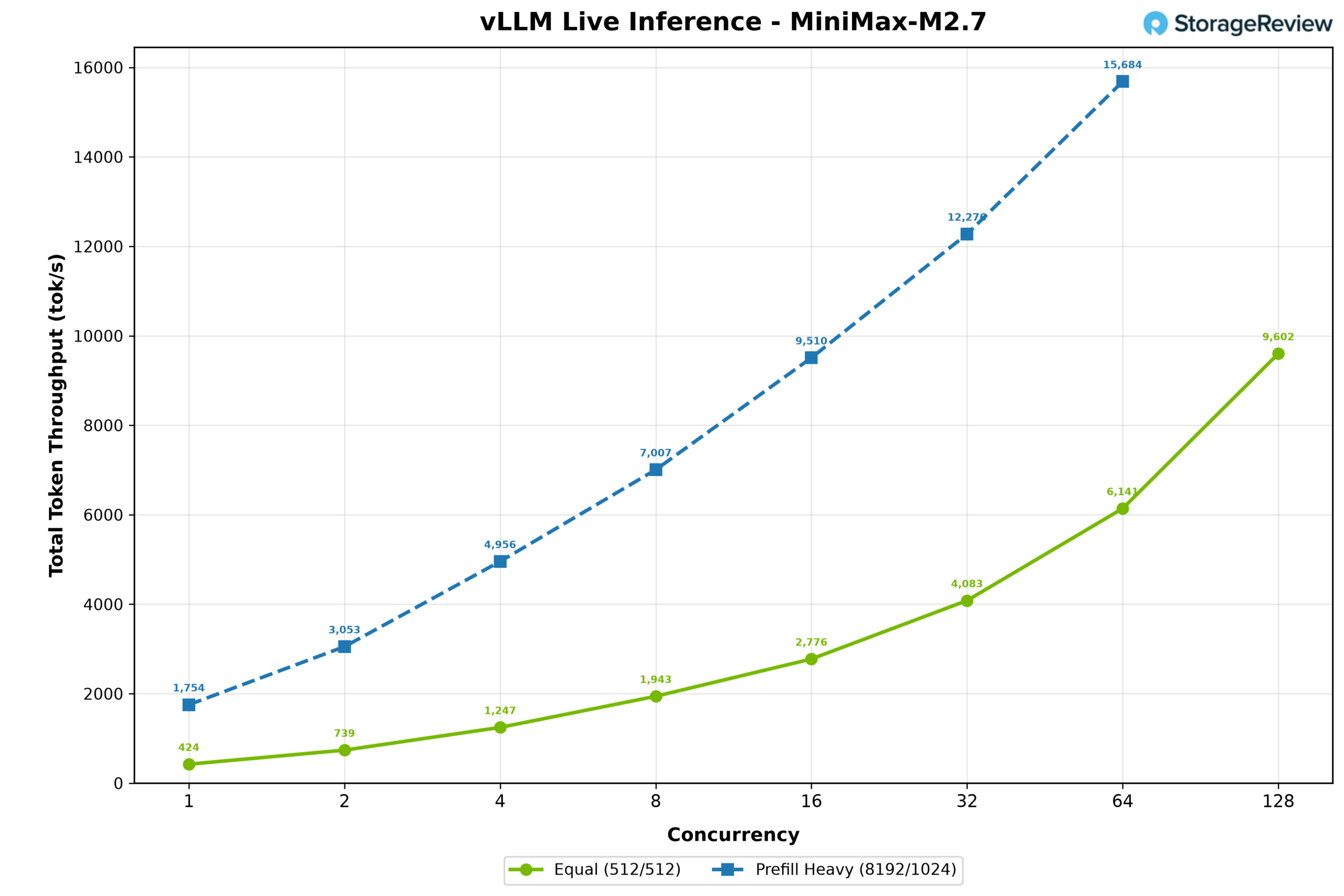
Next up is MiniMax M2.7, one of our favorite models, tested using NVIDIA’s NVFP4 quant, occupying 125GB of VRAM. In the 512/512 workload, output throughput started at 193 tokens per second at concurrency 1 and scaled rapidly to 4,801 tokens per second at concurrency 128. The prefill-heavy workload increased from 195 tokens per second at concurrency 1 to 1,743 tokens per second at concurrency 64. Total token throughput showed the opposite trend, with the prefill-heavy workload climbing from 1,754 to 15,684 tokens per second through concurrency 64, while the 512/512 workload scaled from 424 to 9,602 tokens per second at concurrency 128.
Total token throughput showed the opposite trend, with the prefill-heavy workload climbing from 1,754 to 15,684 tokens per second through concurrency 64, while the 512/512 workload scaled from 424 to 9,602 tokens per second at concurrency 128.
Models that barely fit in HBM
MiniMax M3 (NVFP4)
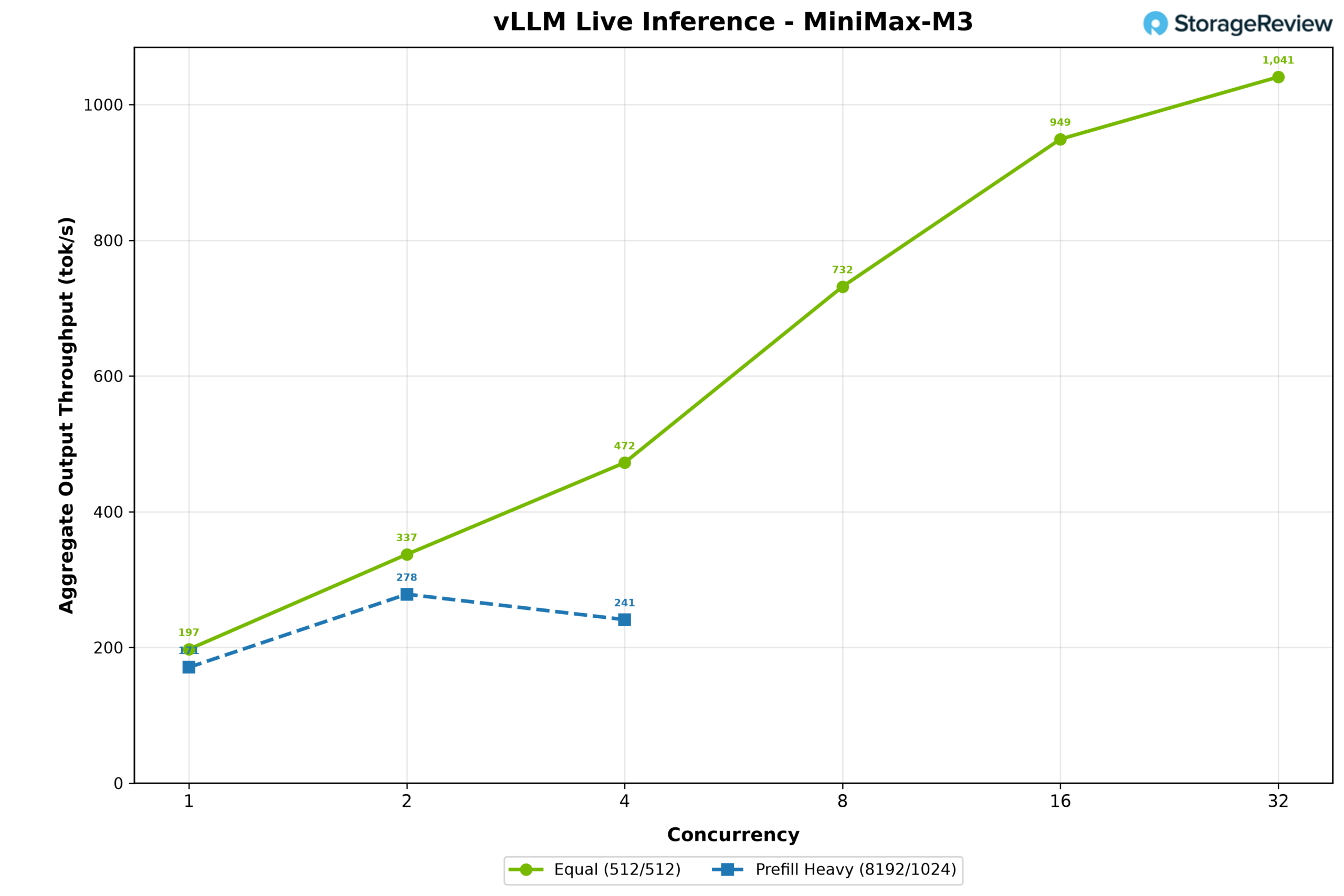
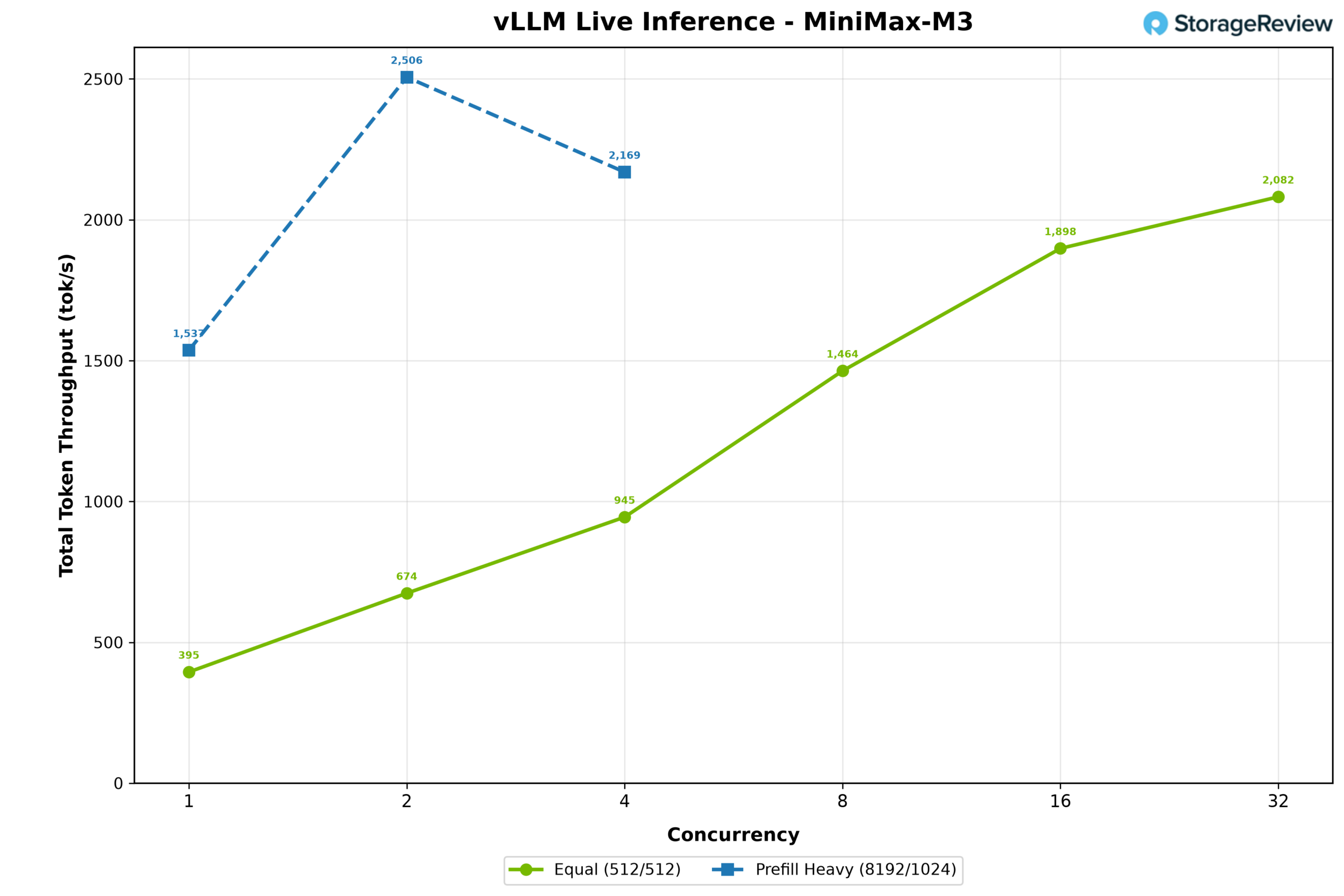
MiniMax M3 shows what barely fitting looks like in practice. Its 233GB NVFP4 checkpoint is smaller than the B300’s 252GB of HBM, but the model still needs room for the runtime and KV cache. It ultimately occupied 223GB of HBM, with 21GB of experts offloaded to Grace. EAGLE3-GQA speculative decoding was used with a synthetic acceptance length of 3 tokens. In the 512/512 workload, output throughput started at 197 tokens per second at concurrency 1 and scaled steadily to 1,041 tokens per second at concurrency 32. The prefill-heavy workload increased from 171 tokens per second at concurrency 1 to a peak of 278 at concurrency 2 before declining to 241 at concurrency 4.
Total token throughput followed a similar pattern, with the 512/512 workload rising from 395 to 2,082 tokens per second, while the prefill-heavy workload peaked at 2,506 tokens per second at concurrency 2 before falling to 2,169 at concurrency 4
Models that do not fit in HBM
GLM-5.2 (NVFP4)
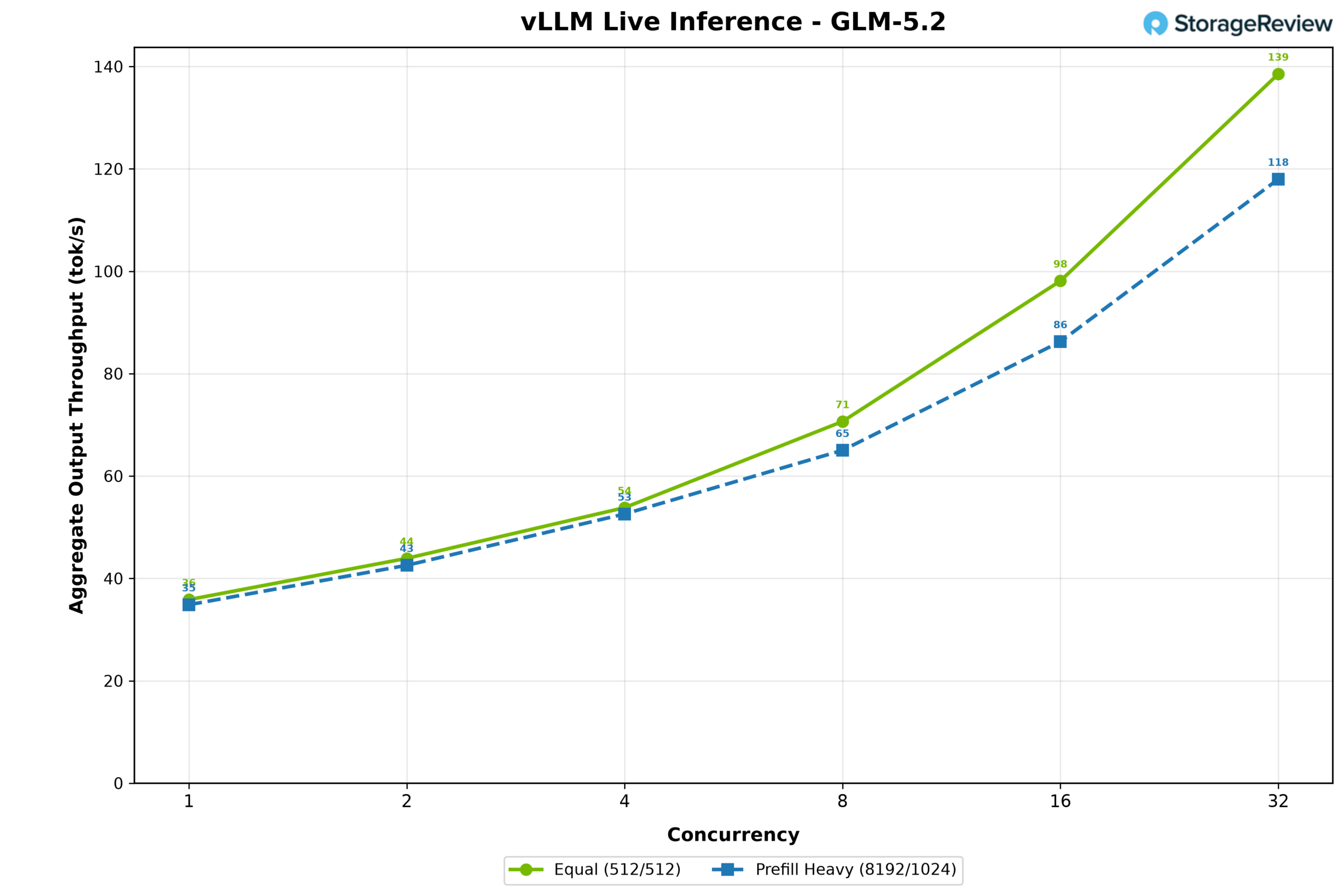
GLM-5.2 was tested using NVIDIA’s NVFP4 quant. Its 433GB checkpoint used 218GB of HBM, with 216GB of expert weights offloaded to Grace memory. MTP speculative decoding was used with a synthetic acceptance length of 3 tokens. Output throughput in the 512/512 workload increased from 36 tokens per second at concurrency 1 to 139 at concurrency 32. The 8,192/1,024 workload followed closely, rising from 35 to 118 tokens per second. The similar results between the two profiles show that generation remained limited primarily by moving the offloaded experts between Grace memory and the GPU. The sweep ended at concurrency 32 because there was not enough HBM left for additional context.
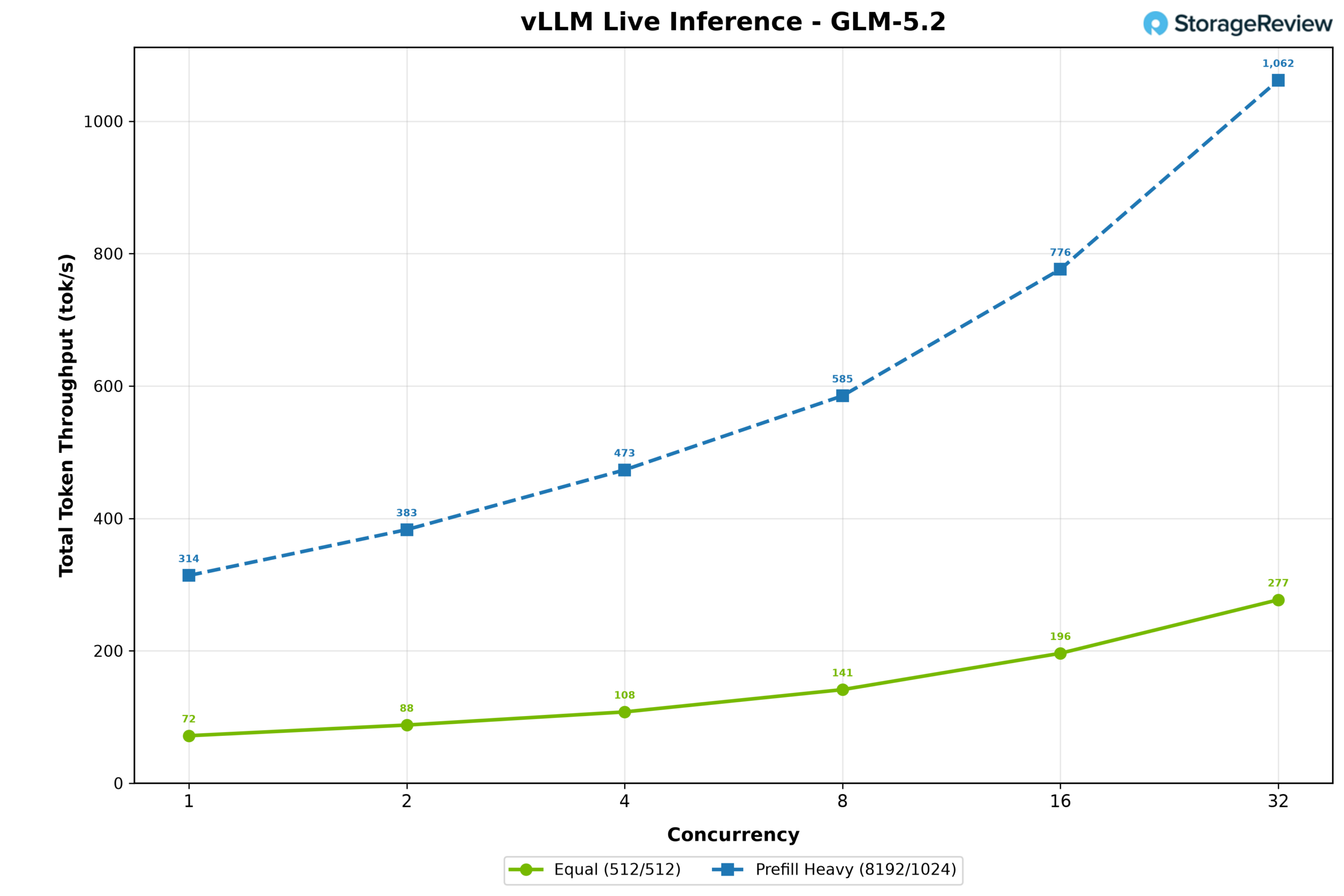
Total token throughput followed the same pattern, with the 512/512 workload rising from 72 to 277 tokens per second and the prefill-heavy workload climbing from 314 to 1,062; here the longer prompts finally separate the two profiles, since the prefill tokens themselves count toward the total.
Nemotron-3-Ultra 550B (NVFP4)
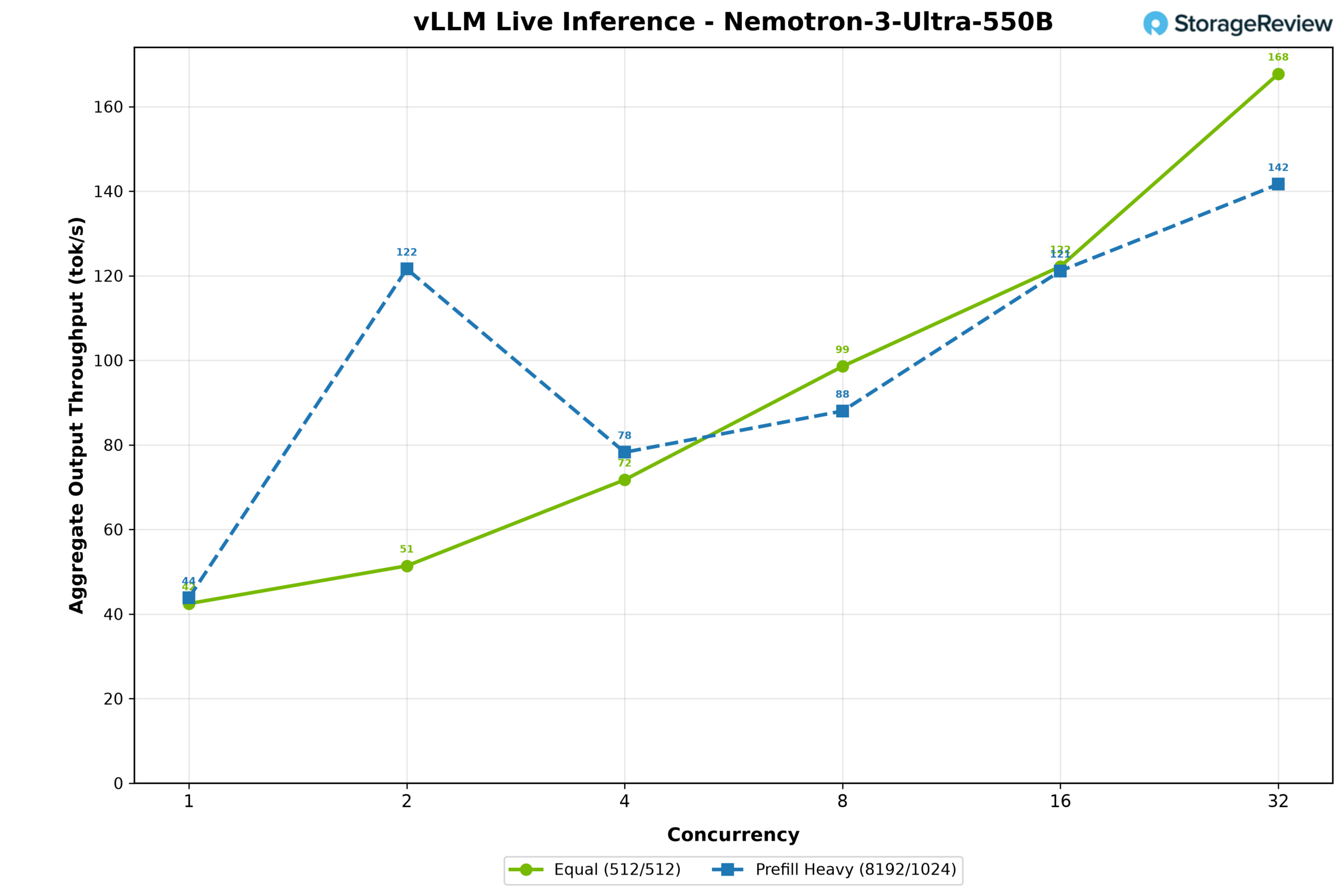
Nemotron-3-Ultra 550B is the largest model we ran, and the one that most directly exercises the full coherent pool. It is a 307GB NVFP4 hybrid Transformer-Mamba model, far too large for HBM alone, with 114GB of its weights offloaded to Grace memory. MTP speculative decoding was used with a synthetic acceptance length of 5 tokens. Output throughput in the 512/512 workload started at 43 tokens per second at concurrency 1 and climbed to 168 at concurrency 32. The prefill-heavy workload told a more interesting story: throughput rose from 44 tokens per second at concurrency 1 to a peak of 122 at concurrency 2, but then fell back to 78 at concurrency 4 as the long prompts filled the limited KV cache. As with GLM-5.2, the two profiles track each other closely, again pointing at expert migration between Grace and the GPU as the limiting factor rather than compute. The sweep ended at concurrency 32 for the same reason: there was not enough HBM left for additional context.
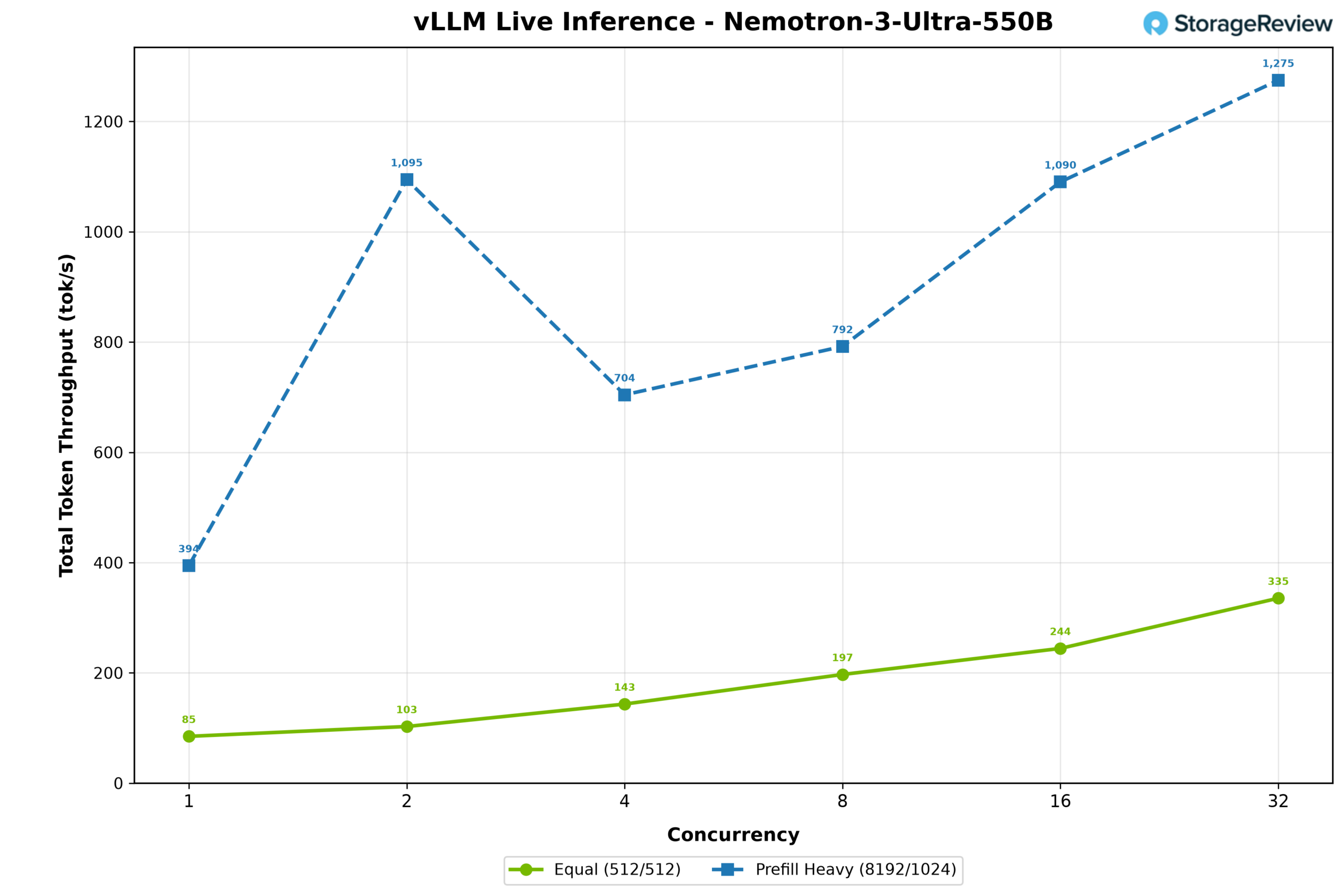
Total token throughput followed, with the prefill-heavy workload peaking at 2,506 tokens per second at concurrency 2 before declining to 2,169 at concurrency 4, while the 512/512 workload scaled from 85 to 336 tokens per second.
WS300 vs. Blackwell RTX PRO 6000 vs. DGX Spark
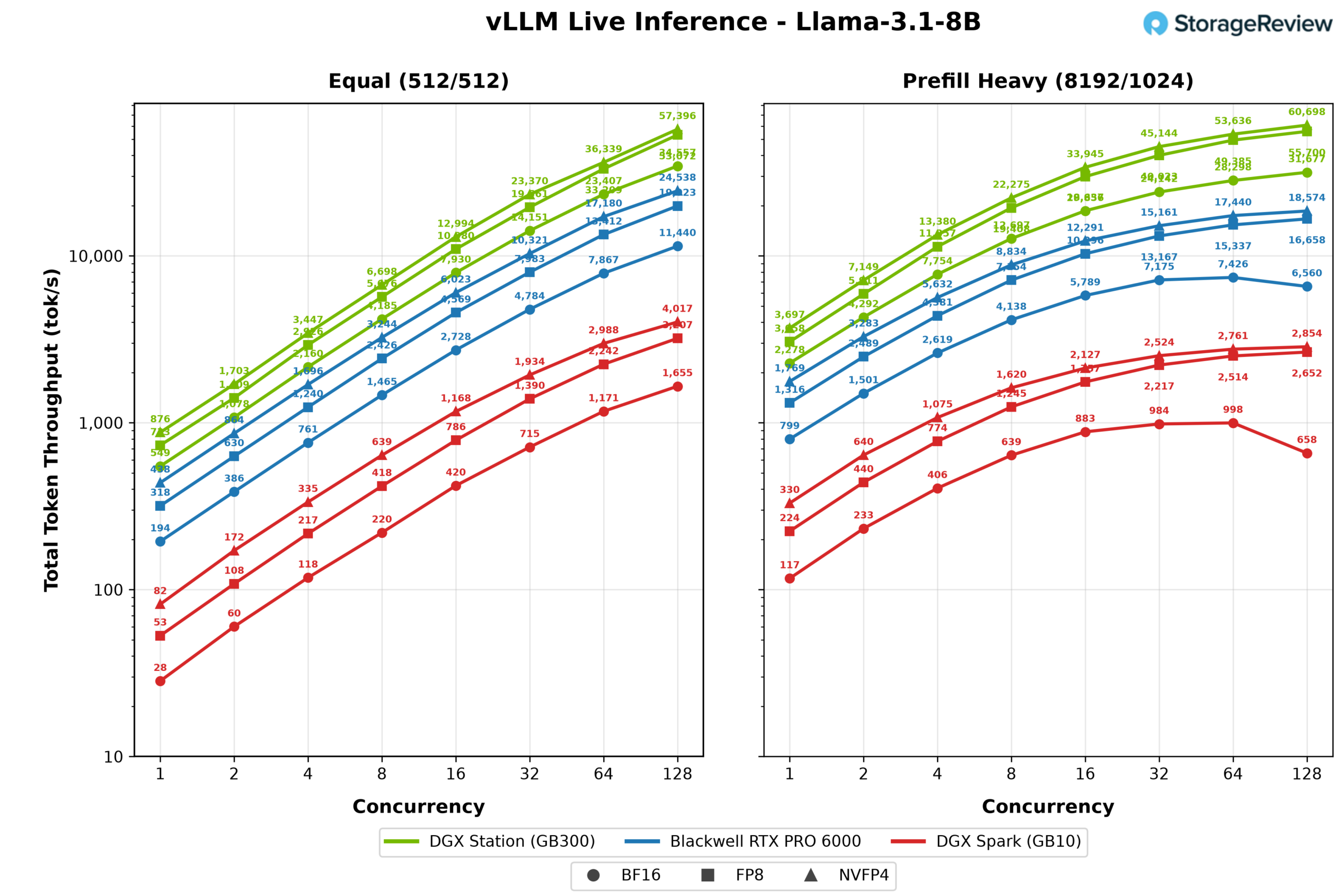
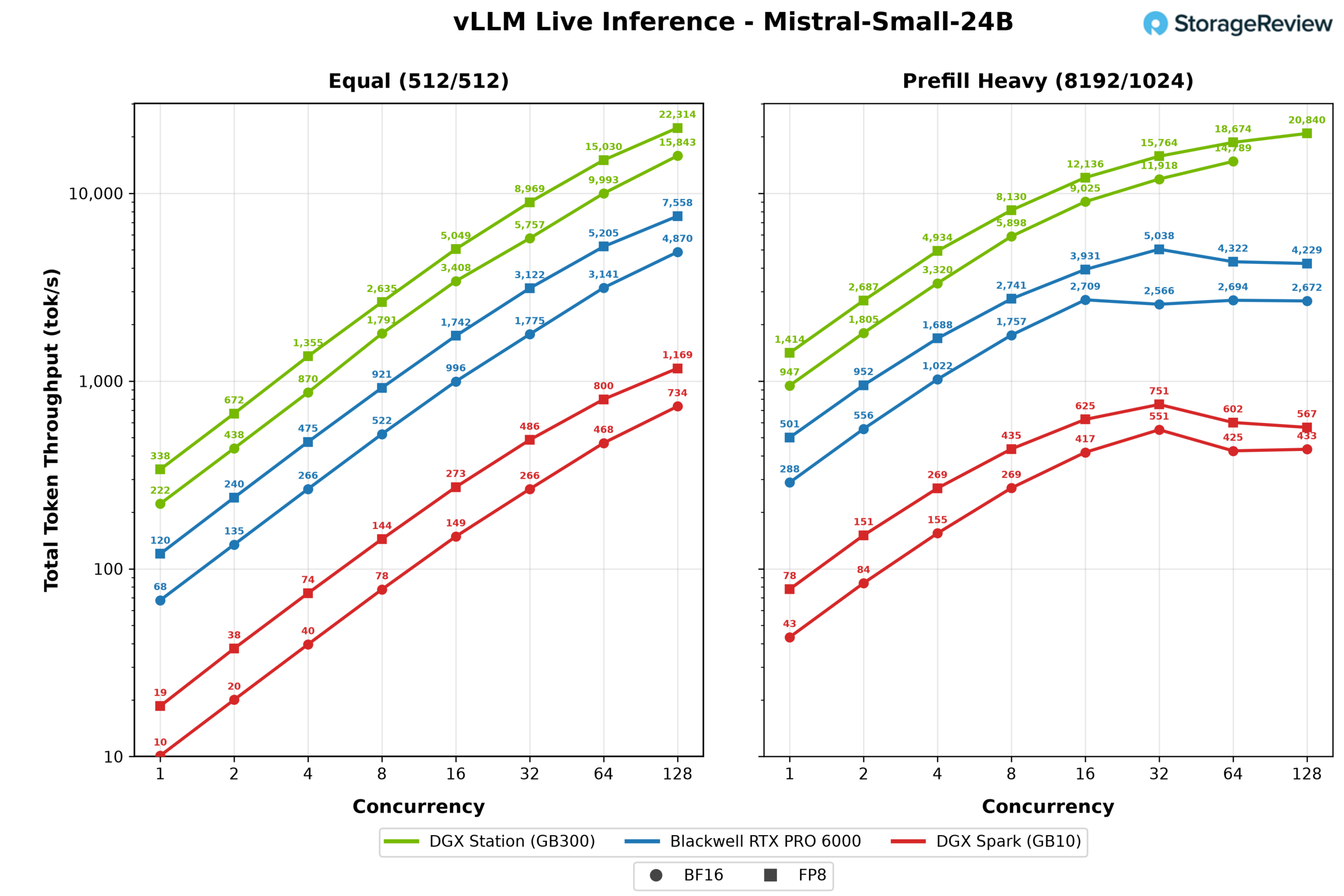
This half of our inference testing puts the WS300 up against the two other ways to get Blackwell on or near a desk: the Blackwell RTX PRO 6000, NVIDIA’s 600W workstation card, hosted in the Dell Pro Max Tower T2 we reviewed earlier, and the GB10 based DGX Spark, represented here by the Acer Veriton GN100. Each system ran the same vLLM live inference workloads under two scenarios, an equal workload with 512 input and 512 output tokens and a prefill heavy workload with 8,192 input and 1,024 output tokens, at concurrency levels from 1 to 128. We charted aggregate output and total throughput for every model all three systems can serve in common: GPT-OSS-20B and GPT-OSS-120B in their native MXFP4, Llama 3.1 8B at BF16, FP8, and NVFP4, and Mistral Small 24B and Qwen3 Coder 30B at BF16 and FP8.
GPT-OSS-20B
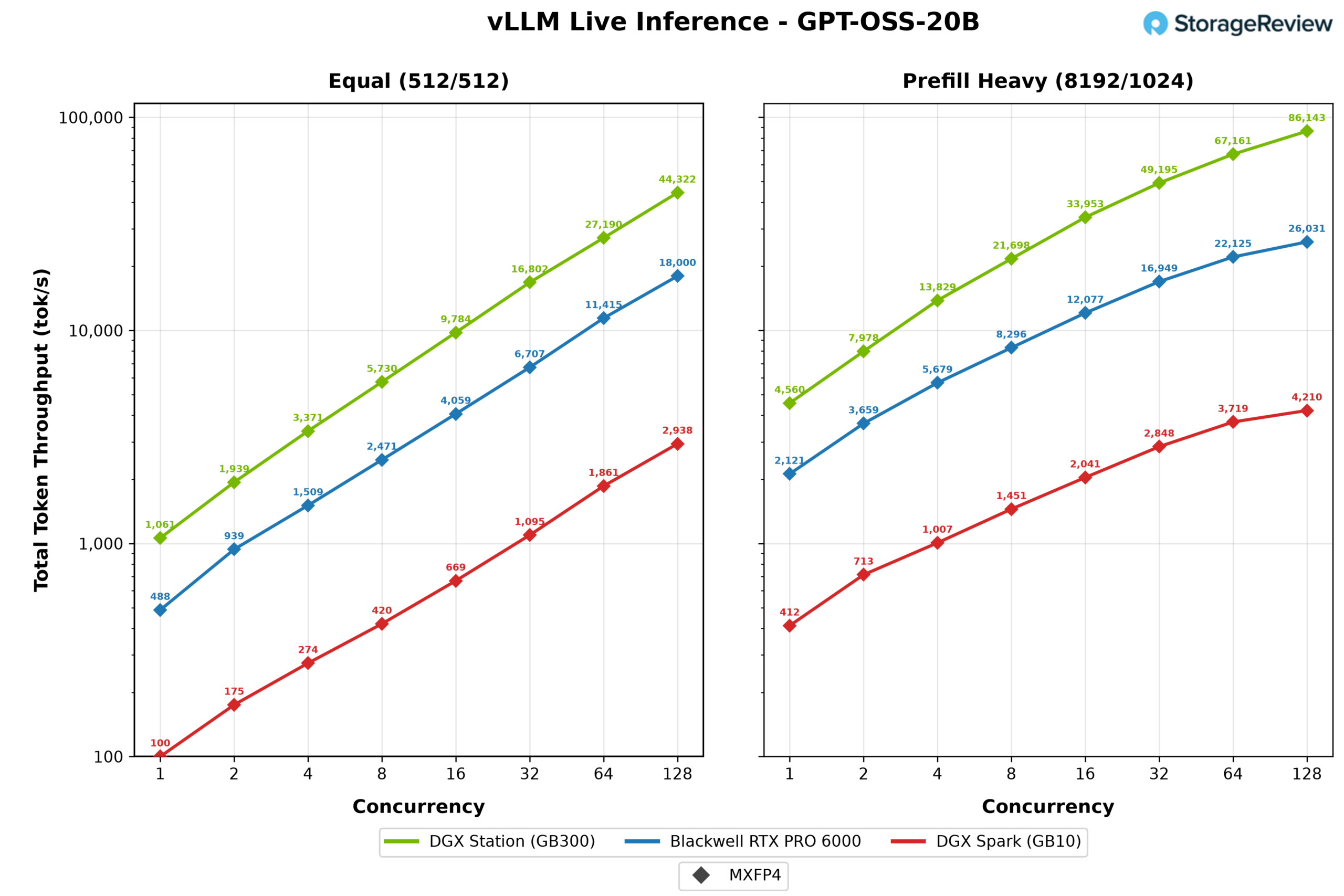
GPT-OSS-20B is the friendliest test of the set, a checkpoint that fits easily on all three systems. With the equal workload, the WS300 scaled cleanly to 22,161 output tokens per second at 128 concurrent streams, roughly 2.5 times the RTX PRO 6000 at 9,000 and 15 times the DGX Spark at 1,469. Single-stream results tell the same story in miniature: 530 tokens per second on the Station, 244 on the card, and 50 on the Spark.
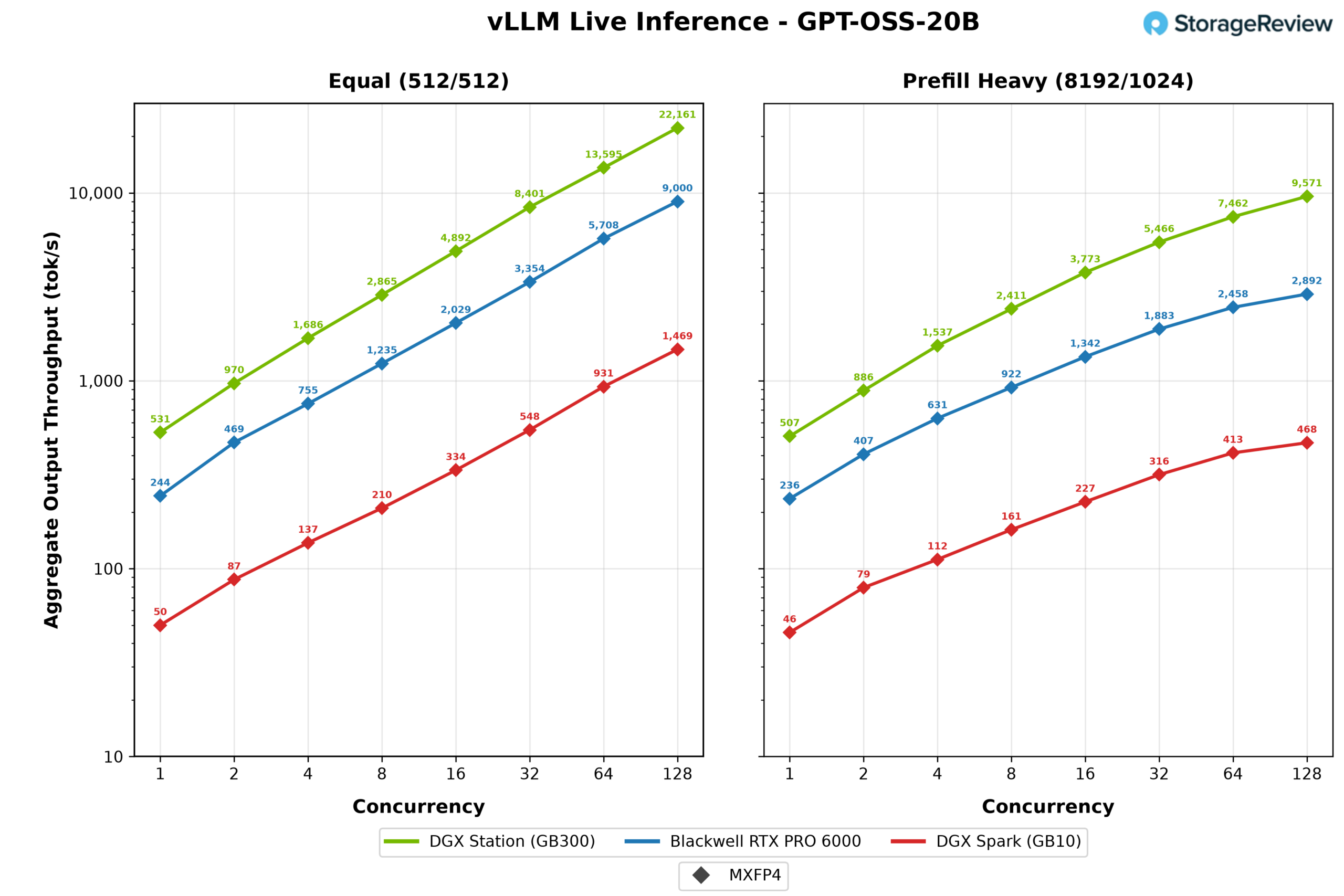
The prefill-heavy scenario separates the field further. Pushing 8,192 token prompts, the WS300 still delivered 9,572 output tokens per second at peak, which works out to more than 86,000 total tokens per second once prefill is counted, while the RTX PRO 6000 topped out at 2,892 and the Spark at 468.
GPT-OSS-120B
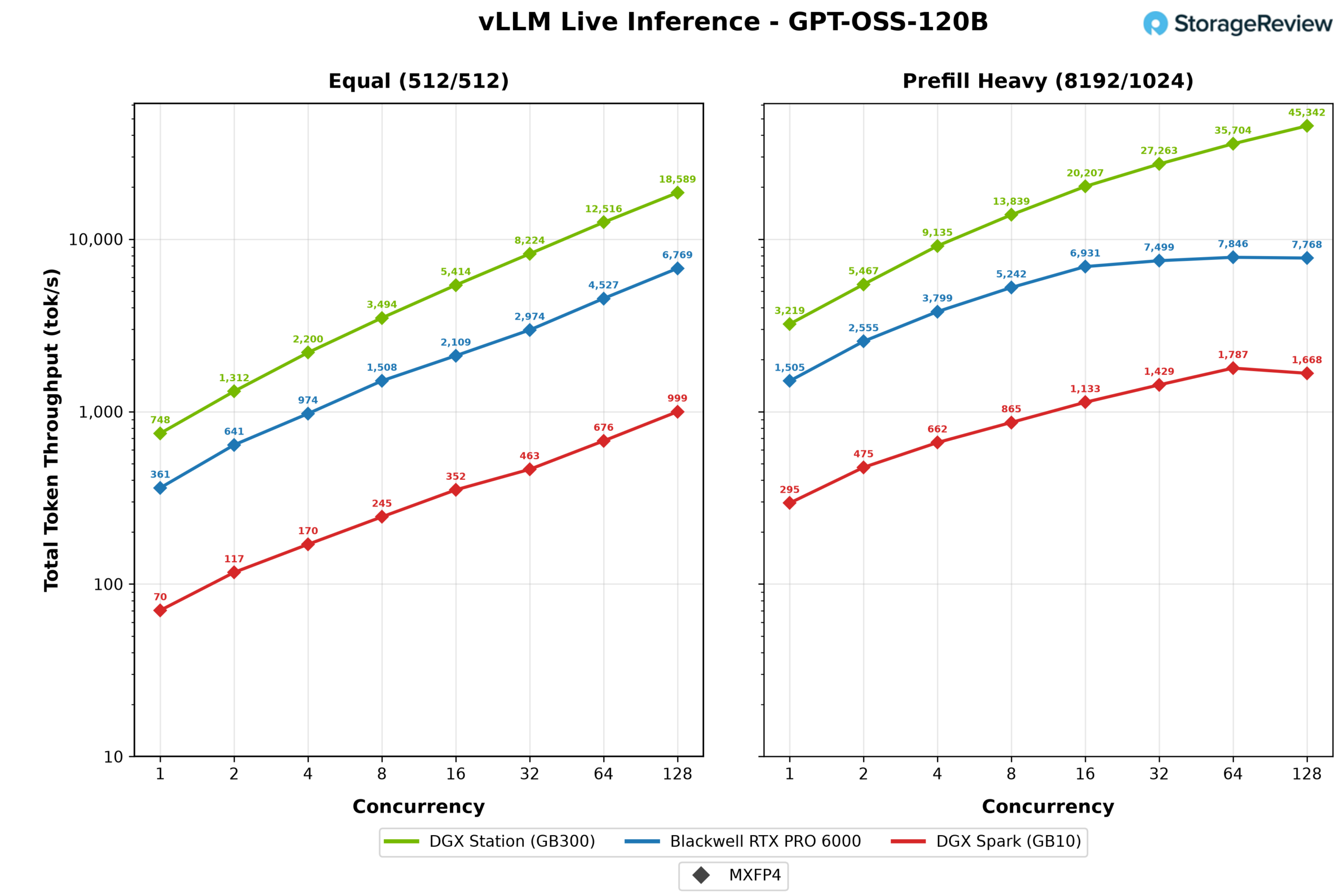
Stepping up to GPT-OSS-120B, all three systems can still load the model, but the memory hierarchy starts to matter. The WS300 peaked at 9,294 output tokens per second under the equal workload, 2.7 times the RTX PRO 6000 at 3,384 and nearly 19 times the DGX Spark at 500.
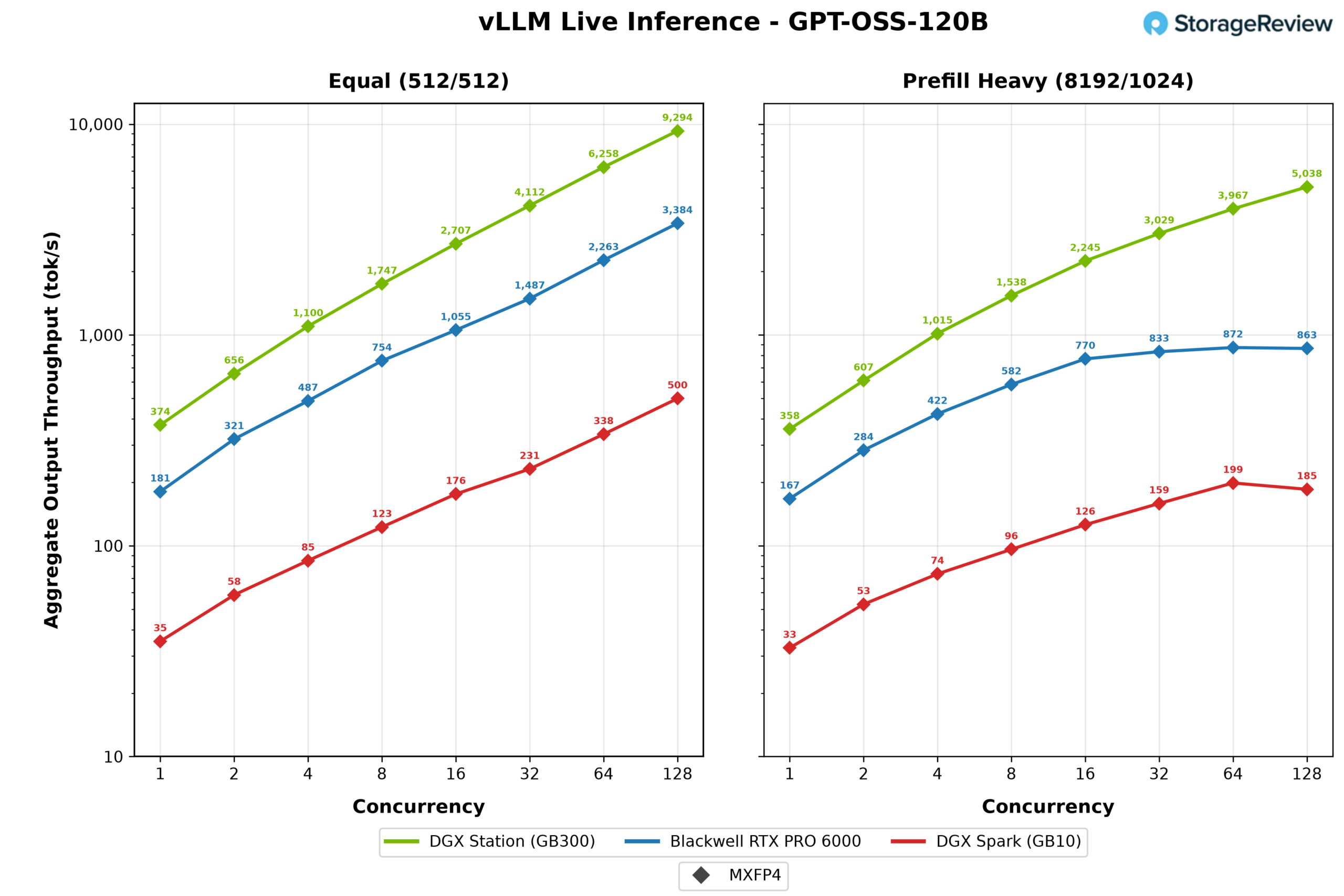
The prefill heavy run is where the smaller systems hit their ceilings. The RTX PRO 6000 flattened at 872 output tokens per second by 64 concurrent streams, and the Spark at 199, while the WS300 was still climbing at 128 streams and finished at 5,038, a gap of nearly 6x over the card. Long prompts swell the KV cache, and the systems with less memory headroom run out of room to batch long before the Station does.
Llama 3.1 8B
Llama 3.1 8B is small enough that we could run it at BF16, FP8, and NVFP4 on every system, which makes it the cleanest look at what quantization buys on each machine. At 128 concurrent streams under the equal workload, the WS300 moved from 17,278 output tokens per second at BF16 to 28,698 at NVFP4, a 66 percent gain. The RTX PRO 6000 gained 114 percent from the same move, from 5,720 to 12,269, and the DGX Spark gained 143 percent, from 828 to 2,009. The pattern is worth remembering: the smaller the machine, the more quantization pays.
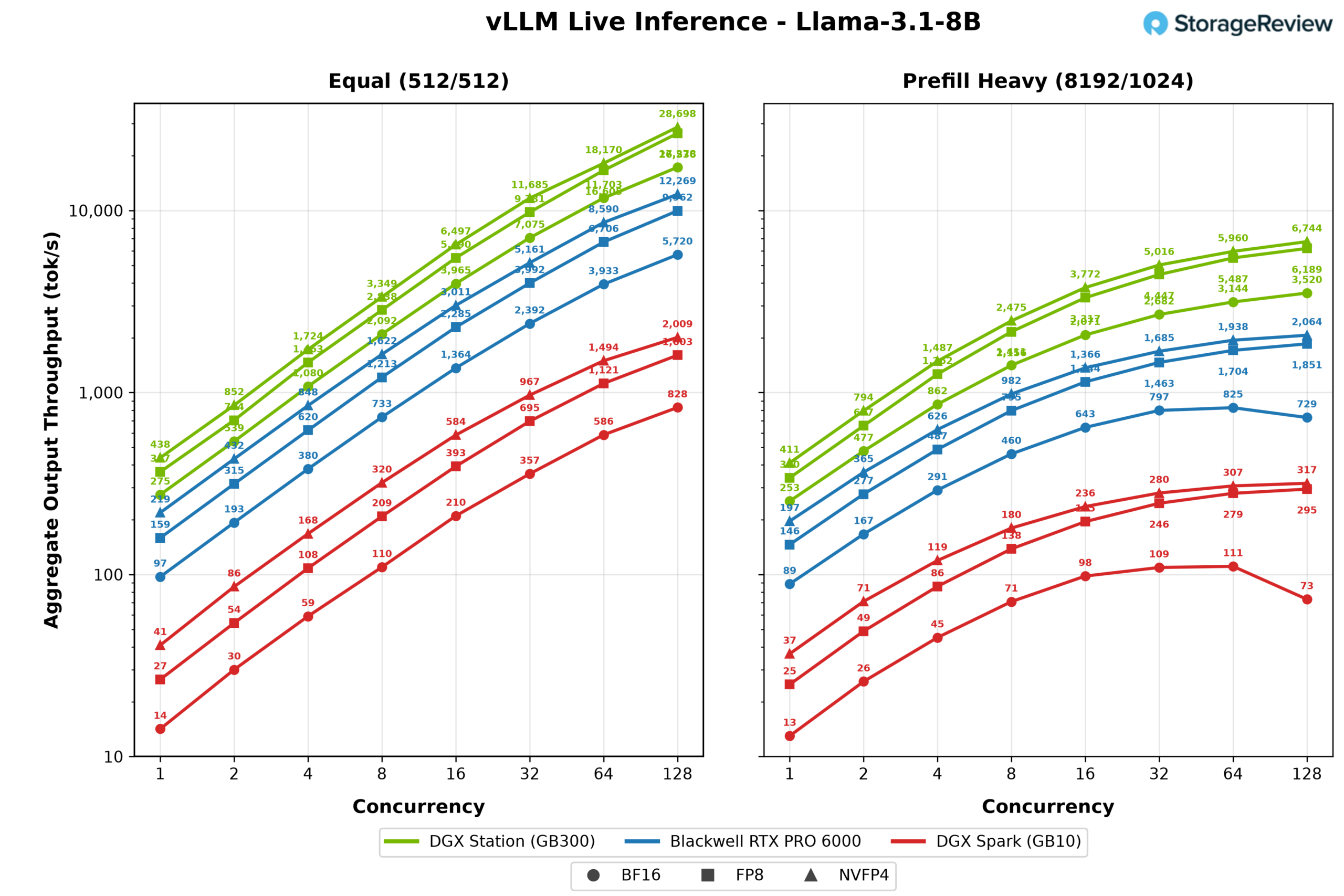
Prefill heavy results compress the whole field, with the WS300’s NVFP4 run peaking at 6,744 output tokens per second against 2,064 for the card and 317 for the Spark.
Mistral Small 24B
Mistral Small 24B produced the widest gaps of the set. At FP8 under the equal workload, the WS300 peaked at 11,157 output tokens per second, three times the RTX PRO 6000 at 3,779 and 19 times the DGX Spark at 585. Single stream, the Station’s 169 tokens per second is much closer to interactive comfort than the Spark’s 9.
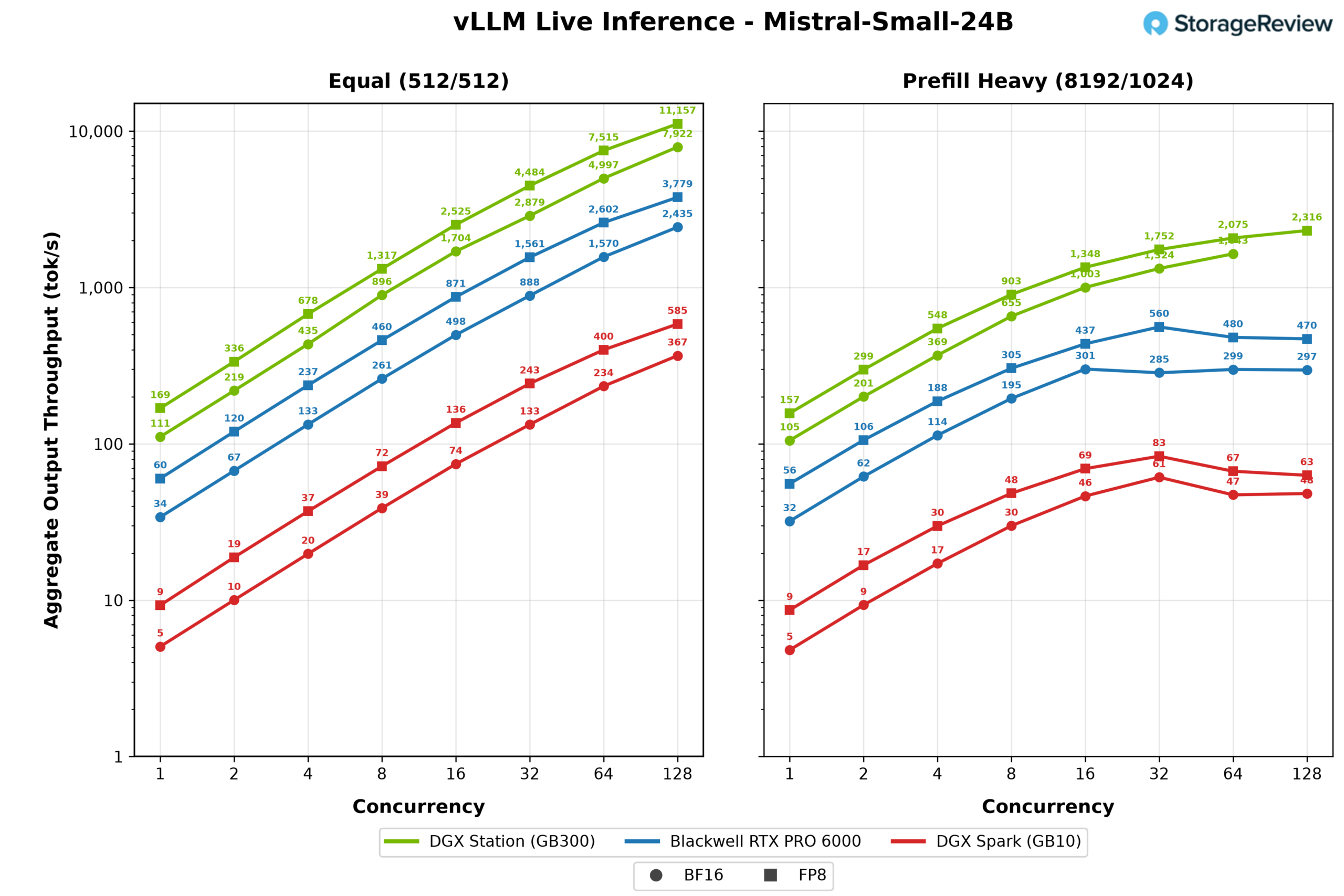
Under prefill heavy load, the RTX PRO 6000 peaked at just 32 concurrent streams and 560 output tokens per second before falling back, while the WS300 carried on to 2,316 at 128 streams.
Qwen3 Coder 30B
Qwen3 Coder 30B, a mixture of experts model with a small active parameter count, is the one test where the smaller systems close the single stream gap. At one concurrent request under the equal workload, the RTX PRO 6000 delivered 208 output tokens per second to the WS300’s 310, the closest any result in this comparison comes to the Station, and even the Spark managed a usable 55. Batching restores the usual order: at 128 streams, the Station’s 12,425 output tokens per second at FP8 is 2.4 times the card and nearly 16 times the Spark.
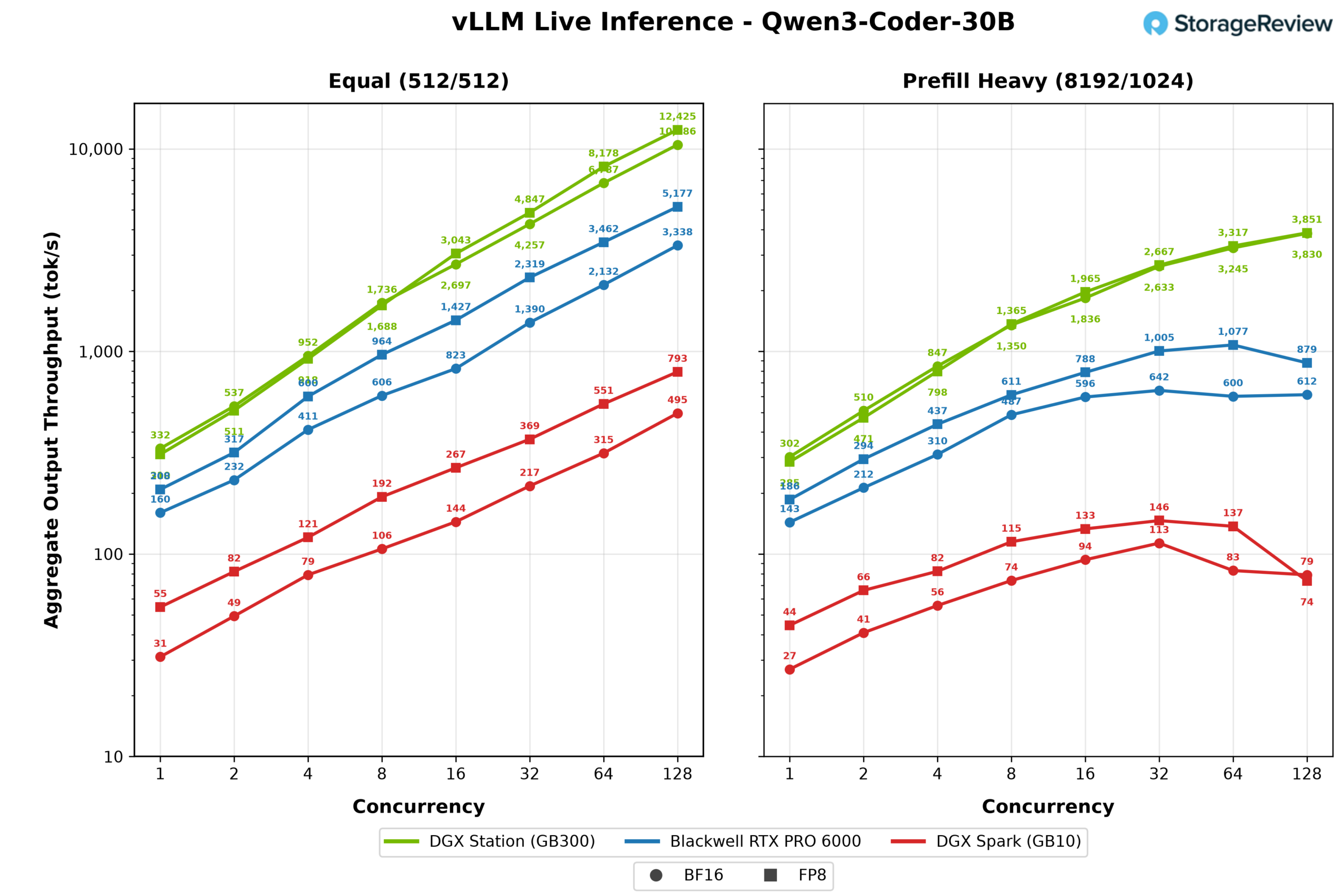
Prefill heavy followed the established pattern, with the WS300 reaching 3,851 output tokens per second while the card peaked at 1,077 and the Spark at 146.
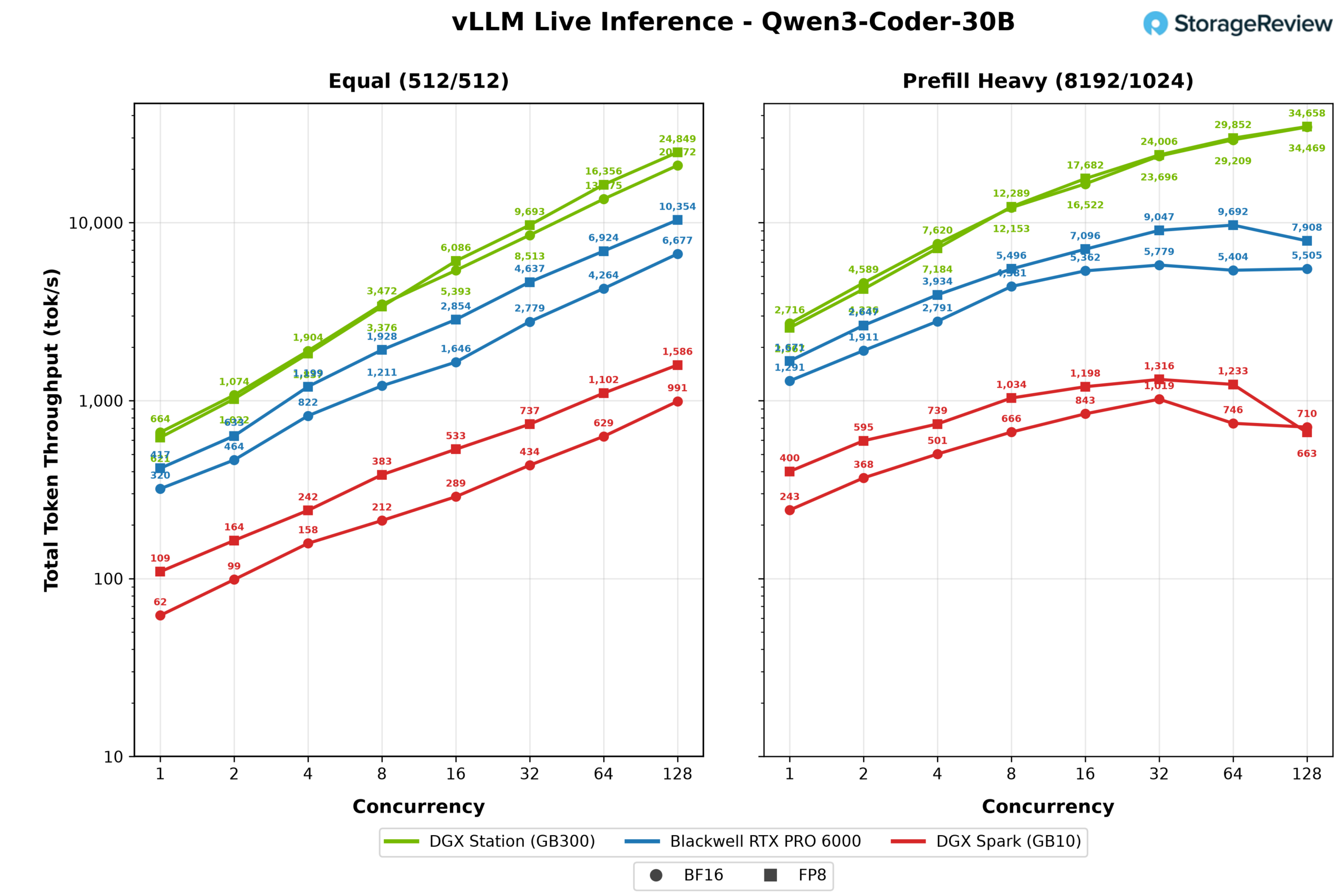
Across the five shared models, the WS300 landed between 2.3 and 3 times the throughput of the Blackwell RTX PRO 6000 and 14 to 19 times the DGX Spark at full concurrency, with the margin widening toward 6x over the card when long prompts stress the KV cache. All three machines run the same CUDA stack and the same quantization paths; what the Station buys is memory capacity and bandwidth, which show up here as concurrency headroom and long context tolerance. Just as important is what these charts cannot show: none of the frontier scale models in the sections above will even load on the other two systems.
GDSIO
Modern AI workloads depend on moving data batches, model weights, and checkpoints from storage into GPU memory quickly enough to keep the accelerator busy. NVIDIA GPUDirect Storage, removes the traditional two-copy path in which data is first read from an SSD into system memory and then copied into GPU memory.
The GB300 DGX Station implements this differently from a conventional PCIe GPU server. The Micron 4600 used for our test is connected to the PCIe switch integrated into ConnectX-8. ConnectX-8 connects upstream to the Grace CPU, while the B300 GPU connects to Grace over NVLink-C2C. The SSD and GPU do not sit beneath the same PCIe switch. Storage traffic instead passes through the ConnectX-8 switch, enters the Grace PCIe root complex, traverses the Grace coherency fabric, and crosses NVLink-C2C to reach the B300’s HBM3e.
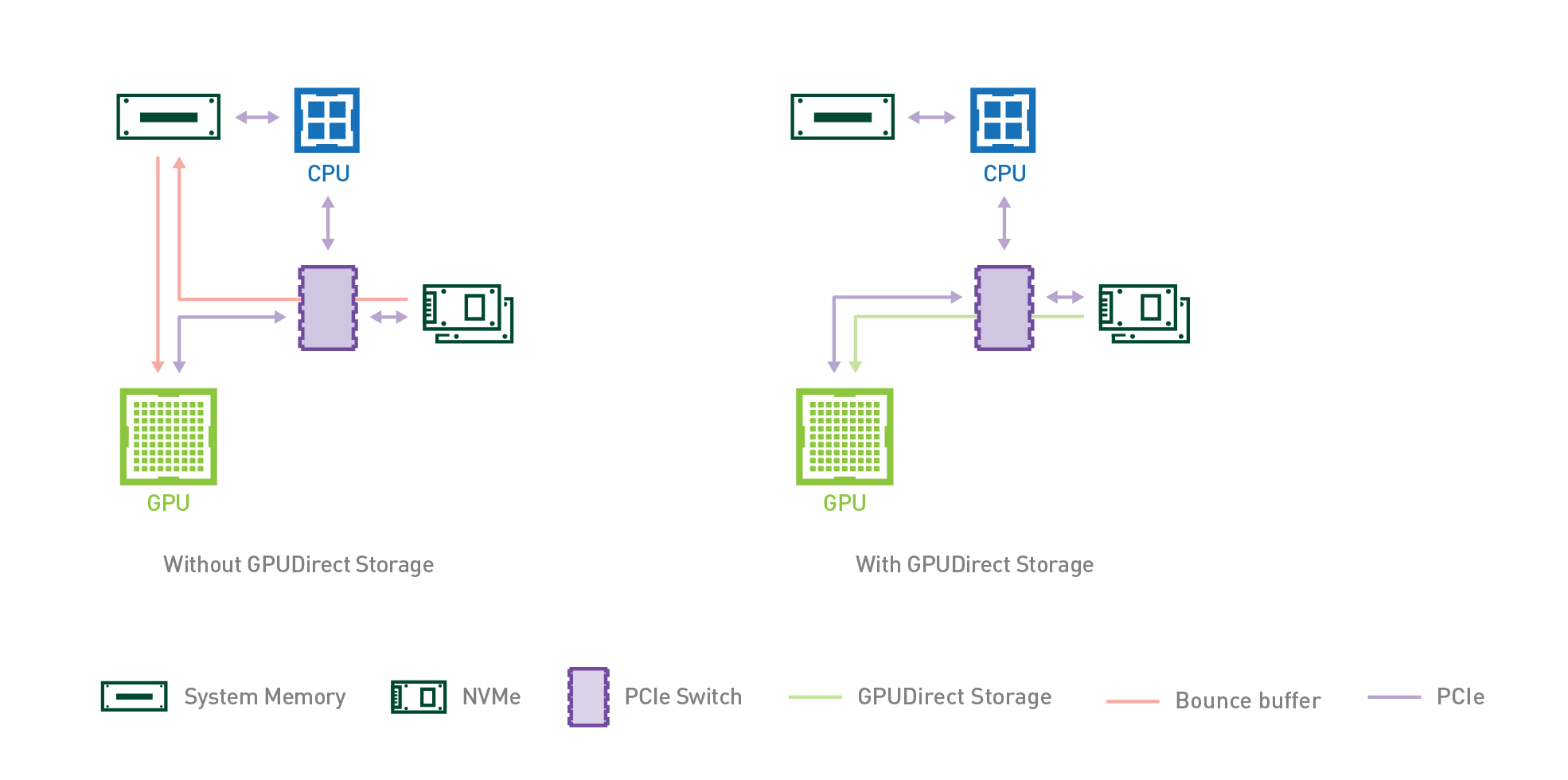
With GPUDirect Storage, cuFile registers a buffer allocated in B300 HBM3e as the source or destination for storage I/O. On a read, the Micron 4600’s controller uses DMA to place data in HBM3e; on a write, it retrieves data from HBM3e. Both operations follow the Grace and NVLink-C2C path described above without staging the payload in Grace’s LPDDR5X memory. Grace still manages the filesystem and NVMe control plane, including command submission and address translation, but it does not copy the data. GPUDirect Storage therefore removes the system-memory staging step even though the traffic still passes through Grace on its way between the SSD and B300 memory. For AI workloads, sequential reads correspond to dataset streaming, model loading, and checkpoint restores, while sequential writes correspond to checkpoint saves and other transfers back to storage. For testing GDSIO performance, we measured storage performance leveraging one standalone secondary SSD.
GDSIO Testing Configuration
- Boot Storage: 2 x Micron 4600 2TB in RAID1
- Secondary Storage: 2 x Micron 4600 2TB
Looking at GDSIO Sequential Read performance, the unit scales consistently across both thread count and block size. At 16K, throughput rises from 16MiB/s at 1 thread to 250MiB/s at 16 threads, reaching 2.0GiB/s at 128 threads. Larger block sizes ramp up much faster, with 256K reaching 11.8GiB/s at 64 threads and peaking at 12.9GiB/s at 128 threads. The strongest results appear at 512K and 1M, where throughput tops out at 13.1GiB/s, with the 1M workload reaching that level at just 32 threads and maintaining it through 128 threads.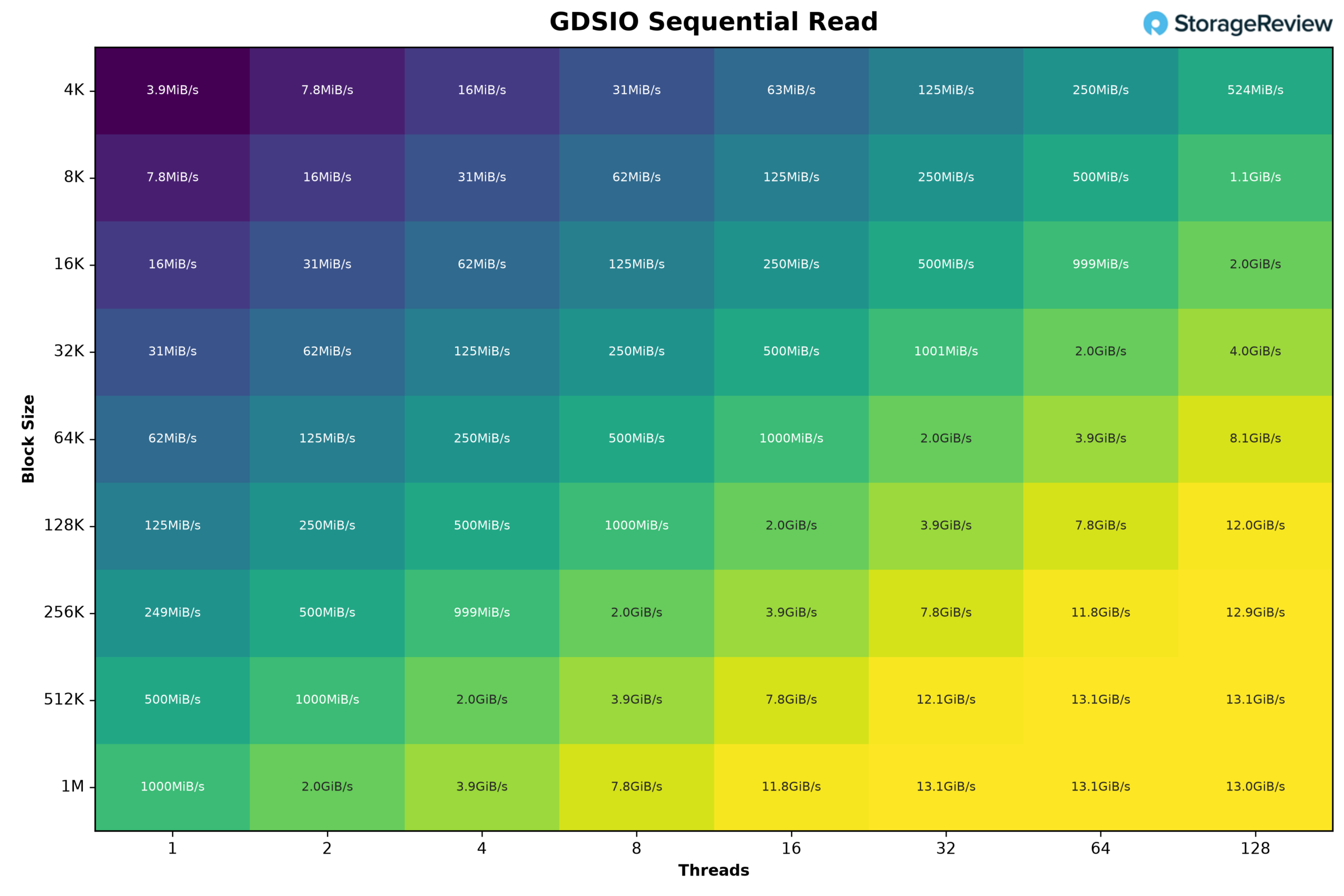
Moving to GDSIO Sequential Write performance, the unit scales consistently across both thread count and block size. At 16K, throughput increases from 16MiB/s at 1 thread to 250MiB/s at 16 threads, reaching 2.0GiB/s at 128 threads. Larger block sizes ramp up much faster, with 256K reaching 7.5GiB/s at 32 threads and 12.0GiB/s at 64 threads. The strongest result comes from the 1M workload, which reaches the 12.0GiB/s ceiling at just 16 threads and maintains that performance through 128 threads. 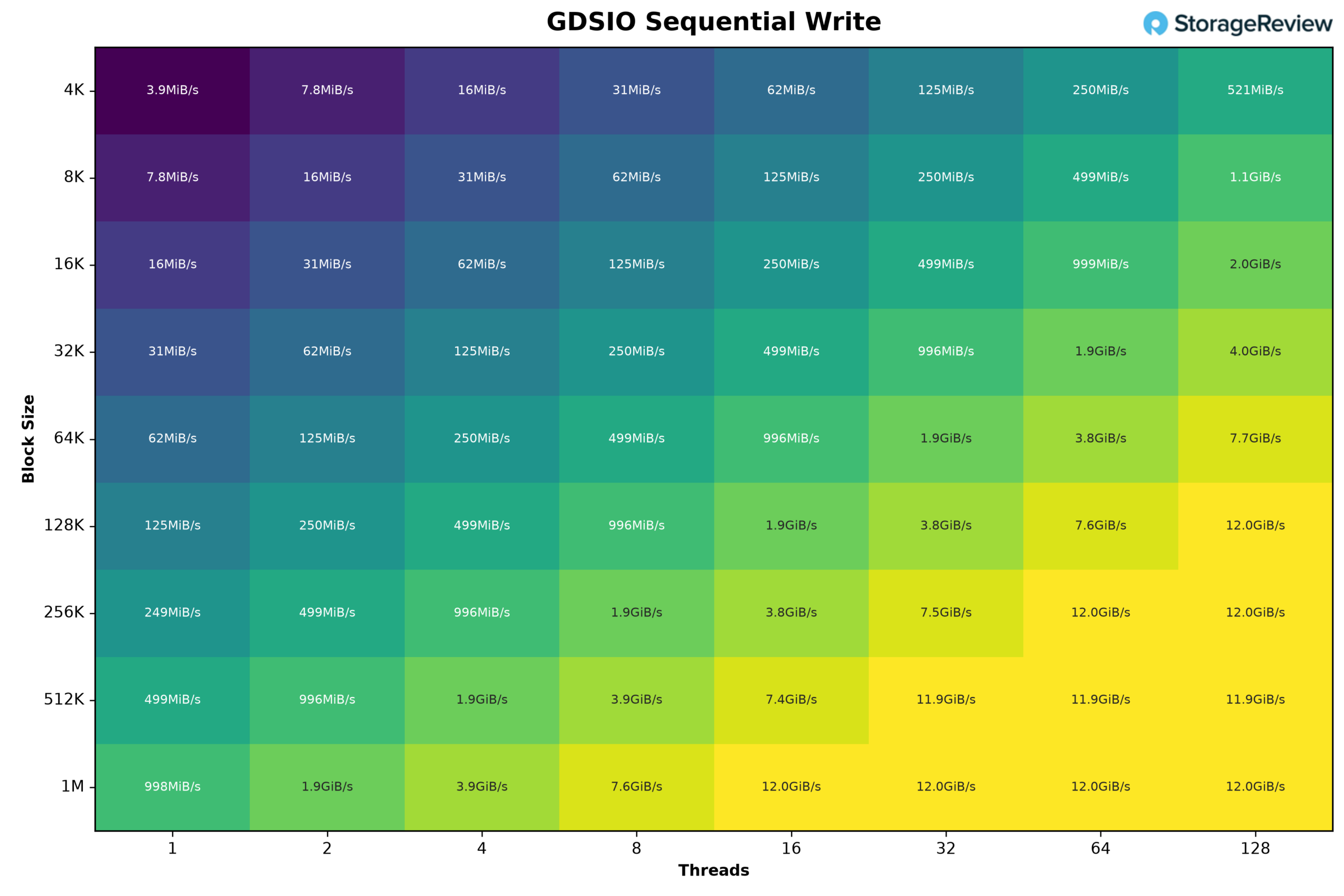
Who is the MSI XpertStation WS300 for?
The WS300 is for organizations that need direct access to Blackwell Ultra but do not want every experiment to begin with a cluster reservation or cloud request. AI labs, inference-engine developers, framework and compiler teams, robotics groups, and enterprise AI teams can use it as a local development node for the workflows above. MIG allows developers to test and develop for a multi-GPU setup, and the BMC makes the system manageable remotely.
It also makes sense for experienced AI developers who need a system that arrives ready to work. The value is not simply the B300. It is the complete platform around it: 252GB of HBM3e, Grace, and 496GB of LPDDR5X, ConnectX-8, mirrored boot storage, liquid cooling, remote management, and MSI-backed support in one tower. The practical limits are the Arm host, the requirement for a dedicated 20A circuit, and the shared 1,600W budget when a large RTX PRO card is installed.
Getting the most from the WS300 also depends on the software surrounding it. NVIDIA provides a broad collection of playbooks and deployment guides designed to help teams bring the system online and put its resources to work quickly. We will explore several of these tools in future coverage, including Brev, which can simplify shared access to the workstation and improve utilization so that such an expensive resource does not sit idle.
As for price, MSI has not published one, and machines in this class rarely carry a list price; this is a capital conversation with a sales team, not an add-to-cart button. The honest comparison is not against other workstations but against what an AI team is already paying for: reserved cluster time, cloud GPU commitments, and the schedule cost of waiting on shared hardware.
Conclusion
The MSI XpertStation WS300 is the most capable workstation we have ever reviewed, and the rare product that changes what a single practitioner can attempt. Frontier-scale checkpoints that normally live behind a cluster reservation, GLM-5.2 at 433GB, Nemotron-3-Ultra at 550 billion parameters, load and serve on a box beside the desk, privately and always available. That’s the source of our enthusiasm for this system.
The DGX Station is aimed at developers: kernel developers targeting Blackwell Ultra, inference-engine and framework teams, robotics groups running the full Isaac loop, and generally users frustrated with scheduling experiments around shared hardware. Outside that niche, the argument for buying these systems is pretty limited. The Arm host will exclude some toolchains; the 20A circuit is an installation requirement on 120v circuits; there is no display output without an add-in card; and an RTX PRO 6000 workstation costs far less, covering single-user work on models that fit in its 96GB.
The economics also fence in the right deployment size. One WS300 is easy to justify against reserved cluster time, and a pair per team still is. Stacking further stops making sense at a certain point: by the time an organization is buying four GB300 towers, for instance, the same money is within reach of an eight-way B300 server with more memory per GPU, denser MIG partitioning, and NVLink between every GPU. The sweet spot is one on the desk, maybe two in the lab, complementing the datacenter investment.
NVIDIA provides the baseboard, so differentiation between OEMs comes down to implementation, and MSI’s execution here is solid. A 1,400W liquid loop cools the B300, Grace, SOCAMM, and ConnectX-8, and the platform stayed stable throughout testing. That deeper look is now published: our WS300 thermals deep dive pairs MSI’s cold plate and radiator data with a 2.8-hour instrumented run showing the die held at 60C and a flat 2.07GHz clock at full load. The 1,600W power budget is distributed across components automatically, and when we tested the hardware power brake with a compromised connection, it throttled rather than shutting down. A pre-wired 12VHPWR lead and an anti-sag bracket support the RTX PRO expansion path. Having tested the first GB300 DGX Station to reach us, we can say the XpertStation WS300 sets a high bar for the platform.
The XpertStation WS300 now holds the Best GB300 System slot on our Best Desktops for Local AI leaderboard, and it anchors the memory discussion in our RAM, GPU, and Storage for Agentic AI guide.


 Amazon